請AI產生摘要
11 月 1 日,一段 17 秒的海綿寶寶短片在 TikTok 上發布,每一格畫面都疊著同一句話:「是時候換你的大頭貼了。」五天後,它累積了 190 萬次播放,而圍繞它的主題標籤頁面則是一場遊行:海綿寶寶、動漫主角,還有戴著紅帽子的貓咪。那就是 聖誕 大頭貼 換裝潮,一項年度儀式:11 月一開始就把個人頭像換成節日版本;而我們查核過的幾乎每一篇爆紅貼文,用的都是別人角色的圖片。
本指南涵蓋這股熱潮的起源、如何用一張自己的照片製作聖誕大頭貼,戴上聖誕帽並保留你的臉、大家實際會搜尋的四種版本(你本人、卡通版的你、配對款、你的寵物),以及如何裁切,讓毛球在圓形裁切後仍完整保留。我們每一種版本都只用單張照片跑出來,提示詞就放在成品旁邊。
重點摘要
- 今年的聖誕大頭貼換裝潮在 11 月 1 日登場,由「是時候換你的大頭貼了」貼文帶起。
- 大多數爆紅貼文都重複使用卡通角色;AI 版本則把你的臉放到聖誕帽下。
- Atlas Cloud 的 影像編輯器 中的 Seedream 5.0 Pro,會在保留你的臉的同時加上帽子、雪和燈光。
- 有一條提示詞規則能確保裁切安全:臉部居中、整頂帽子都在畫面內、毛球上方留空間。
- 配對款一次編輯吃兩張照片,寵物則會戴上介於兩耳之間大小的帽子。
什麼是聖誕大頭貼熱潮?(是時候換你的大頭貼了)
聖誕大頭貼就是任何為 12 月打扮的個人頭像:聖誕帽、雪、仙女燈,有時只是一條紅圍巾。這股熱潮的關鍵是時機。人們在 11 月第一天換上,常配上「是時候了」的說明文字,並在跨年後換回來。
今年這波換裝如期登場。由 @someguynamedsean1 發布的海綿寶寶貼文在 11 月 1 日上線,到 11 月 6 日已累積 190 萬次播放。隔一天,@baixy__ 發布了六秒的動漫角色戴聖誕帽定格畫面,配上一句「11 月到了,代表動漫聖誕大頭貼回來了」,播放次數突破 160 萬。
11 月 1 日剩下的時間則由較小的貼文補上:一個《死神》版本有 36.5 萬次播放,而一則「和你的朋友配對聖誕大頭貼」貼文,拍下兩隻戴著聖誕帽的真貓坐在壁爐前,吸引了 83,600 次播放。
上一季也是如此。2025 年 12 月 5 日的一則分類拼貼(鬼靈精、恐怖片、運動、狗、配對款)有 83 萬次播放,2025 年 11 月 11 日的一則「聖誕大頭貼點子!」幻燈片則有 40.5 萬次。我們在 11 月 6 日從主題標籤頁抓取的 28 篇貼文中,幾乎全都重複使用現成角色圖片。AI 版本則反其道而行:照片裡的人是你。
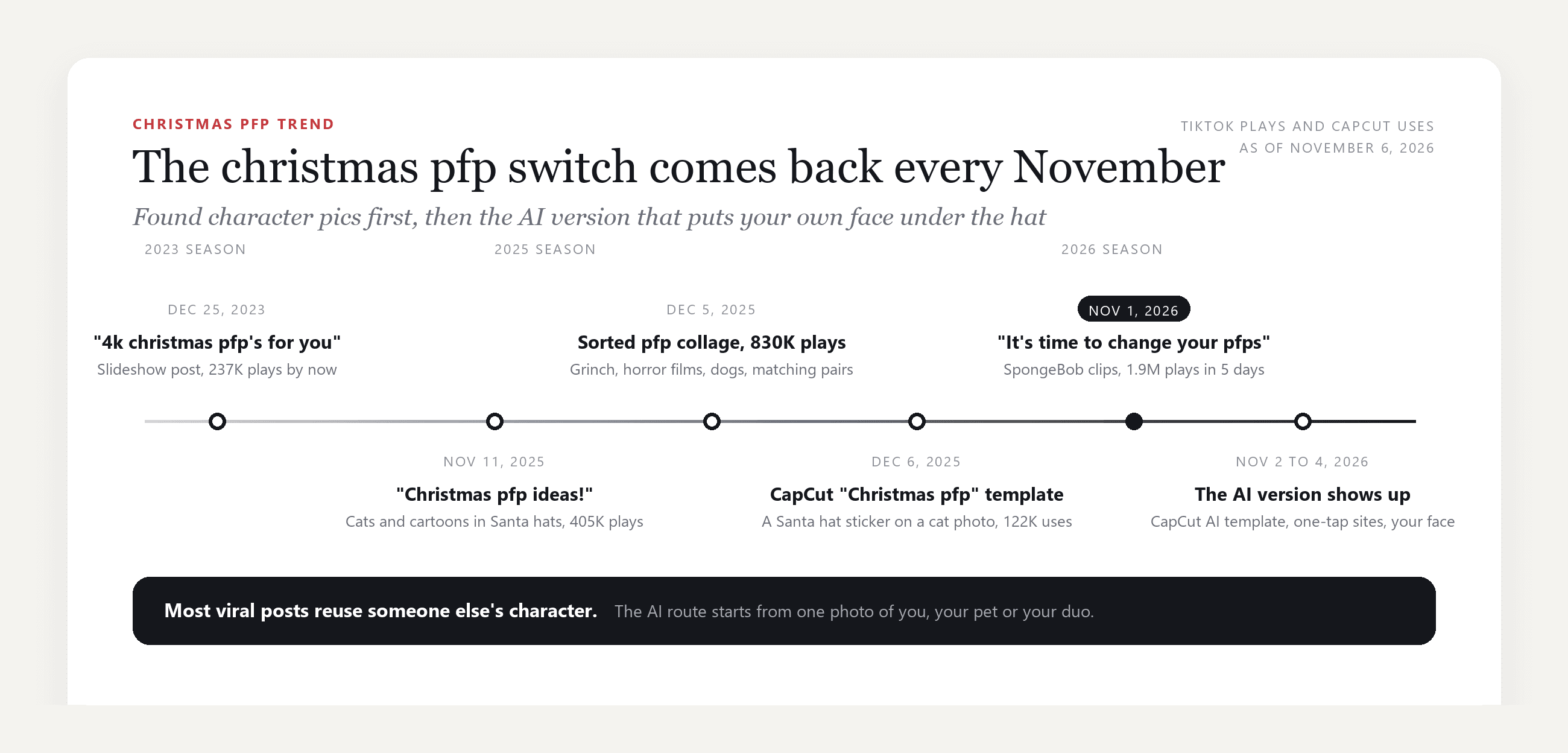
以下是這些貼文背後的東西,於 2026 年 11 月 6 日在範本頁面查核:
| 範本或工具 | 功能 | 規模 |
|---|---|---|
| CapCut「Christmas pfp」範本(2025 年 12 月) | 在一張照片上加上聖誕帽貼紙和落雪,預覽畫面是一隻貓 | 122,348 次使用 |
| CapCut「Christmas Hat Filter」(2023 年 11 月) | 錄影範本:對嘴唸一句台詞,然後加上帽子和表情符號覆蓋層 | 72,370 次使用 |
| CapCut「Christmas PFP」AI 範本(2026 年 11 月 2 日建立) | 輸入一張照片,輸出一張你在雪村裡戴聖誕帽的 AI 定格畫面 | 1,072 次使用 |
| 一鍵 AI 範本網站(2026 年 11 月 4 日上線) | 在影像模型上執行固定提示詞,回傳一張你戴帽子的定格畫面 | 每張照片 3 點數 |
貼紙做法很快,但帽子只是疊在照片上,而不是戴在你的頭髮上。一鍵網站能保留你的臉,但外觀是固定的。以下做法同樣保留臉部,而且提示詞掌握在你手中,當你想要卡通、配對款或寵物版本時,這點很重要。
如何在 Atlas Cloud 上用你自己的照片製作聖誕大頭貼
讓聖誕大頭貼感覺真實的一切都是編輯,而不是貼紙:帽子必須戴在頭髮上,雪必須落在肩膀上,燈光必須在你頭後方發光,而不是覆蓋在頭上。Atlas Cloud 在其影像生成器的 Image Edit 分頁中執行 ByteDance 的 Seedream 5.0 Pro,這是一款編輯模型,會在你周圍重建場景,同時保留你的五官特徵。
一張在純色攝影棚拍攝的男子照片,變成了這個:
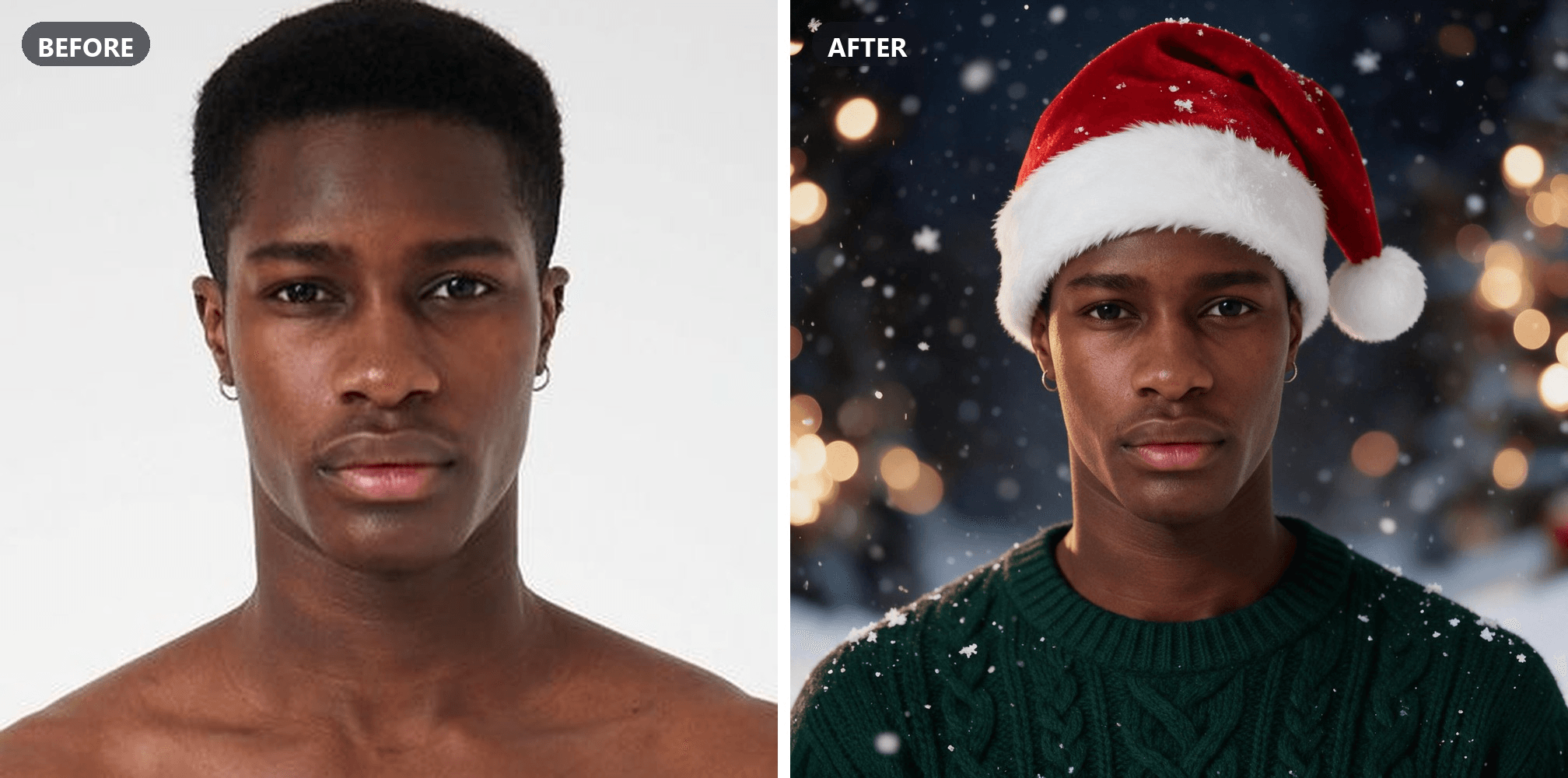
方法 1:在影像編輯器中為你的照片加上聖誕帽
登入、開啟影像生成器,點五下就能得到上圖:
- 選擇 Image Edit 分頁。
- 打開 Models 列,選擇 Seedream v5.0 Pro。
- 在 Reference 底下上傳你的照片。拍到胸口以上、臉朝鏡頭、不要戴帽子或太陽眼鏡。
- 貼上下方提示詞。保留預設的 2048×2048 正方形,這是個人檔案裁切的起始形狀。
- 點擊 Run。
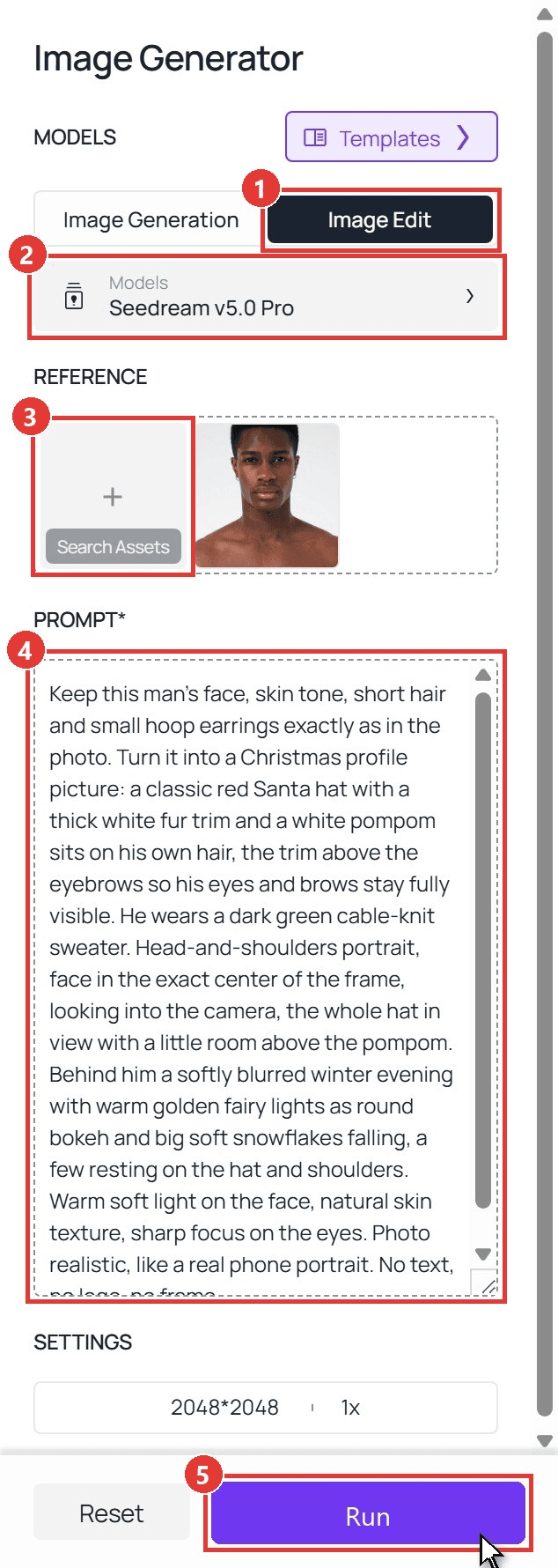
plaintext1Keep this man's face, skin tone, short hair and small hoop earrings exactly as in the photo. Turn it into a Christmas profile picture: a classic red Santa hat with a thick white fur trim and a white pompom sits on his own hair, the trim above the eyebrows so his eyes and brows stay fully visible. He wears a dark green cable-knit sweater. Head-and-shoulders portrait, face in the exact center of the frame, looking into the camera, the whole hat in view with a little room above the pompom. Behind him a softly blurred winter evening with warm golden fairy lights as round bokeh and big soft snowflakes falling, a few resting on the hat and shoulders. Warm soft light on the face, natural skin texture, sharp focus on the eyes. Photo realistic, like a real phone portrait. No text, no logo, no frame.
那段提示詞裡有三行是關鍵。「Keep this man's face」放最前面,因為模型會依照你給的順序來處理。「The trim above the eyebrows」能防止帽子把眼睛蓋住。而「a little room above the pompom」則是之後裁切時的救星:從正方形中央裁出圓形時,唯有帽子沒有碰到頂邊,整頂帽子才會被保留。
方法 2:透過 API 執行相同編輯
步驟 1:建立並複製 API 金鑰,在 Atlas Cloud 主控台的 Settings 頁面。
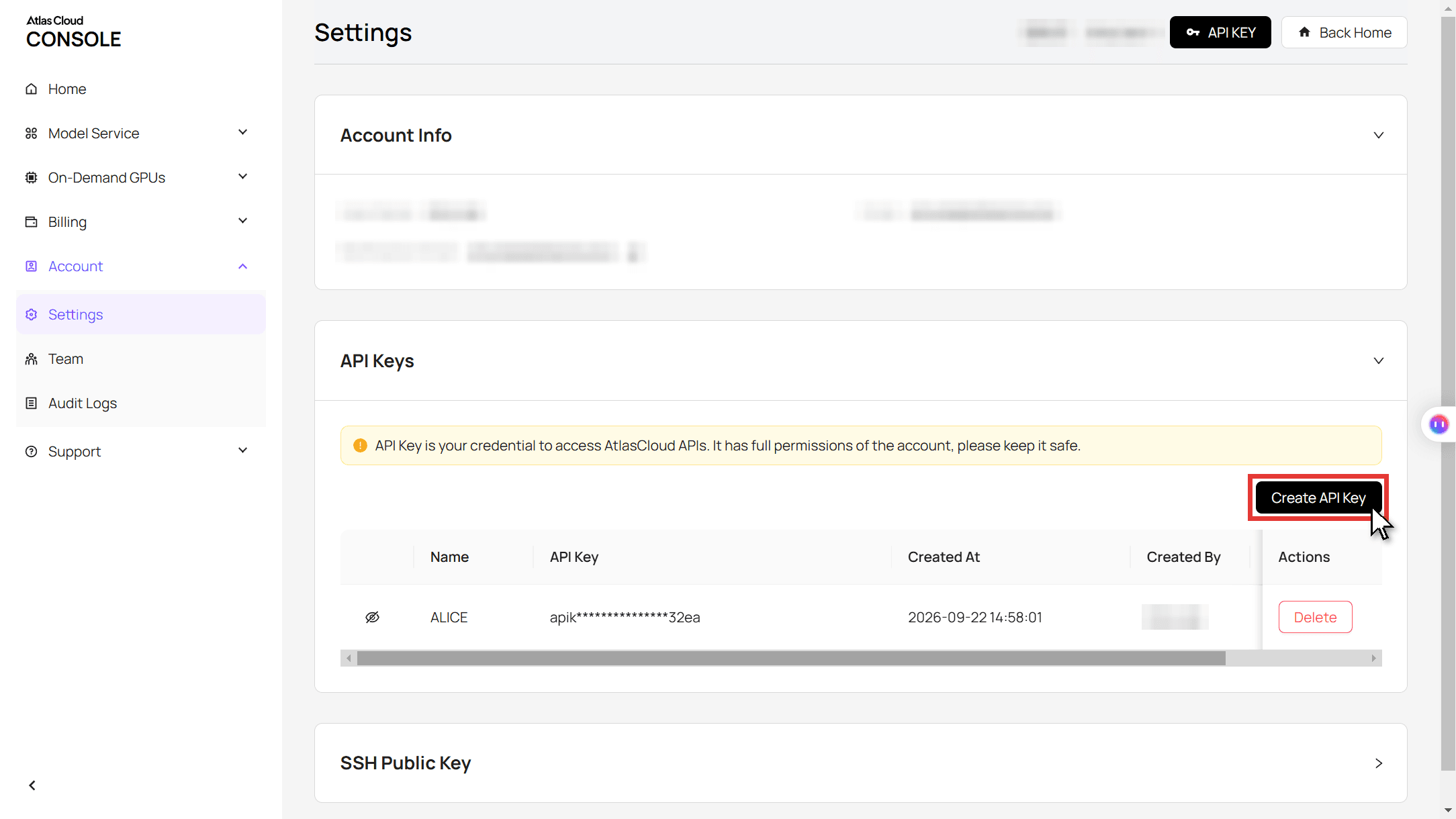
步驟 2:查看請求格式,請見 API 文件。
步驟 3:提交編輯,然後輪詢檔案。 照片以 URL 形式放入 images 陣列,提示詞與上方相同,size 則選擇正方形。
plaintext1curl -X POST https://api.atlascloud.ai/api/v1/model/generateImage \ 2 -H "Authorization: Bearer $ATLASCLOUD_API_KEY" \ 3 -H "Content-Type: application/json" \ 4 -d '{ 5 "model": "bytedance/seedream-v5.0-pro/edit", 6 "prompt": "Keep this man'"'"'s face, skin tone, short hair and small hoop earrings exactly as in the photo. Turn it into a Christmas profile picture: a classic red Santa hat with a thick white fur trim and a white pompom sits on his own hair, the trim above the eyebrows. He wears a dark green cable-knit sweater. Head-and-shoulders portrait, face in the exact center, the whole hat in view with room above the pompom, warm fairy-light bokeh and falling snow behind him. Photo realistic.", 7 "images": ["https://your-cdn.com/portrait.jpg"], 8 "size": "2048*2048" 9 }'
plaintext1curl https://api.atlascloud.ai/api/v1/model/prediction/<prediction_id> \ 2 -H "Authorization: Bearer $ATLASCLOUD_API_KEY"
相同的端點和金鑰可用來執行 Atlas Cloud 上的其他影像模型。更改 model 字串即可切換。
四種聖誕大頭貼點子:聖誕帽、卡通、配對與寵物
這股熱潮背後的搜尋可分成四種外觀,而同一個 Image Edit 分頁全都能搞定。會變動的是提示詞,以及配對款所需的照片數量。
戴上聖誕帽仍像你自己的大頭貼
經典聖誕帽大頭貼是半身照,暖光、空中飄雪。陷阱在毛衣:如果你的照片穿的是背心,就要說明要換成什麼,否則模型沒有理由改變它。
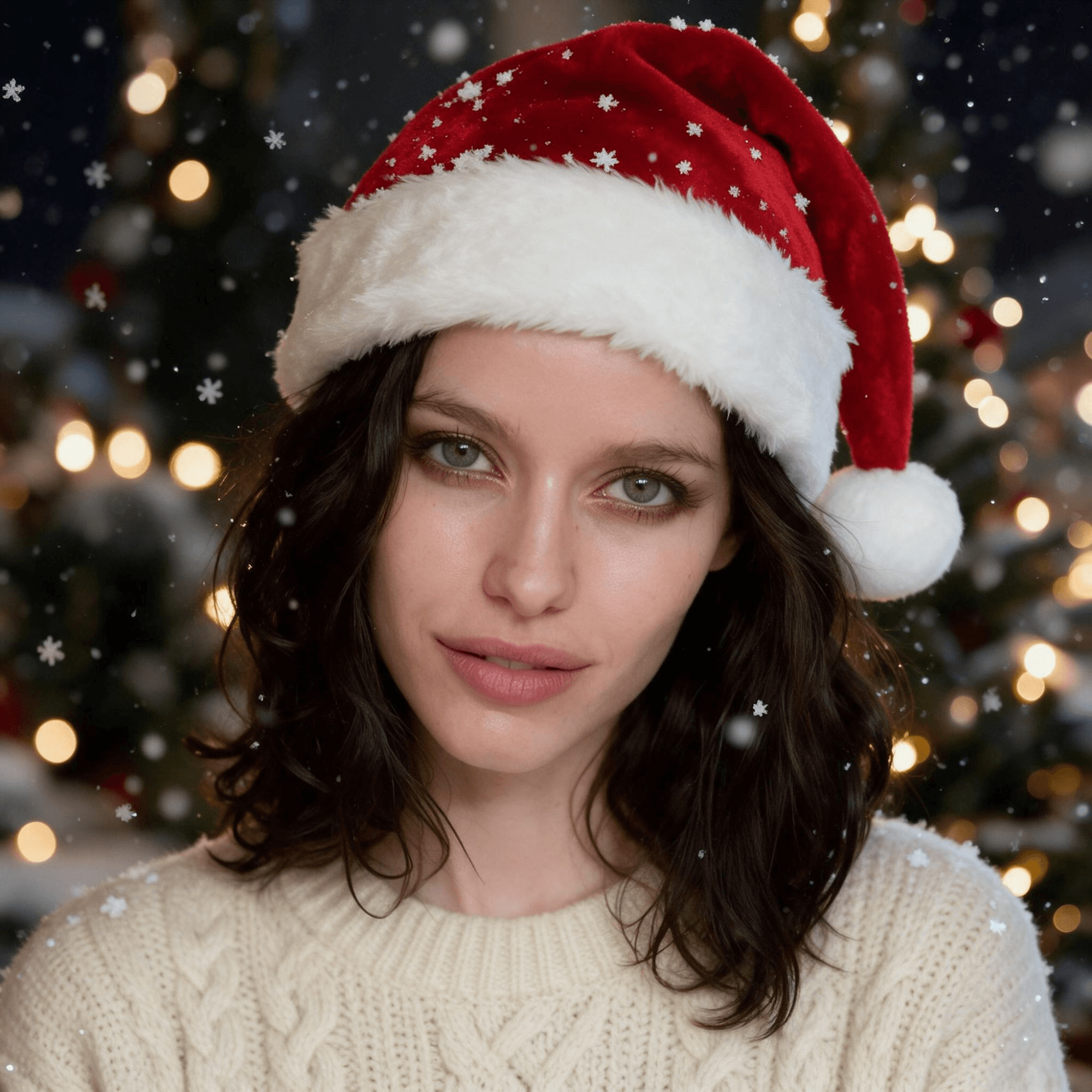
plaintext1Keep this woman's face, green eyes, skin tone and shoulder-length dark wavy hair exactly as in the photo. Turn it into a cozy Christmas profile picture: a classic red Santa hat with a thick white fur trim and a white pompom sits naturally on her own hair, the trim above the eyebrows so her eyes and brows stay fully visible. She wears a cream cable-knit sweater instead of the tank top. Head-and-shoulders portrait, face in the exact center of the frame, looking into the camera with a soft smile, the whole hat in view with a little room above the pompom. Behind her, a softly blurred winter evening with warm golden fairy lights as round bokeh, a hint of a decorated Christmas tree, and big soft snowflakes falling, a few resting on the hat and shoulders. Warm soft light on the face, a small catchlight in each eye, natural skin texture, sharp focus on the eyes. Photo realistic, like a real phone portrait taken on a winter evening. Exactly one person. No text, no logo, no frame.
卡通版的你,而不是借來的動漫角色
「動漫聖誕大頭貼」是我們在這股熱潮背後發現的最大子搜尋,而餵養它的貼文用的是動畫截圖。把自己畫成卡通,能獲得同樣溫馨的手繪感,又不必借用某間工作室的角色。相似度取決於幾個特徵,所以提示詞會把它們寫出來:頭髮長度和顏色、眼睛顏色、眼鏡或鬍子(如果有的話)。

plaintext1Redraw this woman as a cute Christmas cartoon profile picture in a clean illustrated style: smooth dark outlines, soft cel shading, warm colors, a slightly bigger head, big friendly green eyes with a highlight, rosy cheeks, a simple small nose and mouth. Keep what makes her recognizable as simple cartoon shapes: her face shape, shoulder-length dark wavy hair, skin tone and expression. She wears a classic red Santa hat with a thick white fur trim and a white pompom over her hair, the trim above the eyebrows, and a cream knit sweater. Head-and-shoulders, face in the exact center, looking at the viewer, the whole hat in view with room above the pompom. Behind her, in the same flat cartoon style, a deep blue winter night with big round snowflakes, a small decorated Christmas tree and a string of warm colored lights. An original cartoon of this person only, not any existing anime, game or film character. No text, no logo, no frame.
情侶與好友的配對聖誕大頭貼
配對聖誕大頭貼唯有兩張圖共享帽子、光線和雪才成立,而這很難從兩次分開的生成得到。解法是一次用兩張照片生成:Seedream 5.0 Pro 會把兩張都當作參考,回傳一張由細白線分割的寬版圖片,每半邊一個人。把各半裁成自己的個人檔案,並在同一天發布。
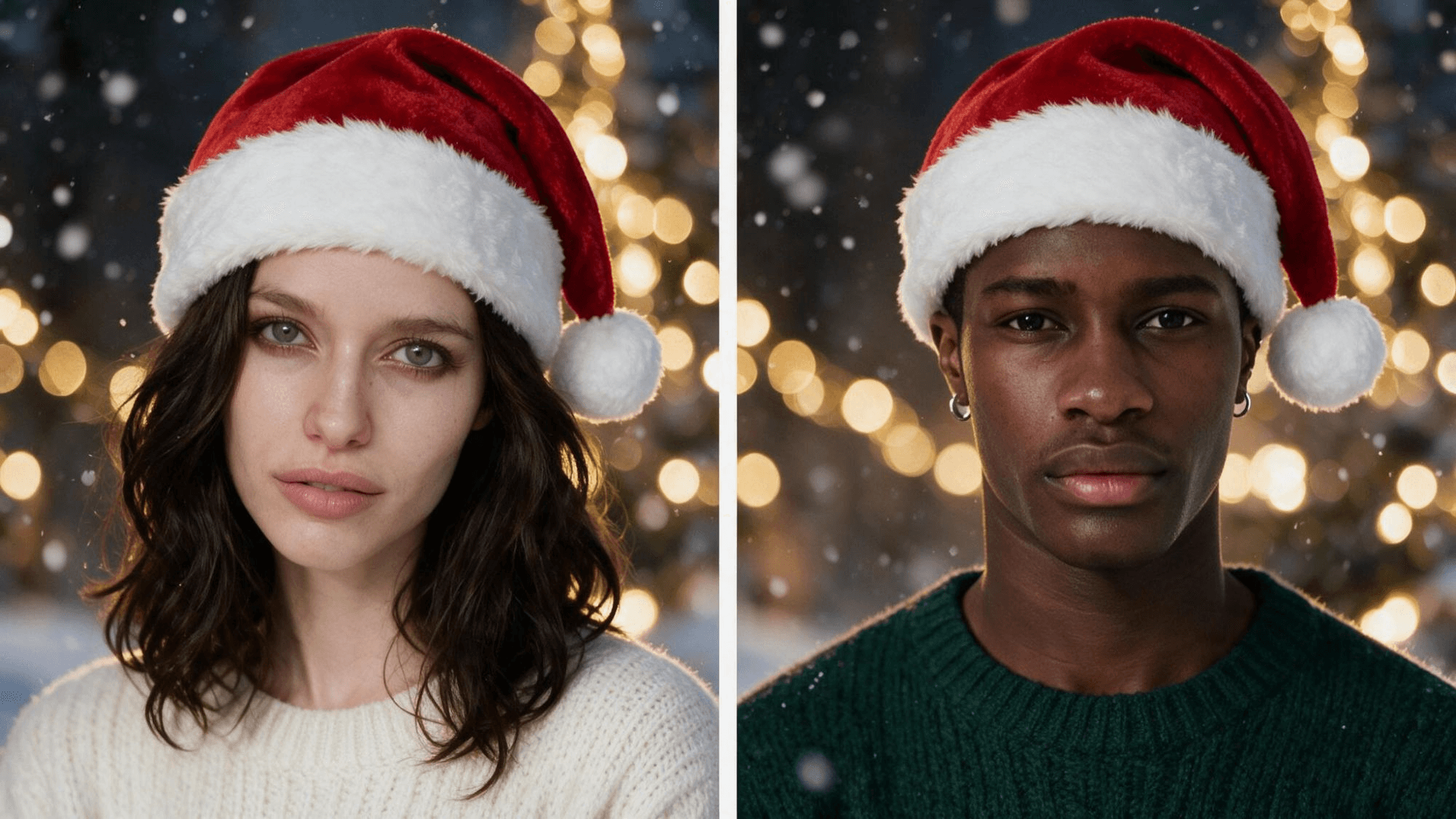
plaintext1Use the two uploaded photos. Make a matching pair of cozy Christmas profile pictures in one image: two square portraits side by side, split by a thin straight white line, so each square can be cropped as its own profile picture. The LEFT square is the woman from image 1. The RIGHT square is the man from image 2. Each square shows only its own person, with their own face, hair, skin tone and expression kept exactly as in their photo. Both wear a classic red Santa hat with a thick white fur trim and a white pompom over their own hair, the trim above the eyebrows. She wears a cream knit sweater, he wears a dark green knit sweater. In each square: a head-and-shoulders portrait, face in the center, looking into the camera, the whole hat in view. Behind each of them the same softly blurred winter evening with warm golden fairy lights as round bokeh and big soft snowflakes falling, the same light and the same colors. Never blend the two faces, never swap hair or clothes between them, never put both people in one square. Photo realistic, like two phone portraits taken on the same evening. No text, no logo, no frame; the thin white line is the only line.
先上傳她的照片,再上傳他的,因為提示詞會依順序指向它們。將尺寸設為 2048×1152,這樣每一半都會接近正方形。
你的狗或貓的聖誕大頭貼
寵物版本正是貼紙的罩門,因為貼上去的帽子很少能卡在兩耳之間。編輯版本則可以,只要照片拍到兩隻耳朵,而且臉朝向鏡頭。狗狗的聖誕大頭貼會保留牠的斑紋、眼睛顏色和咧嘴笑;提示詞會這樣寫,也會寫帽子是「sized for the dog」,否則模型會拿人類尺寸的帽子來用。
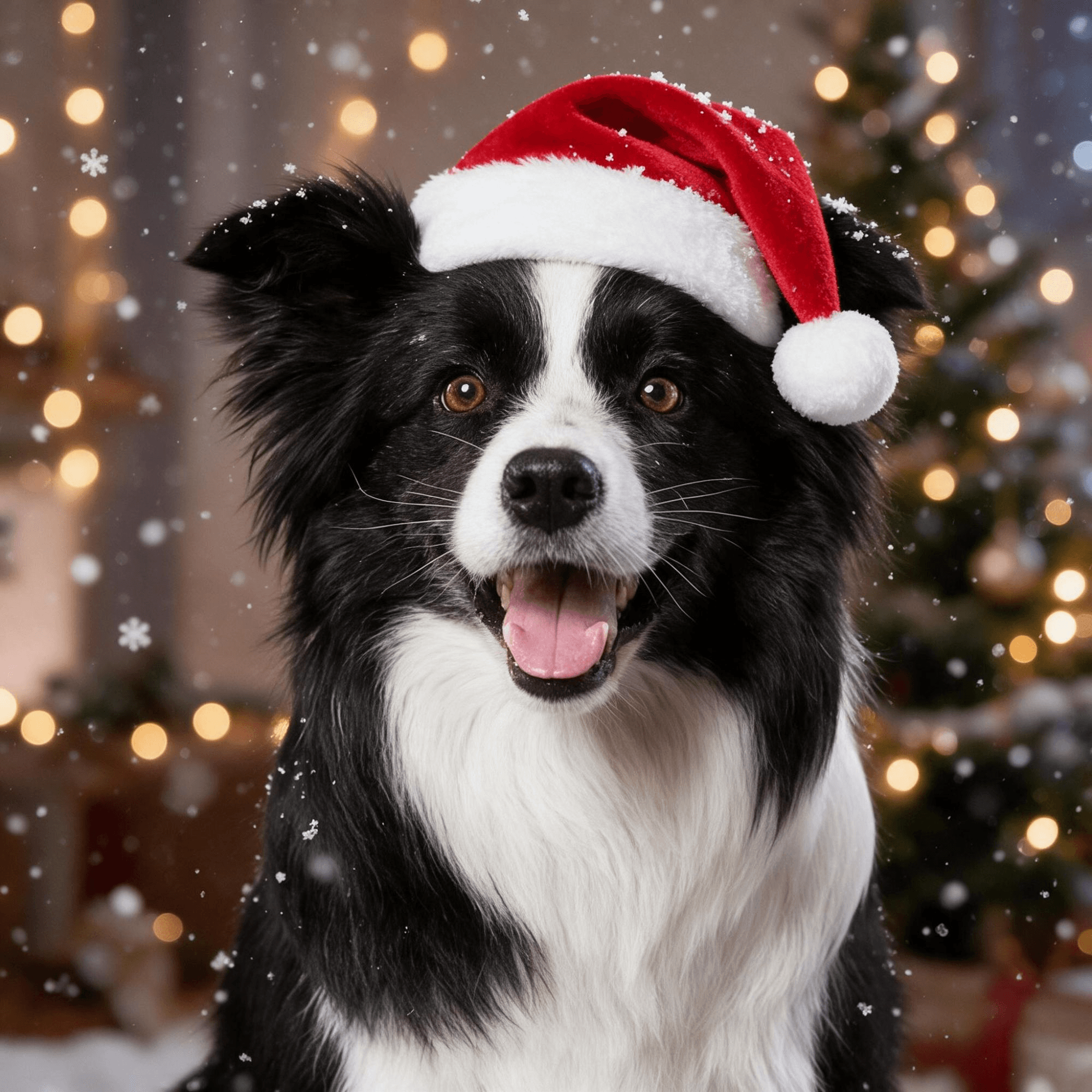
plaintext1Keep this dog exactly as in the photo: the black and white fur, the white blaze down the face, the fluffy ears, the brown eyes and the happy open-mouth expression. Turn the photo into a cozy Christmas profile picture: a small classic red Santa hat with a thick white fur trim and a white pompom, sized for the dog, sits between its ears without covering the eyes. Head-and-chest portrait, the face in the exact center of the frame, looking into the camera, the whole hat in view with a little room above the pompom. Behind the dog, a softly blurred winter evening with warm golden fairy lights as round bokeh, a hint of a decorated Christmas tree, and big soft snowflakes falling, a few resting on the hat and the fur. Warm soft light, every hair of the fur crisp, sharp focus on the eyes. Photo realistic. Only this dog, no people. No text, no logo, no frame.
把「dog」換成「cat」,並寫出你看到的斑紋(橘白毛色、虎斑條紋、綠色眼睛),同樣的提示詞就能給你一張貓咪聖誕大頭貼。
正確裁切:Discord、TikTok 和 Instagram 的尺寸
每個應用程式都會取你的正方形,顯示從中央裁出的圓形,然後在聊天和留言中縮成縮圖。Discord 的聖誕大頭貼一生中大多以那個縮圖尺寸出現。2048×2048 的輸出像素比它們任何一個顯示的都多,所以解析度不是問題,帽子才是。
| 發布地點 | 顯示方式 | 儲存前要檢查什麼 |
|---|---|---|
| Discord | 每則訊息旁的小圓圈 | 毛球在圓圈內;紅帽在深色伺服器主題上,即使縮圖大小也看得清楚 |
| TikTok | 個人檔案上的圓圈,留言中的極小圓圈 | 眼睛要略高於中心;碰到頂邊的帽子會失去毛球 |
| 網格和限時動態圓環上的圓圈 | 毛邊要遠離圓環;如果被切到,就縮小一格 | |
| 配對款 | 兩個帳號上的兩個圓圈 | 以相同縮放裁切各半,讓個人檔案並排時帽子能對齊 |
在應用程式的裁切畫面打開圖片,縮放到整頂帽子都在圓圈內,然後停手。如果提示詞有在毛球上方留下空間,你根本不需要縮放。
常見問題
聖誕大頭貼熱潮和 AI 聖誕照片熱潮一樣嗎?
不一樣。AI 聖誕照片熱潮是完整的攝影棚肖像,有拐杖糖和亮面紅色佈景,並在去年 12 月盛行。聖誕大頭貼則是為圓形裁切而做的半身照,從 11 月 1 日開始。兩者都跑在同一款編輯模型上;AI 聖誕照片熱潮指南涵蓋的是肖像版本和家庭合照合併。
人們什麼時候會換成聖誕大頭貼?
11 月 1 日是非官方日期,這也是為什麼今年最大的貼文都在說明文字或畫面上寫著「是時候了」或「11 月到了」。有些人會等到感恩節過後,而許多人在跨年後換回來,所以現在做一張圖大約可以用兩個月。
我可以用動漫角色當我的聖誕大頭貼嗎?
可以,爆紅貼文裡也滿滿都是,但那些美術作品屬於繪製者。把自己的臉做成卡通版本能給你同樣的外觀,又沒有這個問題,而且它永遠屬於你。
在 Atlas Cloud 上做一張聖誕大頭貼要多少錢?
截至 2026 年 11 月 6 日,Image Edit 分頁中的 Seedream v5.0 Pro 在預設 2048×2048 尺寸下顯示每張圖片 $0.072,包含第一張參考照片。上傳兩張照片的配對版本則顯示 $0.0744。
為什麼聖誕帽會蓋住我的眉毛?
通常是因為照片是從上方拍的,所以模型會把額頭讀得比實際短。在提示詞中保留「the trim above the eyebrows」這行,把照片改在眼睛高度重拍,然後再跑一次。每次生成都會有些差異,所以用相同提示詞再試一次通常就能自行修正。
結論
這股熱潮比今年的貼文更早:每年 11 月把個人頭像換成戴聖誕帽,而且往往還是從卡通借來的。AI 做法改變了一件事:帽子下的臉是你自己的。它涵蓋了人們搜尋的四種外觀(聖誕帽肖像、卡通、配對款、寵物),每一種都只要在 Image Edit 分頁用一張照片。
選一張清楚的胸口以上照片,保留提示詞中關於毛邊和毛球上方空間的規則,裁切就會自己搞定。這就是做出一張仍像你本人的聖誕大頭貼的全部配方。


