


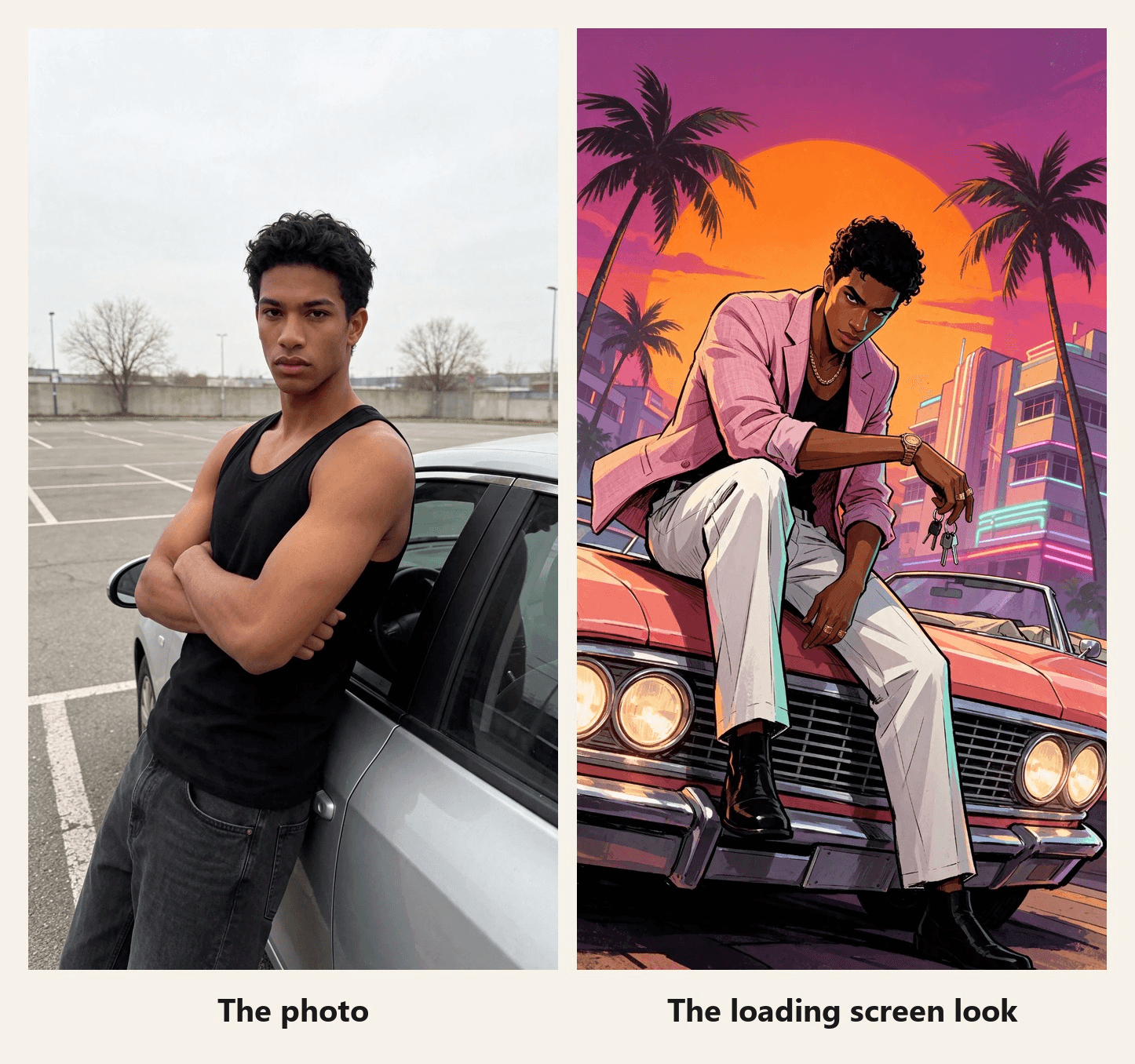
一名身穿黑色背心的男子斜靠在一輛銀色轎車上,背景是灰色停車場。一條發光線像載入進度條一樣沿著畫面攀升,線以下的一切都變成日落景色:粉紅色西裝外套、珊瑚色敞篷車、棕櫚樹。這個轉換就是本週人們在 GTA 6 於 2026 年 11 月 19 日發售 前幾天發布的 GTA 濾鏡。
這些貼文背後的版本是一個 CapCut 模板,且它會停在靜態海報上。本指南會指出該模板並展示其數據。接著,它會在 Atlas Cloud 上用一張照片建立一個角色持續移動的版本。
重點摘要
- 本週在 TikTok 上發布的 GTA 濾鏡是一個名為 GTA 6 Screen AI 的 CapCut 模板,由創作者製作,而非 Rockstar。
- 其 CapCut 頁面顯示,在 2026 年 11 月 16 日,即 GTA 6 發售前三天,已有 155,763 次使用。
- 該模板以靜態海報結束,而 Atlas Cloud 影片生成器 則讓你的角色在揭露後繼續移動。
- GTA 風格 AI 提示詞包含四件事:你自己的特徵、低相機角度、有態度的姿勢,以及線條勾勒、平塗色彩。
- 在你的版本中不要使用遊戲的標誌和角色,並註明是粉絲製作。
TikTok 上的 GTA 濾鏡趨勢是什麼?
首先澄清一點。搜尋 GTA 6 濾鏡時,部分結果是粉絲在爭論遊戲上市預告片的朦朧外觀。本指南涵蓋的是另一種含義:將你的照片變成載入畫面藝術的效果。
那個效果是一個 CapCut 模板。打開 #gtafilter 下的其中一個載入畫面貼文,點擊其 CapCut 模板連結,你就會進入 JDCapcut 的 GTA 6 Screen AI。預覽會播放一段對著鏡子自拍的影片,標題為「你的 GTA 6 載入畫面」,畫面從底部向上擦除,最後留下同一個人斜靠著汽車、身處日落場景的插圖版本。
| GTA 6 Screen AI | 2026 年 11 月 16 日的發現 |
|---|---|
| 創作者 | JDCapcut |
| 建立日期 | 2026 年 8 月 27 日 |
| 使用次數 | 155,763 |
| 長度與比例 | 約 8 秒,9:16 |
| 片段插槽 | 2 |
| 結尾方式 | 靜態插圖,上面疊加遊戲標誌 |
這個模板已存在數月,但這波熱潮是新的。我們在 #gtafilter、#gta6filter 和 #gta6aifilter 下打開的貼文中,幾乎所有日期都在 11 月 10 日至 16 日,也就是發售前一週。
「再見 GTA V」影片:另一個 GTA 6 濾鏡趨勢
第二種格式使用相同的標籤,與其說是濾鏡,更像是一部短片。在 11 月 14 日發布的片段 中,一個男孩在 2013 年的碼頭遇見 GTA V 的三位主角,然後在 2026 年長大成人回來與他們擁抱道別。影片長 30 秒,到 11 月 16 日已超過 36 萬次觀看。
CapCut 有一個基於相同概念的模板,由 ArtemisCC 製作的 GTA5 to GTA6 2。在預覽中,一名年輕男子在海灘上擁抱 GTA V 的三位主角,然後出現在霓虹街道上,旁邊是 GTA VI 的兩位主角。
| GTA5 to GTA6 2 | 2026 年 11 月 16 日的發現 |
|---|---|
| 創作者 | ArtemisCC |
| 建立日期 | 2026 年 11 月 14 日 |
| 使用次數 | 1,776 |
| 長度 | 13 秒 |
| 畫面內容 | 你,旁邊是遊戲本身的角色 |
最後一行很重要。告別格式依賴 Rockstar 的角色,而且兩個模板都會在結果上蓋上遊戲標誌。下面的版本兩者都不使用。
如何用一張照片製作 GTA 載入畫面 AI 影片
模板的海報是靜止的。在 Atlas Cloud 上,你可以讓它動起來:圖像模型會將你的照片重新繪製成載入畫面,而 Seedance 2.5 會生成從照片過渡到藝術畫面的片段,並附帶自己的聲音。
這兩個步驟都在同一個工作區中完成,片段則在 AI 影片生成器 中組合起來。
前兩秒它是一段普通的手機影片。線條上升,線以下他已經穿著粉紅色西裝外套。然後繪畫持續進行:他推開車門,走向敞篷車,車頭燈亮起,他在引擎蓋上坐定,太陽在他頭後方。聲音也是生成的:提示詞要求合成器隨著線條上升、靴子腳步聲和車頭燈的喀噠聲。
在這段剪輯中,我們在該聲音上疊加了一首歌,並將三個時刻對準節拍:擦除結束、車頭燈和最終姿勢。有兩段以慢幾個百分點的速度運行以準時到位,並且每次重拍時畫面都會稍微推近。
方法 1:在影片生成器中建立揭露效果
從靜態圖開始,因為影片需要它作為最後一格。打開圖像生成器,切換到「圖像編輯」分頁,並在「模型」下選擇 Seedream v5.5。上傳你的照片,選擇 9:16 尺寸、2K(1584*2816),貼上以下提示詞並按下「執行」。任何生活照都可以。我們的原圖是一張攝影棚大頭照,所以先多做一次編輯將他放到停車場。
plaintext1Redraw this photo as a hand-painted GTA loading screen illustration, not a photo filter. Keep only his identity from the photo: the same young man, same face shape, same eyes, thick eyebrows, nose and full lips, same warm brown skin, same short curly black hair. Change everything else. Camera: a dramatic low-angle shot from near the ground with a wide lens and a slight tilt, looking up at him. Pose: he sits on the hood of the car with one boot planted on the chrome front bumper, leaning forward with one forearm resting on his raised knee, the other hand hanging loose with a set of car keys dangling from one finger; his head is tilted down a little, eyes locked on the viewer from under his brows, jaw set, a faint smirk. He is tall and lean with long legs. Outfit: a pastel pink linen blazer with the sleeves pushed up, worn over the black tank top, white pleated trousers, black leather boots, a gold chain, a chunky gold watch and two gold rings. Car: a 1980s coral pink convertible with a wide chrome grille and glowing round headlights, filling the lower part of the frame. Background: the huge orange sun sits directly behind his head and shoulders like a halo, a magenta and violet sky, tall palm trees bending in the wind, pastel art deco hotels with glowing neon tubes far behind. His blazer and the palm fronds blow in the wind. Lighting: a strong orange rim light around his whole silhouette, deep violet shadows, teal fill light on one side of his face. Style: thick black ink outlines with varied weight, flat cel-shaded color with sharp graphic shadow shapes, high contrast, saturated palette, bold poster composition. Natural adult proportions. Vertical 9:16, full figure with the car. Only one person, no other people, no other cars. No weapons. No text, no letters, no neon words, no signs with writing, no game logo, no title, no license plate characters, no watermark.
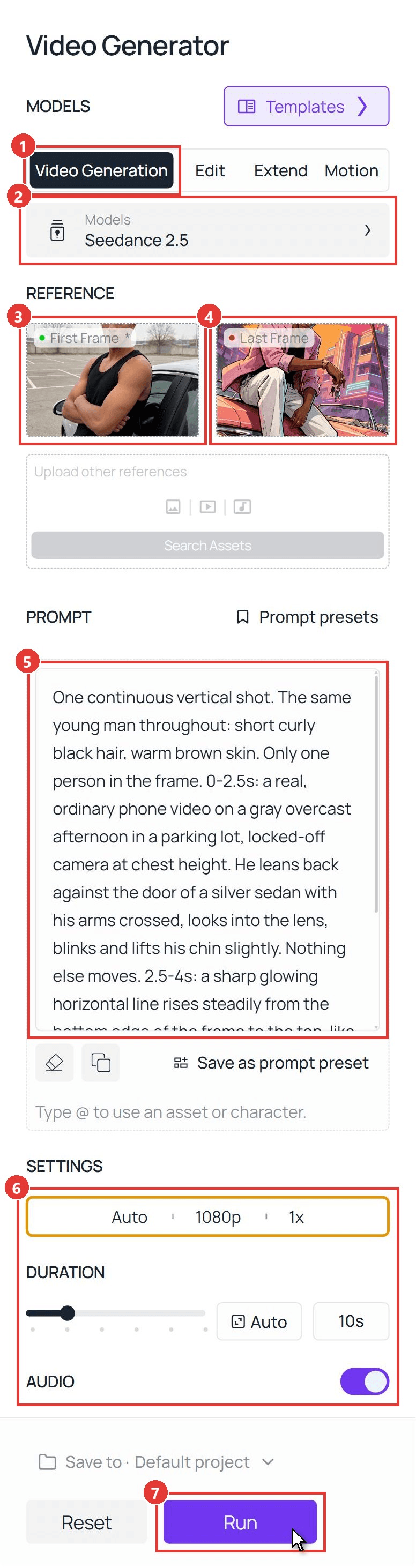
現在處理片段。按照螢幕截圖中的編號控制項操作:
- 切換到 影片生成 分頁。
- 打開 模型 並選擇 Seedance 2.5。
- 上傳你的照片,裁剪為 9:16,作為 第一格。
- 上傳載入畫面靜態圖作為 最後一格。
- 將下方的揭露提示詞貼到 提示詞 中。
- 在 設定 下,選擇 1080p,將 時長 設為 10 秒,並保持 音訊 開啟。比例保持為自動並跟隨第一格。
- 按下 執行。
plaintext1One continuous vertical shot. The same young man throughout: short curly black hair, warm brown skin. Only one person in the frame. 0-2.5s: a real, ordinary phone video on a gray overcast afternoon in a parking lot, locked-off camera at chest height. He leans back against the door of a silver sedan with his arms crossed, looks into the lens, blinks and lifts his chin slightly. Nothing else moves. 2.5-4s: a sharp glowing horizontal line rises steadily from the bottom edge of the frame to the top, like a loading bar wiping upward. Everything the line has passed becomes a hand-painted game loading-screen illustration with thick black outlines and flat cel-shaded color: the silver sedan is now a coral pink 1980s convertible, the gray lot is a sunset boulevard with palm trees and neon-lit pastel hotels, and he now wears a pastel pink linen blazer with pushed-up sleeves over a black tank top, white trousers, black boots, a gold chain and a gold watch. Above the line the real gray parking lot remains until the line passes it. 4-8.5s: the whole frame is now the illustration. He pushes off the car door and spins a set of car keys once around his finger. He turns his body to face the direction he is going and walks four clear steps along the side of the car to its front, his legs and boots visibly stepping one after the other, his arms swinging naturally. The car stays parked in the same spot the whole time: it never rotates, slides or changes shape, and the camera is what moves, gliding forward with him and sinking down to a low angle in front of the chrome grille, looking up at him. He walks the whole way; he never glides, floats or morphs from one place to another. At the front of the car he turns to face the lens, the round headlights switch on with a warm glow, and he hops up to sit on the hood, plants one boot on the chrome front bumper and leans forward with his forearm on his raised knee, the keys dangling from his finger. Palm fronds and his blazer blow in the wind, and the huge orange sun slides into place directly behind his head. 8.5-10s: he tilts his head down a little, locks eyes with the lens with a faint smirk and holds the exact pose of the last frame. He stays an illustration until the end and never turns back into a photo. No other people, no other cars, no weapons. No text, no letters, no logos, no title card, no user interface. Sound: quiet parking-lot ambience for the first 2.5 seconds, a rising synth whoosh as the line travels up, keys jingling, four boot steps on asphalt, the clunk of headlights switching on, then warm evening ambience with distant surf and a soft 1980s synth bass pulse, no voice.
該提示詞的兩個部分支撐了這段影片。定時台詞給了真實素材自己的兩秒鐘,所以「之前」保持清晰可讀。行走台詞明確說出步伐、雙腿和圍繞停放車輛移動的相機,這就是讓他從車門步行到引擎蓋的原因。這與我們的 漫畫書濾鏡 揭露使用相同的第一格和最後一格設定,只是這裡用擦除,那裡用閃光。
方法 2:透過 API 執行 GTA AI 濾鏡
發售週的拍照亭,或你自己應用程式內的 GTA AI 濾鏡按鈕,需要兩次呼叫而不是兩個分頁。
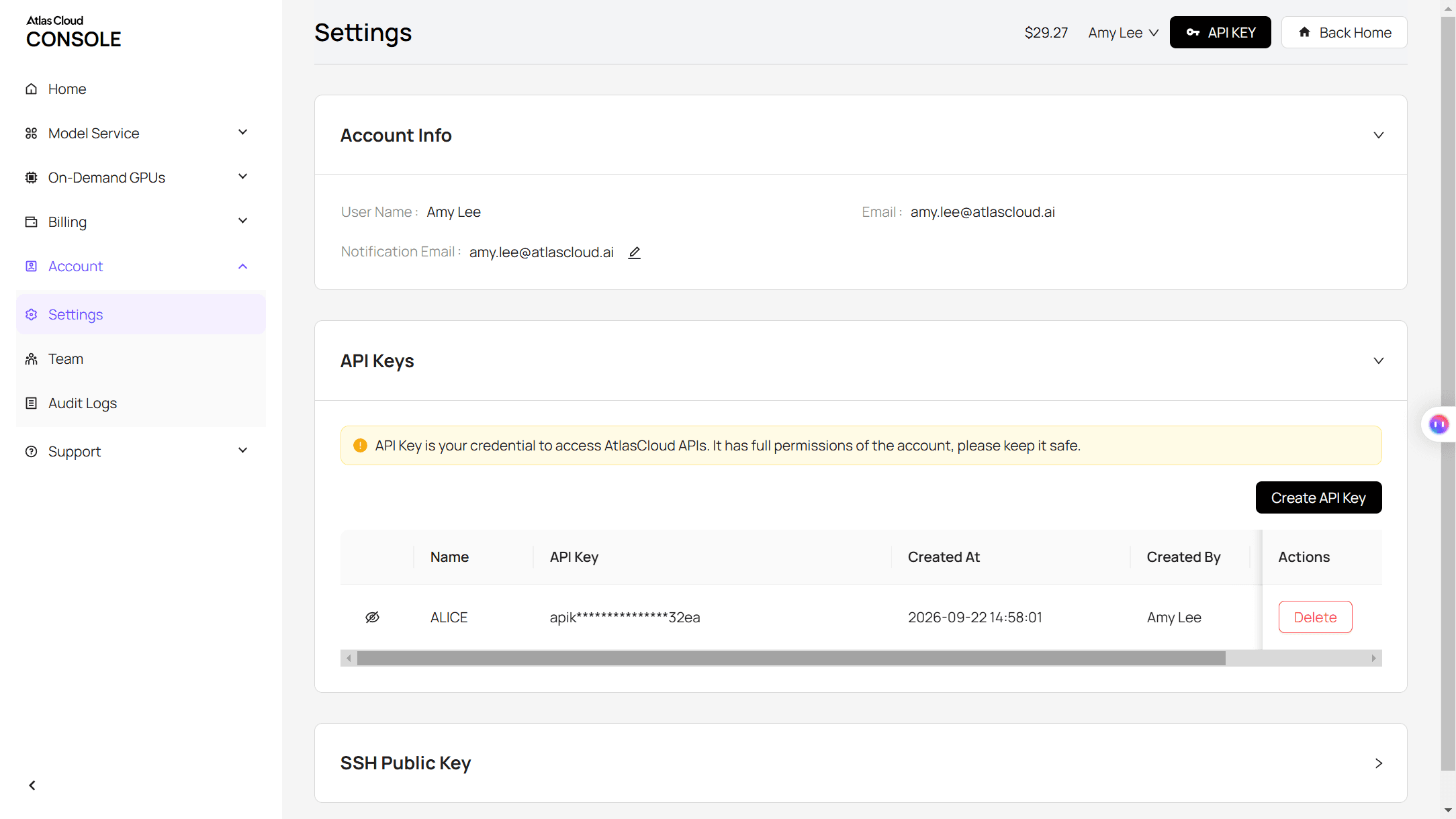
步驟 1:建立並複製 API 金鑰,在 Atlas Cloud 控制台的設定頁面中。
步驟 2:查看請求格式,在 Atlas Cloud API 文件 中。
步驟 3:生成靜態圖,然後生成片段,並輪詢每個檔案。 圖像呼叫接受你的照片 URL 和載入畫面提示詞:
plaintext1curl -X POST https://api.atlascloud.ai/api/v1/model/generateImage \ 2 -H "Authorization: Bearer $ATLASCLOUD_API_KEY" \ 3 -H "Content-Type: application/json" \ 4 -d '{ 5 "model": "bytedance/seedream-v5.5/edit", 6 "prompt": "Redraw this photo as a hand-painted GTA loading screen illustration. Keep only his identity: same face, skin tone and short curly black hair. Low-angle wide shot looking up at him as he sits on the hood of a coral pink 1980s convertible, one boot on the chrome bumper, forearm on his knee. Pastel pink linen blazer, white trousers, gold chain. A huge orange sun behind his head, palm trees, neon-lit art deco hotels. Thick black ink outlines, flat cel-shaded color, strong orange rim light. Only one person. No text, no game logo, no weapons.", 7 "reference_images": ["https://your-cdn.com/photo.jpg"], 8 "size": "1584*2816", 9 "output_format": "jpeg" 10 }'
影片呼叫將原始照片作為 image,並將返回的靜態圖作為 last_image:
plaintext1curl -X POST https://api.atlascloud.ai/api/v1/model/generateVideo \ 2 -H "Authorization: Bearer $ATLASCLOUD_API_KEY" \ 3 -H "Content-Type: application/json" \ 4 -d '{ 5 "model": "bytedance/seedance-2.5/image-to-video", 6 "prompt": "One continuous vertical shot. The same young man throughout. 0-2.5s: a real phone video in a gray parking lot, he leans on a silver sedan with his arms crossed. 2.5-4s: a glowing horizontal line wipes up the frame and everything it passes becomes a hand-painted game loading-screen illustration at sunset. 4-8.5s: he walks four clear steps to the front of the pink convertible while the camera sinks to a low angle, the headlights switch on and he sits on the hood. 8.5-10s: he holds the exact pose of the last frame. No text, no logos. Sound: a rising synth whoosh, boot steps, the clunk of headlights, evening ambience, no voice.", 7 "image": "https://your-cdn.com/photo.jpg", 8 "last_image": "https://your-cdn.com/photo-loading-screen.jpg", 9 "duration": 10, 10 "resolution": "1080p", 11 "generate_audio": true 12 }'
plaintext1curl https://api.atlascloud.ai/api/v1/model/prediction/<prediction_id> \ 2 -H "Authorization: Bearer $ATLASCLOUD_API_KEY"
相同的兩個端點和相同的金鑰可以執行 Atlas Cloud 上的其他圖像和影片模型。若要在不同模型上試用這個外觀,只需更改模型字串,其餘保持不變。
GTA 風格 AI 提示詞:為載入畫面外觀寫什麼
我們最初的靜態圖看起來很拘謹。我們要求模型保留照片中的姿勢,而一個男人雙臂交叉、平視鏡頭站著,就像是一張有棕櫚樹的護照照片。載入畫面藝術依靠角度和態度,所以有效的提示詞只保留照片中的一件事,其餘全部改變。
| 提示詞部分 | 我們的提示詞內容 | 作用 |
|---|---|---|
| 身分 | 僅保留他的身分:臉型、眼睛、眉毛、膚色、頭髮。其餘全部改變。 | 釋放姿勢和場景,同時臉部保持是他的 |
| 相機 | 從靠近地面的低角度拍攝,廣角鏡頭,輕微傾斜 | 讓他像封面藝術一樣聳立在畫面中 |
| 姿勢與服裝 | 坐在引擎蓋上,一隻靴子踩在保險桿上,手指上掛著鑰匙;粉紅色亞麻西裝外套,金錶 | 在一切移動之前賦予角色一個故事 |
| 光線與線條 | 太陽在他頭後方像光環,橘色輪廓光;粗黑線條勾勒,平塗賽璐珞風格色彩 | 設定海報外觀並將他與天空分離 |
最後列出要省略的內容。禁止文字、遊戲標誌和標題的台詞保持畫面乾淨,禁止武器的台詞則保持輕鬆的語氣。
三種外觀:日落大道、夜晚霓虹和海灘日光
替換場景區塊,同一張臉就會落在這張地圖的不同部分。所有三個面板都來自同一張停車場照片,開頭都有相同的身份描述句。
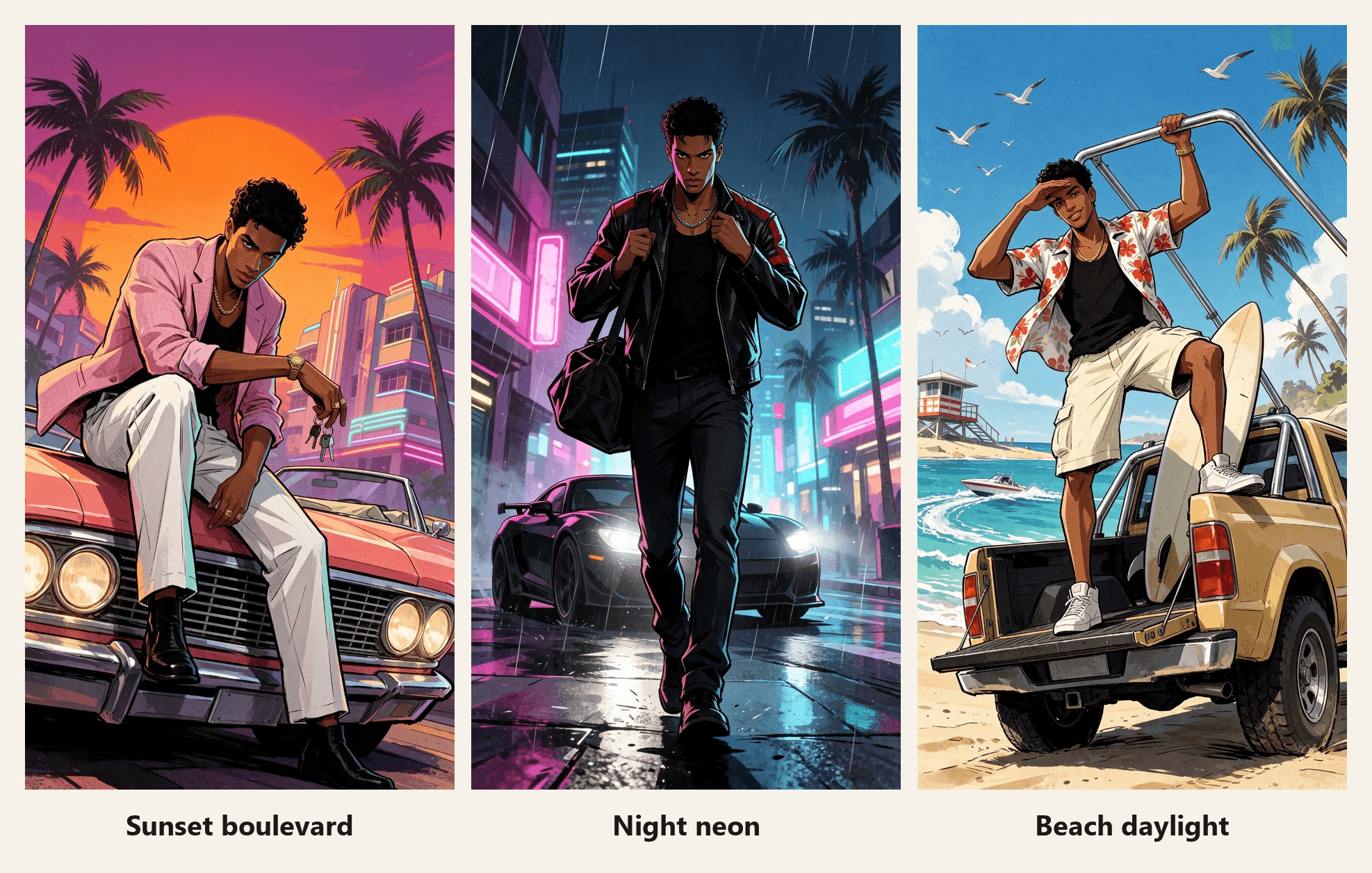
| 外觀 | 姿勢 | 服裝與座駕 | 光線 |
|---|---|---|---|
| 日落大道 | 坐在引擎蓋上,身體前傾 | 粉紅色亞麻西裝外套,珊瑚色 1980 年代敞篷車 | 橘色太陽在他頭後方,紫色陰影 |
| 夜晚霓虹 | 大步走向鏡頭 | 黑色皮革賽車外套,啞光黑色雙門跑車 | 車頭燈在他身後,洋紅色和青色映在他臉上 |
| 海灘日光 | 站在卡車尾門上,手遮眼睛 | 木槿花印花襯衫,升高底盤的海灘卡車 | 強烈的正午陽光,清晰的陰影 |
霓虹街景容易出現文字。夜晚提示詞增加了一行,要求純粹的發光燈管和空白招牌,上面沒有字元,這樣招牌就會乾淨地返回。
GTA 濾鏡應用程式或 CapCut 模板:哪個適合?
有三種方式可以獲得這個外觀,它們適合不同的目標。
| CapCut 模板 | 瀏覽器照片濾鏡 | Atlas Cloud 上的提示詞途徑 | |
|---|---|---|---|
| 你會得到 | 一段 8 秒的擦除效果,以靜態圖結束 | 通常是靜態圖像 | 任何場景的靜態圖,然後是帶聲音的 10 秒片段 |
| 場景與姿勢 | 由模板固定 | 從預設風格中選擇 | 由你撰寫 |
| 遊戲標誌 | 疊加在結果上 | 取決於工具 | 由提示詞省略 |
| 最適合 | 快速加入趨勢 | 新的個人頭像 | 角色持續移動的揭露效果 |
如果你只想今晚發布這個趨勢,模板是捷徑。如果你想要自己的車、自己的服裝和一個會走路的角色,就寫提示詞。若想要相同揭露概念但不同藝術風格,我們的 Pixar 風格 AI 影片 指南涵蓋了 3D 外觀。
常見問題
在哪裡可以找到 TikTok 上的 GTA 濾鏡?
搜尋 #gtafilter 或 #gta6filter,打開一個顯示載入畫面揭露效果的貼文,點擊上面的 CapCut 模板連結。這會在 CapCut 中打開 GTA 6 Screen AI。CapCut 模板可能受地區限制:我們在 2026 年 11 月 16 日查看時,這個模板顯示在我們的位置無法使用。
GTA 濾鏡是 Rockstar 製作的嗎?
不是。GTA 6 Screen AI 是由 JDCapcut 製作的創作者模板,其 CapCut 頁面上沒有任何內容將其與 Rockstar 聯繫起來。請將你用該模板或上述提示詞製作的任何內容視為粉絲藝術。
我可以在我的影片上放 GTA 6 標誌嗎?
標誌和角色屬於遊戲發行商,所以我們省略了它們,並建議你也這樣做。日落、敞篷車和線條勾勒已經很有 GTA 風格。如果貼文可能被誤認為官方素材,請加上註明「粉絲製作」的標題。
ChatGPT GTA 提示詞會得到相同結果嗎?
結構可以沿用:先身分,然後相機、姿勢、服裝、光線,以及要省略的內容清單。我們在 Seedream v5.5 中執行我們的提示詞,並未為本指南測試 ChatGPT,所以預期需要為另一個圖像模型調整措辭。
GTA 6 何時推出?
根據 Rockstar Games,將於 2026 年 11 月 19 日推出,其公告連結在本指南頂部。
在 Atlas Cloud 上製作 GTA 載入畫面影片要多少錢?
截至 2026 年 11 月 16 日,在我們查看時套用 20% 折扣後,一張 1584*2816 的 Seedream v5.5 Edit 靜態圖為 $0.0344。一段 10 秒的 Seedance 2.5 第一格和最後一格片段含音訊,估計在 720p 為 $3.04,在 1080p 為 $5.98。一張基礎照片、一張載入畫面靜態圖和一次 1080p 拍攝總共約 $6.05,所以先在 720p 調整提示詞。
結論
發售週的 GTA 濾鏡是一個使用次數達六位數的 CapCut 模板:一張照片、一次擦除和一張海報。旁邊還有一個建立在遊戲自身角色上的告別影片。兩者都易於發布,且都停在繪畫可以開始移動的地方。
若要更進一步,寫一個載入畫面提示詞,保留你的臉,並改變角度、姿勢和光線。將你的照片作為第一格、該靜態圖作為最後一格交給 Seedance 2.5,你的 GTA 濾鏡就會在擦除後繼續播放,一路到汽車引擎蓋上。




