


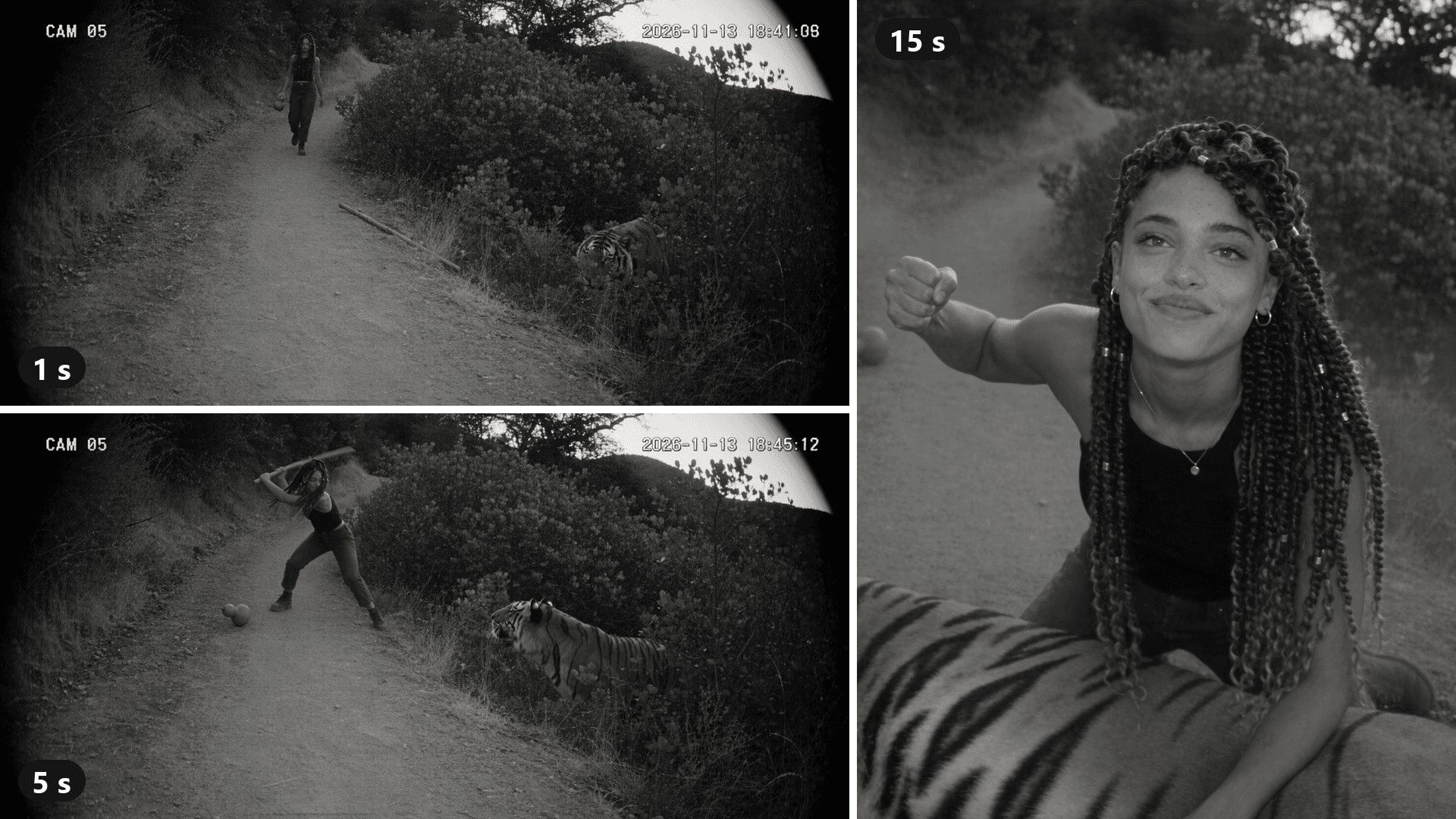
粗糙的監視畫面。一名女子沿著森林小徑走來,手裡甩著酒葫蘆。她右側的灌木叢中,一隻老虎抬起頭。十五秒後,她跪在老虎背上,喘著氣,直直望向鏡頭。
這就是 AI 打虎 做出的東西:一段假 CCTV 片段,用你的臉重述一則中國經典傳奇故事。它不到一週就從中國影片網站傳到 TikTok。本指南追蹤背後的範本,再用你能複製的提示詞,從一張照片重建這個場景。上方片段是我們自己的生成結果。
重點摘要
- AI 打虎 將《水滸傳》的武松打虎,重述成由你主演的粗糙黑白 CCTV 畫面。
- 它於 2026 年 11 月初在中國影片網站開始,並透過 CapCut 範本傳到 TikTok。
- 那個只需一張照片的 CapCut 範本,標題就叫「AI trend」,前五天突破 47,000 次使用。
- 在 Atlas Cloud,一張照片加上有時間節奏的單一鏡頭提示詞,就能在 AI 影片生成器。_
- 使用你自己的臉,或同意使用的朋友,讓打鬥不見血,並將貼文標示為 AI。
什麼是 AI 打虎趨勢?
一張照片輸入,出來的是黑白「監視器」片段:你沿著森林小徑走來,老虎從灌木叢跳出,然後你贏了。常見版本長 10 秒,角落有「CAM 05」,像真實監視畫面。
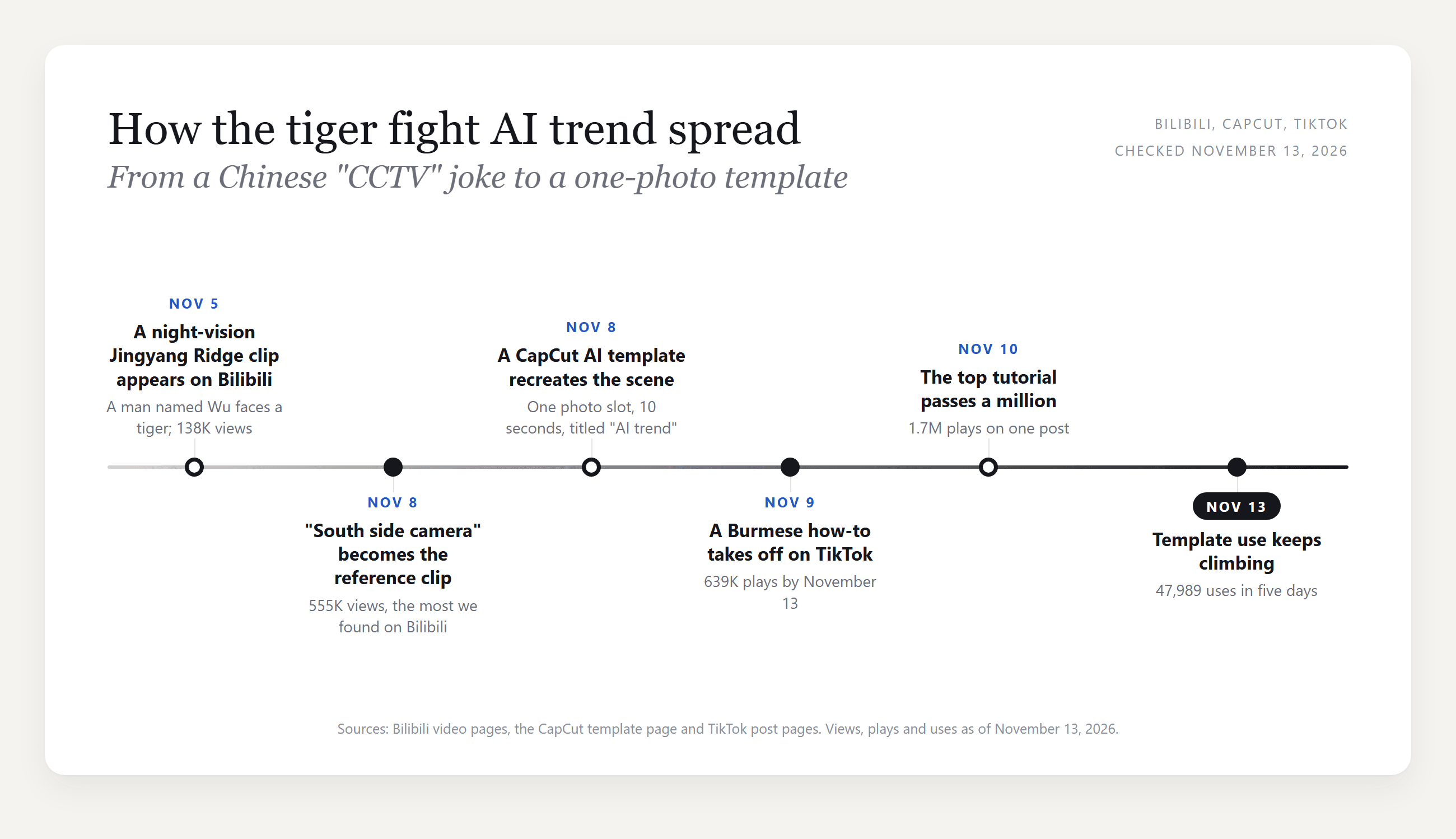
它擴散得很快。我們找到最早的片段在 11 月 5 日上傳到 Bilibili。三天後,一支「景陽岡南側攝影機」版本 發佈於 Bilibili,並奠定 CapCut 範本後來複製的外觀。到 11 月 13 日約有 555,000 次觀看。
同日出現該場景的 CapCut AI 範本。在 TikTok 上,帶緬甸文說明的教學貼文於 11 月 9 日跟進,而 11 月 10 日的一支 TikTok 教學 突破 170 萬次播放。
武松與老虎:CCTV 打虎從何而來
故事出自《水滸傳》,中國四大名著之一。武松在景陽岡下的酒館喝酒,不理會有關食人虎的警告,在黃昏過岡。他的棍子在打鬥中折斷,於是用拳頭將老虎打死。
這就是為什麼 CCTV 打虎的主角帶著酒葫蘆,還抓起棍子。
這種攝影機取景來自一個更廣泛的玩笑。中國創作者開始發布名人傳說的 AI「監視畫面」,而 36Kr 於 11 月 12 日報導,這波潮流始於一段鴻門宴的假錄影。
Bilibili 片段和 CapCut 範本用不同長度講同一個故事:
| Bilibili「南側攝影機」片段 | CapCut「AI trend」範本 | 我們的 Atlas Cloud 版本 | |
|---|---|---|---|
| 攝影機 | 3 台,硬切 | 2 台,一次剪接 | 1 台,一鏡到底 |
| 長度 | 29 秒 | 10 秒 | 15 秒 |
| 主角 | 身穿長袍、束髮的武松 | 以你的照片取代黑衣女子 | 你的照片,服裝由你描述 |
| 打鬥 | 走近、持棍、扭打、壓制 | 走近、躍起,然後壓制 | 走近、躍起、翻滾、壓制,抬頭看向鏡頭 |
範本省略了中間的扭打。我們反其道而行:一台固定攝影機、從不剪接,看起來更像真實監視畫面。
如何用一張照片製作 AI 打虎影片
一張照片,在 Atlas Cloud 跑一次,就產出下方的 AI 老虎影片。
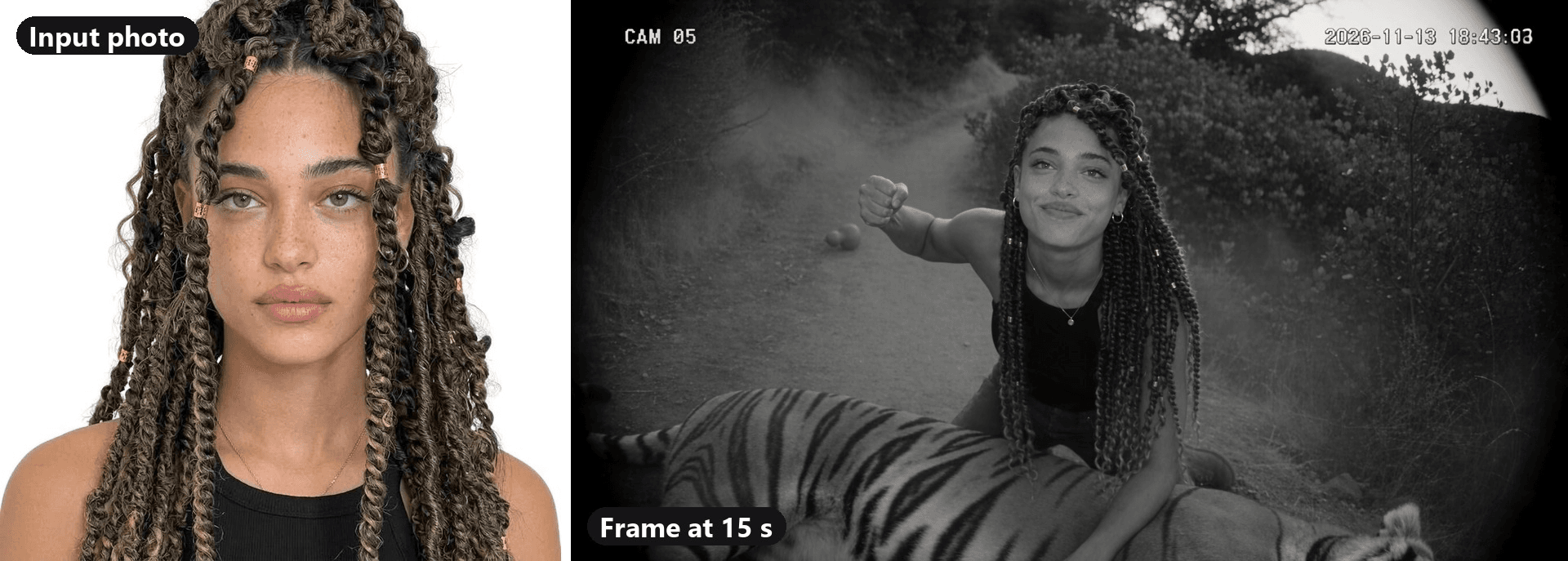
模型是 Seedance 2.5。它從一張單獨的頭肩照開始運作:到最後一格,她的臉、辮子和金色髮飾都與照片相符,而工裝褲和靴子則直接來自提示詞。腳步聲、低吼和翻滾的悶響也出自同一次生成。
挑一張臉朝向鏡頭、清晰的照片。素色上衣在黑白畫面中效果很好,肩膀以下的內容都可以交給提示詞。
一切都在 影片生成器 的 Video Generation 分頁中完成。
方法 1:在 Atlas Cloud 影片生成器中製作 CCTV 打虎
依照截圖上的數字操作:
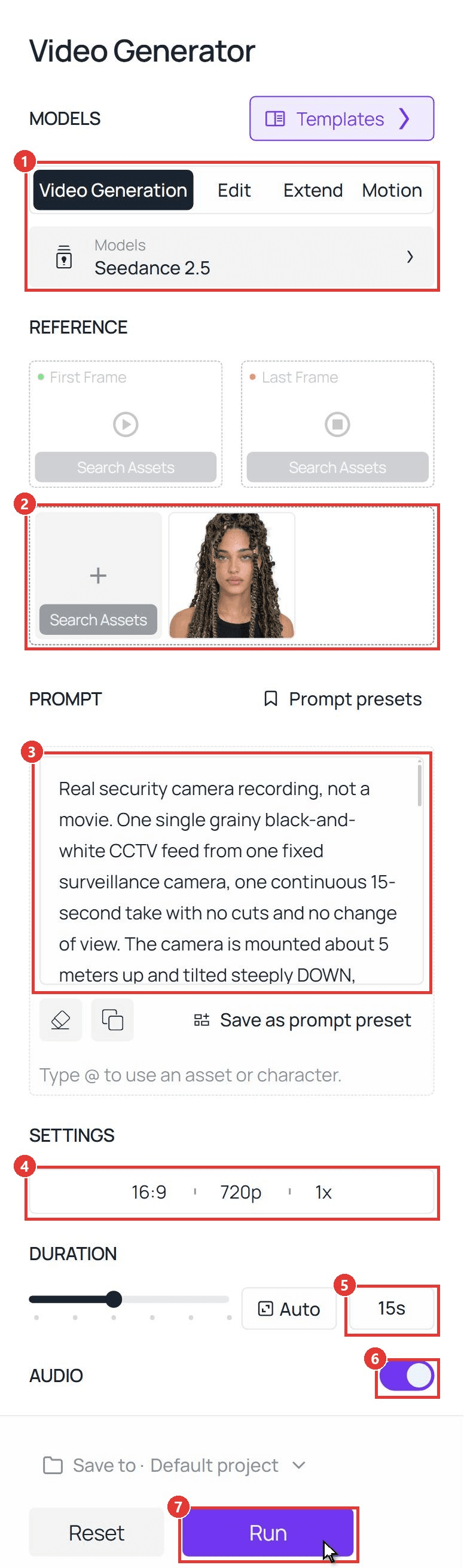
- 模型: 開啟 Video Generation,並保留 Seedance 2.5。
- 參考: 在 Upload other references 上傳你的照片。將 First Frame 和 Last Frame 留空。
- 提示詞: 貼上下方提示詞。@Image1 指向你剛上傳的照片。
- 設定: 選擇 16:9 和 720p,輸出一個。720p 成本較低;上方片段以 1080p 渲染。
- 時長: 輸入 15。
- 音訊: 保持開啟。
- 執行。 片段會出現在右側面板。
plaintext1Real security camera recording, not a movie. One single grainy black-and-white CCTV feed from one fixed surveillance camera, one continuous 15-second take with no cuts and no change of view. The camera is mounted about 5 meters up and tilted steeply DOWN, about 50 degrees below the horizon, onto a dirt path through a dense mountain forest at dusk: a top-down security view. NO sky and NO horizon anywhere in the frame; the ground, the path and the bushes fill the whole picture from the top edge to the bottom edge. Everyone is seen from above: we look down on the tops of their heads and shoulders, and their shadows fall on the ground. The path enters at the top of the frame and runs down toward the bottom of the frame. Wide-angle lens with barrel distortion and dark corners, deep focus, flat dull exposure, low resolution, video noise and compression blocks. The view is locked for the whole video: no pan, no zoom, no tracking, no shake, no cuts, no second camera, no close-ups, no eye-level view, no low camera, no landscape view, no shallow depth of field, no cinematic lighting. We only see what this camera sees: the camera itself, its housing, mounts, poles and cables never appear anywhere in the frame. 16:9. 2Small white text in the top left corner: "CAM 05". Small white running timestamp in the top right corner, starting at "2026-11-13 18:42:07" and counting forward second by second. No other text. 3 4The hero = the young woman in @Image1. Copy her face exactly: face shape, light eyes, thick dark eyebrows, nose, full lips, skin tone and the freckles across her nose and cheeks. Copy her hair exactly: long, waist-length twisted braids in dark brown with honey-blonde highlights, with small gold cuffs on some of the braids; the braids swing with every move. She is tall and slim with an athletic build. She wears the black ribbed tank top and the thin gold necklace from @Image1, plus dark cargo trousers and black lace-up boots. Use @Image1 only for who she is and what she wears; the white background never appears. The same woman in every frame. 5 6The action, in one unbroken shot: 7[0-3s] She walks up the path from the top of the frame toward the camera, small in the frame and seen from above, relaxed, swinging a round gourd bottle in one hand. A large tiger lies low inside the dense bushes on the right side of the path; only its head shows through the leaves. 8[3-5s] The tiger lifts its head. She stops, startled, drops the gourd, which rolls on the path, and snatches up a long wooden stick lying at the edge of the path. 9[5-7s] The tiger leaps out of the bushes at her. She swings the stick; the tiger dodges and the stick flies out of her hands. 10[7-11s] She grabs the tiger by the thick fur of its neck with both hands. They tumble over once on the dirt in a cloud of dust, rolling closer to the camera, and she ends up on top of the tiger in the lower half of the frame. 11[11-13s] Still in the same fixed view, now nearer to the camera and seen from above: the tiger lies flat on its side, beaten and still, breathing. She kneels on its back, presses its neck down with one hand and raises her other fist high. [13-15s] Then she pushes a braid out of her face, tilts her head back and stares straight up into the camera lens. She holds that direct eye contact with the camera until the very last frame, out of breath, with a small, cool half-smile: her whole face is clearly visible, seen from above, looking right at us. 12 13Anatomy: exactly one person and one tiger in the frame. She is one woman with one head, two arms, two hands with five fingers each. The tiger has one head, four legs, one tail and normal stripes. Bodies never merge, stretch or melt during the leap and the tumble. 14Safety: no blood, no wounds, no bites, no claws in skin. The tiger is only pinned down and is not hurt; nobody is hurt. 15Sound: thin and slightly muffled like a cheap security camera microphone: forest birds, footsteps on gravel, the gourd hitting the ground, a low tiger growl and one roar at the leap, the whoosh of the stick, a heavy thud and scuffling in the dust, her hard breathing, a faint electrical hum. No music, no dialogue, no narration. 16No subtitles, no captions, no logos, no watermark, no color.
要改成你自己的版本,只改寫主角段落(臉、頭髮、服裝),必要時把「她」改成「他」。保留攝影機段落和時間節奏。若要在同一片段放入兩個人,我們的 I Love The Smiths 指南 說明如何共用一張參考照片。
方法 2:透過 Seedance 2.5 API 送出相同提示詞
想為群組聊天室裡每個朋友都做一支?API 接受同一張照片和同一段提示詞。
步驟 1:建立 API 金鑰。 在控制台中開啟 Settings,並在 API Keys 下建立金鑰。

步驟 2:確認請求格式。 Atlas Cloud 文件涵蓋驗證,而 Seedance 2.5 參考生影片模型頁面的 API 分頁列出所有欄位。
步驟 3:送出請求並輪詢。 照片以公開 URL 放入 reference_images 陣列:
plaintext1curl -X POST https://api.atlascloud.ai/api/v1/model/generateVideo \ 2 -H "Authorization: Bearer $ATLASCLOUD_API_KEY" \ 3 -H "Content-Type: application/json" \ 4 -d '{ 5 "model": "bytedance/seedance-2.5/reference-to-video", 6 "prompt": "<paste the CCTV tiger prompt here>", 7 "reference_images": ["https://your-cdn.com/your-photo.jpg"], 8 "ratio": "16:9", 9 "resolution": "720p", 10 "duration": 15, 11 "generate_audio": true 12 }'
輪詢傳回的 prediction ID,直到狀態顯示 completed,然後從 outputs 陣列下載片段:
plaintext1curl https://api.atlascloud.ai/api/v1/model/prediction/<prediction_id> \ 2 -H "Authorization: Bearer $ATLASCLOUD_API_KEY"
在 Atlas Cloud 上,每個影片模型的端點和金鑰都相同。若要試另一個模型,更改模型字串即可。
哪個 AI 打虎範本才是真的?
我們在 TikTok 上開啟了 86 則近期趨勢貼文,來自四個標籤和一個音效頁面。其中 53 則連結到同一個 CapCut 範本,而它的標題完全沒透露任何線索。
| 途徑 | 你上傳 | 你得到 | 2026 年 11 月 13 日查核 |
|---|---|---|---|
| CapCut 範本「AI trend」(由 GG-Bond 製作) | 1 張照片 | 10 秒、16:9、景陽岡攝影機標籤 | 47,989 次使用;11 月 8 日建立 |
| CapCut 範本「AI」(另一位創作者) | 1 張照片 | 14 秒、16:9、棕褐色調、無攝影機標籤 | 1,281 次使用;11 月 9 日建立 |
| Atlas Cloud 影片生成器(本指南) | 1 張照片和提示詞 | 此處為 15 秒,場景與服裝由你撰寫 | 上方展示的成果 |
「AI trend」標題和範本說明都沒提到老虎,所以在 CapCut 內搜尋「tiger」不太可能找到它。進入方式是 TikTok 趨勢貼文左下角的範本連結。
範本很快,但場景固定。提示詞則讓你移動打鬥、把酒葫蘆換成咖啡杯,或把長度拉到 10 秒以上。
做出正確的監視器效果
只有當片段看起來像真實攝影機畫面,這個玩笑才成立。五個細節完成大部分效果,每個都是提示詞中的一行。
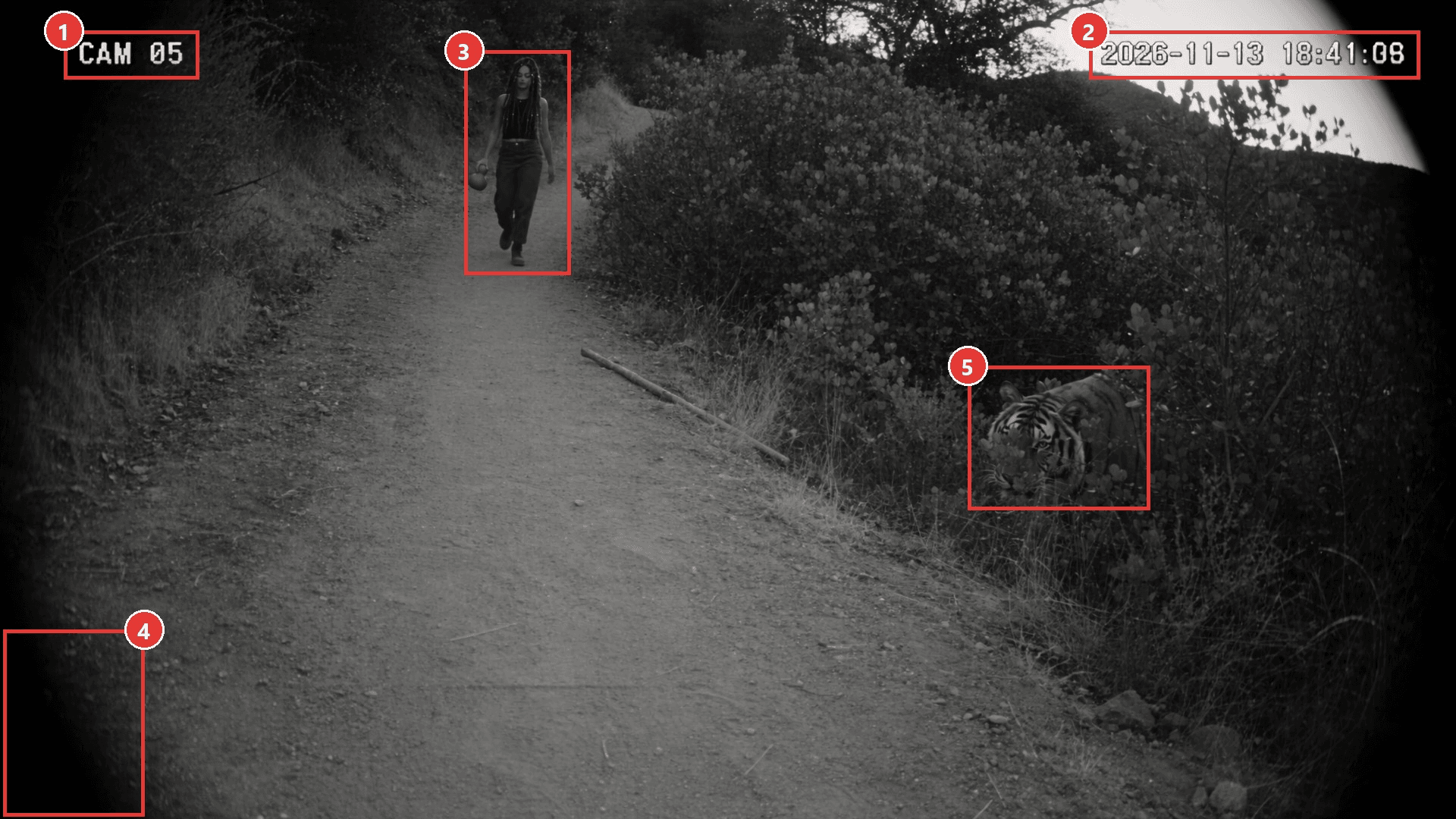
| # | 賣點 | 做到這點的提示詞 |
|---|---|---|
| 1 | 攝影機標籤 | 左上角小白色文字:「CAM 05」 |
| 2 | 持續計時 | 每秒向前跳動的時間戳 |
| 3 | 俯視視角 | 向下傾斜約 50 度,畫面中沒有天空和地平線 |
| 4 | 廉價鏡頭 | 桶形畸變、暗角、低解析度、壓縮區塊 |
| 5 | 緩慢揭露 | 一開始只有老虎的頭從葉間露出 |
有兩行比看起來更重要。「No sky and no horizon」讓攝影機朝向地面,所以要和高度一起給。「We only see what this camera sees」讓攝影機本身不出現在畫面中。還有,不要加音樂:單薄、悶悶的聲音占了 CCTV 效果的一半。
CCTV 濾鏡還是 AI 影片:哪個能做出打虎?
CCTV 濾鏡或監視器濾鏡 App 會重新風格化你已有的素材。很適合走廊惡作劇,但無法把老虎放上小徑。
| CCTV 濾鏡 App | AI CCTV 影片(本指南) | |
|---|---|---|
| 你的起點 | 你拍好的影片 | 一張照片 |
| 老虎 | 不可能 | 與場景一起生成 |
| 攝影機角度 | 你拿手機的位置 | 寫進提示詞 |
| 最適合 | 讓真實素材看起來像監視畫面 | 從零做出整段打虎 |
假監視器畫面:讓打虎保持是玩笑
讓片段好笑的風格,也可能讓它變得可信。2025 年 11 月,Alt News 和 The Quint 揭穿一段 AI 製作的「CCTV」片段:影片中老虎在印度馬哈拉施特拉邦拖走一名男子,並在網路散布為真實畫面。《The Quint》報導,警方已對一名散布該影片的使用者立案。
對知道故事的人來說,酒葫蘆就洩漏了這是玩笑。多數追蹤者不會知道,所以發文時請記住這點:
| 要 | 不要 |
|---|---|
| 開啟平台的 AI 標籤 | 標示為真實畫面或新聞片段 |
| 使用你自己的臉,或同意使用的朋友 | 使用名人、陌生人或兒童 |
| 讓打鬥不見血,老虎只被壓制 | 加入傷勢讓畫面更粗獷 |
| 在說明文字中寫出趨勢名稱或武松 | 標記真實地點,彷彿事發於此 |
TikTok 和 Instagram 的標籤開關,請見我們的 he is nonchalant 指南。
常見問題
CCTV 打虎影片是真的嗎?
不是。這些趨勢片段是 AI 生成,監視器外觀正是玩笑的一部分。沒有人真的拍到老虎:主角來自上傳照片,而老虎、小徑和攝影機則來自範本或提示詞。
我可以加入趨勢中的 phonk 音樂嗎?
可以,在發布階段加入。我們查核的最大趨勢貼文都使用 TikTok 音效庫中的 phonk 曲目。我們的提示詞只要求攝影機麥克風聲音,所以請從 App 的音效庫加入音樂,並保留底下的腳步聲和低吼。
可以讓我的狗或貓代替打虎嗎?
可以。上傳你的寵物照片,並圍繞牠改寫主角段落:品種、毛髮、四條腿、爪子。把棍子換成跳躍,把跪姿換成站在老虎背上。我們的 AI 貓咪跳舞指南 說明如何鎖定毛髮和斑紋,讓寵物保持一致。
在 Atlas Cloud 上,15 秒的 AI 打虎影片要多少錢?
截至 2026 年 11 月 13 日,720p、含音訊的 15 秒片段約 $4.52,是 $5.65 定價的 8 折。在 1080p(我們片段的解析度)下,約 $8.90,定價為 $11.12。折扣限時,Run 按鈕會在你生成前顯示確切價格。
可以做彩色或 9:16 嗎?
提示詞能控制兩者。要做彩色,刪除「black-and-white」和「no color」,但保留顆粒和暗角。要做直式,在設定中選擇 9:16,並把提示詞中的「16:9」改掉。我們執行的是此處顯示的 16:9 黑白版本。
結語
這個趨勢是一個流傳數百年的故事,外加一台監視攝影機。酒葫蘆、棍子和角落標籤,在老虎跳出前就告訴大家這是玩笑。
要做你自己的 AI 打虎片段,一張清晰照片和上方提示詞就夠了。把攝影機放高、讓打鬥保持乾淨,並在發布前開啟 AI 標籤。




