當你將現有的自拍上傳到 TikTok,並在編輯工具中尋找 Bold Glamour 時,你不會找到可直接套用到已儲存照片的原始特效。TikTok 將 Bold Glamour 設計為一款即時 AI 驅動的美顏特效,會在錄製過程中處理臉部特徵,而非上傳後才使用的標準照片濾鏡。其逼真的妝容效果來自 AI 影像處理,而不僅僅是在相機畫面上疊加 3D 臉部網格。
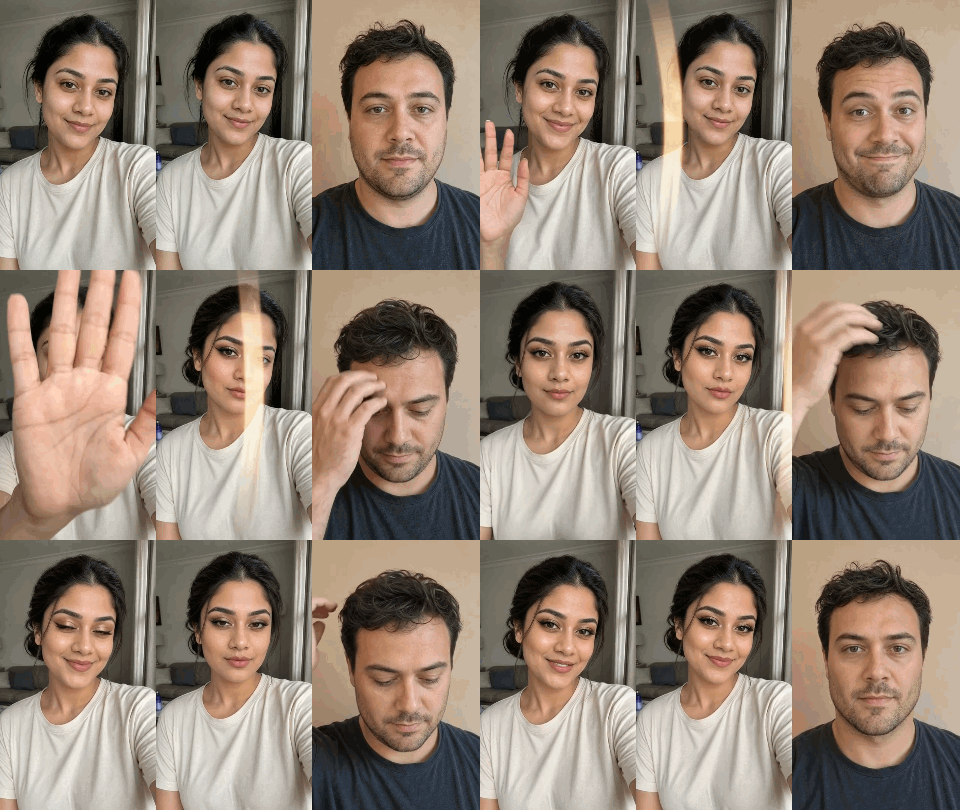
你不必在應用程式中重新拍攝直播畫面來跟上這股潮流。無論你需要清晰的靜態照片或快速的轉場短片,以下有 3 種簡單方法能將濾鏡套用到你現有的照片上。
- 提示詞編輯工具(最適合保留真實臉孔):將你的照片放入 GPT Image 2.0 或 Nano Banana,然後直接輸入你想要的外觀。你能獲得溫暖光澤與乾淨的攝影棚膚質,而不會像那些千篇一律的強力濾鏡把你削掉下巴或縮小鼻子。
- CapCut 範本(影片最快):如果你只想要快速的 before-and-after 影片,放入一張照片,讓範本同步節拍切換,然後直接發佈到 Reels。
- TikTok 綠幕(直播互動最快): 將你的照片作為背景放入並在其上錄製。易於快速互動,但會犧牲原始照片的解析度。
將 Bold Glamour 妝容套用到現有照片的三種方法,以及哪一種經得起考驗
預設遮罩不會適應你的臉型。側面角度與溫暖的室內光線會使唇緣位移,並將膚質變成平坦的蠟狀。
在花時間匯出模糊影像之前,透過並排比較四種主要選項,就能輕鬆挑選正確的工具:
| 方法 | 可套用於現有照片? | 保留臉部比例? | 自訂選項 | 典型輸出 |
| 基於提示詞的 AI 圖像編輯 | 是 | 可透過提示詞控制 | 靈活的妝容與膚質調整 | 高解析度靜態影像 |
| CapCut「Bold Glamour」範本 | 是 | 取決於範本與來源媒體 | 有限;取決於範本 | 短轉場影片 |
| 線上美顏編輯器(Pokecut、LightX) | 是 | 取決於工具與設定 | 預設集與手動調整 | 編輯後的靜態影像 |
| TikTok 綠幕 | 是(作為背景) | 原始照片保持不變 | 無直接美顏調整 | 錄製的影片 |
CapCut 範本何時足夠,何時會失效
如果你的目標是搭配熱門音訊發布快速的 before-and-after 揭露影片,請開啟 CapCut 並搜尋範本:Bold Glamour 或 before, after makeup。你可以將匯入的照片或短片變成簡短的變身影片。
範本不允許你變更太多。時間軸與轉場都已設定好。有些需要多個短片而非單一照片,有些則會替換你的背景。你也無法編輯妝容——例如你的顴骨、眉毛或下顎線。
為什麼一鍵瀏覽器濾鏡會讓你的五官變得扁平
像 Pokecut 和 LightX 這類線上美顏編輯器,讓你從現有自拍重現 Bold Glamour 妝容。它們的控制方式處理編輯的方式不同。Pokecut 套用固定的妝容預設集,而 LightX 提供分別的滑桿來調整五官、妝容色調與效果強度。
標準濾鏡不允許你混合搭配。你無法在增強顴骨修容的同時,不讓應用程式也重塑你的鼻子與下顎線。
如何將自訂 Bold Glamour 濾鏡套用到已儲存照片
接著,使用 AI 圖像編輯工具 將「Bold Glamour」妝容套用到相簿中的照片。
步驟 1:挑選一張臉部特徵清晰的相機膠卷照片
AI 圖像編輯器會從你的來源檔案讀取光線、陰影與邊緣界線。一張隱藏關鍵臉部特徵的照片,會迫使模型猜測底下是什麼,導致不自然的五官。
-
使用正面或略微四分之三角度: 極端的側面輪廓會讓模型更難平衡對稱的眉弓與唇緣。
-
保持下顎線與下巴不受遮擋: 避免手靠在臉頰上、頭髮遮住一隻眼睛,或超大太陽眼鏡蓋住眉骨的自拍。
-
從均勻的室內或日光曝光開始: 如果你的原始照片有強烈的霓虹紫或深橘色陰影橫跨半張臉,請緊密裁切頭部與肩膀周圍,或挑選更乾淨的照片,以免 AI 將深色陰影誤認為修容妝。
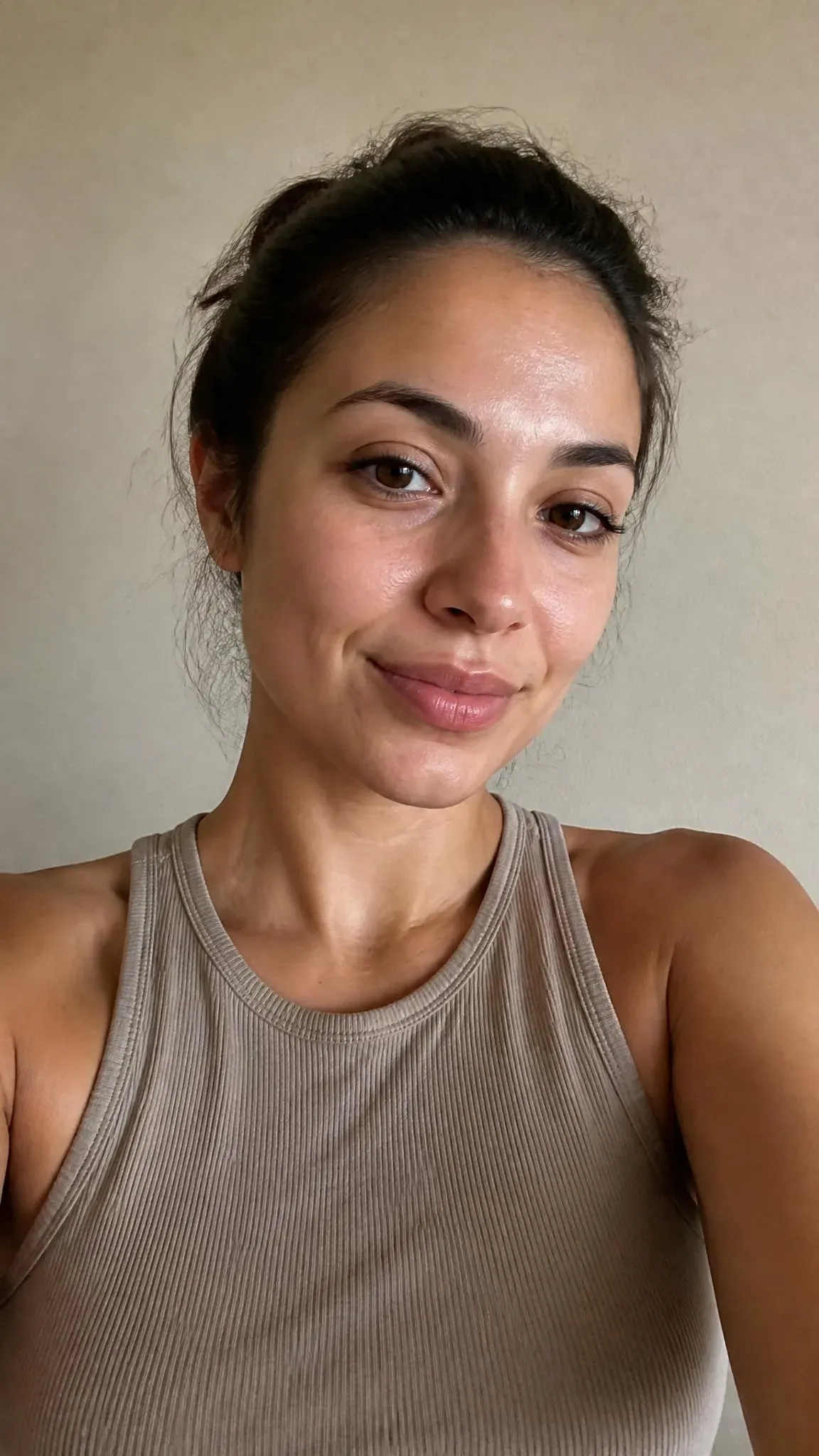
步驟 2:選擇專為人像修圖打造的圖像編輯模型
你需要一個能上妝並重新打亮你的膚色,同時不改變你臉孔的模型。以下是三個可行的選擇:
- Seedream 5.0 Pro(最高 2K): 想要強烈華麗感就選這個。它非常擅長針對小範圍處理,因此你可以加強深層顴骨修容與深色眉毛,而不會讓照片其他部分過曝。
- Nano Banana 2(最高 4K): 如果你的提示詞很長,請使用這個。你可以堆疊多項變更——眼睛、嘴唇、光線——它不會搞亂你的頭髮或衣服。
- GPT Image 2(每次編輯約 $0.005): 細緻選項。它易於接受白話英文編輯,非常適合在你不想有厚重濾鏡臉時,用來修復膚質或微調妝容。
將同一張照片上傳到這三個模型,並執行相同的提示詞,看看你更喜歡哪種風格。
步驟 3:在基礎提示詞中鎖定你的骨骼結構
當你撰寫編輯提示詞時,避免使用「讓我看起來華麗」或「美化臉部」等詞語。模型會將抽象的美麗詞彙解讀為允許窄化你的下顎、縮短人中,並用一般大眾臉取代你的五官。
先寫下要凍結的內容,中間列出妝容與光線,最後以一行指示它不要模糊你的膚質作結。
通常幾秒鐘內就能完成。將結果與原始上傳照片並排放大,檢查你的眼角、鼻樑與痣。如果臉部看起來正確,就下載影像。
三個可直接複製的提示詞,控制你的華麗濾鏡強度
當你以文字提示詞控制編輯時,改變幾個表面描述詞,就能將效果從完整的晚宴修容調整到幾乎看不出來的攝影棚打光,而不改變你的底層骨骼結構。
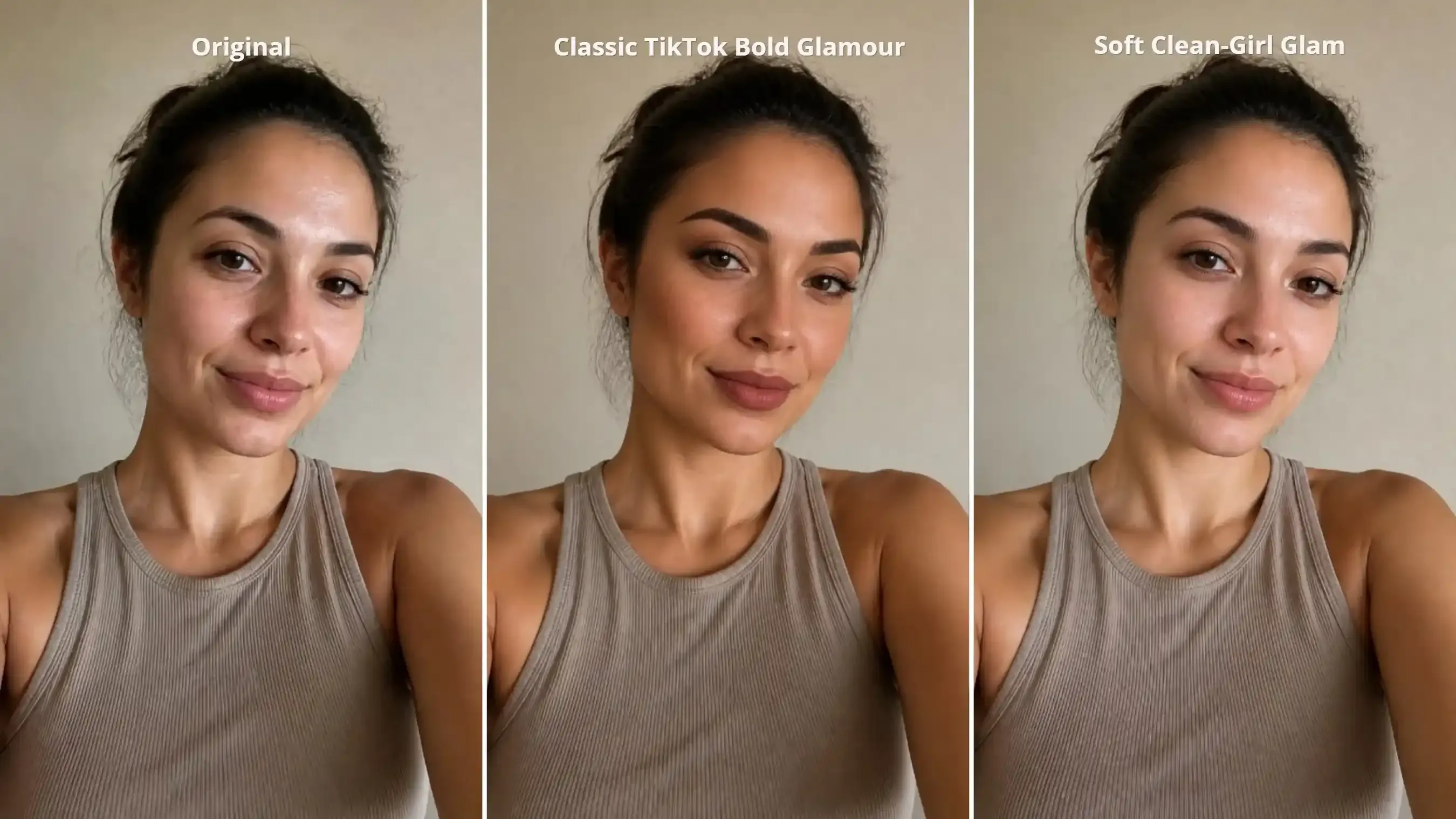
1. 經典 TikTok Bold Glamour(立體修容與霧面唇)
此提示詞重現標誌性的高對比 TikTok 妝容:雕刻般的顴骨陰影、俐落的眉弓、明亮的眼神光,以及豐潤的絲絨霧面唇。
plaintext1Keep the original facial structure, nose, eye spacing, jawline, hair, clothing, and background unchanged. Apply the classic TikTok Bold Glamour look with deep warm-bronze cheekbone and jawline contour, sharply defined arched brows, tightlined upper lashes, subtle bright eye catchlights, and velvet-matte rose-brown lips. Even out the complexion with warm-toned makeup while preserving natural pores and beauty marks. No plastic-looking skin or excessive smoothing.
如何自訂: 在較深或金色調膚色上,將 matte rose-brown lip 替換為 warm terracotta matte lip,或在冷色調膚色上替換為 cool berry-mauve matte lip,讓唇色不與你的自然膚色衝突。
2. 柔和 Clean-Girl Glam(無厚重妝感的攝影棚打光)
如果標準 Bold Glamour 修容對日常個人檔案照片或 LinkedIn 大頭照來說太過戲劇化,這個變化版本會去除厚重的古銅餅與不透明唇膏。它著重於柔和的攝影棚打光、眼下提亮與向上梳理的眉毛。
plaintext1Preserve the exact facial proportions, nose shape, jawline, eye color, hair, and background from the reference photo. Apply a subtle soft-glam retouch: brighten dark shadows under the eyes, brush and define natural eyebrow hairs without harsh edges, add a soft champagne shimmer on the inner eye corners, and apply a sheer hydrating lip tint. Illuminate the face with soft diffused studio key lighting. Retain 100% of natural skin micro-texture, freckles, and pores.
何時使用: 當你想要更明亮、更精緻的五官,但不想有明顯的數位妝容時,可將此妝容用於日常自拍、自然個人檔案照片或專業大頭照。
3. 輪廓分明的下顎線與修整過的眉型:男性與編輯風格變體
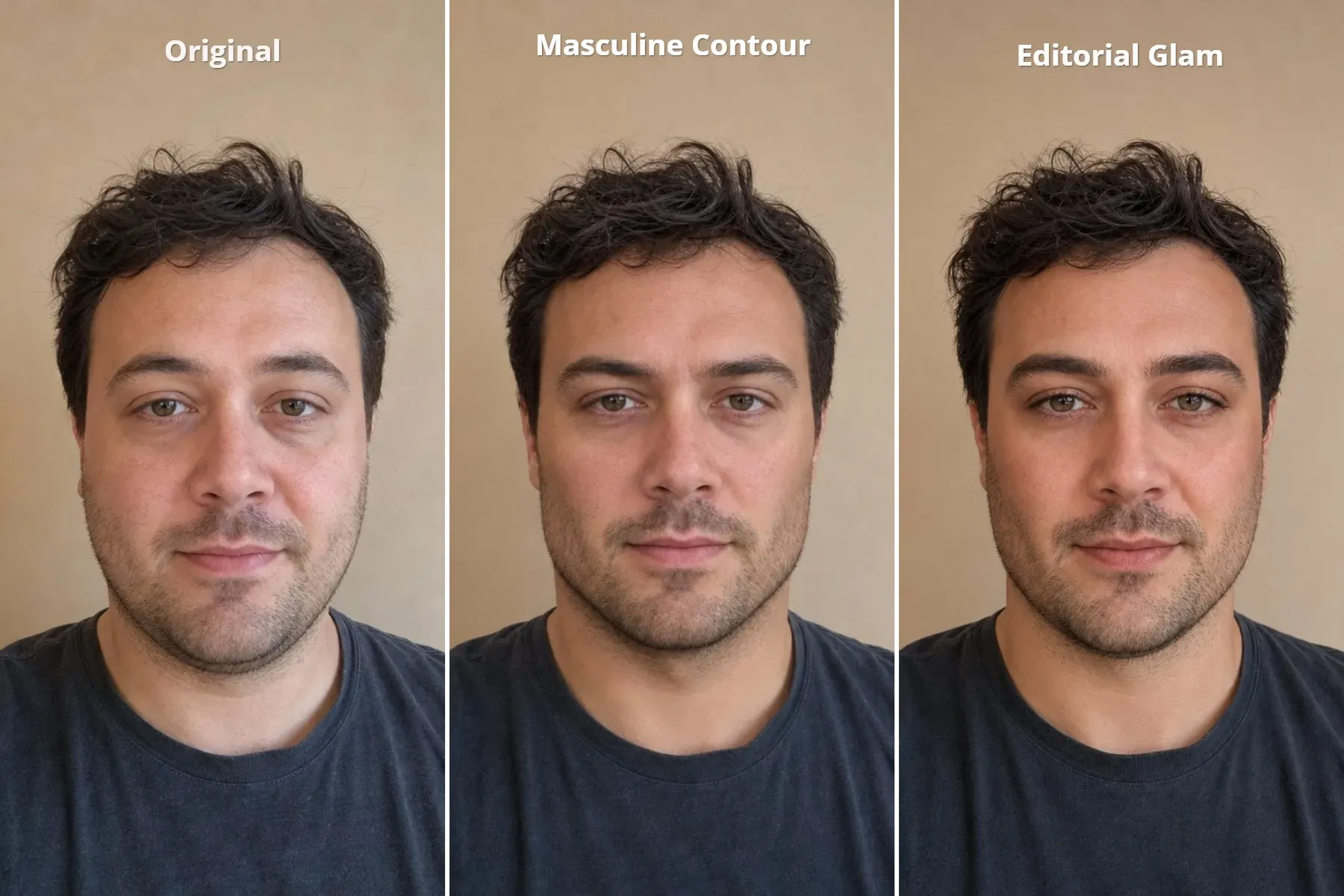
最初的 Bold Glamour 趨勢有相當大比例來自男性測試該濾鏡,因為它能銳化下顎線、凸顯眉骨,並消除疲憊的眼下。標準美顏應用程式經常在修容的同時,加入翼狀睫毛或粉紅色唇彩,因而毀掉男性人像。此提示詞將結構陰影與攝影棚對比獨立出來,同時保持嘴唇與睫毛不變,如果你想要同時預覽臉部毛髮與更銳利的臉頰輪廓,這也能與 在自拍上測試鬍鬚濾鏡 乾淨搭配。
plaintext1Preserve the original facial identity, facial proportions, nose, eyes, hair, clothing, and background. Create a more defined masculine facial structure using targeted contour shading: add distinct but natural shadows directly beneath the cheekbones, along the jawline, and beneath the chin to create stronger facial definition. Slightly emphasize the brow bone and sharpen the natural eyebrow shape without changing its density. Reduce under-eye darkness while keeping natural skin texture and stubble visible. Maintain the original skin tone and overall exposure. Keep lips natural, with no lipstick, eyeliner, or eyelash makeup. No global darkening, exaggerated shadows, or skin smoothing.
如果你想要更重的妝容感,可以這樣寫提示詞:
plaintext1Preserve the original facial identity, facial proportions, nose, eyes, hair, clothing, and background. Create a polished masculine editorial look with defined but naturally shaped facial contours. Add blended contour beneath the cheekbones and along the lower jaw to create a cleaner, more sculpted appearance. Keep the jawline gently tapered with rounded jaw angles, avoiding a wide, square, or overly sharp jaw. Slightly enhance the brow bone and groom the natural eyebrows for a fuller, cleaner shape. Apply an even satin-matte complexion, subtle under-eye concealer, softly defined upper lash lines, and a hint of warm neutral eyeshadow. Add a natural muted nude lip tint. Preserve visible skin texture and stubble while maintaining the original skin tone and overall exposure. The result should resemble a refined men's fashion magazine beauty editorial, with noticeable but balanced makeup and contour.
何時使用: 當你想要更銳利的下顎線、更分明的眉毛與更清新的外觀,但不想添加可見妝容時,請將此版本用於男性自拍與編輯風格人像。
為什麼 AI 華麗濾鏡讓你看起来像陌生人,以及如何修正
當觀眾先注意到 AI 而非認出你的臉時,華麗濾鏡就失敗了。幾乎所有「同一張臉症候群」或塑膠膚質的案例,都歸因於來源照片或提示詞中四個可預測的觸發因素。
| 輸出中出現的問題 | 模型為何這麼做 | 確切的輸入或提示詞修正 |
| 鼻樑變窄或下巴縮成 V 形 | 提示詞包含「美化」、「吸引人」或「模特兒臉」等主觀詞彙,會觸發預設的瘦臉權重。 | 移除主觀的美麗形容詞。在第一句明確聲明「不要改變鼻子寬度、下巴長度或下顎線幾何形狀」。 |
| 額頭蠟黃、無毛孔,看起來像人體模型 | 堆疊平滑詞彙(「無瑕、噴槍、光滑」)或將已套用濾鏡的自拍再跑一次 AI 處理。 | 使用未經編輯的原始相機膠卷照片作為輸入,並在提示詞結尾加上「保留自然皮膚微紋理、毛孔與痣」。 |
| 虹膜顏色偏移或眼白發出霓虹光 | 「明亮閃爍的眼睛」等短語會導致模型漂白鞏膜,並將深棕色眼睛提亮為淡褐色或藍色。 | 將「明亮眼睛」替換為「保留原始 [brown/hazel/blue] 虹膜顏色;在瞳孔加上單一柔和的環形燈眼神光」。 |
| 張嘴微笑時牙齒融合在一起或變成粉筆白 | 厚重的豐唇指令在張大嘴微笑時會滲入內嘴邊界。 | 每當編輯張嘴微笑時,加上「保持原始牙齒形狀與自然牙齒色澤不變」。 |
絕對不要將已經過華麗編輯的輸出結果再餵回編輯器進行第二輪上妝。連續執行兩次圖像到圖像的處理,會加劇皮膚平滑並壓平鼻子與嘴巴周圍的自然臉部深度。如果你想要更深的修容或更紅的嘴唇,請編輯提示詞,並在原始相機膠卷上傳檔案上重新執行。
將編輯後的照片變成前後對比的華麗揭露影片
靜態照片很適合用於大頭貼,但 TikTok 與 Reels 的動態消息偏好影片。將你的原始照片與修圖後的版本,一起放入如 Seedance 2.5 的首尾幀工具,生成乾淨的 5 秒轉場短片。
如何設定雙幀揭露
- 開啟影片生成工作區,並在 First-to-Last-Frame 模式中選擇
Seedance 2.5或Omni 1.1 Flash。 - 將未經編輯的原始相機膠卷自拍上傳到 First Frame 欄位。
- 將經過華麗編輯的人像上傳到 Last Frame 欄位。
- 將長寬比設為
9:16,時長設為5 seconds。 - 貼上以下兩個轉場提示詞的其中一個。
選項 A:手滑擦拭上妝
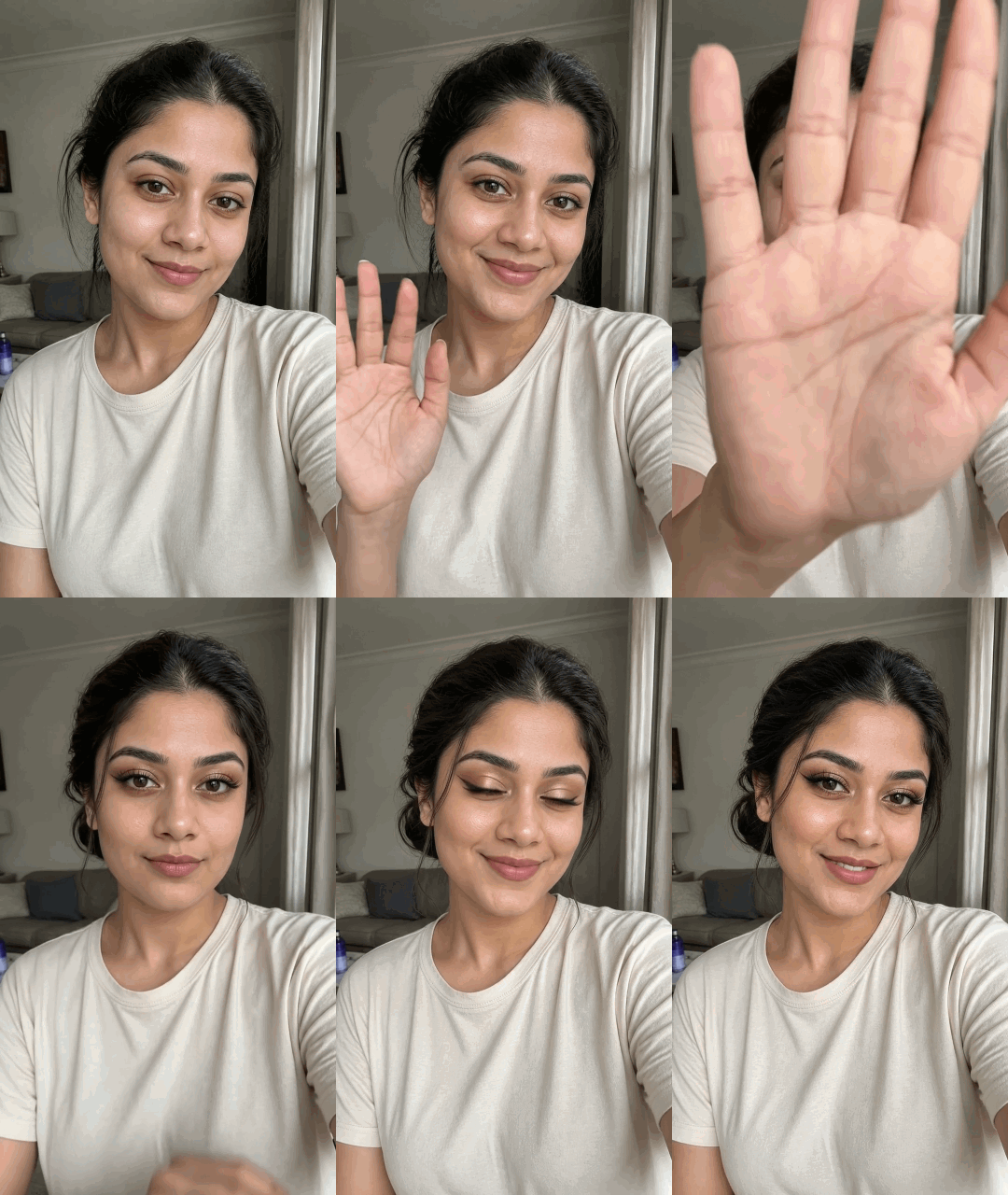
plaintext1Vertical 9:16, 5-second continuous selfie video using the provided first and last frames. 2The woman starts bare-faced, looking into the camera. She raises one hand and smoothly sweeps it across the lens, briefly covering the entire frame. 3Sync the reveal to an upbeat beauty-transition beat: a strong bass drop hits as her hand fully covers the lens. When her hand moves away, reveal her dramatic Bold Glamour makeup and polished low bun hairstyle. 4She finishes with a confident smile and a natural blink. Preserve her facial identity, clothing, camera angle, and living-room background. Smooth motion, realistic hands, no cuts or face distortion.
選項 B:攝影棚環形燈掃過
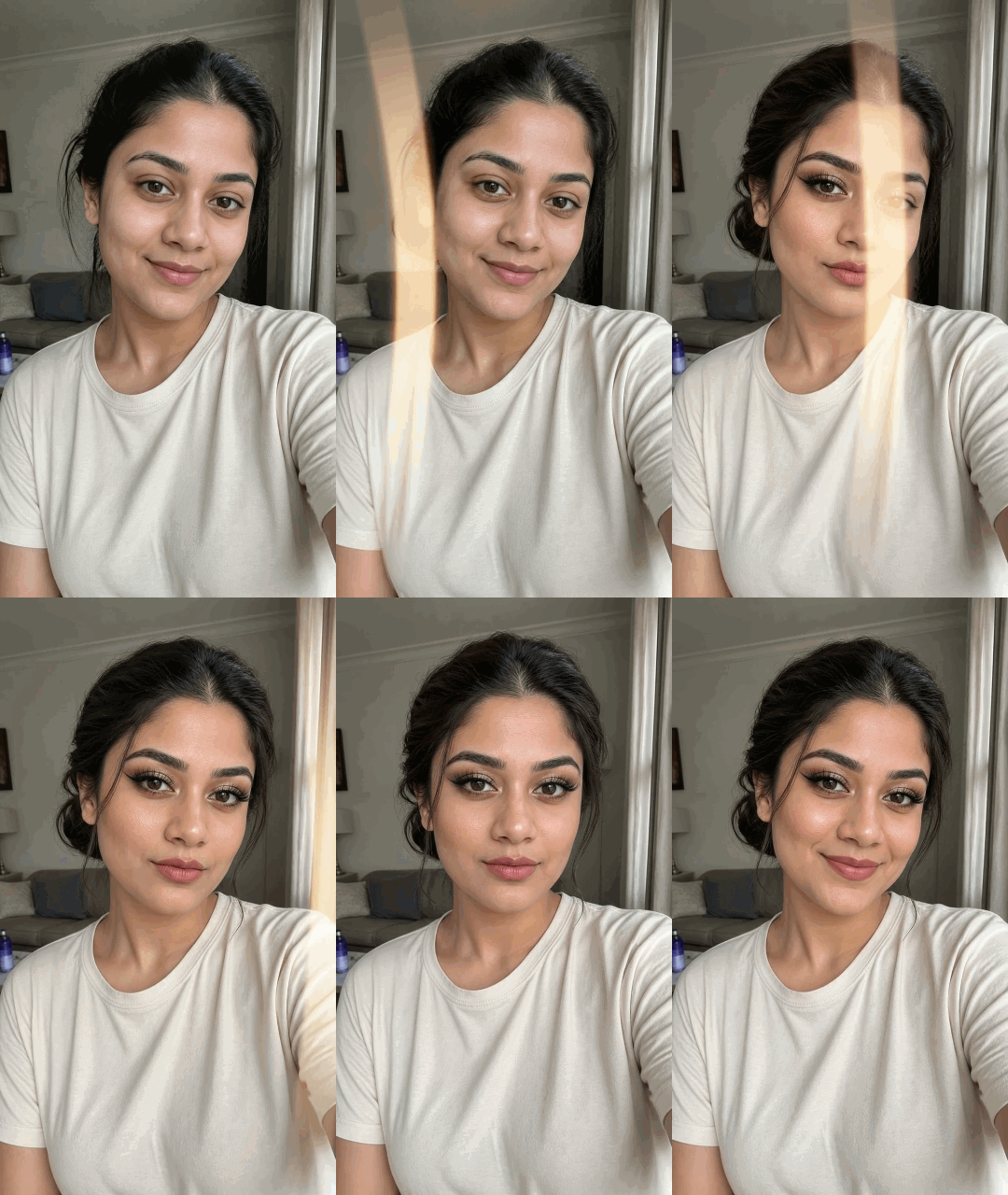
plaintext1Vertical 9:16, 5-second video using the provided first and last frames. 2The woman starts bare-faced, looking into the camera. A soft, warm light sweep moves from left to right across her face. As the light passes, her Bold Glamour makeup and polished low bun hairstyle appear seamlessly, revealing sculpted contour, defined brows, dramatic eye makeup, and rosy-matte lips. 3Sync the completed transformation with an upbeat music beat. Finish with bright ring-light catchlights, a subtle head tilt, and a confident smile. 4Preserve her facial identity, clothing, and living-room background. Smooth transition, natural movement, no cuts, no face distortion.
選項 C:男性華麗變身
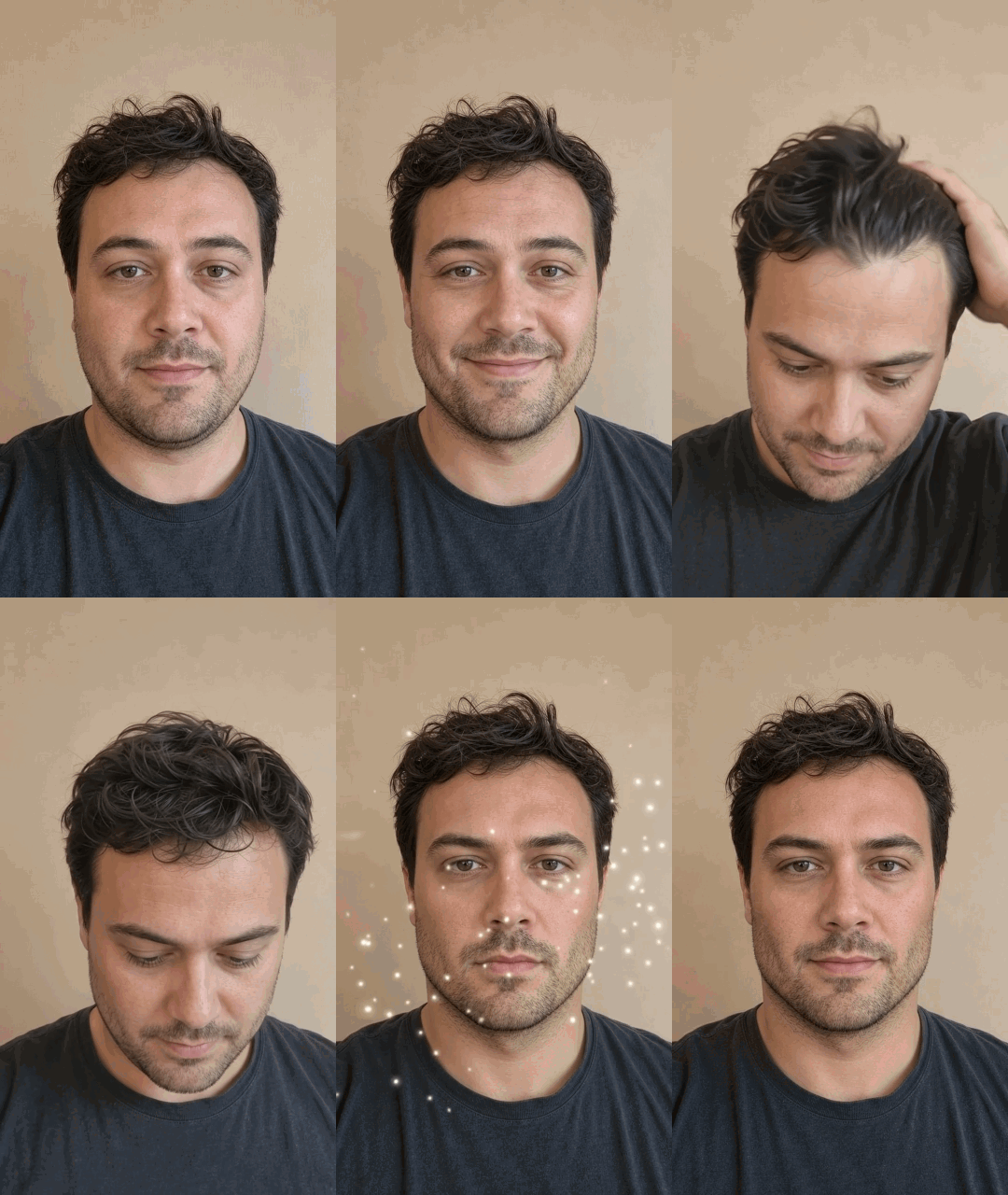
plaintext1Single continuous shot using the provided first and last frames. No cuts or camera movement. 2The man starts facing the camera with his original messy hair and natural appearance. He then lowers his head and runs one hand through his hair, styling it backward. Keep his appearance unchanged throughout this action. After lowering his hand, he lifts his head toward the camera. **Only when he lifts his head**, transform him into the polished hairstyle and masculine editorial makeup shown in the last frame. Add a brief cinematic flash, subtle light sweep, and sparkling particles synchronized with a sharp bass drop. 3He finishes with direct eye contact and a confident smile. Preserve his facial identity, clothing, and background. 4Use modern TikTok fashion-transformation music with deep bass and punchy electronic drums.
在將完成的短片發佈到 TikTok 或 Instagram Reels 之前,請檢查你的影片是否包含可見的 AI 動態轉場。TikTok 要求創作者在 AI 改變臉部動作的短片上開啟 AI-generated content 標籤,而僅針對光線與修容修圖的靜態個人檔案照片,可以像任何標準人像編輯一樣直接從相機膠卷上傳。
現在輪到你了!試試這些提示詞,實驗不同的造型,創造屬於你自己的趣味華麗變身。玩得開心!


