


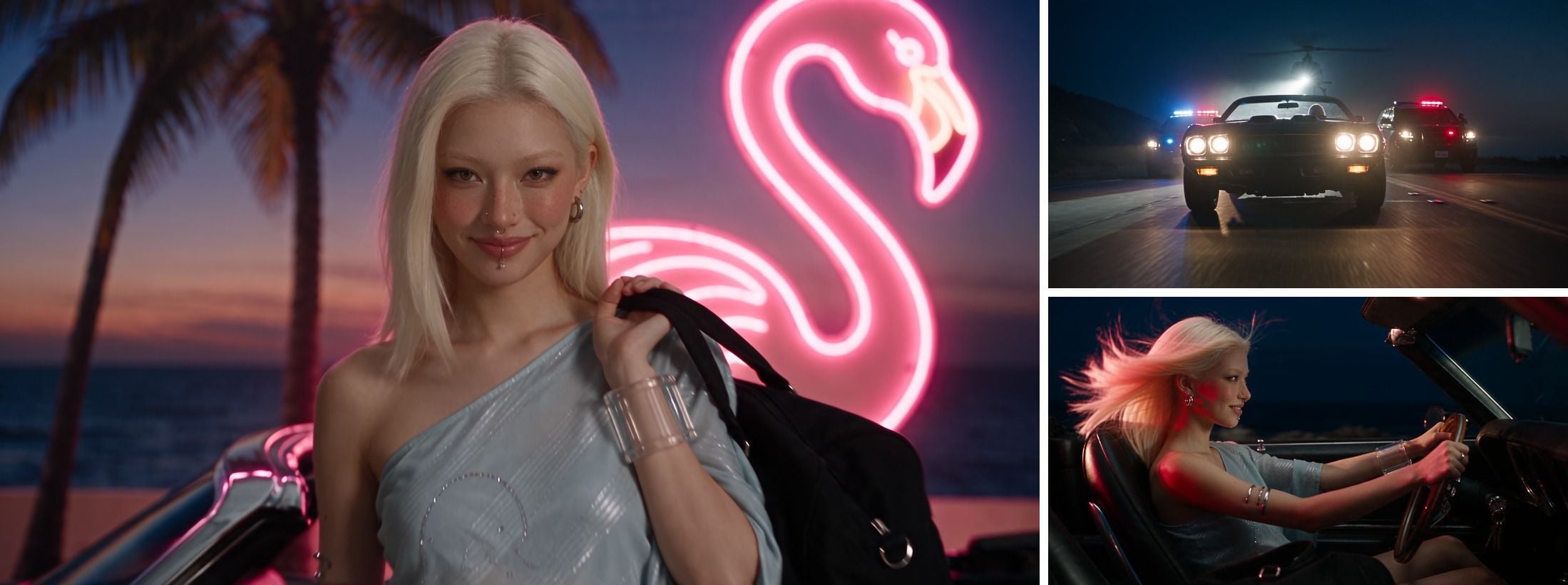
霓虹街头的雨。一位铂金色头发的女子侧目一瞥,发现镜头后勾起嘴角。到第十秒,她已在沿海公路上甩开两辆警车;到第十五秒,她站在粉色火烈鸟招牌下的一辆黑色敞篷车旁,肩上挎着别人的行李袋。
那正是 GTA 6 Vice City Story,一个只需一张照片的 AI 模板,在 GTA VI 发售 的 2026 年 11 月 19 日那一周出现。
上传一张人像,你就能得到一段 15 秒的犯罪过场动画,主角是你。我们逐个镜头拆解了它,然后用 Seedance 2.5、两张参考卡和下方可复制的提示词,从一张人像把它重建出来。
核心要点
- GTA 6 Vice City Story 是一个 AI 模板,可将一张人像变成 15 秒、六个镜头的犯罪过场动画。
- 每个版本都遵循相同剧情:霓虹街头、日落会合、餐馆交接、警车追逐、司机特写、最终姿势。
- 你可以用 Seedance 2.5 和两张参考照片,在Atlas Cloud 视频生成器中制作自己的版本。
- 一张面部卡加一张全身服装卡,让我们主角在她出现的每个镜头中都保持同一套服装。
- 空白的霓虹灯管、无车标的汽车和没有屏幕 HUD,让它带有 GTA 风味,却不出现 Rockstar 的标志。
什么是 GTA 6 Vice City Story AI 视频?
它是一个模板,不是游戏里的模式。2026 年 11 月 18 日,也就是 GTA VI 发售前一天,一家 AI 模板网站发布了它的操作指南。你上传一个人的一张照片,固定脚本就会把它变成一段发生在类似迈阿密城市的短篇犯罪故事。
只有主角会变化。在车旁与你会合的团队、餐馆里的接头人和警察,每次都是新生成的。
| 模板细节 | 我们在 2026 年 11 月 23 日发现的情况 |
|---|---|
| 输入 | 一个人的一张照片 |
| 时长与画幅 | 15 秒,16:9 横屏 |
| 分辨率 | 480p 或 720p |
| 谁会变化 | 只有主角 |
| 谁会生成 | 两名团队成员、餐馆接头人、警察和群演 |
| 提示词 | 无,脚本固定 |
固定脚本意味着结果看起来相似。在我们检查的两段预览视频中,主角最后都穿着敞开的热带衬衫,内搭白色背心。这种千篇一律正是自己动手制作的理由:同样的故事,换成你的脸、你的服装和 1080p 画面。
Vice City Story 模板从何而来,以及为什么 TikTok 上没有 CapCut 版本
在 TikTok 上搜索它,你大多会找到别的东西。11 月 23 日,我们没有发现这个名称下的 CapCut 模板或 TikTok 特效,而 #vicecitystory 标签下混杂着五类帖子:
| 在 #vicecitystory 下会找到什么 | 示例 |
|---|---|
| 对旧游戏的怀旧 | 来自 Grand Theft Auto: Vice City Stories 的片段,2006 年的掌机衍生作 |
| GTA VI 故事模式录制 | 玩家发布的过场动画和结局 |
| 粉丝“如果”动画 | “如果你生来就是 Tommy Vercetti”,约 2,000 次观看 |
| AI 故事短片 | 原创 Vice City 剧集,每部几百次观看 |
| 真人短剧 | 真人演绎自己的 GTA VI 故事,11,100 次观看 |
最大的一个是真人实拍:@heromeh_ 发布了一段配文为“活出我们自己的 GTA VI 故事”的片段,时间是 11 月 22 日,一天后获得了 11,100 次观看。这个模板兜售的是同样的愿望,只是不需要服装和汽车。
如何用一张照片制作 GTA 6 AI 视频
在 Atlas Cloud 上,Seedance 2.5 有参考生视频模式,可以接收人物照片,并在硬切镜头中保持那张脸和那套服装。在我们的运行中,她在每个出现的镜头里都保留了雀斑、穿孔和单肩上衣。下面是剪辑到音乐上的结果:
这段素材是一次 15 秒的生成,自带声音。上面的版本把原声换成了一首音乐,并把剪辑点对齐到节拍上,最后一节会解释。
方法 1:在 Atlas Cloud 视频生成器中主演自己的故事
准备好你自己的两张照片:一张头肩面部卡和一张全身服装卡。提示词之后的章节会展示我们是怎么制作自己的卡片的。然后打开 AI 视频生成器,并对照截图上的编号:
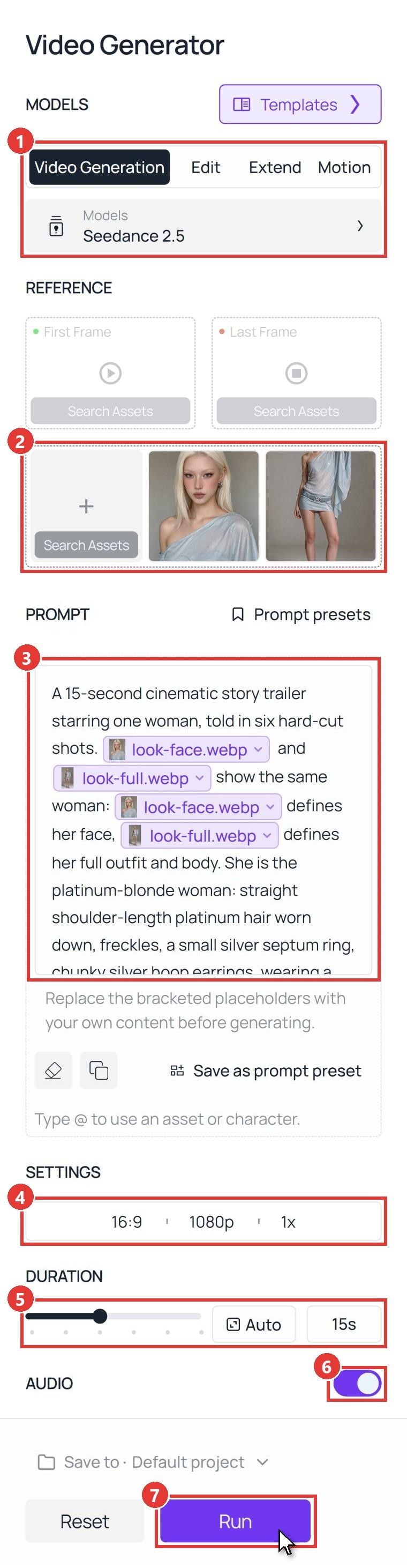
- 模型: 在 Video Generation 标签页中,保留 Seedance 2.5。
- 参考: 在 First Frame 和 Last Frame 下方的框中,先添加面部卡,再添加服装卡。一次添加一张可以保持你想要的顺序,因为第一次上传会成为 @Image1。两个帧槽都留空。
- 提示词: 粘贴下一节的提示词。如果 @Image1 或 @Image2 仍是纯文本,删除它,输入 @ 并从菜单中选择图片。
- 设置: 选择 16:9 和 1080p,输出一个。
- 时长: 设为 15 秒。
- 音频: 保持开启。
- Run。 想先检查故事,可以先用 720p 运行一次,再切换到 1080p 做最终版。
方法 2:将 Vice City Story 提示词发送到 Seedance 2.5 API
要举办粉丝活动或创作者活动,让每位来宾都拥有自己的 Vice City 预告片?API 接受同样的两张卡和同样的提示词,所以你可以循环处理一个文件夹里的人像。
步骤 1:创建 API 密钥。 在控制台中打开 Settings,在 API Keys 下创建一个密钥。
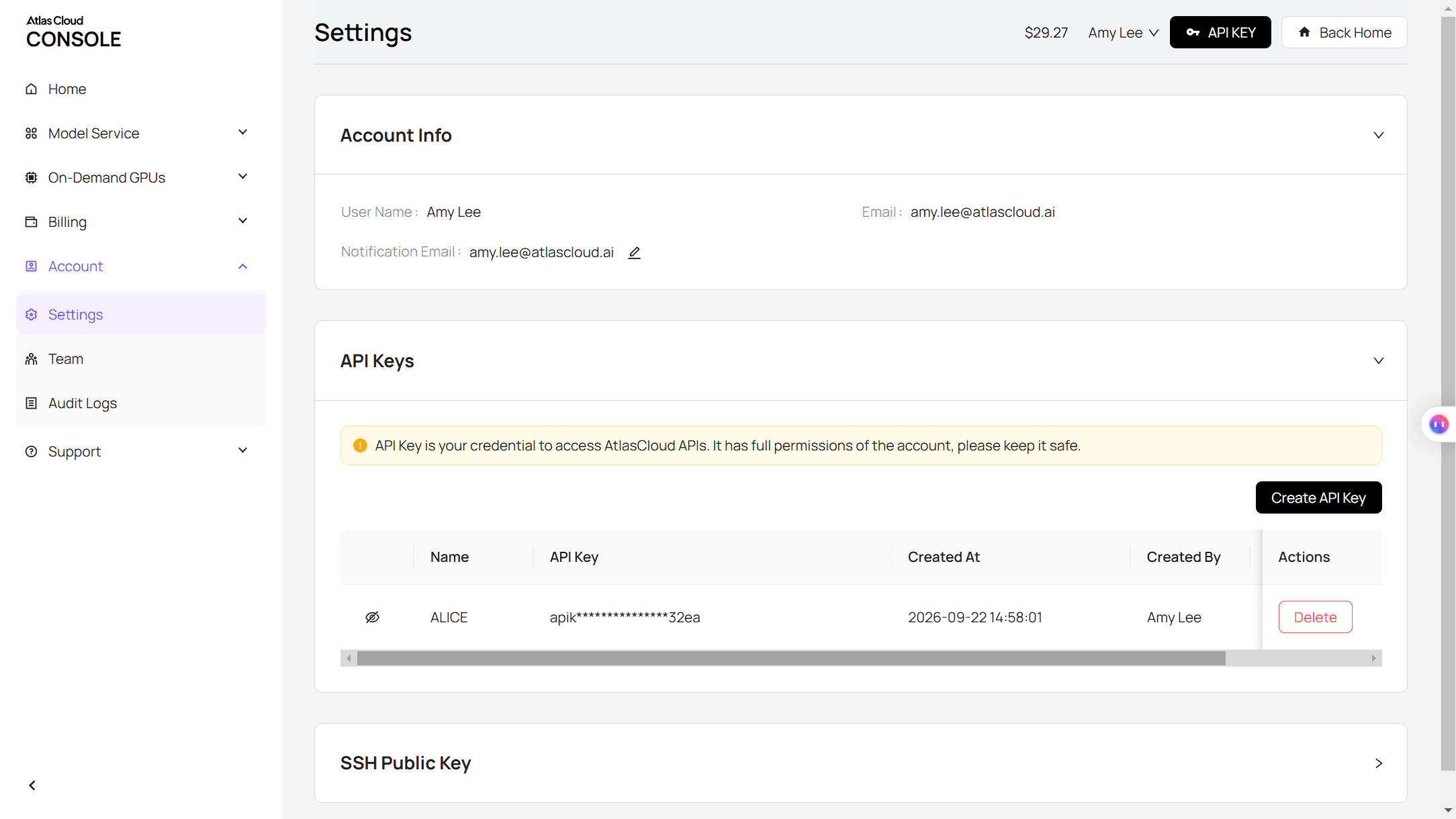
步骤 2:检查请求格式。 Atlas Cloud API 文档 涵盖身份验证,Seedance 2.5 参考生视频模型页面上的 API 标签页列出了每个请求字段。
步骤 3:发送请求并轮询。 两张卡以公开 URL 放入 reference_images 数组,面部卡在前:
plaintext1curl -X POST https://api.atlascloud.ai/api/v1/model/generateVideo \ 2 -H "Authorization: Bearer $ATLASCLOUD_API_KEY" \ 3 -H "Content-Type: application/json" \ 4 -d '{ 5 "model": "bytedance/seedance-2.5/reference-to-video", 6 "prompt": "<paste the Vice City Story prompt here>", 7 "reference_images": [ 8 "https://your-cdn.com/face-card.jpg", 9 "https://your-cdn.com/outfit-card.jpg" 10 ], 11 "ratio": "16:9", 12 "resolution": "1080p", 13 "duration": 15, 14 "generate_audio": true 15 }'
轮询返回的 prediction ID,直到状态显示 completed,然后从 outputs 数组中下载片段:
plaintext1curl https://api.atlascloud.ai/api/v1/model/prediction/<prediction_id> \ 2 -H "Authorization: Bearer $ATLASCLOUD_API_KEY"
在 Atlas Cloud 上,每个视频模型使用的端点和密钥都相同。想尝试另一个,只需更改 model 字符串。
GTA 6 AI 故事提示词,逐镜头拆解
该提示词复制了模板的结构:六个 2.5 秒镜头,每个都带有方括号中的时间戳。一次运行给了我们这样的结果:
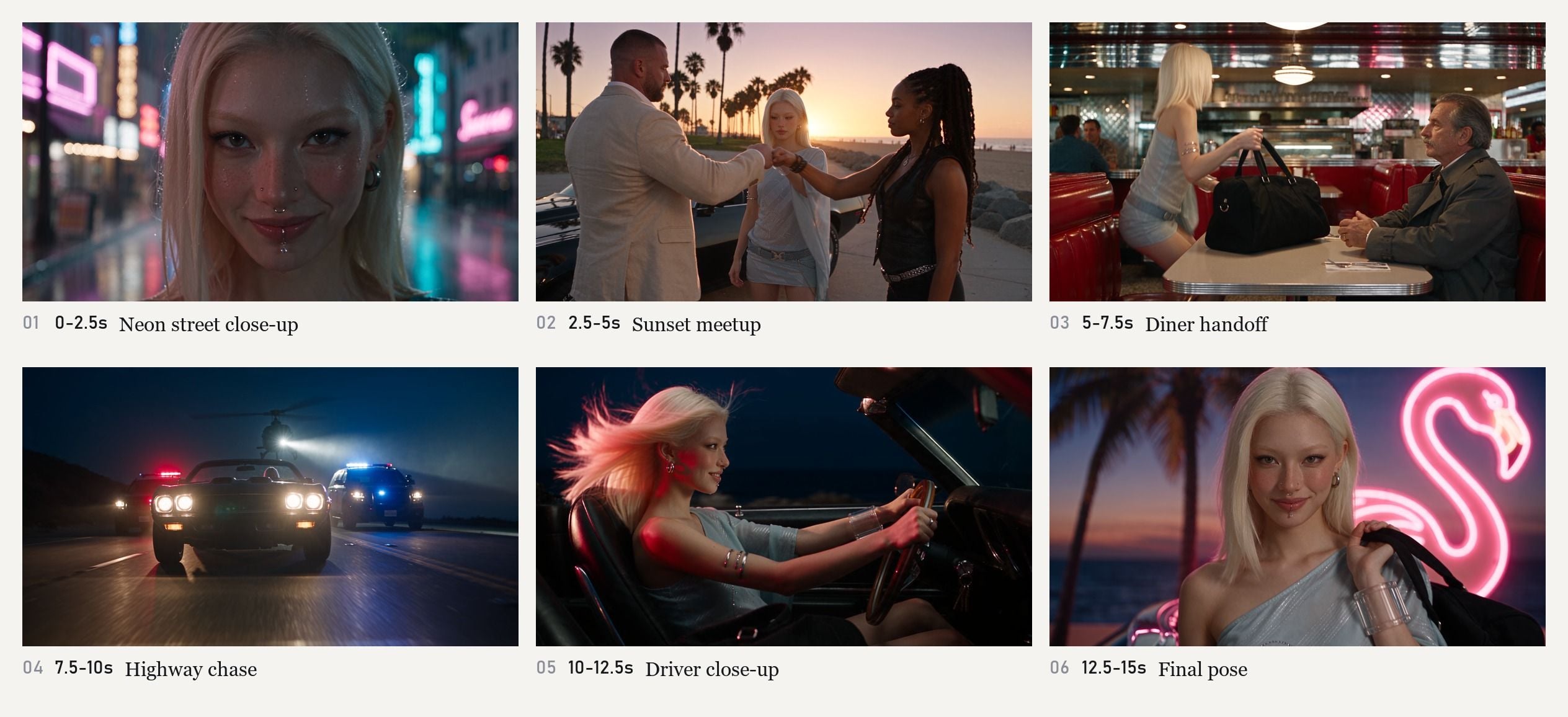
其中有四个选择起到了大部分作用:
- 每个镜头都写明服装。“穿浅蓝色单肩装的铂金色头发女子”出现在她露面的全部五个镜头中,所以没有哪个剪辑会漂移到不同的上衣。
- 限制群演范围。 日落镜头结尾写着“只有这三个人在车旁”,这让陌生人不会进入会合场景。
- 把招牌画成形状。 每个霓虹招牌都是空白的发光灯管,火烈鸟只是轮廓,汽车也没有车标。这样写,提示词就不会给 Rockstar 的字样或真实品牌名留下空间。
- 要声音,不要歌曲。 雨声、引擎、警笛和低沉合成器贝斯,没有对白或歌词,给你一条干净的声音底,可保留也可替换。
复制完整提示词,并把我们的服装描述换成你的:
plaintext1A 15-second cinematic story trailer starring one woman, told in six hard-cut shots. @Image1 and @Image2 show the same woman: @Image1 defines her face, @Image2 defines her full outfit and body. She is the platinum-blonde woman: straight shoulder-length platinum hair worn down, freckles, a small silver septum ring, chunky silver hoop earrings, wearing a pale ice-blue chiffon one-shoulder outfit shimmering with silver rhinestones: one shoulder and that whole arm are bare with a thin silver upper-arm cuff, and a single long cape-like drape falls from the other shoulder; a very short matching mini skirt, a pale blue denim belt with an ornate rhinestone loop buckle slung low on her hips, a clear acrylic cuff bracelet, and silver studded high-heeled mules. Keep her face and this exact outfit identical in every shot, exactly as in @Image2. 2 3Style: the cinematic story cutscene of a modern open-world video game set in a 1980s-flavoured, Miami-like coastal city, rendered photoreal, glossy wet surfaces, hot magenta and cyan neon against orange sunset light, smooth cinematic camera moves, 16:9 widescreen. 4 5[0-2.5s] Night, a rain-wet city street lined with palm trees and low storefronts glowing with blank pink and blue neon panels. Close-up of the platinum-blonde woman in the pale blue one-shoulder outfit; the camera slowly pushes in. She is glancing to the side, then her eyes slide to the lens and the corner of her mouth lifts into a smirk. 6 7[2.5-5s] Sunset on a seawall promenade, palm trees silhouetted against an orange and violet sky. The platinum-blonde woman in the pale blue one-shoulder outfit walks up to a black 1980s muscle convertible with the top down, chrome trim, no badges and a blank plate, her long drape lifting in the sea breeze. Two crew members wait by the car: a broad-shouldered man with a buzz cut and a short dark beard, in a cream linen suit over a black T-shirt, leaning on the hood; and a woman with long dark box braids tied up high, in a black leather vest. They bump fists with her. Only these three people are near the car. 8 9[5-7.5s] Inside a 1980s chrome diner with red vinyl booths and warm pendant lights. The platinum-blonde woman in the pale blue one-shoulder outfit sits in a booth across from a grey-moustached man in a dark grey windbreaker. He slides a black canvas duffel bag across the table; she grabs it by the straps, stands up and slings it over her shoulder. 10 11[7.5-10s] Night, a coastal highway beside the dark ocean, lined with palm trees and street lamps. Low wide shot: the black convertible races toward the camera with its headlights blazing, two dark unmarked police cruisers with flashing red and blue light bars close behind it, a helicopter searchlight sweeping across the road. 12 13[10-12.5s] Inside the black convertible at speed. Medium close-up from the passenger side: the platinum-blonde woman in the pale blue one-shoulder outfit grips the wheel with both hands, wind whipping her platinum hair and her long chiffon drape, red and blue light flickering across her face, the black duffel bag on the passenger seat. She glances at the rear-view mirror and grins. 14 15[12.5-15s] The black convertible is parked under palm trees beneath a glowing hot-pink neon flamingo outline. The platinum-blonde woman in the pale blue one-shoulder outfit leans against the driver's door with the black duffel bag over her shoulder and looks straight into the camera with a calm, confident smile while the camera slowly pushes in to a medium close-up. Hold on her face. 16 17Sound: rain hiss and distant traffic, waves at sunset, diner chatter and clinking cups, a roaring V8 engine, police sirens and helicopter rotor; under the whole clip, a low pulsing original synth bass, non-melodic. No dialogue, no lyrics, no singing. 18 19Rules: every neon sign is a plain glowing tube or a blank glowing panel with no letters, numbers or symbols; the flamingo sign is only a shape. No HUD, minimap, health bar, subtitles, captions, on-screen text, watermarks or logos anywhere. The cars have no badges, the police cruisers have no lettering, and all plates are blank. Nobody walks between the camera and her.
没有 HUD 是故意的,因为过场动画本来就没有。若要带小地图和第三人称摄像机的游玩风格素材,我们的 Seedance 2.5 GTA 6 指南 介绍了那种格式。
把自己放进 GTA 6:一张面部卡和一张服装卡
模板只需要一张人像,因为它不在乎你穿什么。你的版本应该在乎,因为服装是角色的一半。我们给了 Seedance 同一个女人的两张卡:
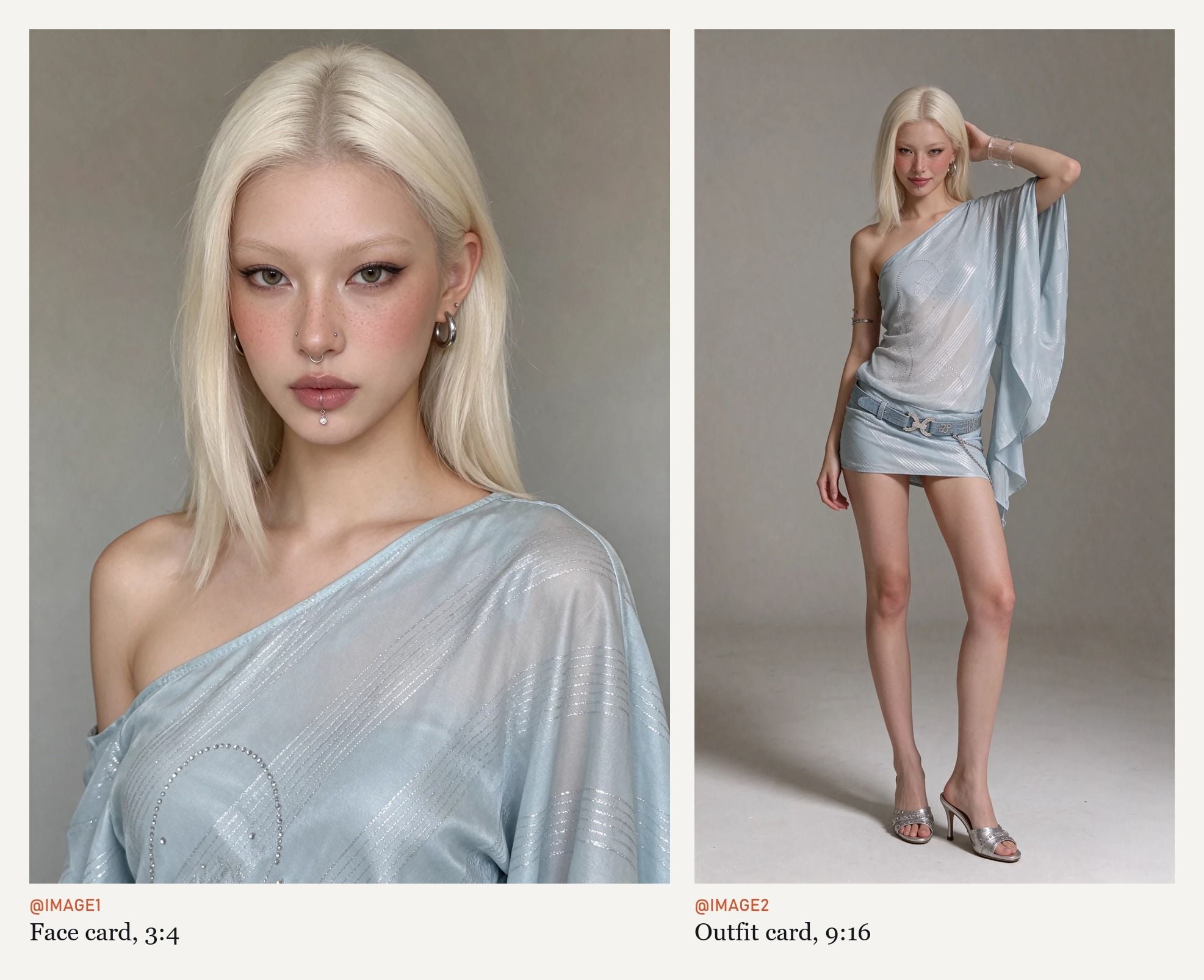
- @Image1,面部卡。 3:4 的头肩照,眼睛看向镜头,柔和均匀的光线。雀斑、穿孔和耳环在画面中占比较大,这样特写镜头有精确的东西可复制。
- @Image2,服装卡。 9:16 的全身照,鞋子入镜,使用不会与霓虹冲突的纯灰色背景。我们以约膝盖高度、50mm 视角来构图,这能让宽镜头中的腿显得修长。
- 让两张卡一致。 我们先在 Atlas Cloud 上用 Seedream 5.5 Edit 制作服装卡,基于人像加上我们想要的服装照片。然后我们根据服装卡制作面部卡,这样两张卡中的领口一致。
不对称服装可能会镜像返回,露出的肩膀换到另一侧。如果两张卡显示的是同一侧,就保留它,因为视频会遵循卡片。
15 秒犯罪过场动画的 AI 电影预告片生成器设置
搜索 AI 电影预告片生成器,你会找到能根据脚本替你挑选镜头的工具。这个制作方式反过来:你写每个镜头,设置决定它们如何渲染。以下是我们使用的设置:
| 设置 | 我们使用的 | 原因 |
|---|---|---|
| 标签页和模型 | Video Generation, Seedance 2.5 | 参考生视频把卡片当作人物来读取,而不是当作开场帧 |
| 参考 | 面部卡,然后服装卡 | 上传顺序决定 @Image1 和 @Image2 |
| 首帧和末帧 | 留空 | 每个镜头都可以自由跳到新地点 |
| 宽高比 | 16:9 | 宽屏过场动画质感;9:16 适合竖版剪辑 |
| 分辨率 | 1080p | 特写能保持雀斑和穿孔清晰 |
| 时长 | 15 秒 | 六个镜头,每个 2.5 秒 |
| 音频 | 开启 | 雨声、引擎、警笛和合成器随画面一起到来 |
将六个镜头剪在节拍上
想让它像预告片一样带感?在下面铺一条音轨,把剪辑点移到节拍上。我们的音轨是 96 BPM,所以一拍持续 0.625 秒,四拍一小节持续 2.5 秒,正好是提示词中一个镜头的长度。
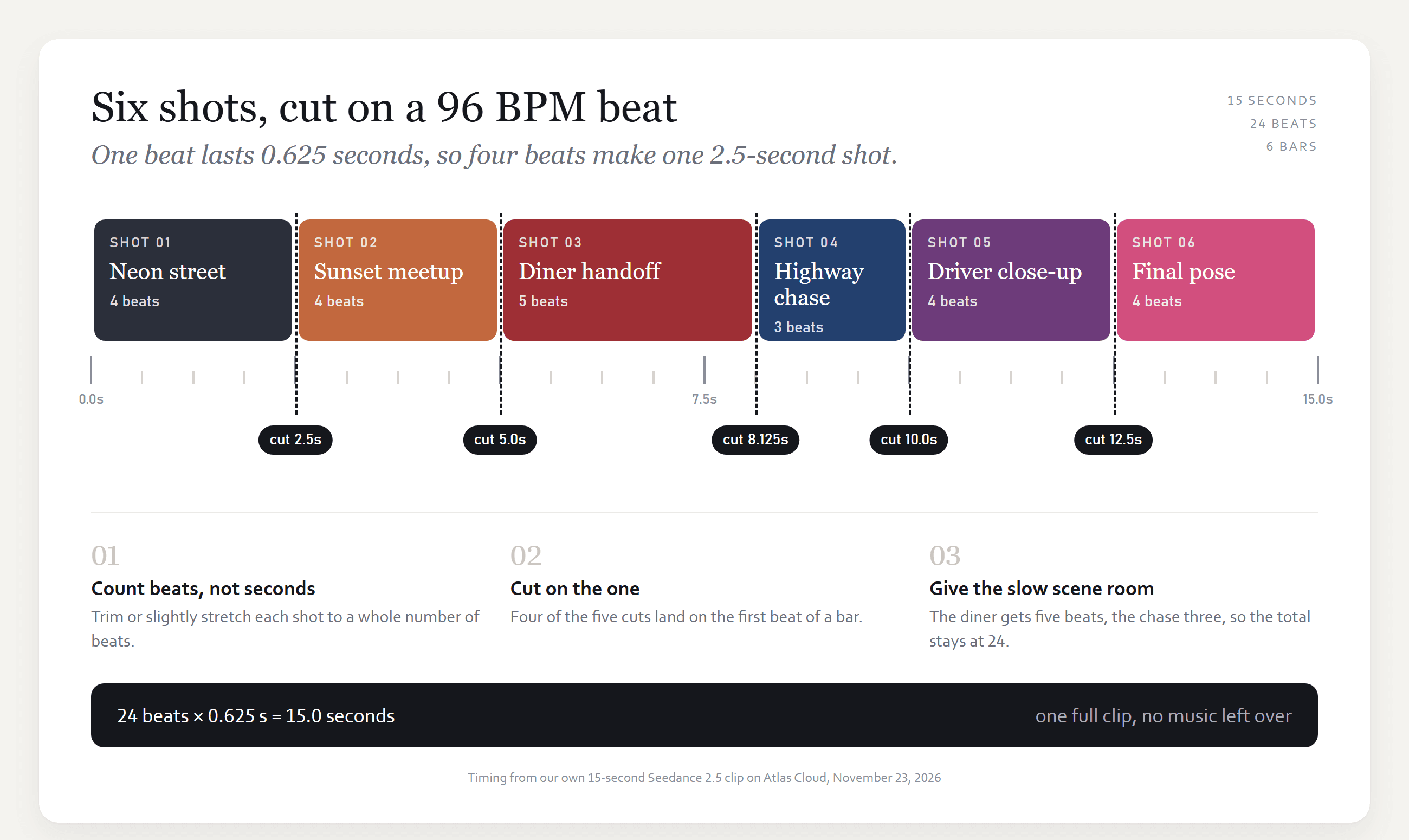
原始剪辑点与小节线差了几帧,所以我们给每个镜头分配了整数拍。三个镜头放慢了 2% 到 9%,没人会看出来;三个镜头在开头丢了一到六帧。
餐馆镜头分到五拍,追逐镜头三拍,所以总数仍然是 24 拍。
同样的算法适用于任何速度。用 60 除以 BPM 得到一拍,然后给每个镜头分配整数拍,加起来等于你的片段长度。还有一个捷径:Seedance 2.5 API 可以接受音轨本身作为参考音频,模型页面说单条音乐可以驱动镜头的节奏和节拍匹配。
常见问题
GTA 6 Vice City Story 是实际游戏的一部分吗?
不是。它是一个模板网站上的 AI 视频模板名称,不是 Rockstar 制作的。GTA VI 设定在 Leonida,这是 Rockstar 对佛罗里达的演绎,也是 Vice City 的所在地,模板的霓虹外观正借用了这里。2006 年那款名称相似的游戏 Grand Theft Auto: Vice City Stories 与此无关。
我的朋友能扮演那两名团队成员吗?
可以。在你自己的两张卡之后,为每个朋友添加一张面部卡,让他们成为 @Image3 和 @Image4,然后把日落镜头中的两段团队成员描述替换为“来自 @Image3 的男人”和“来自 @Image4 的女人”。Seedance 2.5 一次运行最多可接收 30 张参考图像。若想加入更多角色,我们的 告别 GTA 5 AI 视频 用角色卡在两条片段中构建了一个六人故事。
我在每个镜头里都会像我自己吗?
特写镜头承担相似度。霓虹街头、驾驶座和最终姿势会把你的脸拍得很大,这些镜头会参考面部卡。日落会合和餐馆镜头展示你的全身,这时服装卡起更大作用,而公路追逐主要是关于车。所以把精力放在面部卡上:清晰、面向镜头、光线柔和均匀。
在 Atlas Cloud 上,一段 15 秒的 GTA 6 Vice City Story 视频要多少钱?
截至 2026 年 11 月 23 日,1080p 带音频约 $11.19,是 $13.98 标价的 8 折。同一片段 720p 草稿约 $4.52(标价 $5.65),是在最终运行前检查故事的便宜方式。折扣没有显示结束日期,Run 按钮会在生成前显示确切价格。
结论
这个模板的窍门很简单:一个固定的六镜头犯罪故事,换进一张脸。第一次很有趣,之后每个结果都带着同样的脚本走进同一家餐馆。
自己动手制作需要两张照片和一个提示词,换来的是你可以挑选服装、团队成员和剪辑所配的音乐。保留六个节拍,让招牌保持空白,你的 GTA 6 Vice City Story 就会像为你量身定制的过场动画一样播放。







