The integration is genuinely small. Post a photo reference to one URL, poll a second URL until the status flips, read the image link out of the payload. An hour of work if you have shipped anything asynchronous before.
Then someone asks what it costs to run this for every new hire, and the afternoon disappears. A dozen image endpoints on the same platform will each turn a portrait into a headshot. The cheapest sits at $0.028, and that is a discounted price. The dearest takes $0.229768 for one picture. Most of that spread traces back to resolution tiers, quality flags, and whichever promotion happens to be running, which is not the same thing as a spread in how good the face comes out.
This is a working map of that decision for anyone building an AI headshot API into a product. Every price, field name, and enum below came from Atlas Cloud's own schemas and its pricing endpoint on August 18, 2026.
Key Takeaways
- A headshot is not its own model category at the API layer. It is an image-edit call with a fixed intent, so the endpoint you choose decides your cost per user far more than the prompt does.
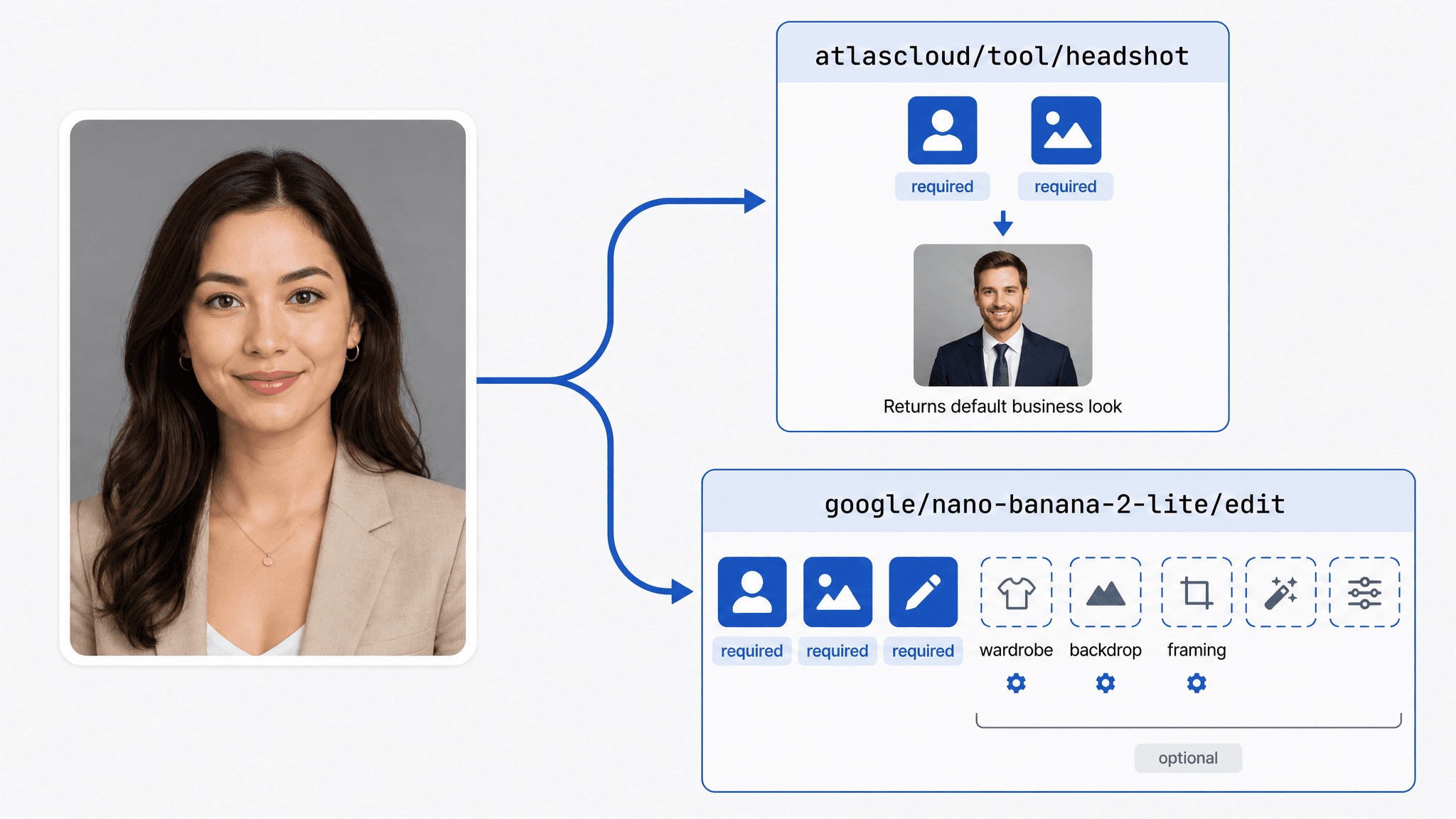
- The dedicated headshot endpoint accepts exactly two fields and returns one image. General edit endpoints accept a dozen fields and expect you to describe the result yourself.
- Leaving the size parameter out of a Seedream edit call silently lands you in the higher-priced tier, which doubles the bill without any error to catch.
- Every model on the platform shares one submit-and-poll loop, so swapping endpoints later is a change to a model string rather than a rewrite.
- You can confirm the output style before writing any code: the free AI headshot generator gives each eligible account one full-resolution run.
Why Developers Reach for an AI Headshot API Instead of a Headshot Site
Consumer headshot sites are built around a session. You upload, you wait, you download, and the allowance resets tomorrow. Nothing in that loop survives contact with a product that has to onboard four hundred employees this quarter and reconcile the spend against a cost centre.
What an API adds is not really the generation. It is the bookkeeping around it. Each submission comes back with an id and a status you can poll against, which is the difference between an invoice you can explain and one you cannot.
There is a second, quieter advantage. Tool endpoints publish their schemas, so you can read the entire input surface before you commit to one. Atlas Cloud exposes a family of these single-purpose image tools, and their request shapes are almost identical:
| Tool endpoint | Required fields | Optional fields | Price per image |
|---|---|---|---|
| atlascloud/tool/headshot | model, image | none | $0.045 |
| atlascloud/photo-cleanup | model, image | output_format | $0.02 |
| atlascloud/image-upscaler | model, image | outscale, output_format | $0.01 |
The headshot entry is the strictest of the three: one photo in, one photo out.
Where Atlas Cloud Fits for Developers Building Headshot Features
Worth seeing what the model actually returns before you write any integration code, because the output style is fixed and you either want it or you do not. Atlas Cloud keeps its single-purpose tools on one page, and the AI tools index is where the headshot generator sits alongside upscaling and cleanup. The tool page states that each eligible user gets one free trial, and its FAQ adds that the free generation includes a full high-resolution download.
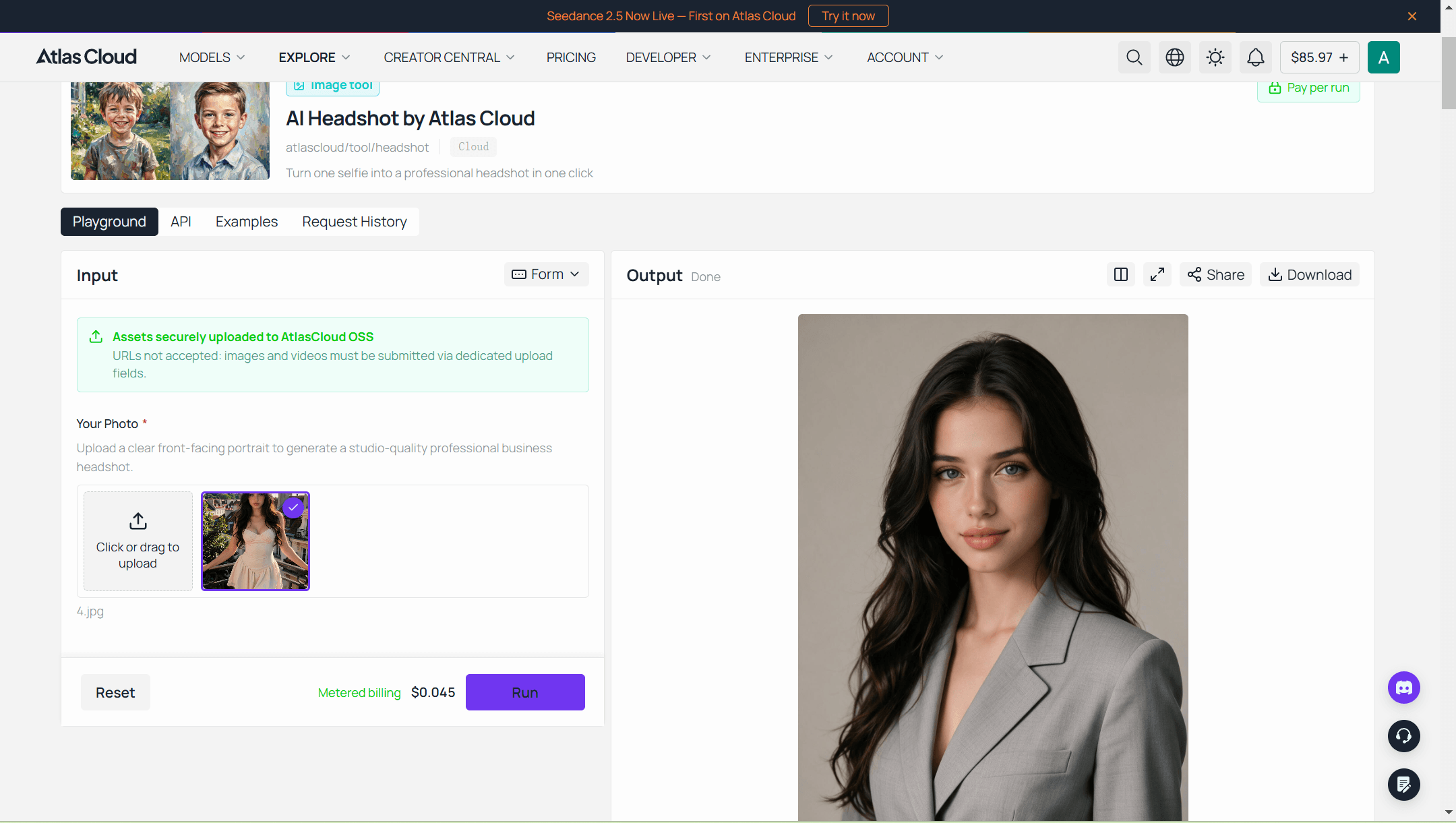
Past that first run, the same model becomes a metered playground. The AI Headshot playground prints its price on the Run button before you submit, and a notice above the uploader explains that assets go to Atlas Cloud storage rather than being pulled from a link you paste. If you would rather write the prompt yourself and control wardrobe, backdrop, and framing, the Nano Banana 2 family covers the general editing route, and its Lite variant happens to run cheaper per image than the fixed tool. The pricing section works through what that trade costs.
Two Ways to Call the AI Headshot Generator API
Both paths run the same model string. The difference is whether a person is watching the result come back.
Method 1: Test the Professional Headshot API in the Playground
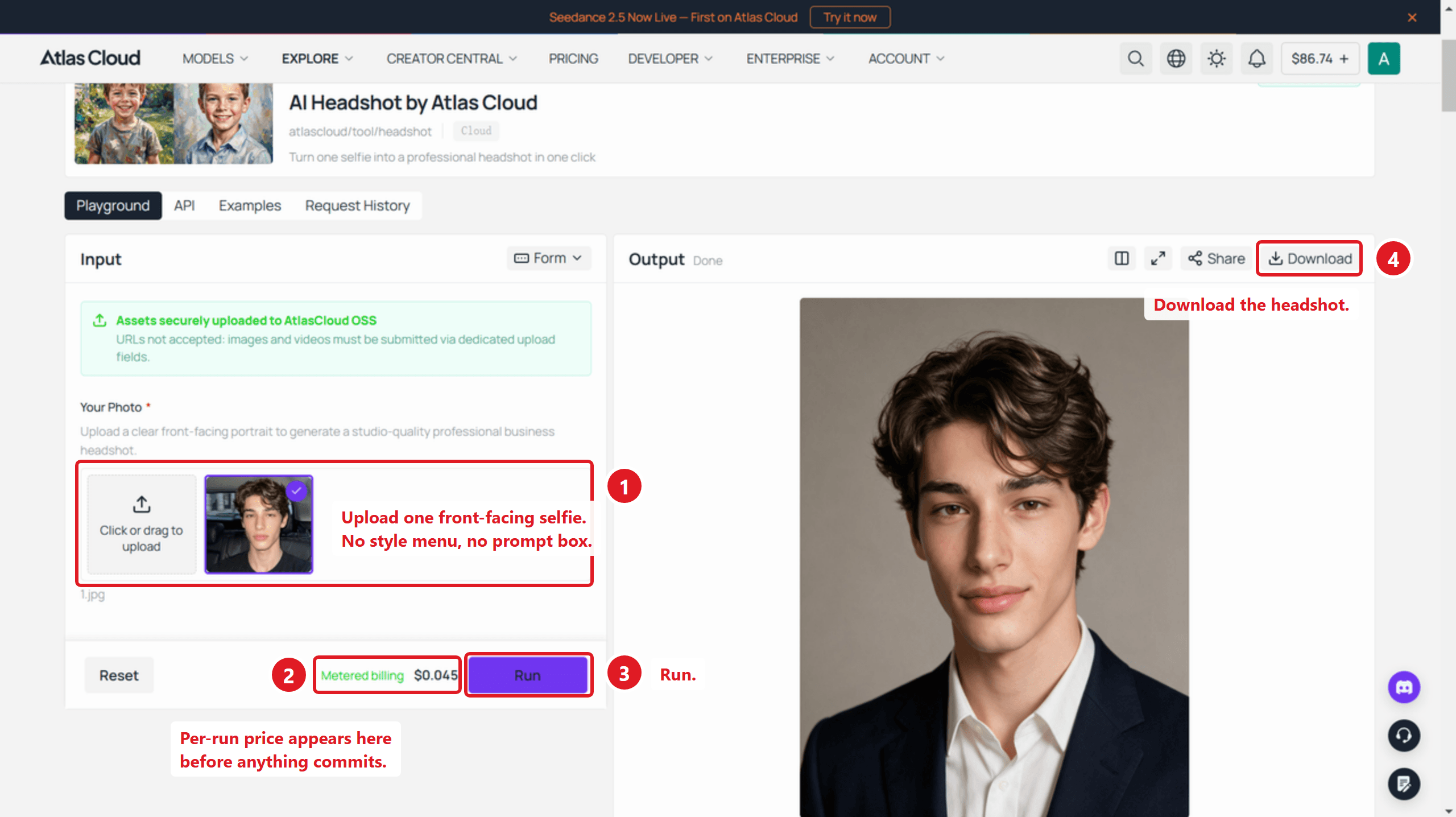
Sign in, open the playground linked above, and upload a clear front-facing portrait. The schema's own description for the input field is exactly that phrase, so the model is tuned for a straight-on shot rather than a three-quarter profile or a group crop.
The Run button carries the charge for the run you are about to make, and that is the number to budget against. The marketing page quotes no price at all, so the playground is where the figure lives. One useful mismatch to know about while you are there: the tool's page copy mentions choosing between business formal, smart casual, and a plain studio look, but the published schema has no style field. Whatever the copy suggests, the endpoint returns the model's default business treatment.
Method 2: Call the AI Headshot API From Your Own Code
The running flow is two HTTP requests. Getting there takes three steps.
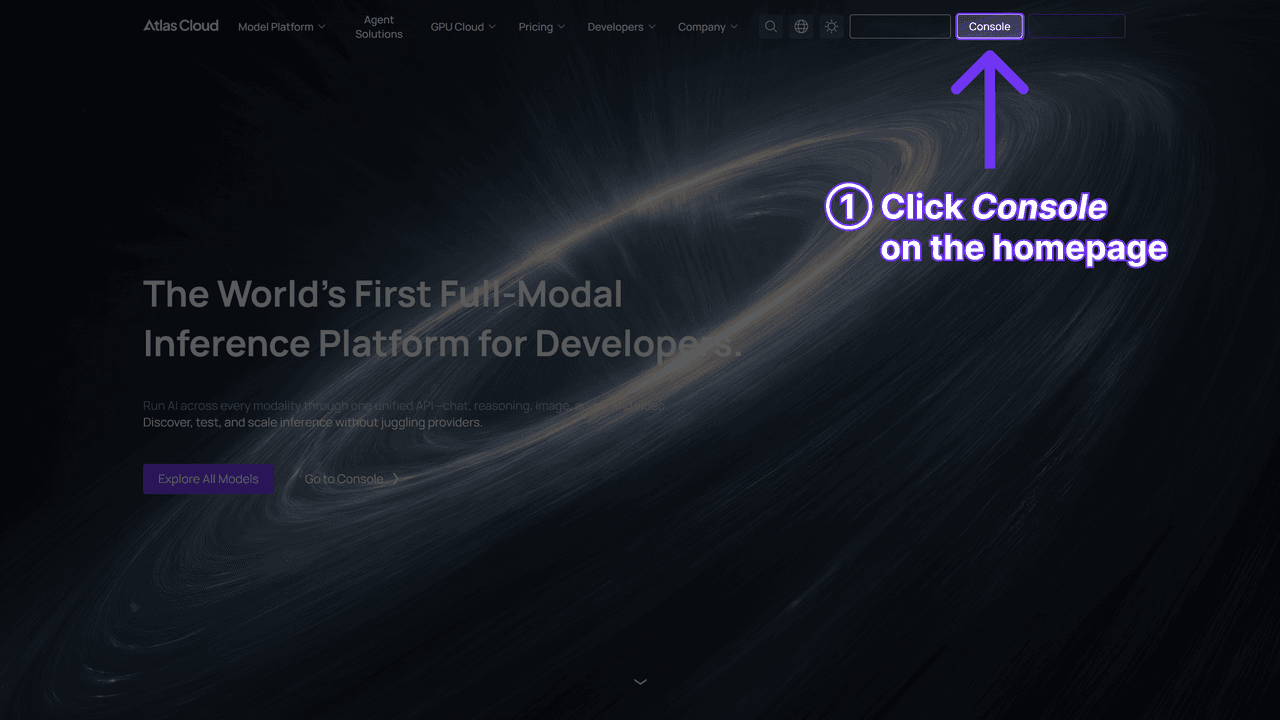
Step 1: Create an API key. Generate one in the Atlas Cloud console, copy it, and keep it server-side. The tool endpoints take the same key as every model on the platform.
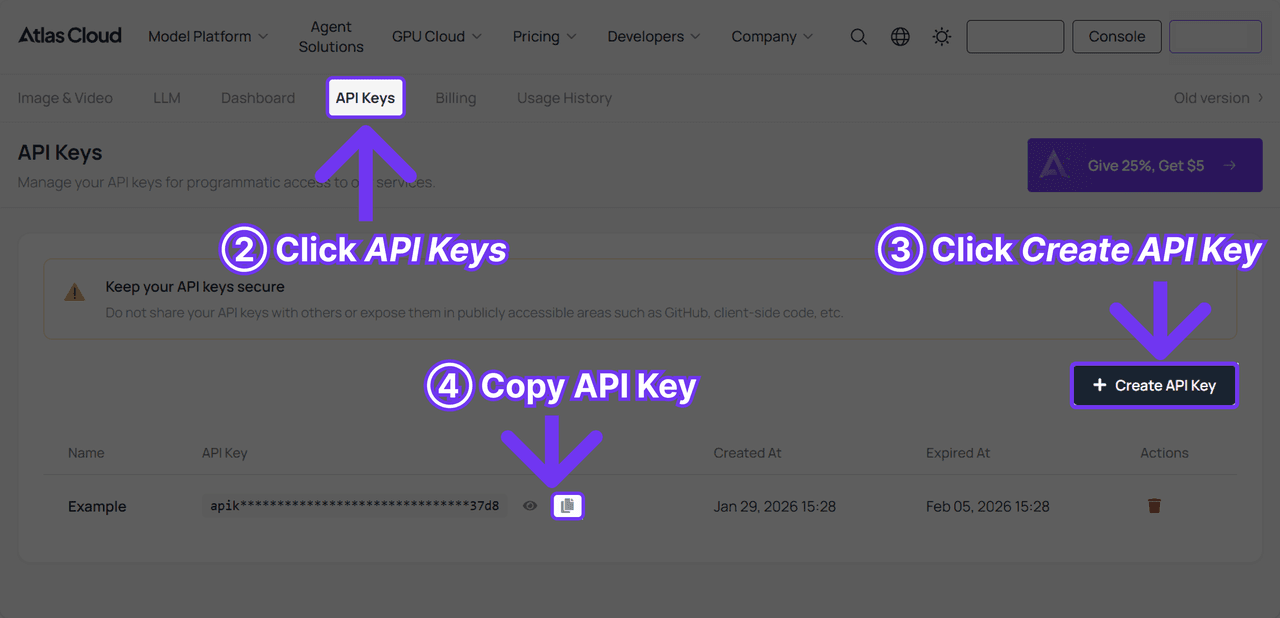
Step 2: Check the API docs. Authentication, the shared image endpoint, and the polling contract live in the API documentation. Each model also publishes its own OpenAPI schema, and this one is atlascloud-tool-headshot.json, worth reading before you guess at field names. The model page also carries an API tab next to the playground, so the request shape is one click from where you tested it. One thing that cost me time here: the platform's public model list returned 466 entries when I checked and the headshot tool was not among them, even though its sibling tools for upscaling and photo cleanup were. Schema, readme, and pricing all resolve normally, so the endpoint is live. Catalogue search alone will not surface it.
Step 3: Send the first request. Submission is asynchronous and hands back a prediction id.
Bash1curl -X POST https://api.atlascloud.ai/api/v1/model/generateImage \ 2 -H "Content-Type: application/json" \ 3 -H "Authorization: Bearer $ATLASCLOUD_API_KEY" \ 4 -d '{ 5 "model": "atlascloud/tool/headshot", 6 "image": "https://your-cdn.com/portraits/emp-4192.jpg" 7 }'
Poll until the status settles:
Bash1curl -s https://api.atlascloud.ai/api/v1/model/prediction/<PREDICTION_ID> \ 2 -H "Authorization: Bearer $ATLASCLOUD_API_KEY"
The completed payload carries outputs, an array that stays empty until the job finishes and then holds the hosted image URL. status is your loop condition and reads created, processing, completed, or failed.
Test one thing on that first call rather than assuming it. The schema types image as an image reference without saying where the file may live, and the playground is blunt about its own side of that question. The green notice above its uploader reads "URLs not accepted: images and videos must be submitted via dedicated upload fields." The sibling edit models document their inputs as URLs. Confirm which form your key takes before you wire a batch job around it.
That request shape is the part worth internalising. The same key, the same POST, and the same polling call reach every image model on the platform, so moving from the fixed headshot tool to a fully promptable editor later means editing the model string and adding the fields that model accepts. Nothing else in your worker changes.
AI Headshot API Pricing per Generated Image
Every figure below came from the platform's pricing calculation endpoint on August 18, 2026, priced against the exact request I would send. All of them returned a discount flag of 100, meaning no promotion was running, apart from the two variants in the next subsection.
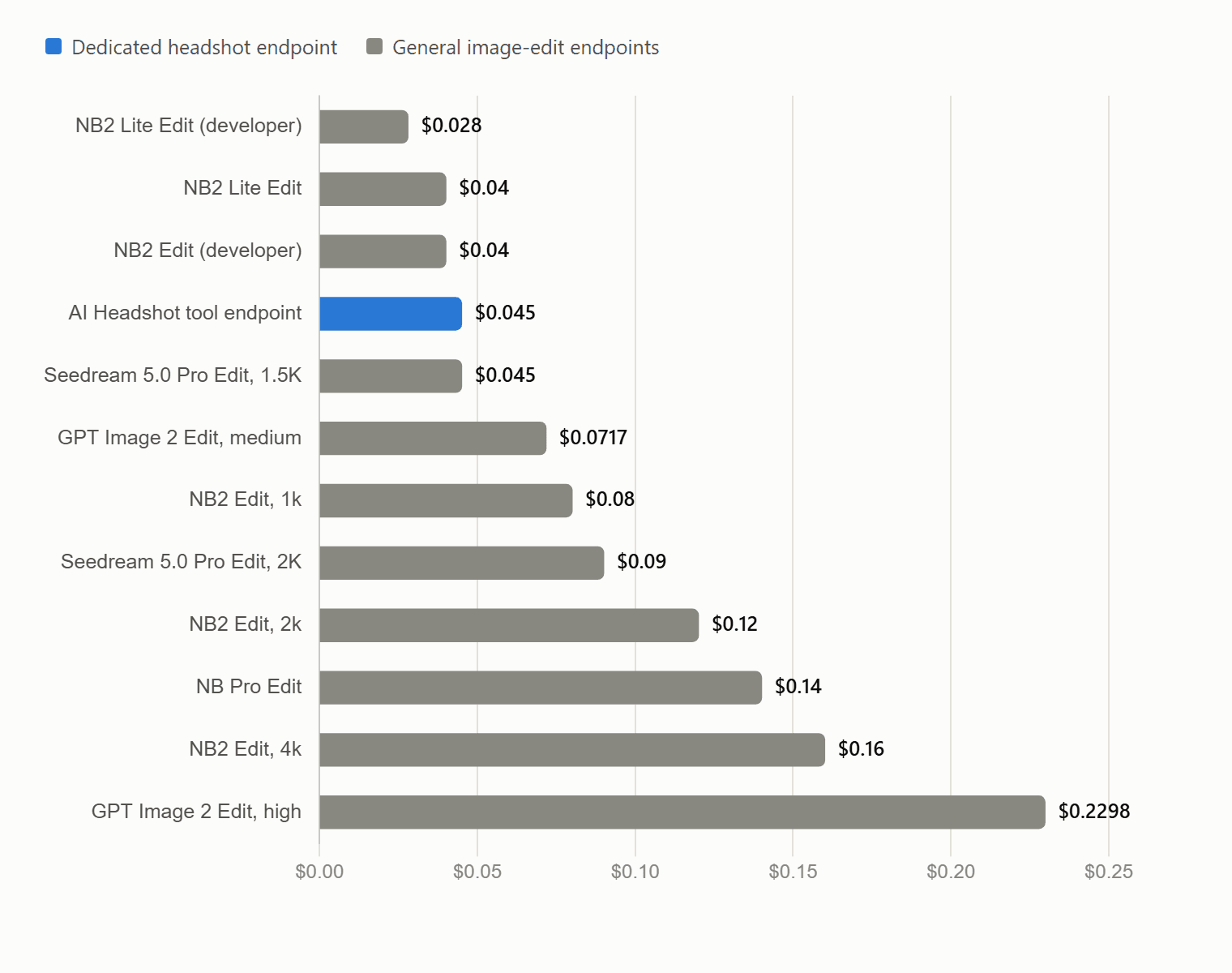
The dedicated headshot endpoint sits at $0.045, which puts a thousand generated headshots at $45. Nano Banana 2 Lite Edit undercuts it at $0.04, so the same volume runs $40, and its readme is explicit that the number of input reference images does not affect the price. Saving that $5 per thousand means writing and maintaining your own headshot prompt, which is a real decision rather than an obvious one.
Defaults are where the money leaks. Seedream v5.0 Pro Edit charges $0.045 at 1024×1024 or 2048×1152, but its size parameter defaults to 2048×2048, which lands in the higher tier at $0.09. Omit the field and you pay double with no error to catch. The same model adds $0.003 for each input image past the first, which a two-image request confirms by pricing at $0.048. GPT Image 2 Edit repeats the pattern from a different angle: quality defaults to medium at $0.071728, and moving to high takes a single 1024×1024 image to $0.229768.
Resolution tiers are the last variable. Nano Banana 2 Edit charges $0.08, $0.12, and $0.16 for 1k, 2k, and 4k, while the Lite variant offers 1k only. For a profile photo that ends up displayed at a few hundred pixels, paying for 4k is spending on pixels nobody will see.
Discounted Developer Endpoints in the AI Headshot API Lineup
Two variants carried an active discount on field namen the day of writing:
| Endpoint | List price | Current price | Discount |
|---|---|---|---|
| google/nano-banana-2-lite/edit-developer | $0.04 | $0.028 | 30% off |
| google/nano-banana-2/edit-developer | $0.08 | $0.04 | 50% off |
Neither model page explains how a developer endpoint differs from the standard one beyond the price, so treat the undiscounted figure as the durable number when you build a cost model. These flags have moved before, and the honest way to check is to price your exact request against the platform rather than trusting a figure from an article, including this one.
What the AI Headshot API Changes About a Face
The fixed endpoint is opinionated. Its readme describes the job as turning a casual portrait into a studio-quality business headshot, which in practice means the background and clothing get replaced while the face is meant to stay recognisably yours.
I ran one portrait through both routes to see where they part company.
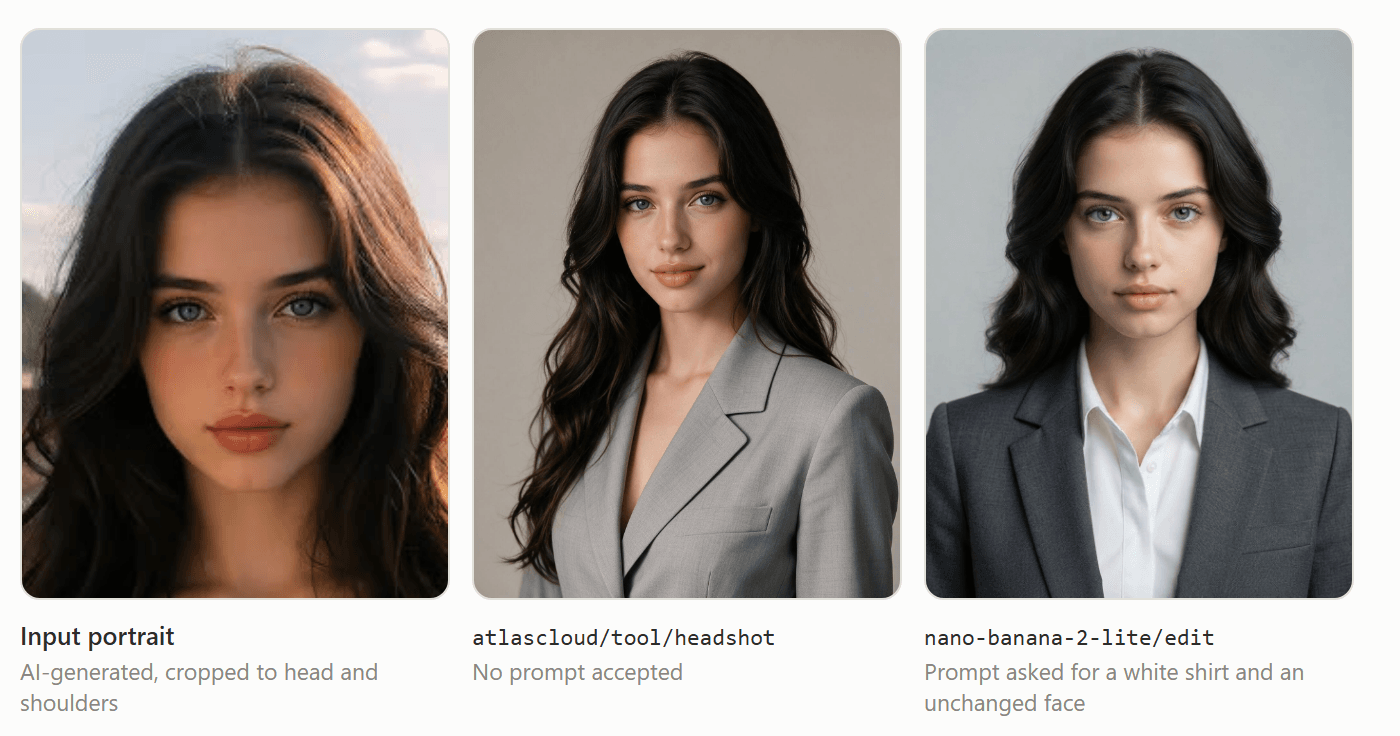
Run on August 19, 2026. The input is an AI-generated fictional person, not a photograph of anyone real.
Both outputs are recognisably the same face, and both did the job of putting a person into business attire on a plain backdrop. The differences are in what nobody asked for. The fixed endpoint chose a light grey blazer with nothing under it, decided the crop, and left the long wavy hair alone. The edit endpoint delivered every item the prompt named, the charcoal blazer, the white shirt, the light grey backdrop, the head-and-shoulders framing, then went further and shortened the hair into a tidier, more symmetrical shape. The prompt had asked for the face to stay unchanged and said nothing about hair.
Going the general-edit route hands the decisions back to you, at the cost of having to state them. Compare what each accepts:
| Field | atlascloud/tool/headshot | google/nano-banana-2-lite/edit |
|---|---|---|
| prompt | absent | required |
| image / images | one image, required | 1 to 14 images, required |
| aspect_ratio | absent | 15 values including auto |
| resolution | absent | 1k only |
| thinking_level | absent | default, high, minimal |
| enable_base64_output | absent | API only, returns BASE64 instead of a URL |
Two things to plan around. The platform's readme for the Lite tier says the model may struggle with small faces, accurate spelling, and very fine details. The input in that test began as a full-length shot where the face occupied a small share of the frame and came through it fine, so the warning is not a hard floor, but a group photo crop is the harder case and worth screening for. The same readme states that edited images include C2PA content credentials and an imperceptible SynthID watermark by default. That signature travels with the file. LinkedIn shows content credentials on any image that arrives with C2PA information attached, so a headshot generated this way can land on a profile with its provenance on display.
Which is fine, as long as the face is the right one. LinkedIn's profile photo guidelines permit an illustration or artistic rendering of yourself, with the condition that the photo must reflect your likeness. An AI headshot passes that test. A generated face that is not the user's does not.
Running an AI Headshot API in Production
A few things worth deciding before shipping rather than after.
| Concern | What the platform gives you | Reasonable default |
|---|---|---|
| Job completion | A four-state status on every prediction | Poll with backoff, treat failed as retriable once |
| Latency | No completion-time figure in the schema | Queue the work, never block a page render on it |
| Skipping the poll | enable_sync_mode on the general edit models, absent on the fixed tool | Use sync mode only for interactive single requests |
| Output handling | outputs array of hosted URLs | Copy to your own storage on completion |
| Input quality | The schema asks for a clear front-facing portrait, nothing more specific | Screen out group crops and tiny faces before spending a call |
| Consent | Responsible-use note requires authorisation for the media you upload | Capture consent at upload time, store the record |
That last row is the one teams skip. The endpoint's own documentation asks you to obtain consent before editing or generating a real person's likeness, and to avoid using results to deceive, harass, or impersonate. If your feature turns employee photos into headshots automatically, the consent step belongs in the upload flow rather than in a policy document nobody reads.
Frequently Asked Questions
Is there an AI headshot API for developers with a free tier?
The API itself is metered from the first call. The free run lives on the tool page, where each eligible account gets one full-resolution generation. Use it to confirm the output style, then budget for per-image pricing once you integrate.
Which model string should I use for a professional headshot API call?
atlascloud/tool/headshot if you want the fixed business treatment with no prompt to maintain. google/nano-banana-2-lite/edit if you need control over wardrobe, backdrop, or aspect ratio and are willing to write the instruction yourself. Both post to /api/v1/model/generateImage.
How much does an AI headshot API cost per image?
$0.045 through the dedicated endpoint as of August 18, 2026, with no discount active. Across the twelve endpoints I priced on the same platform, a single edited image ran from $0.028 to $0.229768 depending on model, resolution tier, and quality setting.
Does the AI headshot generator API keep the person's real face?
That is the stated behaviour: the tool replaces background and attire rather than generating a new person. Fidelity depends heavily on the input, and a small or angled face in the source photo gives the model less to preserve.
Are AI headshot API outputs watermarked or signed?
Nano Banana 2 Lite edits include C2PA content credentials and a SynthID watermark by default, per the model's documentation on the platform. Signing behaviour is model-specific, so check the readme for whichever endpoint you settle on.
Can headshots generated through an API be used on LinkedIn?
Yes, provided the image reflects the actual person. LinkedIn's photo guidelines allow artistic renderings of yourself and prohibit photos consisting solely of other people's likenesses, stock imagery, or fictional characters.
Conclusion
If what you need is a standard business headshot and you would rather not own a prompt, the fixed endpoint is the shorter path. Two fields, one output, a price you can read before you call it.
The moment your product needs something specific, a particular jacket, a brand backdrop, a portrait crop that matches your card component, that endpoint has nothing to offer and you are writing a prompt whether you planned to or not. Two questions decide it, and neither is the unit price. Will anyone still be maintaining that prompt in two years? And will the gap between a 1k output and a 4k one ever reach a user's screen?





