Swapping one face into one photo is a thirty-second job anywhere. The same job across eighty product shots, or a season of thumbnails, turns on a different question: how many photos one run accepts, and what each photo actually costs. Sites ranking for batch face swap answer the first question in their headlines; the second answer tends to live on a pricing page the tool page does not link.
So we read both pages for each tool. This list ranks seven services by what their own text discloses: real per-batch caps, per-image rates, free allowances, watermark answers. Where two pages from one site disagree, we quote both.
Key Takeaways
- The web batch face swap tools we checked cap one run between 5 and 50 photos. The bigger advertised caps mostly sit behind paid tiers.
- Free labels rarely survive the same site's pricing page. DeepSwapFace fronts "100% Free | No Watermark" while its own credit table bills batch swaps at 3 credits per image.
- Where a rate is published, prepaid credit packs run cheapest per photo, while Atlas Cloud posts a per-photo price quoted before each run, with no pack or tier attached.
- Atlas Cloud also has a free face swap tool with no usage cap and no watermark. It takes one photo per pass, so it auditions a donor face at no cost before any batch route bills.
One thing to settle before the tools: the label covers three different jobs, and vendors rarely say which one they sell.
| The job | What goes in | What comes out | Where it shows up |
|---|---|---|---|
| One face across a photo set | a set of photos plus one donor face | every photo carrying the donor face | the default meaning of batch face swap |
| Several versions of one photo | one photo plus several donor faces | one output per donor face | AIFaceSwap's demo, Remaker's second upload mode |
| Every face inside a group shot | one photo containing several faces | the same photo, each face replaced | sold separately as multiple face swap |
The third row is a different feature despite the similar name; we have covered how those single-photo multi-face tools bill in our Vidwud teardown. Everything below concerns the first two rows, plus the route the table leaves out: looping a single-swap API over a folder, which has no per-run cap because there is no run, only calls.
The Scripted Batch Face Swap Route on Atlas Cloud
Atlas Cloud sells the piece under every batch widget on this list: a face swap endpoint priced per call. Batch, on this route, is a loop you write rather than a cap you rent. The platform's other lane is its AI tools page, a collection of free image tools with a face swap among them; that swap charges nothing per run, and Method 4 builds it into the batch workflow.
Method 1: Swap Faces in the Atlas Cloud Playground
For a handful of photos, the form is enough. The face swap playground asks for a Source Face, one clear front-facing photo of the person going in, and a Target Image, the photo being changed. Size defaults to auto, with 13 fixed pixel dimensions available up to 2048×2048; output is JPEG or PNG. Identity transfers while pose, clothing, background, and lighting stay put. For a small batch, leave the source face loaded, swap the target photo, and run again; the button quotes the price each time.
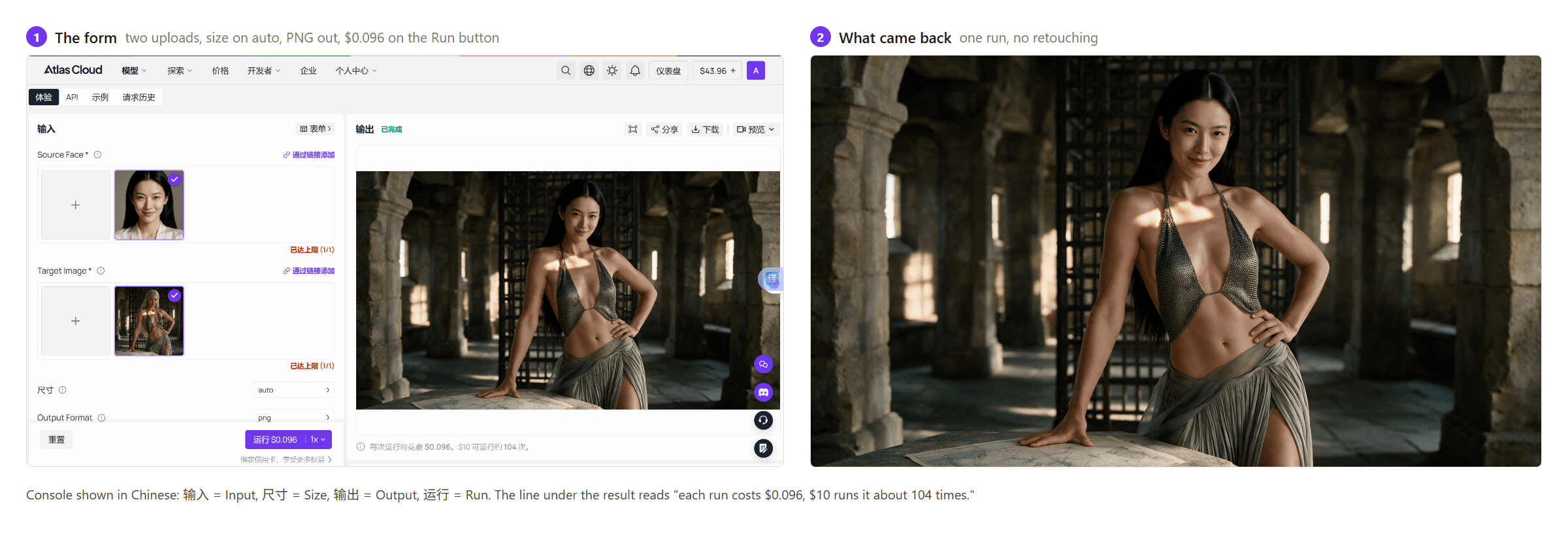
Method 2: Loop a Batch Face Swap Through the Atlas Cloud API
Three steps take the same swap from form to script.
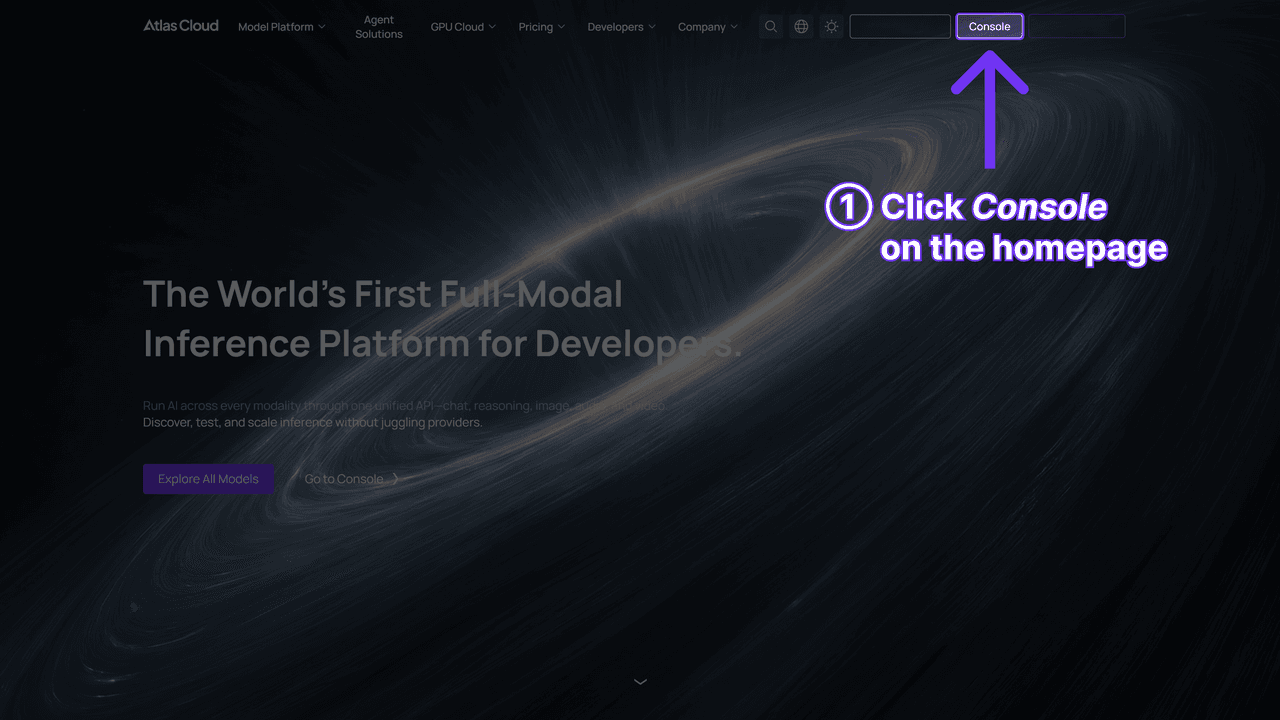
Step 1: Create an API key in the Atlas Cloud console dashboard and copy it.
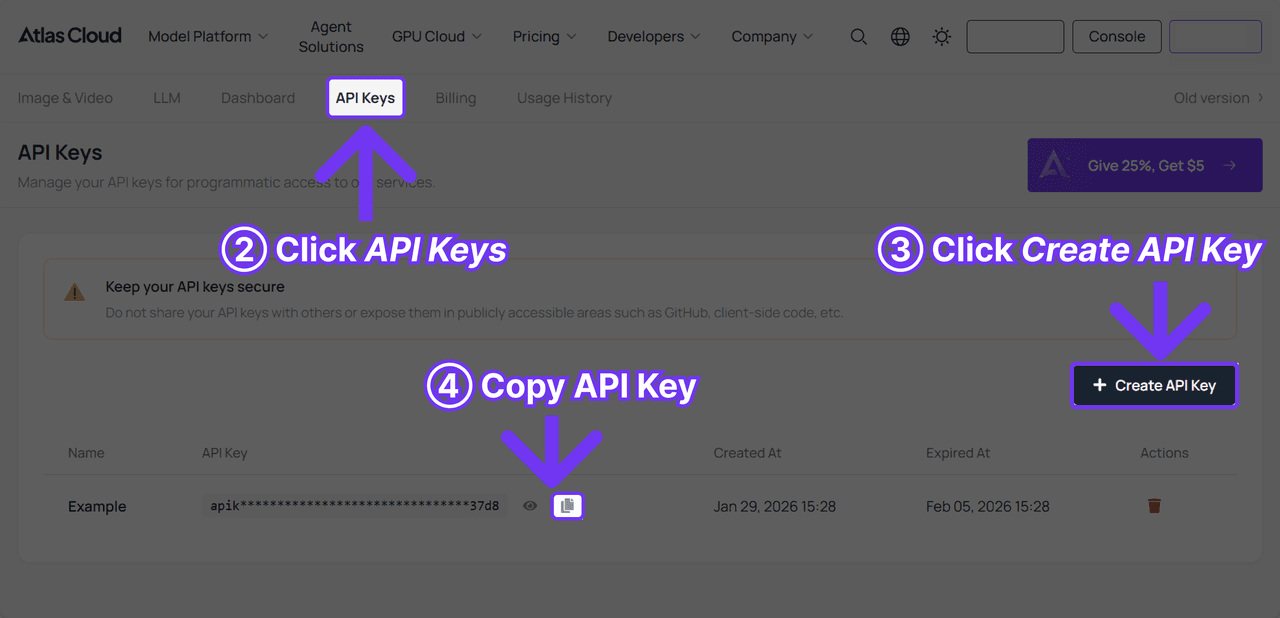
Step 2: Read the API docs for authentication and the shared image endpoint's parameter list.
Step 3: Send one request per photo. Face swap rides the platform's shared generateImage endpoint; the model string does the routing:
plaintext1curl -X POST https://api.atlascloud.ai/api/v1/model/generateImage \ 2 -H "Authorization: Bearer $ATLASCLOUD_API_KEY" \ 3 -H "Content-Type: application/json" \ 4 -d '{ 5 "model": "atlascloud/face-swap-image", 6 "image": "https://your-cdn.com/donor-face.jpg", 7 "Image": "https://your-cdn.com/target-photo-001.jpg", 8 "output_format": "jpeg", 9 "size": "auto" 10 }'
Lowercase image is the donor face and capital Image is the target photo; reversing them reverses the swap, so check it in code review rather than in output review. Each response returns a prediction ID to poll:
plaintext1curl https://api.atlascloud.ai/api/v1/model/prediction/<prediction_id> \ 2 -H "Authorization: Bearer $ATLASCLOUD_API_KEY"
Wrap the pair in a loop over a folder and the batch is whatever the folder holds, at $0.096 a photo, meaning a 100-photo job prices at $9.60 before it starts. The same key and calling pattern reach every other model on the platform, which is what makes the next method possible without new plumbing.
Method 3: Four Face Swap Variants From One Seedream Edit Call
Both methods above move one face per run. The second shape from the table up top, one photo rendered with several different faces, has a cheaper route on the platform that is not a face swap tool at all. Seedream 5.0 Pro Edit is ByteDance's instruction-driven image editor, and its model page states the property that matters here: it accepts up to ten reference images per request and resolves cross-image instructions like "put the dress from image 2 on the person in image 1." Load a base photo plus four donor faces, ask for a four-panel sheet, and one call returns all four variants.
We ran. Base photo in the first slot, four faces in the next four, output size 2048×2048, and an instruction that named each panel's donor and forbade the failure we expected: averaging four references into one composite face.
plaintext1Image 1 is the base photograph. Images 2, 3, 4, and 5 each show a different person's face. 2 3Produce a single 2x2 grid. Every panel is a full copy of image 1 with only the facial identity changed: top-left uses the face from image 2, top-right uses image 3, bottom-left uses image 4, bottom-right uses image 5. 4 5Across all four panels keep the pose, expression, hairstyle, clothing, background, framing, and lighting of image 1 identical, so the four panels differ in nothing except whose face it is. Blend each face into the scene's lighting and skin tone. Do not average or mix the four reference faces together, do not add captions, labels, numbers, or borders.
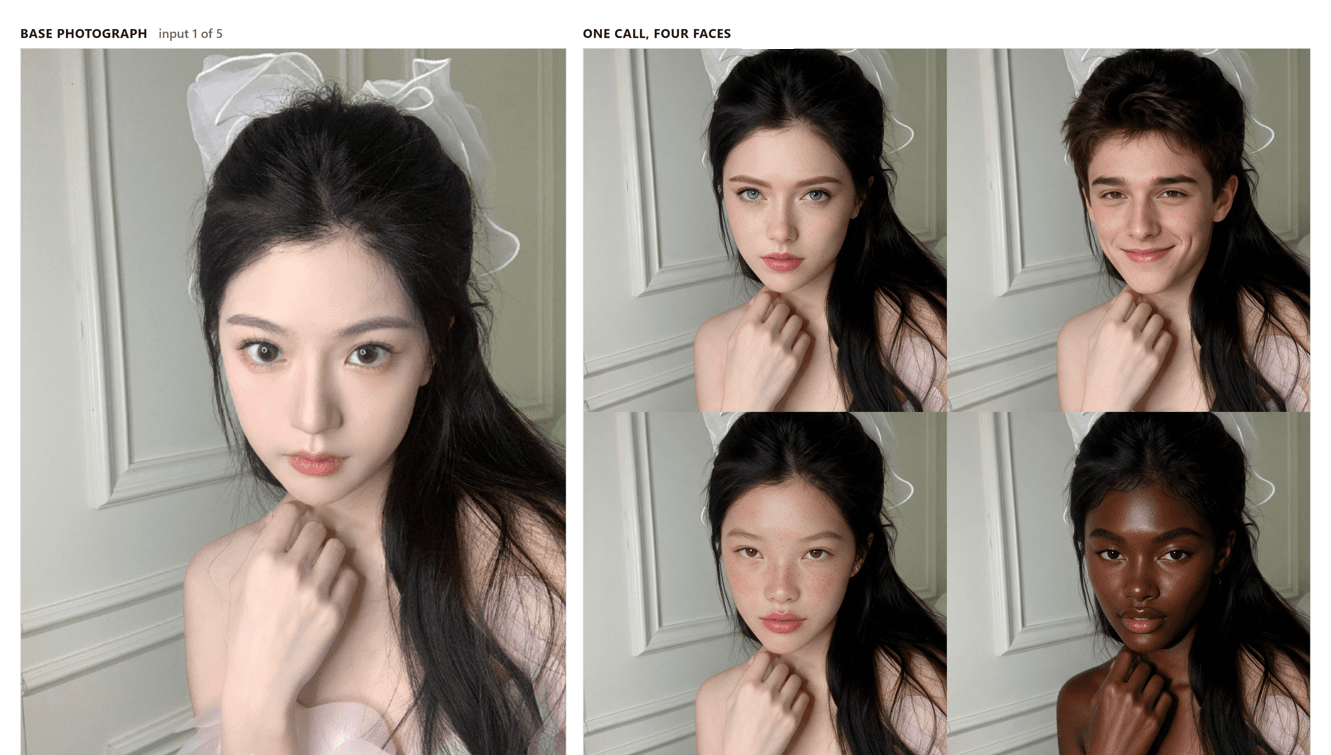
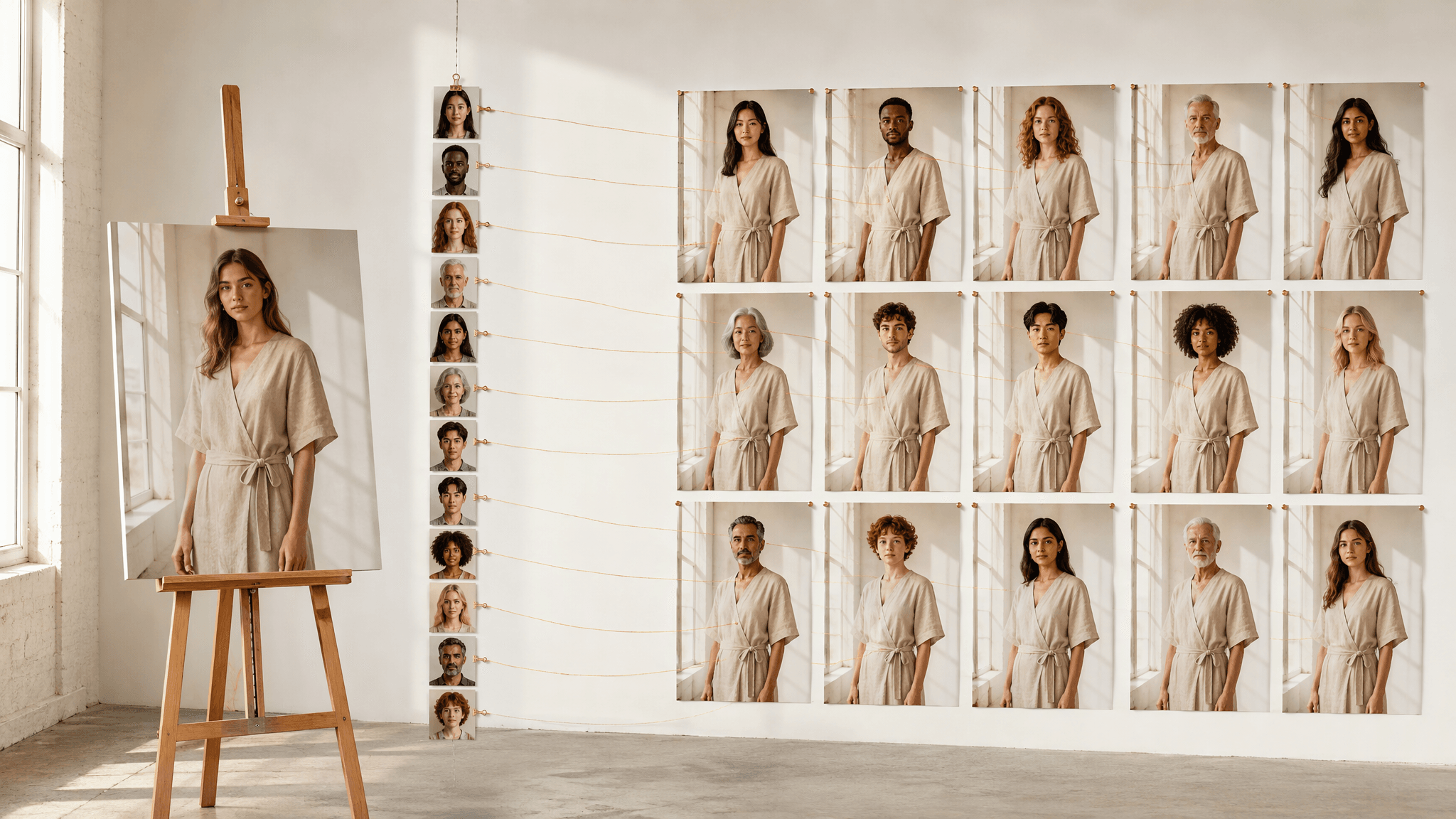
Base photo beside the single run that produced all four variants, five input images, $0.102 at current prices.
Four separate identities came back rather than a blend, and each landed in the panel its number specified: image 2 top-left, image 3 top-right, image 4 bottom-left, image 5 bottom-right. Fidelity to the donor photographs is closer than a general-purpose editor suggests. Two of the four faces we supplied carry heavy freckling, and both freckle fields come through nearly mark for mark instead of being smoothed into clean skin. Pose, hand position, the bow, the panelled wall and the direction of the light hold across every panel. Tone travels past the face as well: in the bottom-right panel the hand and shoulder were recoloured to match the new face, which is right for realism and a reminder that this endpoint edits the whole frame rather than a face-shaped region inside it.
The arithmetic at current prices, checked August 12, 2026: $0.09 for a 2K output plus $0.003 for each input image after the first, which prices the five-image grid call at $0.102 and a two-image call, one base photo plus one face, at $0.093. Four variants for $0.102 works out to about two and a half cents a face, against $0.093 apiece running them one at a time, and $0.096 on the dedicated face swap endpoint. Sizes at or under 2.36M pixels bill at the cheaper 1.5K tier, $0.045, though a four-panel sheet wants the pixels.
Resolution and obedience are what the cheap route spends. To measure that, we ran the top-left panel's donor again on its own, with the grid clauses dropped and the space spent on identity instead:
plaintext1Image 1 is the photo to edit. Image 2 shows the face to use. 2 3Replace the facial identity of the person in image 1 with the face from image 2. Keep everything else in image 1 exactly as it is: the same pose, head angle, expression, hairstyle, clothing, background, framing, crop, and lighting direction. Match the new face's skin tone and shading to the lighting in image 1 so the edit reads as one photograph. 4 5Preserve the facial structure from image 2 as it is: face shape, nose bridge and width, jawline, eye spacing, lip shape, and any moles, freckles, or scars. Do not smooth skin, beautify features, slim the face, or restyle the photograph. Identity accuracy matters more than attractiveness.
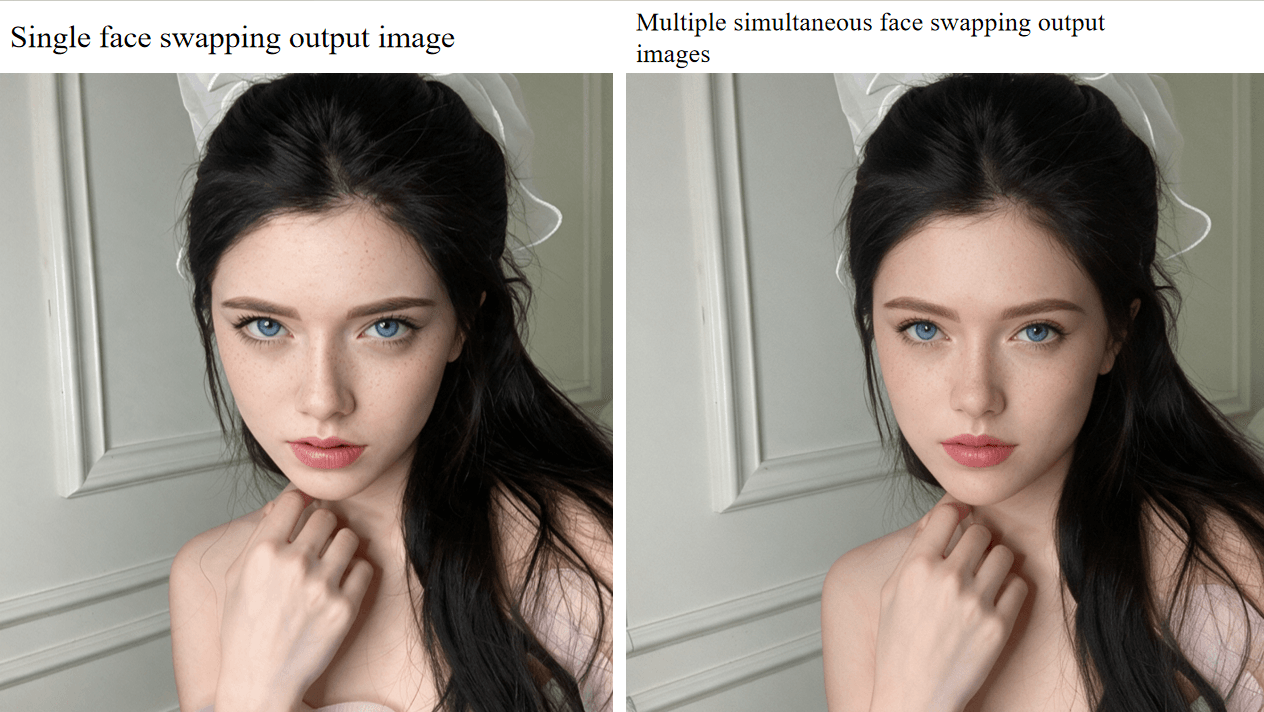
Same base photo, same donor face as the top-left panel above, $0.093 at current prices.
That is the top-left panel's donor run on its own, and the difference is not subtle. Individual freckles, skin texture and separate strands of hair survive here that the panel version cannot carry, because each panel occupies a quarter of the canvas. A portrait source gets cropped tighter to fit a square panel too, so the bow that sits fully in frame alone is clipped in the sheet. Instruction drift showed up in one panel of four: the donor with short hair and a broad smile brought both along, so the top-right result wears his hairline and his expression over the base photo's long black hair, leaving two hair textures on one head. That is the sort of slip an instruction-following editor produces and a purpose-built swap endpoint does not.
Use the grid to choose and the single call to deliver. Shortlisting four candidate faces for a thumbnail or a casting board costs about two and a half cents a look, and the winner can be rerun on its own, or on face swap proper when identity fidelity outranks the bill. The request is the same shape as Method 2, with the reference images passed as an array:
plaintext1curl -X POST https://api.atlascloud.ai/api/v1/model/generateImage \ 2 -H "Authorization: Bearer $ATLASCLOUD_API_KEY" \ 3 -H "Content-Type: application/json" \ 4 -d '{ 5 "model": "bytedance/seedream-v5.0-pro/edit", 6 "prompt": "Produce a single 2x2 grid. Every panel is a full copy of image 1 with only the facial identity changed: top-left uses the face from image 2, top-right image 3, bottom-left image 4, bottom-right image 5. Keep pose, expression, hair, clothing, background and lighting identical across panels. Do not average the reference faces together.", 7 "images": [ 8 "https://your-cdn.com/base-photo.jpg", 9 "https://your-cdn.com/face-1.jpg", 10 "https://your-cdn.com/face-2.jpg", 11 "https://your-cdn.com/face-3.jpg", 12 "https://your-cdn.com/face-4.jpg" 13 ], 14 "size": "2048*2048", 15 "output_format": "png" 16 }'
Method 4: One Free Face Swap Before the Batch Bills
The three methods above meter by the run. Atlas Cloud's free AI face swap tool does not: its FAQ answers the free question with a plain yes, no usage cap and no watermark on the finished image. Load a source face and a target photo, and about 8 seconds later a PNG comes back at the target's size, up to 1280 pixels on the longest side.
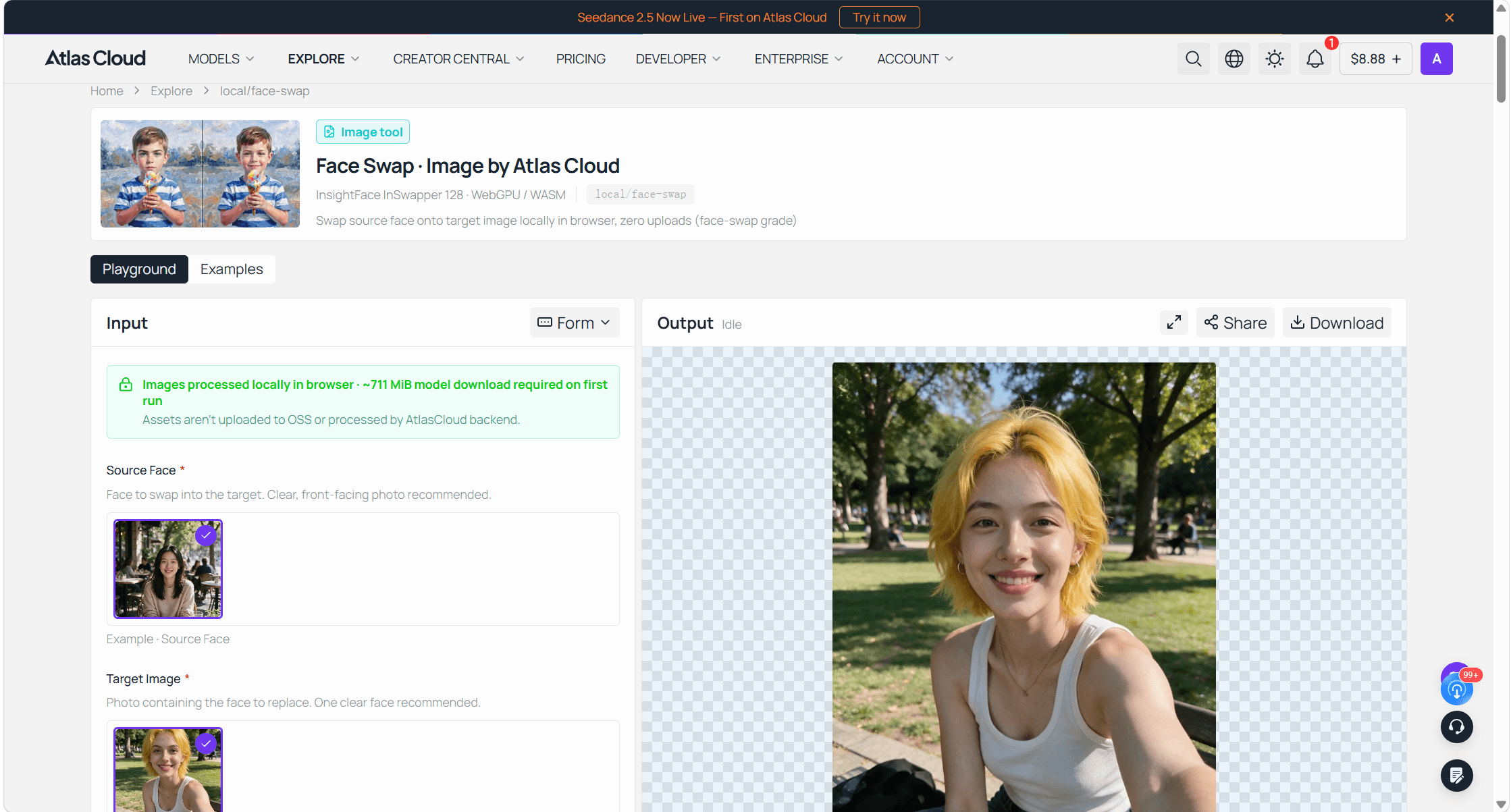
For a batch job, the free tool settles the first question at no cost: which source face to use. Pick one photo from the batch as a test target, swap each candidate face onto it, and keep the face that comes out best before any paid run starts. If the set is small, a dozen photos or so, the free tool can simply do the whole job one photo at a time.
AIFaceSwap: A 50-Photo Batch Face Swap Behind Credits
Among the web tools, AIFaceSwap publishes the most complete batch numbers, and none of them are free. The batch playground takes "no more than 50 pictures at once," promises that "all images will be swapped to the same target face," warns that "this function needs to consume credits," and estimates that a full load "will take about a minute." Its FAQ answers the free question directly: "Currently batch face swap is a paid feature." The pricing page's usage table prices it at 1 Image = 1 Credit, tagged VIP Only, and the site's credit rules add a wrinkle worth knowing: daily login rewards come as silver credits, while "Video, GIF, and Batch face-swapping features require gold credits," the purchased kind. The free allowance and the batch feature never touch.
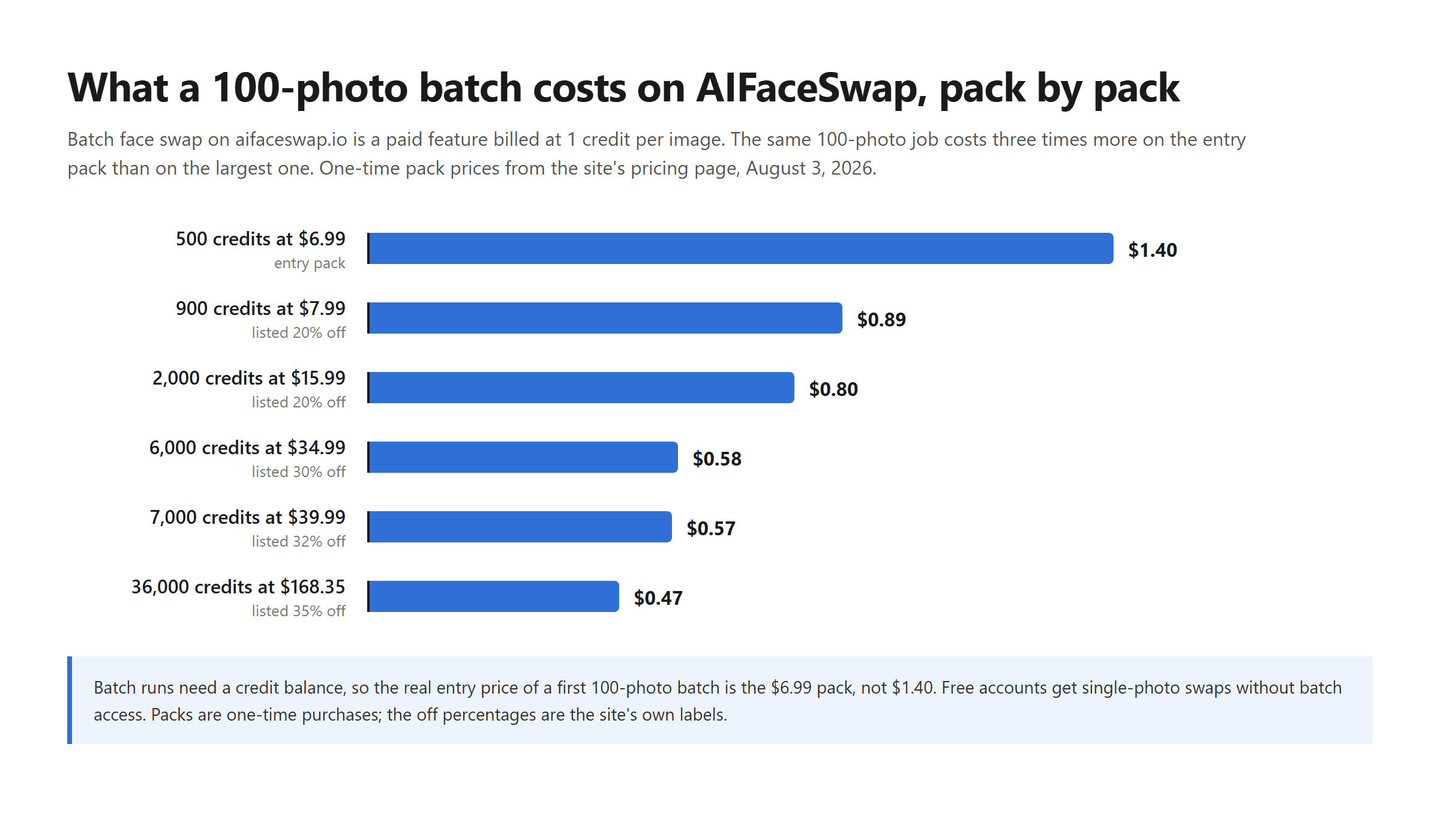
Pack prices from the aifaceswap.io pricing page; batch rate 1 credit per image.
Volume is rewarded steeply. The entry pack works out near a cent and a half per photo; the largest pack, listed at $168.35 against a struck-through $259, lands under half a cent. Single-photo swaps stay outside the paywall, and the same usage table quantifies them: 100 times per day for visitors, unlimited for registered users. One housekeeping detail from the batch playground itself: finished images are "cleared after 2 days," so download the set promptly.
VidMage: Batch Face Swap With a Free Daily Lane
VidMage is the tool on this list that puts the most numbers on its free batch lane, even though the lane itself is narrow. Its batch page states the split plainly: "Free users can upload up to 5 images per batch. Subscribers can upload up to 50."
| Free plan | Paid | |
|---|---|---|
| Photos per batch | 5 | 50 |
| Daily free swaps | "15 free batch swaps daily" per the batch page; the pricing page lists "15 pics/day" | 400 credits/month on the $14.99 plan ($8.33/month billed yearly) |
| Per-photo rate | inside the daily allowance | 1 credit per photo; packs from $9.99 for 500 credits |
| Watermark | comparison copy claims "Always watermark-free, even in free trial"; the free plan's own row lists a "Watermarked live swap" for the Mac tool | the same comparison claim, with no separate per-tier statement we found |
| Offline option | Mac app advertised to run batch swaps on-device | same app, with paid perks |
Two of those cells deserve the caution flags. The daily free budget is written two ways: fifteen batch swaps of up to five images reads as seventy-five photos, fifteen pics per day reads as fifteen, and nothing on either page reconciles the difference, so test with a throwaway set before planning around the bigger reading. The watermark answer likewise points both directions depending on which section you trust. The genuinely distinctive entry is the Mac app, which the site says processes batches entirely on-device with nothing uploaded, a real consideration when the faces belong to clients. That processing claim is the vendor's own; we have not audited the app's traffic.
The No-Login Batch Face Swap Shelf
Three services run batch face swaps in the browser with no account at all, and they illustrate the disclosure spectrum better than any ranking prose could.
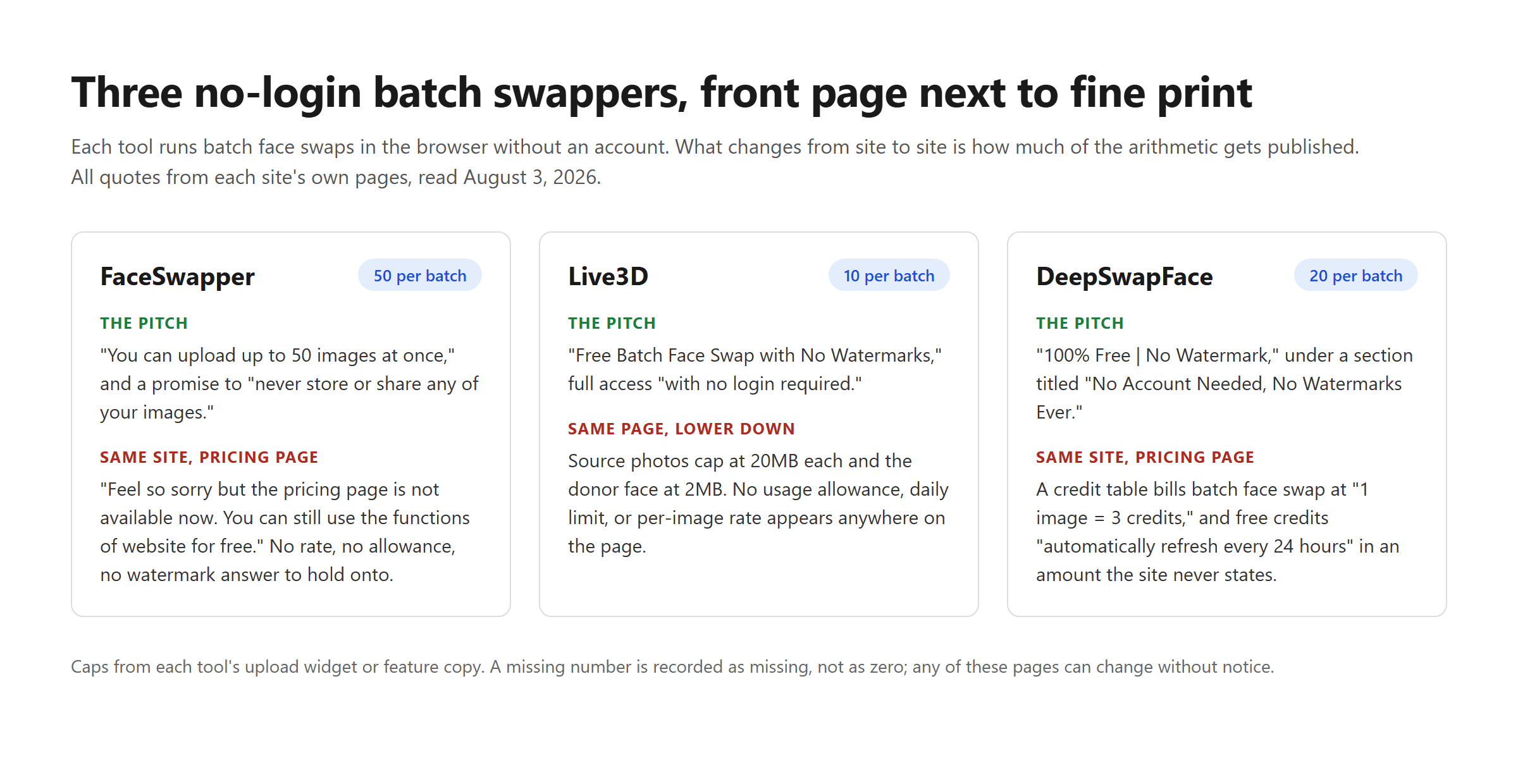
Quotes from each site's own pages.
FaceSwapper posts the biggest free cap, "up to 50 images at once," alongside a promise to "never store or share any of your images." Its pricing link currently opens an apology: "Feel so sorry but the pricing page is not available now. You can still use the functions of website for free." That is a real free 50-photo batch today, with no posted rate or allowance to say what tomorrow looks like, and no watermark statement we could find on the pages we checked.
Live3D caps a batch at 10 images and is the most modest operation here: no login, a stated "Free Batch Face Swap with No Watermarks," source photos to 20MB and the donor face to 2MB, and no allowance or per-image number that we could find on the page. Whether absence of a meter means absence of a limit is not knowable from the outside.
DeepSwapFace accepts 20 images per batch, GIFs included, under the banner "100% Free | No Watermark" and a section titled "No Account Needed, No Watermarks Ever." Its own pricing page tells the rest: a usage table billing batch face swap at 1 image = 3 credits, free credits that "automatically refresh every 24 hours" in an unstated amount, and one-time packs starting at $9.99, displayed against struck-through prices under a countdown timer. The claim and the meter coexist a click apart.
Choosing Your Batch Face Swap Route
Remaker rounds out the seven. Its batch page offers both directions from the terminology table, multiple original images and multiple target faces, which no other tool here folds into one screen. The page's own notice dialogs carry Buy Credits prompts, and within the pages we read we found no per-batch cap, no per-image rate, and no free allowance stated anywhere. A two-direction tool with fully undisclosed arithmetic sits last on a list ranked by disclosure.
| Tool | Max photos per batch | Published rate | Free lane | Account needed |
|---|---|---|---|---|
| Atlas Cloud | no batch cap, one call per photo | $0.096/photo standard, $0.186 largest sizes | free tool, one photo per pass | API key for the batch route |
| AIFaceSwap | 50 | 1 credit/image, packs $6.99 to $168.35 | single swaps only, batch excluded | yes, VIP for batch |
| VidMage | 5 free, 50 paid | 1 credit/photo, packs from $9.99 | 5-photo batches, daily allowance stated two ways | yes for paid tiers |
| FaceSwapper | 50 | none published | everything, for now | no |
| Live3D | 10 | none published | everything, per its copy | no |
| DeepSwapFace | 20 | 3 credits/image on its pricing page | daily credits, amount unstated | no |
| Remaker | not stated | not stated | not stated | credits prompted |
Whatever the route, a batch pipeline repeats whatever its single swap does, so a tool that softens skin or misses glasses on one photo will do it fifty times. Judge output on one photo before paying for volume anywhere.
Read the table by your job. A dozen photos once: FaceSwapper or Live3D cost nothing and ask for no email, or the same dozen click through the free swap tool from Method 4; keep expectations flexible about the numbers the shelf sites never wrote down. Recurring small sets: VidMage's free lane or its $9.99 pack covers weekly meme duty. Hundreds of photos on a schedule, or faces belonging to paying clients: the meters start to matter more than the stickers, and the two routes that publish complete arithmetic are AIFaceSwap's packs and Atlas Cloud's per-call price, with the API loop being the only route that puts no cap on the run and no prepaid balance on the shelf. Whatever route wins, get consent from the people whose faces you are moving; a page with no readable policy is not permission, only silence.
Frequently Asked Questions
What is a batch face swap?
In most tools, it means applying one donor face across many photos in a single run: upload a set, add one clear face, and every output carries that face. Some services also sell the reverse under the same label, one photo rendered with several different donor faces. Both differ from multiple face swap, which replaces several faces inside one group photo.
How many photos can a batch face swap handle at once?
Among the tools we checked: 50 at AIFaceSwap and FaceSwapper, 20 at DeepSwapFace, 10 at Live3D, and 5 per batch for VidMage free users rising to 50 for subscribers. API routes have no per-run cap because each photo is its own call; a script decides the batch size.
Is any batch face swap completely free?
FaceSwapper and Live3D currently run batches without accounts or credit meters, at caps of 50 and 10 images per run, and FaceSwapper's own pricing page says the site's functions are free while that page is down. Neither publishes a rate or allowance you can hold onto, which is the trade. Tools that look free elsewhere often meter batch specifically: DeepSwapFace advertises 100% free yet bills batch at 3 credits per image, and AIFaceSwap excludes batch from its free tier outright. The other genuinely free lane is Atlas Cloud's face swap tool, which computes in your browser rather than on a server and states no usage cap, though it takes one photo per pass: free for a small set, manual for anything worth calling a batch.
What does a 100-photo batch face swap cost?
As rates published: about $1.40 through AIFaceSwap's $6.99 entry pack, dropping to $0.47 on its largest pack; about $2.00 through VidMage's or DeepSwapFace's $9.99 packs; and $9.60 at Atlas Cloud's posted $0.096 per photo, rising to $18.60 if every output uses the largest size options. The pack prices require buying the pack first; the posted price bills per run.
Can a batch face swap run through an API?
The web batch tools on this list do not document batch API endpoints on the pages we read. Atlas Cloud's face swap endpoint is built for it: one POST per photo through generateImage, a prediction ID to poll, and a loop turns a folder into a batch at $0.096 per standard-size photo. AIFaceSwap's site menus advertise an API service for its swap tools, but its batch feature is presented as browser-only.
Do batch face swap tools watermark the results?
Answers range from absent to contradictory. Live3D and DeepSwapFace both claim watermark-free output on their batch pages, FaceSwapper says nothing either way on the pages we checked, and VidMage claims always watermark-free in one section while its free plan lists a watermarked Mac live swap in another. Run one disposable photo through any tool and inspect it before committing a real set.
Conclusion
Read side by side, the routes here sort into four honest offers. Free processing with its terms in writing, from the face swap tool on Atlas Cloud, one photo at a time.. Prepaid credits that reward bulk, from AIFaceSwap and VidMage. A posted per-photo price on an endpoint a script can hit all night, from Atlas Cloud. The first is fine for play, the second for the photo that decides the rest, the third for routine volume, and the fourth for work where the unit cost has to survive an invoice. The one number to carry out of this comparison: a hundred photos runs between fifty cents and ten dollars depending on the route, free if your patience covers a hundred manual passes, and every route that states its price is safer to plan around than any route that only states the word free.





