A missing or casual photo cuts your profile views by up to 21 times according to LinkedIn Official Data. Yet, booking a professional studio photographer often costs between $150 and $500.
Many "free" AI headshot tools hide their downloads behind $30 paywalls or cover your photos in huge watermarks. To save you time, we tested popular options to find which free ai headshot generator for linkedin workflows deliver actual high-resolution files without requiring upfront billing.
Fast Verdict: Top Free LinkedIn Headshot Generators
| Tool | Primary Strength | Free Credit Allowance | Key Limitation | Best User Fit |
| GoStudio.ai | Industry-specific style matching | Free trial credits | Advanced styles require top-ups | Tech & Executive roles |
| BetterPic | High-resolution output | Basic visual previews | 4K exports require paid upgrade | High-clarity profile needs |
| HeadshotPro | Quick, account-free testing | Instant preview access | Full packages require payment | Fast style checks |
| Canva AI | Background editing control | Standard editor access | Premium apps require Canva Pro | Students & Graduates |
| Adobe Firefly | Targeted clothing & background edits | Monthly free credits | Credit-limited monthly generation | Custom outfit updates |
Finding the best free ai photo generator for linkedin requires knowing the catch: platforms like Adobe Firefly offer recurring monthly credits, whereas dedicated headshot generators operate on free trial tokens. Using a flexible free linkedin profile picture maker or testing no credit card ai headshots allows you to upgrade your career image instantly.
Why Your LinkedIn Profile Photo Matters and the Fake AI Trap
Using a cropped wedding photo or a grainy selfie as your profile picture can silently cost you interviews. In fact, a Ringover study found that 71% of recruiters have turned down strong candidates over a bad profile photo alone.
While upgrading your image boosts profile views by 21 times, falling into the ai uncanny valley photo trap creates a different set of problems. Over-smoothed skin, distorted background lines, and glassy, unnatural eyes trigger distrust.
plaintext1[Low-Res Selfie / Casual Photo] ➔ 71% Recruiter Rejection Risk 2[Plastic / Uncanny AI Photo] ➔ 66% Negative Recruiter Reaction 3[Clean, Natural AI Headshot] ➔ 21x Increase in Profile Views
No hiring manager zooms in with a magnifying glass to inspect your headshot. What they notice in a fraction of a second is authenticity—or a lack of it. 66% of recruiters think that once a photo enters "clearly generated" realm, it creates a negative impression.
Can recruiters tell if your LinkedIn photo is AI-generated?
Only 39.5% can correctly identify AI photos on first glance. However, they immediately notice when a realistic ai headshots free tier output erases skin texture or changes your core facial geometry.
To avoid fake looking AI headshots, stick to realistic AI headshots free tier options that preserve your actual features. Upload varied selfies, choose subtle corporate styles, and skip heavy filters. A linkedin headshot generator free that keeps likeness intact beats a glossy fake every time and protects trust once the interview starts.
If you want to experiment with custom prompt syntax or flexible generator setups without being forced into rigid templates, explore these free alternatives to AI image generators.
Detailed Breakdown of the 5 Best Free AI Headshot Generators for LinkedIn
Spending hours writing complex prompts or uploading twenty different photos just to get one usable picture frustrates job seekers. Platforms requiring minimal setup while matching specific industry standards solve this problem fast.
1. GoStudio.ai: Best for Role-Specific LinkedIn Styles
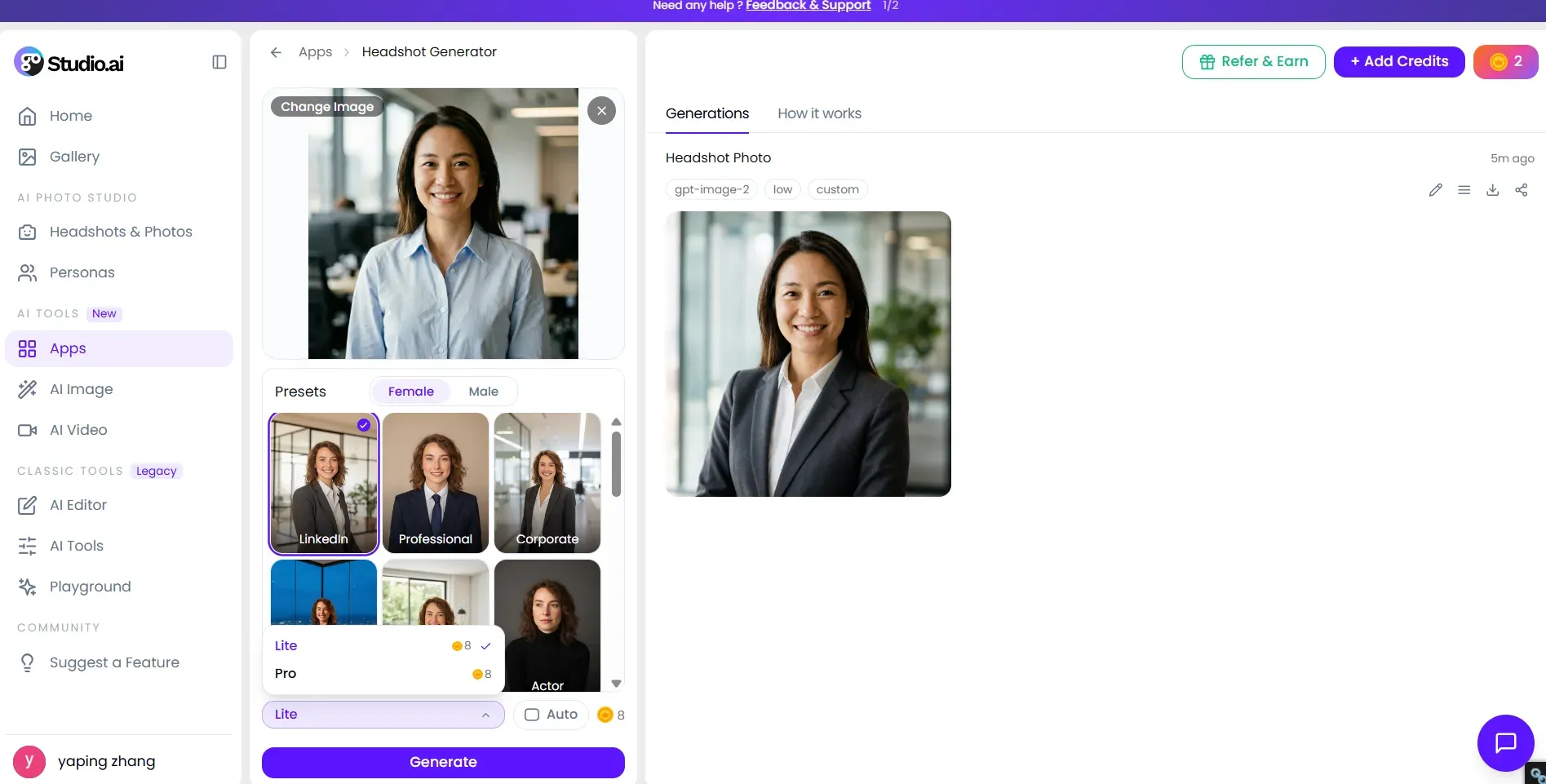
For applicants entering targeted fields, GoStudio.ai simplifies photo generation by removing manual prompt creation. Instead of requiring massive training sets, its single-photo workflow allows you to turn selfie into professional headshot free of friction.
Free Tier Features and Limits
New users get 10 free credits upon sign-up with no credit card required, allowing you to export clean, high-resolution headshots with zero watermarks.
However, keep in mind how the credit system works in practice: generating a headshot—whether you choose the Lite or Pro model—costs 8 credits per run. This means your initial free allowance gives you exactly 1 usable generation (or batch) to test the platform. If you want to experiment with multiple style presets or re-roll your photos, you’ll need to top up credits or upgrade to a paid plan.
Practical Value for Candidates
Generic tools apply identical suit templates to every user. GoStudio adjusts framing and background depth to fit specific career fields. Utilizing these presets provides free professional headshots ai assets that match recruiter expectations across corporate, creative, or executive sectors.
To improve profile authority, pair your updated photo with a matching banner color palette that reflects your target industry.
2. BetterPic – Best for High-Resolution 4K Downloads
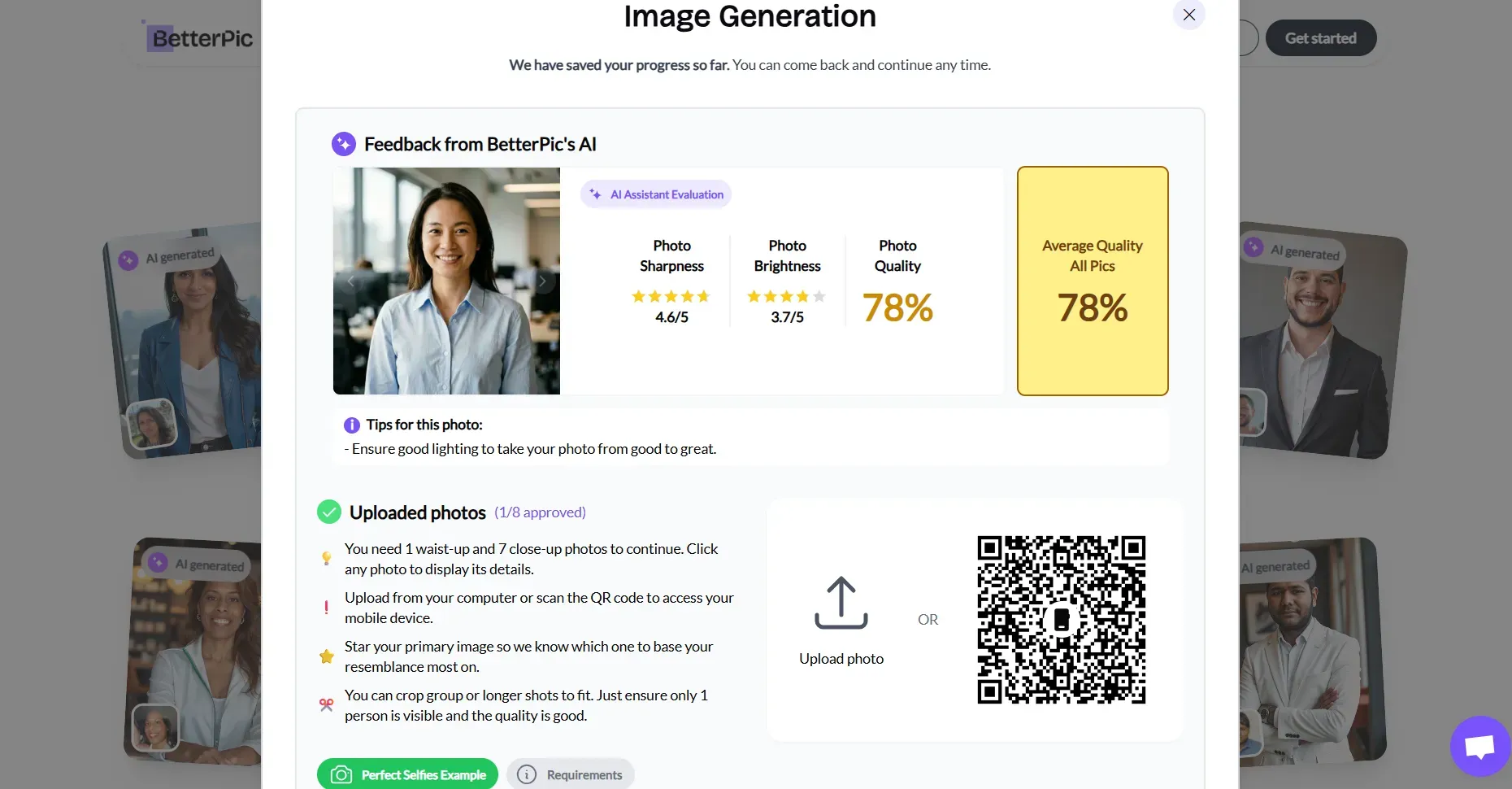
Freelancers lose client pitches when their LinkedIn photo pixelates on high-resolution screens. BetterPic solves that with true 4K output on its free tier.
BetterPic’s free AI headshot generator delivers up to 10 professional headshots in genuine 4K resolution. Upload 8 varied selfies showing different angles and expressions. The system then produces polished results with realistic lighting adjustments and up to five outfit or background combinations.
Free Tier Features and Limits
- Crisp 4K downloads ready for LinkedIn’s circular crop and resume files
- Natural lighting that avoids the flat plastic look common in lower-tier tools
- Full commercial rights so you can use the images on profiles, websites, and proposals
- No credit card required to start
Limitations appear in the free queue. Processing can take one to three months depending on volume. Paid packs starting at $35 move results to under an hour and unlock 150-plus styles plus tighter likeness training. The free version still grants five AI Studio credits for basic edits after generation.
Practical Value for Candidates
One quick heads-up on privacy: free users grant marketing rights by default, but you can request data deletion via support anytime. That small trade-off yields high-value results. Deploying these sharp 4K images across LinkedIn and your personal sites creates a polished, professional brand that commands attention—all without paying for a traditional studio session.
3. HeadshotPro (Free Tier): Best for Fast No-Sign-Up Generation
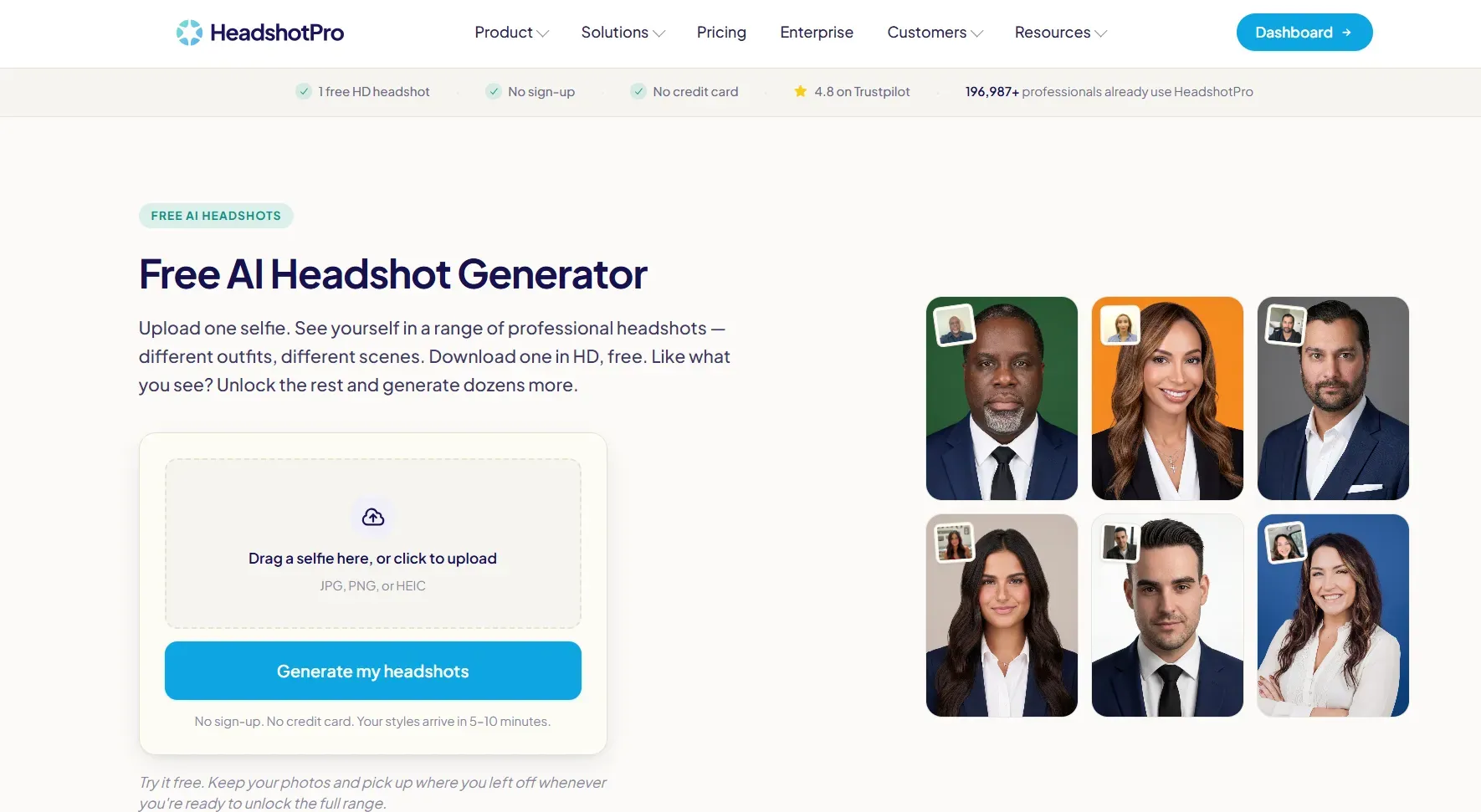
Few things are more frustrating than spending ten minutes uploading photos only to hit a surprise email paywall or mandatory credit card form. When you need a quick profile image update without setting up an account or giving out payment details, removing onboarding friction becomes essential.
Free Tier Features and Limits
-
Zero Onboarding Friction: $0 cost to start with no account sign-up and no credit card required upfront.
-
Quick Preview Turnaround: Generates your first previews within 5 to 10 minutes.
-
Free Download Allowance: You get 1 HD headshot with watermark to keep for free from a pre-selected style template, along with 8 additional preview styles to see alternative looks.
-
Format & Customization Limits:
- Output Format: Restricted to Square aspect ratio only (HD + landscape formats require a paid upgrade).
- Styles & Poses: Relies on auto-generated poses and pre-selected styles rather than full creative control.
- Edits & Re-rolls: No free edits, re-rolls, or money-back guarantees on the trial tier.
Practical Value for Candidates
The free generator builds a varied gallery displaying different outfits and backgrounds from your single source photo. It automatically selects the highest-scoring rendering for your free high-definition download, while keeping additional variations as previews.
To maximize your LinkedIn search impact, verify that the eye alignment in your final export stays level with the upper third of your profile circle frame.
4. Canva AI Headshot Generator – Best for Custom Background Control and Editing
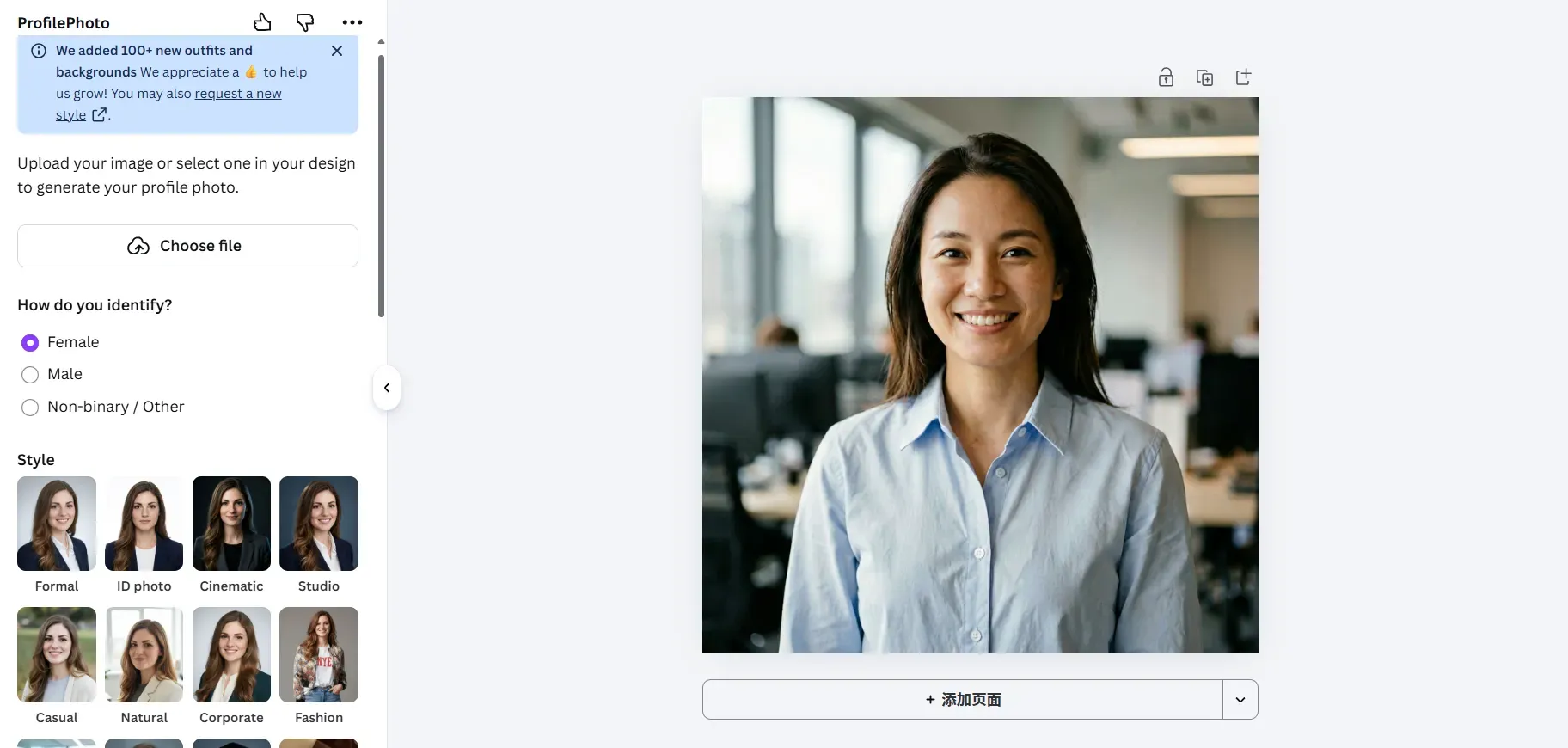
Many job hunters have a decent selfie, but messy backgrounds and poor lighting spoil their professional image. Canva fixes this by pairing smart AI tools with easy photo editing features.
Instead of creating fake faces that look weird, Canva cleans up real photos and replaces messy backgrounds. Its built-in ProfilePhoto app turns casual selfies into neat headshots while keeping your natural face and expression intact.
Free Tier Features and Limits
- Daily Generation Limit: Free users receive 2 credits every 24 hours. Since each run costs 2 credits, you get 1 free generation pass per day via the ProfilePhoto AI integration.
- Core Controls: Includes expression lock options and gender identity selection to preserve your natural look while generating studio-style variations.
- Background Customization: Supports manual color fills and AI backdrop prompts to swap out casual household environments for neutral tones.
- Export Options: Allows downloading full high-resolution PNG and JPG formats on the free tier (advanced tools like one-click Background Remover, Magic Eraser, and transparent SVG exports require Canva Pro).
Practical Value for Candidates
Use Magic Edit and auto white balance to fix dark shadows, balance your lighting, and clear out busy backgrounds quickly. To make a strong impression on LinkedIn, pick a background color that fits your field: choose classic slate grey for finance, dark navy for tech, or warm soft shades for creative work.
5. Adobe Firefly: Best for Generative Touch-Ups and Outfit Adjustments
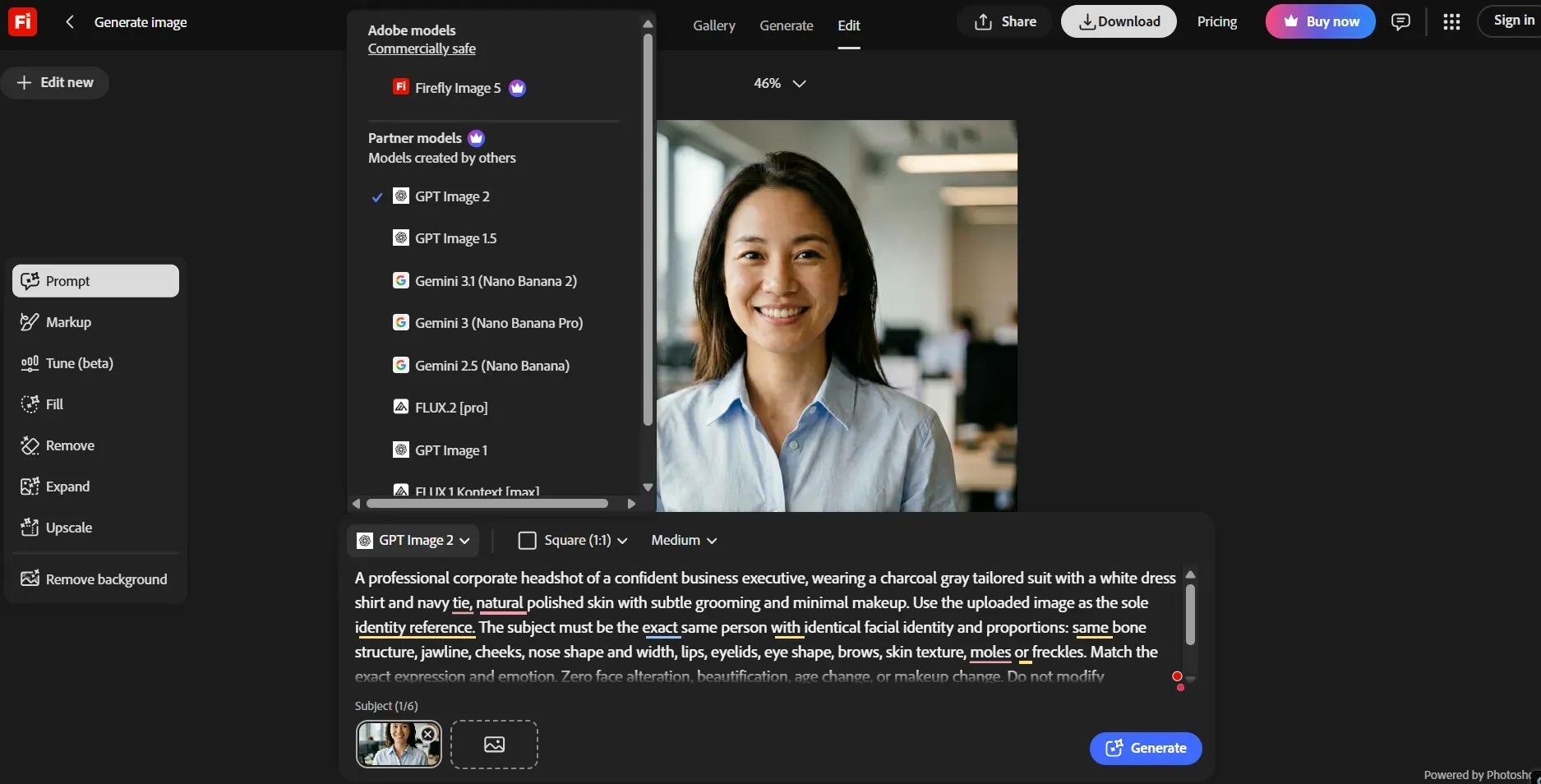
A casual phone photo rarely works for a polished profile, but paying hundreds for a studio session just to replace a t-shirt with a blazer is overkill. Adobe Firefly fixes this by letting you make targeted tweaks to your existing photos without changing your actual face.
Free Tier Features and Limits
- Monthly Generative Credits: Free accounts get 25 generative credits per month. Each Generative Fill brush edit or background change costs 1 credit.
- Watermarks & Credentials: Downloads on the free tier include a subtle Adobe Firefly watermark or embedded Content Credentials metadata.
- Export Options: Supports standard web and print resolution exports (higher-res batch exports require a paid Creative Cloud subscription).
Practical Value for Candidates
Generic prompts like "professional outfit" produce unrealistic synthetic textures. Specify precise fabrics, such as "matte cotton button-down shirt," and keep the background light direction consistent with your original photo lighting to maintain full visual realism.
How to Take the Perfect Input Selfie for Realistic AI Headshots
Most free AI profile tools output warped ears, extra limbs, or waxy skin textures simply because the uploaded image provides poor visual data.
What Kind of Photo Works Best for a Free AI Headshot Generator?
If you want to know how to turn selfie into professional headshot free of common digital artifacts, optimize your shot before uploading. AI diffusion models rely heavily on clear facial landmarks and light gradients.
| Parameter | Best Input Photo for AI Headshot Setup | Setup to Avoid |
| Lighting | Diffused natural sunlight facing a window | Direct harsh sun, high-contrast side shadows |
| Camera Angle | Eye level, taken from 4 feet away | Low-angle chin shots, high-angle wide angles |
| Expression | Soft, natural smile or relaxed neutral expression | Exaggerated grins, squints, or forced frowns |
| Backdrop | Flat, solid neutral wall (white or gray) | Complex backgrounds, crowded rooms, wallpapers |
Advanced AI Headshot Generator Prompt Tips to Avoid Bad AI Headshots
To build true topical authority and fix errors that standard guides miss, pay attention to camera physics and prompt alignment:
- Manage Lens Distortion: Front-facing phone cameras default to wide focal lengths (equivalent to 24mm to 28mm), which artificially enlarge nose proportions. Set your camera to 2x telephoto mode or ask someone else to take the photo from four feet back.
- Synchronize Prompting with Source Lighting: If your tool allows custom prompts, align the lighting terms (such as "soft window key light") with the natural direction of the light in your original selfie.
Pro-Tip for Custom Prompting:
Standard template tools restrict how much you can tweak the background or lighting. If you want to refine your custom prompt syntax before committing to fixed templates, test your text prompts on Atlas Cloud's ERNIE-Image-Turbo. It's completely free to use upon login and outputs clean, high-resolution renders without watermarks, making it an ideal sandbox to test lighting terms like "soft window key light" or "blurred executive office depth" at zero cost.
LinkedIn Photo Specifications and AI Formatting Compliance
Recruiters discard profiles the moment a photo appears pixelated or cropped wrong inside LinkedIn’s circular frame. Correct formatting prevents that waste after you generate a free AI LinkedIn profile picture.
LinkedIn policy requires the image to reflect your actual likeness. AI tools that preserve facial features meet the rule. Fully synthetic faces that no longer look like you violate it and risk removal.
Exact Dimensions and File Rules
- Recommended size: 400 x 400 pixels (square)
- Acceptable range: minimum 400 x 400, maximum roughly 7680 x 4320 pixels
- File size: under 8 MB
- Formats: JPG or PNG
- Display: LinkedIn crops to a circle, so keep the face centered
Framing and Contrast Checklist
Aim for the face to fill about 60 percent of the frame from chin to top of head. Leave modest space above the head. Use even lighting with clear contrast between face and background so the image remains sharp on mobile screens.
| Spec | Requirement | Why It Matters |
| Dimensions | 400 x 400 px recommended | Prevents blur after circular crop |
| File size | Under 8 MB | Ensures fast upload |
| Face fill | ~60% of frame | Maximizes recognition |
| Lighting contrast | Even front light | Avoids muddy or washed-out look |
After generation, crop the free AI LinkedIn profile picture to these linkedin profile picture dimensions before upload. Export at higher resolution if available, then resize. This step keeps the linkedin avatar resolution crisp and aligns with linkedin photo guidelines ai users must follow.
Once the photo is live, reinforce it with industry keywords in the headline. That pairing improves topical authority and helps the full profile surface more often in recruiter searches.
Privacy, Data Ownership, and Image Safety Concerns
Is an AI headshot generator safe? Only if the Terms of Service spell out three non-negotiable points: source images delete quickly, generated files belong to you with commercial rights, and your photos stay out of future model training.
What to Check Before You Upload
- Immediate or timed deletion of original selfies (ideally within 24 hours)
- Explicit commercial rights AI headshot ownership so you can use the image on LinkedIn, resumes, and client sites
- Clear opt-out or “no training” language for free ai headshot data protection
- No third-party sharing or resale of facial data
| Tool Example | Source Photo Deletion | Commercial Rights | Model Training |
| HeadshotPro Free | Within 24 hours | Yes, full | No |
| BetterPic Free | On request | Yes | Possible marketing use |
| Canva / Firefly | Account-based | Yes for outputs | Varies by plan |
HeadshotPro states photos auto-delete and never train models. BetterPic free tier may retain images for marketing unless you email support for removal. Canva and Adobe Firefly grant commercial rights to generated results under standard accounts, yet users should still review current policies.
For ai photo privacy LinkedIn users, the safest path is to generate, download, then request deletion of source files immediately. After the free professional headshot is live, reinforce the profile with precise industry keywords.
Final Verdict and Next Steps to Upgrade Your Profile
A weak profile photo still costs interviews even after hours of resume polishing. Choose the free AI headshot generator for LinkedIn that matches your biggest constraint, then lock in the rest of the profile.
Job seekers who need rapid high-resolution files should start with BetterPic’s free 4K tier. Graduates targeting specific industries get the most from GoStudio.ai’s Corporate, Tech, and Executive presets. Anyone who wants zero account friction can finish in under ten minutes with HeadshotPro’s free HD download. Canva suits users who already edit designs and need background control. Adobe Firefly works best for prompt-based clothing and lighting fixes.
Quick Match Table
| User Type | Best Free Tool | Primary Reason |
| Urgent job seekers | BetterPic | True 4K downloads |
| Role-focused graduates | GoStudio.ai | Industry style presets |
| Zero-friction testers | HeadshotPro Free | No sign-up, one HD keep |
| Design-oriented freelancers | Canva AI | Full background editing |
| Outfit adjustment needs | Adobe Firefly | Generative clothing prompts |
Three-Step Action Plan
- Generate and download the headshot that meets LinkedIn’s 400 x 400 recommended size.
- Upload it, then rewrite the headline with a clear role plus one industry keyword.
- Update the About section and banner image so the new photo sits inside a consistent visual brand.
These steps turn a free professional headshot AI result into a complete upgrade LinkedIn profile free of studio costs. After the photo is live, post one short insight related to your target field.





