Grok’s image and video generation features were once accessible to most X users, but tighter rate limits and the push toward X Premium image generation paid tiers have left many creators searching for open options. The good news: you don’t need to pay to keep making great AI assets. Here are the best free alternatives to grok image generation 2026 and the most robust free alternatives to grok video generation 2026 , picked for real-world usefulness and creative freedom.
Quick Comparison
| Best For | Recommended Free Tool | Primary Modality | Key Creative Advantage |
| Photorealism & Speed | Meta AI | Image & Video | Genuinely free, fast outputs, 2026 text-to-video enhancements |
| Cinematic Motion | Qwen Video / Hunyuan | Video Only | Advanced prompt adherence, multi-second motion, audio sync |
| Typography & Design | Ideogram (Free Tier) | Image Only | Best-in-class text rendering inside complex graphic assets |
| Complex Prompting | ChatGPT (DALL-E free tier) | Image Only | Excellent contextual prompt understanding and fine-tuning |
| Advanced Editing | Google Gemini | Image Only | Granular multi-turn follow-up editing and canvas controls |
Note: All tools listed offer a free tier as of mid-2026. Feature availability may vary by region and account type.
Why Users Are Searching for Free Alternatives to Grok Image Generation in 2026
When xAI launched Grok's "Imagine" feature, it quickly built a loyal following. Its outputs were fast, the text-rendering inside images was genuinely strong, and its filters were notably more permissive than those of rival tools, making it popular with creatives who felt constrained elsewhere. The early promise of a grok ai video generator free tier added further appeal.
What Changed in 2026
The experience has narrowed considerably. Grok Imagine limits have tightened, free users now face strict daily generation caps, and full access requires an active X Premium subscription. xAI image generator pricing has pushed many casual users toward alternatives that offer comparable creative range without a paywall.
Grok Free Tier vs. Paid Tier at a Glance
| Feature | Free Users | X Premium Subscribers |
| Daily image generations | Limited | Higher quota |
| Video generation | Restricted | Available |
| API access | Paid only | Included |
| Content filter flexibility | Standard | Standard |
Note: Tier details reflect publicly available information as of mid-2026 and may change. Verify current limits at x.ai.
Meta AI: The Best Overall Free Alternative for Casual Creators
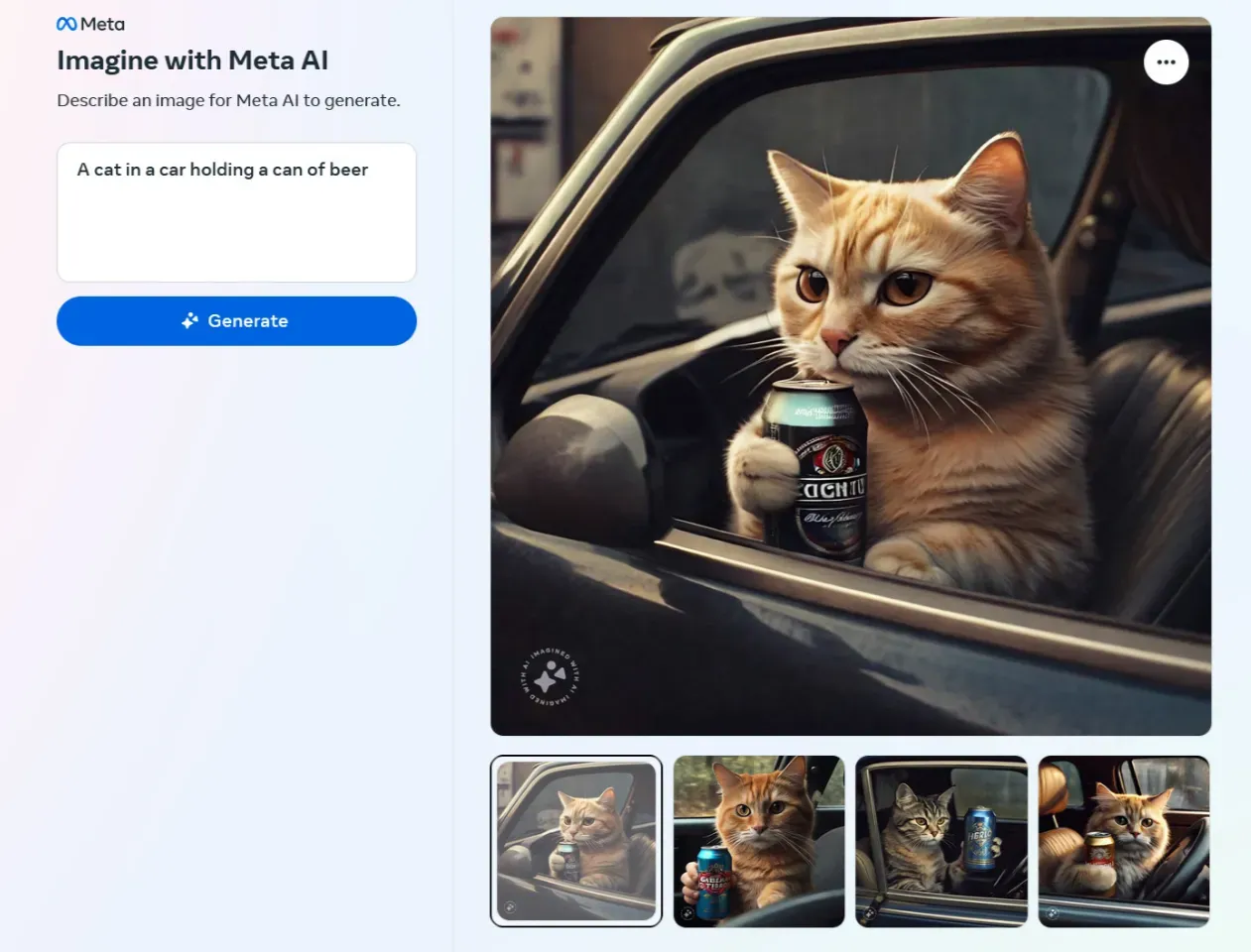
Meta AI has quietly turned into one of the easiest ways to create AI art in 2026. Most tools force you to make a new account or download another app. This one is different. Instagram, WhatsApp, and Facebook are just a few of apps you already use on a daily basis. You can also just use the meta.ai website. The fact that you don't have to jump through any hoops is exactly what makes it so great.
What It Does Well
Meta AI image generation produces results quickly, typically within a few seconds of submitting a prompt. The quality is consistently solid for photorealistic and stylized outputs alike. For users who want to go further, Meta AI also supports image/text-to-video conversion, making it a genuine free text to video tool for creators who previously relied on Grok's unified generate-then-animate workflow.
| Feature | Meta AI (Free Tier) |
| Image Generation Speed | Fast (under 5 seconds typical) |
| Text-to-Video Capability | Available on web & selected chat surfaces |
| Video Audio & Music Integration | Supported (Can add AI background tracks/sound FX post-generation) |
| Temporal Video Extension | Supported (Allows user to extend clips beyond the initial 3s window) |
| Dynamic Video Re-styling | Supported (One-click prompt to swap visual styles while keeping motion) |
| Platform Availability | Web, WhatsApp, Instagram, Facebook |
| Account Required | Meta account (Free) |
| Cost | Free |
Where It Falls Short
Meta AI is the perfect starting spot for everyday creators in 2026. It gives you fast, free images and short clips with zero tech hassle. Plus, it is already right there on the apps you use.
Google Gemini and ChatGPT: Best Free Tools for Precise Prompting and Editing
For users who need more than a quick output, these two platforms offer the strongest advanced AI prompt control available on a free plan in 2026. Understanding where each excels will help you get the most of both because they serve slightly different needs.
| Feature | Google Gemini (Free) | ChatGPT (Free) |
| Multi-turn image editing | Strong | Limited |
| Complex scene rendering | Moderate | Strong |
| Workspace integration | Google Suite | None |
| Daily generation limit | Yes | Yes |
Google Gemini: Conversational Editing at Its Best
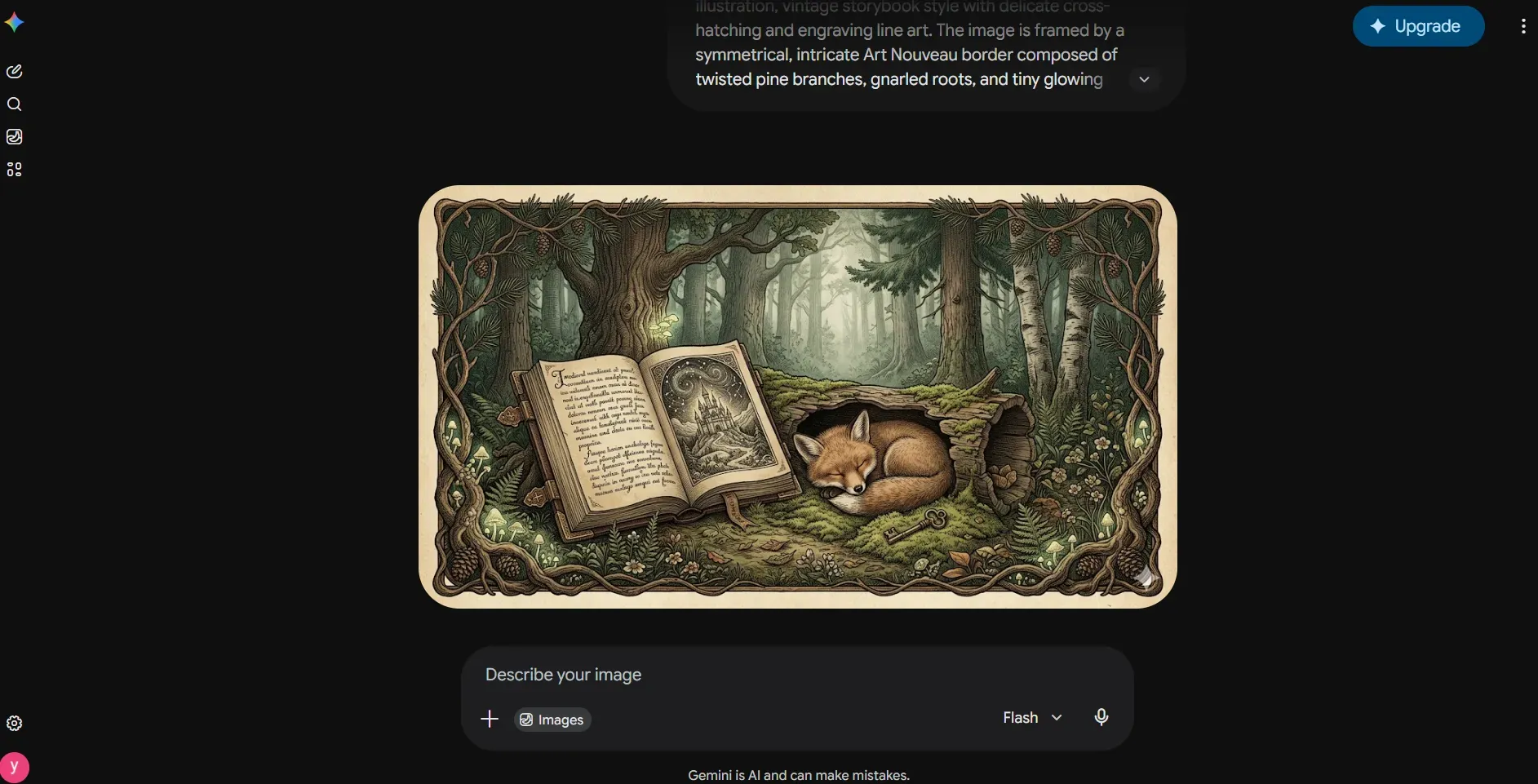
Google Gemini image generation free access stands out for its multi-turn editing capability. Rather than re-prompting from scratch, users can issue follow-up instructions like "keep the subject but change the background to a night sky" and Gemini applies the change contextually. It also integrates natively with Google Workspace, making it a strong choice for professionals already working inside Docs, Slides, or Drive.
Google Gemini image generation free version stands out because you can edit images step-by-step. Instead of starting over with a new prompt, you can just type, "keep the person but make the background a night sky." Gemini gets the context and changes it. It also links right up with Google Workspace. That is a massive plus if you spend your day in Docs, Slides, or Drive.
As one of the more capable multimodal AI alternatives to Grok, Gemini handles text, image, and contextual reasoning within a single conversation thread.
Pro Tip: Gemini’s free tier (Nano Banana 2) restricts you to about 100 images per day with dynamic limits. However, in actual testing, the count currently falls short of 100—it is roughly in the range of 20 to 30.
Note: Google automatically burns a highly visible, translucent white SynthID logo directly onto the bottom-right corner of all generated outputs as seen in the image.
ChatGPT: Complex Compositions on a Free Plan
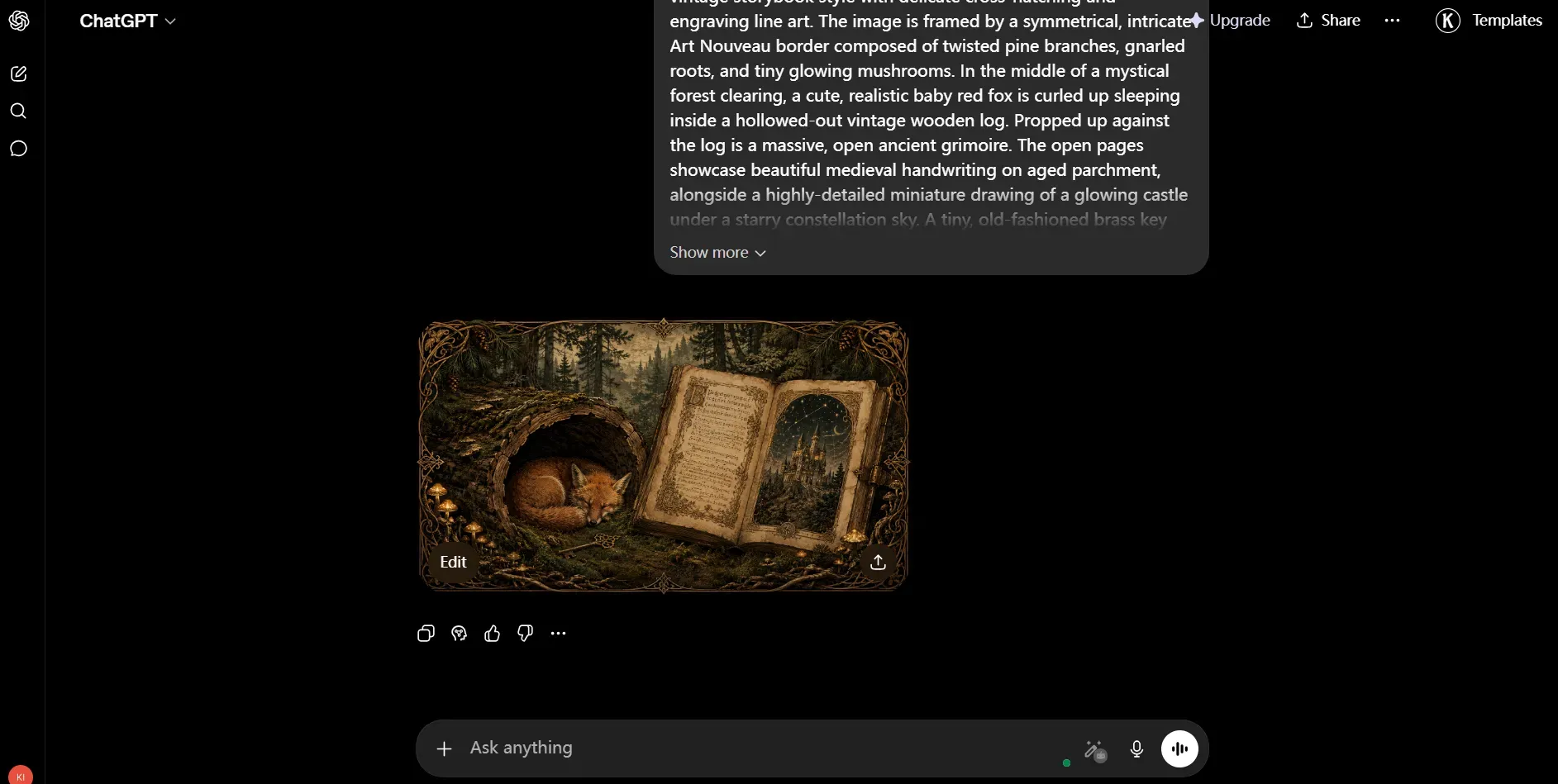
ChatGPT lets free users make images with DALL-E. It does a great job with complex scenes, text diagrams, and long prompts with lots of details. Just watch out for the daily ChatGPT image limits on the free plan in 2026. If you make a lot of pictures, you will run out of credits fast.
Pro Tip: While official docs state ChatGPT’s free tier limits you to 2–3 images daily, real-world testing shows you can often pull at least 10 generations, depending on your account's specific dynamic quota. Even better, it leaves your outputs clean without any prominent watermarks. The real kicker? You can select custom dimensions right from the start and use ChatGPT’s native editor to tweak and modify the images afterward.
Navigating Free Tier Caps
Both platforms reset limits on a daily cycle. The practical workaround is simple: use Gemini for iterative editing tasks and reserve ChatGPT for single, detail-heavy generations where prompt complexity matters most.
Ideogram and Recraft: Top Alternatives for Graphic Design and Typography
Grok has always struggled to put readable text inside its images. If you are a designer or marketer who needs crisp lettering and clean layouts, skip it. You are much better off using Ideogram or Recraft instead. They consistently do a better job.
| Feature | Ideogram (Free) | Recraft (Free) |
| Text rendering quality | Excellent | Moderate |
| Vector output | No | Yes |
| Credit replenishment | Gradual refill | Daily allowance |
| Outputs public by default | No | Yes |
| Best for | Posters, covers, type-heavy designs | UI assets, icons, brand graphics |
Ideogram: The Gold Standard for Text in Images
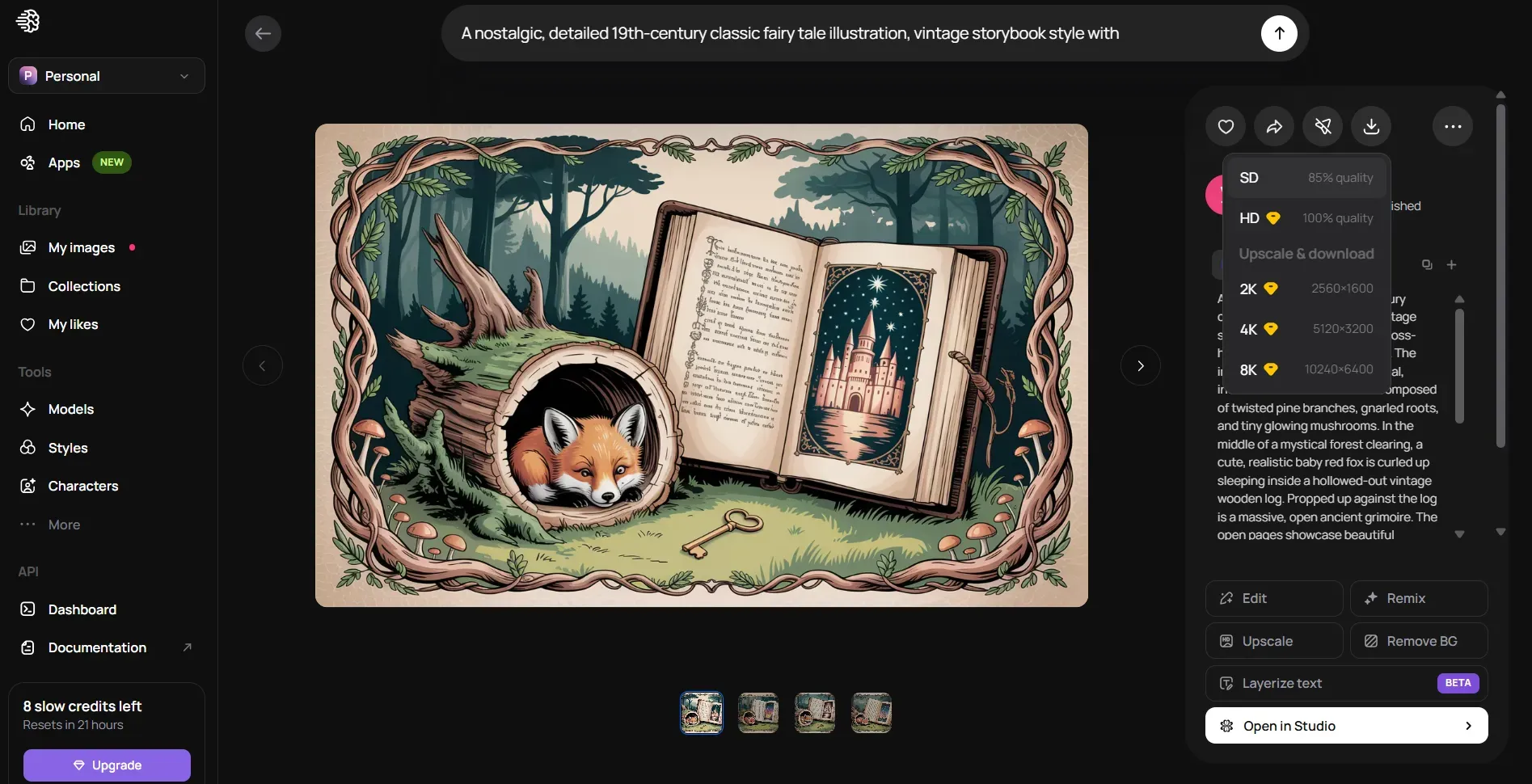
Ideogram is widely regarded as the most reliable AI image generator with text rendering available on a free plan. Its specialty is producing crisp, readable lettering within compositions, making it ideal for posters, book covers, social media headers, and event flyers.
Ideogram does its free tier credits a bit differently. They don't just reset every night at midnight. Instead, your points slowly drip back into your account over time. It is great if you use the tool throughout the day, but it definitely holds you back if you try to make a ton of pictures all at once.
Pro Tip: The free plan lets you drop a batch of 4 clean, unwatermarked images at once, but there's a catch when it comes to saving them. Free downloads are stuck at standard definition, which hits about 85% of the full quality. If you really need those super crisp, high-res files for your work, you will have to open your wallet and pay for a premium plan.
Recraft: Professional Vector Assets Without the Price Tag
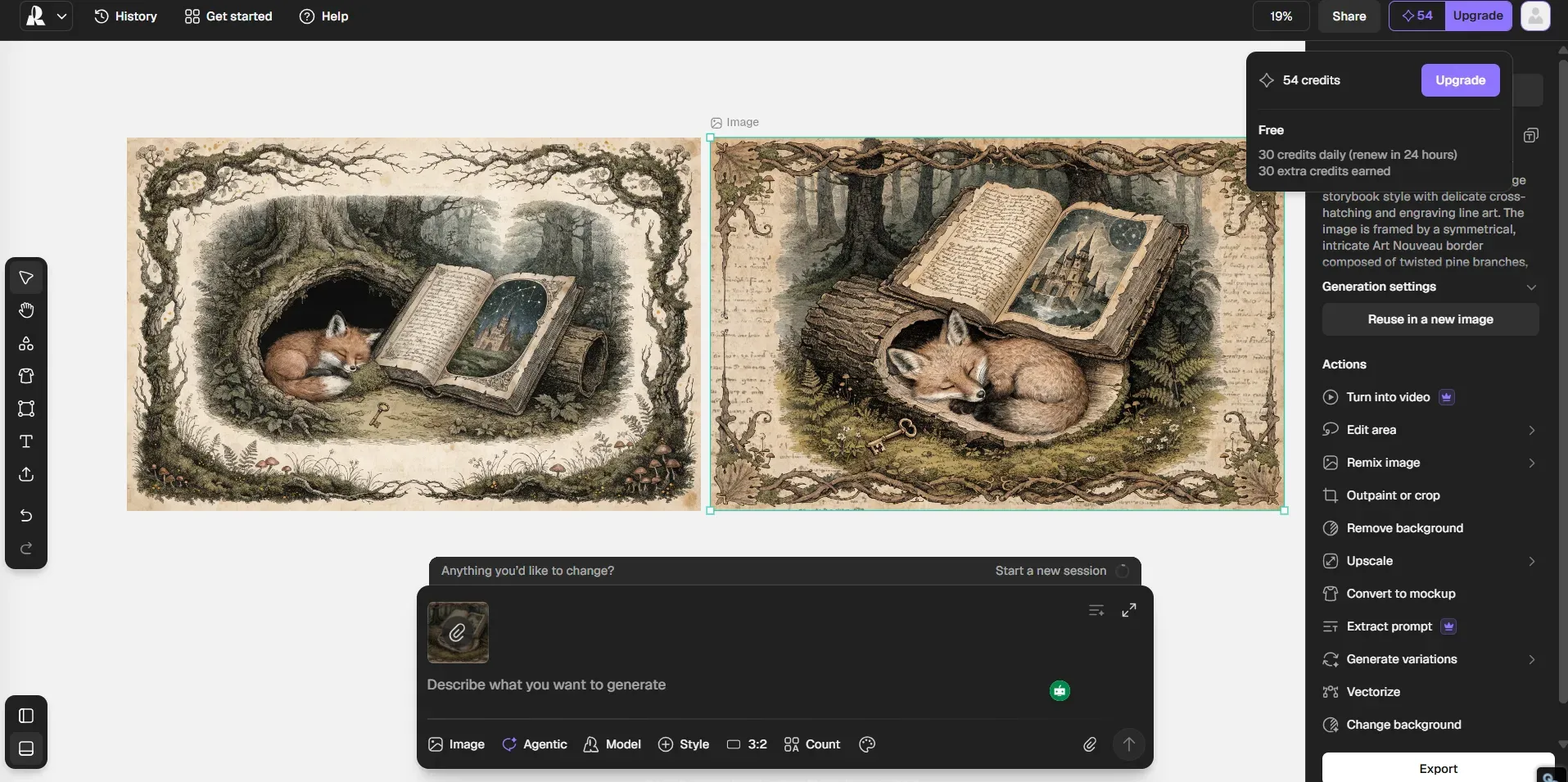
Recraft is basically the best vector AI art free tool for anyone who needs clean vectors, app icons, and brand graphics. The quality matches what you get from paid software. It gives freelancers and small design teams a massive head start without forcing them to spend a dime.
One important caveat: free users on Recraft work under public-output rules, meaning generated assets are visible in the community gallery. Users with confidentiality requirements should factor this in before use. It functions well as a Recraft alternative evaluation step before committing to a paid plan.
Pro Tip: Recraft’s free tier pumps out up to 2 images per batch, burning 3 credits per image. You get a daily allowance of 30 credits plus 30 earnable extra credits, but advanced features like video or vector extraction are locked behind a paywall.
Which One Should You Use?
If readable text inside an image is the priority, Ideogram is the clear choice. If you need scalable vector files or professional design assets, Recraft fills that gap more effectively than almost any other free tool available in 2026.
Perchance.org: No Account, No Hard Limits
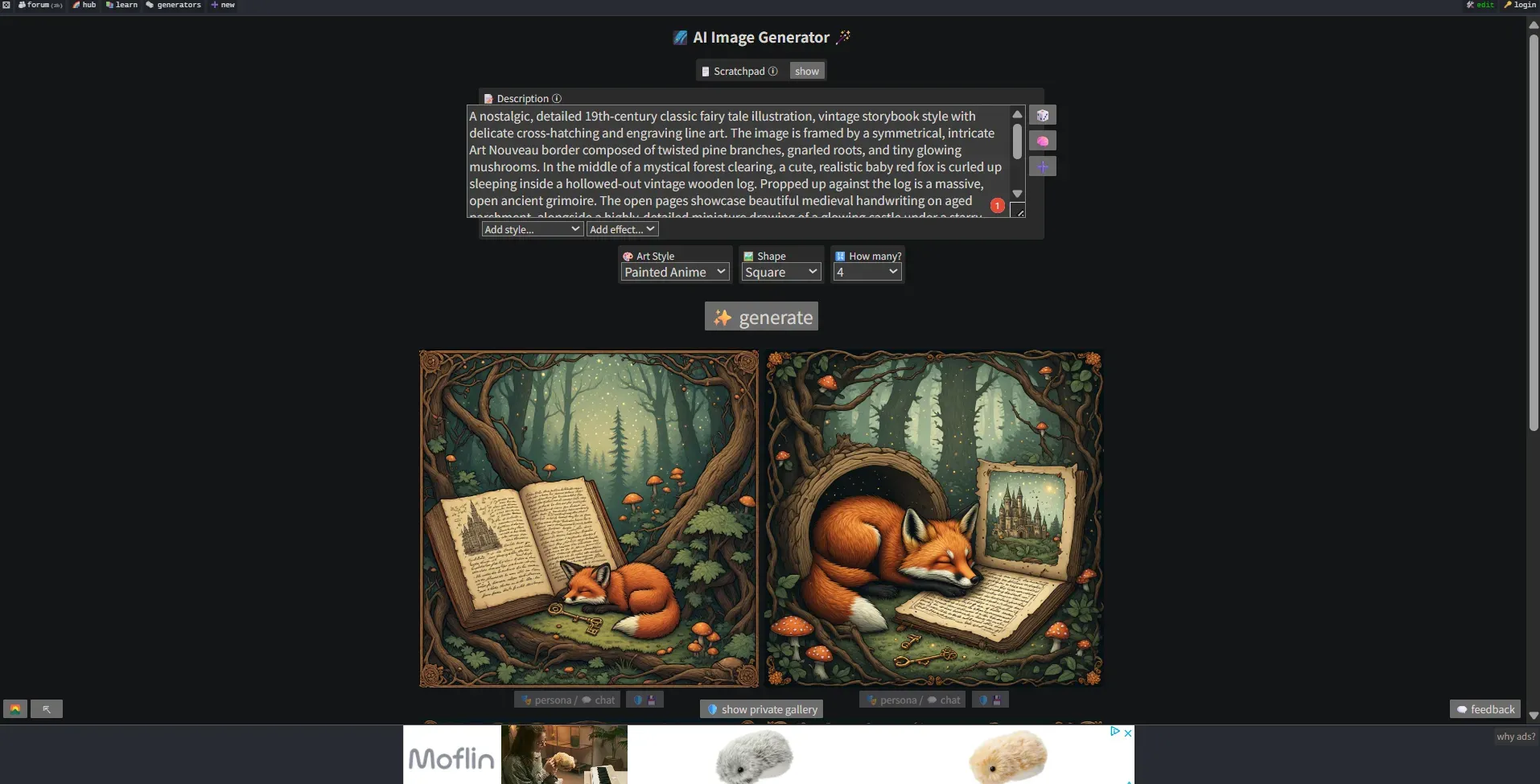
Expanding into Video: The Community Plugin Edge
There are no strict dynamic queues, no subscription pop-ups, and absolutely zero signup barriers—making it the ultimate anonymous sandbox for both image and video experimentation when you want to bypass the corporate guardrails of Meta or Gemini.
Tencent Hunyuan Video: The Cinematic Standard for Realism
Sharing the localized spotlight, Tencent Hunyuan Video is the preferred engine for power users focusing on deep environment interactions and native camera tracking commands. It handles complex physics layers, e.g., fluid dynamics, cloth wind ripples, with higher structural cohesion across multi-second generations than standard hosted web queues.
- Decoder-Only MLLM Text Encoder: Abandoning standard CLIP or traditional T5-XXL limitations, Hunyuan implements a pre-trained Multimodal Large Language Model (MLLM) text backbone. This provides deep causal attention mapping, enabling the model to accurately render complex multi-step prompt chains, subtle facial micro-expressions, and spatial orientation layout tags.
- High-End 3D Causal VAE Compression: This system uses a unique 3D Causal Variational Autoencoder to compress video pixels. It shrinks data 16 times across the frame and 4 times over time. By cutting down the heavy data load, it handles full focus across long video clips while keeping 1080p image quality completely stable. | | | | ----------------------- | ------------------------------------------------- | | Feature | Tencent Hunyuan Video (1.5 / Main) | | Core Architecture | Unified Diffusion Transformer (DiT) | | Base Parameters | 13B (Flagship) / 8.3B (Lightweight v1.5) | | Max Upscaled Output | 1080P Ultra-HD via Native SR Network | | Audio/Speech Sync | Immaculate (Dynamic situational ambient tracking) | | Hardware Baseline | Demands higher baseline memory structures |
For full architecture execution or to download the official model weights, clone the source directories directly via github.com/Tencent-Hunyuan/HunyuanVideo and wrap the model pipelines within your local ComfyUI interface.
Running FLUX Locally: Full Control for Power Users
For users with capable hardware, running open source AI image generator models locally removes content restrictions entirely, since no third-party server is involved. Blackforest Labs' FLUX models are among the most capable available for local deployment.
Minimum recommended hardware for local FLUX generation:
| Component | Minimum Spec |
| GPU | Nvidia RTX 3060 (12GB VRAM) |
| RAM | 16GB system RAM |
| Storage | 30GB+ free (model files) |
| OS | Windows 10/11 or Linux |
Want to run FLUX locally for free? Just grab the model files from the official Blackforest Labs page on huggingface.co/black-forest-labs. After that, you can load them up right through ComfyUI.
Wan 2.2 The Open-Source MoE Video Powerhouse
Released as a massive architectural leap, Wan 2.2 utilizes a Mixture-of-Experts (MoE) design that delivers cinematic-level aesthetics and complex physical motion rendering without destroying your rendering timelines.
It stands out for its deep multi-modal versatility:
- Unified Animation Framework (Wan-Animate): Natively replicates highly granular human body expressions and holistic movements using a single character image and a motion reference video.
- Speech-to-Video Pipelines (Wan-S2V): Supports direct audio-driven video synthesis—allowing you to feed a reference photo alongside an audio file (or optional text-to-speech strings) to generate perfectly lip-synced, animated vertical or widescreen talking avatars. | | | | --------------------- | ----------------------------------------- | | Feature | Wan 2.2 (Open-Source) | | Core Architecture | Mixture-of-Experts (MoE) | | Max Resolution | 720P @ 24fps (Optimized via VAE) | | Audio/Speech Sync | Excellent (Native Wan-S2V audio nodes) | | Character Control | Superior (Holistic movement replication) | | Hardware Baseline | 5B Variant runs smoothly on consumer GPUs |
Want to integrate these next-gen pipelines? You can pull the official weights and inference layers directly from github.com/Wan-Video/Wan2.2 and deploy them via the ComfyUI-WanVideoWrapper node extension.
While running FLUX/Wan 2.2/Hunyuan locally gives you full control over the pipeline, it creates a massive hardware bottleneck for creators without an enterprise GPU. This is where Atlas Cloud enters the pipeline as the definitive 2026 upgrade.
If your local hardware falls short of the 12GB+ VRAM limit, or you are looking to build a high-volume automated workflow, running local scripts isn't practical. This is where Atlas Cloud has become the go-to infrastructure for creators in 2026.
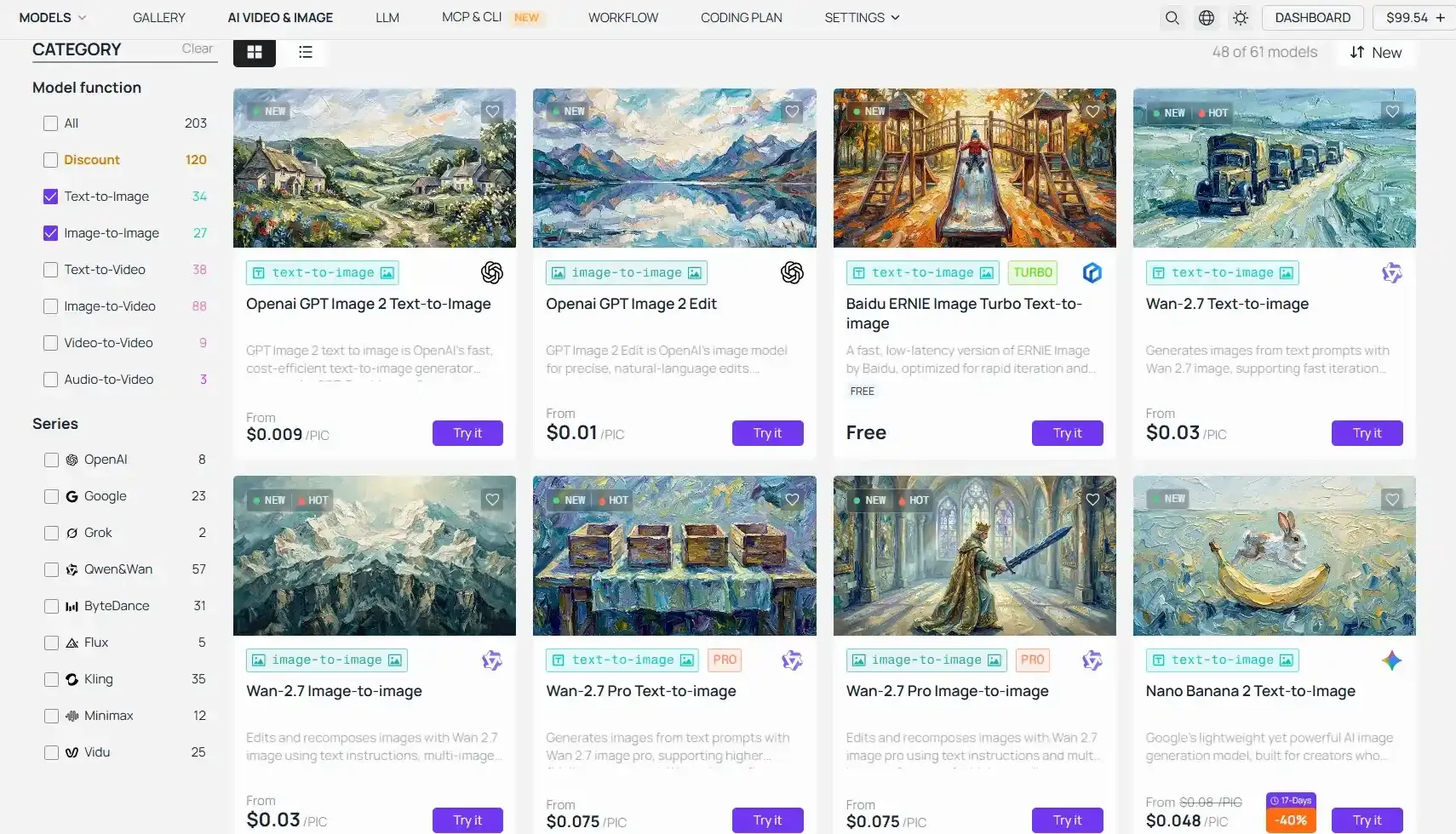
You don't have to clog up your own PC with massive model files anymore. Atlas Cloud handles everything through one simple API. It gives you fast, lag-free access to top-tier open-source models.
With a single API key, you can call FLUX for hyper-realism or ChatGPT 2.0 for perfect typography, avoiding both the tight daily quotas of Meta/Gemini and the hardware costs of a local rig.
Furthermore, you don’t even have to abandon Grok’s native rendering style; Atlas Cloud provides direct access to Grok's Text-to-Image and Image-to-Image APIs on a cost-efficient, pay-as-you-go basis. You can effortlessly maintain your precise Grok-based image pipelines and seamlessly transition them into video workflows without being throttled by X Premium’s daily limits.
Advanced Insights: Making the Most of Free AI Generation
Moving your workflow away from Grok comes with a few technical realities. Here is how to navigate credit walls, hardware barriers, and multi-modal outputs on free tiers.
The Myth of "Unlimited" Free Cloud Generation
Truly unlimited free AI generation no longer exists in the cloud. Hosted platforms like Meta AI, Ideogram, and Perchance all rely on rate limits or slow-refill credit systems to manage server loads.
The Only Unlimited Path: Running an open-source model like FLUX or Stable Diffusion locally on your own hardware. Once downloaded, your only cost is electricity—no daily limits, no subscription fees, and complete creative privacy.
Next-Gen Video: Navigating Audio Synchronization
If your Grok workflow relied heavily on moving imagery, replacing it requires looking at dedicated multi-modal engines. Tools like Hunyuan Video and Qwen AI have become the 2026 standard for free-tier users because they support native audio-to-video synchronization—saving you the hassle of adding sound design in post-production.
Hardware Limitations & Cloud Workarounds
Local generation demands serious hardware juice. If your graphics card isn't ready for heavy lifting, you don't have to settle for the tight quotas of free cloud tiers. Here are your three execution paths in 2026:
| Execution Path | Cost Model | Setup Complexity | Best Used For |
| Local ComfyUI Setup | 100% Free (Electricity only) | High (Requires manual installations) | Power users with an Nvidia RTX 3060 (12GB) or higher who love full control. |
| Hosted Free Tiers (Meta/Gemini) | Free with strict daily quotas | None (Browser ready) | Casual users running standard, highly moderated prompts on a daily basis. |
2026 Technical Checklist: What to Know Before Switching
Before you commit to a new free AI art workflow, keep these three structural shifts in mind:
- Local vs. Hosted Constraints: Hosted alternatives (Meta, Gemini) are heavily censored and limited by cloud queues. Local execution via ComfyUI offers absolute freedom but demands a steep learning curve and a dedicated GPU.
- Audio-Synced Video is Now Standard: When evaluating Grok video alternatives, do not settle for silent animation. Look for tools utilizing Qwen or Hunyuan backends to get native sound integration.
- The VRAM Compromise: If you want to run FLUX locally but your hardware falls short of the 12GB VRAM requirement, look for GGUF quantized versions of the models. They allow older 8GB graphics cards to run heavy models without crashing your system.
Conclusion: Which Grok Alternative Should You Choose Today?
The right pick among the free alternatives to Grok image generation 2026 comes down to one question: what do you actually need it for?
| Your Priority | Best Free Tool |
| Speed and social media output | Meta AI |
| Text and typography in images | Ideogram |
| Precise, iterative editing | Google Gemini |
| Complex scene compositions | ChatGPT (free tier) |
If you just want to mess around, using Meta AI and Ideogram together will easily cover your daily creative needs for free. But if you work with content and need a reliable, free AI workflow that can keep up with heavy prompting, pairing Gemini with ChatGPT is your best move.
If you absolutely demand creative freedom and data privacy, setting up FLUX locally is your only real option.
You don't need a paid plan to start using any of these tools. Each one fills a gap left behind by Grok's strict new limits. The AI tool for content creators that works best for you in 2026 is the one that doesn't add to your troubles. Just pick one, test it out on your actual work, and see how it goes.





