

Turning a couple's photo into a short, sweet kissing clip has become one of the most shared AI video trends, but plenty of people hit a wall. In a r/HailuoAiOfficial thread bluntly titled "Kiss not allowed??", users vent that even a gentle kiss prompt sometimes gets rejected. This guide walks you through the whole Hailuo AI kiss workflow, from uploading photos to fixing rejected clips, plus copy-paste prompts and the consent rules that keep it ethical. Use only photos of adults you have the right to use.
Key Takeaways
- The Hailuo AI kiss generator turns one or two front-facing photos (or a text prompt) into a short MP4 kissing clip, per Hailuo's official tool page.
- A clear prompt like "warm romantic lighting, gentle kiss, slow camera push-in" gives the best results.
- Rejected clips are usually a moderation flag, not a bug; keep prompts plainly romantic and use clear photos to reduce false rejections.
- Developers can batch the same romantic image-to-video effect through Atlas Cloud's hosted Hailuo (MiniMax) models.
What Is the Hailuo AI Kiss Generator?
The Hailuo AI kiss generator is an entertainment tool that animates one or two portrait photos into a short kissing video with guided facial motion, as described on Hailuo's official AI kiss tool page. It is built on Hailuo AI, the video generator from the Chinese AI company MiniMax. You upload clear, front-facing photos, add a short prompt, and get an MP4 ready for TikTok, Instagram, or a private message.
It is designed for lighthearted, personal use, think anniversary surprises or a fun clip for a partner, not for impersonating people or anything explicit. The official page itself tells users to "respect privacy, consent, and platform rules" and to upload "only what you have rights to use." Keep that framing and the tool works as intended.
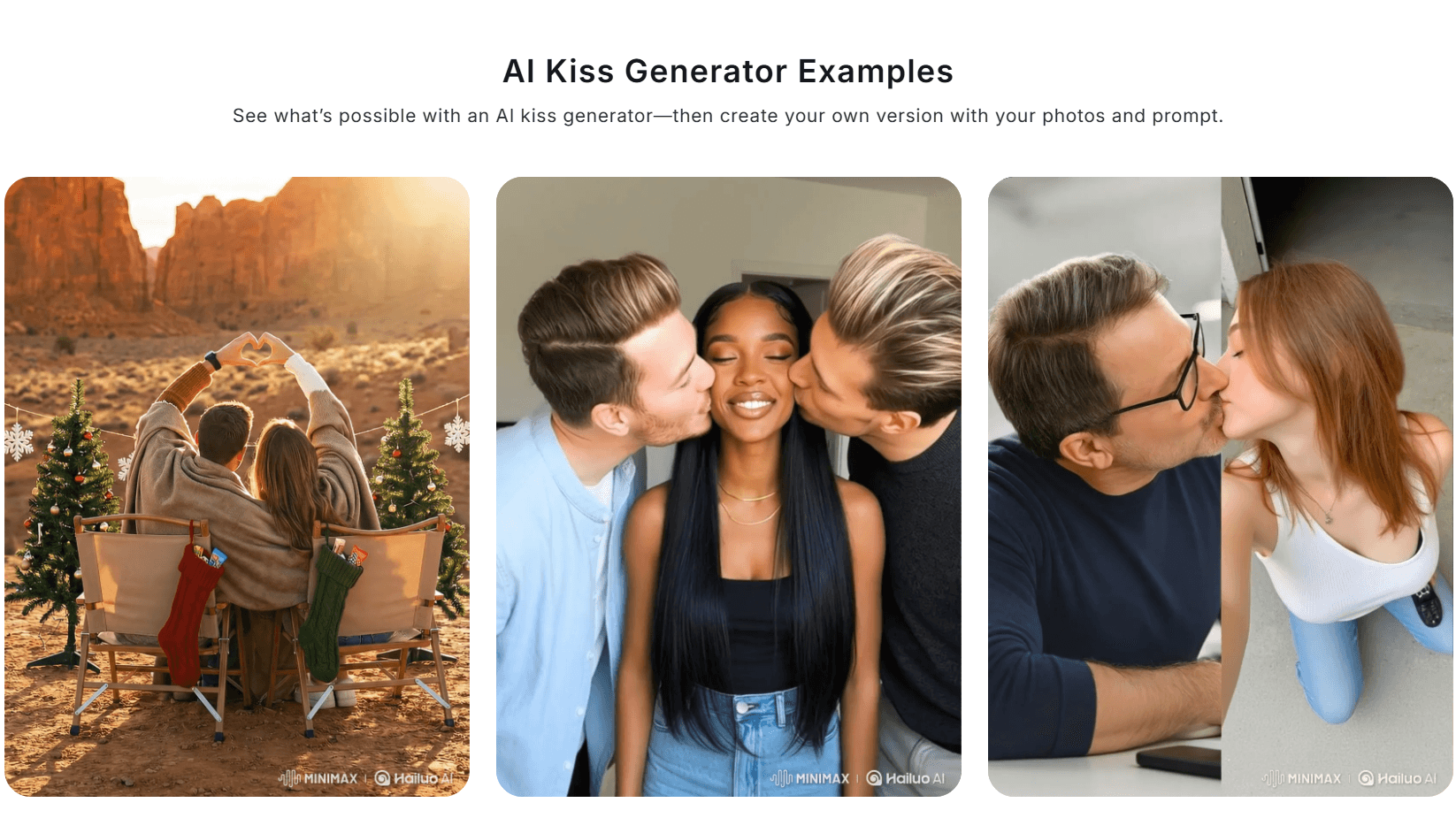
What you get back is a short, social-ready clip rather than a long scene. The model adds guided facial motion, a lean-in, a soft kiss, a small reaction, so a still photo turns into a few seconds of movement. That short length is a feature, not a limit: a clean five-second clip that looks natural beats a longer one that drifts into uncanny territory. Think of it as an animated greeting card, which is exactly how most people share these on TikTok, Instagram, or in a private message.
How to Make a Hailuo AI Kiss Video: Step by Step
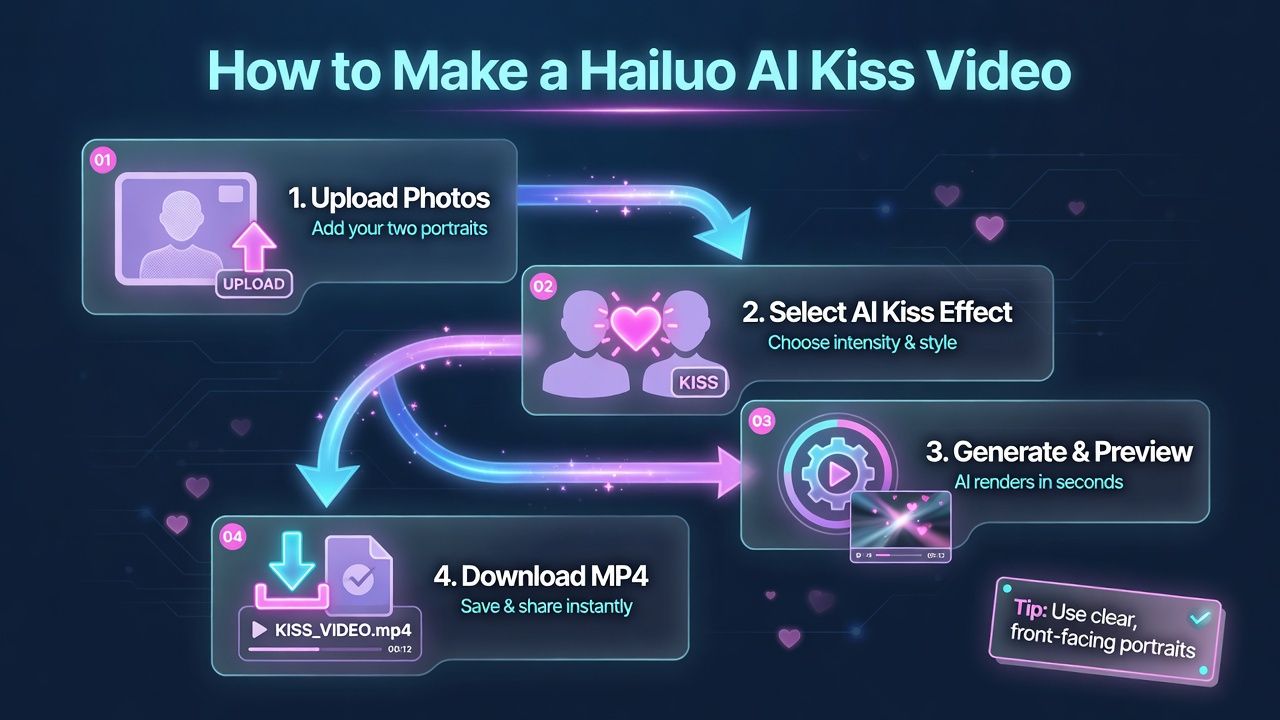
Making a Hailuo AI kiss video takes four steps, and the whole thing runs in a browser. The single most important factor is photo quality: clear, front-facing, well-lit portraits give the model the most to work with.
- Upload one or two photos. Use sharp, front-facing portraits with good lighting and unobstructed faces. Two photos let the model pair two people; one photo works for a solo-to-partner scene. Avoid sunglasses, hats that hide the face, group shots, and heavy filters, since the model needs to read facial features cleanly.
- Add a short prompt. Describe the mood and camera, for example "warm romantic lighting, gentle kiss, slow camera push-in." One clear sentence beats a long one; name the emotion, the light, and a single camera move.
- Generate and preview. The model renders a short clip with guided facial motion. Preview before you commit, and if the motion looks stiff or the faces warp, regenerate or simplify the prompt rather than piling on more words.
- Download and share responsibly. Export the MP4 and share it only with the consent of everyone shown. A clip meant as a private gift does not need to be posted publicly.
Best Hailuo AI Kiss Prompts (Copy-Paste)
A good Hailuo AI kiss prompt names the emotion, the lighting, and the camera move, then stops. Keep it plainly romantic and non-explicit. Paste any of these and swap in your own detail:
- A couple leans in for a gentle first kiss, warm romantic lighting, slow camera push-in, soft focus, tender and heartfelt.
- One partner softly kisses the other on the forehead, eyes closed, warm golden light, calm and affectionate, gentle slow motion.
- A couple embraces and shares a soft kiss at sunset, light wind in their hair, cinematic backlight, shallow depth of field, emotional.
- Two people reunite and share a happy kiss, bright natural daylight, gentle handheld camera, joyful and warm.
- A couple shares a slow, cinematic kiss in the rain, soft city lights behind them, gentle push-in, moody and romantic, shallow depth of field.
- An older couple shares a tender kiss and smiles, soft indoor light, warm and nostalgic, slow gentle motion.
Notice the pattern: each prompt states who, the kiss, the light, and one camera move, and nothing explicit. That structure is what gives Hailuo a clear, repeatable target and keeps the result both natural and well within the rules. The same modular prompt hierarchy is explained in full in our Hailuo AI video generation prompt guide.
Why Your Hailuo AI Kiss Video Gets Rejected (and How to Fix It)
If your Hailuo AI kiss video keeps getting rejected, it is almost always a content-moderation flag rather than a technical error, which is exactly what the Reddit thread above describes. The top community answer notes that rejected generations usually do not burn credits, so a retry is low-risk. Still, you can cut down on false rejections.
Three fixes help most: keep the prompt plainly romantic and non-explicit (use words like "gentle," "tender," "affectionate"), use clear photos of adults whose faces are fully visible, and avoid anything the filter could read as suggestive or as a real person who has not consented. This is about reducing false rejections of wholesome content, not about slipping anything explicit past moderation, which you should not attempt.
Hailuo AI Kissing Video Generator: Consent and Ethics
Any Hailuo AI kissing video generator points a powerful effect at real people's faces, so consent is not optional. Hailuo's own tool page is explicit about this, telling users to respect privacy and consent and to upload only images they have the right to use.
The rules that matter: Use only photos of yourself or adults who have clearly agreed. Never upload images of someone without their consent, never depict minors, and never use the effect to harass, deceive, or create the false impression that someone did something they did not. When in doubt, ask first.
Tips for a Realistic, Natural Result
Beyond the prompt, a few habits make the output look natural instead of uncanny. Front-facing photos with even lighting and neutral expressions animate best, because the model is not fighting shadows or odd angles. Match the two photos roughly in lighting and resolution so the paired scene feels coherent. Keep the requested motion simple, a single gentle kiss reads better than a complicated sequence in a short clip.
It also helps to set realistic expectations. AI video can still warp hands, teeth, or earrings on close inspection, so favor framing and lighting that flatter rather than stress-test the model. If a result is almost right, regenerate with the same inputs before rewriting everything, since small run-to-run variation often lands a cleaner take. And keep the clip short: the trend lives on quick, shareable moments, not long scenes. Creators looking for another quick effect can follow the same source image discipline in our Hailuo AI kungfu video tutorial.
Generating Romantic Videos at Scale With the Hailuo API
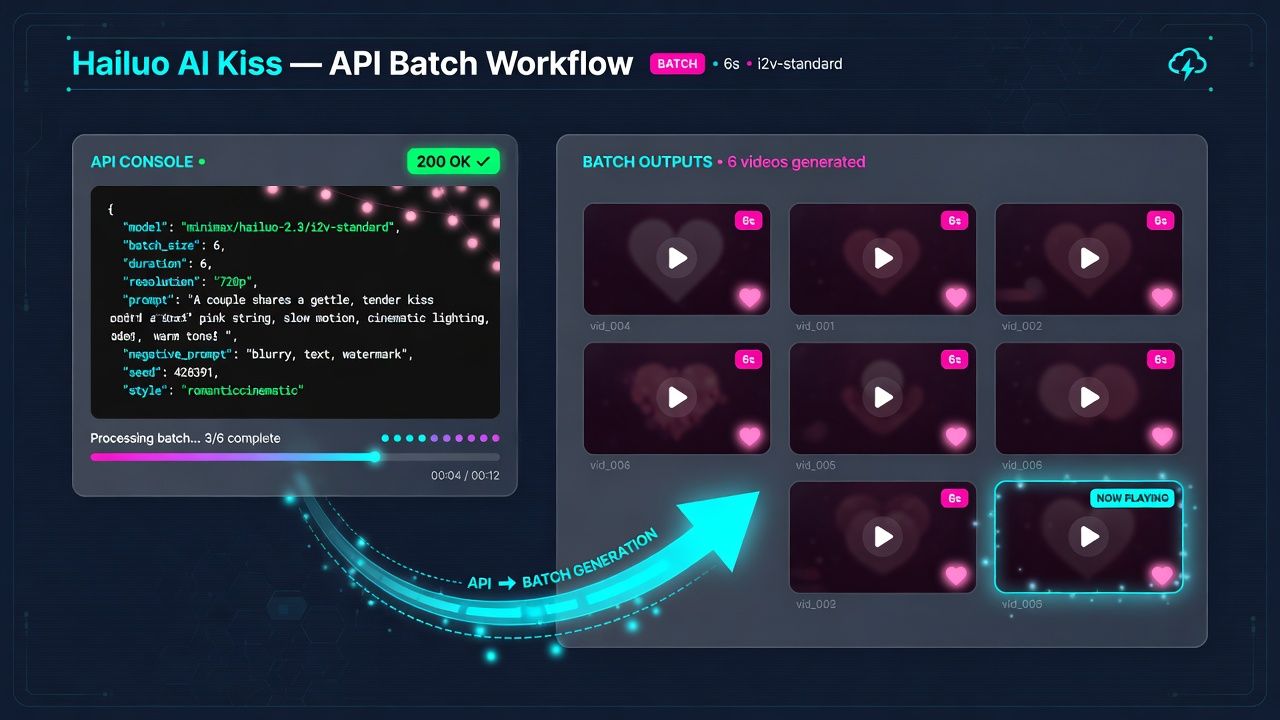
If you need more than a one-off clip, the same romantic image-to-video effect can run through an API. Atlas Cloud hosts Hailuo video models from MiniMax, including Hailuo 2.3 image-to-video, billed per generation. The web app's one-click "AI Kiss" template is the easy path; the API route is image-to-video, where you supply the photo plus a romantic prompt and script it across many renders.
On Atlas Cloud, minimax/hailuo-2.3/i2v-standard costs about $0.28 per generated clip at the default 6-second length (10 seconds is also available), so a short clip stays inexpensive and a batch is predictable. The call takes your photo URL and prompt, then you poll for the finished video:
plaintext1curl -X POST https://api.atlascloud.ai/api/v1/model/generateVideo \ 2 -H "Authorization: Bearer $ATLAS_API_KEY" \ 3 -H "Content-Type: application/json" \ 4 -d '{ 5 "model": "minimax/hailuo-2.3/i2v-standard", 6 "duration": 6, 7 "prompt": "A couple shares a gentle, tender kiss, warm romantic lighting, slow camera push-in", 8 "image": "https://.../your-photo.jpg" 9 }' 10 11# Poll for the finished video 12curl https://api.atlascloud.ai/api/v1/model/prediction/PREDICTION_ID \ 13 -H "Authorization: Bearer $ATLAS_API_KEY"
The same consent rules apply at the API layer: only process images you have the right to use. Teams building a romantic-video feature can compare options on Atlas Cloud's model pricing and wire the effect into their own product. For a full breakdown of credit costs across every tier, our Hailuo AI pricing and cost guide walks through the numbers plan by plan.
Frequently Asked Questions
Is the Hailuo AI kiss generator free?
Hailuo offers the AI kiss effect online, and many third-party tools advertise a free tier, though credits and limits vary by platform. Generating through the Atlas Cloud API is pay-as-you-go instead, for example Hailuo 2.3 image-to-video at about $0.28 per 6-second clip.
What photos work best for a Hailuo AI kiss video?
Clear, front-facing portraits of adults with even lighting and fully visible faces. Match the two photos in lighting and resolution, and avoid sunglasses, heavy shadows, or extreme angles so the paired kissing scene looks natural.
Why does Hailuo reject my kiss prompt?
It is a moderation flag. Keep the prompt plainly romantic and non-explicit, use clear photos of consenting adults, and retry, since rejected generations typically do not consume credits. Do not try to push explicit or non-consensual content through.
Can I use a Hailuo AI kissing video generator on someone else's photo?
Only with their clear consent. Never upload images of someone without permission, never depict minors, and never use the effect to deceive or harass. Use only photos you have the right to use.
Can I make a Hailuo AI kiss video from one photo?
Yes. The tool accepts one or two photos, or even a text prompt. A single front-facing portrait can drive a solo-to-partner scene, while two photos pair two specific people.
Conclusion
A Hailuo AI kiss video is simple to make: upload clear front-facing photos, add a plainly romantic prompt like "gentle kiss, warm lighting, slow push-in," preview, and export the MP4. If a clip gets rejected, keep it wholesome and retry. Above all, use only photos you have the right to use and never depict anyone without consent. For teams that need volume, Atlas Cloud's hosted Hailuo image-to-video models let you run the same effect per generation through a simple API. For the bigger picture on how this model performs across other use cases, our full Hailuo AI video generator review covers testing results in detail.





