You had the caption ready before you had the tool. Template picked, selfie taken, the joke already writing itself in your head.
So you upload both images, hit Start face swapping, and four seconds later you have a result. Then you zoom in. The face is floating on the neck like a sticker. The 2011-era compression grain that made the meme feel like a meme got buffed into smooth plastic. You switch to the video tab with a 12-second clip and it gets trimmed to 10, cutting right before the line that was the whole point.
One does not simply face swap for free.
This is not a takedown. Pixnova really is free, really does skip the login, and really does hand you a clean download in a few seconds. So the first half of this piece is the honest, complete tutorial: photo, video, GIF, multi-face, batch, every limit written down. The second half is the part nobody publishes: a six-step chain that fuses the face into the meme instead of pasting it on top, with every prompt copyable and every price listed.
Medieval stone council hall, elders leaning in around a long table while one holds up a finger and a glowing phone reading RENDERING 8 of 10 seconds
Key takeaways
- Photo face swap on Pixnova is genuinely free. No account, no watermark on the official page's own terms, results in roughly 3 to 5 seconds.
- The hard ceilings are real: video maxes out at 10 seconds, uploads at 30MB, multi-face at 5 faces, and your results are deleted after 1 day. Download immediately.
- It pastes, it does not fuse. A face rectangle gets dropped onto your base image. It has no idea your base is a JPEG that has been re-compressed a dozen times since 2011, which is exactly why the output reads as sticker.
- The fix is a four-model chain, not a better tool: grab the real original meme, fuse the face with Nano Banana 2 Edit, animate 5 seconds, then convert to GIF with a local ffmpeg step, because nothing outputs a GIF directly.
- Atlas Cloud's free AI face swap tool covers the baseline swap without the cleanup timer: free per its own FAQ, no usage cap, no watermark, and the PNG stays on your disk.
Two companion reads if you want the wider view: our face swap meme playbook covers caption craft, and the GIF face swap guide goes deeper on looping output.
A Pixnova AI Face Swap vs a Fused One: Look First, Read Later
Here is the whole argument in one image. Same meme, same source face. Left is the untouched 568x335 Boromir template straight off Imgflip. Right is that exact file after one fusion pass.
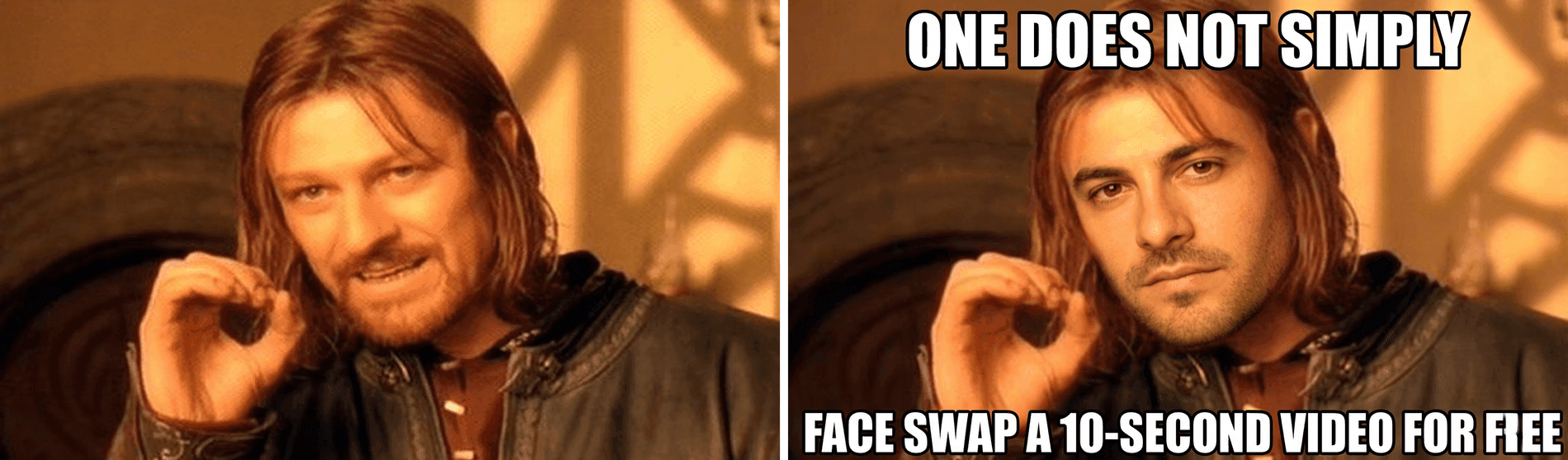
Side by side comparison: original One Does Not Simply Boromir meme template on the left, the same frame with a swapped-in human face and Impact captions on the right
Three things to check, in this order:
- The raised hand did not move. Same finger, same angle, same shoulder lean. That pose is the joke, and the joke survived.
- The scene stayed soft. Look at the blurred stone courtyard behind him. Still mushy, still that washed warm 2001 film grade. The 2K tier resamples the frame, so it is not byte-identical noise, but nothing got re-detailed into a stock photo.
- The face is a different person. Not Sean Bean with a filter. A different human, wearing the same grave warning expression, lit by the same light coming in from the upper left.
That is the difference between pasting and fusing, and it is the only thing this article is really about.
Why Pixnova AI Face Swap Blew Up in 2026 (and Where Free Runs Out)
Start with the part Pixnova deserves credit for, because it is a lot.
It removed every reason not to try it. There is no signup wall. You land on the page, drag in two images, and click one button. Results land in 3 to 5 seconds for photos, and the site claims more than 2M users (Pixnova, July 2026). The tool ships in six separate modes, not one: Photo, Video, Multiple, GIF, Batch, and Animal face swap, plus a template library sorted into General, Christmas, Superhero, Lady Model, Business, and Sports so you do not have to bring your own base image at all.
It also names its own engine room in the footer: Seedance 2.0, Nano Banana, Kling 3.0, Wan 2.7, Flux AI. Hold that thought, it matters in a minute.
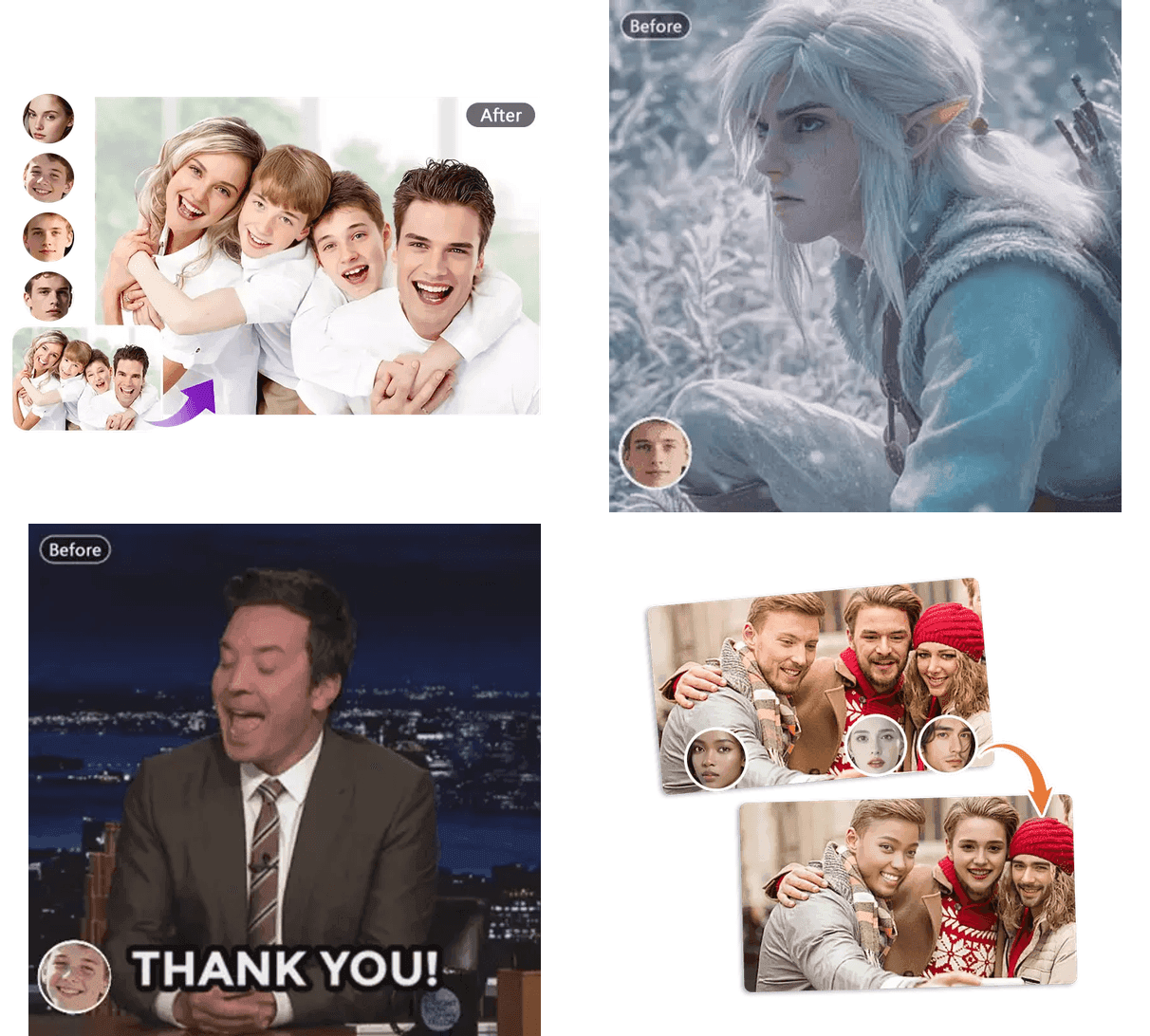
Four Pixnova product examples in a 2x2 grid: photo face swap, video face swap, GIF face swap and multiple face swap, screenshots from pixnova.ai
Pixnova's own example assets for its photo, video, GIF and multiple face swap modes. Source: pixnova.ai.
Now the part that stops you. All of these come from Pixnova's own FAQ, not from a competitor's blog:
| Limit | Value |
|---|---|
| Max video length | 10 seconds ("server resources") |
| Max upload size | 30MB per file |
| Max faces at once | 5 faces |
| Result retention | Deleted after 1 day |
| Batch mode | Up to 10 images per run |
| GIF mode | GIF and WebP, size-capped separately |
The 10-second cap is the one that hurts. Most reaction clips worth swapping are 12 to 20 seconds, so you either re-cut the joke or lose the punchline. Video also moves you onto credits rather than the free photo path, and credit packs start at $7.99 for 1,600 credits, rising to $194.35 for 100,000, one-time purchase with no expiry (Pixnova Pricing, July 2026).
On quality, third-party testing lines up with what you would expect from a fast pipeline: results are strong on clean, well-lit, front-facing footage and get inconsistent on complex or low-light material (Techraisal, 2026). One thing to verify yourself rather than trust anyone on: the official page states "No login No watermark," but scattered reports describe watermarks or consent prompts on certain outputs in certain regions. Download one file and look at it before you build a workflow on it.
Why your output looks pasted on. This is the mechanical explanation, and it is not a knock on Pixnova specifically. It is what template-based swapping is.
| Paste-style swap | Fusion-style edit | |
|---|---|---|
| Facial identity | Copied from your photo, fairly literal | Re-rendered, close to you but not pixel-exact |
| Base image grain | Ignored, so the face is sharper than the scene | Re-rendered with the base's compression noise |
| Caption text | Often redrawn or nudged out of alignment | Held in place, or added deliberately |
| Light direction | Approximated from the face crop | Matched to the scene's actual key light |
| Pose and framing | Untouched | Untouched |
| "Instantly fake" factor | High on low-res memes | Low |
A paste operation copies a rectangle of face. It does not know that your base image is a JPEG that has been screenshotted, re-uploaded and re-compressed a dozen times since 2011. So it hands back a crisp face sitting inside a mushy frame, and your eye catches the mismatch before it catches the joke.
Fusion redraws the head with the base image's grain, light and color, which is why the seam disappears.
And here is the turn. Go back to that footer. Seedance, Nano Banana, Kling, Wan, Flux. Those are the models doing the work, and none of them has a 10-second physical limit. The cap, the resolution downgrade on the free tier, the 1-day deletion: those are packaging decisions, not model limits.
Which means the interesting question is not "is Pixnova good." It is "what happens if I skip the wrapper."
Beyond AI Face Swap Pixnova: The Model Chain, Settings, and Real Prices
Four models, one browser tab, no wrapper. The chain below runs on Atlas Cloud, and everything it needs lives on two shelves there: the metered models in this table, and the free AI tools collection next to them, which includes a free face swap that covers the baseline step on its own. That one gets its own section right after Step 1. Here is the whole chain.
| Step | Model | Job in this chain | Setting to pick | Price |
|---|---|---|---|---|
| 3 | GPT Image 2 Text-to-Image | Produce one clean, evenly-lit source face (skip if you use your own selfie) | quality high, ratio 1:1 | $0.009 per image |
| 4 | Nano Banana 2 Edit | The actual fusion swap, keeps grain, captions and light | resolution 2K, aspect ratio blank | $0.12 per image at 2K |
| 5 | Seedance 2.0 Mini Image-to-Video | Animate the fused still for 5 seconds | 720p, 5s, ratio blank | 20% off as of July 2026 |
| 5b | Seedream 5.0 Pro Edit | Optional: re-render the same frame as a clean HD poster | size 2048x1152 | $0.045 per image |
| 6 | Any LLM | Write the ffmpeg command that converts the clip to a GIF | none | free |
Prices verified on the model pages themselves, not on a blog, as of July 2026. Full list at Atlas Cloud's model directory.
Three honest boundaries before you start, because I would rather you know now:
- No model here outputs a GIF. Step 6 is a local ffmpeg command. It is not a platform feature and I am not going to pretend it is.
- Fusion is not pixel-exact identity transfer. Nano Banana 2 re-renders the head, so the result reads clearly as that person without being a forensic match. For meme work that tradeoff is correct, because pixel-exact identity transfer is what produces the sticker look.
- Video models re-render every frame, so the face drifts slightly toward an average across the clip. The still from Step 4 is the reference result. The GIF exists to prove it moves.
Pixnova AI Face Swap Tutorial, Then the Fused Upgrade: Step 1 to 6
Step 1: The 3-Click Pixnova Face Swap Baseline
Do this first. It takes under a minute and it gives you the thing you are comparing against.
- Upload source image with a face. This is the photo or video you want the face swapped into. You can also skip uploading and pick one of the sample base images sitting under the panel. JPG, PNG and WEBP for photos; M4V, MP4, MOV and WEBM for video. 30MB ceiling either way, stated right under the button.
- Upload a face image. The face going on. Front-facing, evenly lit, no heavy filters. This matters more than anything else on the page. A three-quarter profile with hard shadows will fail on any tool, including the expensive ones.
- Click Start face swapping. Three to five seconds and you have a file. The video tab is a separate tab at the top of the same panel, and that is where the 10-second ceiling and the credit-based pricing live.
The left sidebar is where the other modes are: Multiple Face Swap for stills and for video, GIF Face Swap, Batch Face Swap, and Animal Face Swap. Multiple mode asks you to map each detected face to a face image, up to 5. Batch runs up to 10 stills per job. And the part people forget until it costs them: your results are deleted after 1 day, so download before you close the tab.
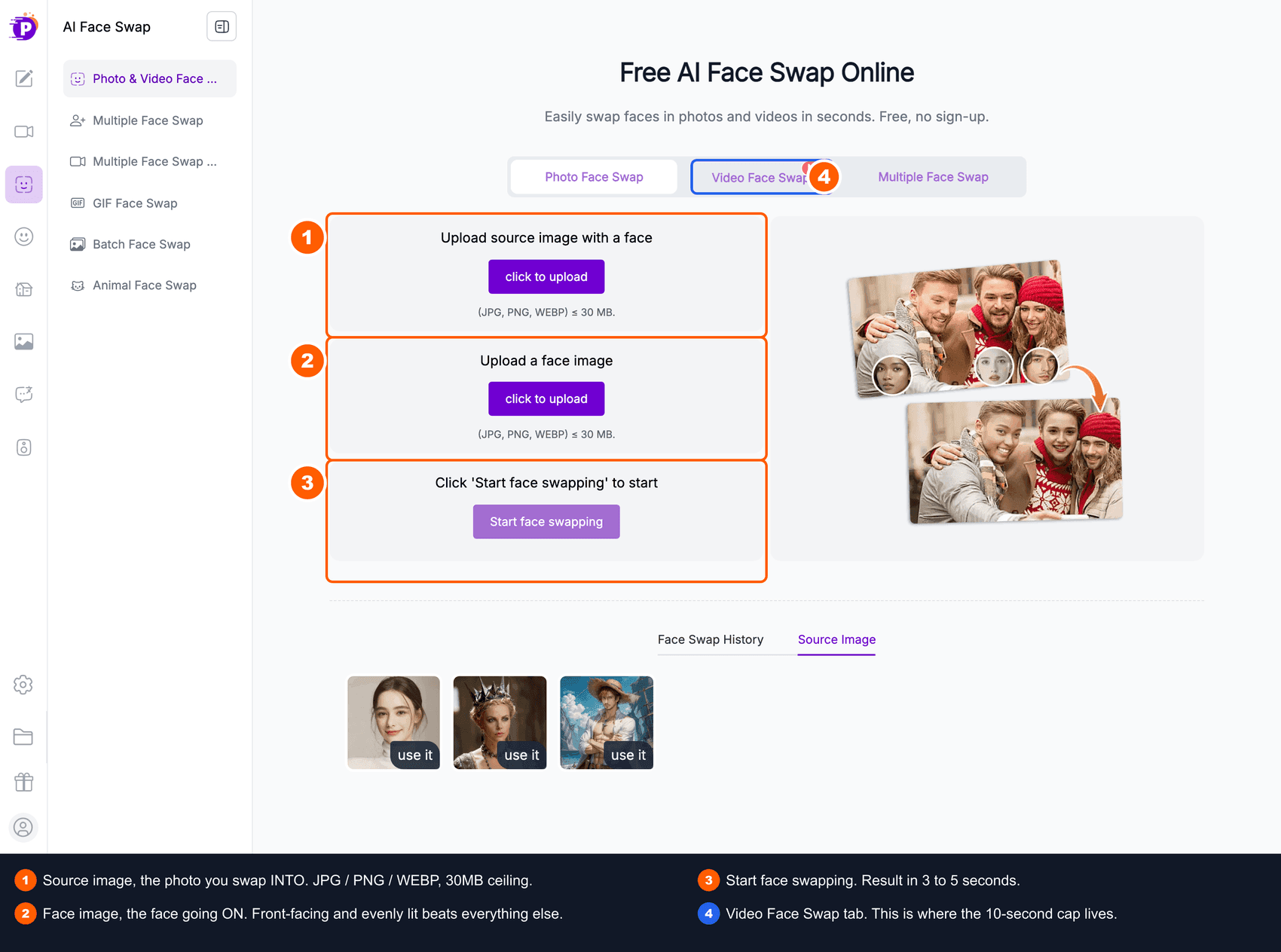
Pixnova AI face swap interface with numbered callouts on the Source Image slot, the Face Image slot and the Start face swapping button
The Pixnova face swap page. Screenshot from pixnova.ai, annotated for this walkthrough.
As a baseline this is fine. It is fast, it is free, and for a clean modern photo it holds up. Now zoom into the grain and the caption bar, and keep reading.
Step 1 Without the 1-Day Delete: The Free Atlas Face Swap
Pixnova's baseline comes with a stopwatch: whatever you just made is deleted after a day, and the free tier reduces output resolution on the way out. Atlas Cloud's free AI face swap tool runs the same three-move baseline with neither condition. Its own FAQ answers the money question with a plain yes: free, no usage cap, and no watermark, and the label above the upload slots says the same thing in three words: "Free · No charge."
The flow will feel familiar after Step 1. Upload the meme as the target photo, upload the face as the face photo, and swap. The tool maps 468 facial points and lands a result in about eight seconds. Instead of a prompt you get two sliders, Blend and Feather: Blend sets how strongly the new face takes, Feather how softly its edges melt into the surrounding pixels. On a grainy 2011 screengrab, Feather is the slider that decides whether the seam shows, so nudge it up.
To keep it apples to apples, run the exact pair this article uses: the untouched 568x335 Boromir template from Step 2 as the target photo, and the stand-in headshot from Step 3, or your own selfie, as the face photo.
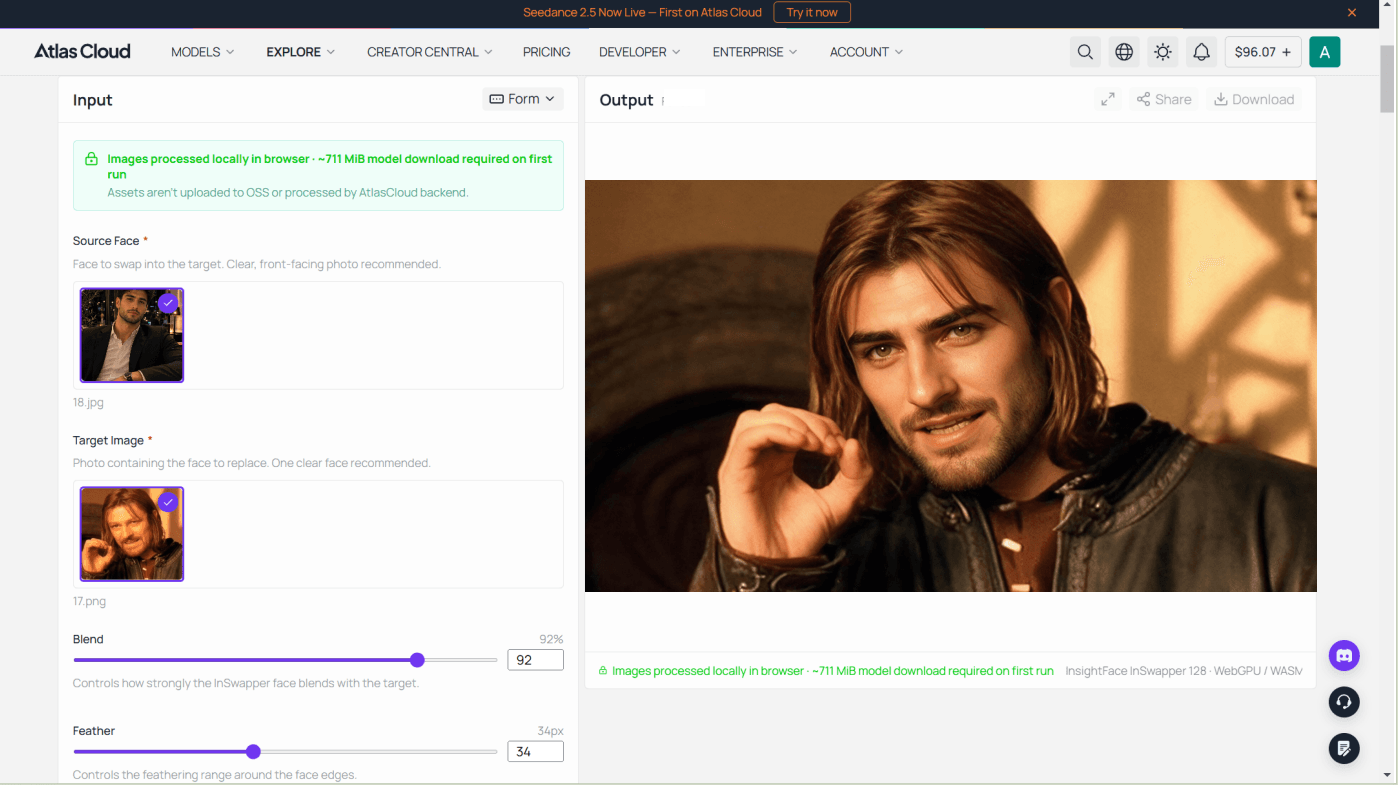
The boundaries, stated plainly: it is a swap, not a fusion, so the grain-matching is still Step 4's job. Photos only, one face per run, no video, GIF or batch modes — exactly where Pixnova's sidebar is strong. Output is PNG at your target photo's size up to 1280 pixels on the longest side, below the edit models' 2K, and the first visit fetches about 711 MiB of model files. In exchange: rerun it as often as the caption needs with no meter moving, and the PNG lives on your disk, not on a one-day timer.
Step 2: Give Your Pixnova Face Swap a Real Original as Its Base
The single biggest mistake in AI meme work: asking a model to draw something that looks like the meme, then swapping onto that. It never works. An AI recreation of Boromir is not Boromir, readers smell it instantly, and the joke dies before the punchline.
So download the real file. The One Does Not Simply template lives at https://i.imgflip.com/1bij.jpg, a 568x335 JPEG lifted from the Council of Elrond scene in The Fellowship of the Ring, in continuous circulation since 2011 (Know Your Meme).
plaintext1curl -A "Mozilla/5.0 (Macintosh; Intel Mac OS X 10_15_7) AppleWebKit/537.36 (KHTML, like Gecko) Chrome/125 Safari/537.36" \ 2 -L -o boromir.jpg https://i.imgflip.com/1bij.jpg
Do not upscale it first. That low resolution is the meme's ID card. If your output looks cleaner than 568x335, you have already lost.
Step 3: Get One Clean Source Face (GPT Image 2)
Your own selfie is the better input here, and if you have one, skip straight to Step 4. I am generating a stand-in face so this walkthrough is reproducible by anyone reading it.
Paste this exactly:
plaintext1Studio headshot of a 32-year-old man with short dark brown hair, light stubble, and warm brown eyes, facing the camera straight on with a neutral closed-mouth expression. Even soft key light from the front, plain mid-grey seamless backdrop, sharp focus on the eyes, natural skin texture with visible pores, no glasses, no hat, shoulders visible. Photorealistic, 85mm portrait lens look.
Settings: model openai/gpt-image-2/text-to-image, quality high, aspect ratio 1:1. One image, $0.216 at quality high; drop to medium and it is $0.058, which is plenty for a stand-in.
Why those words: "even soft key light from the front" and "plain mid-grey seamless backdrop" are doing the real work. A neutral, evenly-lit face gives the fusion model no baked-in shadows to fight when it relights the head for a torch-lit stone courtyard.
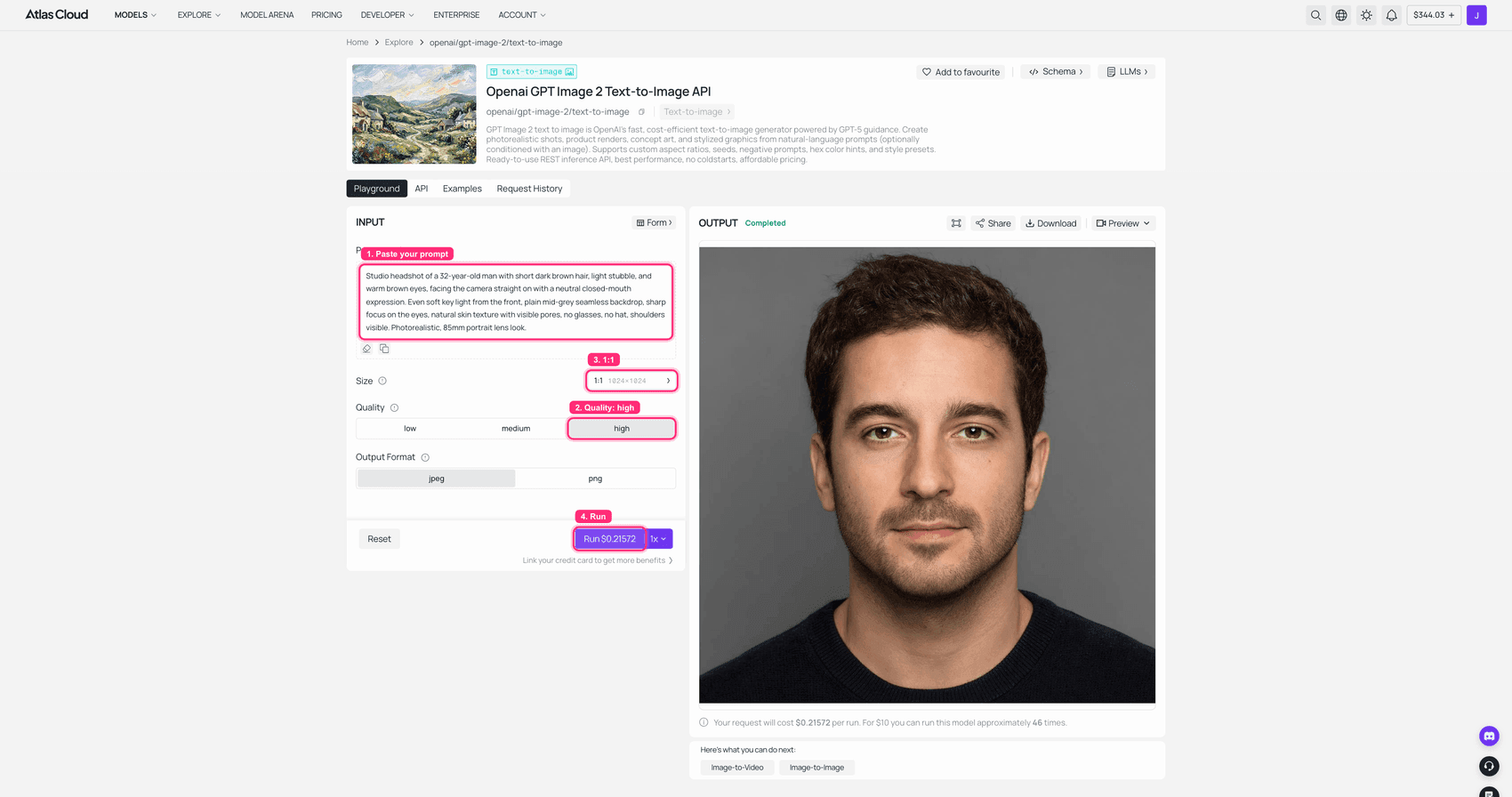
GPT Image 2 playground on Atlas Cloud with the headshot prompt filled in and the finished front-facing portrait in the OUTPUT panel
GPT Image 2 on Atlas Cloud: quality high, 1:1, the clean source face rendered on the right.
Step 4: The Real Pixnova Face Swap Upgrade, Fused In With Nano Banana 2
This is the step that decides whether your meme lands or looks like a school project. The prompt has three parts, in this order, and the order is not optional:
- Describe what is actually in the base image. The model needs to know what it is looking at before you ask it to change part of it.
- Demand the head swap, and state that the identity must change. Without that sentence the model frequently "improves" the original face and hands you back Sean Bean with better skin.
- List, item by item, everything that must stay identical. This is the keep-list, and it is why the grain survives.
Paste this exactly:
plaintext1Image 1 is the low-resolution "One Does Not Simply" meme screenshot from a 2001 fantasy film: a long-haired bearded medieval man in a dark fur-trimmed leather tunic sits in a sunlit stone council courtyard, leaning forward with his right index finger and thumb raised beside his face, wearing a grave cautioning expression, with a soft blurred stone-and-timber background. Image 2 is a studio headshot of a clean-shaven man with short dark brown hair. 2 3Edit Image 1 in place. Perform a complete head swap: replace the medieval man's head and face with the man from Image 2, so the result is clearly that person and NOT the original actor. This identity change is required, do not keep the original man's face. Keep his face fully HUMAN, with his own eyes, nose and mouth, wearing the original's grave cautioning expression in human form. 4 5Keep exactly unchanged: the raised right hand with the index finger and thumb beside the face, the shoulder-forward lean, the fur-trimmed leather tunic and long-hair silhouette, the stone courtyard background, the warm daylight coming from the upper left, and the low-resolution 2001-era softness and heavy JPEG compression grain. Match his skin tone and shadows to the scene's warm light. Do not clean up, sharpen, upscale, denoise or beautify the image, it must stay visibly low-resolution. 6 7Then add classic meme captions in white Impact font with a black outline: "ONE DOES NOT SIMPLY" across the top of the frame and "FACE SWAP A 10-SECOND VIDEO FOR FREE" across the bottom, both centred and all caps. 8 9Output ONE single edited image, not a side-by-side, diptych or before/after.
Settings: model google/nano-banana-2/edit, resolution 2K, aspect ratio left blank so it inherits the base frame, two reference images loaded in this order: the meme screenshot first, your face second. Compress both references to roughly 1600px JPEG before uploading. $0.12 per run at 2K.
Two things that will actually happen to you:
- The image slots are numbered by upload order, not by the order you think. So write "the meme screenshot" and "the headshot" in your prompt rather than "first image" and "second image." It removes the ambiguity entirely.
- Output occasionally arrives with a white bar along one edge, because the base frame's ratio and the output ratio disagree. Crop it off, do not re-run.
- Check the caption letter by letter. It renders Impact convincingly, outline and all, but it drops or mangles a character often enough to matter. My own run in the comparison image above lost the R in FREE. Either re-run, or drop the text in with any image editor afterwards, which is the safer move if the rest of the frame is already right.
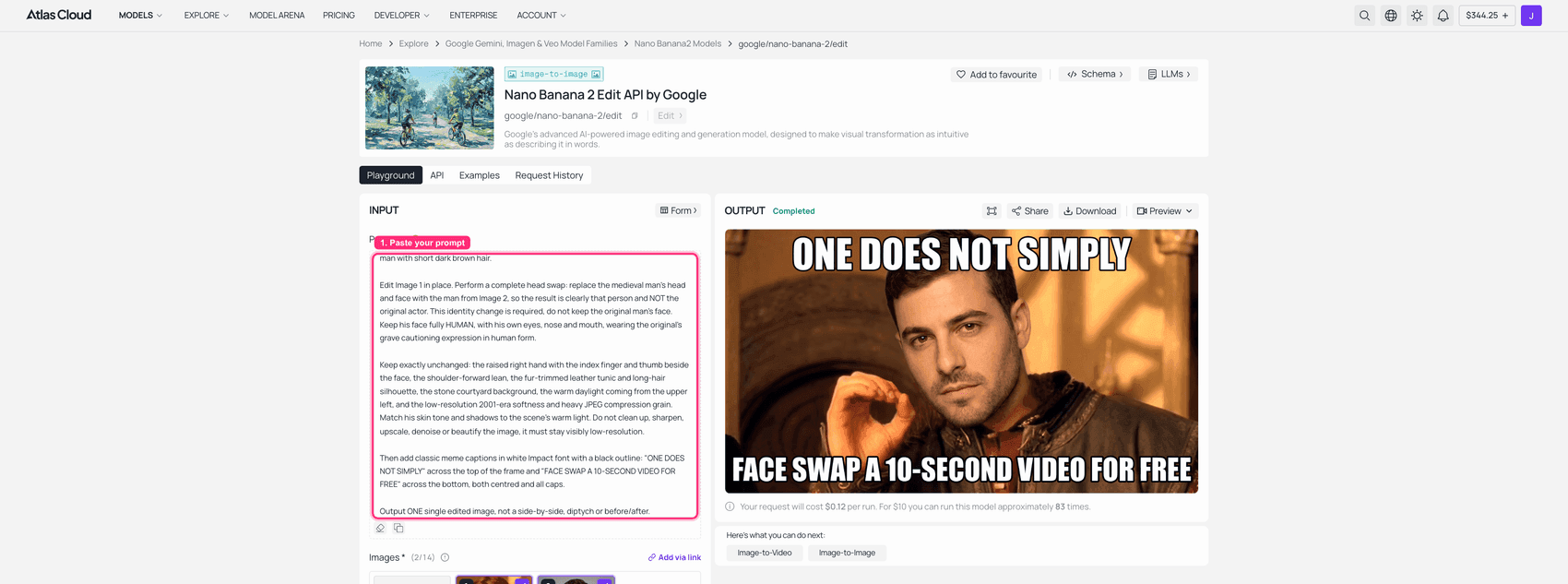 Nano Banana 2 Edit playground on Atlas Cloud with the meme base and the headshot loaded as references, and the fused captioned meme in the OUTPUT panel
Nano Banana 2 Edit on Atlas Cloud: both references loaded at 2K, the fused result on the right.
Look at your output before you move on. Reject and re-run if the face has hard edges, if the whole frame turned crisp and clean, or if it looks uncanny rather than funny. Budget one retry.
Step 5: Make Your Pixnova AI Video Face Swap Move (Seedance 2.0 Mini, 5s at 720p)
Feed the Step 4 still in as the first frame and ask for the smallest possible motion. Small is the whole strategy here: the less you ask a video model to change, the less the face drifts.
plaintext1The bearded council member holds his raised hand still, then slowly lowers it a few centimetres as he leans a little further forward. He blinks twice, his brow tightens, and he gives one small grave nod. Subtle handheld camera drift. The background stays static and blurred. Locked-off framing, no zoom, no cuts, no restyling, keep the exact same face, hair, tunic, lighting, caption text and grainy low-resolution look as the input frame.
Settings: model bytedance/seedance-2.0-mini/image-to-video, image = your Step 4 output, resolution 720p, duration 5s, aspect ratio blank. Expect one to four minutes of render time. The Run button shows the exact price before you commit, .and the model is 30% off as of August 2026, which puts a 5-second 720p clip at about $0.43.
The honest caveat, again, because it is load-bearing: this model regenerates every frame rather than tracking a face across them. In my clip the face drifts back toward the original actor over the five seconds, and the raised hand lowers out of frame. Your still from Step 4 is the canonical result. The clip is there to prove the fusion holds up in motion, not to be a frame-perfect copy.
Two real things happened on this step that are worth knowing before you spend anything. First, the playground's content check blocked the film-still frame outright ("may be related to copyright restrictions"), while the same job submitted through the API went through and produced the clip in the GIF above. Second, blocked runs are not billed. So the screenshot below is the identical step, identical settings, run on one of the variation frames from the next section instead, because that one is an ordinary street photo with no film IP in it.
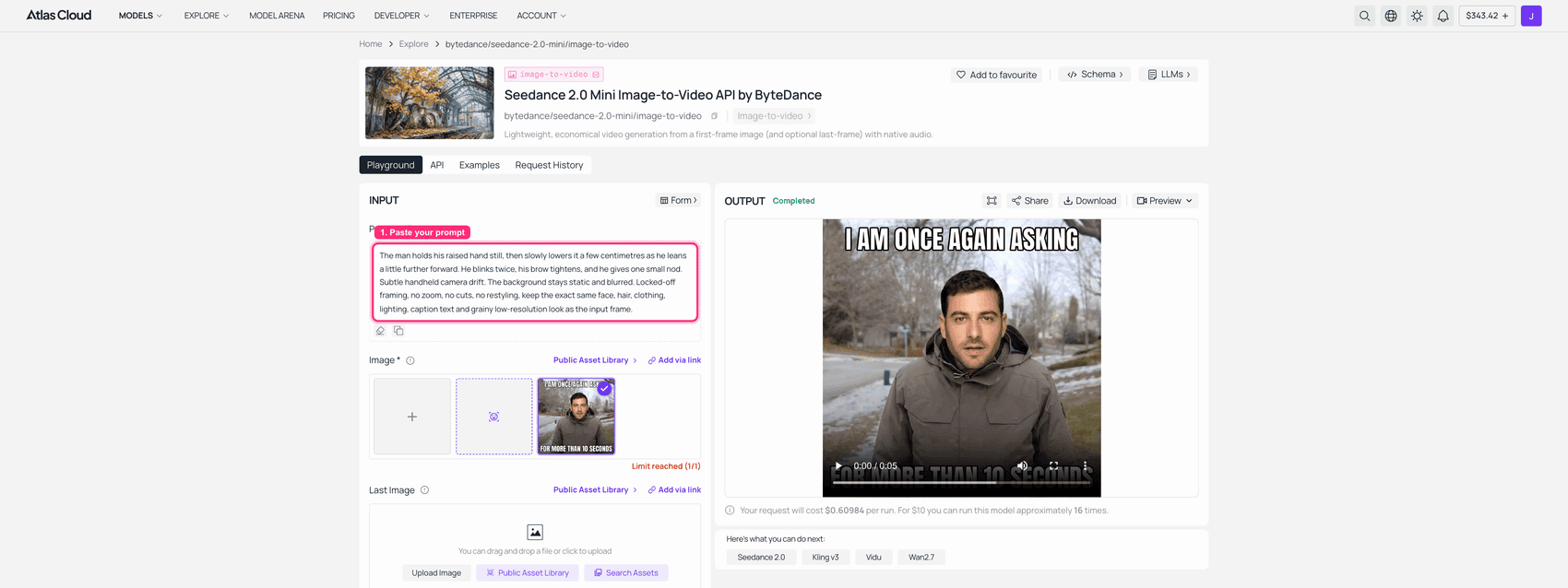
Seedance 2.0 Mini Image-to-Video playground on Atlas Cloud with a fused meme loaded as the first frame and a finished 5-second clip in the OUTPUT panel
Seedance 2.0 Mini on Atlas Cloud, 720p and 5 seconds, a real completed 0:05 clip on the right. Run on the non-film variation frame after the film still was content-blocked.
Step 6: Turn Your Pixnova Face Swap Into a Looping GIF
Every image and video model on every platform hands you PNG, JPEG or MP4. None of them hands you a GIF. That last hop is ffmpeg on your own machine, and you do not need to memorise the flags. Hand this to any LLM:
plaintext1I have a 5-second 1280x720 MP4 at ./swap.mp4 and I need a looping GIF under 5 MB for Reddit and X. Give me one copy-paste ffmpeg command using a two-pass palettegen/paletteuse filter that scales the width to 480px with lanczos, drops to 12 fps, limits the palette to 128 colours, uses bayer dithering, and loops forever. Then give me two fallback variants: one tuned to stay under 3 MB, one that keeps 15 fps. Explain in one line each what I trade away.
Measured sizes from the exact clip in this article, so you can pick a target before you start: 480px at 12fps with 128 colours came out at 3.1MB, pushing to 15fps at the same width 3.4MB, dropping to 400px at 12fps 2.2MB, and 320px at 10fps with 96 colours 1.1MB. Low-motion clips compress far better than you would guess, so start at 480px and only step down if you actually blow the limit.
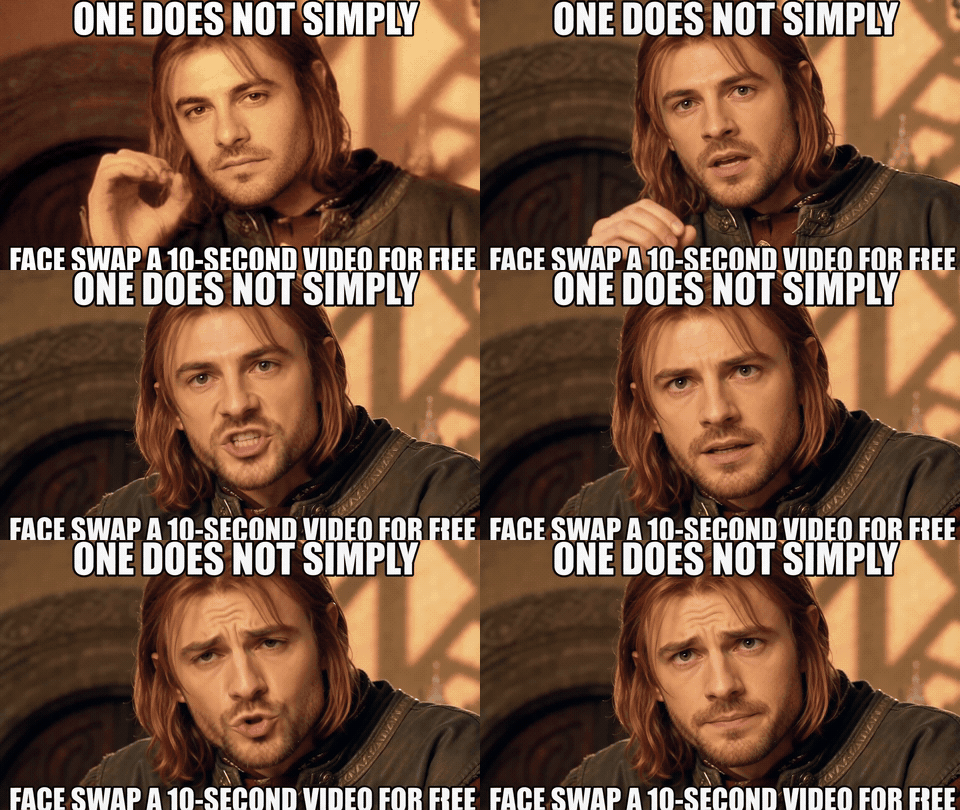
Animated GIF of the fused One Does Not Simply meme, the swapped-in face blinking and nodding with the Impact captions in place
The finished loop. Same grain, same captions, different face, and it moves.
More Pixnova Face Swap Ideas Worth Stealing (Four Memes, One Face)
Same six steps, same face, four different base images. Each one was fused individually rather than swapped as a grid, because a single run asked to handle four faces at once handles all four badly.
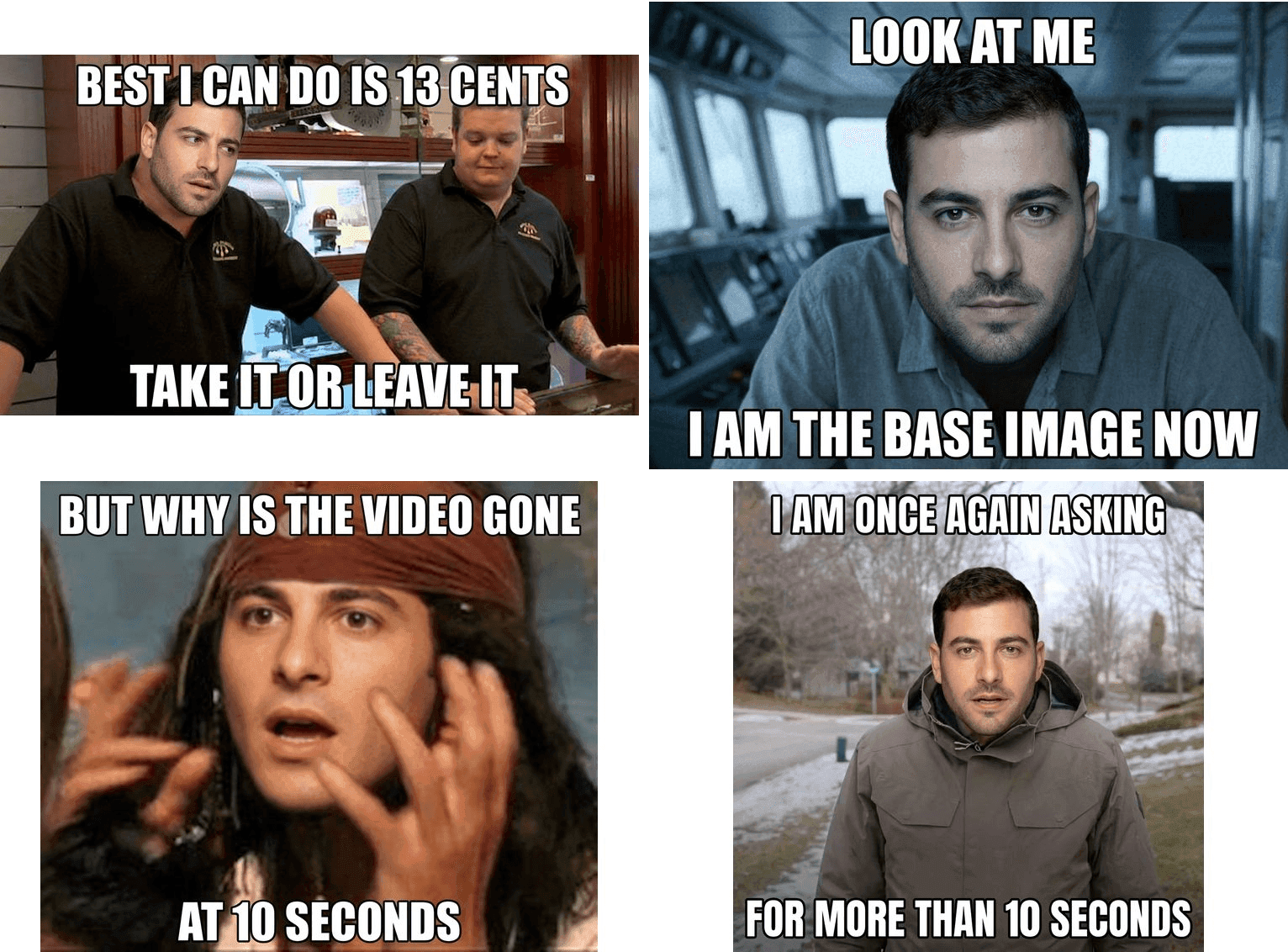
Four fused meme variations in a 2x2 grid: Pawn Stars Rick Harrison, Captain Phillips I am the captain now, Jack Sparrow but why is the rum gone, and Bernie Sanders once again asking, all with the same swapped-in face
The only thing that changes between runs is the base-image description and the keep-list. The structure is identical:
- Pawn Stars, "Best I Can Do." Base: two men behind a glass pawn-shop counter, the left one mid-negotiation with an open-palmed shrug. Keep: the shrug, the counter, the display case clutter, the flat TV-camera lighting. Caption: BEST I CAN DO IS 13 CENTS.
- Captain Phillips, "I'm The Captain Now." Base: a thin man in a pale shirt in a cramped ship's bridge, leaning into the camera. Keep: the lean, the bridge, the cold blue-grey light, the shallow focus. Caption: LOOK AT ME. I AM THE BASE IMAGE NOW.
- Jack Sparrow, "But Why Is The Rum Gone." Base: a bandana-wearing pirate with braided beard, both hands raised in confused protest. Keep: both raised hands, the beads, the bandana, the tight crop, the sun-bleached grade. Caption: BUT WHY IS THE VIDEO GONE AT 10 SECONDS.
- Bernie Sanders, "Once Again Asking." Base: an older man in a heavy olive parka on a grey suburban street with patchy snow. Keep: the parka, the slushy street, the flat overcast light, the slightly-off centre framing. Caption: I AM ONCE AGAIN ASKING FOR MORE THAN 10 SECONDS.
Or go the other way and make it a poster. Everything above fights to keep an image ugly, because ugly is what makes a meme read as a meme. But sometimes you want the opposite: same face, same pose, rendered like a film poster. In that case switch models, because the "beautification" that ruins meme fusion is exactly the behaviour you now want.
Seedream 5.0 Pro handles this in one pass:
plaintext1Re-render this council-chamber scene as a polished cinematic film poster: the same man, the same face and identity, the same raised hand beside his face, the same forward lean, the same fur-trimmed leather tunic. Upgrade to sharp modern HD, crisp detail, volumetric late-afternoon light through the stone arches, shallow depth of field, subtle film grain, teal-and-amber grade. Remove all caption text. Keep his face unchanged and recognisable.
Settings: bytedance/seedream-v5.0-pro/edit, size 2048x1152, which is 16:9 and stays in the cheaper tier at $0.036 per image.
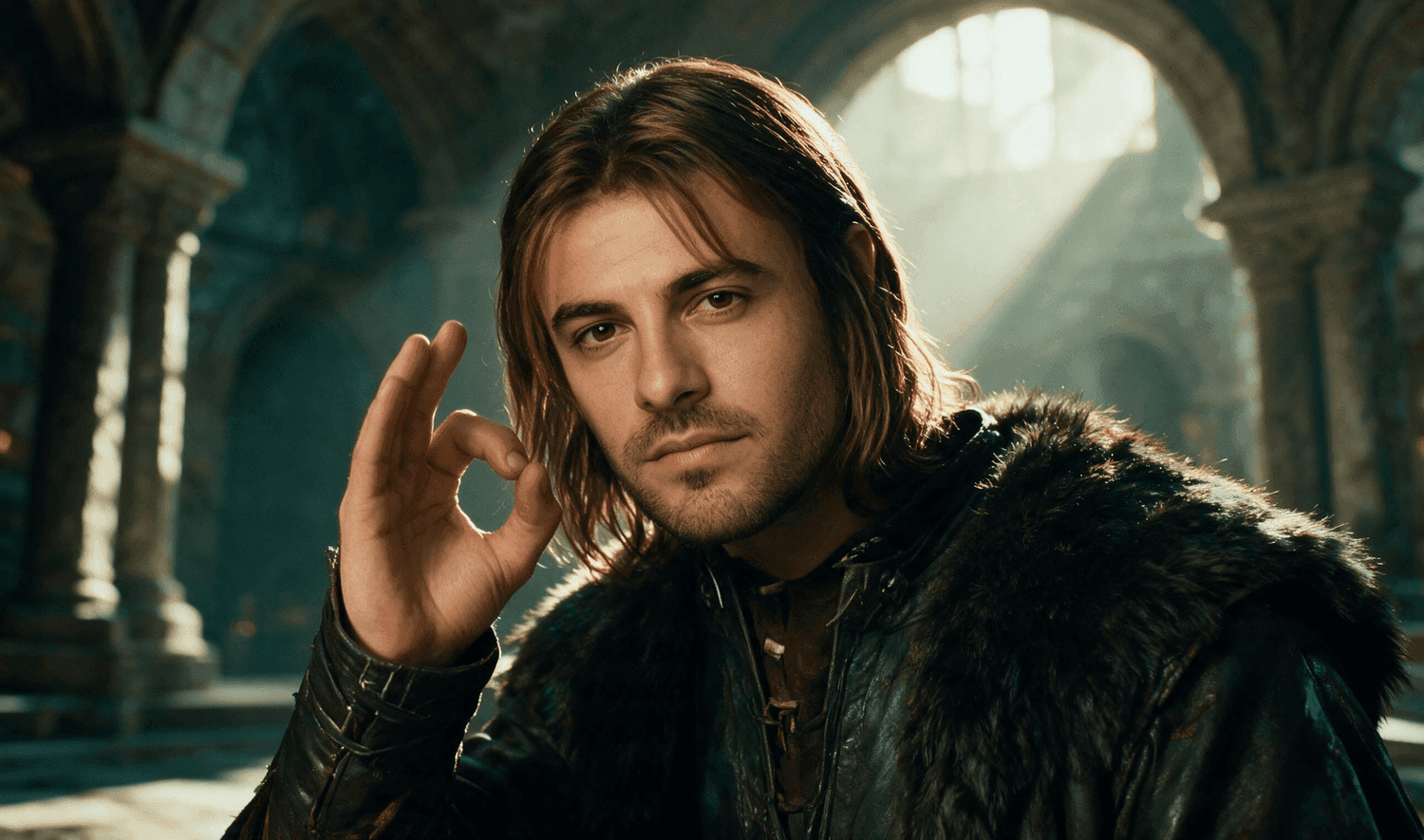
Cinematic film poster version of the swapped council chamber scene, sharp HD detail with volumetric light through stone arches and a teal and amber grade
Same subject, same pose, opposite intent. This is what happens when you let the model clean things up on purpose.
What a Pixnova AI Face Swap Really Costs vs Pay-Per-Run
| Pixnova free tier | Pixnova credit packs | Pay-per-run model chain | |
|---|---|---|---|
| Login required | No | Yes | Yes (API key) |
| Watermark | Page states none | None | None |
| Max video length | 10 seconds | 10 seconds | No fixed cap on the model |
| Output resolution | Reduced on the free tier | Higher tiers on Premium | Up to 2K on the edit step |
| Faces per run | Up to 5 | Up to 5 | One per run, by design |
| Result retention | Deleted after 1 day | Deleted after 1 day | Yours, saved locally |
| 20 still memes | $0 | $0 (photos are free) | about $2.40 |
| One 5-second clip | Not available free | Credits, packs from $7.99 | Price shown before you run |
The itemised cost of the exact chain in this article, so you can check my arithmetic: GPT Image 2 at $0.216 for the one-off stand-in face, plus Nano Banana 2 Edit at 2K for $0.12, plus about $0.43 for the 5-second Seedance clip on the current 30% promo, plus $0 for the GIF conversion. Skip the generated stand-in face and use your own selfie and the image path lands at $0.12 per meme, call it 13 cents once one stand-in face is amortised across a batch. Still image only, no video: $0.12.
And the fair version of the comparison: if you are making photo memes, in volume, and you genuinely do not mind that the grain gets smoothed away, Pixnova's free tier is cheaper than any pay-per-run setup and I am not going to pretend otherwise. Free is free. What the 13 cents buys you is the meme texture surviving, no 10-second ceiling, and files that still exist tomorrow morning.
One note on the legal side, briefly, because it is genuinely relevant when your base image is a film still. Copyright in movie frames belongs to the studio. Parody and commentary get meaningful latitude in many jurisdictions but that is not blanket immunity, and it varies by where you are. Swapping in a real person's face needs that person's consent, full stop. Do not make anything designed to mislead. Pixnova's own FAQ draws the same line: "The creation of deepfakes or deceptive media using AI is strictly banned."
Frequently Asked Questions
Is Pixnova AI face swap really free, and does it add a watermark?
Photo face swap is free and unlimited with no account required, and the official page states "No login No watermark." Video moves you onto credits, priced on the Render button itself. Third-party reports of watermarks on some outputs in some regions do exist, so download one file and check it yourself before committing to a workflow.
How long can a Pixnova video face swap be, and why is it capped?
Ten seconds, and Pixnova's FAQ attributes the limit to server resources. The free tier also reduces output resolution and queues at peak times. Longer video, higher resolution and larger uploads sit behind Premium. Calling an image-to-video model directly has no equivalent 10-second ceiling.
Why does my Pixnova face swap look pasted on?
Because a face rectangle was copied onto a base image that has completely different sharpness, grain and light direction. A fusion edit fixes it by re-rendering the head with the base image's own compression noise and key light. The three sentences that do the work are in Step 4: describe the base, demand the identity change, then list everything that must stay unchanged.
Can Pixnova face swap a GIF directly, and can a model chain?
Pixnova has a dedicated GIF Face Swap mode that accepts GIF and WebP, and on this specific point it is genuinely more convenient. No image or video model outputs GIF natively, so the chain runs still swap, then image-to-video, then a local ffmpeg conversion. Step 6 has a prompt that writes that command for you.
How many faces can a pixnova face swap handle at once, and what if I need more?
Five faces per run, per Pixnova's FAQ, and Batch mode covers up to 10 separate images per job. Past that you split into batches. With an edit model the practical answer is different: run one face per pass and stack the passes, which is slower but far more reliable than asking one run to place several faces well.
Is it legal to face swap a movie still like the Boromir meme?
The frame is the studio's copyright. Parody and commentary have real but limited latitude that varies by jurisdiction, so treat it as tolerance rather than permission. A real person's face requires their consent. Anything built to deceive is out, both legally and under Pixnova's own stated policy.
Prices and platform limits verified July 2026. Model prices come from the individual model pages on Atlas Cloud; Pixnova's limits come from its own published FAQ and pricing page.





