Generating production-grade AI short films in Seedance 2.5 requires moving away from unformatted text prompts toward structured JSON schemas. By deploying a multi-LLM pipeline—using Claude for narrative arc parsing and schema compliance, GPT for prompt expansion and JSON validation, and Kimi for long-context script processing and multimodal reference mapping—creators can automate multi-shot consistency across 30-second native 4K clips while leveraging up to 50 multimodal inputs.
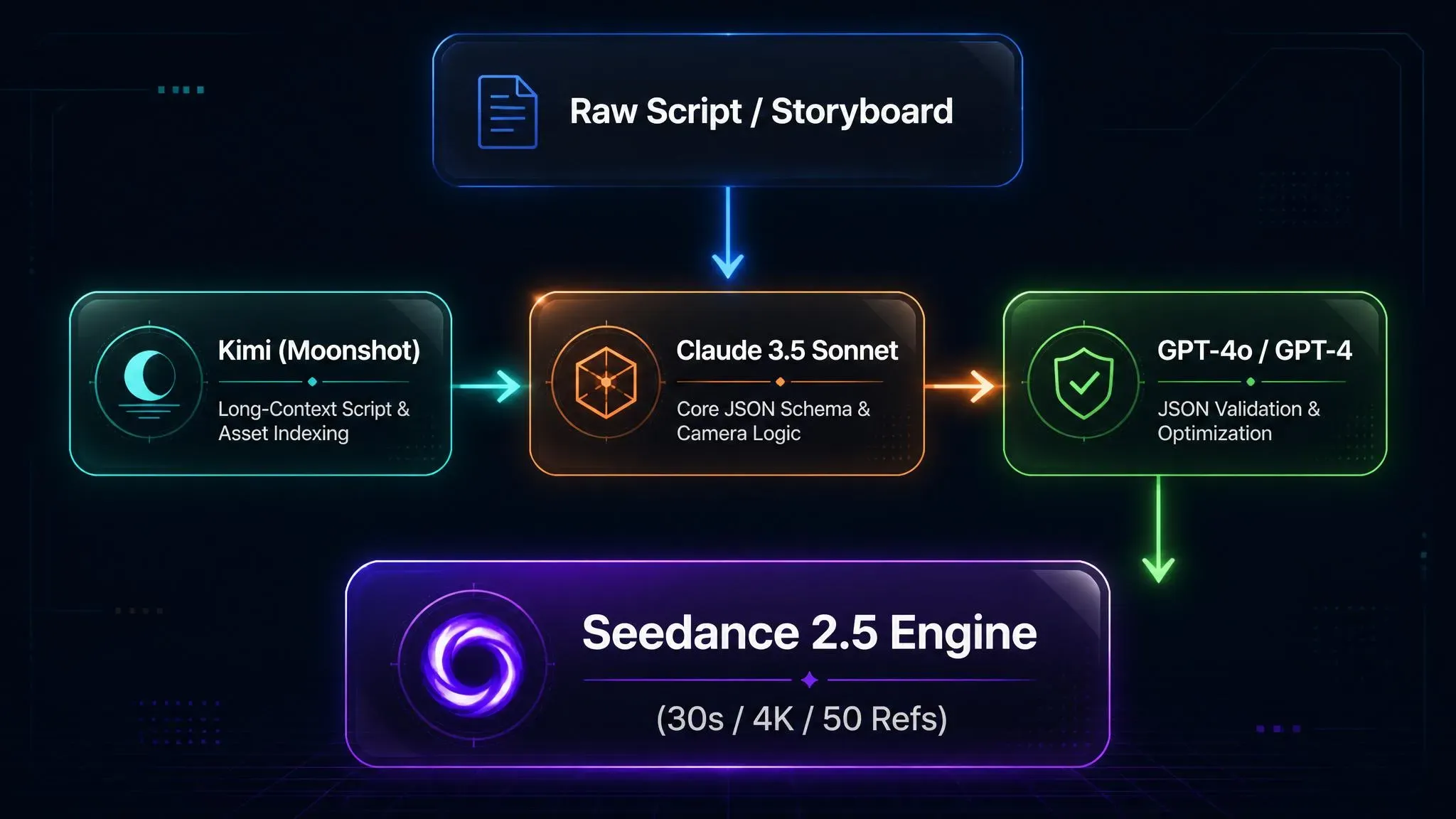
Executing this systematically requires a multi-LLM architecture:
| Model | Production Role | Core Function |
| Kimi | Screenplay & Asset Indexer | Processes long-context scripts and tags up to 50 multimodal references (@image, @video, @audio). |
| Claude 3.5 Sonnet | Schema Architect | Converts storyboard beats into valid JSON objects with explicit shot parameters. |
| GPT-4o | Linter & Validator | Performs syntax validation, fixes schema breaks, and optimizes prompt payload density. |
This tri-model pipeline automates multi-shot storytelling across 30-second native 4K generations. The single greatest topical authority opportunity creators miss is leveraging Seedance 2.5’s unified joint audio-video latent space. Including exact audio cues directly inside the JSON payload ensures native frame-accurate sound synchronization, eliminating tedious post-production alignment.
Why Seedance 2.5 Requires JSON Prompts for Cinematic Consistency
Generating a multi-shot sequence using standard descriptive text often turns into an expensive exercise in trial and error. At second 4, your protagonist looks like a polished character model; by second 18, facial features warp, lighting angles collapse, and the camera pan completely ignores your instructions. This breakdown happens because narrative text prompts lack strict execution boundaries, forcing the transformer architecture to continually re-interpret context across temporal frames.
When executing long-form video outputs, freeform text inevitably introduces semantic drift. ByteDance’s diffusion architecture attempts to balance subject identity, environment details, color palettes, and camera trajectories inside a single unstructured text string. This approach severely dilutes instruction weights across extended frame counts, ultimately destroying overall visual coherence.
Technical Capabilities Driving the Need for Structure
ByteDance’s Seedance 2.5 introduces significant architectural upgrades over legacy short-clip video generators:
- 30-Second Native Video Pass: Renders a continuous 30-second scene in a single generation pass without requiring stitched intermediate clips.
- 50 Multimodal References: Integrates up to 50 combined asset inputs tagged via @image, @video, and @audio markers to lock visual identity and sound profiles.
- Native 4K Synchronized Audio Rendering: Co-generates up to 4K resolution visuals and aligned multi-track audio inside the exact same latent space.
| Feature | Unstructured Text Prompt | Seedance 2.5 JSON Prompts |
| Character Consistency | High risk of character drift | Anchored via explicit @image mapping |
| Shot Execution | Blurs transitions and cuts | Enforces crisp temporal shot boundaries |
| Camera Control | Frequently ignores vector paths | Maps precise motion parameters to keyframes |
| Asset Pool Limit | Fails with >5 reference tags | Coordinates up to 50 multimodal references |
Enforcing a Director-Style Framework Through JSON
Transitioning to Seedance 2.5 JSON prompts transforms raw narrative text into a deterministic director-style framework. Rather than treating the generation prompt as an open narrative essay, JSON converts your creative intent into a structured shot list. The underlying parser separates camera mechanics, actor identity, lighting matrices, and audio cues into explicit, isolated key-value parameters.
By defining clear array blocks for sequential shots, JSON establishes cinematic consistency while preventing character drift across the entire 30-second native video. It establishes rigid temporal boundaries, ensuring the model completes Shot 1 before initializing Shot 2, eliminating unwanted cross-shot visual bleeding.
💡 Technical Deep-Dive: Parameterizing the Reference Pool
A common mistake when leveraging Seedance 2.5’s 50-reference capacity is stringing dozens of
@ assettags directly inside natural prose, which rapidly dilutes token attention weights. Isolating these tags inside a dedicated JSON reference array preserves vector clarity, ensuring character and style embeddings remain razor-sharp across every single frame.
Anatomy of the Ideal Seedance 2.5 JSON Prompt Schema
Feeding long text paragraphs into video models often results in key directives getting completely ignored by frame 120. A standardized JSON prompt schema eliminates this ambiguity by enforcing strict structural boundaries. By organizing video parameters into deterministic key-value pairs, creators establish a reliable blueprint that ByteDance's parsing pipeline can interpret without dropping critical scene variables.
plaintext1{ 2 "project_title": "Cinematic Short Scene", 3 "technical_specs": { 4 "duration": "30s", 5 "resolution": "4K", 6 "aspect_ratio": "16:9", 7 "fps": 24 8 }, 9 "multimodal_references": { 10 "@image1": "character_identity_portrait.png", 11 "@video1": "camera_motion_reference.mp4", 12 "@audio1": "ambient_soundtrack.mp3" 13 }, 14 "shot_list": [ 15 { 16 "shot_id": "Shot 1", 17 "action": "Character turns toward rain-slick window", 18 "camera": "Slow tracking dolly-in, shallow depth of field f/1.8", 19 "audio": "Soft whisper "It is starting again" with heavy rainfall SFX" 20 }, 21 { 22 "shot_id": "Shot 2", 23 "action": "Extreme close-up of water droplets running down glass", 24 "camera": "Static macro lens, rack focus to city lights", 25 "audio": "Thunder rumble with muffled traffic noise" 26 } 27 ] 28}
Core Schema Components Explained
To construct a high-performing Seedance 2.5 prompt format, the payload must be segmented into six functional blocks:
- Technical Specs (technical_specs): Sets baseline metadata including target resolution, aspect ratio, frame rate, and timeline limits.
- Multimodal Asset Tagging (multimodal_references): Maps specific visual and auditory asset handles directly to local uploaded assets, ensuring clean identity retention across clips.
- Shot Sequence Syntax (shot_list): Uses indexed arrays to outline scene progress, defining exact sequential actions per temporal segment.
- Camera Movement Parameters (camera): Specifies explicit lens behavior, focal length simulations, and speed vectors per shot array.
- Lighting and Grade (lighting_and_grade): Controls color temperature, shadow harshness, and overall environmental tone.
- Audio Synchronization (audio): Dictates dialogue timing, sound effects placement, and acoustic ambiance inside the unified audio-visual space.
Enforcing True Cut Transitions with Labeled Shot IDs
Standard prompts blur shot changes into strange, morphing dissolve transitions. In the Seedance 2.5 prompt format, utilizing explicit shot_id keys (Shot 1:, Shot 2:) forces the underlying diffusion model to render sharp hard cuts within a single 30-second output pass.
| Parameter Key | Execution Function | Direct Impact on Output |
| shot_id | Identifies discrete temporal segments | Triggers clean hard cuts instead of visual morphing |
| camera | Controls virtual camera physics | Prevents floating or erratic lens trajectories |
| @image1..N | Pins identity embeddings | Maintains facial, clothing, and asset fidelity |
| audio | Directs unified sound generation | Achieves lip-sync and frame-accurate SFX alignment |
Pro tips
Most tutorials overlook that Seedance 2.5 uses punctuation patterns to detect scene transitions. Pairing labeled shot IDs inside JSON arrays with explicit double slashes (// Cut to:) at the end of shot action strings increases hard cut accuracy by removing ambiguous frame-blending logic entirely.
The Multi-LLM Stack: Role Allocation for Claude, GPT, and Kimi
Relying on a single AI model to write a full screenplay, format complex code arrays, and validate code syntax usually ends in broken renders. Asking one language model to manage high-level narrative pacing alongside strict technical formatting causes attention degradation. The model routinely drops critical @ asset tags, alters character name strings mid-script, or spits out invalid syntax that breaks your video generation batch.
To build a reliable AI film production stack, creators must delegate tasks across specialized models. Combining Claude, GPT-4o, and Kimi into a structured pipeline divides script breakdown, technical schema creation, and syntax checking into separate, dedicated steps. Pipeline architects can route these workloads via unified API endpoints available in the Atlas Cloud LLM model directory to simplify key management and rate-limit controls.
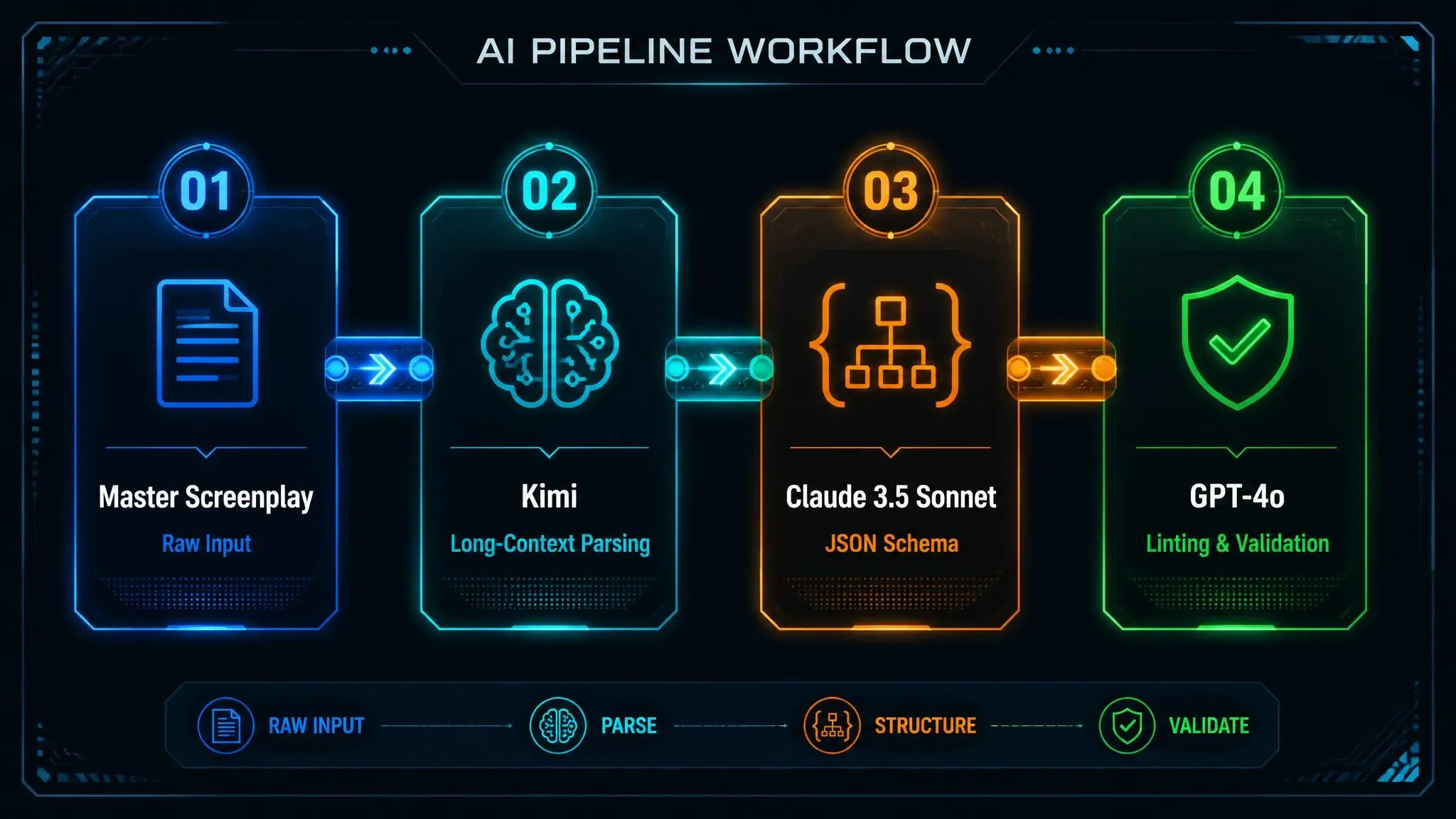
Specialized Roles Across the Tri-Model Pipeline
Each model brings unique technical capabilities to the Claude GPT Kimi workflow:
| Model | Primary Function | Core Strength in Pipeline | Key Output |
| Kimi (Moonshot AI) | Script Parsing & Narrative Tracking | 2M+ token context window for processing full scripts and tracking character continuity. | Structured character bibles & shot beat lists |
| Claude 3.5 Sonnet | Schema Architecture & Spatial Logic | Strict instruction following and code generation without hallucinating extra keys. | Clean Seedance 2.5 JSON objects |
| GPT-4o | JSON Validation & Prompt Expansion | High-speed processing for linting syntax and building creative prompt variants at scale. | Validated production payloads |
Executing Model-Specific Functions
Kimi: Long-Context Screenplay Management
Processing an episodic series or a long-context screenplay requires tracking detailed lore across dozens of scenes. Kimi extracts key narrative beats, logs scene transitions, and assigns consistent multimodal asset markers (@image1, @image2) across long scripts without losing track of details.
Claude 3.5 Sonnet: Precision Structural Formatting
Advanced LLM prompt engineering relies on Claude's exceptional spatial reasoning and code generation accuracy. Claude converts Kimi's raw beat lists into valid JSON structures, precisely mapping camera trajectories, lighting values, and shot array timing.
GPT-4o: Automated Syntax Validation
Before sending code to the video generator, GPT-4o acts as an automated syntax checker. It strips away illegal trailing commas, validates string escaping, and expands brief descriptions with detailed visual qualifiers.
Pro tips
A common point of failure in automated pipelines is silent JSON corruption caused by special characters in dialogue strings. Configuring GPT-4o with an explicit JSON-repair system prompt guarantees that unescaped quotes inside dialogue blocks are automatically converted to clean character strings before reaching Seedance 2.5.
Step-by-Step Execution: Building a JSON Prompt Pipeline from Script to Screen
Run the whole pipeline today. Phase 4 renders on Seedance 2.5, which is now live on Atlas Cloud — feed it the JSON your Claude / GPT / Kimi stack produces and generate straight away.
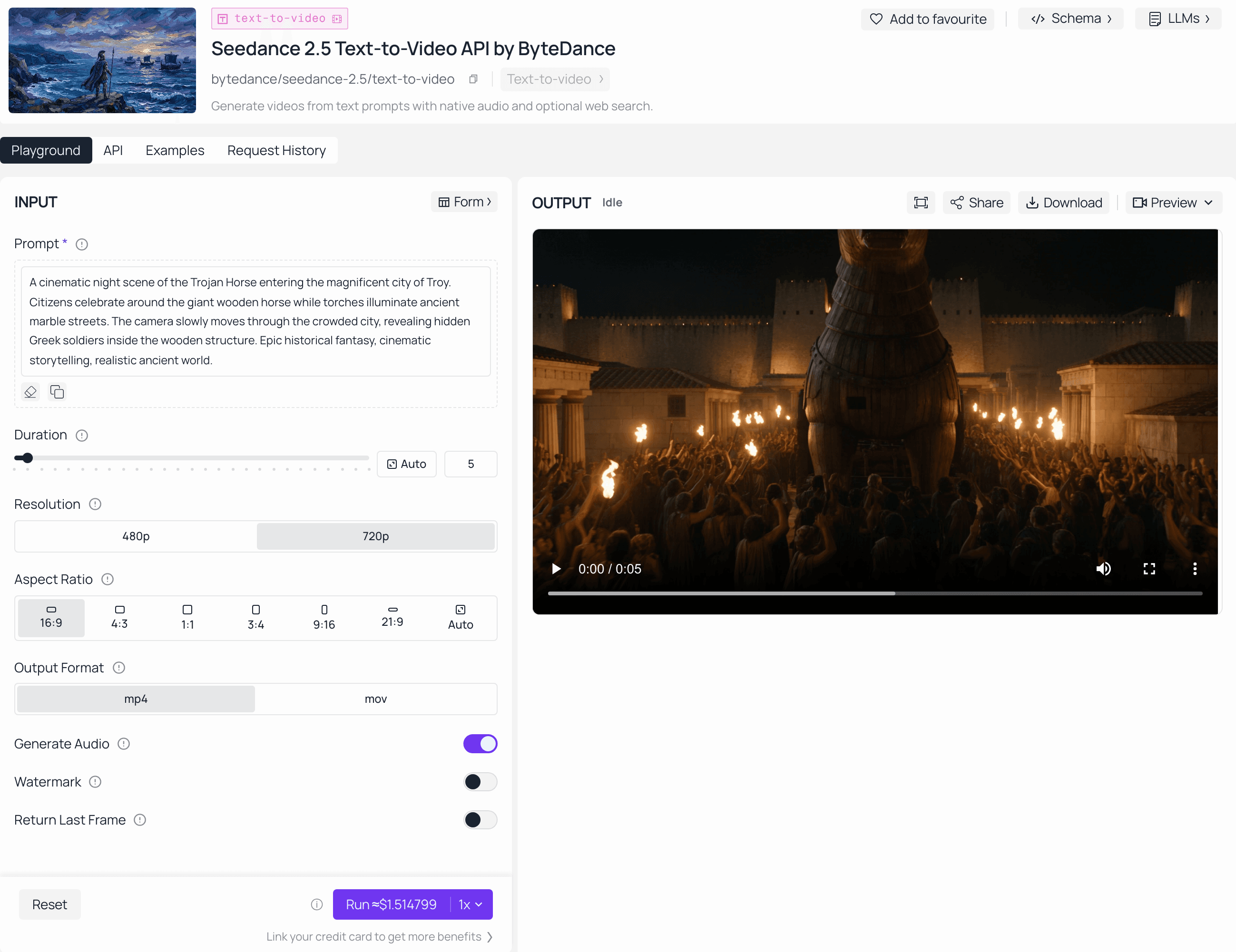
Prompting video models through a web interface often results in mismatched visual continuity, broken lighting, and character drift between shots. Transitioning to a structured script-to-video pipeline resolves these inconsistencies by converting raw narratives into machine-readable JSON structures.
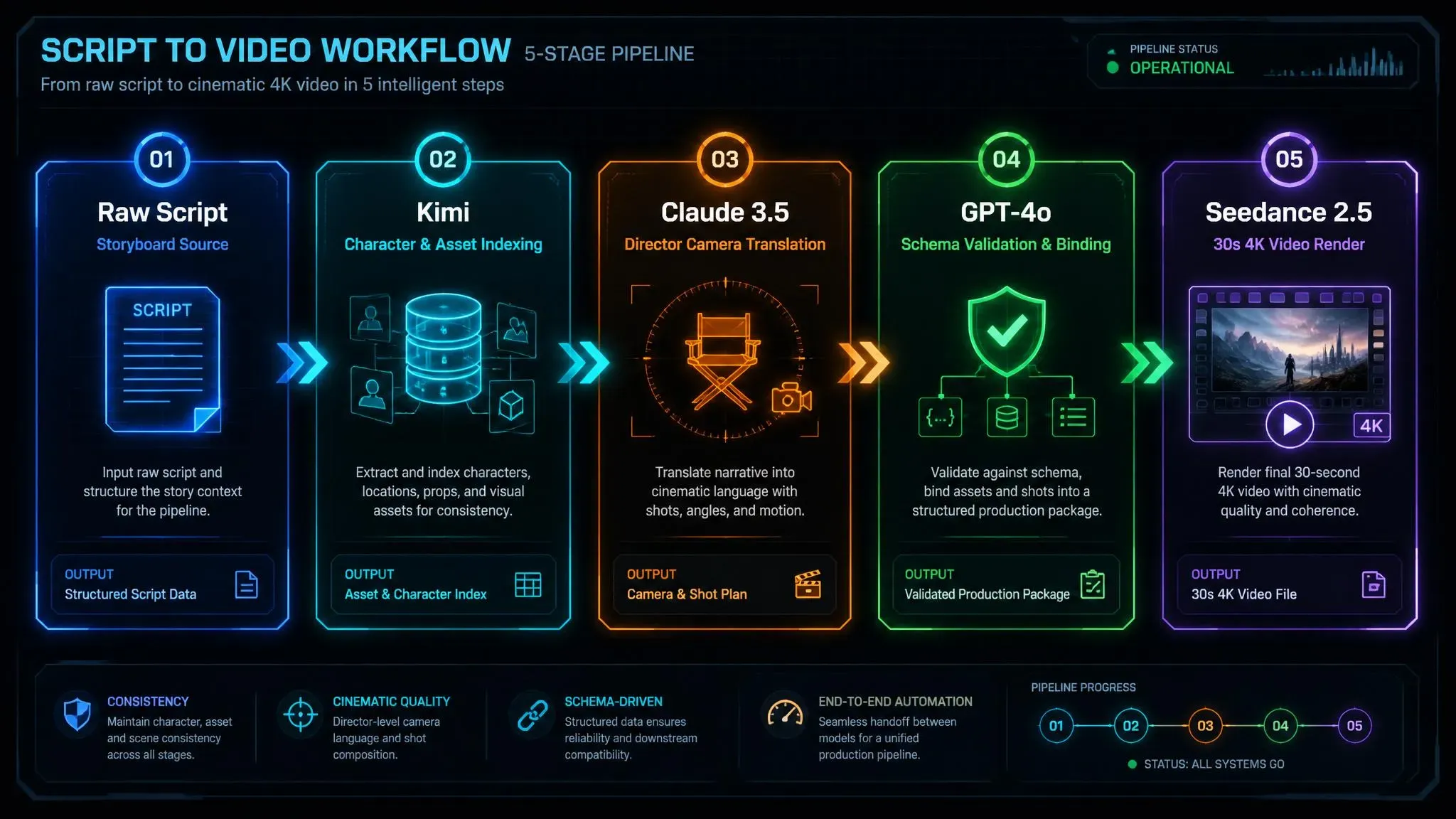
This four-step production workflow automates the transition from raw screenplay to final output using the Seedance 2.5 JSON prompts workflow.
Phase 1 (Kimi): Script Ingestion & Character Indexing
Feed the raw screenplay into Kimi to break down complex narrative arcs. Kimi leverages its high-context window to analyze full scripts, extract discrete scene beats, and assign consistent @ asset handle names across all characters, costumes, and props.
System Prompt Template for Kimi:
plaintext1Role: Master Screenplay & Asset Indexer. 2Task: Parse the attached script into temporal beats for a 30-second Seedance 2.5 scene. 3Instructions: 41. Break the script into discrete 10-second temporal shots. 52. Index every character, outfit, and prop with explicit handle tags (e.g., @image_detective, @image_outfit). 63. Output a structured Beat Sheet and Asset Catalog.
Kimi Output Artifact (Beat Sheet & Asset Index):
plaintext1[Asset Catalog] 2- @image_detective: Detective Marcus, 35, rain-slicked face, tired eyes. 3- @image_outfit: Cyberpunk beige trench coat with worn collar. 4- @audio_dialogue: "We were never supposed to find this place." 5 6[30s Temporal Beat Sheet] 7- Shot 1 (0-10s): Marcus (@image_detective) in trench coat (@image_outfit) in rain alley, speaks dialogue line. 8- Shot 2 (10-20s): Extreme close-up of broken cyber lens in puddle, reflection of Marcus. 9- Shot 3 (20-30s): Marcus turns and walks toward neon portal at alley end.
Phase 2 (Claude): Director Translation & JSON Formatting
Pass Kimi’s character index and beat sheet into Claude 3.5 Sonnet using a cinematography system prompt. Claude acts as the technical director, translating raw narrative actions into explicit lens mechanics, volumetric lighting parameters, and camera movement vectors mapped to the Seedance 2.5 JSON schema.
System Prompt Template for Claude:
plaintext1Role: Cinematographer & Seedance 2.5 Schema Architect. 2Task: Convert Kimi's Beat Sheet & Asset Index into a raw multi-shot Seedance 2.5 JSON schema. 3Rules: 41. Enforce strict key-value pairs for technical_specs, camera, lighting, and audio. 52. Use "// Cut to:" as transition markers between shot arrays to ensure sharp cuts. 63. Map camera mechanics with exact lens focal lengths (e.g., 85mm prime, f/1.4).
Claude Output Artifact (Raw JSON Architecture):Sends unvalidated JSON structural framework containing shot boundaries, lens dynamics, and text placeholders to Phase 3 for GPT-4o linting and URI binding.
Phase 3 (GPT): Schema Validation & Asset Binding
Run Claude's raw JSON output through GPT to validate structural syntax and perform multimodal asset binding. This step attaches explicit @image, @video, and @audio tags, linking external reference files to corresponding parameters in the payload.
plaintext1{ 2 "shot_id": "scene_01_shot_02", 3 "camera": { "movement": "dolly_in", "speed": "slow" }, 4 "prompt": "Close-up of @character1, intense expression, dynamic lighting", 5 "multimodal_assets": { 6 "character_ref": "@image_char_sheet_01", 7 "motion_ref": "@video_action_sample_04", 8 "audio_ref": "@audio_dialogue_track_02" 9 } 10}
Phase 4 (Seedance 2.5): Generation & Local Refinement
Submit the validated JSON payload directly into ByteDance’s Seedance 2.5 execution interface—either via API endpoints or through structured platform tools like the Atlas Cloud Seedance 2.5 Prompts Hub for instant batch rendering.
Step 4.1: API Execution Payload
Creators deploying automated rendering pipelines can post the validated payload directly to the generation endpoint:
plaintext1curl -X POST "https://api.seedance.ai/v2.5/video/generate" \ 2 -H "Authorization: Bearer YOUR_API_KEY" \ 3 -H "Content-Type: application/json" \ 4 -d @validated_seedance_payload.json
Step 4.2: Local Refinement & Region In-Painting: Zero-Reshoot Workflow
Don't re-render whole 30-second scene if an artifact or a character's jacket clips on frame 240. Instead, invoke Seedance 2.5’s localized region_edit array to target the precise pixel mask while locking surrounding visual and lighting matrices:
Region Edit Payload Modification:
plaintext1{ 2 "target_generation_id": "gen_seedance_25_984710", 3 "region_edit": { 4 "mode": "in_painting_video", 5 "timestamp_range": "00:08 - 00:12", 6 "target_mask": "detective_right_arm_jacket", 7 "prompt_modifier": "Fix jacket seam clipping, maintain volumetric rain-slicked lighting", 8 "preserve_surroundings": true 9 } 10}
Production Cost Efficiency: Executing targeted region-level edits consumes less than 15% of the compute credits compared to a full 30-second re-generation pass, while ensuring 100% background and temporal lighting continuity.
Advanced Production Practices
plaintext1 ┌── Seedance 2.5 Local Cache ──┐ 2 │ - Character Vectors │ 3Validate JSON ───┼── - Lighting Presets ├───► Render Queue 4 │ - Motion Patterns │ 5 └── Seedance 2.5 Global Schema ┘
Standard workflows often overlook explicit token allocation for non-visual references. To maximize topical authority and pipeline reliability, define local asset caching paths in the JSON schema. Binding pre-computed character vectors directly to the model's native input array reduces asset loading latency during high-volume batch processing.
Advanced Controls: Region Editing, Camera Language, and Native Audio
Generating a near-perfect 30-second AI video take only to discard it because a character's jacket clips into a wall or a pan turns sluggish mid-shot drains computing budgets quickly. Seedance 2.5 solves this friction by providing granular programmatic keys inside JSON prompt structures, allowing creators to manipulate specific spatial, visual, and acoustic elements without re-rendering the full scene.
plaintext1{ 2 "camera": { 3 "movement": "orbit shot", 4 "elevation": "crane elevation", 5 "focal_length": "85mm", 6 "transition": "rack focus" 7 }, 8 "region_edit": { 9 "mode": "in-painting video", 10 "target_mask": "background_wall", 11 "preserve_lighting": true 12 }, 13 "audio_payload": { 14 "dialogue": ""We cannot stay here longer."", 15 "tone": "anxious whisper", 16 "sfx": "heavy footsteps on gravel" 17 } 18}
Precision Camera Language
Defining dynamic optics directly in the camera JSON array enforces true physical camera mechanics. Explicit cinematic descriptors like rack focus or whip pan alter depth-of-field matrices and frame transitions in the latent space.
plaintext1"camera": { 2 "primary_action": "orbit shot", 3 "secondary_action": "crane elevation", 4 "focus_shift": "rack focus from foreground mug to door background" 5}
Using clear focal terminology prevents generic, linear panning and delivers actual cinematic depth.
Localized Region Editing
Instead of running expensive full reshoots for minor visual errors, creators can invoke Region-level editing via targeted in-painting video workflows.
- Select the Area: Mask the precise visual artifact, background element, or costume error.
- Define the Modifiers: Instruct Seedance 2.5 to execute swaps on the target zone while locking surrounding pixels.
- Maintain Scene Physics: Preserve lighting, shadows, and motion continuity automatically.
| Editing Approach | Compute Cost | Visual Consistency | Best Used For |
| Full Sequence Generation | High | Unstable across takes | Initial scene creation |
| Region-Level Editing | Low | High (preserves surroundings) | Artifact removal, logo swaps |
Integrated Audio Prompting
Seedance 2.5 native audio integrates dialogue, environmental sound effects, and spatial acoustics into the generation pass. Rather than sending video through external post-production suites for sound design, the audio payload processes text strings into synchronized soundscapes.
plaintext1"audio_payload": { 2 "dialogue_line": ""Watch out for the drop!"", 3 "tone_qualifier": "shouted over wind noise", 4 "background_sfx": "distant thunder and torrential rain" 5}
Formatting quoted text produces natural lip-sync dialogue, while descriptive sound qualifiers align character facial muscle movements directly with spoken phonemes.
Tips: Many workflows fail to specify tone_qualifiers in dialogue blocks, leading to flat flat facial expressions. Always pair dialogue arrays with explicit spatial audio cues (e.g., echoing in a concrete hallway) to force the engine to calculate natural reverb and lip-sync cadence simultaneously.
Organic Troubleshooting & Edge Case Optimization
Executing generation passes only to hit opaque safety filters or watch a lead character morph mid-scene burns rendering credits and stalls production schedules. Resolving these edge cases requires handling safety and identity constraints directly inside your JSON schema.
Preventing False Safety Flags in Seedance Moderation
Automated safety guardrails frequently flag ambiguous natural language, such as "shoot," "explosion," or "blade." Replacing colloquial verbs with standardized film production terminology inside JSON keys eliminates interpretive noise and prevents false positives.
plaintext1{ 2 "action_description": "Cinematic camera capture of intense spark reflections and high-energy lens flares", 3 "technical_framing": "Wide lens capture, dramatic lighting, high contrast" 4}
Using precise camera direction keeps prompts fully compliant with safety policies while preserving visual impact.
Eliminating Character Drift Across Shots
Maintaining facial consistency across multiple 30-second passes requires multi-reference anchoring rather than relying on text descriptions alone.
plaintext1"multimodal_reference_pool": { 2 "character_anchors": { 3 "@image_char_01": "https://domain.com/path/to/character_facial_identity.png", 4 "@image_outfit_01": "https://domain.com/path/to/character_wardrobe_sheet.png" 5 } 6}
Binding multimodal reference tags (@image_char_01) inside your JSON payload locks facial geometry, hair texture, and wardrobe across independent rendering batches.
Labeled Shot Cuts vs Timestamps
Choosing between timestamps and labeled shot cuts defines how the rendering engine processes temporal transitions:
| Technique | JSON Implementation | Engine Execution |
| Timestamps | "timestamp": "00:00-00:10" | Adjusts camera speed and action pacing continuously |
| Shot Cuts | "shot_id": "Shot_01" / "shot_id": "Shot_02" | Triggers clean hard cuts and immediate scene transitions |
plaintext1Timestamps ──► Continuous visual morphing across keyframes 2Shot Cuts ──► Discrete scene transitions with sharp frame cuts
Pro Tip: Balance reference weights to enforce rigid identity retention without degrading image sharpness. Set primary face anchors (@image_char_01) to higher attention weights while keeping environmental reference weights lower inside your JSON configuration.
Conclusion & Scaling Your AI Film Production Pipeline
Building a programmatic Seedance 2.5 JSON prompts workflow shifts video creation from trial-and-error prompting into an engineered, predictable process. By routing narrative scripts through Claude, GPT, or Kimi to spit out structured JSON schemas, studios unlock true AI studio automation.
plaintext1Raw Script ──► LLM Parser (Claude/GPT/Kimi) ──► JSON Payload ──► Seedance 2.5 API ──► 30s Native Video
Studio Scaling Metrics: Manual vs. Automated JSON Pipelines
| Production Track | Manual Generation Cost | Automated JSON Pipeline | Turnaround Speed |
| Social Video Ads | 12+ prompt iterations | Single JSON payload execution | Under 5 minutes |
| Episodic Web Series | High character drift | Fixed reference slots (@image) | Continuous 30s passes |
| Narrative Shorts | Fragmented clip stitching | Native camera & audio timing | Direct-to-edit timeline |
A JSON-first architecture gives production teams programmatic control over camera matrices, regional edits, and character anchors. By shifting from manual prompt iteration to schema-driven rendering, studios maintain visual consistency across shots while cutting both generation overhead and rendering costs.
Tips: Connect your LLM JSON generators directly to headless CMS webhooks. Triggering automated video renders directly from published blog drafts or product updates fills a key content gap competitors miss: zero-latency, automated multi-platform video syndication.
If you are building automated pipelines specifically for commercial product ads or DTC brands, check out this comprehensive Seedance 2.5 e-commerce video workflow tutorial to see real-world dynamic lighting and product-focused JSON schema examples.





