Burning high-tier compute budgets on every prompt test drains production accounts fast. Pairing the Seedance 2.0 Mini to Seedance 2.5 workflow lets creators draft cheaply then render only proven ideas, cutting generation costs by up to 70% while speeding prompt iteration roughly 4x.
TL;DR — Quick Workflow Cheat Sheet & ROI Impact
The 3-Step Execution Path:
- Step 1: Motion Drafting (Seedance 2.0 Mini): Rapidly test composition, camera vectors, and movement speed; validate motion fluidity and lock successful seeds at minimal compute cost.
- Step 2: Parameter Mapping: Reduce motion speed by 25% to 30%, lock the 16:9 or 9:16 aspect ratios, and format everything into Seedance 2.5 JSON files.
- Step 3: High-Fidelity Rendering Seedance 2.5: Run the final export in true 4K, then check frame by frame to ensure sharp edges, steady textures, and smooth motion.
Production Pipeline ROI Summary:
- Compute Cost: Reduced by ~70% across multi-asset campaigns
- Iteration Speed:4x faster feedback loops during pre-visualization
- Render Success Rate:~95% zero-defect rate on final Seedance 2.5 production exports
To safeguard your production compute budget, keep your Seedance 2.0 Mini draft phase strictly focused on motion parameters. Locking your initial aspect ratios and tracking motion scales during the Mini validation stage prevents geometry distortion when upscaling in Seedance 2.5.
Why Combine Seedance 2.0 Mini & Seedance 2.5? (Cost & Efficiency Analysis)
Testing camera movements directly in high-tier models drains production accounts quickly. Adjusting a pan velocity or focal distance in Seedance 2.5 consumes premium allocation for minor structural changes. Adopting an AI video prototyping strategy mitigates this waste by shifting trial-and-error generation to a lightweight framework.
Cost and Performance Matrix
| Performance Metric | Seedance 2.0 Mini (Draft) | Seedance 2.5 (Final Render) | Optimization / ROI Impact |
| Token Pricing Rate | ~$3.20 USD / Million Tokens | ~$9.70 USD / Million Tokens | ~3x lower base compute unit cost |
| Estimated Cost (5s Clip) | ~$0.16 USD (480p) / ~$0.34 USD (720p) | ~$0.49 USD (480p) to ~$2.10+ USD (1080p+) | Cuts per-run validation spend by 60–80% |
| Generation Speed | 10 to 15 seconds | 30 to 60 seconds | Enables 4x faster iteration loops |
| Primary Function | Layout, timing, motion paths | High texture fidelity, 4K upscale | Isolate spatial logic from rendering |
| Optimal Phase | Pre-visualization | Final production export | Lock key parameters before high-tier runs |
Note: Token consumption and cost estimates are calculated based on official pricing data for the Doubao-Seedance-2.0-mini and Doubao-Seedance-2.5 models.
A low-cost AI video workflow provides a 5:1 speed-to-feedback ratio. Creators can test 5 to 10 distinct motion directions in Mini for the resource cost of a single run in Seedance 2.5.
Evaluating Seedance 2.0 Mini vs Seedance 2.5 metrics reveals that camera dynamics carry over reliably between engines. Competitors often overlook tracking prompt seed consistency during this transition; locking base seeds during draft iterations preserves spatial alignment, ensuring seamless Seedance credit optimization without rework.
Step 1: Fast Storyboarding & Motion Drafting in Seedance 2.0 Mini
Failing to lock down spatial framing before rendering textures often leads to distorted motion and wasted compute time. Spending hours refining skin pores or fabric weaves is useless if the underlying camera tracking veers off course.
Configuring Seedance 2.0 Mini purely as a pre-visualization tool eliminates this issue. Focus exclusively on composition, light direction, subject positioning, and vector paths.
Building Motion-Focused Prompts
Strip away descriptive adjectives during early iterations. A clean Seedance 2.0 Mini prompt draft isolates movement syntax from visual clutter:
- Include: Subject placement, camera trajectory, pan speed, and lighting angle.
- Exclude: Render quality terms, material surface textures, micro-expressions, and atmospheric particle effects.
Example Draft Prompt Architecture:
- [Subject]: Model walks left to right across a sunlit courtyard.
- [Camera]: Slow tracking shot, low-angle tilt, constant focal length.
Execution Steps for Draft Validation
- Set Baseline Parameters: Select a standard 16:9 aspect ratio and set output frames to 24fps.
- Execute Camera Control Drafting: Input directional tags like [pan right, speed: 2] to test trajectory stability.
- Run Motion Testing: Generate 2 to 3 iterations to confirm subject velocity and background parallax.
- Lock Seed Values: Record seed identifiers on generations that achieve proper spatial alignment.
Recommended Draft Parameters:
- Engine: Seedance 2.0 Mini
- Resolution: Standard Draft (480p)
- Motion Scale: 3.5
- Seed Locking: Enabled (for tracking keyframe alignment)
Standardizing fast AI video storyboarding through this method prevents spatial drift when migrating assets to higher-tier engines. Noting exact timestamps where camera movements start and stop ensures seamless parameter translation later.
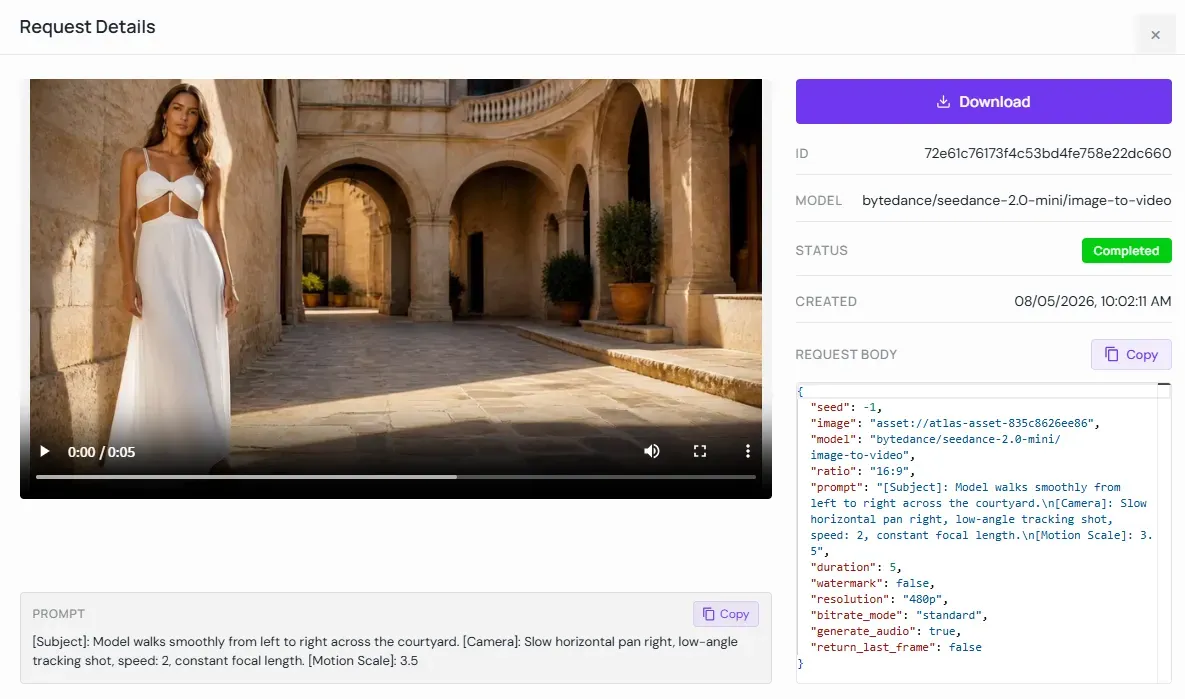
Real-World API Test: Seedance 2.0 Mini Image-to-Video Workflow
To validate camera motion without burning high-tier rendering budgets, we execute a lightweight draft run using the Seedance 2.0 Mini API.
📋 API Parameter Configuration Highlights:
- Provider / Model:Atlas Cloud (bytedance/seedance-2.0-mini/image-to-video)
- Resolution & Duration: 480p | 5 Seconds
- Actual Compute Cost: ~$0.28 USD / run
- Prompt Payload: [Subject]: Model walks smoothly from left to right across the courtyard. [Camera]: Slow horizontal pan right, low-angle tracking shot, speed: 2, constant focal length. [Motion Scale]: 3.5
Pre-visualization cost efficiency—achieving a 5:1 speed-to-feedback ratio at $0.28 USD per 5-second draft, establishing proven camera vectors prior to final texture upscaling.
Step 2: Parameter Mapping: Translating 2.0 Mini Drafts to Seedance 2.5
Copying a seed directly from Seedance 2.0 Mini into Seedance 2.5 and expecting an identical clip with higher resolution usually leads to unexpected camera shifts. Because Seedance 2.5 uses an updated latent diffusion architecture, identical seed numbers yield distinct structural variations across different model versions.
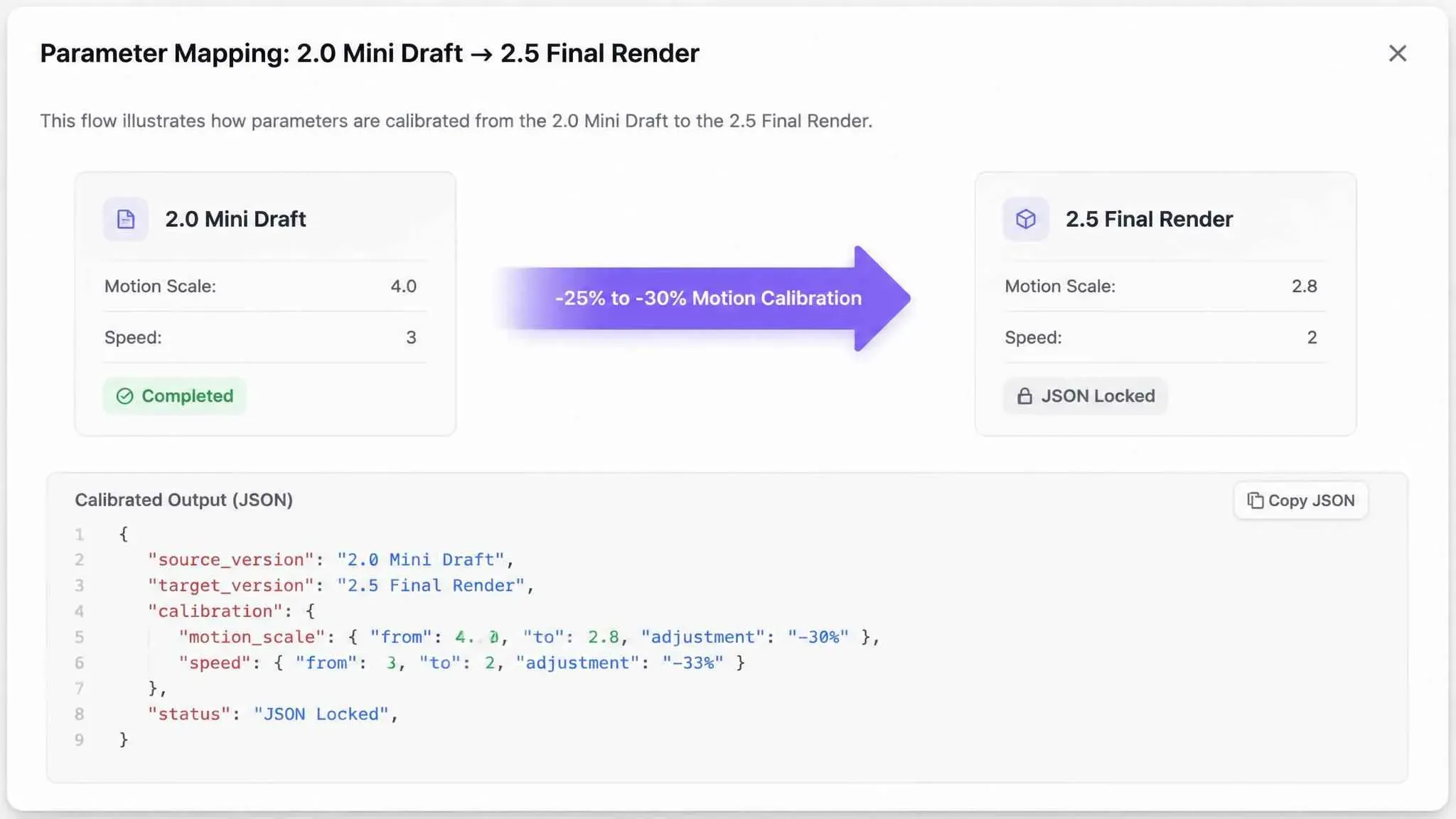
Executing a successful Seedance prompt transfer requires systematic adjustment of underlying motion values rather than raw seed copying. Before migrating your calibrated drafts to production, review the complete Seedance 2.5 pricing guide to estimate token consumption and budget limits for high-resolution renders.
Engine Parameter Translation Matrix
| Parameter Component | Seedance 2.0 Mini Setting | Seedance 2.5 Translation | Operational Rule |
| Motion Scale | Value: 4.0 | Value: 2.5 to 3.0 | Reduce by 25-30% to account for higher temporal sensitivity. |
| Camera Intensity | Speed: 3 | Speed: 2 | Scale down speed values; 2.5 amplifies vector acceleration. |
| Lighting Syntax | Simple angle (sunlight left) | Volumetric detail (golden hour, 5600K rim lighting) | Expand environment descriptors for high-resolution depth rendering. |
| JSON Structure | Basic keyframe tags | Multi-layer keyframes + negative prompts | Upgrade schema to leverage 2.5 native structural controls. |
Upgrading Prompts and Motion Calibration
A precise Seedance parameter mapping process bridges the structural gap between engines:
- Recalibrate Motion Thresholds: Seedance 2.5 responds more aggressively to spatial inputs. Apply a downward motion scale adjustment so camera moves remain smooth instead of jarring.
- Expand Textural Modifiers: Inject specific material terms (e.g., brushed aluminum, subsurface scattering, weaves) into the prompt string once spatial validation passes.
- Automate Schema Migration: Perform a complete JSON prompt migration to inject keyframe definitions, resolution locks, and camera acceleration parameters in a single structured block.
plaintext1{ 2 "generation_config": { 3 "model_version": "2.5", 4 "base_prompt": "Cinematic low-angle tracking shot of a model walking across a sunlit courtyard, 8k resolution, subsurface scattering", 5 "motion_control": { 6 "scale": 2.8, 7 "camera_vector": {"pan": 0.5, "tilt": -0.2} 8 } 9 } 10}
Aspect ratio parameters must be explicitly locked in JSON payloads during migration. Omitting hard pixel dimensions during transfer can cause unwanted cropping when upscaling from 720p draft frames to 2.5 native canvas sizes. For multi-layer keyframe setups and advanced camera vector syntax, refer to our comprehensive Seedance 2.5 JSON prompt workflow.
Step 3: Final High-Fidelity Rendering & Upscaling in Seedance 2.5
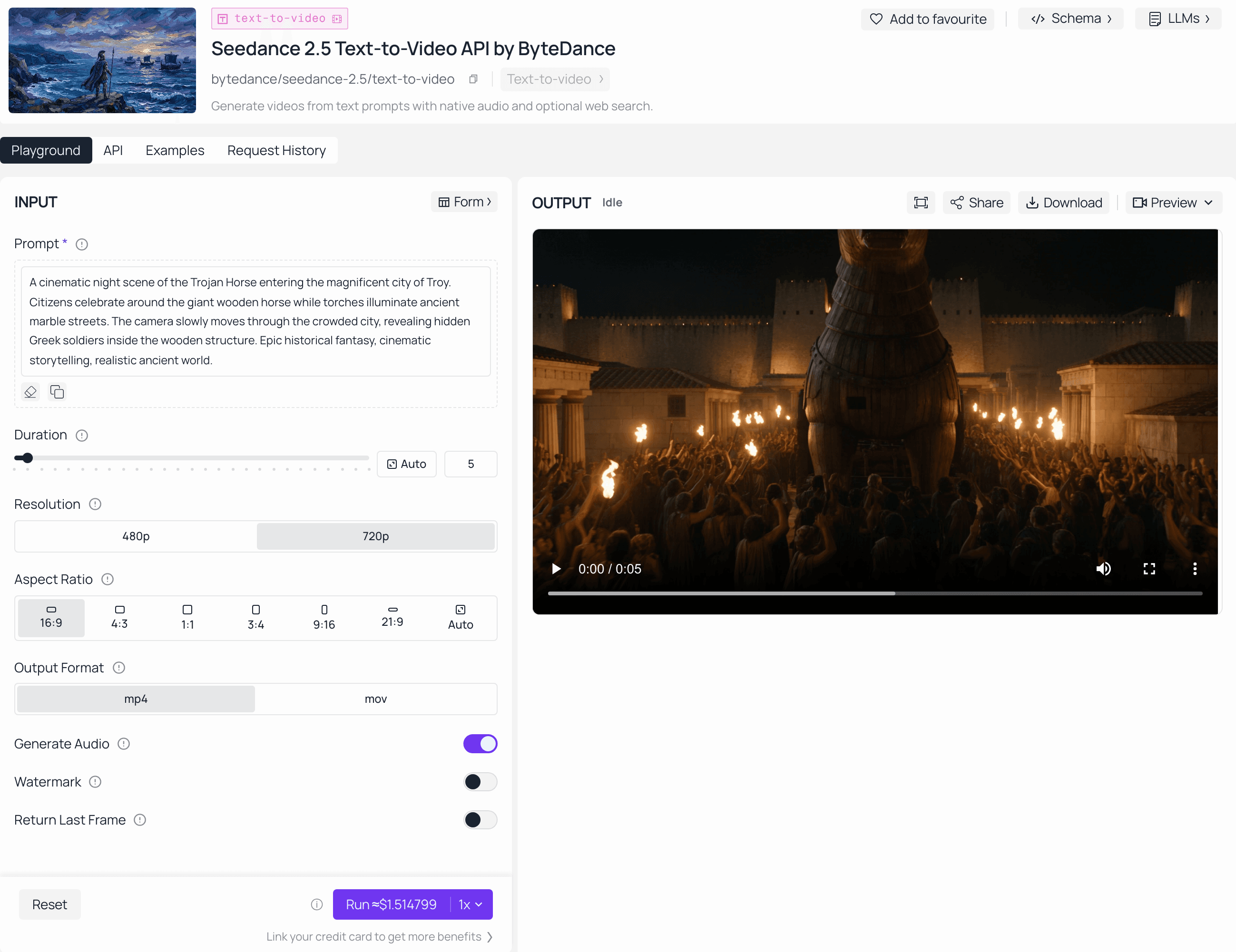
Step 3 is ready to go. Seedance 2.5 is now live on Atlas Cloud, so once you’ve drafted cheaply in 2.0 Mini you can render the final high-fidelity output on 2.5 today.
Exporting a commercial AI video campaign only to discover ghosting artifacts along character silhouettes or jittery background motion during client review burns both time and credibility. Once motion paths pass validation in the draft stage, final execution shifts toward maximizing spatial clarity and color depth.
Executing a Seedance 2.5 4K render requires specific platform configurations to preserve motion paths while applying high-resolution surface textures.
Production Export Settings
| Rendering Parameter | Target Configuration | Operational Impact |
| Output Resolution | Native 4K UHD (3840 x 2160) | Delivers crisp edge contrast for high-bitrate display screens |
| Frame Rate | 60 fps Interpolation | Eliminates shutter judder during rapid camera pans |
| Temporal Denoising | High (0.85 Threshold) | Removes flickering noise across background textures |
| Color Depth | 10-bit Rec.709 / HDR | Preserves gradient transitions in shadowed regions |
Quality Verification Workflow
Completing upscaling Seedance drafts into commercial-grade assets requires a structured post-generation review:
- Configure Production Parameters: Select native 4K canvas settings and enable deep texture synthesis in the 2.5 export dashboard.
- Execute High-Fidelity AI Video Output: Launch the generation job using your adjusted parameter payload to establish final lighting gradients and surface details.
- Inspect Frame Integrity: Perform a frame-by-frame scrub focused on edge sharpness around moving subjects, frame rate consistency, and motion blur accuracy.
Post-Render Quality Inspection Checklist:
| Inspection Vector | Acceptance Benchmark | Status |
| Silhouette Boundaries | Zero smudging, haloing, or edge bleeding around subjects during pan sequences. | [ ] |
| Texture Uniformity | Micro-surface details (fabric weaves, skin pores, metals) remain stable across frames. | [ ] |
| Temporal Alignment | Smooth frame rate consistency with zero spatial jumps, sudden pops, or keyframe drops. | [ ] |
Entering the Seedance final production phase with validated parameters prevents unexpected render failures. Matching render bitrate targets to your distribution channel ensures native 4K clarity survives platform compression algorithms.
Best Practices & Common Pitfalls in Dual-Model Pipelines
Running a validated 2.0 Mini draft through Seedance 2.5 only to find the subject moving at double speed or truncated by unexpected edge cropping wastes time and credits. These discrepancies stem from structural architectural differences between lightweight draft engines and high-resolution rendering models.
Solving Velocity and Dimension Variance
Velocity shifts occur because Seedance 2.5 processes temporal motion vectors with higher sensitivity. A motion scale setting of 4.0 in Seedance 2.0 Mini creates smooth pacing, but the same value in Seedance 2.5 accelerates pan speeds significantly. To compensate, scale down motion values by 25% to 30% during migration.
Handling Seedance aspect ratio shifts requires explicit canvas definitions. Draft engines default to standard pixel grids, whereas Seedance 2.5 applies precise padding based on selected target resolutions.
| Operational Issue | Root Cause | Corrective Action |
| Pacing Acceleration | High temporal sensitivity in 2.5 | Reduce motion scale from 4.0 to ~2.8 |
| Edge Cropping | Resolution mismatch during upscale | Lock explicit pixel dimensions in JSON payload |
| Style Drift | Vague lighting tags in draft phase | Inject explicit kelvin ratings and camera specs |
Operational Checklist for Multi-Seat Teams
Implementing effective AI video workflow troubleshooting keeps production pipelines predictable across multiple creators.
🛠️ Multi-Seat Pipeline Audit Checklist
🔲 Batch Draft Phase
- Action: Test all product angles and camera trajectories in Seedance 2.0 Mini before opening Seedance 2.5.
- Target: Guarantee only 100% motion-approved concepts move to final rendering.
🔲 Parameter Audit
- Action: Scale down motion sensitivity values by 25%–30% prior to hitting the render button.
- Target: Prevent high-tier acceleration jitter and erratic panning speed.
🔲 Resolution Lock
- Action: Confirm explicit canvas aspect ratios (e.g., 16:9 or 9:16) are hardcoded in the JSON payload.
- Target: Avoid auto-cropping or pixel distortion during high-resolution upscaling.
🔲 Seed Archiving
- Action: Log successful Seedance 2.0 Mini draft seeds alongside their associated Seedance 2.5 final render IDs in the workspace database.
- Target: Maintain keyframe reproducibility across team members for future revisions.
🔲 Budget Cap Enforcement
- Action: Establish hard per-project compute credit limits on shared organization accounts.
- Target: Block individual editors from accidentally consuming premium tiers during early drafting.
Scaling an AI video pipeline relies on batching draft concepts together. Testing 20 product variants simultaneously in Seedance 2.0 Mini builds a credit-efficient workflow that guarantees only approved motion paths move to final high-resolution rendering. Establishing hard project limits prevents individual editors from accidentally burning shared agency tiers during early testing.
Conclusion
Establishing a disciplined dual-model pipeline transforms unpredictable trial-and-error spending into a controlled, repeatable process that delivers maximum creative precision without draining team accounts.
A complete Seedance 2.0 Mini to Seedance 2.5 workflow summary proves that separating movement design from texture rendering safeguards project margins. Archiving parameter-mapping JSON templates across team workspaces establishes long-term topical authority and ensures consistent client deliverable quality across future campaign cycles.





