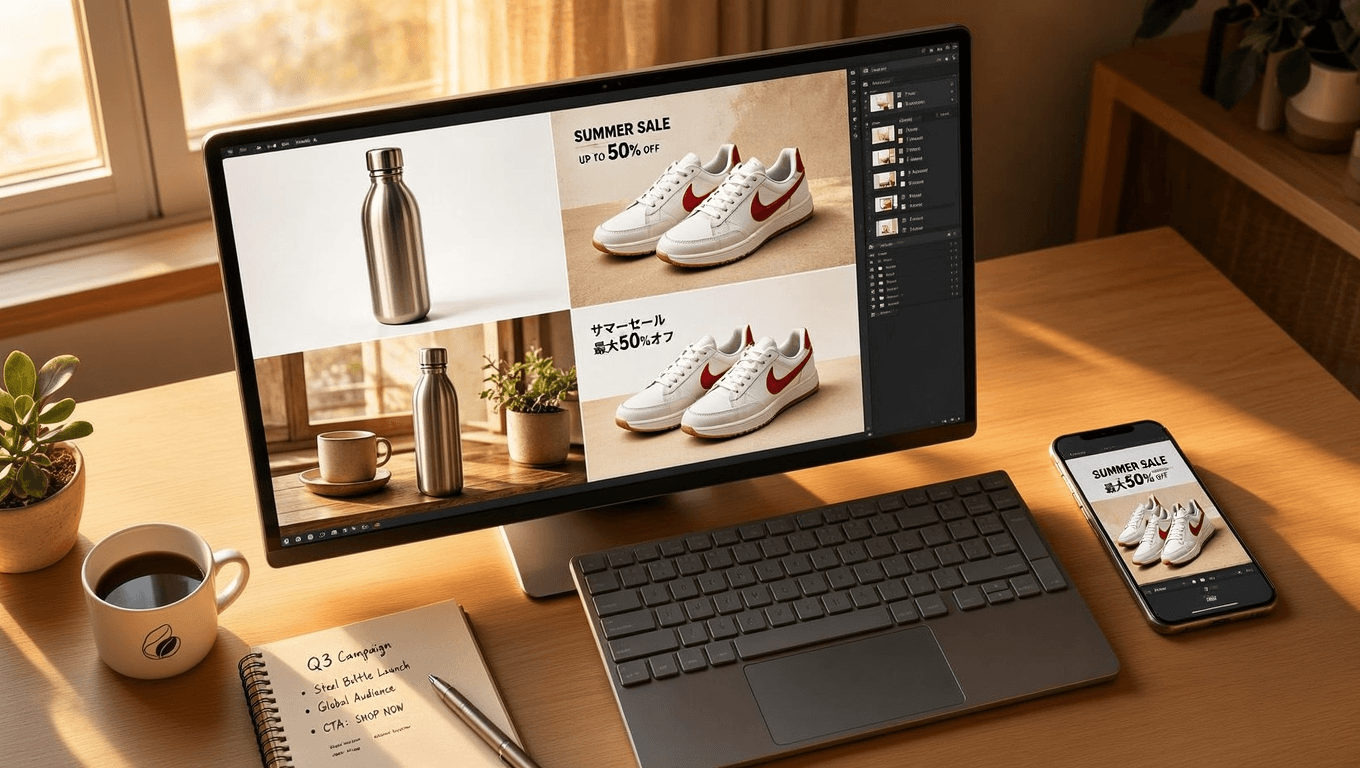
One product launch can swallow a hundred images before a single unit ships. Main image, six colorways, lifestyle shots, selling-point cards, promo banners in four languages, then a resize for every placement. A studio bills days for that list. Seedream 5.0 Pro bills four and a half cents and gets through it in an afternoon.
This guide turns that price gap into four concrete playbooks: marketplace listing images, lifestyle scenes with virtual models, multilingual promo banners, and A/B ad iteration. Each comes with a prompt you can paste and a cost you can budget.
Key Takeaways
- Seedream 5.0 Pro ships two endpoints that matter for commerce work: text-to-image for net-new creative, and an edit model that keeps your real product intact while changing everything around it.
- The killer features for ad teams are practical, not flashy: exact-text rendering in 15 prompt languages, up to 10 reference images, hex-code color matching, and layer separation that returns transparent PNGs.
- On Atlas Cloud both endpoints run a flat $0.045 per image, with no per-size surcharge, so a 50-SKU catalog refresh with four images per product lands near $9.
- Text is good enough for headlines and CTAs, not for fine print. ByteDance itself admits the gap, so proofread every string before anything goes live.
Why Seedream 5.0 Pro Fits E-commerce and Ad Work
ByteDance built this model for exactly this job. The launch post demos a Christmas sale poster with dense promo copy laid out "with well-judged spacing," English text "rendered without spelling errors," and a pet e-commerce homepage mockup where a Golden Retriever's paw breaks out of one product tile to press a button in the next. BytePlus announced the API on July 8, 2026 with the same pitch: "Edit with precision. Visualize complex information. Render realistic images and portraits. Create across languages."
Independent testing backs the positioning. A hands-on Chinese-language review (title translated from Chinese) ran commercial briefs through the model: a coffee-brand poster built for later layer editing, a skincare hero image with English copy, and a multi-scene character consistency test.
The specs that decide whether it fits your pipeline:
| Spec | Seedream 5.0 Pro | Why commerce teams care |
|---|---|---|
| Endpoints | Text-to-image + Edit (image-to-image) | Generate concepts, then edit real product photos |
| Resolution | 2K and 3K class output, no 4K | Enough for listings and social; not for large print |
| Reference images | Up to 10 per edit request | Product + model + scene in one generation |
| In-image text | 15 prompt languages, exact strings | Localized banners without a design team |
| Output per run | Exactly 1 image | Every variant is a deliberate, priced decision |
| Layer separation | Background + element layers as transparent PNGs | Reusable assets for ongoing campaigns |
Where to Run Seedream 5.0 Pro: Atlas Cloud Setup
Every playbook below runs on Atlas Cloud, which hosts the full ByteDance model family behind one API key. The Seedream 5.0 Pro playground is the fastest way in: no setup, and the Run button quotes the exact price before you commit. As of July 22, 2026 that quote reads $0.045 per image, roughly 222 images per $10. One useful quirk we confirmed across the 1.5K and 2K presets: the price does not change with size, so a big 2K hero costs the same as a small draft. The Run button is the source of truth if you are reading this later.
Method 1: Create Ad Images in the Seedream 5.0 Pro Playground
Log in, open the playground, and you get one required field: the prompt box. Below it sit the size picker, output format, and a Thinking toggle that runs a reasoning pass before generation. Leave Thinking on for layout-heavy work like banners; its prompt-optimization pass is what makes multi-element compositions land.
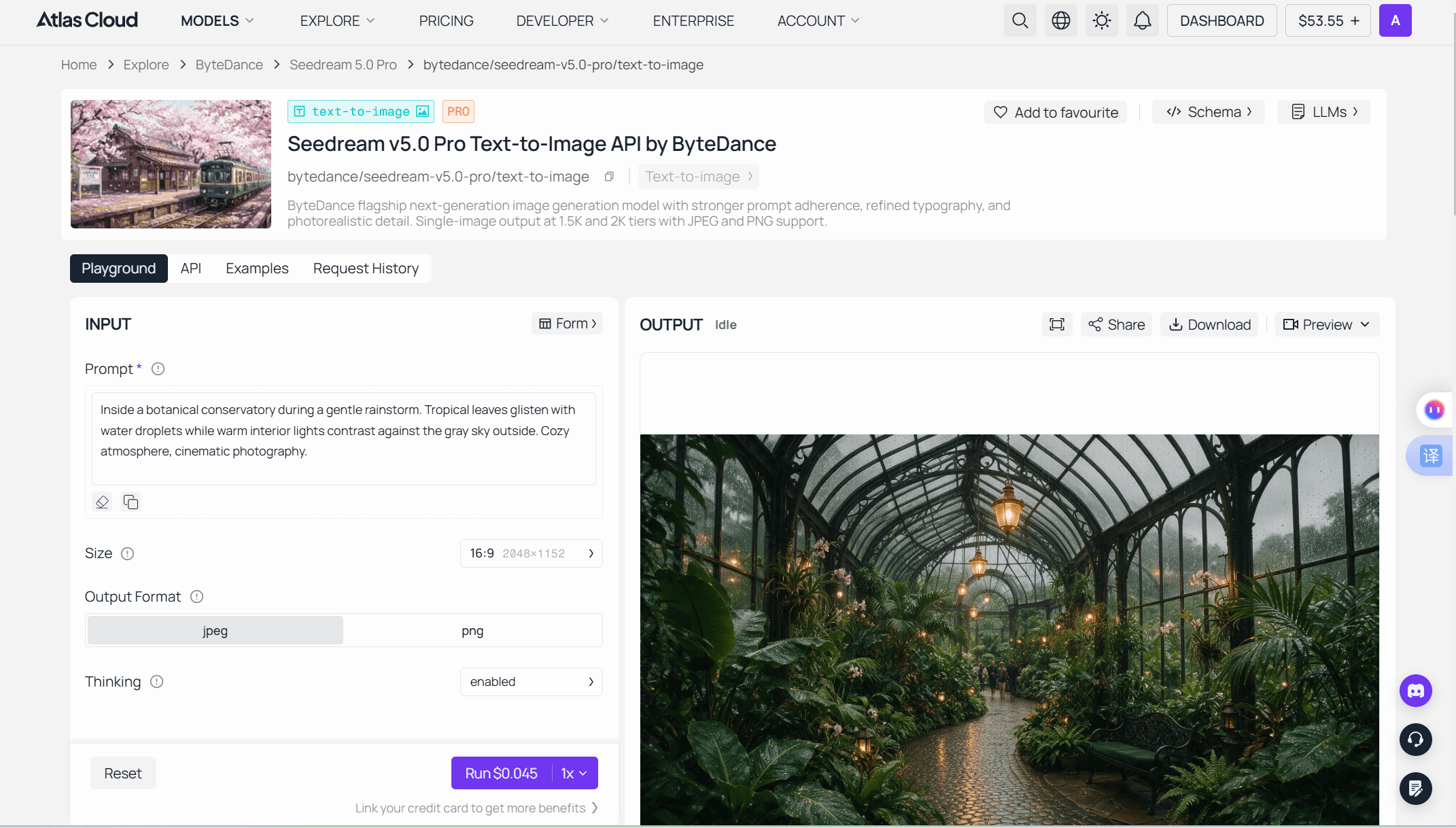
For product work, switch to the Edit tab instead. It accepts 1 to 10 images by upload or URL, and the reference math is friendly: the first input image is free, each additional one adds $0.003. Match the size preset to the destination before you run, because the picker beats anything you write in prose. Finished images come back with download controls plus two follow-on paths, image-to-image and image-to-video.
Method 2: Scale E-commerce Batches Through the Seedream 5.0 Pro API
Once a prompt works in the playground, catalog-scale work moves to code. The model returns one image per request, so scale comes from looping single calls, one per SKU.
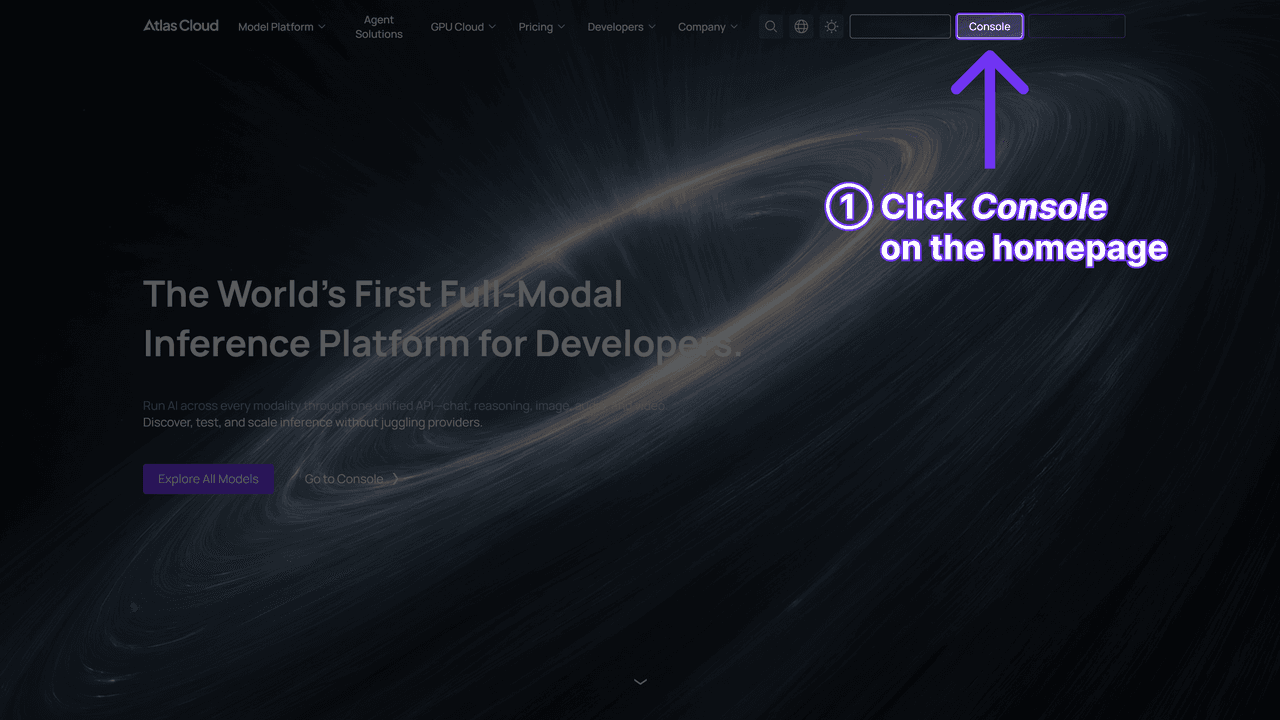
Step 1: Get your API key. Create one in the Atlas Cloud console and set it as an environment variable. Keep it out of client code.
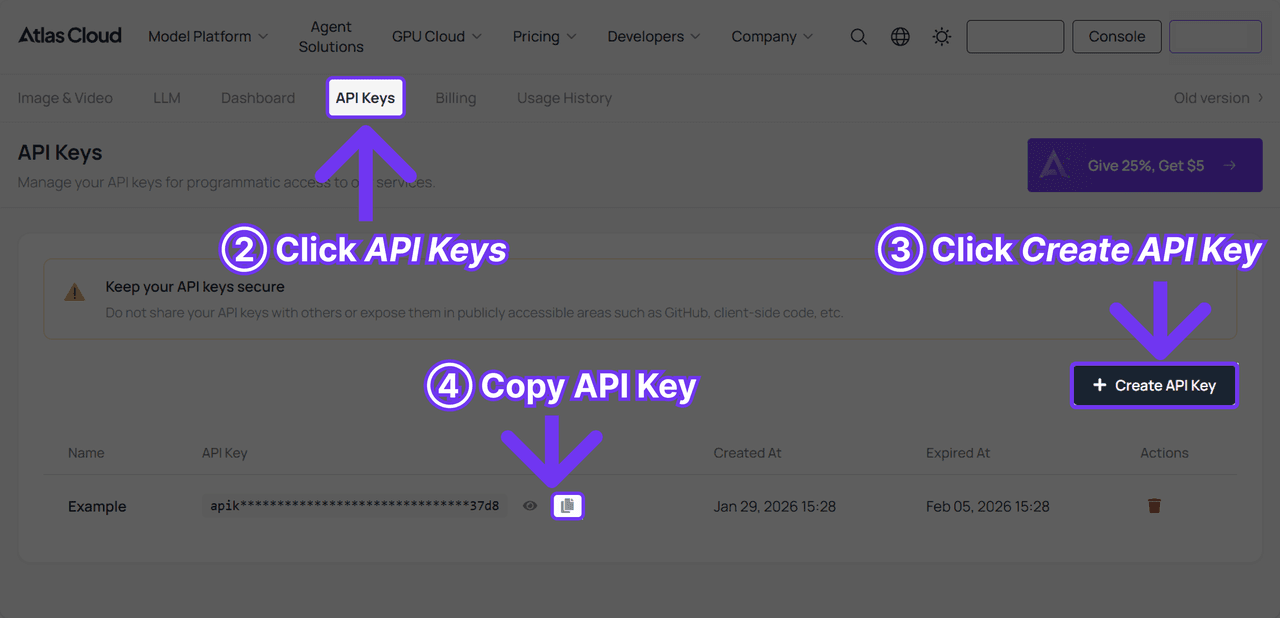
Step 2: Check the API docs. Endpoints, parameters, and auth live in the API documentation. Generation is asynchronous: submit, get a prediction ID, poll.
Step 3: Make your first request.
plaintext1curl -X POST https://api.atlascloud.ai/api/v1/model/generateImage \ 2 -H "Content-Type: application/json" \ 3 -H "Authorization: Bearer $ATLASCLOUD_API_KEY" \ 4 -d '{ 5 "model": "bytedance/seedream-v5.0-pro/text-to-image", 6 "prompt": "<your banner prompt>", 7 "size": "2048*1152", 8 "output_format": "png", 9 "thinking": "enabled" 10 }'
Poll GET /api/v1/model/prediction/{id} until status hits completed; the image URL arrives in outputs[0]. For product editing, swap the model string to bytedance/seedream-v5.0-pro/edit and add an images array with your reference URLs. Everything else stays identical. Always pass size explicitly: the API defaults to the square 2048*2048, which is rarely what a banner wants.
That sameness is the point of the platform. One key, one auth header, one submit-and-poll loop across every model. When your pipeline later adds video, the integration doesn't change, only the model string does.
Seedream 5.0 Pro Listing Images: Pack Shots That Pass Marketplace Rules
Start with the least glamorous image you own, because it is the one with hard rules attached. Amazon's main-image requirements are strict enough that violations get listings suppressed, and the current spec is a checklist a prompt can encode:
| Amazon main image rule | How to encode it in the prompt |
|---|---|
| Pure white background, RGB 255,255,255 | "pure seamless white background (RGB 255,255,255)" |
| Product fills 85%+ of frame | "the product fills about 85 percent of the frame" |
| 1,000+ px on the longest side | Use a 2K preset; every Pro tier clears the bar |
| No text, logos, watermarks, or props | "no text, no logo overlays, no watermark, no props" |
One rule of craft before the prompt: never generate the product itself from imagination. A main image must show the item the customer receives, so the honest workflow runs through the Edit endpoint with your real photo as reference. The model's job is the studio, not the product. Atlas Cloud's own model page frames the e-commerce use case the same way: change the color, material, or background while the product's structure stays intact.
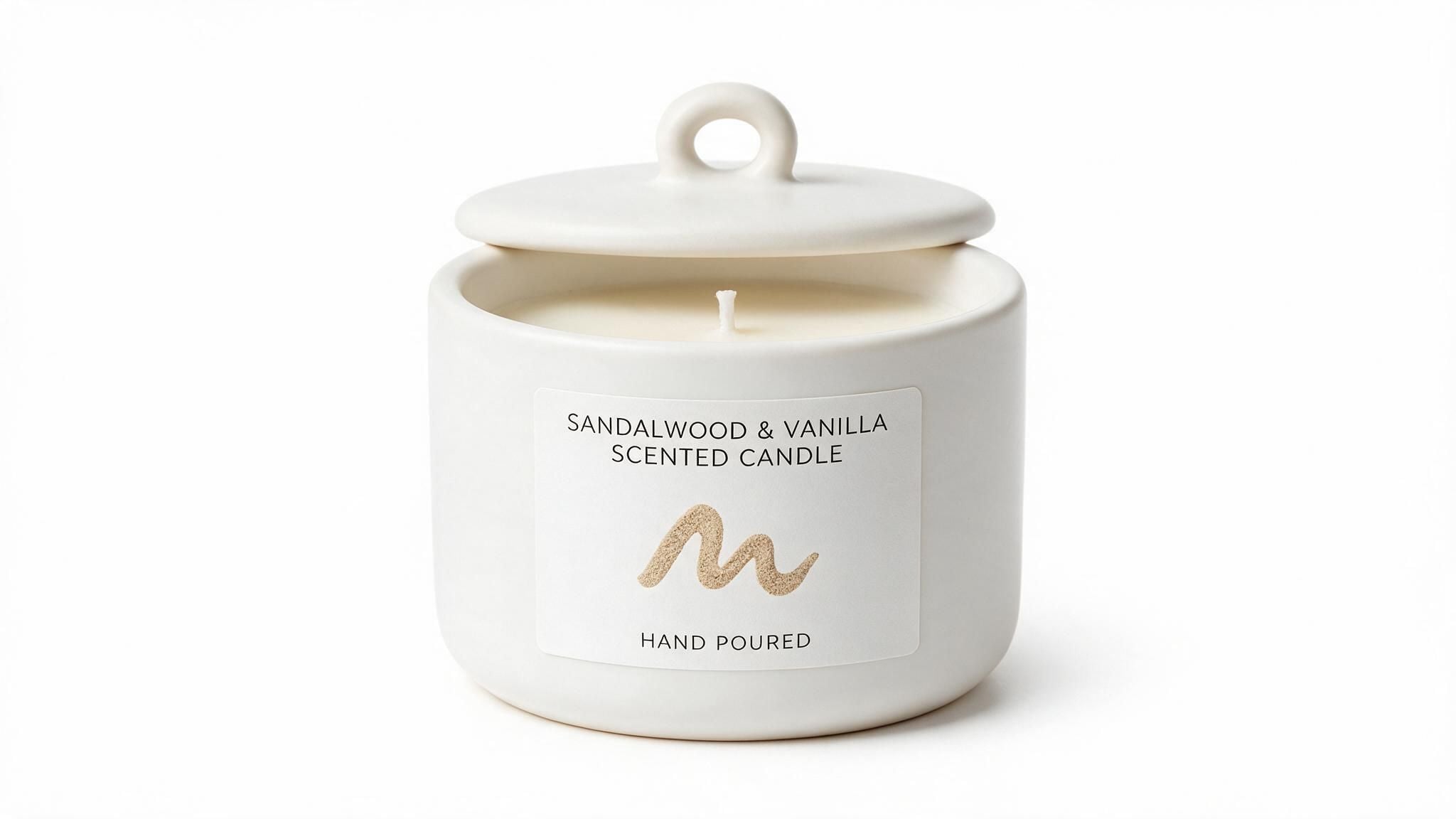
Paste this into the Edit tab with one clean photo of your product:
Keep the product from the reference image exactly as it is, same shape, label text, and proportions. Replace the background with pure seamless white (RGB 255,255,255). Center the product so it fills about 85 percent of the frame. Soft, even studio lighting with a subtle natural contact shadow under the product. No text, no logo overlays, no watermark, no props. Clean e-commerce pack shot, catalog quality. 1:1.
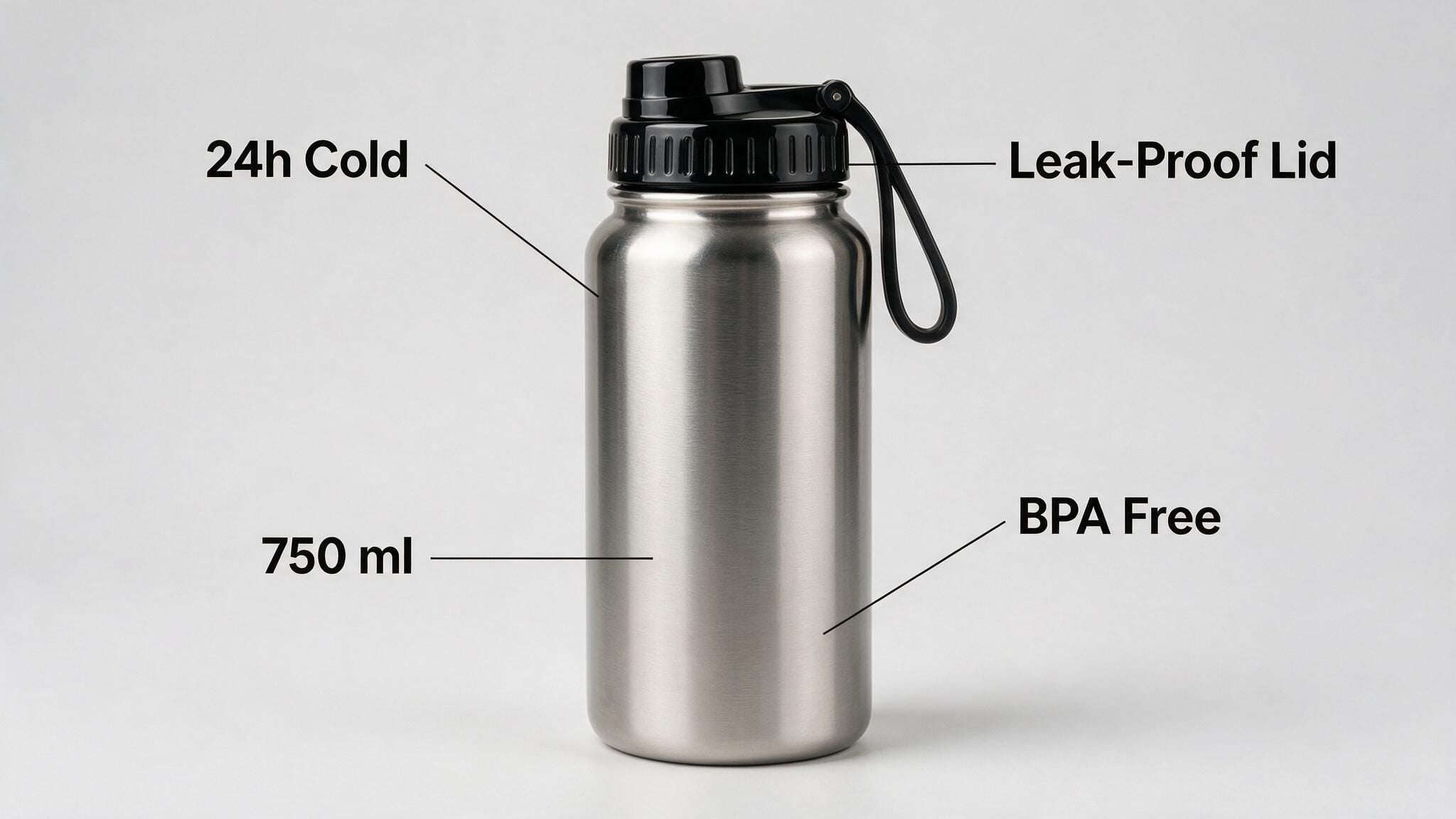
Then spend one more run on the highest-leverage secondary image, the selling-point card. This plays to the model's high-density layout strength. The trick that keeps the text accurate: quote every string exactly and give it a position.
Create a clean selling-point card for the stainless steel bottle from the reference image, 1:1, soft light-gray studio background. Exactly four feature callouts with thin lines pointing to the relevant part, labeled with exact text: "24h Cold" (top left), "Leak-Proof Lid" (top right), "750 ml" (bottom left), "BPA Free" (bottom right). Bold sans-serif labels, no other text anywhere. Bright even lighting, catalog style.
Lifestyle Scenes and Virtual Models with Seedream 5.0 Pro
Lifestyle images sell the life, not the object, and this is where multi-reference fusion earns its fee. The Edit endpoint merges objects, styles, and materials from several reference images into one target while keeping perspective and lighting coherent. In practice that means image 1 is your product, image 2 is your model, and the prompt directs the scene. Atlas Cloud's own edit playground demos the addressing convention, with a default prompt that assigns "the color from position 1 as the primary body color and the color from position 2 as the accent color." Number your references and call each one out by its slot.
Use image 1 as the product and keep its label, cap, and proportions exactly. Use the woman from image 2 as the model, same face and hair. Scene: she stands at a bright kitchen counter in morning light, holding the bottle from image 1 in her right hand, label facing the camera. Candid lifestyle photography, shallow depth of field, natural skin texture, slight handheld softness, no beauty filters. 4:5.
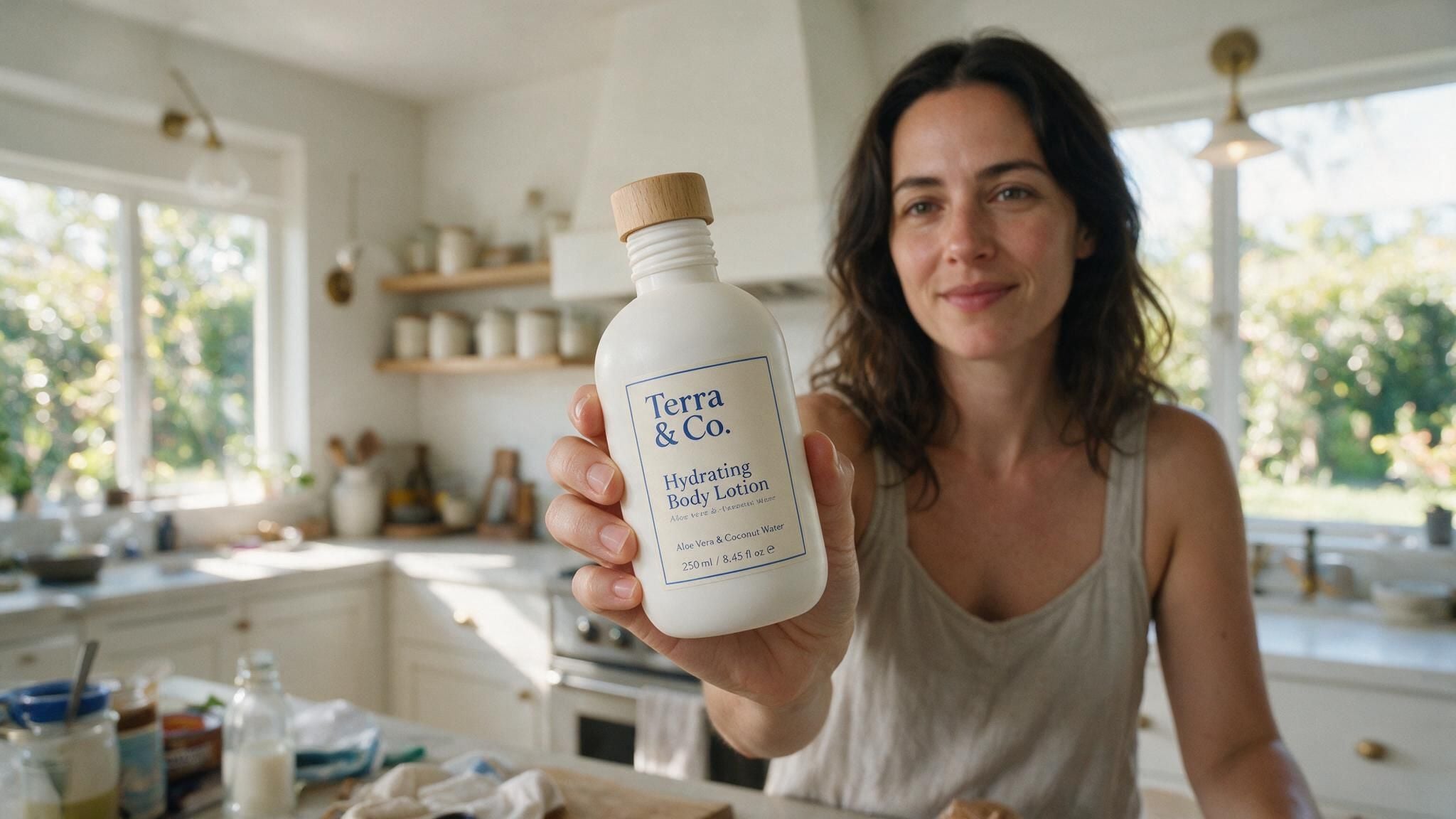
The last line matters. Asking for photographic flaws, grain, handheld softness, unfiltered skin, is the reliable way to keep AI models out of the uncanny valley, and it doubles as a workaround for this model's tendency to over-smooth faces.
Can the same face survive a whole campaign? That question got a public test the day after launch. On July 9, 2026, Japanese creator @akiyoshisan ran Seedream 5.0 Pro through an identity-consistency check, generating one spokesperson across six different commercial scenes:
 takes selections, boxes, coordinates, and anchor points, then changes only the region you name. One documented quirk worth knowing: anchor-based targeting works best on layouts with clear rows and columns, which most ad grids are. Brand color is handled the same way, by exact value: give it a hex code and it matches or corrects the target region to that code. A variant run looks like this: > Change only the price badge in the top right corner from "$49" to "$39". Keep every other pixel identical: same shoe, same lighting, same text. **Layer separation turns finals into kits.** Ask the model to split a finished banner and it returns the background plus each element as transparent PNGs, with the areas hidden behind the subject inpainted back in. The launch post shows a poster split into more than 10 independent layers. Per Atlas Cloud's model page, a separation run returns 2 to 20 images billed per image, and the prompt decides how many layers come back. Do this once per campaign master, and next month's promo is a headline swap in any design tool, no regeneration needed. The budget math at the flat $0.045 rate: | Job | Runs | Cost | |---|---|---| | Baseline banner | 1 | $0.045 | | 6 headline/price variants | 6 | $0.27 | | 4-market localization set | 4 | $0.18 | | 10-layer separation of the master | ~10 outputs | ~$0.45 | | 50-SKU refresh, 4 images each | 200 | $9.00 | **Then assemble it all in one sitting.** The four playbooks above are parts; here is the whole product launch. A new SKU just landed: a stainless steel water bottle, one clean phone photo, an empty listing, a Friday deadline. Each step below reuses a prompt you already have. 1. **Compliant pack shot.** Drop the phone photo into the Edit tab, run the white-background prompt from the listing section. The main listing slot is filled. 2. **Selling-point card.** Same reference photo, the callout-card prompt. The listing gets its first comparison image. 3. **Lifestyle hero.** Add a model reference, run the kitchen-scene fusion prompt. This is the image that carries the feed ad. 4. **Launch banner.** Feed the lifestyle hero back in as a reference and build the sale-banner layout around it, so ad and listing share one look. 5. **Market set.** Swap the strings for each locale, one run per language. 6. **Motion cut.** Send the lifestyle hero to [Seedance 2.0 image-to-video](https://www.atlascloud.ai/models/bytedance/seedance-2.0/image-to-video) for a short scroll-stopper. Seedream 5.0 Pro images are trusted inputs across the Seedance family, so text-to-image outputs skip the input-moderation step automatically and edit outputs skip it once your account clears KYC. The full set, seven stills and one motion cut, tallies up like this: | Step | Asset | Model | Cost | |---|---|---|---| | 1 | White-background pack shot | Pro Edit | $0.045 | | 2 | Selling-point card | Pro Edit | $0.045 | | 3 | Lifestyle hero (+1 model reference) | Pro Edit | $0.048 | | 4 | Launch banner (English) | Pro Edit | $0.045 | | 5 | 3 localized banner versions | Pro Edit | $0.135 | | 6 | 5-second 720p motion cut | Seedance 2.0 I2V | ≈$0.97 | | | **Full launch set** | | **≈$1.29** | Two notes on that last row. The stills total about 32 cents; the video is roughly three-quarters of the bill, so drop it if the placement is static. And the pricing splits two ways as of July 2026: Seedream 5.0 Pro is a flat $0.045 with no active discount, while Seedance 2.0 image-to-video runs an effective $0.2419 per second for 720p and does carry a 20% promo right now (the ≈$0.97 above is already the discounted five-second clip, down from about $1.21). The Run button always shows the live number.](https://static.atlascloud.ai/uploads/how_e_commerce_teams_turn_seedream_5_0_pro_into_an_ad_creative_engine_5_219d13fb2d.jpg)
Source: @akiyoshisan on X , posted July 9, 2026.
The face, hairline, stubble, and even the navy blazer hold steady from panel to panel while pose, camera angle, and lighting all change. That stability is what makes a virtual brand ambassador practical: shoot one reference set, then place the same person in every seasonal campaign. The creator's own read was that the photoreal reference ability is strong enough that they build storyboard frames with the Seedream series by default.
Seedream 5.0 Pro Promo Posters and Multilingual Ad Banners
Promo graphics are a text problem wearing an image costume. The quote-and-position trick from the selling-point card is the whole game here, just at banner scale, plus one addition: forbid every word you didn't ask for.
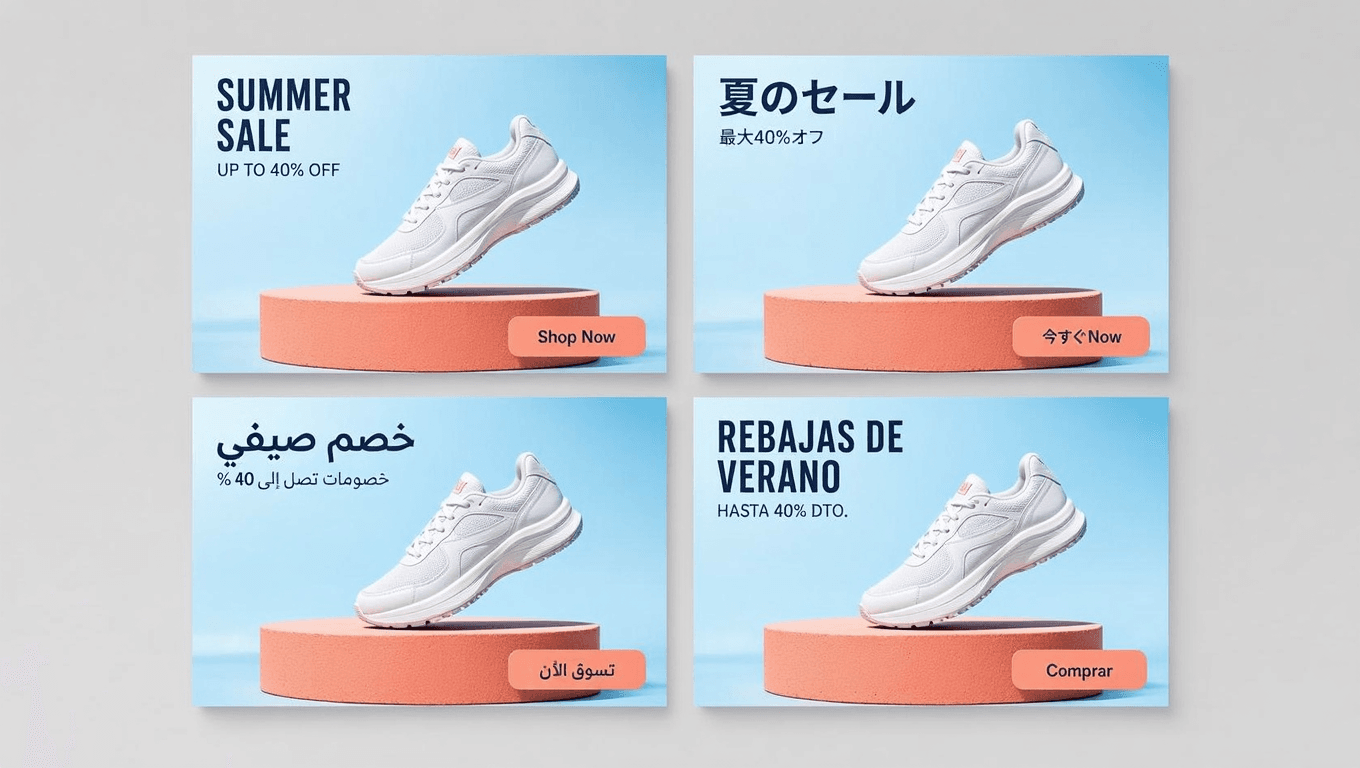
Horizontal 16:9 summer sale banner for a sneaker brand. A white running shoe angled mid-frame on a sunlit coral podium, hard summer shadows, sky-blue background. Exact text: top left "SUMMER SALE" in bold condensed uppercase; below it "UP TO 40% OFF" in a smaller weight; bottom right a rounded button reading "Shop Now". No other words anywhere. Clean commercial layout with generous negative space.
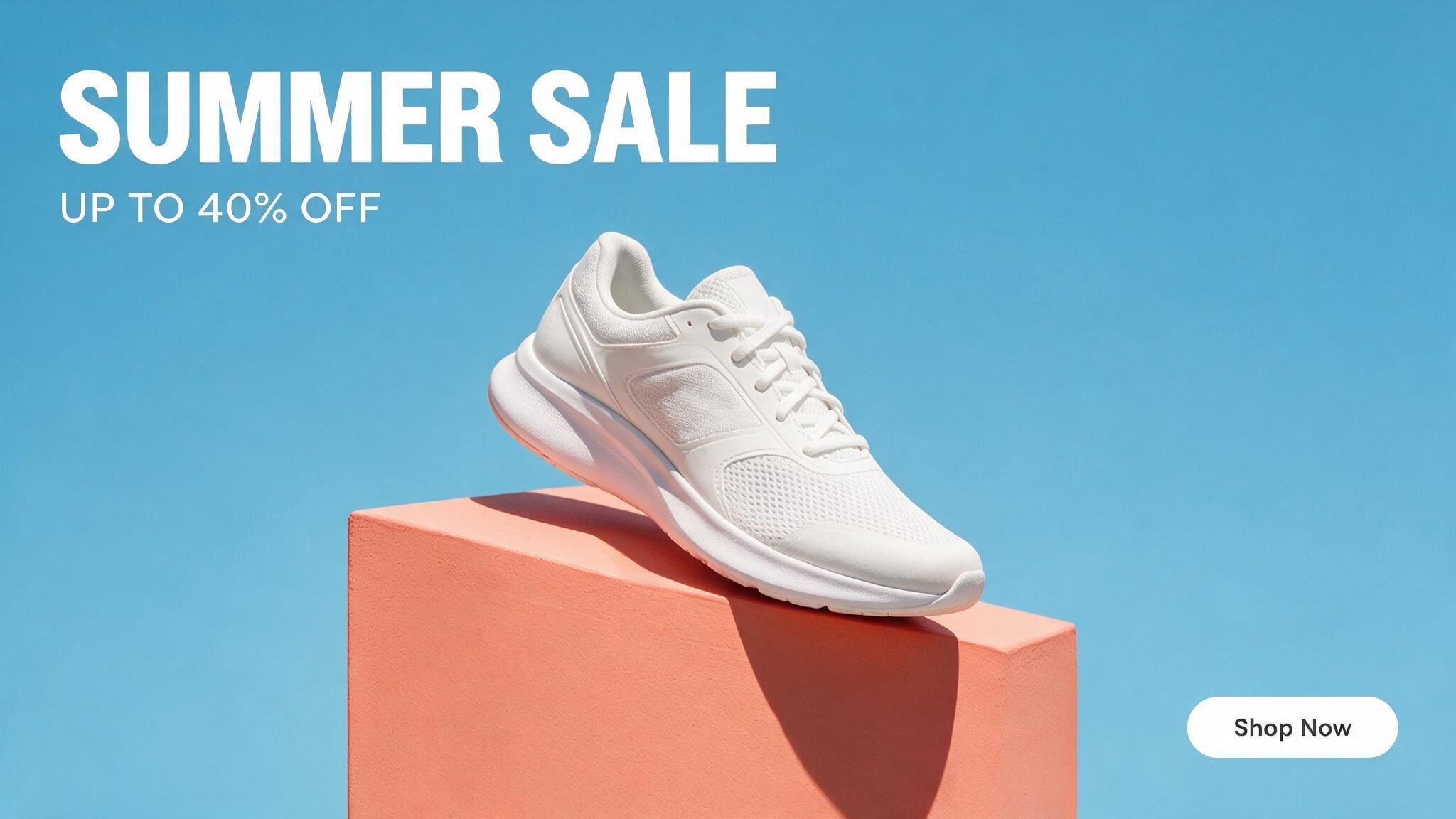
Localization is where the economics turn absurd. The model renders text in 15 prompt languages, including Arabic, Russian, Spanish, French, Portuguese, Thai, Korean, and Japanese, and the official launch post claims correct handling of Arabic's right-to-left cursive and Spanish accent marks. A 17-case Chinese test report probed exactly this (title translated from Chinese) with an international coffee festival poster: four language zones on one canvas kept a unified visual style, with Arabic typesetting flowing naturally. For a campaign, you don't re-design per market. You feed the finished English master into the Edit tab and swap only the strings:
Keep the exact same layout, colors, and shoe. Replace "SUMMER SALE" with "夏のセール", "UP TO 40% OFF" with "最大40%オフ", and "Shop Now" with "今すぐ購入".
Size each run to its placement rather than cropping one master file:
| Placement | Ratio | Pro size to use |
|---|---|---|
| Square feed post | 1:1 | 2048×2048 preset |
| Portrait feed ad | 4:5 | Custom, e.g. 1638×2048 |
| Stories / vertical video cover | 9:16 | 1152×2048 preset |
| Site hero / display banner | 16:9 | 2048×1152 preset |
The picker's presets don't cover every ad ratio, but the model accepts any aspect from 1:16 to 16:1, so a true 4:5 feed size is one custom value away.
Now the honest part. ByteDance's launch post concedes "there is still room to improve in finer-grained text rendering," and the Chinese review that ran the commercial briefs in section one drew the same line: text has improved a lot, but proofread manually before anything ships. Headlines and CTAs render reliably; long fine print does not. Our text rendering test maps that boundary character by character. Budget thirty seconds of proofreading per final; it is the cheapest QA step in this entire workflow.
Scale a Seedream 5.0 Pro Campaign: Variants, Layers, and a Full Run
Ad creative is never one image; it is a family of near-duplicates fighting for a click-through rate. Two capabilities make Seedream 5.0 Pro unusually good at producing that family without drift.
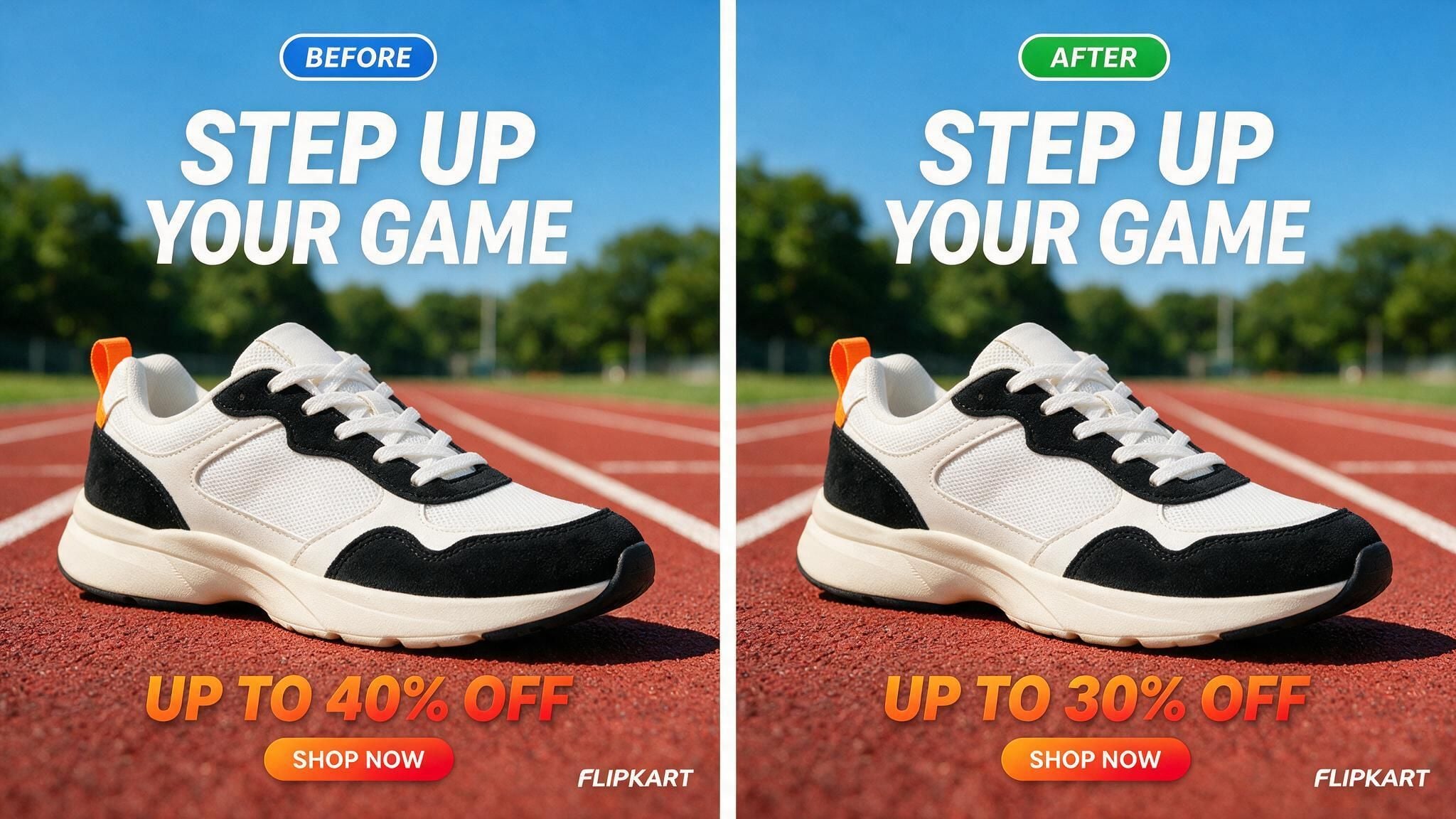
Region edits change one thing. The edit endpoint takes selections, boxes, coordinates, and anchor points, then changes only the region you name. One documented quirk worth knowing: anchor-based targeting works best on layouts with clear rows and columns, which most ad grids are. Brand color is handled the same way, by exact value: give it a hex code and it matches or corrects the target region to that code. A variant run looks like this:
Change only the discount line from "UP TO 40% OFF" to "UP TO 30% OFF". Keep every other pixel identical: same shoe, same headline, same button, same lighting.
Layer separation turns finals into kits. Ask the model to split a finished banner and it returns the background plus each element as transparent PNGs, with the areas hidden behind the subject inpainted back in. The launch post shows a poster split into more than 10 independent layers. Per Atlas Cloud's model page, a separation run returns 2 to 20 images billed per image, and the prompt decides how many layers come back. Do this once per campaign master, and next month's promo is a headline swap in any design tool, no regeneration needed.
The budget math at the flat $0.045 rate:
| Job | Runs | Cost |
|---|---|---|
| Baseline banner | 1 | $0.045 |
| 6 headline/price variants | 6 | $0.27 |
| 4-market localization set | 4 | $0.18 |
| 10-layer separation of the master | ~10 outputs | ~$0.45 |
| 50-SKU refresh, 4 images each | 200 | $9.00 |
Then assemble it all in one sitting. The four playbooks above are parts; here is the whole product launch. A new SKU just landed: a stainless steel water bottle, one clean phone photo, an empty listing, a Friday deadline. Each step below reuses a prompt you already have.
- Compliant pack shot. Drop the phone photo into the Edit tab, run the white-background prompt from the listing section. The main listing slot is filled.
- Selling-point card. Same reference photo, the callout-card prompt. The listing gets its first comparison image.
- Lifestyle hero. Add a model reference, run the kitchen-scene fusion prompt. This is the image that carries the feed ad.
- Launch banner. Feed the lifestyle hero back in as a reference and build the sale-banner layout around it, so ad and listing share one look.
- Market set. Swap the strings for each locale, one run per language.
- Motion cut. Send the lifestyle hero to Seedance 2.0 image-to-video for a short scroll-stopper. Seedream 5.0 Pro images are trusted inputs across the Seedance family, so text-to-image outputs skip the input-moderation step automatically and edit outputs skip it once your account clears KYC.
The full set, seven stills and one motion cut, tallies up like this:
| Step | Asset | Model | Cost |
|---|---|---|---|
| 1 | White-background pack shot | Pro Edit | $0.045 |
| 2 | Selling-point card | Pro Edit | $0.045 |
| 3 | Lifestyle hero (+1 model reference) | Pro Edit | $0.048 |
| 4 | Launch banner (English) | Pro Edit | $0.045 |
| 5 | 3 localized banner versions | Pro Edit | $0.135 |
| 6 | 5-second 720p motion cut | Seedance 2.0 I2V | ≈$0.97 |
| Full launch set | ≈$1.29 |
Two notes on that last row. The stills total about 32 cents; the video is roughly three-quarters of the bill, so drop it if the placement is static. And the pricing splits two ways as of July 2026: Seedream 5.0 Pro is a flat $0.045 with no active discount, while Seedance 2.0 image-to-video runs an effective $0.2419 per second for 720p and does carry a 20% promo right now (the ≈$0.97 above is already the discounted five-second clip, down from about $1.21). The Run button always shows the live number.
Frequently Asked Questions
Can Seedream 5.0 Pro make Amazon-compliant main images?
Yes, with the right workflow. Use the Edit endpoint with a real photo of your product as the reference, then prompt for a pure white RGB 255,255,255 background, 85% frame fill, and no text or props. Every Pro size preset clears Amazon's 1,000-pixel minimum. The product itself must come from your photo, not from imagination, or the image misrepresents what ships.
How many reference images does Seedream 5.0 Pro accept, and what do they cost?
Up to 10 per edit request on Atlas Cloud. The first reference image is free and each additional one adds $0.003, so a product-plus-model-plus-scene fusion with three references adds less than a cent to the $0.036 base price.
Which languages can Seedream 5.0 Pro render on ad banners?
Fifteen prompt languages, including English, Chinese, Japanese, Korean, Thai, Arabic, Russian, French, Portuguese, and Spanish. Right-to-left Arabic script and accented characters are handled natively. Accuracy is strong on short display text and weaker on fine print, so proofread every string before publishing.
What does an A/B ad variant batch cost on Atlas Cloud?
At the flat $0.045 per-image rate (as of July 2026, with no active Seedream discount), a baseline banner plus six price or headline variants costs about $0.32. Reference images attached to edit runs add $0.003 each after the first, so even reference-heavy variants stay close to five cents apiece.
Can I turn Seedream 5.0 Pro product images into video ads?
Yes. On Atlas Cloud, Pro images pass into the Seedance video models as trusted inputs: text-to-image outputs automatically, edit outputs once your account clears KYC. The playground exposes this directly with an image-to-video button on every finished generation.
Conclusion
The pattern across all four playbooks is the same: Seedream 5.0 Pro rewards teams that treat it like a production tool, not a slot machine. Real product photos go in as references. Text gets quoted and positioned, never left to chance. Masters get layer-separated so future variants cost an edit instead of a redesign. And every string gets proofread, because that is the one job the model still hands back to you.
The economics do the rest. At $0.045 an image, the four-cent question is no longer whether AI creative is worth testing. It is which of your listings gets refreshed first.





