The wall between you and pro-level content has finally crumbled. Now, the mission is straightforward: turn a basic sentence into a stunning, high-definition video in less than five minutes using powerful Text to Video AI.
Quick-Start Guide: Top Free AI Video Platforms/Models
The following table compares the leading platforms offering free access to powerful video generation:
| Platform | Key Strength | Free Tier Benefit | Best Use Case |
|---|---|---|---|
| digen.ai | Script-to-Scene Expert | Daily credit refreshes | Marketing & Tutorials |
| vheer | High-End Cinematic Realism | No-watermark exports | Creative storytelling |
| vidu Q2 | Mastery of Human Emotion | High-speed generation | Action-heavy scenes |
| Qwen | Logical Reasoning | Open-access ecosystem | Complex instruction videos |
Whether you are a developer or make art, these smart tools use advanced tech to keep every frame smooth. Pick the best model to get studio-quality results. You will save time and avoid the high costs of traditional filming.
Next, I will focus on introducing digen.ai, vheer, and Qwen. For more information about vidu, you can read Best Free AI Video Generator.
Professional Storytelling with digen.ai
| Feature | Free Tier Capability | Professional Benefit |
|---|---|---|
| Daily Credits | ~300 Credits, ~20 Credits/ video | Allows for 10+ generations |
| Video Models | Sora 2, VO3, SeedDance, Real Motion | Access to cinema-grade motion physics |
| Resolution | 480p | Ready for TikTok, Reels, or YouTube |
Lots of sites claim to offer great results, but digen.ai is different. It is a top-tier video generator made for creators who want pro quality without the hard work. Using powerful tech like Sora 2 and VO3, you can turn a script into a high-end video in just minutes.
Stick to this process to get the most out of your ideas. It helps you use the platform's strong free features to stay productive and creative.
Your Step-by-Step Guide
- Scene Structuring: Navigate to the "Video" section and input a basic topic.
- Better Prompts: Click the "Enhance Prompt" button to grow a simple thought (like "clean cartoon about work") into a full scene list with a cool art style.
- Creation: Hit "Generate Video." A short 5-second clip usually finishes in less than a minute.
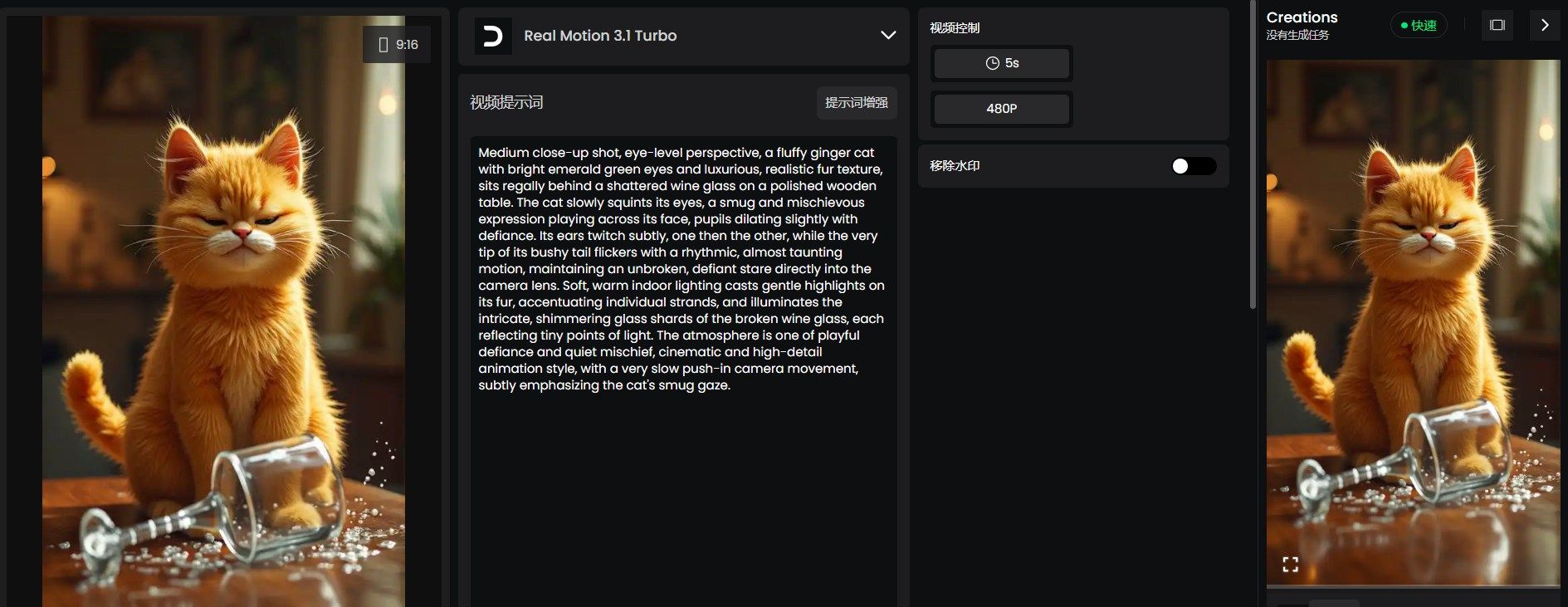
Just look at the image. Clicking "Enhance Prompt" turns your quick idea into a detailed scene. Making a 5-second 480p video takes 20 credits (I chose the Real Motion 3.1 Turbo model). You cannot remove the watermark when you export. You need to buy a subscription to get rid of that logo.
Video Evaluation Report
Let's take a look at the video results:
- Detail Check: The tool kept all the sharp parts of the first picture. You can really see the cat's soft, thick orange fur and the tiny reflections on the broken glass.
- Smooth Movement: There is almost no weird warping or shaky background. These glitches happen a lot with AI, The environment remains stable while the subject moves.
- Great Lip-Sync: The mouth moves perfectly with the audio. When the cat says, "Yes, I knocked that glass," the lips match the words exactly and look very natural.
- Tiny Touches: The little squint and head tilt give the cat a lot of character. It looks smug and sassy, which matches the voice in the clip perfectly.
However, videos also have some shortcomings:
- Static Environment: While the cat is expressive, the foreground (the glass and table) remains completely static. A slight ripple in the spilled liquid or a minor shift in the glass shards would have increased the immersion.
- Human-like Teeth: The cat's last grin shows teeth that look like ours. It makes the clip funny, but it feels a bit weird. It doesn't look like a real animal if you want it to stay totally natural.
Final Verdict: This is a top-tier AI generation for a portrait-style character video. The strength of the Real Motion 3.1 engine clearly lies in its voice-to-motion mapping, making it an excellent tool for "talking head" style content or character-driven social media clips. Of course, you can also try other models to help you find the one that suits you better.
Technical Content Creation with Qwen
While other platforms focus on cinematic flair, Qwen is the powerhouse for creators who need logical consistency and technical accuracy. As a multimodal one-click AI video generator, it excels at turning complex instructions into structured visual content, making it the ideal text to video ai free choice for educational or "how-to" niches.
The following table outlines the capabilities of the Qwen ecosystem as of early 2026:
| Feature | Free Tier Capability | Professional Benefit |
|---|---|---|
| Daily Credits | Unlimited (Open Ecosystem) | No daily generation caps |
| Video Models | Qwen-2.5-VL / Omni-Latest | Superior logical "reasoning" in frames |
| Resolution | 720p to 1080p | Clearer text and technical detail |
From Logic to Visuals
Following this workflow ensures your technical videos remain coherent from the first frame to the last.
Navigate to the Qwen AI interface and select "Video Generation." Unlike standard models, Qwen understands complex spatial relationships.
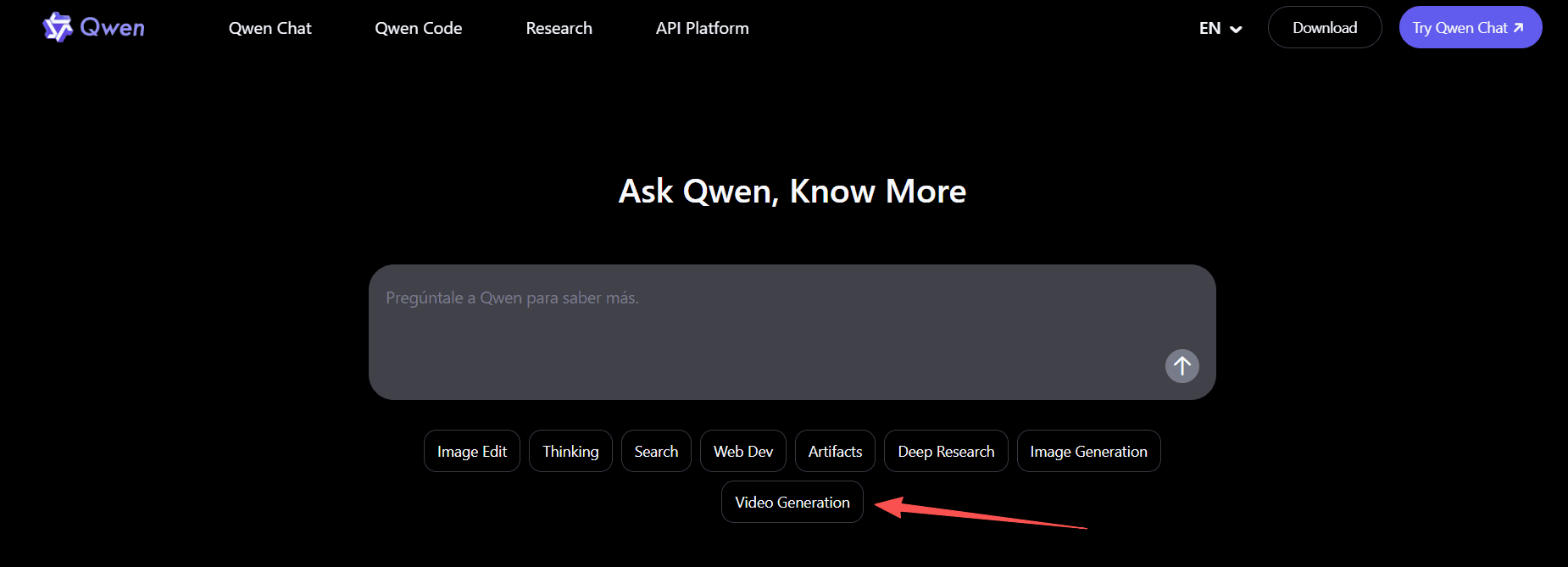
Clicking "Video Generation" will take you to the creation panel. Select "Video Creation" and the video size, then enter your prompt to generate the video. Unlike "black box" AI tools, Qwen allows you to choose specific models based on your hardware and project needs:
- Qwen3.5-Plus: The flagship for multimodal tasks.
- Qwen3.5-Flash: High-efficiency for rapid prototyping.
- Qwen3.5-27B: Optimized for local deployment to ensure data privacy.
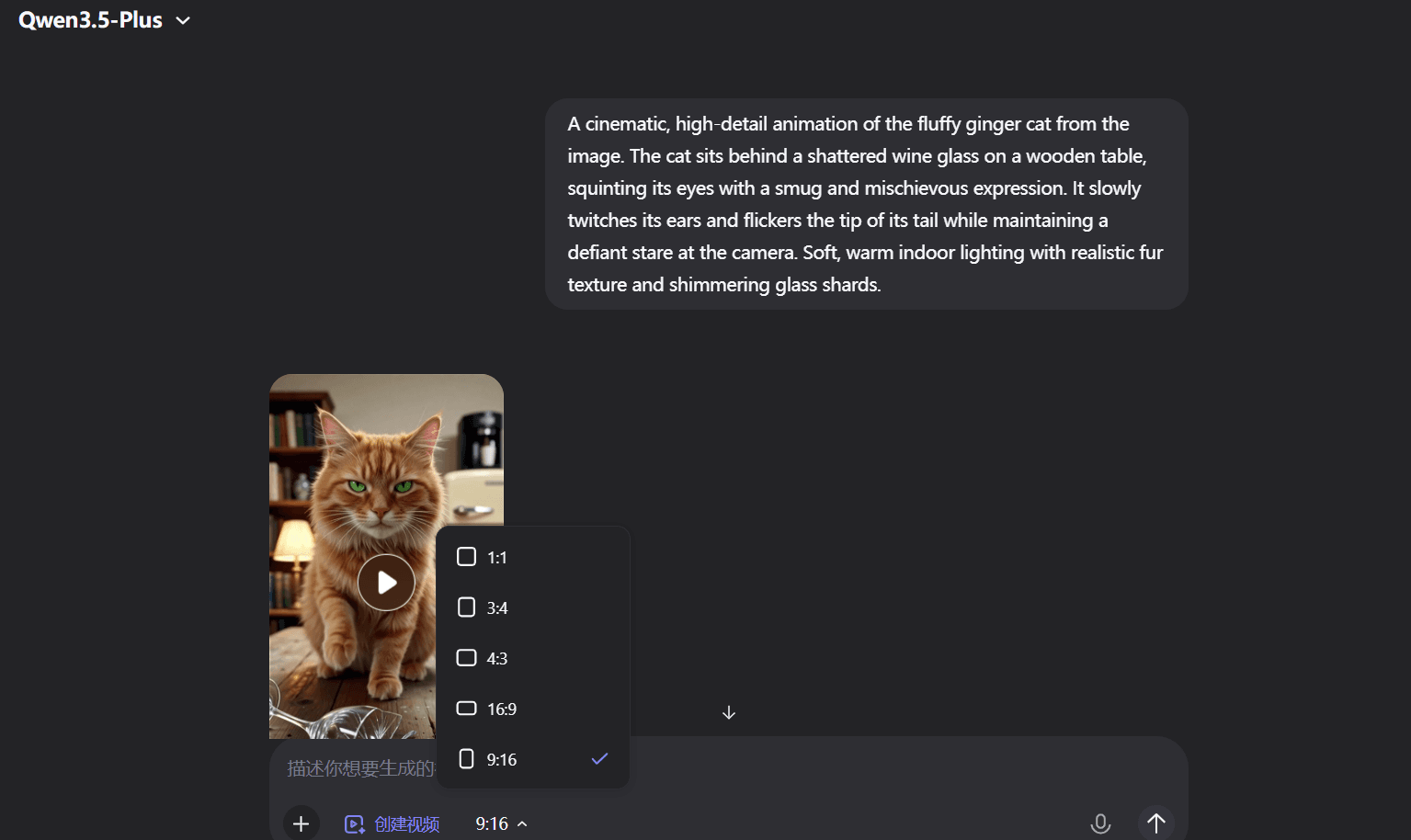
Video Evaluation Report
The model I chose is Qwen3.5-Plus. Let's take a look at the generated video results:
- Good Colors: The video has a bold, high-contrast look. It doesn’t look washed out like a lot of other clips you see online.
- Sharp Details: You can pick out every hair on the fur. Even the wood grain on the old table and the sharp bits of broken glass look very clear.
- Real Cat Moves: The cat moves just like a real pet would. It does a slow blink and then licks its paw. These little habits make it feel much more authentic.
- Smooth Motion: The cat moves fluidly after it stops staring and begins to lick. You can see its weight shift naturally as it changes its pose.
- Extra Touches: The ears twitch a tiny bit and you can see the chest move as the cat breathes. These small details really help the video come to life.
However, videos also have some shortcomings:
- The "Lick" Artifact: If you look very closely at the paw-licking moment, there is a slight "blur" where the tongue meets the fur. While very well-executed, this remains one of the most difficult physical interactions for AI to render perfectly without minor clipping.
Final Take: The Qwen3.5-Plus model is great at making things look real. It gets rid of that fake, shiny AI look and feels much more gritty and natural. This is a solid choice if you want your animals to act like actual pets instead of talking cartoon characters.
Creating Cinematic Masterpieces with vheer
While digen.ai excels in character-driven storytelling, vheer is the preferred choice for creators seeking cinematic scale and high-fidelity environmental effects. In 2026, vheer has distinguished itself as the champion of "no-watermark" exports for its basic models, offering a rare combination of 4K-ready realism and user-friendly automation.
| Feature | Free Tier Capability | Professional Benefit |
|---|---|---|
| Daily Credits | Unlimited (Basic Model) | Rapid iteration without cost barriers |
| Video Models | Cinematic 3D, Pixar-Style | Access to diverse artistic visual identities |
| Max Resolution | 1080p (Standard) / 4K (Pro) | Social-media ready clarity for all users |
| Watermark | No Watermark (Standard) | Immediate professional use for branding |
Guide to Image-to-Video Generation
- Upload: Start with a high-quality base image in the "Image to Video" tool.
- Path Selection: The AI automatically suggests motion paths (e.g., a cat tilting its head or liquid spilling).
- Export: Select "Vheer Quality" for free, watermark-free generations ranging from 5 to 20 seconds.
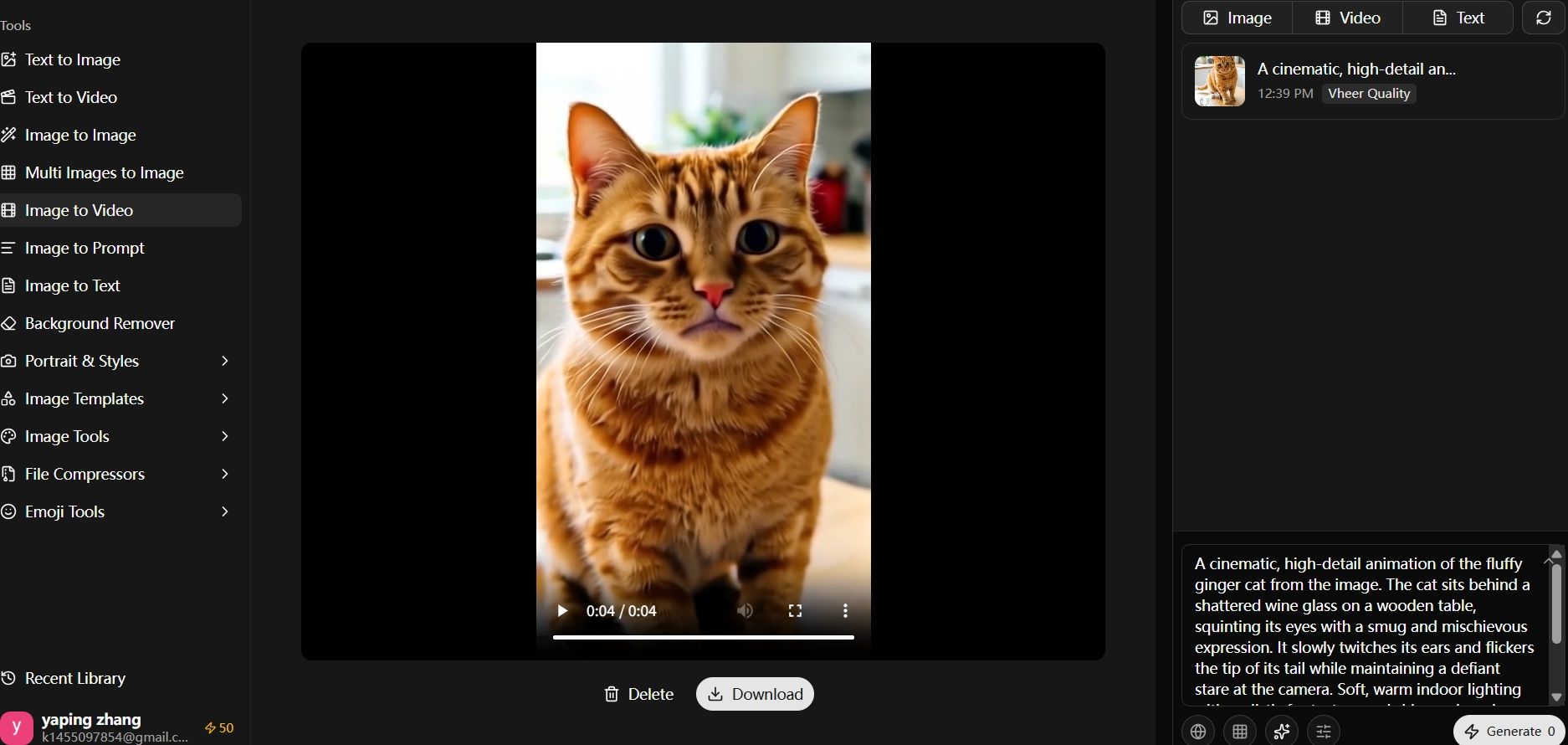
Only Vheer Quality is a free model selection option, therefore the generated videos do not consume credits. It can generate videos ranging from 5 to 20 seconds in length with a resolution of 768.
Video Evaluation Report
Digen is great for lip-syncing and Qwen wins on realism, but this Vheer clip feels like a bright, high-energy ad. The movement is very smooth.
- Look and Feel: The video has a "tidy kitchen" vibe with lots of bright light. The cat’s fur looks colorful and sharp. It feels more like a fancy pet commercial than the dark, moody style you get from Qwen.
- Fluidity of Movement: Vheer shines in the natural shifting of the cat's posture. The way the cat leans forward slightly and adjusts its weight feels very organic and less "robotic" than some talking-head models.
- Facial Dynamics: The eye movement is the highlight here. The cat looks around with a wide-eyed, curious expression that feels less "calculated" and more like a real-life feline reacting to its environment.
However, videos also have some shortcomings:
- Interaction: Similar to Qwen, the cat does not interact directly with the glass, but the physics of the liquid on the table looks quite convincing.
- Character Expression: Compared to the "smug" Digen cat, the Vheer cat looks a bit more "innocent" or "startled," showing how different models interpret the same "guilty cat" concept through different emotional lenses.
Final Verdict: Vheer is a strong contender for lifestyle and high-action clips. While it lacks the advanced lip-syncing of Digen, it provides a much more stable and "commercial-ready" visual that feels less like an "AI experiment" and more like a high-quality stock footage clip.
Which One Should You Use?
The "best" AI video generator depends entirely on your output format:
- For "Talking Characters":digen.ai wins due to its sophisticated control over facial muscles and phoneme accuracy.
- For "Physical Realism":Qwen is superior, capturing authentic animal behaviors and gritty, realistic textures.
- For "Commercial Stability":vheer provides the most stable, "stock-footage" style clips that are ready for immediate professional branding.
By choosing the right tool for the right task, you can produce content that rivals traditional studios in a fraction of the time.
The Bottleneck of Local Generation
While tools like digen.ai and vheer are perfect for individual creators, professional developers and agencies often face a different challenge: scaling. If your project requires generating hundreds of high-definition assets or integrating these AI capabilities into a custom application, managing multiple individual subscriptions is neither cost-effective nor efficient.
This is where Atlas Cloud provides a strategic advantage.
Scaling with Atlas Cloud
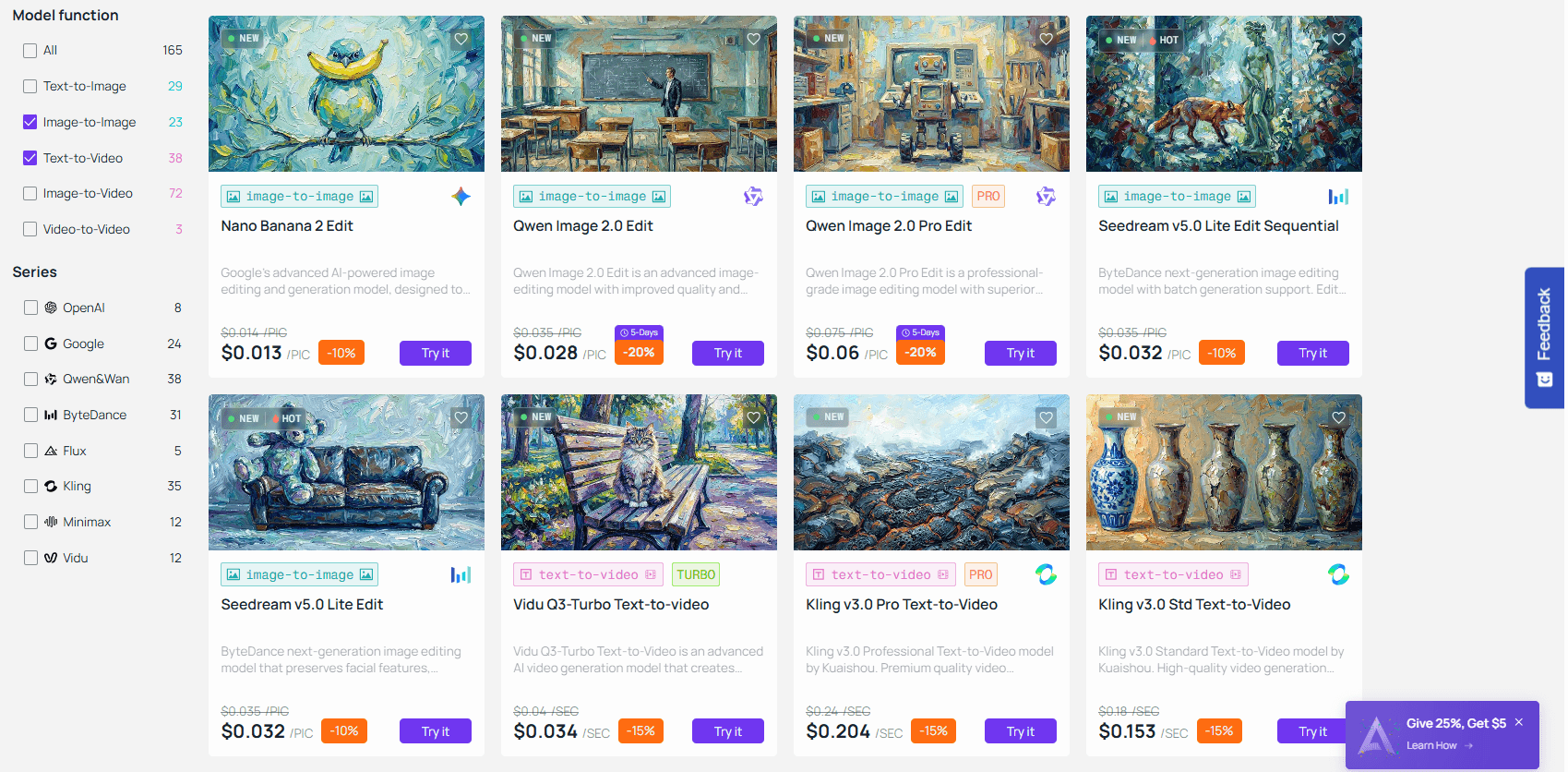
For those who require large-scale video generation while maintaining strict cost-efficiency, Atlas Cloud acts as a centralized powerhouse. By offering robust API access to leading models—including high-performance versions of the Qwen series—it allows you to bypass the traditional "per-video" credit limits of consumer platforms.
- Save Money: This is built for big jobs that cost way too much on other apps.
- Fast Setup: It gives you the quick, smooth speed you need for live apps.
- Easy to Add: This works great if your team wants to put video tools right into your own software.
Right now, Atlas Cloud offers 110 different models for text-to-video and image-to-video projects. A 5-second video may be made for between $0.05 and $1.50. Businesses and developers may complete projects without going over budget because to these low prices.
Final: Finding Your Perfect Fit
The accessibility of tools like digen.ai, Qwen, and vheer has democratized professional-grade storytelling, allowing anyone with a creative spark to produce cinematic results in minutes. To help you decide on your next step, refer to this final comparison of the ecosystems discussed:
| Project Scale | Recommended Path | Primary Goal |
|---|---|---|
| Personal & Social | digen.ai or vheer | High visual appeal and ease of use. |
| Technical & Logical | Qwen 3.5 Series | Accuracy and consistent spatial reasoning. |
| Enterprise & Scaling | Atlas Cloud Integration | High-volume API access and cost-efficiency. |
Ready to Start?
It doesn't matter if you want to go viral or build a new AI app. Right now, the cost to start is very low. Use the free plans first to see what looks best for your brand. When you need to do more, let Atlas Cloud help you move from quick tests to a professional setup.
The clarity of your prompts will be more crucial in the future of content than the size of your studio. Which model will you test first?
FAQ
Which platform is best for removing watermarks for free?
vheer remains the most popular choice for "no-watermark" exports on its basic models. While digen.ai offers superior lip-syncing, its free tier typically includes a watermark that requires a subscription to remove.
Can I use these AI-generated videos for commercial projects?
Commercial rights vary by platform and tier. Generally:
- Free Tiers: Often restricted to personal or "fair use", verify each platform's Terms of Service.
- Paid/API Tiers: Usually grant full commercial rights.
- Atlas Cloud: Typically provides enterprise-grade licensing for high-volume commercial API use.
How do I choose between Qwen and other cinematic models?
The choice depends on your content's "logic" requirements:
| If your video needs... | Choose... | Reason |
|---|---|---|
| Complex instructions | Qwen | Better spatial and logical reasoning. |
| Character emotions | digen.ai | Advanced facial muscle mapping. |
| Visual aesthetics | vheer | High-fidelity environmental rendering. |





