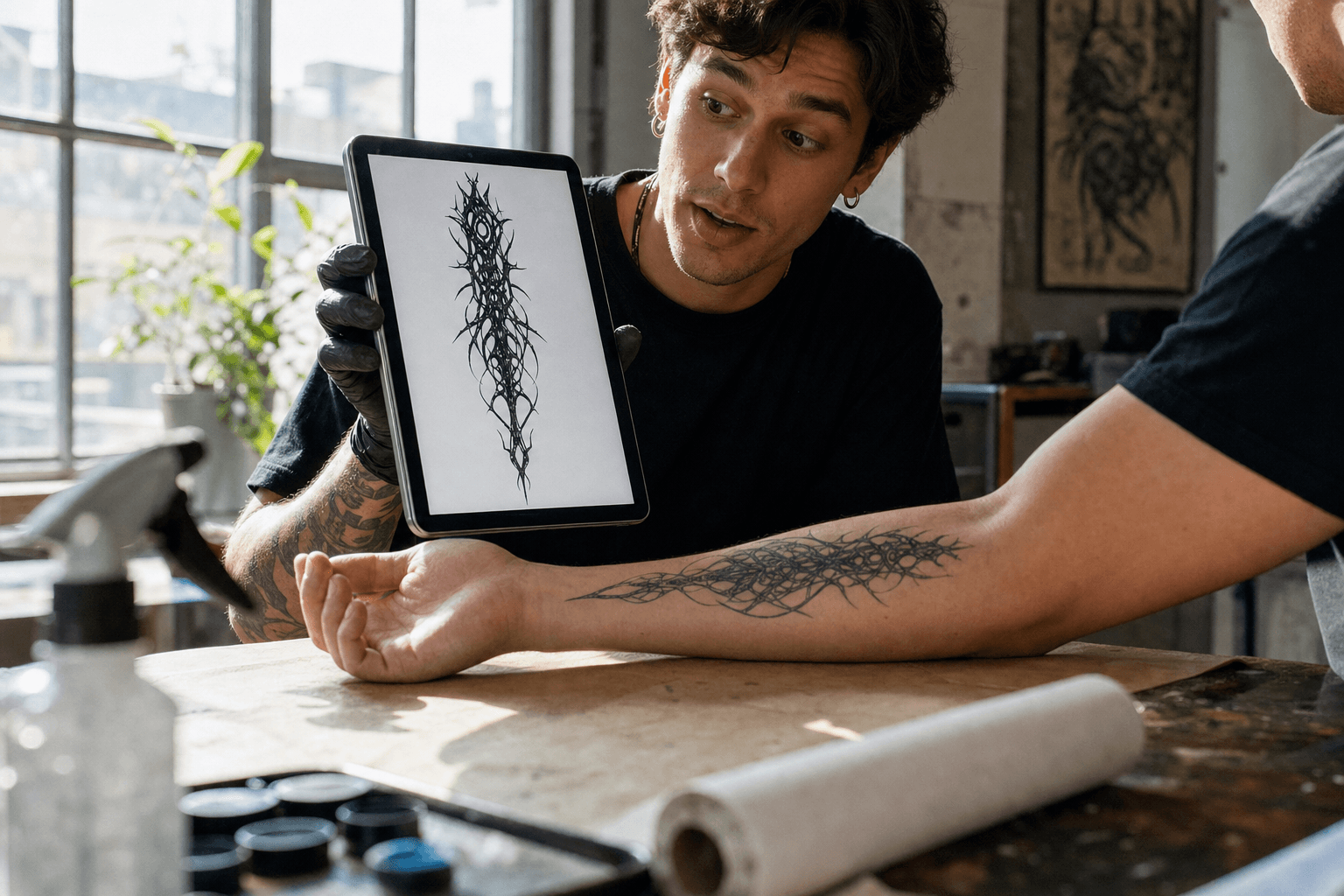
Tattoo artist holding a tablet showing a cybersigilism stencil next to a client's forearm resting on a papered workbench in a bright daylight studio
The gap this article closes: a stencil on a screen, an arm on the table, and no way to see one on the other. Generated with openai/gpt-image-2/text-to-image.
About 32% of US adults have a tattoo, and 24% of tattooed adults say they have regretted at least one of them (Pew Research Center, August 2023, n=8,480).
Almost nobody regrets the drawing. They regret the translation. It looked incredible as a square image on a screen, and then it landed on a curved arm under different light, and it was not the same thing anymore.
The Adobe Firefly AI tattoo generator will hand you that beautiful square image in seconds. Then it leaves you standing at the exact spot where the money and the ink get committed. Three judgments still sit between the picture and your skin, and ink does not have an undo.
This is not a review and not a tool list. It is one reproducible chain: design, stencil, your own arm, and a short clip where the lines move with the muscle. Firefly does the first part well. The rest is on you, and it is faster than you think.
Key Takeaways
- Firefly's tattoo tool is genuinely good at concepting and free to try with an Adobe ID on a monthly generative-credit allowance, but it outputs a finished illustration, not a tattooable file.
- It has no idea your arm is a cylinder. Ask for a forearm wrap and you get a flat rectangle, which is exactly where 2026's most-requested style breaks.
- Converting Firefly output to a stencil is manual work in Photoshop. One hands-on test clocked it at about 20 minutes per design.
- Two things it cannot do at all: put the design on a photo of your own arm with correct wrap and healed-ink texture, and show you what happens when you flex.
- An image-edit model plus one image-to-video run closes both gaps for less than the price of a coffee, and the whole chain runs in one browser tab.
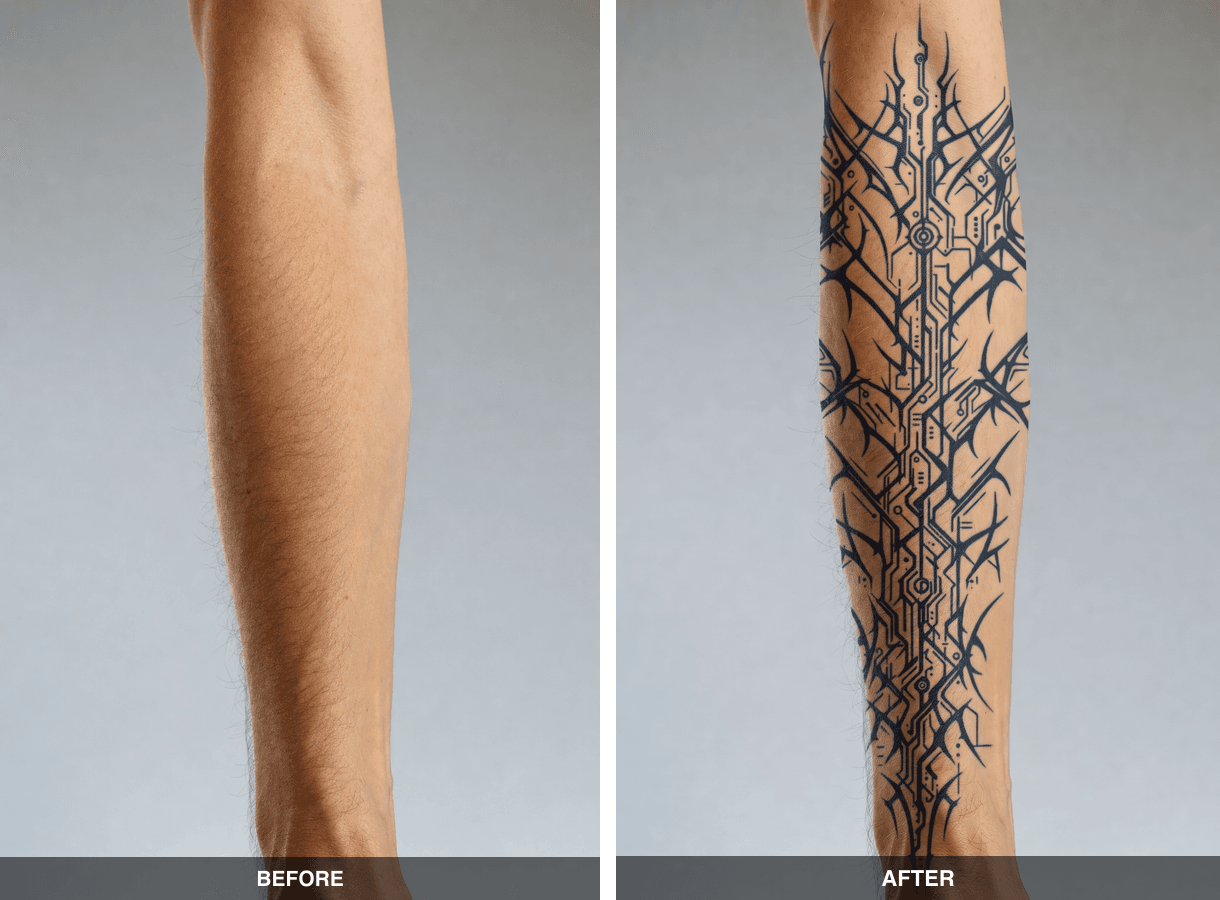
Before and after of the same left forearm: bare skin on the left, a healed cybersigilism blackwork band wrapping from elbow to wrist on the right
The payoff of this article: the same forearm photo before and after the fusion step. Left is the bare canvas shot, right is the design sitting under the skin, curving with the muscle and compressing toward both silhouette edges. Canvas shot generated with openai/gpt-image-2/text-to-image, fusion with google/nano-banana-2/edit.
Why the Adobe Firefly AI Tattoo Generator Stops Short of Real Ink
Firefly's problem is not quality. It is that a tattoo decision needs three answers Firefly was never built to give: can this line actually be tattooed, what does it look like wrapped on my body, and does it survive movement.
What the Adobe Firefly AI Tattoo Generator Actually Gets Right
Credit where it is due. You can drive it with a text prompt or upload a reference image, and it covers the styles people actually ask for, from bold traditional and realism to minimalist linework, blackwork and lettering (Adobe, 2026). Output lands in the Creative Cloud world, so Photoshop and Illustrator are one click away. The training data is licensed Adobe Stock, which matters if you plan to hand the file to a studio. For pure ideation, it is one of the cleanest tools on the market.
It is also the right tool for a conversation. A concept sheet you can text to an artist beats describing "kind of spiky, kind of tribal, but techy" over DM.
Four Places the Adobe Firefly AI Tattoo Generator Breaks Down
Our running example is a cybersigilism forearm wrap: jagged bio-organic black spines tapering from elbow to wrist. That is not an arbitrary choice. One Toronto studio's 2026 trend guide puts cybersigilism at the top of the list and describes it as "jagged, aggressive, bio-organic black lines," usually "wrapped around muscular areas like the forearm or shoulder" (Misfits Tattoo, 2026). Wrapping is the whole point of the style, and wrapping is precisely what a flat image generator cannot reason about.
Four failure points, in the order they bite:
- It gives you a rendered illustration, not a stencil. Soft shadows, anti-aliased haze, varying line weight. A stencil needs closed, single-weight pure black outlines.
- It has no anatomy model. Ask for a sleeve and you get a rectangle of art. Nothing curves, nothing compresses at the edges of the arm, nothing accounts for the wrist.
- Detail density and digital shading lie to you. Micro-detail that looks crisp at screen size is not the same thing as ink pushed into living skin, and 3D-style gradients are not whip shading.
- It is a still image. Skin is not a poster. You cannot see the design deform when you close your fist.
One hands-on test of Firefly's tattoo generator ran three prompts (American traditional panther, fine-line rose, Chicano script) and reported the same wall: about 20 minutes of Photoshop levels and threshold work per stencil, no understanding that "an arm is a cylinder or that a chest has curves," results that looked "like a sticker, not a tattoo," and occasional structural hallucinations like a two-headed snake. The verdict was blunt: "Only for initial inspiration" (Encre Vive, May 2026). Worth knowing that this is a single third-party test from a site that sells a competing tattoo tool, so treat it as one data point, not a consensus. Our own runs matched it on the anatomy point exactly.
| Capability | Firefly tattoo generator | The chain in this article |
|---|---|---|
| Concept quality from a text prompt | Excellent | Excellent |
| Style range (traditional, fine line, blackwork, lettering) | Excellent | Excellent |
| Clean tattooable stencil | Manual, roughly 20 min in Photoshop | One edit run, prompt-driven |
| Wrap onto a photo of your own arm | Not supported | Yes, with anatomy in the prompt |
| Healed-ink skin texture (not a sticker) | Not supported | Yes |
| Motion / flex preview | Not supported | Yes, one image-to-video run |
| Vector and SVG export | Yes, via Firefly Vector and Illustrator | No |
| Creative Cloud integration | Native | None |
| Billing | Subscription with monthly credits | Pay per run |
Why "Adobe AI Art Tools Tattoo" Searches Keep Ending in Photoshop
Search "adobe ai art tools tattoo" and every path terminates in the same place: a rendered image and a manual cleanup job. That is not a bug in Adobe's stack, it is the design of it. Firefly is a generalist creative engine wired into a professional editing suite, so the assumption is that a human finishes the file.
For a tattoo, though, "finishing the file" is not retouching. It is three distinct jobs: flatten the art into printable line work, project it onto a real body, and stress-test it in motion. None of those are Photoshop brush work. They are model calls, and they take minutes.
The Adobe Firefly AI Tattoo Generator Workflow: Generative AI for Custom Tattoos, Plus Three Steps It Leaves to You
Here is the honest division of labour. Adobe Firefly generative AI for custom tattoos is a strong step one. Steps two through five need models that accept an image as input and reason about the surface they are painting on.
All four runs below happen on model pages in one browser tab on Atlas Cloud, billed per run with no subscription or credit pack. Prices below are the list prices on each model's own page, checked August 2026.
For a faster start, Atlas Cloud also packages this into a free AI tattoo generator — your first design is free — then move to the individual model pages below when you need the stencil, skin preview, and motion test.
| Step | Model | Job | Output setting | Price |
|---|---|---|---|---|
| 1 | GPT Image 2 Text-to-Image | Design sheet (or import your Firefly export) | quality high, 1024x1536 | from $0.009 per image, token-based |
| 2 | Nano Banana 2 Edit | Flatten the art into a stencil | 2K | $0.12 per image |
| 3 | GPT Image 2 Text-to-Image | Bare-arm canvas, only if you have no photo | quality high, 1024x1536 | from $0.009 per image |
| 4 | Nano Banana 2 Edit | Fuse the stencil onto the arm, wrapped | 2K, two input images | $0.12 per image |
| 5 | Kling v3.0 Pro Image-to-Video | Flex and rotation test | 1080P, 5s default | $0.095 per second, down from $0.112, 15% off as of August 2026 |
Two notes before you start, because they matter more than the model names.
Nano Banana 2 Edit takes up to 14 input images and has a 1K / 2K / 4K resolution switch that changes the bill ($0.08 / $0.12 / $0.16 per image), so pick your tier deliberately. And this stack is not a tattoo app: no AR live try-on, no body-part template library, no vector export, no Adobe integration. It also cannot tell you whether a design is safely tattooable. That call belongs to your artist, every time.
From Adobe Firefly AI Tattoo Generator Design to Skin Preview, Step by Step
Five runs, roughly fifteen minutes, one arm. Copy the prompts verbatim.
Every image below is the actual output of the run it sits under, generated with the exact prompt and settings printed alongside it. They are the artifacts, not screenshots of the interface.
Step 1: Generate the Design (the Part the Adobe Firefly AI Tattoo Generator Already Does Well)
If you already have a Firefly export you like, skip to Step 2 and use it as your input. Generating it here just keeps the whole chain in one place and one billing model.
The prompt below is written for a vertical band, because that is the shape a forearm actually needs. Note the negatives baked in: no grey wash, no background scenery, even line weight. Those three phrases are what makes Step 2 easy instead of painful.
text1A cybersigilism tattoo design sheet: jagged bio-organic black spines and thorn-like 2tendrils, sharp intersecting angles, tribal-meets-circuitry linework, arranged as a 3vertical band that tapers from elbow to wrist with deliberate negative space gaps. 4Pure black ink on flat white paper, no grey wash, no color, no background scenery, 5even line weight, high contrast, flat 2D illustration, centered composition. 6
Settings: model openai/gpt-image-2/text-to-image, quality high, size 1024x1536 (2:3 portrait). Billing here is token-based and scales with size and quality, so a tall high-quality frame costs a little more than the base rate on the page. The exposed parameters are prompt, quality and size, so if you want to land in the same neighbourhood twice, keep the prompt identical.
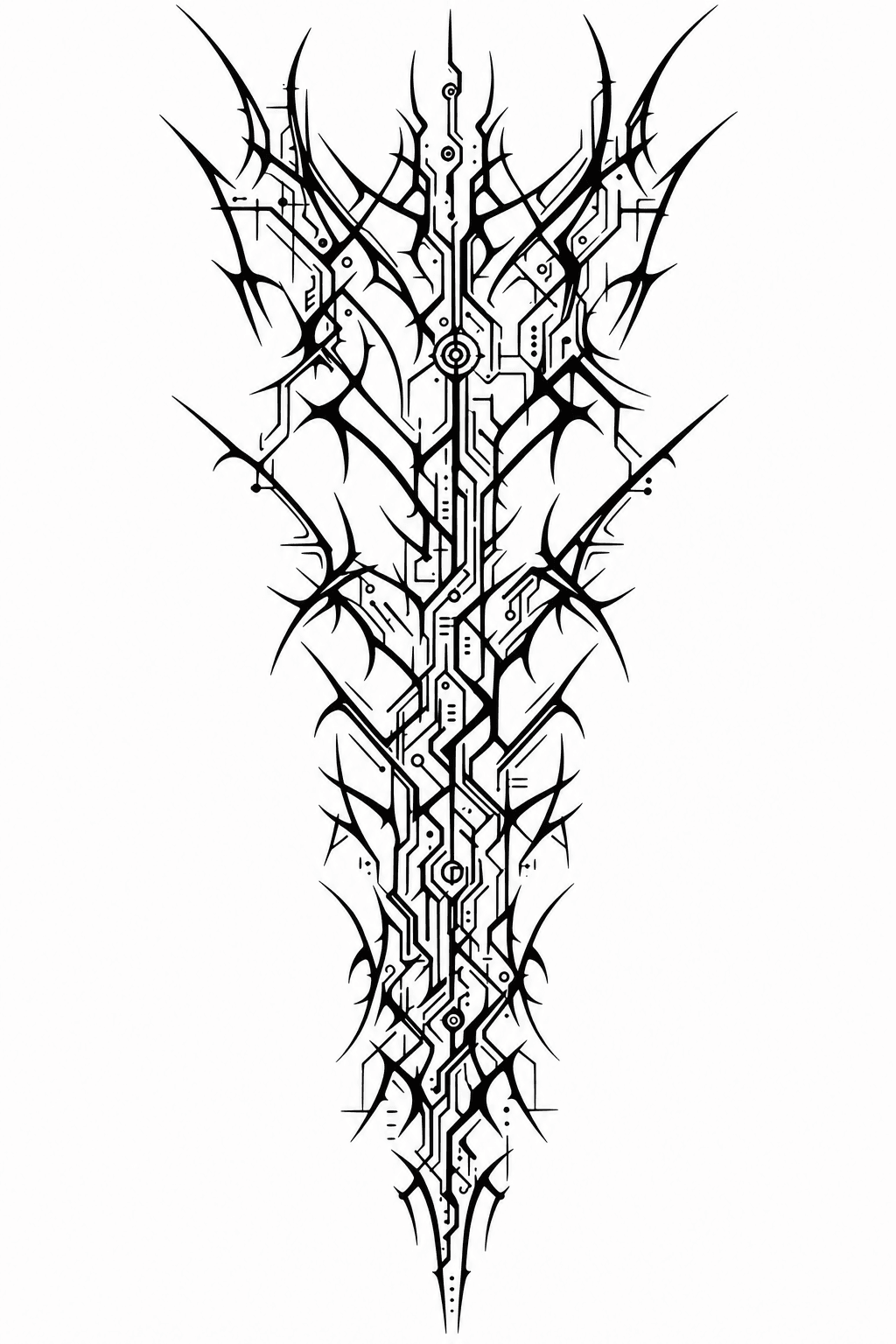
Vertical cybersigilism tattoo design sheet: jagged black spines and thorn-like tendrils tapering from elbow to wrist on flat white paper
The actual Step 1 output from the prompt above. Generated with openai/gpt-image-2/text-to-image at quality high, 1024x1536. This is the stage Firefly also reaches: a clean concept, and nothing you can transfer yet.
Step 2: Convert It Into a Tattooable Stencil
This is the 20 minutes of Photoshop work, done as one prompt. The goal is boring on purpose: same shapes, same proportions, same negative space, zero grey.
The line-thickening instruction is the part people skip. A hairline that looks elegant at 2K will blur into a smudge once it heals in skin, so anything under about 2px gets fattened now, on screen, where it is free.
text1Convert this into a clean tattoo stencil. Pure #000000 single-weight outlines on pure 2white, all lines closed and continuous, remove every grey gradient, soft shadow and 3anti-aliased haze. Thicken any line thinner than 2px so it survives on skin. Keep the 4exact same shapes, proportions and negative space, do not redraw, restyle or add 5detail. Flat line art only. 6
Settings: model google/nano-banana-2/edit, one input image (your Step 1 or Firefly design), resolution 2K, output format png. Leave web search and image search grounding off. You do not want the model inventing reference material here, you want it obeying.
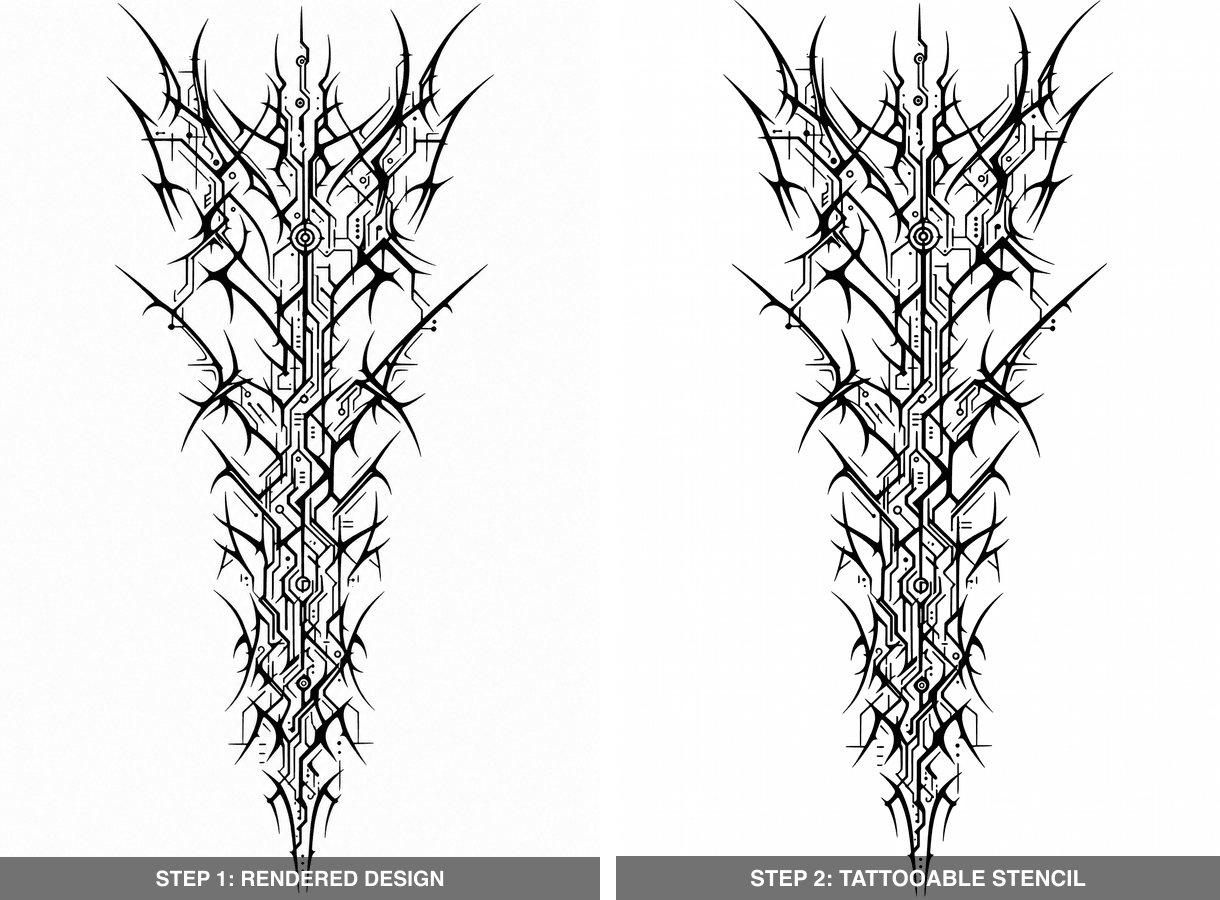
Side by side: the rendered cybersigilism design on the left, the same shapes flattened into a single-weight black stencil on the right
Step 2 input and output, side by side. Same shapes, same negative space, but the tapered strokes and anti-aliased haze on the left have become closed, even-weight black lines on the right. Generated with google/nano-banana-2/edit at 2K.
Step 3: Shoot the Canvas the Adobe Firefly AI Tattoo Generator Never Asks For
Use your own arm. That is the entire reason this chain exists. Four rules for the photo: natural window light, arm filling roughly 70% of the frame, no overlapping shadows, and the wrist rotated slightly so the outer forearm faces the camera.
No usable photo, or previewing for a client who is not in the room? Generate a neutral canvas instead, then swap in the real photo later.
text1Photorealistic close-up of a bare adult left forearm, palm rotated slightly inward so 2the outer forearm faces camera, elbow at top of frame and wrist at bottom. Soft north 3window light, neutral grey seamless background, visible skin texture with pores and 4fine hair, no tattoos, no jewelry, no watch, sharp focus, natural skin tone, 85mm lens. 5
Settings: same as Step 1, openai/gpt-image-2/text-to-image, quality high, size 1024x1536. This bare arm is the left panel of the before/after image at the top of this article.
Step 4: Fuse the Ink Onto Skin, the Step the Adobe Firefly AI Tattoo Generator Skips
The strongest run in the chain, and the one that changes decisions. Load two images in this order: the arm photo first, the stencil second. Order matters, because the prompt refers to them positionally.
Three ideas are doing the work in this prompt. Wrap, so the lines curve with the cylinder and compress toward the silhouette edges. Ink under skin, so the black desaturates toward blue-black with slightly diffused edges instead of sitting on top like a decal. And strict preservation, so lighting, pores, hair and background survive untouched. Drop the last one and the model quietly "improves" your arm into a stock photo.
text1Apply the black linework from the second reference onto the forearm in the first 2reference as a fully healed tattoo. Wrap the design around the cylindrical volume of 3the arm so the lines curve with the muscle and compress toward both silhouette edges. 4Ink sits under the skin: slightly desaturated blue-black, softly diffused edges, a 5touch of grain, never a crisp printed overlay. Strictly preserve the same lighting 6direction, shadows, skin tone, pores, hair and background. Do not change the pose, 7the arm shape or the design's proportions. 8
Settings: model google/nano-banana-2/edit, two input images (arm, then stencil), resolution 2K, thinking level high if you want it to work harder on the wrap. If the result looks pasted on, that is your signal that the "ink sits under the skin" clause got outvoted by a too-clean input photo. Re-run with a grainier arm shot before you rewrite the prompt.
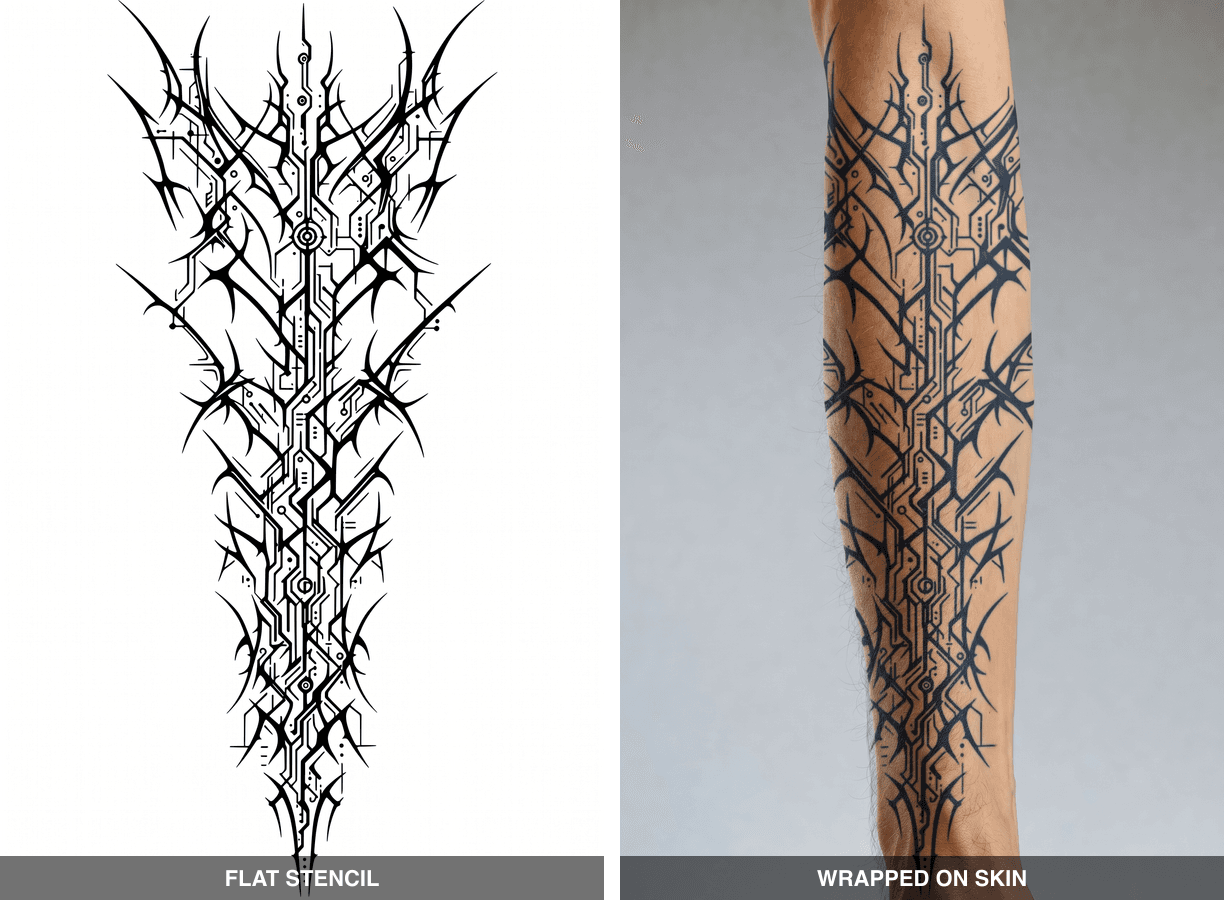
Side by side: the flat stencil on the left, the same design fused onto the forearm and curving with the muscle on the right
The whole point of Step 4, in one frame. Left is the flat stencil that went in; right is the same linework bending around the arm, compressing toward both silhouette edges and sitting under the skin instead of on it. Generated with google/nano-banana-2/edit at 2K from two reference images.
Step 5: Run the Motion Test
Static previews flatter bad placement. A wrap that reads beautifully in one frozen pose can fold into mush when the wrist turns, and you only find that out on the table. Five seconds of video finds it in advance.
text1The tattooed outer forearm stays facing the camera for the whole shot. The wrist turns 2no more than 20 degrees while the fingers slowly close into a light fist, tendons and 3muscle flexing underneath the skin. The tattoo lines stretch and shift naturally with 4the moving surface. Locked-off camera, soft window light unchanged, no cuts, no zoom, 5no text. 6
That first clause is not decoration. Our first attempt asked for "rotates outward about 30 degrees" and the model took it as an invitation to roll the arm all the way over to the clean inner forearm, so the tattoo left the frame entirely. Pin the tattooed surface to the camera and let the flex do the work.
Settings: model kwaivgi/kling-v3.0-pro/image-to-video, first frame is your Step 4 output, resolution 1080P, duration left at the default 5 seconds, sound off. Keep cfg_scale at its default 0.5. Higher values fight the physics you actually want here.
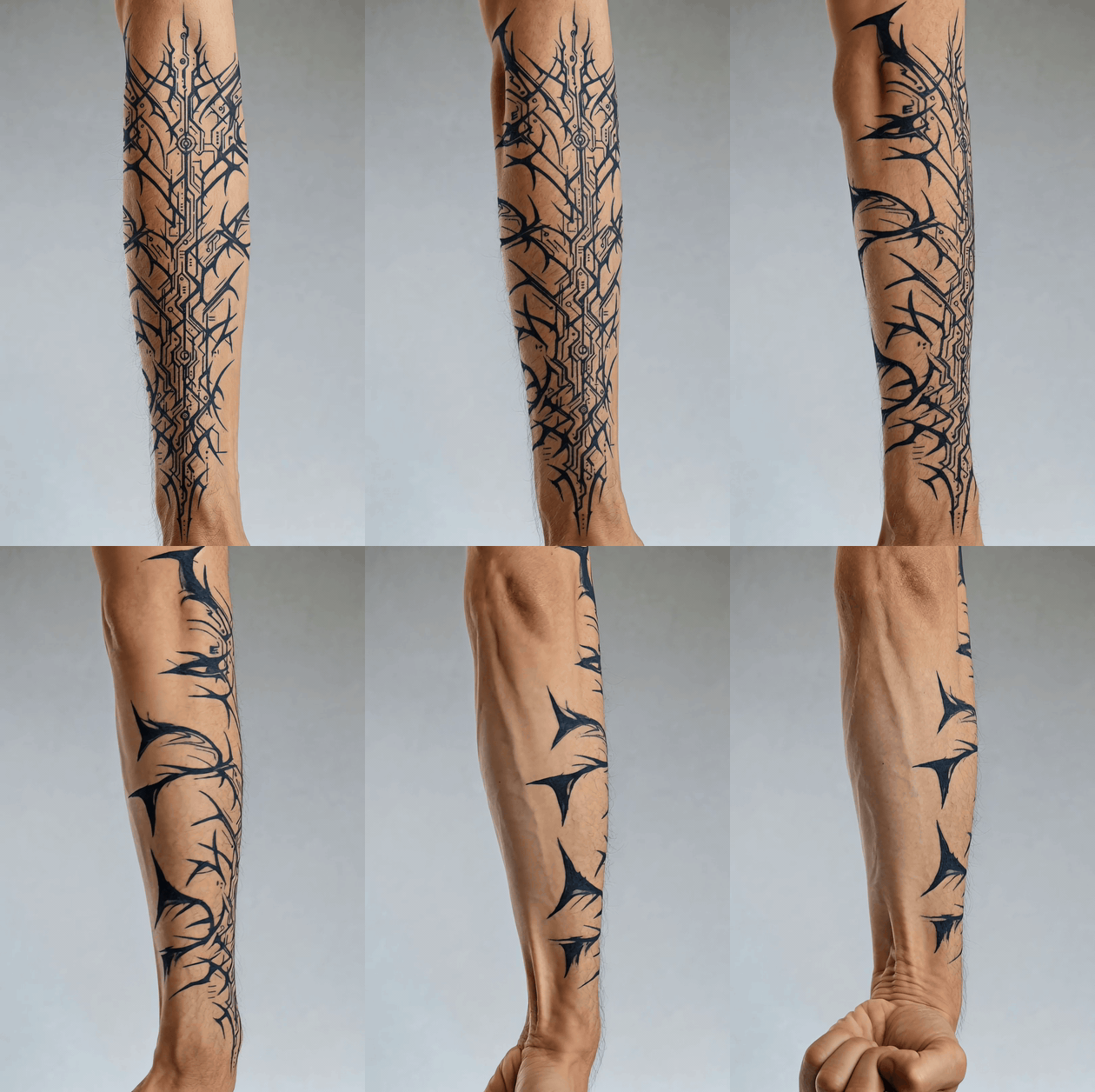
Five-second motion test: the forearm rotates outward and the fingers close into a fist while the black cybersigilism lines stretch with the skin
Step 5 output, shown here as a silent GIF. Generated with kwaivgi/kling-v3.0-pro/image-to-video at 1080P, 5 seconds. Watch what happens as the wrist turns: the band compresses toward the silhouette edge and most of it rolls out of sight. A flat mockup will never tell you that a third of your design lives on a surface nobody sees head-on.
Variations: Restyling One Adobe Firefly AI Tattoo Generator Design Four Ways
Once the arm photo is in hand, style shopping costs one edit run each. Same canvas, same lighting, four different pieces of ink, which is the comparison you actually want before committing. This is also the part people are really searching for when they type "adobe ai tattoo generator" into Google: not one pretty design, but the same design tried on until one of them stops looking like a maybe.
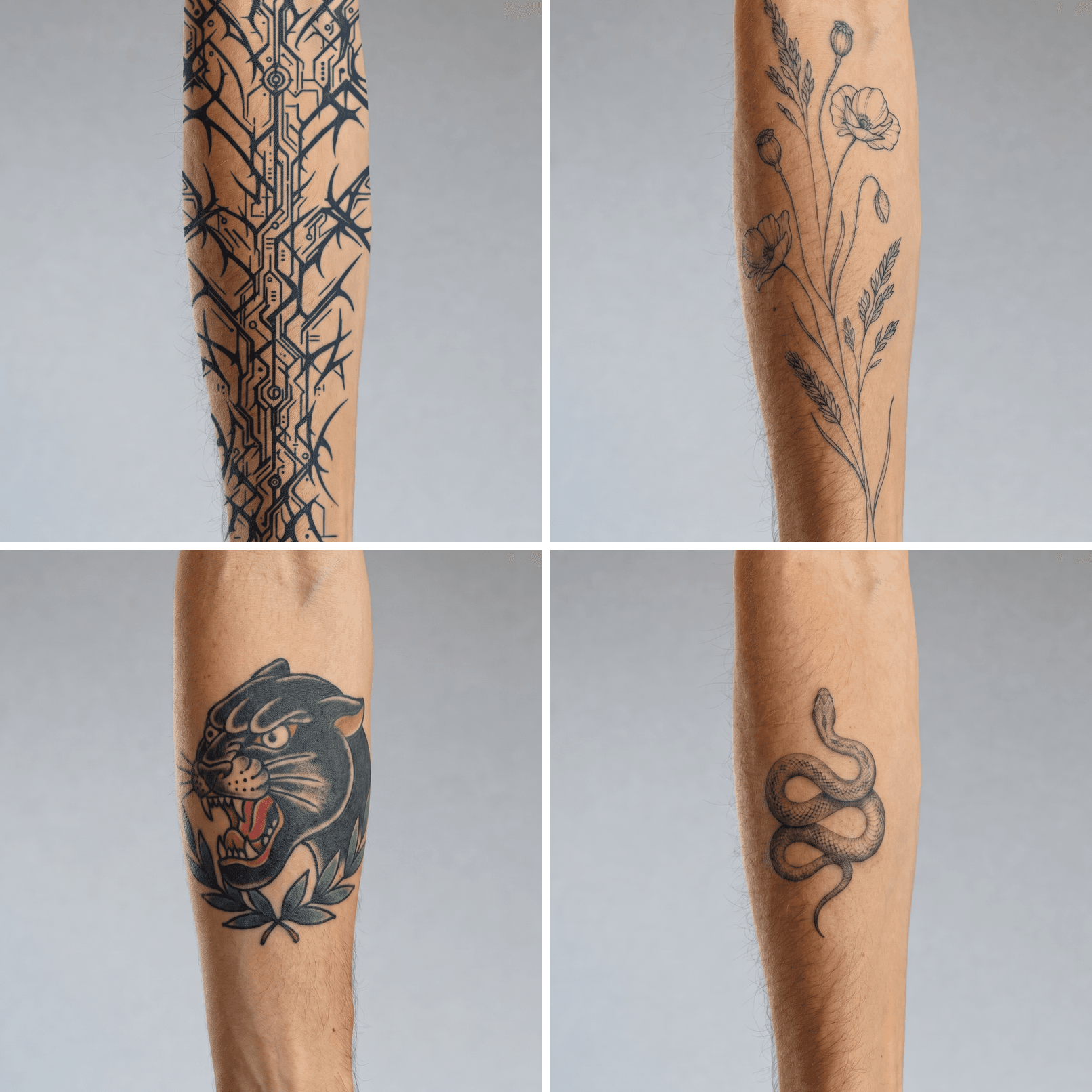
Four variations on the same forearm: cybersigilism blackwork, fine-line floral, American traditional panther, and micro-realism snake
The same forearm, four styles, one Nano Banana 2 Edit run each. Left to right, top to bottom: cybersigilism, fine-line floral, American traditional, micro-realism.
Swap the style words in the Step 1 prompt, rerun Steps 1, 2 and 4, and keep everything else identical. Three practical notes from doing this repeatedly:
- Fine line is where the 2px rule earns its keep. Push line weight up before fusing or the preview lies to you in the flattering direction.
- American traditional wants bolder outlines and flat fills, so tell Step 2 to keep solid black areas solid rather than converting them to outlines.
- Placement matters more than style. Rerun Step 4 with "inner forearm", "shoulder cap" or "collarbone" in the prompt and the same design reads completely differently.
If you are shopping through a lot of placements quickly, Nano Banana 2 Lite Edit runs $0.04 per image at 1K, which is fine for triage. Do the final fusion at 2K.
What the Whole Adobe Firefly AI Tattoo Generator Chain Costs
One full pass, at the settings above, list prices as of August 2026.
| Run | Model and setting | Cost |
|---|---|---|
| Design sheet | GPT Image 2 T2I, high, 1024x1536 | from $0.009 |
| Stencil | Nano Banana 2 Edit, 2K | $0.12 |
| Bare-arm canvas (skip if you shoot your own) | GPT Image 2 T2I, high, 1024x1536 | from $0.009 |
| Skin fusion | Nano Banana 2 Edit, 2K | $0.12 |
| Motion test, 5s at 1080P | Kling v3.0 Pro I2V, $0.095 per second | $0.475 |
| Full chain | about $0.73 | |
| Change the design and redo stencil plus fusion | 3 runs | about $0.25 |
| Four style variations on the same arm | 4 fusion runs | $0.48 |
The video run is most of the bill, which is why it is the last step rather than the first. Two ways to trim it: Veo 3.1 Fast Image-to-Video at $0.08 per second, or skip motion entirely on styles you are only triaging.
One model to avoid for Step 4, for a specific reason. Beautify-leaning editors like Seedream v5.0 Pro Edit are cheaper at $0.045 per image, but they tend to clean and upscale the whole frame. Pores go, grain goes, and the tattoo drifts straight back to sticker territory. Cheaper input, worse answer to the only question you asked.
Compared against a subscription, the difference is structural rather than dramatic. Firefly bills monthly against a credit pool whether you design one tattoo or forty. This chain bills per run, which suits a decision you make once every few years. The full model catalogue and prices are public if you want to price your own variant.
Before You Get Inked: Ownership and Studio Etiquette
Firefly trains on licensed Adobe Stock, which is cleaner than most, and Adobe's own terms govern commercial use. Separately, copyright in a purely AI-generated image is still unsettled in most jurisdictions, so do not assume you own an exclusive design. None of this is legal advice.
Two etiquette notes that will save you an awkward consultation. Do not hand an artist an AI pastiche of another artist's recognisable style and ask them to copy it. And bring three things instead of one: the stencil, the skin preview, and the motion clip. Then let the artist redraw whatever they need to. A preview is a conversation starter, not a green light, and the final stencil should always be theirs to approve.
Frequently Asked Questions
Is the Adobe Firefly AI tattoo generator free to use?
There is a free tier. You need an Adobe ID, and generations draw on a monthly generative-credit allowance, with paid plans buying larger pools. Adobe changes those numbers and runs promotions, so check Adobe's current Firefly pricing page rather than trusting any third-party figure, including ours.
Can the Adobe Firefly AI tattoo generator show a tattoo on my own arm?
No. It generates a standalone design, and it does not project that design onto a photo of your body or wrap it around your anatomy. To see it on your own arm you need an image-edit model that accepts two inputs at once, your arm photo plus the line art, and a prompt that explicitly asks for cylindrical wrap and under-skin ink. That is Step 4 above.
Can I take an Adobe Firefly AI tattoo generator design straight to a tattoo artist?
Bring it as a reference, not as a finished file. A rendered illustration is not a stencil: line weight, spacing and negative space all need a human pass, and detail that reads at screen size may not hold in healed skin. Bring the stencil, the skin preview and the flex clip, then defer to the artist's redraw.
Who owns an Adobe Firefly generative AI custom tattoo design?
Firefly's training data is licensed Adobe Stock and Adobe's terms cover commercial use of Firefly output, so start there. But copyright protection for purely AI-generated images remains uncertain in most jurisdictions, so do not rely on it to claim exclusivity over a design. Not legal advice.
Does the Adobe Firefly AI tattoo generator export a print-ready stencil or SVG?
Vector export is a real Adobe advantage: Firefly Vector and Illustrator can get you to SVG, which the chain in this article cannot do. A stencil is a different problem. Vector or raster, you still have to strip grey, close the lines and normalise line weight before anyone can print and transfer it.
Which model type is better for skin previews, an edit model or a beautify model?
An edit model that preserves the input. Beautify and upscale-leaning editors smooth skin texture, drop grain and even out lighting, which is exactly the information that makes ink look like it is under the skin rather than printed on top. Pick the model that changes only what you asked it to change.





