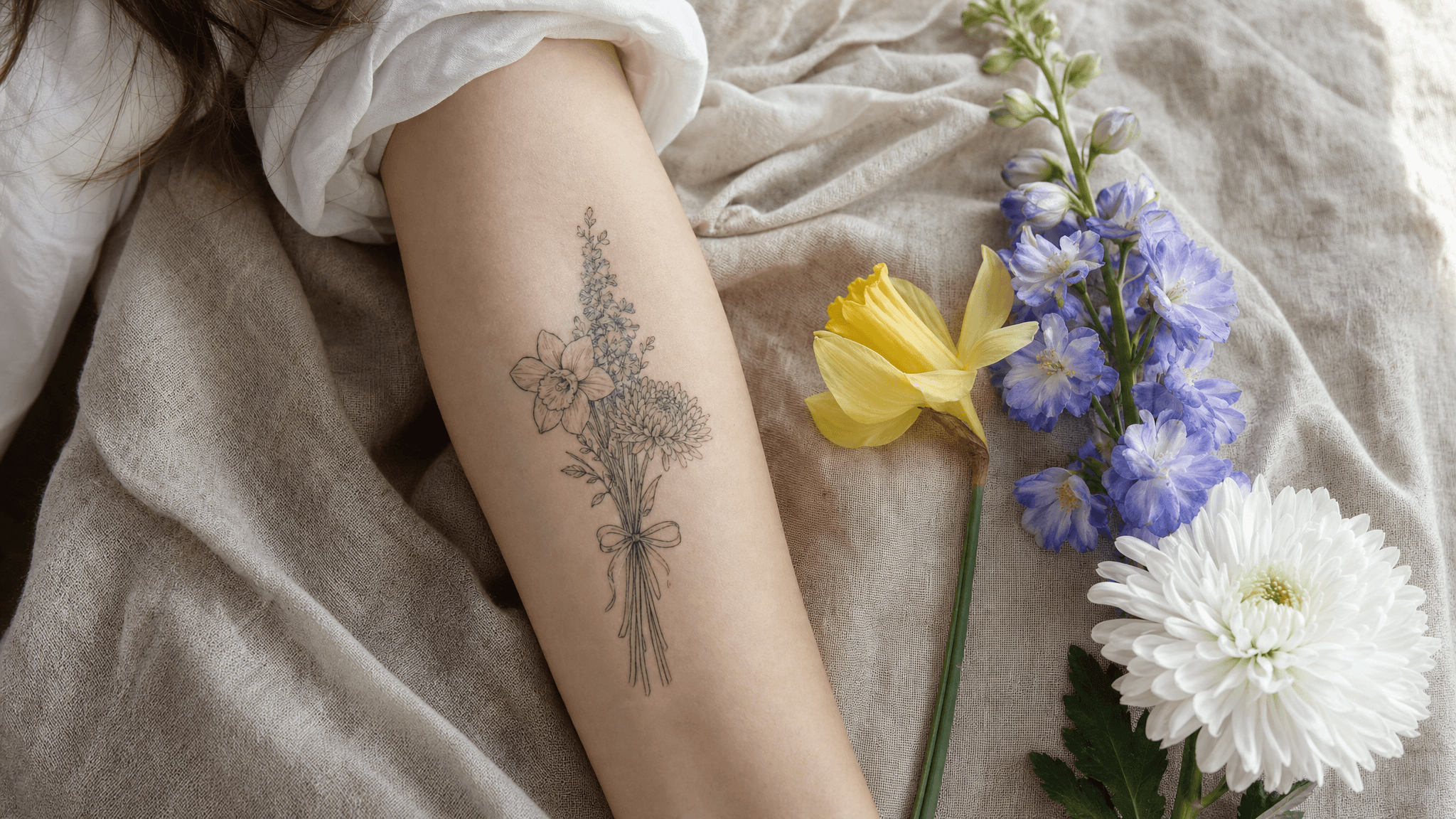
Fine-line birth flower bouquet tattoo on a woman's inner forearm resting on linen, beside a daffodil, a larkspur stem and a chrysanthemum
The design brief for this whole article: three species, one stem bundle, one ribbon of names. Generated with openai/gpt-image-2.
A mother walks into a tattoo studio with a printout. The image is beautiful. Soft fine lines, a hand-tied bouquet, a ribbon with three names. The artist looks at it for two seconds and says: "These are daisies and roses. You told me your kids are March, July and November."
Her prompt said "March, July and November birth flowers." The model heard "flowers."
That is the whole problem with this trend in one scene. A birth flower tattoo means something because it is specific. March is a daffodil, not a generic spring bloom. July is a larkspur, not a water lily unless you chose the water lily on purpose. And a generative model's deepest instinct is to sand specificity down into "pretty."
Below is how to force it back. Three runs, one browser tab, every prompt copyable, and an honest accounting of what it costs and what it does not.
Key takeaways
- Almost every AI birth flower tattoo generator fails on botanical identity, not on style. It draws a lovely bouquet of the wrong species.
- The fix is three prompt clauses: name the species, describe its shape, and lock the flower count with
exactly three.- Names on a ribbon need their own instruction and a few reruns. Text is where these models slip the most.
- Test the design on your own arm photo before you book. A flat design that reads clearly on white can turn to mush on curved skin.
- Fine-line botanical work spreads as it heals. Draw the flower heads bigger than feels necessary.
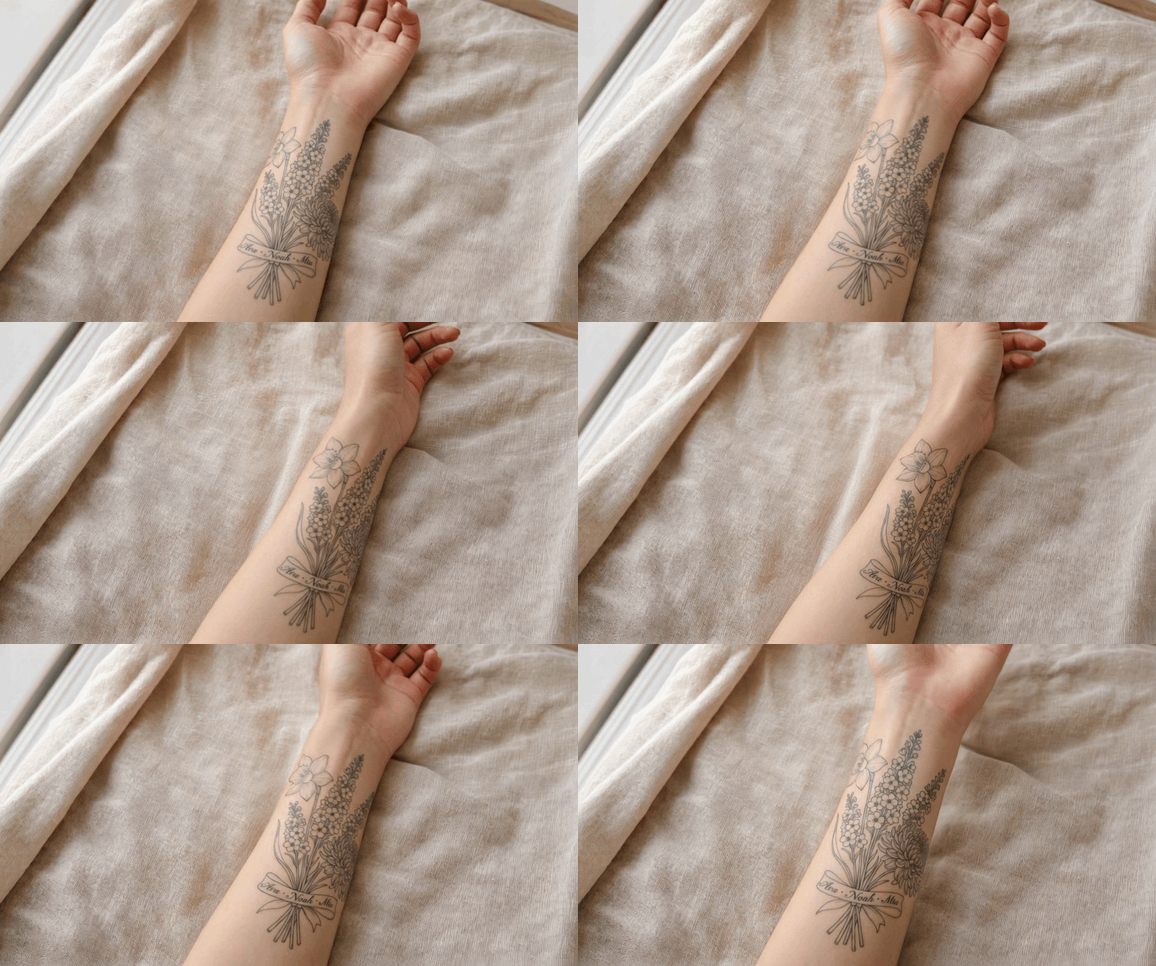
Fine-line birth flower bouquet tattoo bending with the forearm as the arm rotates toward the camera
The finished design on skin, rotating. Watch the larkspur spike in the centre: it stays readable as the forearm turns, which is the only test that matters. Generated with kwaivgi/kling-v3.0-turbo.
1. Why Your AI Birth Flower Tattoo Generator Keeps Drawing the Wrong Flower
Three things go wrong, and they go wrong in this order.
The species name gets swallowed by its category. "Larkspur" is a rare token. "Flower" is one of the most common tokens in any image model's training set. Ask for a larkspur inside a longer sentence and the model quietly resolves it upward to the nearest confident concept: a tall pretty stem with petals. You get a plant. You do not get Consolida ajacis.
Flower count drifts. Bouquets in training data have lots of flowers. Ask for three and you will often get five, because five looks more like a bouquet. For a family piece, extra flowers are not a stylistic bonus. They are extra children.
Fine lines lie on white paper. A single-needle botanical drawing at screen resolution has detail that skin cannot hold. Healed fine-line ink spreads slightly, and adjacent petal lines merge into a grey mass. The design that "works" is the one that still works after that spread.
This is exactly the gap experienced artists keep flagging. Lal Hardy, who has been tattooing for 47 years, put it bluntly: "AI makes people have a totally unrealistic expectation of what is possible as a tattoo." He describes a client's AI-generated neck bird where the design "was stretching off into the ether," plus the familiar six-fingered hands (LADbible, July 2026). Wrong petal counts are the botanical version of six fingers. Most people simply do not know what a larkspur is supposed to look like, so nobody catches it.
The fix is not a better tool. It is a longer sentence.
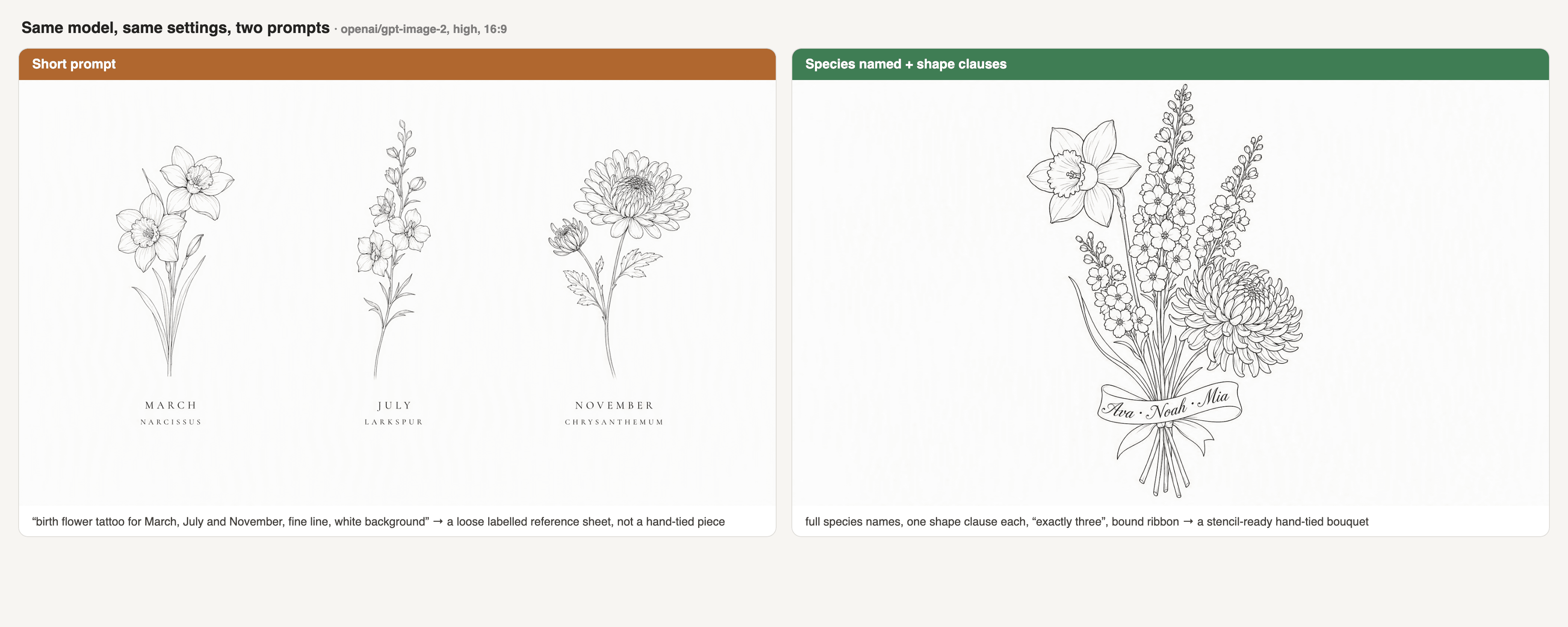
Side-by-side comparison on GPT Image 2: the short prompt returns a loose labelled reference sheet, while the species-named prompt returns a stencil-ready hand-tied bouquet of daffodil, larkspur and chrysanthemum
Same model, same settings, two prompts. Left: the short prompt most people type returns a loose labelled reference sheet rather than a hand-tied piece. Right: species named and shaped, with a bound ribbon, returns something an artist can stencil. Generated with openai/gpt-image-2.
T2. What the two prompts actually return
| Short prompt | Species-named prompt | |
|---|---|---|
| What you type | "birth flower tattoo for March, July and November, fine line, white background" | Full species names plus one shape clause each, plus exactly three |
| What comes back | A pleasant generic bouquet: rose, daisy, filler foliage | A trumpet-coronaed daffodil, a spiked larkspur, a balled chrysanthemum |
| Right species? | Usually none of the three | Two or three of three on a good seed |
| Flower count controlled? | No, drifts to four or five | Yes, holds at three |
| Usable by an artist? | Only as a mood reference | Yes, as a stencil starting point |
2. Birth Flowers by Month: The Table Your AI Birth Flower Tattoo Generator Should Have Memorised
Before the prompt, the facts. Most months have two flowers, a primary and a secondary, and that is not sloppiness. As The Old Farmer's Almanac explains it, "Not all cultures agree on which flowers correspond to which months, plus some flowers simply aren't as available in different regions" (The Old Farmer's Almanac, February 2026). There is no single global registry. Pick the one you want and say so.
The third column is the part that matters for your prompt. Paste it straight in.
| Month | Primary | Secondary | Shape clause to paste into your prompt |
|---|---|---|---|
| January | Carnation | Snowdrop | "ruffled fringed petals packed into a dense rounded head on a knuckled stem" |
| February | Violet | Primrose | "five rounded petals with the lowest one broadest, on a slender hooked stem, heart-shaped leaves" |
| March | Daffodil (Jonquil) | none | "a trumpet-shaped central corona ringed by six flat outer petals" |
| April | Daisy | Sweet Pea | "a single row of narrow strap-like ray petals around a flat round centre disc" |
| May | Lily of the Valley | Hawthorn | "small nodding bell-shaped flowers spaced along one side of an arching stem" |
| June | Rose | Honeysuckle | "tightly spiralled overlapping petals opening into a cup, thorned stem, toothed leaflets" |
| July | Larkspur | Water Lily | "a tall vertical spike densely covered in small five-petalled florets, each with a backward spur" |
| August | Gladiolus | Poppy | "a tall one-sided spike of large funnel-shaped blooms with pointed sword-like leaves" |
| September | Aster | Morning Glory | "many thin ray petals in a single flat halo around a small button centre" |
| October | Marigold | Cosmos | "a dense pompom of tightly packed ruffled petals above feathery divided leaves" |
| November | Chrysanthemum | none | "a dense ball of many layered narrow petals curving inward" |
| December | Narcissus (paperwhite) | Holly | "a small shallow cup on a six-petalled star, several blooms per stem" |
Two notes people get burned by. April and July genuinely have two accepted options, so "April flower" is ambiguous in a way "March flower" is not: choose daisy or sweet pea explicitly. And November has one flower in this tradition, so if a generator hands you two different November blooms, one of them is invented.
3. The AI Birth Flower Tattoo Generator Stack: Three Runs, One Browser Tab
The design case for the rest of this article is the one that is actually trending: a family birth flower bouquet, three children, one inner forearm. That format is not a hunch. Pew Research found that 32% of American adults have a tattoo, and among tattooed adults 69% say honoring or remembering someone or something is a reason they got one, rising to 73% of women against 63% of men (Pew Research Center, August 2023). Memorial intent is the centre of gravity of this whole category, and a bouquet of your kids' months is that intent in one image.
Three months, chosen because their silhouettes are maximally different so mistakes are visible at a glance: March / daffodil, July / larkspur, November / chrysanthemum. Ribbon at the stem crossing, three names on it: Ava, Noah, Mia.
Three jobs, three models, all on one platform so nothing has to be re-uploaded between steps.
T3. The three-run workflow
| Run | Model | Job | Settings | Page price |
|---|---|---|---|---|
| 1 | openai/gpt-image-2/text-to-image | Draw the species-correct bouquet plus the name ribbon | quality high, 16:9, PNG | $0.009 / image |
| 2 | google/nano-banana-2/edit | Fuse it onto a photo of your own forearm | resolution 2k, 2 reference images (up to 14 supported) | $0.08 / image |
| 3 | kwaivgi/kling-v3.0-turbo/image-to-video | Rotate the arm to see what survives the curve | 720p, 5s (3 to 15s supported) | $0.095 / second |
Prices are the per-unit rates listed on each model page as of August 2026, no discount badges on these three. Treat them as a floor rather than a promise: GPT Image 2 bills by output tokens, so a large canvas at high quality quotes higher than the headline. The Run button shows the real number for your exact settings before you spend anything, so read it there.
If you only want to see whether the idea holds up, the free AI tattoo generator does Run 1 without an account: in its own words, "Your first tattoo design does not cost anything, and there's no credit card required just to see what the tool can do." Be clear about the boundary though, because it matters later: that free run is text to image only. It does not put the design on your arm and it does not make the video. Runs 2 and 3 happen in the model playgrounds.
4. How to Use an AI Birth Flower Tattoo Generator, Step by Step
Step 1. Make it say the species out loud.
Open the GPT Image 2 text-to-image page. Set quality to high, aspect to 16:9, output PNG. Then paste this, unedited:
text1A single fine-line botanical tattoo flash design centred on a clean solid white background: 2a vertical hand-tied bouquet of exactly three identifiable species - one Narcissus daffodil 3with a trumpet-shaped corona and six flat outer petals at the top left, three tall Larkspur 4spikes densely covered in small five-petalled florets through the centre, and one 5Chrysanthemum with a dense ball of layered narrow petals at the lower right. The stems cross 6low and are bound with a thin ribbon carrying the words "Ava · Noah · Mia" in delicate 7italic script, letters clearly legible and correctly spelled. Single-needle continuous 8linework of even weight, botanical-illustration accuracy so each species is recognisable at 9a glance, no shading, no colour, no extra flowers, no leaves outside the bouquet silhouette, 10no background elements, no watermark, professional fine-line tattoo stencil flash art. 11
Three clauses are doing all the work. exactly three locks the count. Each per-species shape phrase locks the identity, straight out of the table above. And no extra flowers stops the model from helpfully padding the arrangement.
Run it three times. Seeds vary, and you are choosing on two criteria: are all three species right, and are the three names spelled correctly. Text is the flakier of the two. If run one gives you perfect flowers and "Nooh," keep running.
To reproduce the failure case for yourself, run the same model and settings on the short version, birth flower tattoo for March, July and November, fine line, white background, and compare. That pair is the comparison image in section 1.
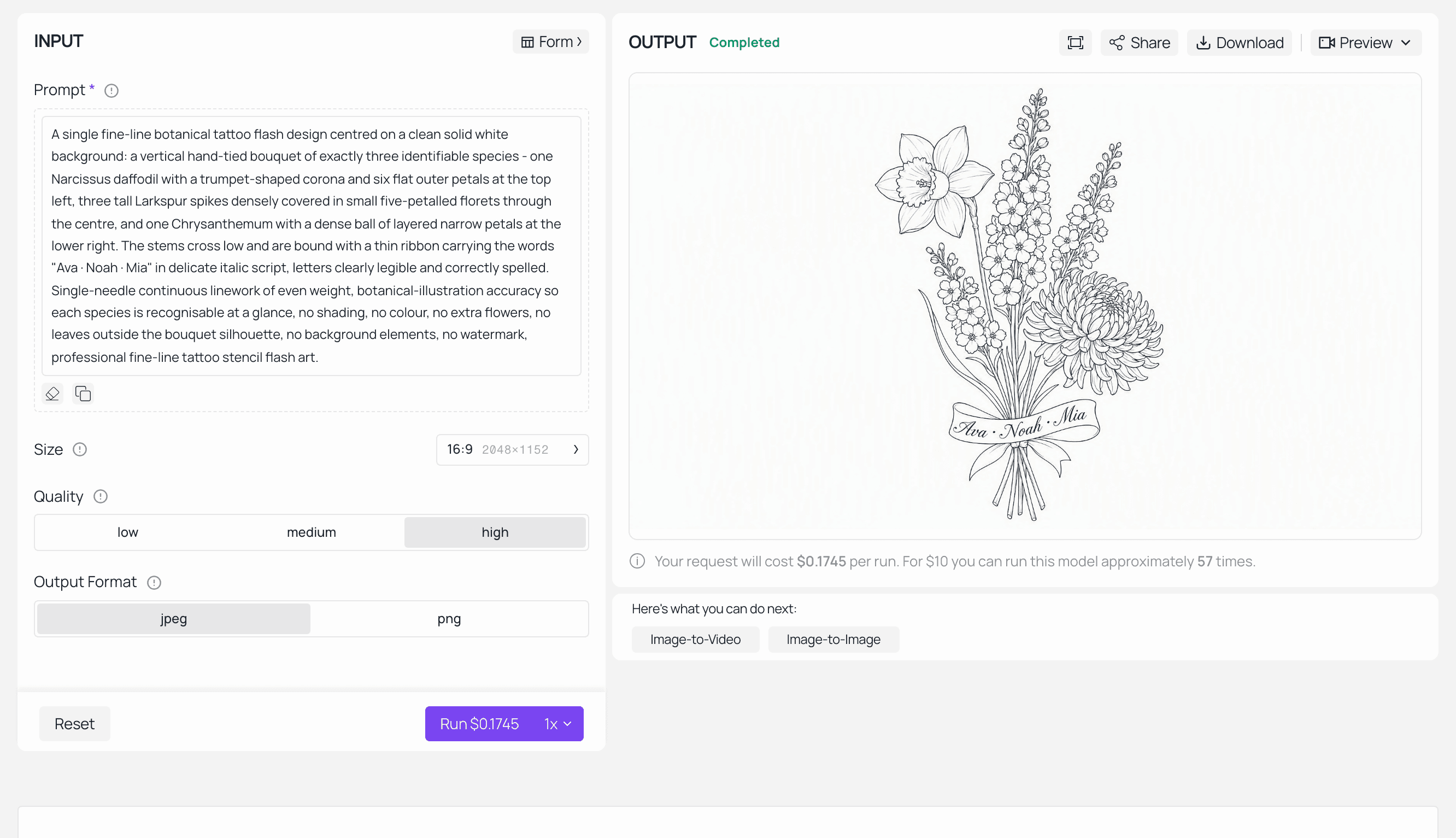
Atlas Cloud GPT Image 2 playground with the birth flower bouquet prompt loaded and the completed fine-line design in the output panel
Run 1 completed: quality high, 16:9, three species and the name ribbon in the OUTPUT panel.
Step 2. Put it on your own arm and hold the spelling.
This step is why the AI design is worth anything. A flash sheet tells you nothing about how the piece sits on a real limb.
Take one photo of your inner forearm: natural window light, arm straight, no flash, no hard reflections, hand relaxed. Open the Nano Banana 2 edit page, set resolution to 2k, and load two references: your arm photo first, the Step 1 design second. Then:
text1Place the fine-line birth flower bouquet from the second reference image onto the inner 2forearm in the first reference photo as a real, freshly healed tattoo. Follow the natural 3curve of the forearm and size the bouquet to run about 15 cm from the wrist crease toward 4the elbow. Keep all three flower species individually recognisable and keep the script 5names legible and correctly spelled. Render the linework as soft dark grey-black ink 6slightly diffused into the skin with visible pores and skin texture through it, not a flat 7sticker or decal. Strictly preserve the same lighting, skin tone, shadows, arm hair and 8camera angle as the original photo. Do not change the background, the pose, the framing, or 9anything else in the photo. 10
The phrase carrying the most weight is "slightly diffused into the skin with visible pores and skin texture through it." Without it, edit models render tattoos as clean vector decals floating above the arm, which flatters the design and teaches you nothing. With it, you get roughly what a healed piece looks like, which is the point.
Check the reference thumbnails in the panel before you run. The arm should be first and the design second, and the loaded order does not always follow the order you clicked.
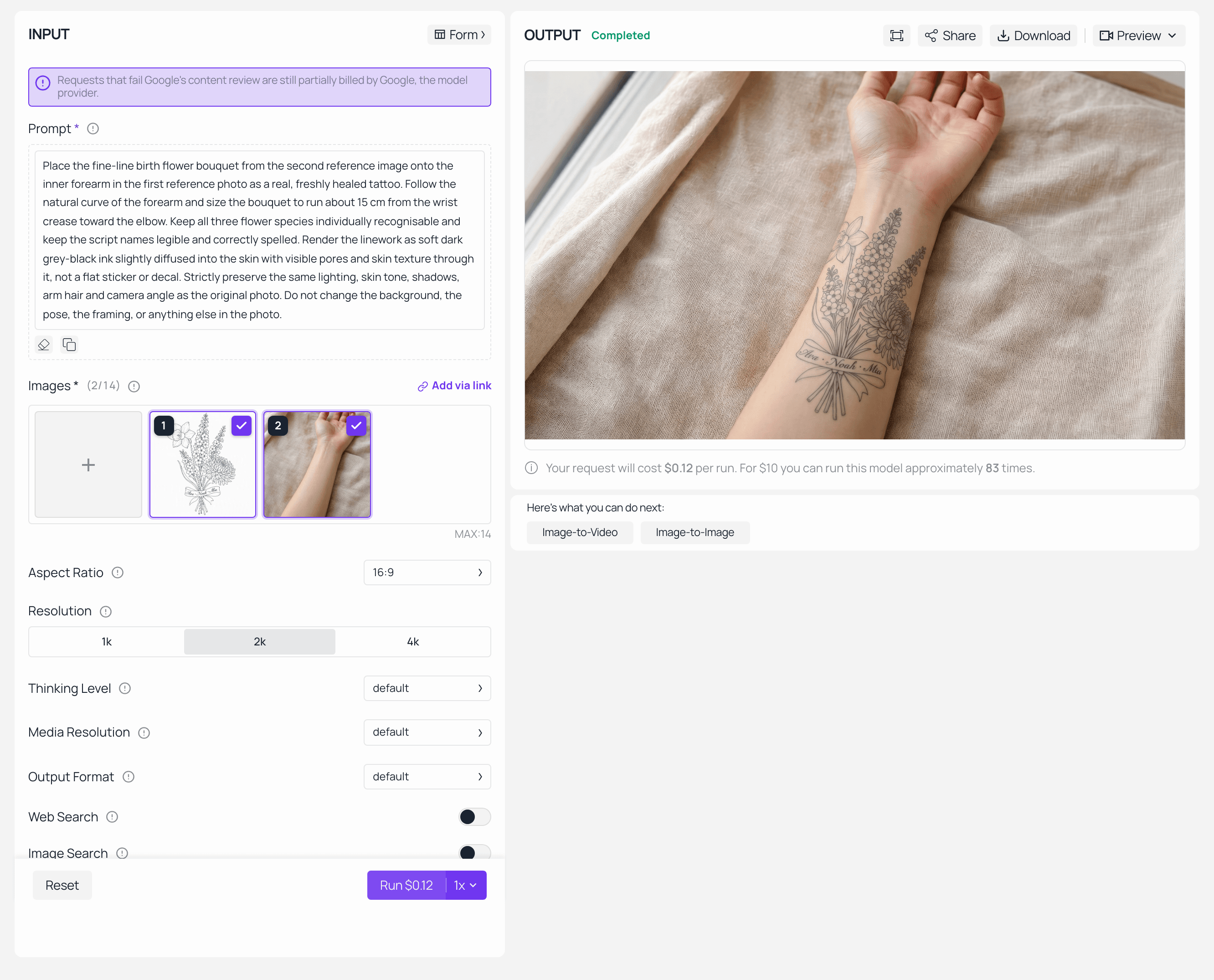
Atlas Cloud Nano Banana 2 Edit playground showing the arm photo and the birth flower design as references, with the tattooed forearm result in the output
Run 2 completed at 2k: both references loaded left, the fused forearm result right.
Step 3. Turn the arm and see what survives.
Static images hide the failure that actually matters. Skin curves, and a spiked larkspur that reads perfectly head-on can collapse into a grey smudge at 45 degrees.
Open the Kling v3.0 Turbo image-to-video page, load your Step 2 output as the input image, set 720p and 5 seconds. Note that the duration slider is worth double-checking before you commit, since it silently defaults if a click does not register.
text1The person slowly rotates their forearm and lifts it slightly toward the camera. The 2fine-line birth flower tattoo stays locked to the skin and bends with the muscle as the arm 3turns, staying sharp and readable. Natural window daylight, subtle skin movement, gentle 4handheld camera, single continuous take, no cuts, no text overlays, no extra limbs. 5
Then watch it once with the sound off and one question in mind: at the worst angle in those five seconds, can you still tell the middle flower is a larkspur? If yes, the design has enough contrast to hold on a real forearm. If the petals merge, go back to Step 1 and ask for larger flower heads and fewer florets per spike. That single loop is the difference between a design that photographs well and one that ages well.
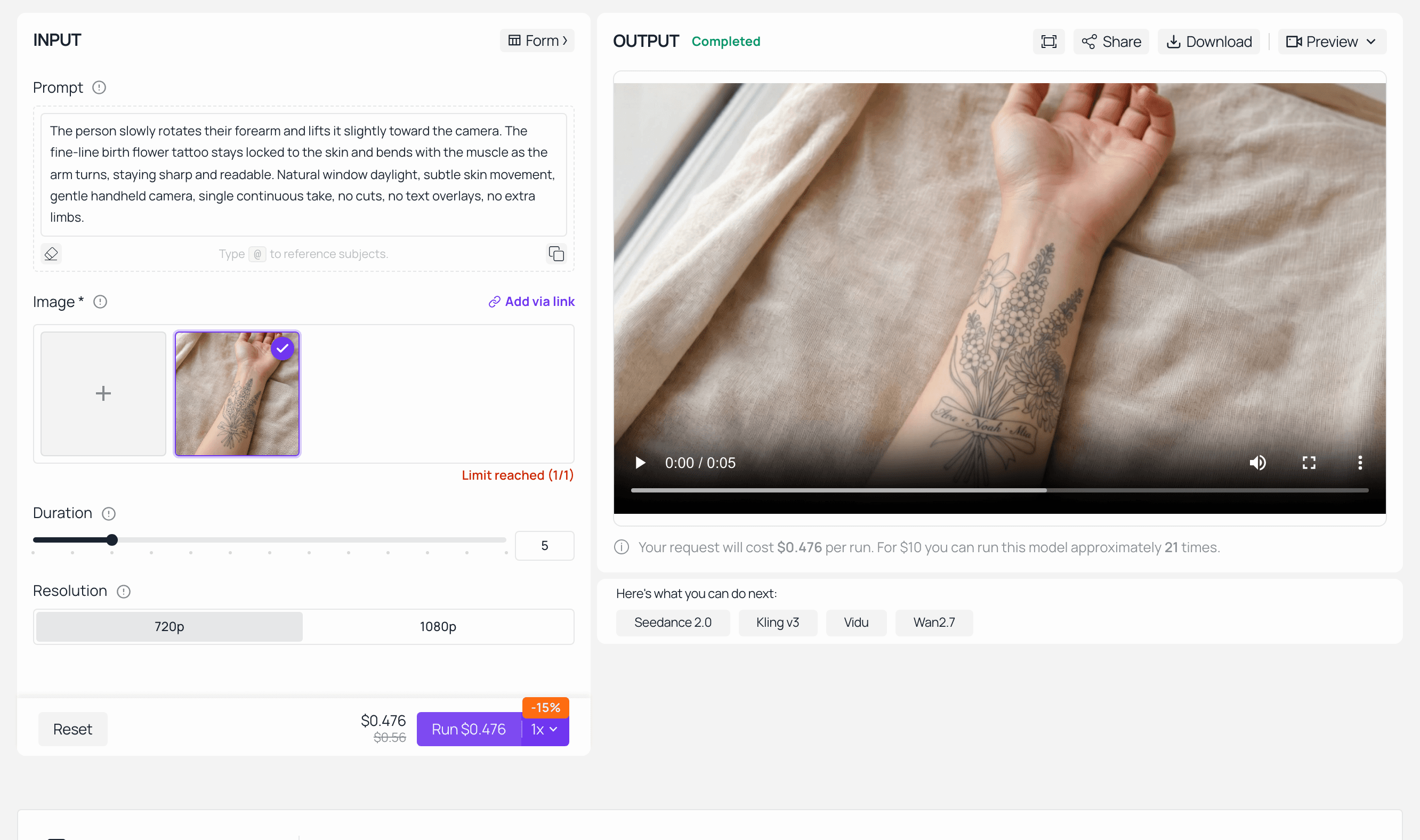
Atlas Cloud Kling v3.0 Turbo playground with the tattooed forearm image loaded and the completed five-second rotation clip in the output player
Run 3 completed: 720p, 5 seconds, the finished rotation clip in the OUTPUT player.
5. Variations: AI Name Tattoo Generator, AI Tattoo Font Generator and AI Kanji Tattoo
Same bouquet, four treatments. Each is one more GPT Image 2 run at high and 16:9, changing only the style clause.
- Blackwork silhouette. Solid black fill instead of outline. Ask for the three species to stay identifiable by silhouette alone, which is a harder constraint than it sounds and a good stress test of whether your shape clauses are doing their job.
- Watercolour. Soft washes, no black outline. Beautiful on screen. Ask your artist about longevity before you fall in love, because unlined colour work behaves differently over years than lined work.
- Name-only script. Drop the flowers, keep the words. This is the lane people arrive in through an ai tattoo font generator or an ai tattoo lettering generator search: three names stacked vertically in a delicate hand, one minimal daffodil stem to the right. Generate at least three seeds and read every letter. An ai name tattoo generator is only as good as its worst character, and a permanent typo is a permanent typo.
- Kanji. Vertical 「三月・七月・十一月」 beside the bouquet. One hard warning: have a native reader check the characters before anyone touches you with a needle. Image models routinely produce characters that are visually close but wrong, and an ai kanji tattoo that reads as a near-miss glyph is the single most expensive mistake in this whole article. This is not a maybe. Get it checked.
Two more that need no new image: swap the ribbon for a fine constellation line matching a birthday's star sign, or reduce the whole thing to one month's single stem on the wrist for a first tattoo.
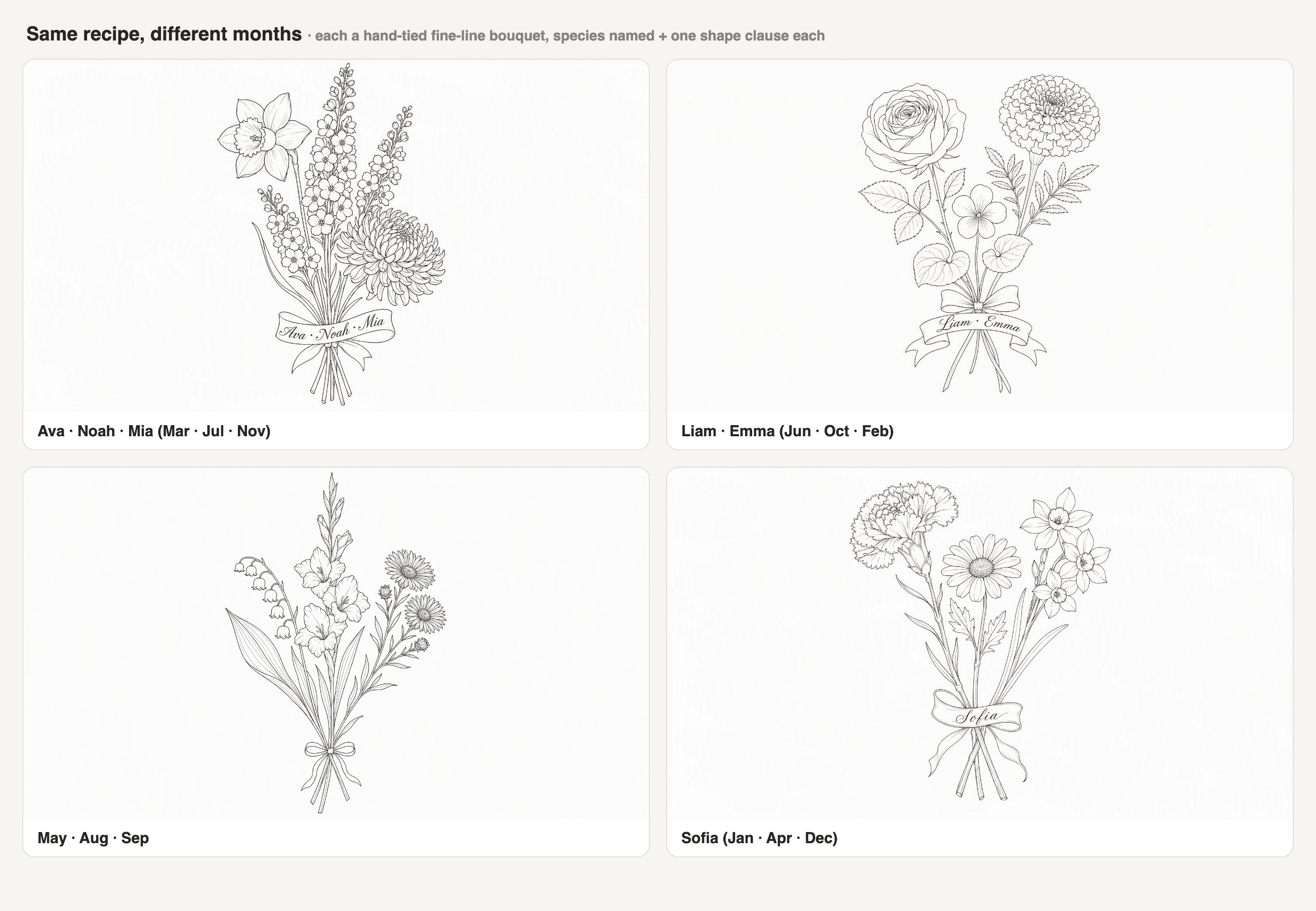
Two by two grid of AI birth flower tattoo variations: blackwork silhouette, watercolour, name-only script and kanji month characters
Four treatments of the same three-species bouquet. Generated with openai/gpt-image-2.
6. Where "AI Tattoo Generator From Text Free" Ends and Real Costs Begin
Search "ai tattoo generator from text free" and you get a wall of tools that are, genuinely, free for one thing: turning a sentence into a picture. That is real value and you should use it. It is also where free stops in every product in this category, including ours. The free tattoo generator linked in section 3 covers Run 1 and nothing after it.
Here is the arithmetic for the full chain, at the per-unit page rates.
T4. What the three-run chain actually consumes
| Step | Runs | Rate | Subtotal | Covered by the free run? |
|---|---|---|---|---|
| Run 1, bouquet base | 3 seeds | $0.009 / image | ~$0.027 | First image yes, reruns no |
| Run 2, fuse onto your arm | 2 attempts | $0.08 / image | ~$0.16 | No |
| Run 3, 5s rotation clip | 1 clip | $0.095 / second | ~$0.475 | No |
| Variations grid | 4 images | $0.009 / image | ~$0.036 | No |
| Full chain | ~$0.70 |
Read that table as an order of magnitude, not an invoice. Two caveats, both real. GPT Image 2 is billed on output tokens rather than a flat per-image fee, so a big canvas at high quality quotes above the listed rate. And the video line is the whole budget: one 5-second clip costs more than every image in this article combined, which is why you run it once, at the end, on the design you already like.
The honest summary: the picture is free, the proof is not. Whether the proof is worth roughly a cup of coffee, before you commit to something permanent, is your call.
7. Taking Your AI Birth Flower Tattoo Generator Design Into a Real Studio
You are not delivering a tattoo. You are delivering a brief that saves an artist an hour of sketching.
That is how working artists frame it too. Zachariah Davis of Urban Ink Tattoos 605 in Sioux Falls describes the AI-image stage as the client finally getting the picture out of their head, work that "would take hours" sitting together, and then his own role beginning: "Well, it's almost there, I see what you want. I can take it the rest of the way and give you what you want." His view on the technology is not defensive: "It's not something that's going to ruin artists. It's something that's going to help artists." He also names the limit exactly. "AI can make the coolest thing ever, but if you don't have a good artist, you're not going to have a good tattoo" (Dakota News Now, August 2026).
What to bring to the consultation:
- The Step 1 PNG at full resolution, plus the two or three seeds you rejected. The rejects tell the artist what you do not want, which is often more useful than what you do.
- The Step 2 on-arm render, labelled as a simulation. Do not present it as a photo of a tattoo.
- A plain photo of the actual placement, no filter, and one measurement. "About 15 cm from the wrist crease" beats any adjective.
- A one-line note: this is a reference, not a stencil. Redraw as needed.
- The month-to-species list in writing. If your artist redraws the larkspur, they should be redrawing a larkspur.
Two realities to hold on to. Fine-line botanical work spreads as it heals, and it fades faster on high-friction placements like fingers, hands and the outer ribs, so ask for slightly larger flower heads and one weight thicker than the render shows. And on ownership, AI image outputs sit in genuinely unsettled legal territory in most jurisdictions, so do not assume you hold an enforceable copyright in a generated design. For a family piece nobody is licensing, that mostly does not matter. If it matters to you, ask a lawyer, not a blog.
Frequently Asked Questions
What is my birth flower, and does an AI birth flower tattoo generator know it?
Look it up in the table in section 2: March is a daffodil, July is a larkspur, November is a chrysanthemum, and most other months offer a primary and a secondary. The model does technically "know" the association, but it will not reliably act on it from the month name alone. Name the species and describe its shape in the prompt.
Can an AI birth flower tattoo generator combine three or four birth flowers into one bouquet?
Yes, and this family-bouquet format is currently the most popular use of the whole category. But you have to write exactly three (or four) and give each species its own shape clause. Left to itself the model adds blooms until the arrangement looks conventionally full, which quietly changes what the tattoo means.
Is there a genuinely free AI birth flower tattoo generator?
Yes, with a real boundary. On the Atlas Cloud tool, your first design generation costs nothing and needs no credit card. That covers text to image only. Putting the design onto a photo of your own arm and generating the rotation clip are separate model runs, billed per run, as broken down in section 6.
Will my tattoo artist accept a design from an AI birth flower tattoo generator?
Increasingly, yes, as a reference rather than a stencil. Davis's "it's almost there, I can take it the rest of the way" is the normal reaction now. Bring the high-resolution PNG, the on-arm simulation clearly labelled as a simulation, a placement photo, one measurement, and the written month-to-species list.
Can an AI tattoo text generator spell my kids' names right on the ribbon?
Sometimes, on some seeds. Treat every text to tattoo AI run as a draft: generate at least three, then read the output letter by letter rather than glancing at the shape of the word. Non-Latin scripts raise the stakes sharply. Kanji, Arabic and Hebrew all need a native reader to sign off before your appointment.
Will a fine-line birth flower bouquet still look like those flowers in five years?
Only if it was drawn with that in mind. Fine lines spread slightly as they heal and adjacent petal lines can merge, so a dense larkspur spike is exactly the sort of detail that turns into a grey column. Ask for larger flower heads, fewer florets per spike, and a bit more space between elements, and avoid the fastest-fading placements.





