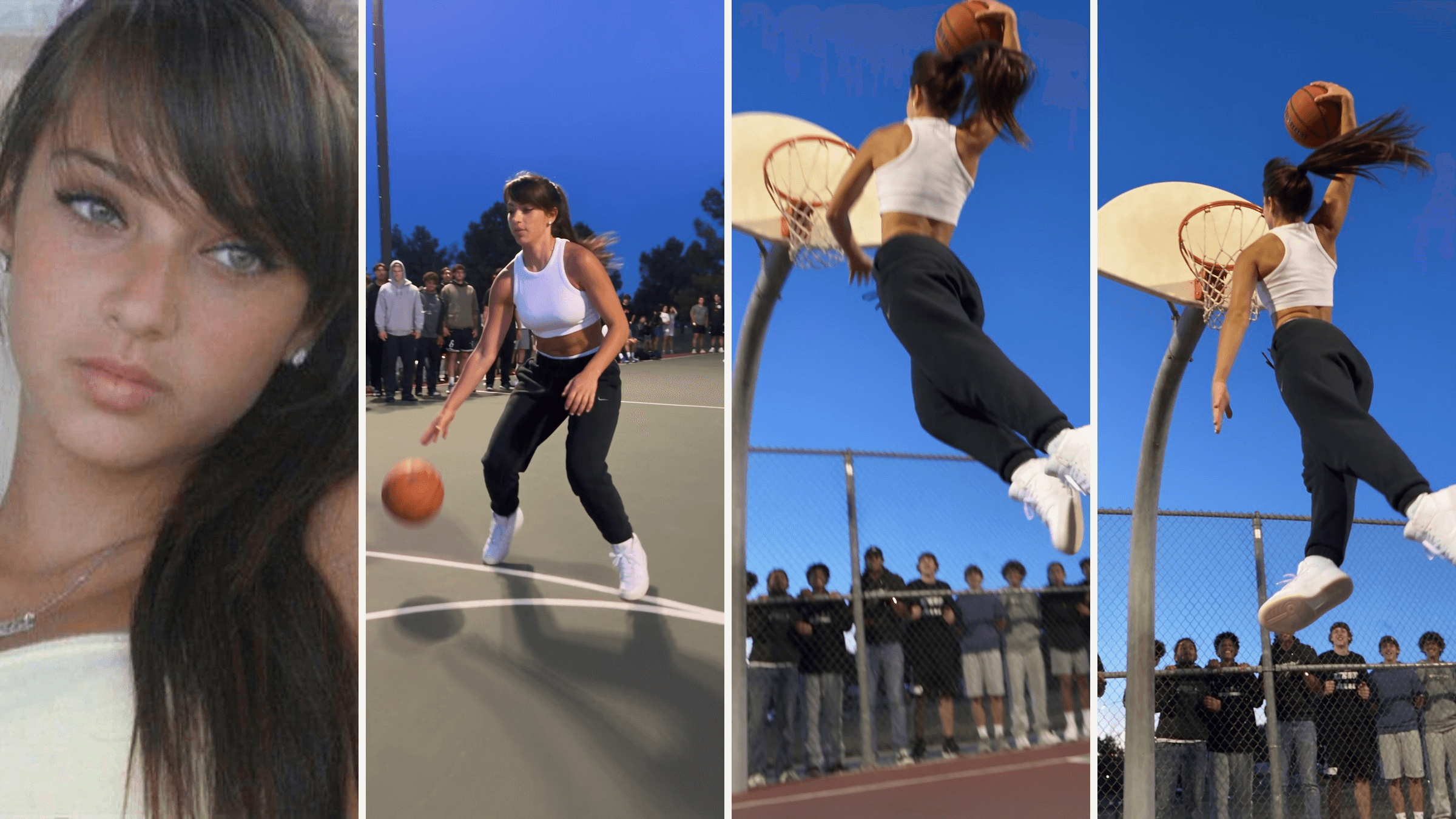
Your friend has never touched a rim in their life. Then a clip lands in the group chat: they cross over a defender, take off from the free-throw line and hammer it home while a crowd behind the fence loses it.
That is the AI dunk trend. One photo goes in, and a 10-second highlight comes out. Below you'll find the CapCut templates behind the viral posts, the prompt we used to make the clip above, and a second prompt for dunking on someone.
Key Takeaways
- The AI dunk trend turns one photo into a 10-second clip of you dribbling, taking off and finishing at the rim.
- The two biggest tutorials we traced both link to one CapCut template, Dribble + Dunk, now past 268,000 uses.
- You can build the same clip in the Atlas Cloud AI video generator with Seedance 2.5 and one reference photo.
- A dunk onsomeoneversion needs only one photo, because the defender lives in the prompt.
- Writing the shot second by second kept the dribble, takeoff and slam in order in all three of our runs.
What Is the AI Dunk Trend?
It is a short vertical video in which an ordinary person suddenly plays above the rim. The format is always the same: a dribble, a takeoff in slow motion, a dunk, then a reaction. The person in it usually could not dunk in real life, which is the joke.
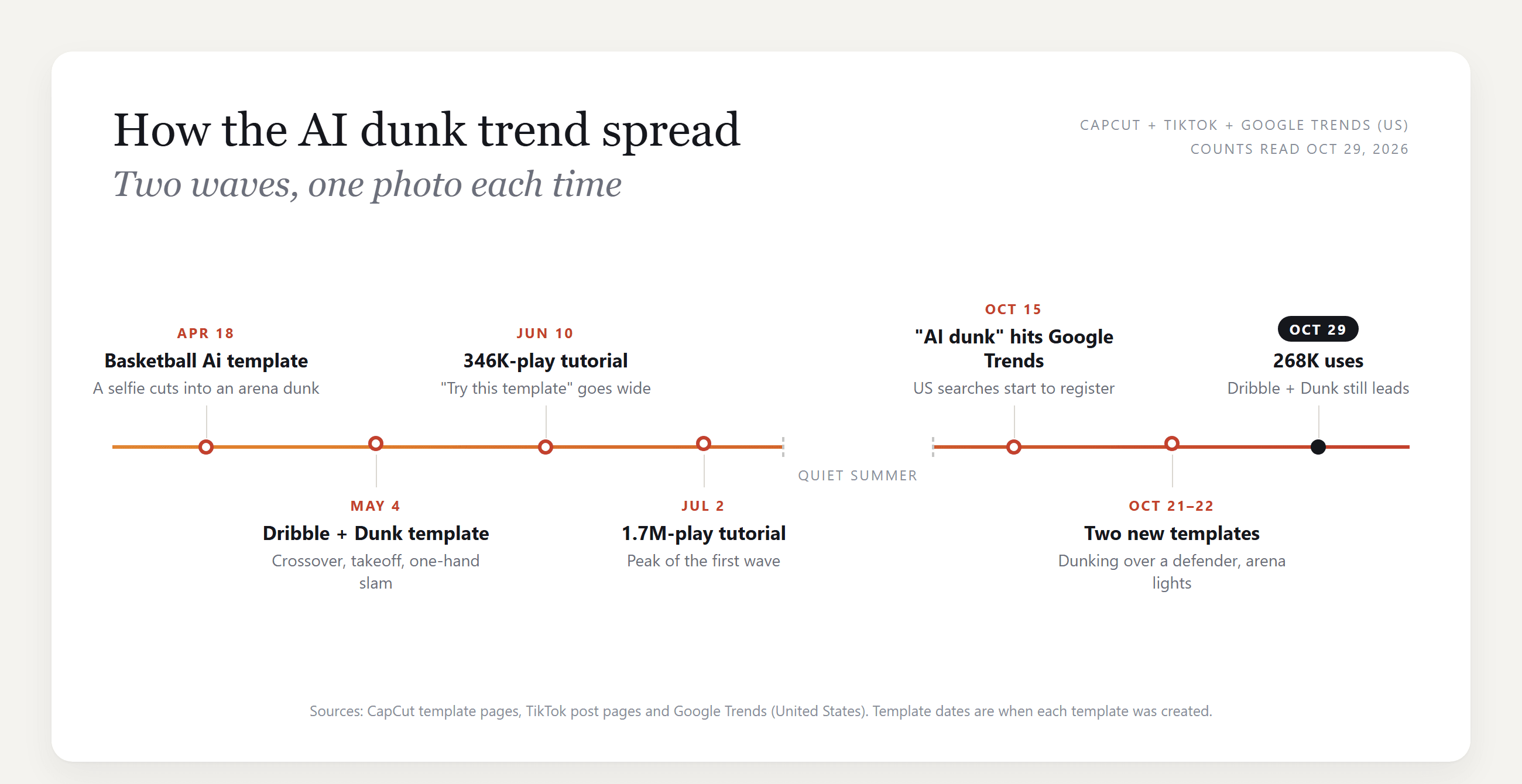
The trend came in two waves. The first peaked in early summer, when one July 2 tutorial passed 1.7 million plays with a "try this template" link. Then it went quiet until mid-October. Google Trends shows US searches for "AI dunk" registering from October 15, and a week later two new templates appeared. A tutorial posted on October 22 reached 140,500 plays in a week.
The October versions changed the shot. Instead of a solo dunk on a playground, they put you in a gym or an arena and have you dunk over a defender.
How to Make an AI Dunk Video From One Photo
A template locks the court, the outfit and the camera moves. With a prompt, you choose all three, plus who you dunk on.
Atlas Cloud runs Seedance 2.5, which takes your photo as a reference for face and hair and builds the whole scene around it. Here is the clip from the hero image, made from a head-and-shoulders portrait:
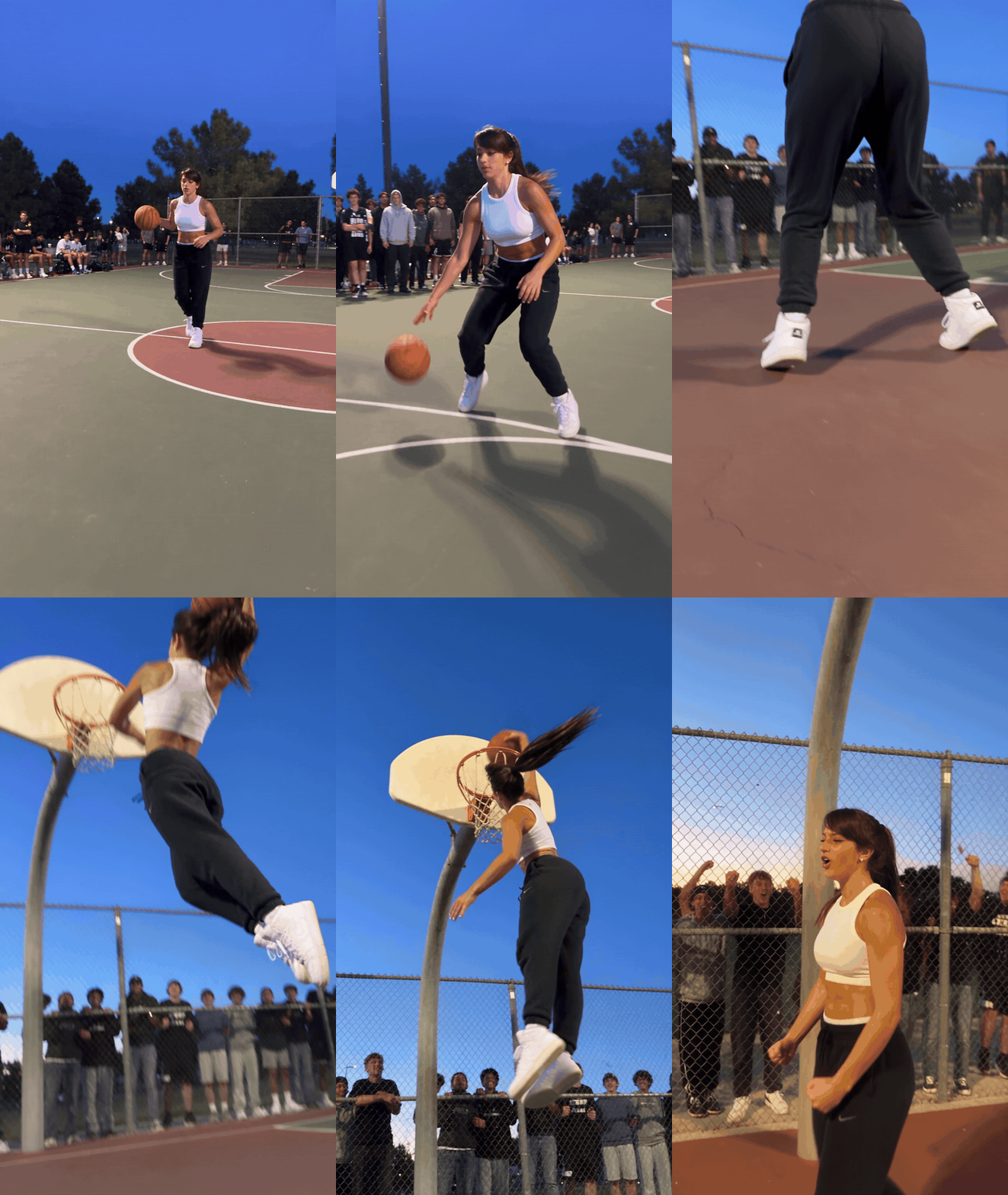
The source photo showed no legs, no sneakers and no basketball clothes. The prompt named the outfit, and the model filled in the rest of her body. It also kept the order we wrote: the crossover near the 3-second mark, takeoff by 5, the slam around 7 and the shout at the end.
Method 1: Make the Dunk in the Atlas Cloud Video Generator
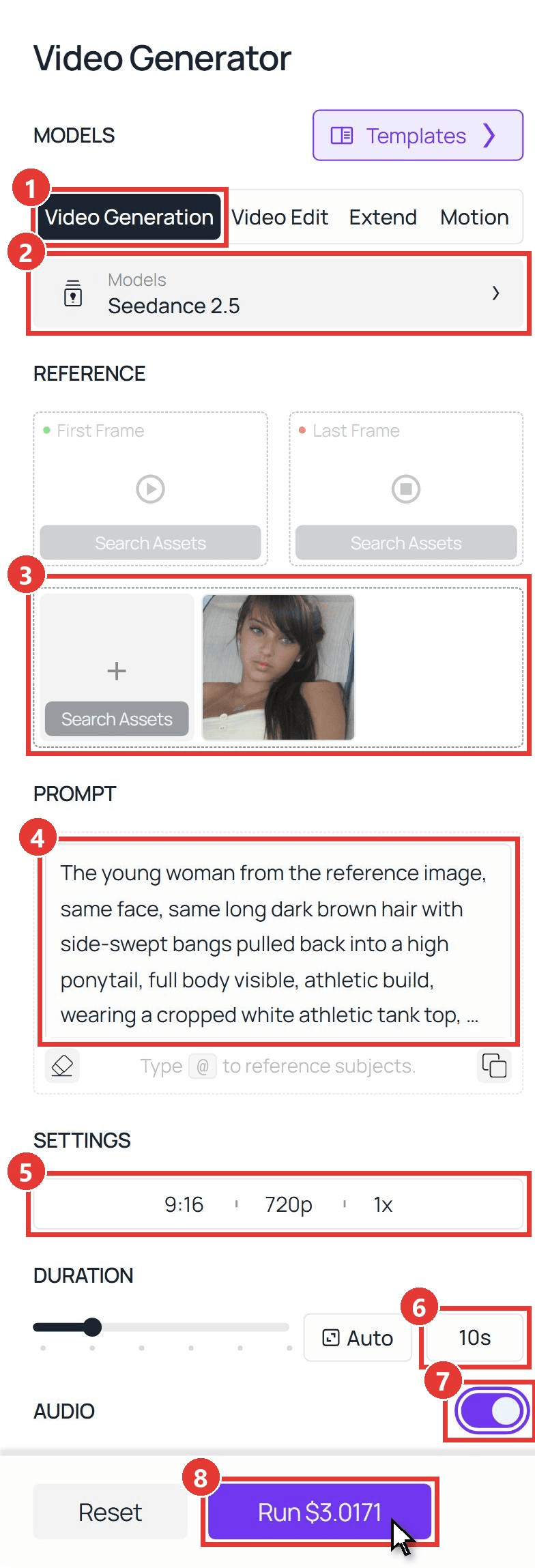
Sign in, open the Atlas Cloud video generator, and follow the numbers:
- Open the Video Generation tab.
- Keep Seedance 2.5 under Models.
- Upload your photo in the box under First Frame and Last Frame, the one for other references. Leave both frame slots empty, so the clip opens on the court instead of in your living room.
- Paste the prompt below.
- Under Settings, pick 9:16 and 720p (1080p for the final version).
- Set Duration to 10s.
- Keep Audio on for the sneaker squeaks and the crowd.
- Click Run.
plaintext1The young woman from the reference image, same face, same long dark brown hair with side-swept bangs pulled back into a high ponytail, full body visible, athletic build, wearing a cropped white athletic tank top, black joggers and white high-top sneakers. She is on a floodlit outdoor basketball court at dusk, a crowd of friends lined up along the chain-link fence. 0-3s: she dribbles hard from half court toward the camera and hits one quick crossover past a defender in a plain black jersey. 3-6s: low-angle tracking shot as she plants and takes off just inside the free-throw line, ponytail flying. 6-8s: slow motion at the peak, she cocks the ball back with one hand and slams it through the rim, the net snapping. 8-10s: she lands, turns to the crowd and shouts while her friends behind the fence jump and cheer. Realistic sports footage, handheld phone-camera feel, natural body motion, no logos, no text on screen. Sound: sneakers squeaking, ball bouncing, rim clang, crowd roar.
Rewrite the first sentence so it describes your own photo: hair, gender and what you want to wear.
Method 2: Send the Dunk Prompt Through the API
Making clips for a whole team or adding a dunk button to an app? The API takes the same photo and prompt.
Step 1: Create an API key. In the console, open Settings and create a key under API Keys. One key works for every model.
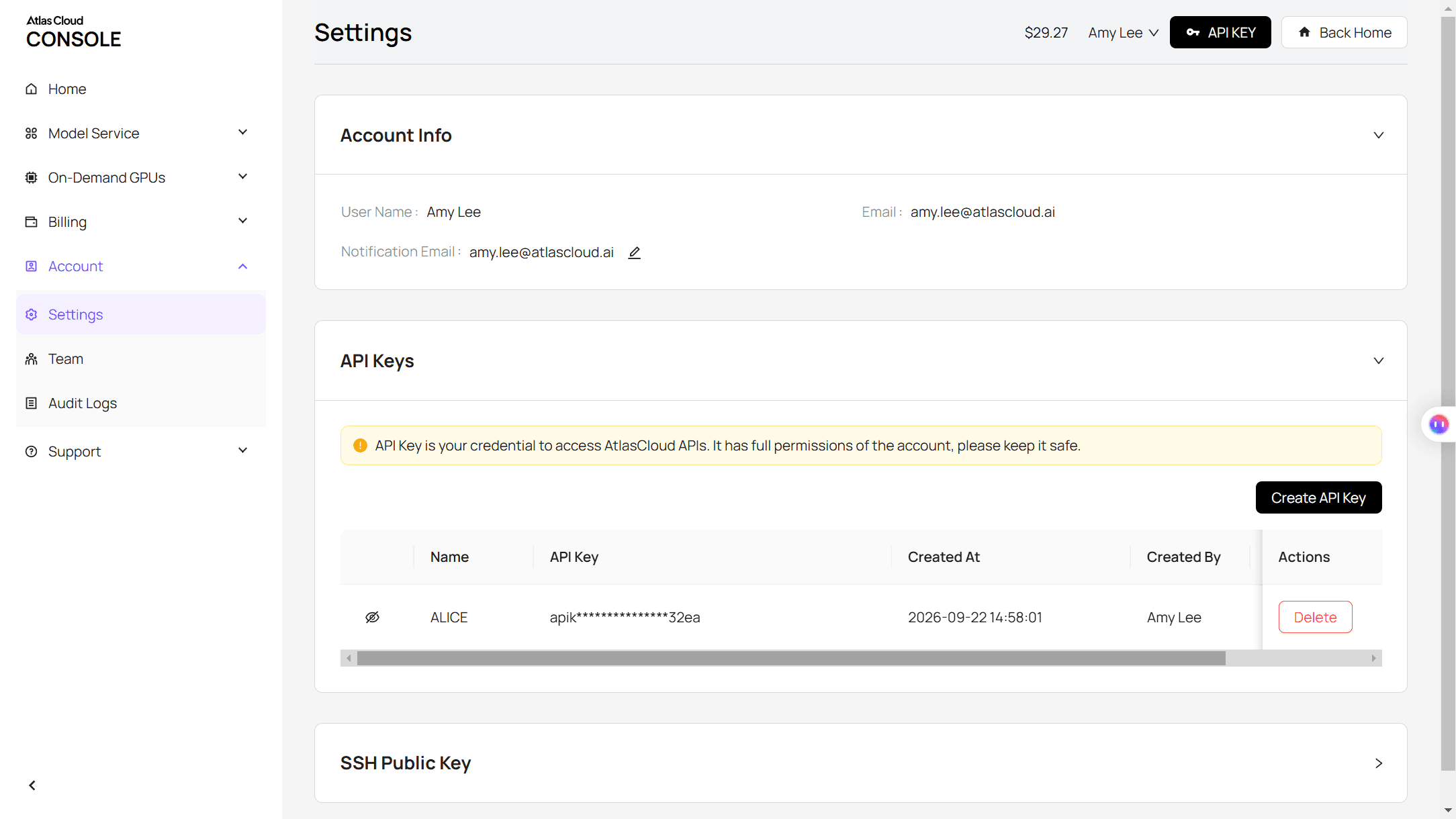
Step 2: Check the request format. The Atlas Cloud docs cover authentication and the video endpoint.
Step 3: Send the request and poll. Your photo goes in the reference_images array:
plaintext1curl -X POST https://api.atlascloud.ai/api/v1/model/generateVideo \ 2 -H "Authorization: Bearer $ATLASCLOUD_API_KEY" \ 3 -H "Content-Type: application/json" \ 4 -d '{ 5 "model": "bytedance/seedance-2.5/reference-to-video", 6 "prompt": "<paste the Method 1 prompt here>", 7 "reference_images": ["https://your-cdn.com/your-photo.jpg"], 8 "duration": 10, 9 "resolution": "720p", 10 "ratio": "9:16", 11 "generate_audio": true 12 }'
Poll the returned prediction ID until the status reads completed, then download the clip from the outputs array:
plaintext1curl https://api.atlascloud.ai/api/v1/model/prediction/<prediction_id> \ 2 -H "Authorization: Bearer $ATLASCLOUD_API_KEY"
The endpoint and key stay the same across every video model on Atlas Cloud. To try another one, change the model string.
AI Dunking Video Prompts for a Solo Slam and Dunking on Someone
The October templates want a victim. Here's the thing: you don't need a second photo for that. Describe the defender in the prompt, give them a plain jersey so the model doesn't invent a team, and tell the camera where to sit.
plaintext1The young man from the reference image, same face, same dark wavy shoulder-length hair, full body visible, lean athletic build, wearing a sleeveless heather-grey basketball tank top, black basketball shorts and black high-top sneakers. He is in a packed indoor arena under bright lights. 0-3s: he drives along the baseline with the ball while a taller defender in a plain white jersey steps in front of the rim. 3-6s: he leaps straight at the defender, knees up, and the defender jumps with both arms raised. 6-8s: slow motion, he rises over the defender's outstretched arms and throws down a two-handed dunk, hanging on the rim for a beat. 8-10s: he drops, stares down the defender who stumbles back, and the bench behind him erupts. Realistic broadcast-style basketball footage, camera low under the rim, no team logos, no text, no scoreboard numbers. Sound: crowd roar, rim rattle, a referee whistle.
His source photo was a shirtless studio portrait. Again, the outfit line did the dressing.
Three things carried both runs. Time stamps keep the action in order. "Slow motion at the peak" gives you the freeze-frame moment people screenshot. And ending on a reaction (a shout, a stare-down) makes the clip feel finished.
For longer or multi-shot versions, our guide to writing Seedance 2.5 prompts covers the structure, and the ramalama costume walk tutorial shows the same one-photo method for a full-body outfit reveal.
Which AI Dunk CapCut Template Is Behind the Trend?
Search CapCut for "dunk" and you get dozens of results. Many are edit templates that add slow motion to real game footage. These four are the AI ones that the trending posts link to:
| Template | Created | Uses (Oct 29, 2026) | What the preview shows |
|---|---|---|---|
| Dribble + Dunk | May 4, 2026 | 268,128 | Outdoor court at sunset with a city skyline, a crossover past a defender, a one-hand dunk, a crowd at the fence |
| Basketball Trend | Oct 21, 2026 | 24,011 | Gym with tall windows, a dunk over a defender in a yellow tank |
| Basketball Ai | Apr 18, 2026 | 9,446 | Opens on a selfie, cuts to an arena for a drive, a dunk and a team celebration |
| photo trend | Oct 22, 2026 | 1,468 | Pro-style arena, a full-court dribble and a dunk over a defender |
One name trap: a template called "Dunk ai" has nothing to do with basketball. Its 3-second preview shows a person hanging from a power line.
If you want the exact look of a template, use it. If you want your own court, your own outfit or a specific person to dunk over, a prompt gives you that control.
Frequently Asked Questions
How much does an AI dunk video cost on Atlas Cloud?
A 10-second Seedance 2.5 clip with audio costs $3.02 at 720p and $5.94 at 1080p. Both prices include a 20% discount from the $3.77 and $7.42 list prices, as shown on October 29, 2026. Draft at 720p, then rerun your favorite prompt at 1080p.
Is the Dunk AI app the same as an AI dunk video maker?
No. Dunk AI is a training app for iOS and Android. You record a real jump, and it measures your vertical and suggests drills. It analyzes real jump videos rather than generating new ones, so it only shares a name with this trend.
How long should an AI dunk video be?
Ten seconds matches the templates and leaves room for all four beats: dribble, takeoff, dunk and reaction. Seedance 2.5 accepts anything from 4 to 30 seconds. For a shorter clip, cut the reaction first so the takeoff keeps its slow motion. For a longer one, add a second action, like a replay from another angle.
Do I need two photos to dunk on someone?
No. Both clips in this guide used a single photo. The defender comes from the prompt, so describe their jersey, height and what they do with their arms.
Conclusion
The trend runs on a simple promise: anyone can play above the rim for ten seconds. CapCut templates give you that in one tap, with someone else's court and camera.
If you want your own version, write the dribble, the takeoff and the slam second by second, add who you are dunking on, and let one photo carry your face. That is all an AI dunk video takes.





