


An AI game maker 3D tool can help you turn a description into a playable prototype. The useful question is what you can do with that first version: move around, collide with objects, complete a goal, restart, and share it with someone else.
Start with a small browser game if you want to test an idea quickly. Choose an editable engine project if you need deeper control. Use a separate 3D asset generator when the missing piece is a model, such as a collectible or obstacle. Those choices solve different parts of game development.
Key takeaways
- A playable prototype needs working controls, collision, a goal, and a reliable restart.
- Browser game makers, AI coding workflows, and 3D model generators produce different deliverables.
- Build one short level with simple shapes before adding custom assets.
- Check generation limits, export options, and publishing requirements before committing to a free tool.
What should an AI 3D game maker actually produce?
Search results for an AI 3D game maker mix together several promises. Some tools generate runnable game code. Others create meshes, environments, or videos that resemble gameplay. Decide which file or experience you need before comparing features.
| Your goal | Useful output | What you still need to check |
|---|---|---|
| Let someone play a small idea | A runnable browser game and share link | Controls, game rules, loading, and restart |
| Continue development in an engine | An editable project with scripts and assets | Engine compatibility, project structure, and export |
| Add an object to an existing game | A downloadable 3D mesh with materials | Scale, pivot, topology, collision, and performance |
| Explain a visual idea | A concept image or video | Whether a separate playable build exists |
A rendered turntable proves that an object can be viewed from several angles. A game preview proves more only when the player can interact with it. Click inside the preview, move in different directions, and deliberately try to lose. Watch what changes after those inputs.
For a first project, define success in plain language: “A new player can collect the required objects, reach the exit, and start another run.” That gives you a concrete way to judge the output of a 3D AI game generator without getting distracted by its opening camera shot.
Keep the first scope small enough to describe in a paragraph. A courtyard with a few collectibles lets you inspect movement, collision, and game state. An open world with crafting, multiplayer, and a dialogue system creates many more ways for the first build to fail. You can expand a working loop after someone has played it.
What real AI game videos show
These three public demos show different ways to turn generated environments into games. All three videos come from the providers' published case studies. They show what the teams built; they are not benchmarks performed for this article.
Rosebud AI x World Labs Marble: add rules to a generated world
The Rosebud AI 3D game maker appears in a collaboration with World Labs Marble, a generative world model. The published workflow brings generated scenes and GLB collider meshes into Rosebud AI, then uses its Rosie assistant to add interaction. Its main showcase is a multiplayer, Simon Says-style prototype. (World Labs case study, November 2025.)
Official Rosebud AI and World Labs Marble demo, approximately 68 seconds. The full recording shows a multiplayer room game followed by several exploration and character-interaction scenes.
Watch the opening library sequence: avatars move through the room while a countdown and leaderboard remain visible. Later sequences show a train interior, a desert room, and character dialogue. The recording gives you behavior to inspect beyond the appearance of an isolated environment.
That separation matters when you see a convincing “text to 3D game AI” demonstration. The generated space supplies the setting. Your game still needs rules that read player actions and update shared or local state. For the courtyard exercise below, look for the same connection between collecting a token, changing the counter, and unlocking the exit.
Gaussian Mansion: bring generated spaces into Unreal Engine 5
Gaussian Mansion demonstrates an engine-based route. Developer José Tijerín used environments generated with World Labs Marble in a rail shooter built with Unreal Engine 5. World Labs describes a workflow that starts with illustrations and panoramic images, then assembles generated spaces for the engine project. (Gaussian Mansion case study, November 2025.)
Official Gaussian Mansion demo by Tijerín Art Studio, published by World Labs, approximately 46 seconds. The full recording includes a weapon introduction and first-person gameplay with ghost targets and on-screen counters.
The recording moves from an approach to the mansion and a weapon case into scenes with a crosshair, ammunition indicators, and moving targets. Those visible systems help distinguish a gameplay demonstration from an environment fly-through. The case study credits an engine production workflow; it does not establish that one prompt generated every system.
Use that distinction when choosing your own route. If your priority is a tightly directed sequence with custom combat behavior, plan time to integrate and test it in the engine. If your priority is a short browser collection game, keep the camera, input scheme, and rules much smaller. Both approaches benefit from generated assets, but the integration work differs.
ICARE: connect generated worlds with custom gameplay
ICARE is a browser-based adventure created by WithLore in collaboration with World Labs. The published production breakdown combines environments generated with World Labs Marble, Spark 2.0 streaming, custom Three.js gameplay, and AI-assisted engineering. Players explore worlds inspired by historical thinkers and help restore their lost tools. (ICARE case study, June 2026.)
Official ICARE launch film by WithLore and World Labs, approximately 40 seconds. The complete source video introduces the characters and generated environments of the browser adventure.
The film moves between floating islands, a third-person character in flower-lined passages, and historical dream worlds. World Labs' breakdown explains how streamed environments and authored gameplay fit together. The launch film introduces the experience; evaluate the playable build separately when checking controls or loading behavior.
For a first project, borrow the relationship between place and purpose. Give the player one object to recover and one character or exit to bring it to. Test that short route before connecting more environments. You can make 3D games with AI while keeping the initial objective small enough to explain and verify.
How to make 3D games with AI: build one testable level
Use the following exercise to evaluate an AI 3D game creator. The prompts are original templates for your own run. Their outputs will depend on the tool and your iterations; this article does not claim that they produced a tested game.
The project is a small courtyard collection game. It uses one player, five tokens, one exit, and a failure condition. Keep a desktop keyboard target for the first pass so you can test a consistent set of controls.
1. Ask for the complete play loop
Start a new 3D, single-player project in your chosen game maker. Give the assistant the controls, objective, failure behavior, and reset requirements together. Leave custom artwork for a later version.
plaintext1Build a small single-player 3D browser game in a sunny courtyard. 2 3OBJECTS: Use simple geometric shapes for the player, walls, five collectible tokens, and one exit gate. 4 5CONTROLS AND CAMERA: Use WASD to move and Space to jump. Use a third-person camera that follows the player. 6 7OBJECTIVE: The player must collect all five tokens before entering the exit. Show the collected count. 8 9FAILURE AND RESTART: Falling outside the courtyard causes a loss. Winning or losing must show a Restart button. Restart must reset the player, all tokens, the counter, and the exit state. 10 11SCOPE: Keep the first version to one small level. Include visible controls. 12 13EXCLUSIONS: Do not add enemies, multiplayer, inventory, or external services.
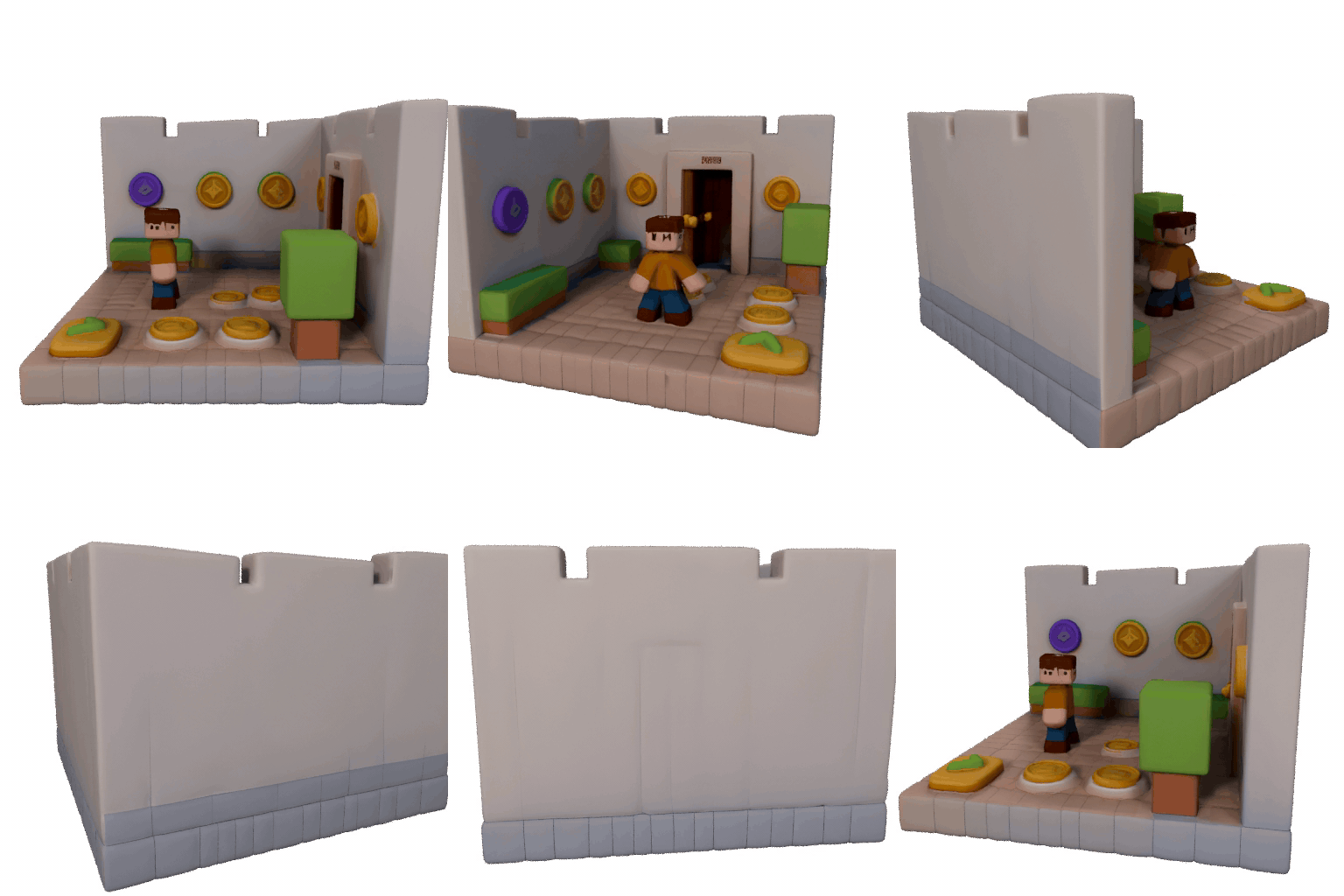
Generated courtyard scene preview, shown as a looping GIF. The rotation reveals the player figure, tokens, and exit; movement, collection, and restart still need implementation and testing in a game maker or engine.Generation process for the courtyard brief: the prompt appears on the left, with generation settings below, and a completed geometry preview on the right.
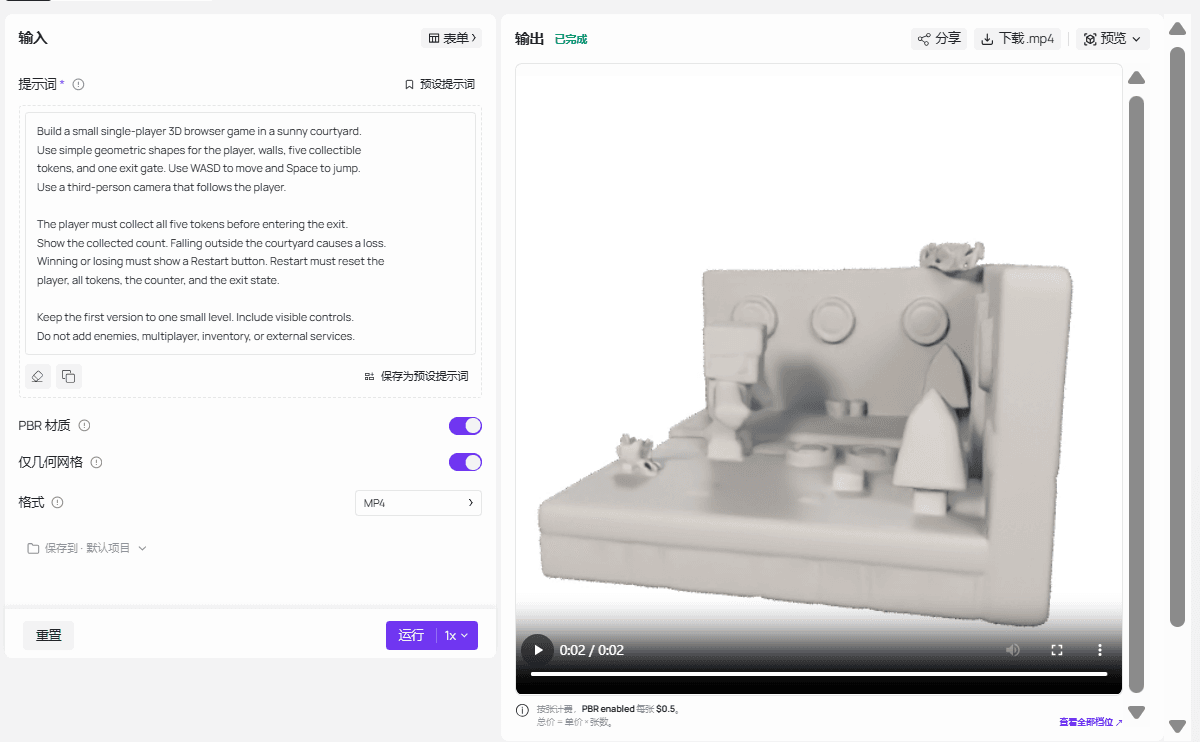
When generation finishes, make a complete attempt before editing the prompt. Move around the walls, jump near an edge, collect a token, and approach the exit early. Then finish the intended route. Write down the first behavior that fails.
The exit check is especially useful. A gate that opens immediately may look correct in a screenshot while ignoring the central rule. Ask the assistant to explain where the token count is stored and how the exit reads it. Even a no-code workflow benefits from a clear account of that relationship.
2. Repair one observable failure
Describe the action, the observed result, and the expected result. If you can reproduce the bug, say how. A focused instruction is easier to evaluate than asking the assistant to “improve the whole game.”
plaintext1OBSERVED BEHAVIOR: After I collect two tokens and press Restart, the counter still shows 2/5 and those two tokens remain missing. 2 3EXPECTED BEHAVIOR: Restart should restore all five tokens and show 0/5. 4 5TASK: Fix this reset behavior. 6 7KEEP UNCHANGED: Keep movement, camera settings, token positions, and the exit rule unchanged.
Replay both a win and a loss after the fix. A reset can work from one end screen and fail from the other. Also restart twice in a row. Repeated runs may reveal duplicated objects, leftover event handlers, or state that was only cleared once.
Keep a working version before requesting another feature. If your tool provides history, use it. If you have project files, save a separate working copy or commit. Give each version a short description of what changed so you can compare behavior without relying on memory.
3. Replace one shape with a custom asset
Once the loop works, replace one token with a custom mesh. Keep the original collision shape and collection trigger until you have verified the replacement. This helps you identify whether a new problem comes from the visual asset or the game rule.
Before duplicating it, inspect the object from the player's camera. Check its size next to the character, its position above the ground, and its visibility against the environment. Spin it through a full turn. A missing back surface or an off-center pivot becomes obvious in motion.
If you want to create 3D games with AI efficiently, make each new asset earn its place. A distinct exit marker can improve navigation. Five different token models may add work without improving the loop. Reusing one approved object also makes visual and performance problems easier to trace.
4. Test the version another player will open
Use the tool's preview or sharing route to test a separate build. Open the resulting player link outside the editor and try it on the intended device. Authoring and playing can have different account requirements, so verify both paths.
Give a tester only the controls that appear in the game. Observe whether they can identify the objective, recover from failure, and understand why the exit is closed. If you must explain every step aloud, improve the game's feedback before adding another level.
Record the failure precisely if the shared build differs from the preview. Missing assets, keyboard focus, loading behavior, and layout can affect the player experience. A short capture of the actual build can help document the issue; a generated gameplay-style video cannot verify these interactions.
Can AI make 3D models for games?
Yes. An AI 3D model generator for game assets can supply objects for your prototype. The generated mesh still needs inspection inside the game that will use it. A useful first target is a stationary prop or collectible with a simple silhouette.
If this is the missing part of your project, Atlas Cloud offers a separate asset-generation route. Its catalog includes Tripo H3.1 Text-to-3D, which generates a mesh from a text description with optional textures and physically based rendering (PBR) materials. The model page also exposes a target face-count control.
The catalog lists Tencent Hunyuan 3D Pro (v3.1) Text-to-3D, with geometry or textured generation and a custom face-count setting. These models address object creation. You still build movement, triggers, scoring, and restart in the game project. Check the selected model's current settings and output formats before generating.
For the courtyard exercise, an AI 3D prop generator for games could receive this object brief:
plaintext1A single stylized brass sun token for a small 3D courtyard game. 2 3GEOMETRY: Thick circular body, rounded edges, a simple raised sun emblem on both faces, and a flat lower edge. 4 5MATERIAL: Warm brass surface with restrained roughness variation. 6 7VISIBILITY: One isolated object with a clear silhouette. 8 9EXCLUSIONS: No lettering, pedestal, surrounding scene, or detached small parts.
Treat descriptions such as “simple” or “low poly” as requests to inspect, not guarantees about the resulting mesh. Choose the geometry settings your target device can handle, then check the downloaded result. Material count, texture size, lighting, and the number of visible objects also affect how the level runs.
When importing AI-generated 3D game assets, inspect the following before making many copies:
- Scale and orientation: place the object beside the player and confirm that forward and up point where you expect.
- Pivot: rotate the collectible and check that it turns around the intended center.
- Surfaces and materials: inspect the back, underside, texture seams, and appearance under the level's lighting.
- Collision: choose a collider appropriate for the object's role, then test contact from several directions.
- Runtime cost: measure the complete scene on the target device, including repeated instances of the asset.
Godot Engine's Advanced Import Settings illustrates the handoff clearly: it provides a 3D preview, per-node options, and a setting for generating physics bodies and collision shapes. Model inspection and physics configuration are explicit import tasks. (Godot Engine documentation, accessed November 2026.)
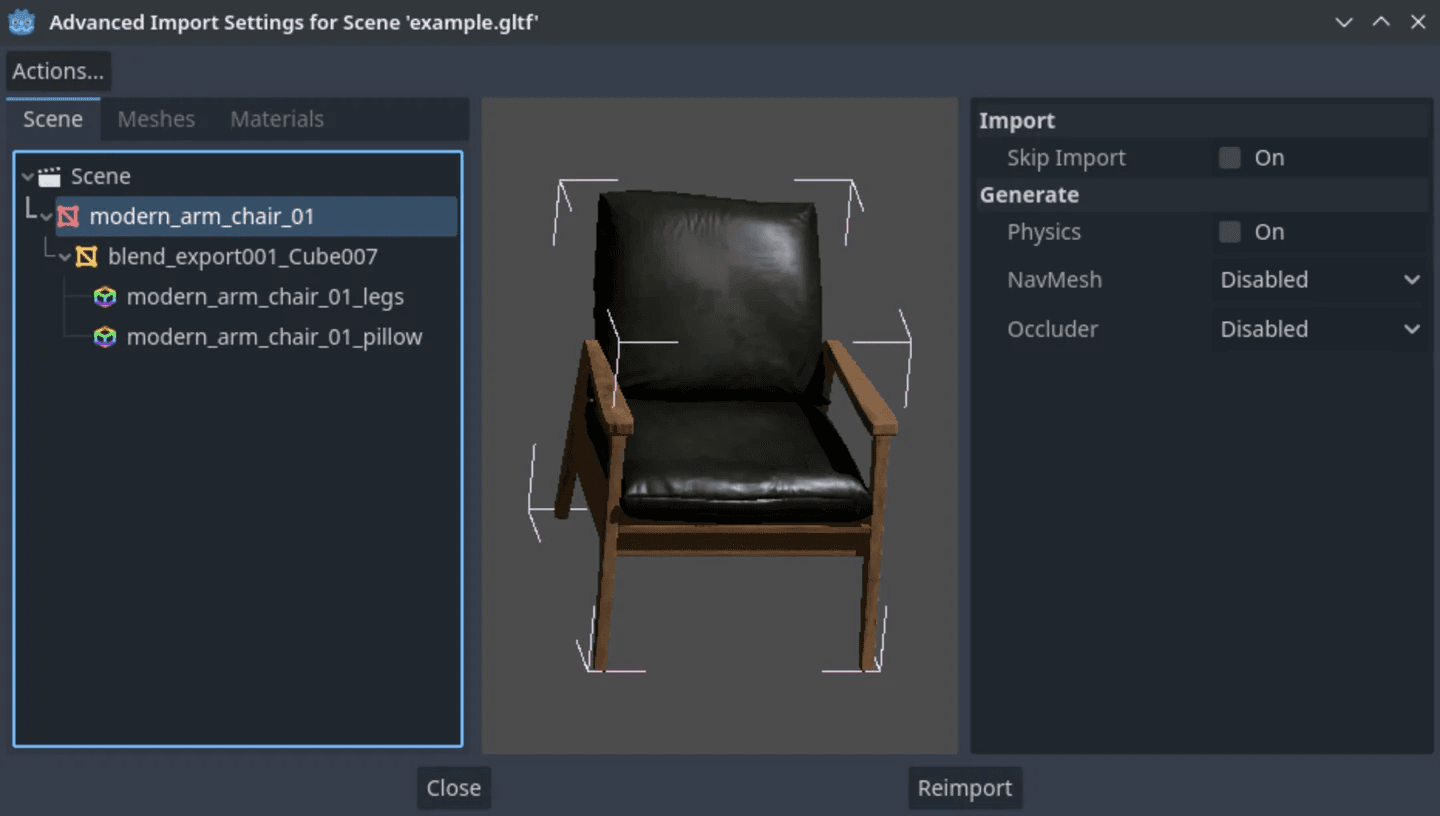
Godot Engine's documentation screenshot shows per-node import options beside the model preview. Configuring an imported object is a separate step from generating its visible mesh. Source: Godot Engine documentation; chair model credited there to Poly Haven.
Characters add another layer. A character mesh may still need a suitable skeleton, skin weights, animations, and controller integration. Start with a static object if you are learning the pipeline. You can assess the asset workflow without also debugging animation and player movement.
Choose a free, online, or with-code workflow
The right route depends on what you want to keep after the experiment. An AI game maker 3D online workflow suits a short browser prototype you can share. An AI 3D game maker with code suits a project where you want to inspect scripts, organize files, or continue development outside the original editor.
For a browser maker, check what you can actually export. A share link, downloaded web build, and native engine project are different deliverables. Ask this before building around a platform-specific feature. Moving a collection of models into another engine will not automatically transfer the game's logic.
For a code-assisted route, pick the engine first and keep the first level equally small. Ask the assistant for one change at a time, including which files it changed and how to verify the result. Run the project after each change. A code explanation is useful only when it matches the behavior you see.
If you are searching for “ai game maker 3d free,” inspect the whole path from creation to sharing. A free starting allowance may still limit how many corrections you can make or which outputs you can retain. Read the current plan details for generation credits, project access, asset downloads, and publishing features.
Budget for iteration as well as the initial prompt. A tool that lets you generate once may be enough to explore an interface, but you need room to fix errors and retest. Avoid paying for a larger plan until you have checked that the smaller workflow produces the kind of project you need.
You can use the same courtyard exercise to compare tools without declaring a universal winner. Record whether each version can move, collect, reject an early exit, win, lose, and restart. Also record what you can download. These observations tell you more about fit than a gallery of attractive opening scenes.
For your first AI game maker 3D project, finish one level that another person can understand and replay. Keep that working version. Then choose the next improvement from what the player struggled with, whether that is a clearer goal, a more readable collectible, or more reliable controls.
Frequently asked questions
Is there an AI game maker 3D with no sign-up?
Check creation separately from playing. A public game may open without a creator account, while generating or saving a project requires one. Try the save and export steps before relying on an account-free workflow. A playable public example does not establish that authoring has the same access requirements.
Can I make a 3D game with AI without coding?
You can use natural-language instructions in a game maker that supports them. You still need to specify rules, play each version, and describe failures. Coding knowledge becomes useful when you need custom systems, debugging detail, or a more portable development workflow.
Is an AI 3D game asset generator enough to make a game?
It supplies part of the game. A mesh needs a place in a scene and behavior appropriate to its role. A collectible, for example, needs a trigger, a counter update, and reset behavior. An environment needs collision and a player controller before its navigable areas can be tested.
Can I make a realistic 3D game with AI?
Start by testing what “realistic” means for your project: lighting, materials, scale, animation, or physical interaction. Improve one dimension after the basic loop works. Visual realism alone does not show whether the game is responsive, understandable, or practical on the intended device.vv







