In the still shot, a grey crew-neck fits noticeably tighter across the shoulders, with zero warping along the bedroom doorframe behind him. In the next clip, that photo runs as a 5-second vertical video: the chest expands on an inhale, the sleeves fill out, and the facial features stay completely sharp and unchanged.
Both outputs start from one waist-up photo. The difference is whether you stop at a four-cent image edit or pass that edited frame into a video generator. Below is how the current muscle filter tools split that job, the exact prompts to grade muscle volume across three tiers.
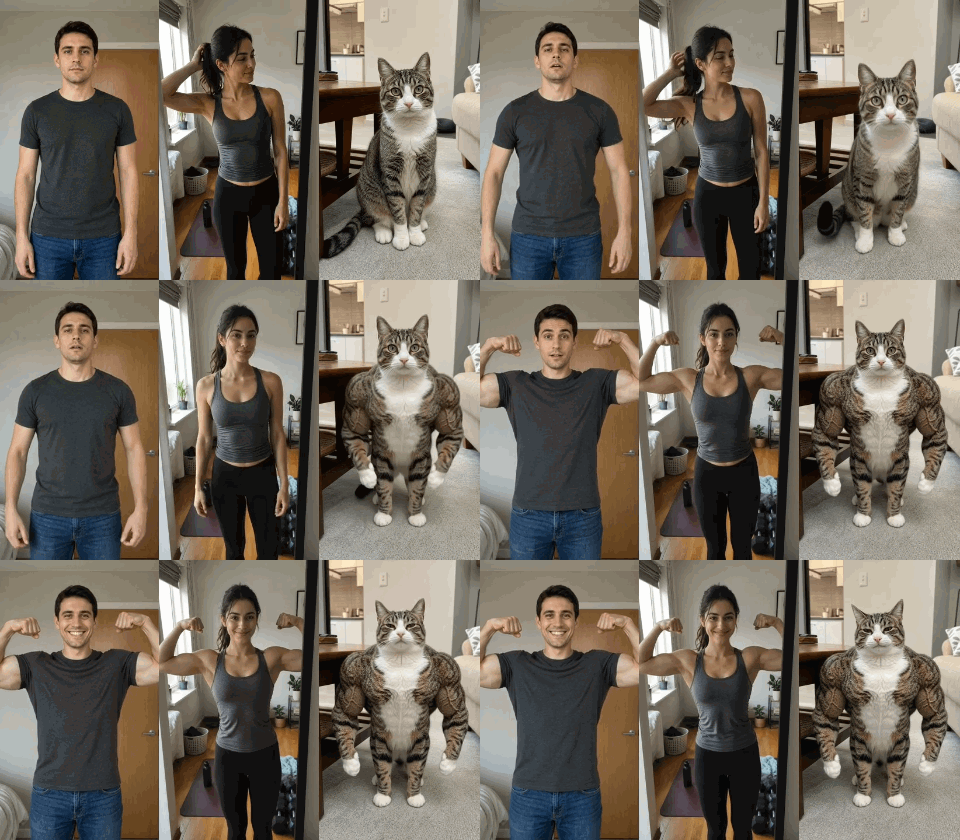
One Search Term, Different Ways to Create a Muscle Transformation
Products ranking for "muscle filter" do not run the same process under the hood. Depending on the app you open, your photo goes through a static pixel retoucher, a locked video template, or a prompt-driven base model.
| Tool or Route | Output Type | Muscle Level Control | Clothing Preservation | Pricing and Credit Model |
| YouCam | Still photo/AI muscle growth video | Prompt-based muscle customization | Depends on user prompt wording | Credit-based web subscription; free trial exports carry limits |
| GigaBody App | Still photo | 1-3 scale: Bulk, Cut, Slim | Best results with minimal or fitted clothing | Free: 15 photos/hour; Pro: $7.99/month or $39.99/year |
| MakeViral | 2K photo, 10s flex video, or buff pet photo | Fixed exaggerated bodybuilder preset | Keeps shirt on men; switches women to a fitted tank top in flex clips | 3 credits/photo; 126 credits/10s video; packs from $9.99 |
| Aragon.ai | Still photo | 4 levels: Soft, Natural, Fit, Super Physique | Clothing adapts to the enhanced physique | 8 credits per photo edit; free credits available |
| Atlas Cloud (AI Image & Video Models) | Still photo and AI video | Custom muscle levels through prompts | Prompt-based clothing control | Pay-as-you-go; varies by model and settings |
For a more customized result, you can use Seedream 5.0 Pro on Atlas Cloud to edit your photo with a prompt describing the muscle definition, body proportions, and clothing you want. Once the image looks right, use Seedance 2.5 to animate the transformation. Keep in mind that clothing and facial details may still change during video generation.
How to Add Realistic Muscle to a Still Photo: 3 Intensity Tiers
Starting with a still photo edit solves two problems at once. First, it answers "what would I look like with muscles" for less than eight cents a run. Second, it gives you an identity-locked target image that you can later feed into a video generator as the final frame.
Seedream v5.0 Pro, which accepts up to 10 reference images and preserves facial geometry while redrawing skin and fabric contours. You can also run the same prompts on GPT Image 2.5 Sunburst Edit for lower-cost test drafts.
Step-by-Step in the AI Image Editor
Next, I will use Atlas Cloud as an example to provide a practical demonstration.
Open Atlas Cloud and log in, click on "model," and locate the AI Image Generator of your choice within the AI Image API section:
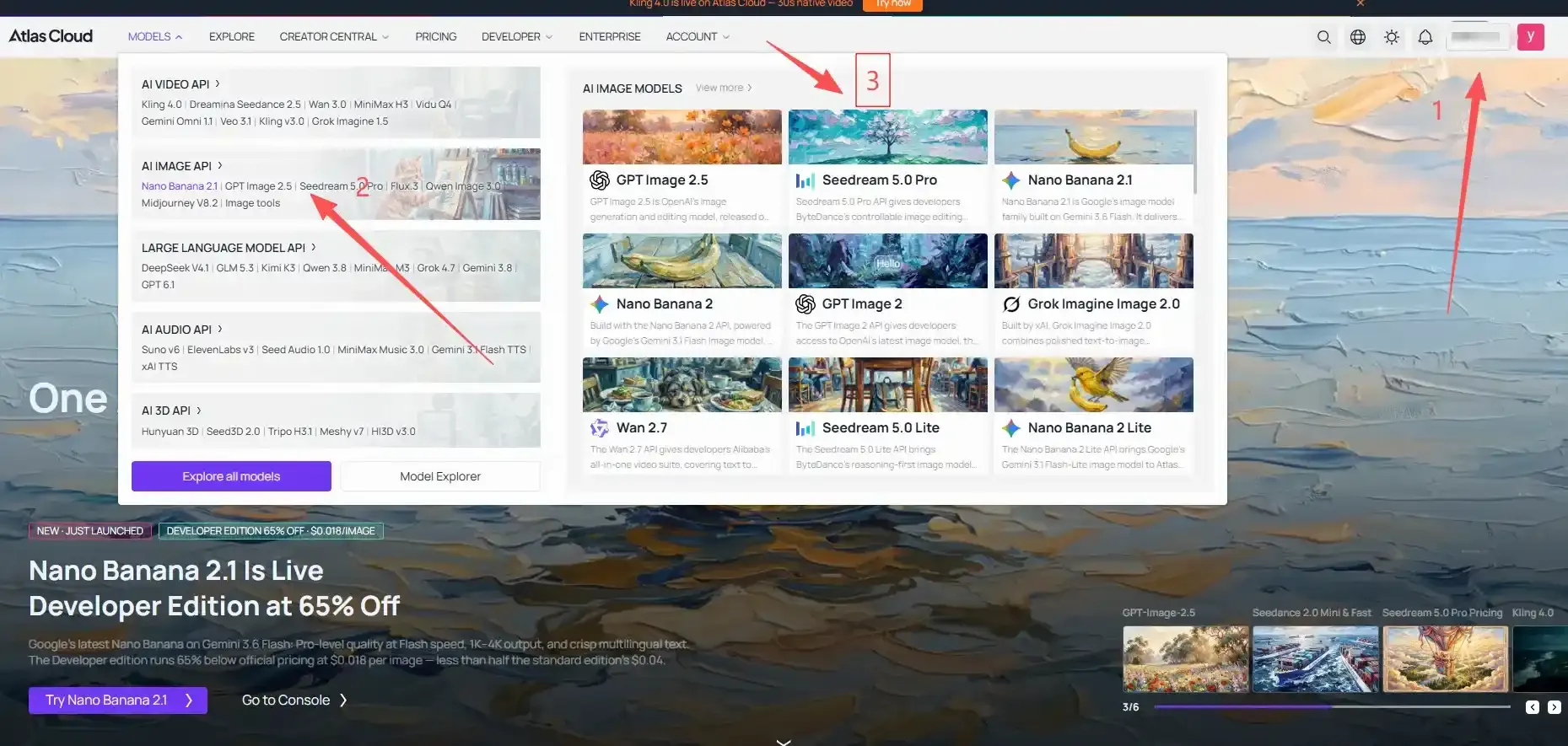
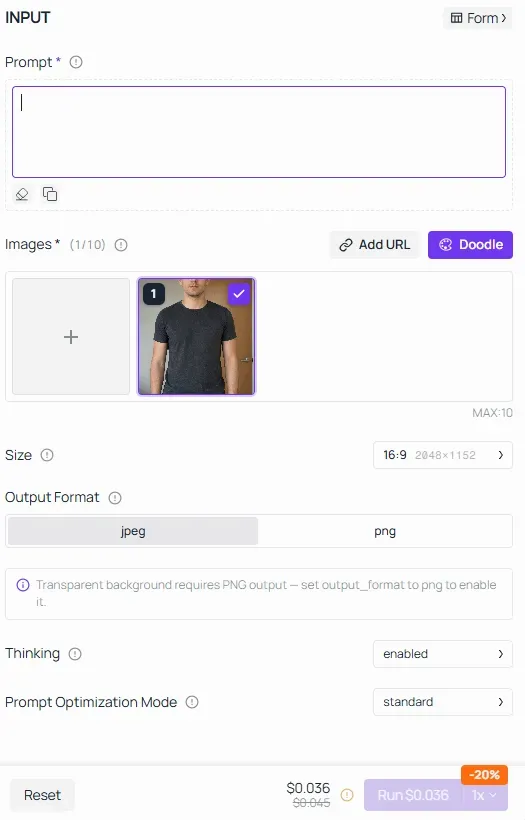
Here, I have chosen Seedream v5.0 Pro, opened it and chose the image editing model, and then you can upload your photo to begin editing:
Copy-Ready Prompts for Lean Tone, Athletic Swimmer, and Bodybuilder Bulk
Most one-tap muscle filters fail because they apply heavy bodybuilder mass to every photo. Copy the base prompt below and swap the bracketed [INSERT MUSCLE TIER LINE] with one of the three graded descriptions underneath.
plaintext1Use Image 1 as the reference. Preserve the person's identity, facial features, hairstyle, skin tone, and expression. [INSERT MUSCLE TIER LINE]. Keep the original clothes, color, and background unchanged, adjusting the fabric naturally to fit the new body shape. Maintain realistic body proportions, skin texture, and natural indoor lighting. Photorealistic, no extra people or text.
Swap in the exact line for the build you want:
- Tier 1 — Lean Tone (3-to-6-Month Gym Preview): Add a little muscle definition to the shoulders, upper arms, and chest. Keep the arms relatively slim and the waist flat. The overall build should look fit but not bulky.
- Tier 2 — Athletic Swimmer (V-Taper Build): Give the person noticeably wider shoulders, a fuller and more muscular chest, and thicker upper arms than the original. Create a clear V-shaped upper body with a narrower-looking waist.
- Tier 3 — Bodybuilder Bulk ("AI Steroids" Prank): Make the upper body much bigger, with very broad shoulders, a thick chest, large biceps, and bulky forearms. Add noticeable traps around the neck for an exaggerated bodybuilder look.
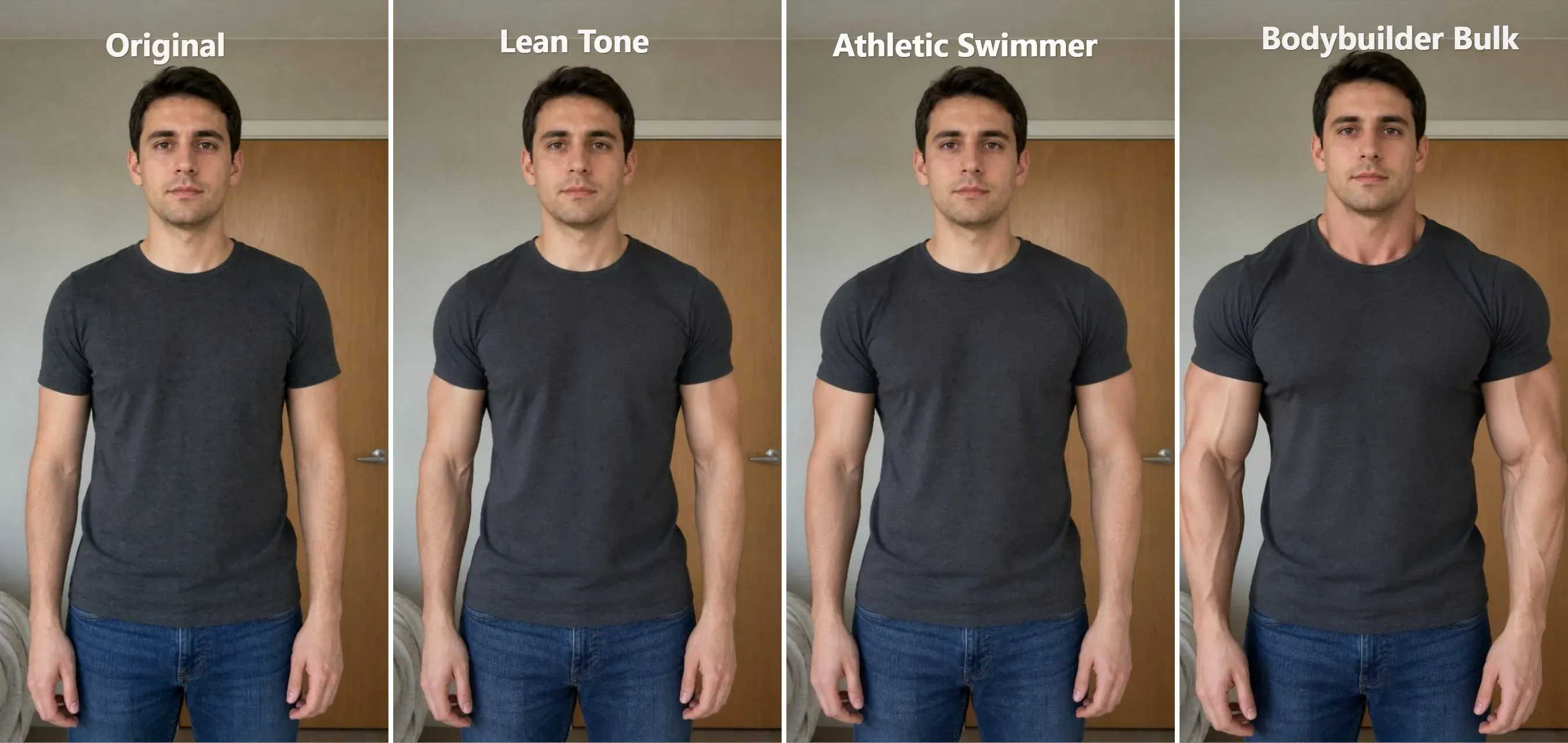
A clean 4-panel horizontal grid showing the same source photo alongside the three generated outputs: (1) Original Photo, (2) Tier 1 Lean Tone, (3) Tier 2 Athletic Swimmer, and (4) Tier 3 Bodybuilder Bulk.
Shirtless or Gym-Mirror Six-Pack Variation: If your source photo already shows a bare torso at the beach or in a gym mirror or if you want to replace the shirt with a bare chest for a six-pack preview, replace the clothing sentence in the base prompt with this line:
plaintext1Show a bare muscular torso with defined upper and lower abdominal six-pack separation, natural oblique lines, and realistic skin pores that match the exact skin tone and lighting direction of the face in Image 1.
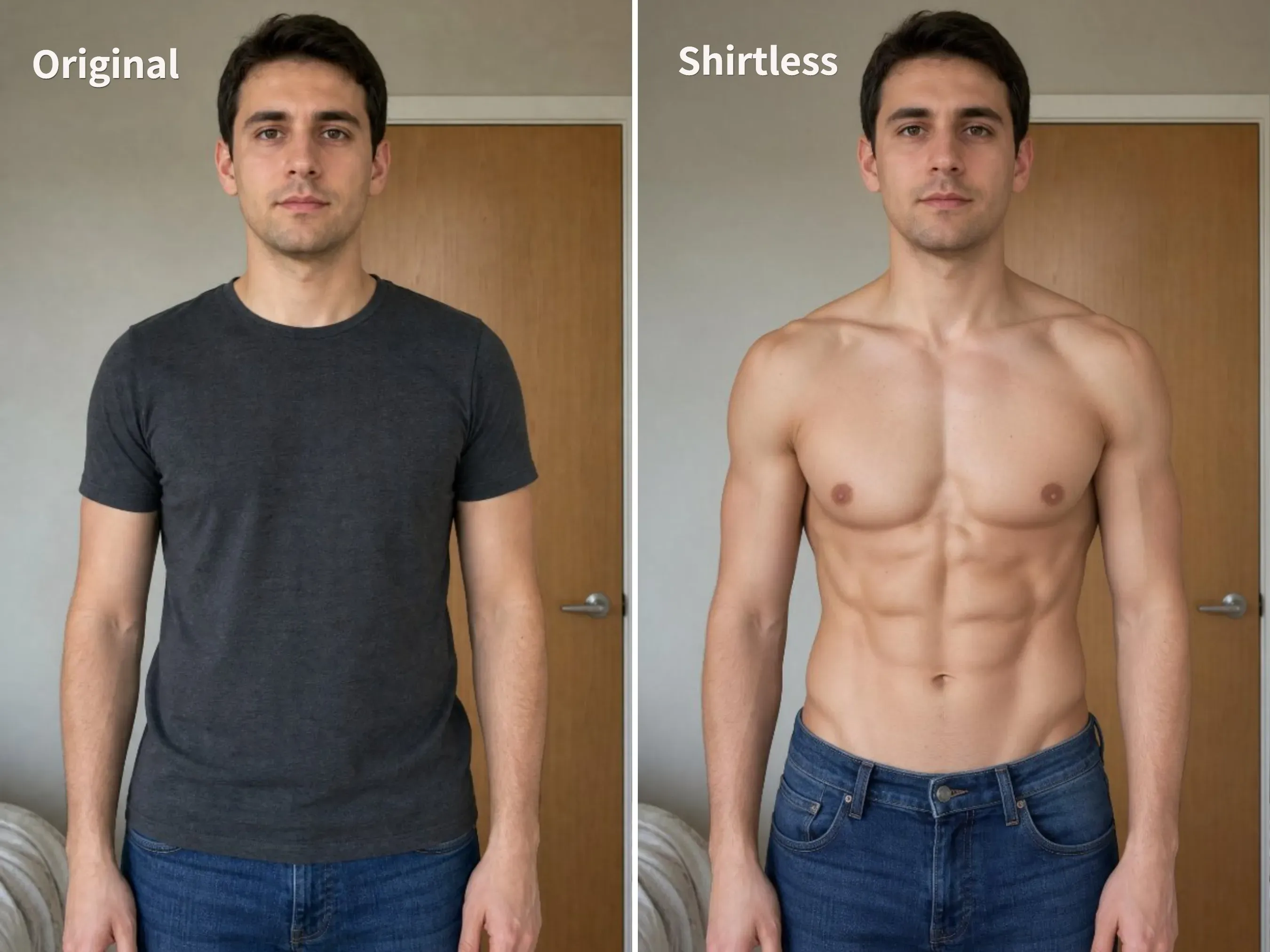
Every line in the base prompt guards against a specific model habit:
| What you want to control | The prompt line that helps |
| Keep your face recognizable | Preserve the person's identity, facial features, hairstyle, skin tone, and expression. |
| Keep the original shirt | Keep the original T-shirt, color, and background unchanged, adjusting the fabric naturally to fit the new body shape. |
| Make the added muscles look natural | Maintain realistic body proportions, skin texture, and natural indoor lighting. |
| Avoid changes to the background | Keep the original ... background unchanged. |
Keep the abs realistic: Describe clear abdominal separation and natural oblique lines, rather than relying on dark shadows to suggest muscle definition.
Turn One Photo Into a 5 or 10-Second AI Muscle Flex Video
A still image shows the finished physique. A 5 or 10-second video shows the expansion happening in real time, which is why the TikTok "AI steroids filter" and "buff filter" clips get shared in group chats.
You can drive it from a single photo or lock both ends of the animation using the muscular still you generated in the previous section.
Single-Frame Prompt vs. First-and-Last-Frame Lock in Seedance 2.5
Following the same steps as for the AI Image Editor, open Atlas Cloud, log in, click on "AI Video API," and then select the AI Video Generator you wish to use:
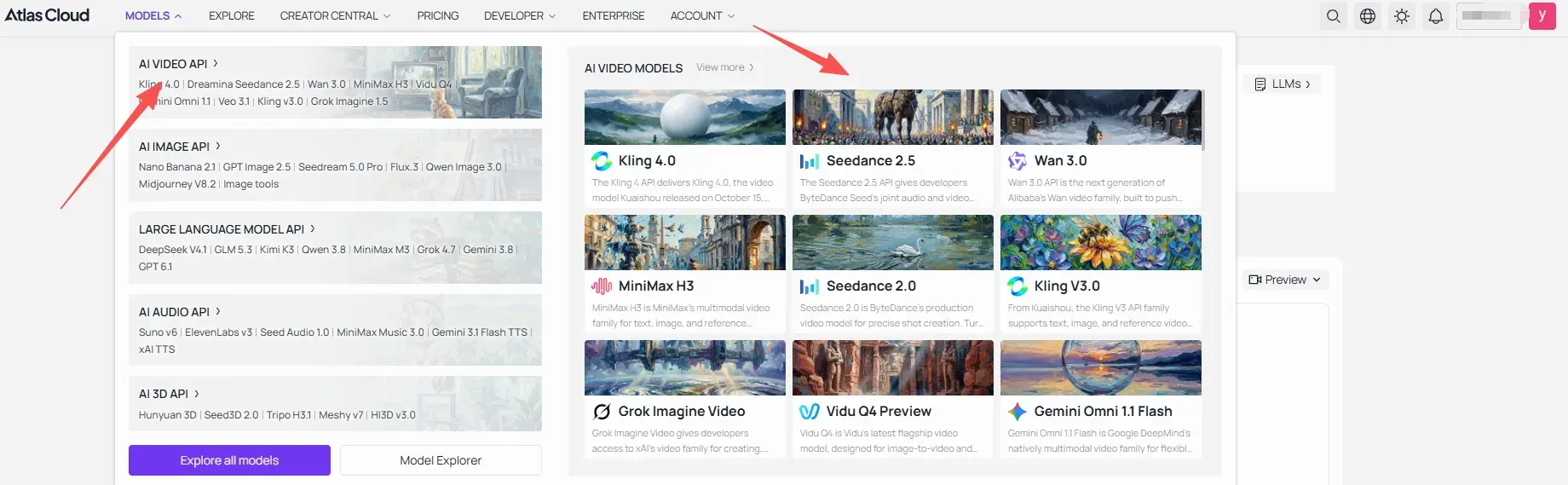
Next, I will conduct a practical test using Seedance 2.5.
-
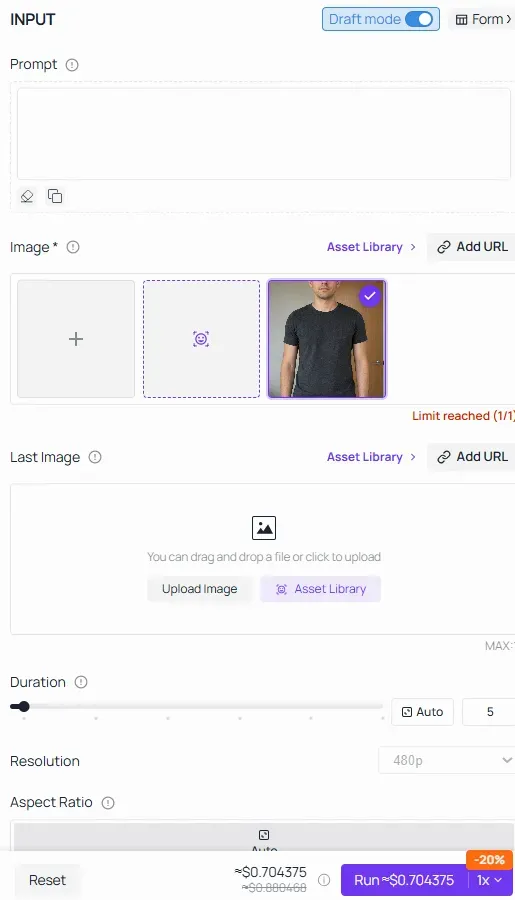
Choose your frame method:
- Route A — Single-Frame Prank (Fastest): Upload your original 9:16 waist-up photo into First Frame. Leave Last Frame empty. The prompt alone drives the muscle growth.
- Route B — First-and-Last-Frame Lock (Zero Face Drift): Upload your original waist-up photo into First Frame and upload your edited Seedream v5.0 Pro muscular photo into Last Frame. Because both frames share the exact same face, shirt, and room, the model interpolates the muscle growth between two verified endpoints without inventing a stranger's face at second eight.
-
Paste one of the timed prompts below.
-
Set Duration to 5 and Resolution to 480p for your first run. Leave Audio on if you want room tone and fabric stretch sounds.
-
Click Run.
Timed 5-Second Prompts to Copy: Clothed Stretch, Athletic Tank, and Buff Pet
5s clips hold together best when you split the prompt into three beats: the starting pose, the expansion, and a final facial reaction.
Clothed Shirt-Stretch Flex Prompt Template
plaintext1[DURATION]-second video, one continuous shot, locked camera, smooth motion. 2The person starts with their original [STARTING PHYSIQUE], wearing [ORIGINAL CLOTHING]. Suddenly, their entire upper body undergoes an exaggerated muscular transformation. Their [BODY PARTS] expand dramatically, creating a [TARGET PHYSIQUE] with a clearly visible contrast from their original build. 3Their [CLOTHING] remains fully intact throughout the transformation, stretching naturally over the enlarged muscles without disappearing, becoming transparent, or tearing. 4After transforming, they [DISPLAY POSE] and [FACIAL EXPRESSION / REACTION], looking at [GAZE TARGET]. 5Preserve the original face, hairstyle, clothing, and background. Maintain smooth, continuous movement. 6Audio: [MUSIC STYLE] with a strong beat drop at the transformation reveal. No narration.
Women's Fitted Athletic Tank Flex Prompt Template
Third-party wrappers like MakeViral automatically swap women into a generic tank top during flex clips. To control the exact top and muscle level yourself, use this prompt:
plaintext1[DURATION]-second video, one continuous shot, locked camera, smooth natural motion. 2[STARTING ACTION]. The person then [TRANSFORMATION TRIGGER]. As this happens, their [BODY PARTS] dramatically transform into [TARGET PHYSIQUE], creating a clear contrast with their original body shape. 3Their [CLOTHING] remains unchanged, stretching naturally over the enlarged muscles without tearing or disappearing. 4After the transformation, they [DISPLAY POSE], looking at [GAZE TARGET] with a [FACIAL EXPRESSION]. 5Preserve the original face, hairstyle, and surroundings. 6Audio: [MUSIC STYLE] with a strong beat drop synchronized with the start of the transformation. No narration.
Buff Dog or Cat Prank ("AI Steroids" Pet Filter) Prompt Template
Upload one full-body photo of a sitting dog or cat into First Frame and run this variation:
plaintext1[DURATION]-second video, one continuous shot, fixed camera. 2The [PET] from the first frame smoothly transitions from [STARTING POSE] to [TRANSFORMATION POSE]. As it does so, its body suddenly undergoes an exaggerated AI steroids transformation. Its [BODY PARTS] expand dramatically into [TARGET MUSCULAR PHYSIQUE], creating a striking contrast with its original body shape. Its head remains normal in size. 3The [PET] maintains [FINAL BODY POSITION] throughout and after the transformation. Preserve its original [DISTINCTIVE APPEARANCE FEATURES] and recognizable facial features. 4After transforming, the [PET] [HEAD OR BODY GESTURE] and gives the camera a [FACIAL EXPRESSION], creating a [PERSONALITY OR HUMOR EFFECT]. It holds this pose confidently. 5Preserve the original environment, furniture, lighting, and camera angle. Smooth continuous movement, no cuts or sudden pose changes. 6Audio: [MUSIC STYLE] with a strong beat drop synchronized with the muscle reveal. No narration.
Run the Image Edit or Flex Video Through the Atlas Cloud API
Building a fitness preview app or batch-generating prank clips? Both models sit behind one API key and use the same polling loop.
Step 1: Create an API key. Open Settings in your Atlas Cloud console, click Create API Key, and save the string.
Step 2: Generate the muscular still photo. Send your source photo URL in the images array:
Taking seedream-v5.0-pro as an example, the code is as follows:
plaintext1generate_url = "https://api.atlascloud.ai/api/v1/model/generateImage" 2headers = { 3 "Content-Type": "application/json", 4 "Authorization": "Bearer $ATLASCLOUD_API_KEY" 5} 6 7 data = { 8 "model": "bytedance/seedream-v5.0-pro/edit", 9 "prompt": "your prompt", 10 "images": your reference image, 11 "size": "Select the size you want", 12 "output_format": "jpeg" 13 }'
Step 3: Generate flex video. Swap the endpoint to generateVideo and pass the source photo in the image field:
Taking seedance 2.5 as an example, the code is as follows:
plaintext1generate_url = "https://api.atlascloud.ai/api/v1/model/generateVideo" 2headers = { 3 "Content-Type": "application/json", 4 "Authorization": "Bearer $ATLASCLOUD_API_KEY" 5} 6data = { 7 "model": "bytedance/seedance-2.5/image-to-video", 8 "prompt": "<paste your prompt here>", 9 "image": "your reference image", 10 "duration": 3-30s, 11 "resolution": "480p/720p/1080p", 12 "generate_audio": true 13 }'
Step 4: Poll for the output URL. Both endpoints return a prediction ID. Poll the status endpoint until it returns completed:
plaintext1poll_url = f"https://api.atlascloud.ai/api/v1/model/prediction/{prediction_id}"
Input Photo Rules and Why Some AI Muscle Edits Look Pasted On
Most failed muscle edits come from tight crops or missing boundary instructions in the prompt. Fix the source photo or add the locking line before re-running.
| What you see | What usually caused it | What to change |
| Head looks tiny or disconnected from the muscular body | Source photo is cropped too tightly | Use a full-body or waist-up photo with the head and upper body clearly visible. |
| Only certain muscles become enlarged | Key body parts are hidden or missing from the prompt | Keep the shoulders, chest, and arms visible. Specify each area you want transformed. |
| Hands, paws, or limbs look distorted | Limbs overlap, are cropped, or lack clear outlines | Choose a photo where the limbs and extremities are clearly visible. |
| Skin tone or fur patterns change | Original appearance isn't specified in the prompt | Identify distinctive features and instruct the model to preserve them. |
| Clothing or body details change unexpectedly | Clothing or appearance constraints are missing | Describe the original clothing and specify which visual features must remain consistent. |
| Final expression looks unnatural | Prompt requests an exaggerated or poorly defined expression | Specify a natural ending expression, such as a confident grin, mischievous look, or playful head tilt. |
Edit the body first; animate second. In Seedream 5.0 Pro to lock in your shoulder width and waist taper without warping the background. Take that clean still directly into Seedance 2.5 for the final 5 or 10 second flex reveal.
What an AI Muscle Photo and 5-Second Video Actually Cost
All prices below reflect the Atlas Cloud console rates and the active 20% discount checked on November 1, 2026:
- Draft still photo
GPT Image 2.5 Sunburst Edit: ~ $0.017 per image/low-quality, higher quality, the greater the cost. - High-resolution still photo
Seedream v5.0 Pro: $0.036 at 1.5K or $0.072 at 2K with the 20% discount. - 5-second flex video
Seedance 2.5: ~ $0.7 at 480p,~ $1.5 at 720p and $3 at 1080p
The images and videos shown above cost less than $4 in total to create.
FAQ
Can I put two people in the same muscle filter video?
Yes. Single-frame Image-to-Video takes one photo, but Seedance 2.5 Reference-to-Video accepts up to 30 reference images in one request. Upload your photo as @Image1 and a friend's photo as @Image2, then prompt both subjects standing side by side in a gym mirror flexing on the same beat.
Do I need to turn on the AI-generated content label when posting on TikTok?
Yes, if the result looks photorealistic. TikTok's AI-generated content policy requires creators to apply the AIGC label or a clear caption disclosure to realistic AI visuals showing real people doing or displaying things they did not do in real life. A realistic 5s clip of a real person flexing an AI-generated physique falls directly under that rule.
Can an AI muscle filter predict my actual 6-month gym progress?
No. Image editing models redraw shadows and proportions from training data rather than your personal bone structure, muscle insertions, tendon length, or diet. Even the Tier 1 Lean Tone prompt is a visual styling preview, not a physiological forecast.


