You type your grandmother's name. You hit generate. Four seconds later you get something beautiful, delicate, exactly the vibe you had in your head.
Then you zoom in. The "n" has three legs. There is a stray dot floating over the "a". One letter has quietly become a different letter.
That is the whole problem with the current generation of text-to-tattoo tools. The art is fine. The words are not. And words are what most people actually want, because 69% of tattooed adults in the US say honoring or remembering someone or something was a reason they got inked (Pew Research Center, August 2023). Names. Dates. A line from a song. A proverb in a script you cannot read.
This is the workflow I use to get from a typed phrase to something a tattoo artist will actually put on a stencil, without the spelling roulette. Three steps, three models, one browser tab.
Key takeaways
- Almost every AI tattoo generator from text fails on lettering, not on art. Fix the letters first, then everything else gets easy.
- Pick a model that is built for typography, not for photorealism. On Atlas Cloud that is Seedream v5.0 Pro, whose model page specifically claims design-grade typography and accurate CJK text rendering.
- Generate flat black-ink flash art, never a "photo of a tattoo". Photoreal renders are the exact thing artists refuse.
- Then run two cheap edit passes: one to convert the design into stencil-ready line art, one to preview it on your own forearm.
- Budget under a dollar for a full piece including re-rolls. The expensive mistake is the ink, not the pixels.
- For any kanji, hanzi or Cyrillic tattoo, a model can render the characters perfectly and still hand you the wrong meaning. Verify with a human who reads the language.
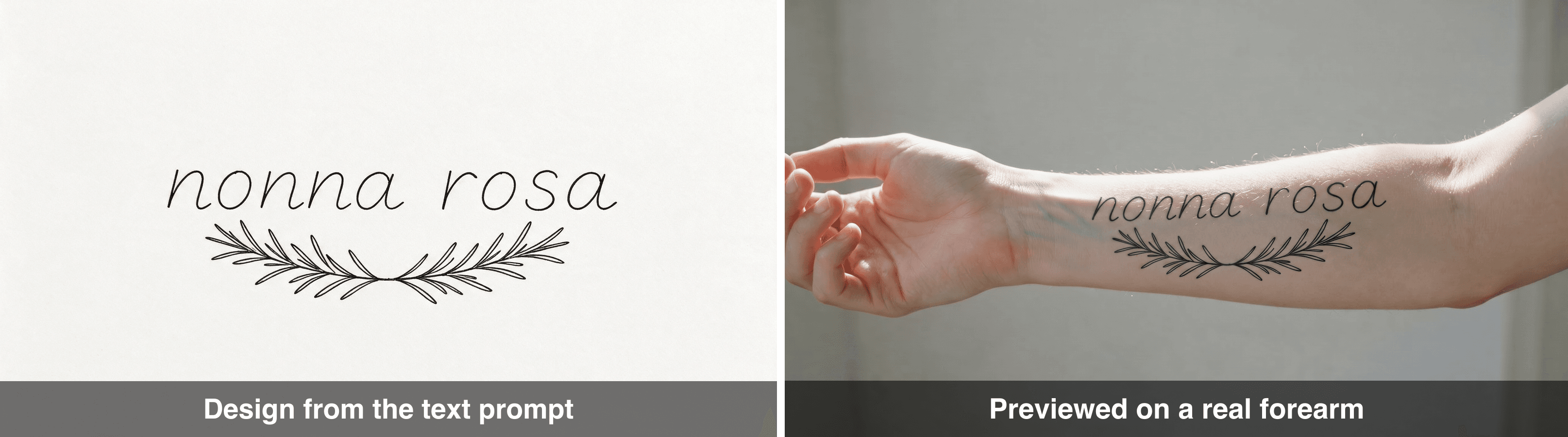
The finished workflow: a stencil-ready fine-line lettering design on the left, the same design previewed on a real inner forearm on the right
Left: the design straight out of the text prompt. Right: the same design fused onto a real forearm photo so you can judge size and placement before booking. Both frames are real outputs from the three-step workflow below.
Why Every AI Tattoo Generator From Text Nails the Art and Fails the Words
Two separate failures get blamed on the same tool, and they need different fixes.
Failure one: the image is gorgeous and un-tattooable. Tattoo artists have been shouting about this for a while now. Don Richards of Kids Love Ink in South London put it bluntly, saying AI designs are often "un-tattooable, with levels of detail that are impossible on real skin" (Stories and Ink, July 2025). The reason is mechanical. Most image models are tuned to produce photographs. Ask for a tattoo and you get a photo of a tattoo: soft grey gradients, hairline strokes half a pixel wide, micro-detail that reads beautifully at 2048px and turns into a grey smudge two years after it heals. Then a client walks in with that render and expects it on a finger.
Failure two: the text is wrong. This one is worse because it is invisible until it is permanent. Diffusion models draw letters as shapes, not as characters, so a name comes out almost right. Non-Latin scripts are where it gets genuinely dangerous. Ariana Grande's palm tattoo for "7 Rings" ended up reading 七輪, which is shichirin, a small charcoal grill (CBS News, January 2019). That was human error, not AI. But a text to tattoo ai will reproduce exactly that class of mistake at scale and with total confidence, and it will make the characters look flawless while doing it.
The fix for both is the same move: stop asking for a picture of a tattoo, and start asking for flash art. Flat. Black. Single line weight. The thing an artist traces.
What a Working AI Tattoo Generator From Text Setup Looks Like (Three Models, One Tab)
You need three different jobs done, and no single model is best at all three. Generating readable lettering is a typography problem. Cleaning a design into a stencil is an edit problem. Previewing it on your arm is a two-image fusion problem.
I run all three on Atlas Cloud because the playgrounds sit next to each other, so the output of one step is a two-second upload into the next. No API keys, no notebook, no re-uploading files across three different sites.
Want the fast path first? Atlas Cloud's free AI tattoo generator creates your first lettering design free; when you need to fix the spelling and export a clean file, move to the three model pages below.
| Job in the workflow | Model | Listed price | Why this one |
|---|---|---|---|
| Generate the design from your text | bytedance/seedream-v5.0-pro/text-to-image | $0.045 per image | Its model page claims design-grade typography and accurate CJK text rendering, which is the whole ballgame for lettering |
| Convert it into stencil-ready line art | bytedance/seedream-v5.0-pro/edit | $0.045 per image, plus $0.003 per extra reference image | Same family, so it keeps the letterforms it just drew while stripping the shading. Takes up to 10 references |
| Preview it on your own arm | google/nano-banana-2/edit | $0.08 per image | Strong at fusing two real photos into one believable frame. Takes up to 14 references |
Prices are the listed pay-as-you-go rates on each model page, checked August 2026. Keep edits at 1K or 2K output: higher resolutions bill more, and a stencil does not need 4K. You can sanity-check any of this on the full model list.
A note on the pictures below: every step image is the real file that came back from the run, not a screenshot of the playground window. The prompts and settings printed here are exactly the ones used, so you can paste them into the playground and get the same thing.
The running example for the rest of this guide is one real piece: an inner-forearm memorial tattoo reading nonna rosa in fine-line script, with a small sprig of rosemary under it. Rosemary for remembrance, which is a genuinely old bit of symbolism and also a terrible pun I am refusing to apologise for. Swap in your own words and every step below still works.
Step 1: Prompt Your AI Tattoo Generator From Text Like a Flash Sheet, Not a Photo
Open the Seedream v5.0 Pro text-to-image playground. Three things matter in this prompt and everything else is decoration.
First, say black ink only, no shading, no grey wash. That single clause is what turns an un-inkable render into a design an artist can trace. Second, describe the surface as paper, not skin. A flash sheet is flat and evenly lit, so the model stops inventing photographic depth. Third, spell the word out letter by letter at the end of the prompt. It looks stupid. It measurably helps.
Paste this:
text1Tattoo flash sheet on off-white paper, one single design, black ink only. 2The words "nonna rosa" in delicate fine-line handwritten script, lowercase, 3clean single-weight strokes, every letter clearly separated and fully legible. 4A small sprig of rosemary curving underneath the words, thin needle-fine leaves. 5No shading, no grey wash, no colour, no paper texture, no border, 6no extra words, no signature, no watermark. 7Flat top-down view, even studio light, high contrast. 8Spell the words exactly: n-o-n-n-a r-o-s-a 9
Settings: pick 2048 x 1152 (that is the 2K tier at 16:9), and generate one image at a time rather than a batch. You are going to re-roll for spelling, and re-rolling one image at a time is cheaper than throwing away three bad ones per batch.
Now the part nobody tells you: read the letters out loud from the image before you continue. Not skim. Read. Cover the rest of the design with your hand and go letter by letter. If a single stroke is wrong, hit generate again. Two or three re-rolls is normal, and at four and a half cents each that is the cheapest quality gate in the entire process.
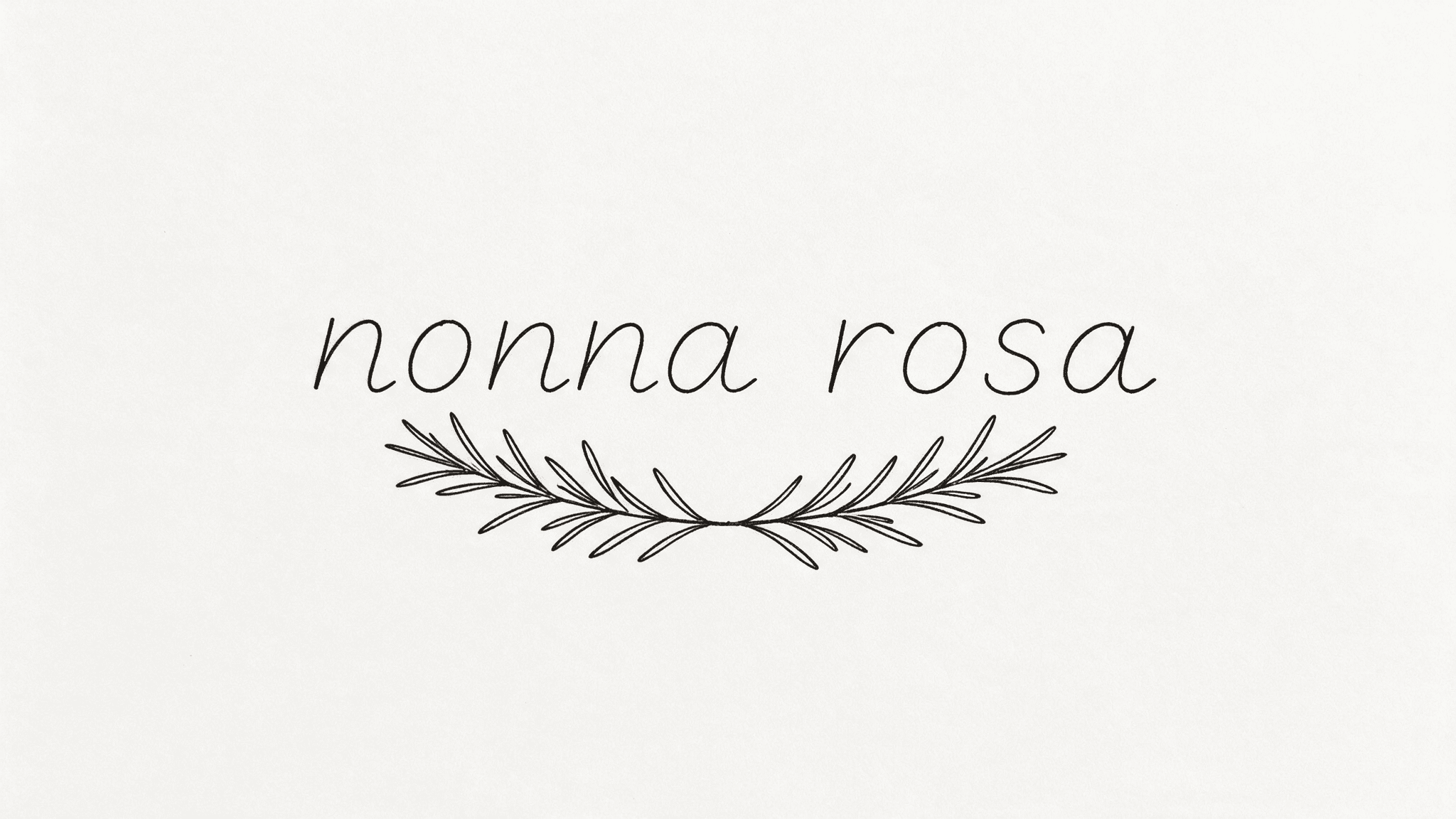
The fine-line lettering design that came out of the flash-sheet prompt: the words nonna rosa in lowercase script with a sprig of rosemary curving underneath, black ink on off-white paper
What the prompt above actually returns: flat black ink, no shading, every letter separated and legible. Generated with bytedance/seedream-v5.0-pro/text-to-image at 2048 x 1152.
Step 2: Turn the Design Into Stencil-Ready Line Art, the AI Tattoo Lettering Generator Step Everyone Skips
Your step 1 output still is not a stencil. Look closely and you will find soft edges, a few strokes that taper to nothing, and probably a hint of grey where the model was being artistic. An artist can work around that, but they will charge you for the time and they will make choices you did not ask for.
So do the cleanup yourself. Download the step 1 image, open the Seedream v5.0 Pro edit playground, upload it as the reference image, and paste this:
text1Convert this tattoo design into stencil-ready line art. 2Pure black lines on pure white. One uniform line weight throughout. 3No grey, no gradients, no shading, no dotwork, no paper texture, no antialiasing haze. 4Keep the lettering pixel-identical in shape and spelling: same letterforms, same word. 5Close every open contour so each shape can be traced cleanly. 6Thicken any line that is thinner than a hair so it will still read once healed. 7
Settings: output 2048 x 1152 again so it matches your input, and load only the one reference image. The extra-reference surcharge only kicks in past the first, so this pass costs the base rate.
That "thicken any line thinner than a hair" clause is doing real work. Fine-line tattoos blur as they settle, which is precisely the complaint artists have about AI references. Deliberately fattening the thinnest strokes at the design stage is how you get a piece that still reads in five years.
If the edit changes a letter, throw it out and run it again. Spelling drift during an edit pass is rare but it happens, and it is the last moment you can catch it for free.
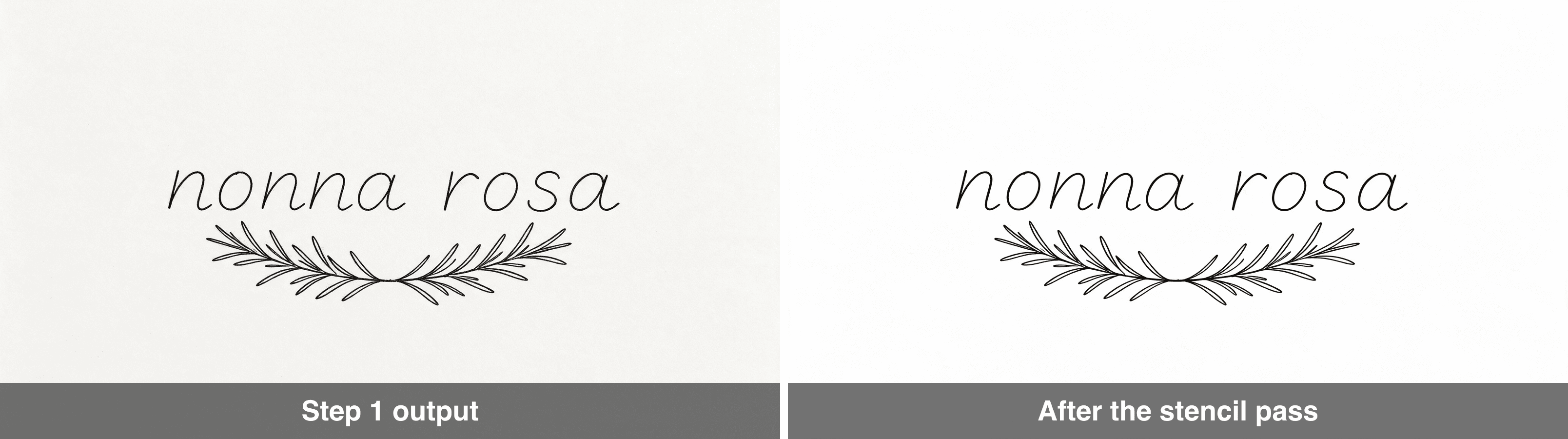
Side by side: the step 1 design on off-white paper on the left, and the same design after the stencil pass as clean black lines on pure white on the right
Step 2, before and after: the paper tone and soft edges go, the letterforms and the spelling stay. Generated with bytedance/seedream-v5.0-pro/edit from the step 1 file.
Step 3: Preview the AI Tattoo Generator From Text Result on Your Own Arm
This is the step that saves people from a tattoo they hate, and almost nobody does it.
A design that looks perfect on a white square can be completely wrong at actual size on actual skin. Lettering that reads beautifully at 2000 pixels wide becomes an unreadable squiggle at eleven centimetres on a forearm. You need to see it on your body, at your size, before you book.
Take a photo of the bare body part in daylight. Plain background, arm relaxed, no filter, no flash. Then open the Nano Banana 2 edit playground and upload two references in this order: Image 1 is your stencil from step 2, Image 2 is your arm photo. Then paste:
text1Place the tattoo design from Image 1 onto the inner forearm in Image 2. 2Size it to sit between the wrist and the elbow, running along the arm. 3Follow the curve of the forearm so the lines bend with the skin. 4Match the skin tone, keep the natural light and shadow of the photo, 5and give the ink a slightly settled healed matte look, not a sticker. 6Keep the arm, the hand, the background and the lighting of Image 2 unchanged. 7No hard edges, no glow, no outline or box around the design. 8
Settings: 2K output and the aspect ratio that matches your arm photo (4:5 or 1:1 for a normal phone shot). Skip 4K here, it bills more and adds nothing you can see.
Run it two or three times at different described sizes ("size it small, about the width of two fingers" versus "run it the full length of the forearm"). Put the results side by side. Nine times out of ten the version you pick is not the one you expected, and that realisation is worth every cent of the eight cents per render.
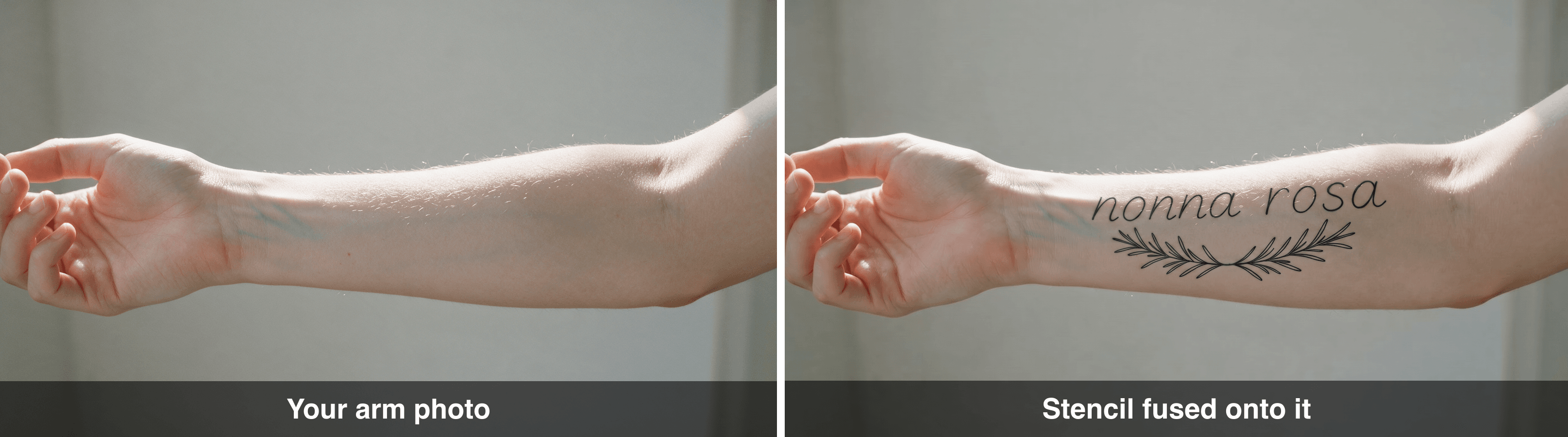
Side by side: a bare inner forearm photographed in daylight on the left, and the same photo on the right with the nonna rosa design sitting on the skin
Step 3, the input photo and the result: same arm, same background, same light, with the stencil now following the curve of the forearm. Generated with google/nano-banana-2/edit from the step 2 stencil plus the arm photo.
Variations: AI Name Tattoo Generator, AI Tattoo Font Generator and AI Kanji Tattoo
Once step 1 works, the same prompt skeleton covers every lettering request people search for, whether you found it filed under ai tattoo text generator, font generator or name generator. You are only swapping the style clause.
- As an ai name tattoo generator: replace the phrase and keep everything else. Names are the highest-risk case because you will notice a wrong letter forever, so re-roll harder here than anywhere else.
- As an ai tattoo font generator: name the actual lettering tradition instead of saying "nice font". Useful ones that models actually know: fine-line handwritten script, heavy blackletter, monoline sans-serif small caps, American traditional bold serif, chicano script, typewriter monospace.
- As an ai tattoo lettering generator for a long quote: add "set on two lines, balanced, no hyphenation" or the model will squeeze everything into one unreadable ribbon.
- As an ai kanji tattoo generator: ask for "traditional Japanese brush calligraphy, vertical column, single characters clearly separated". Then read the warning below, because this is the one that bites.
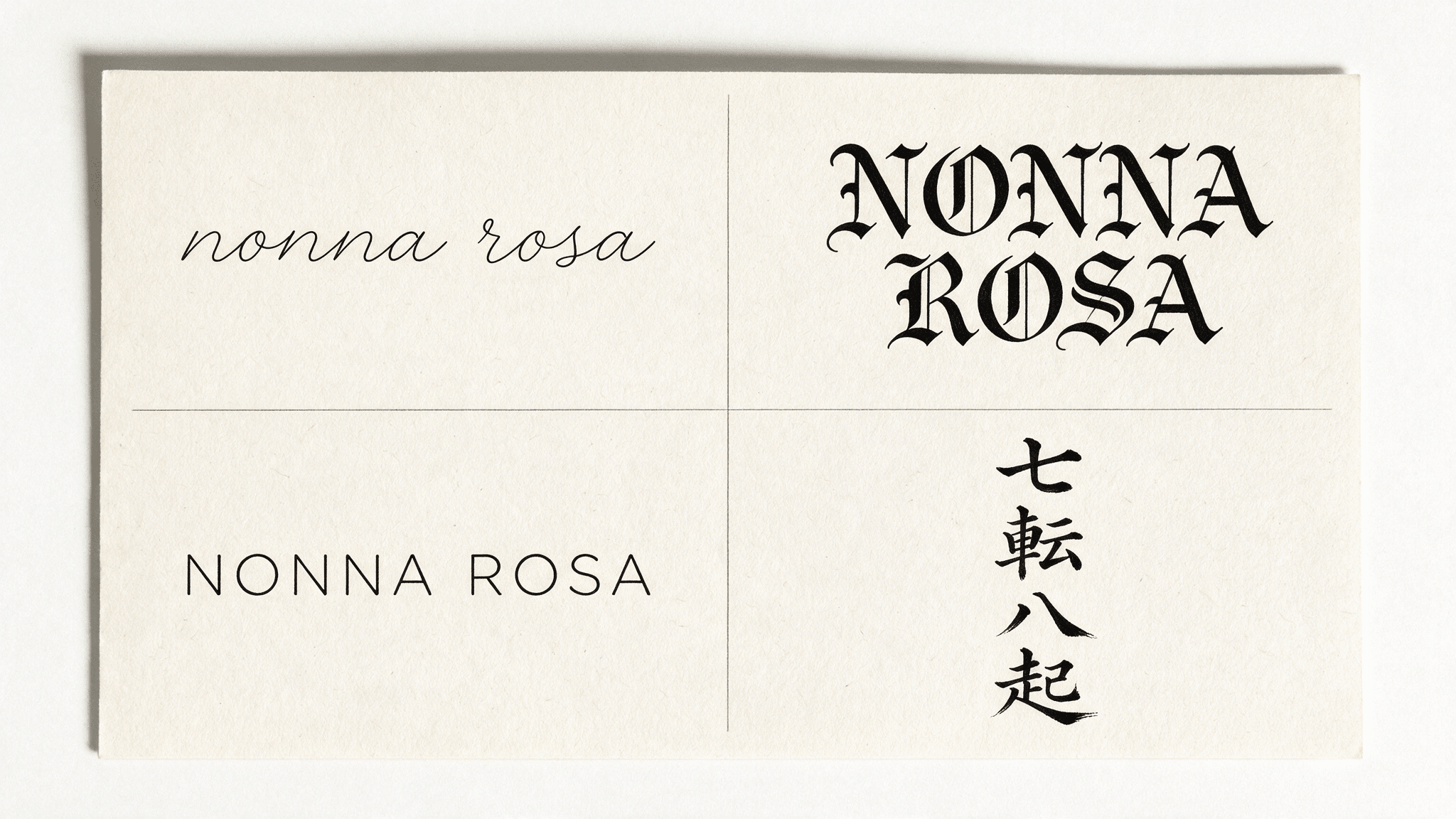
Four lettering treatments on one reference sheet: fine-line script, heavy blackletter, monoline sans small caps, and a vertical column of Japanese brush kanji
One prompt, four lettering traditions. The first three panels are the same two words; the fourth is the kanji phrase 七転八起 set as a vertical brush column. Generated with bytedance/seedream-v5.0-pro/text-to-image.
The kanji warning, and please take it seriously. A model can render 七転八起 with beautiful brush weight and still be handing you a phrase that does not mean what you were told. That one is real: it reads shichiten hakki, the four-character form of nanakorobi yaoki, "fall seven times, get up eight" (JapanDict). I verified it in a dictionary before typing it here, and you should verify yours too. Two rules for any script you cannot read:
- Decide the characters before you open any generator. Get them from a dictionary or a native speaker, not from the image model, and not from the tool's own "translate my phrase" button.
- After generating, paste the rendered characters back into a dictionary and check them one by one. Models regularly drop a stroke or substitute a visually similar character, and either one changes the meaning completely.
An image model is a rendering engine. It is not a translator, and it has no idea whether your tattoo says "resilience" or "barbecue".
Where "AI Tattoo Generator From Text Free" Ends and Real Costs Begin
Free tiers are genuinely fine for the browsing phase. Type ten ideas, see which direction feels right, delete nine of them. Nobody should pay to daydream.
Where free tools stop being enough is exactly where this guide starts. What you typically cannot do on a free tier: re-roll twenty times to nail a spelling, get a clean high-resolution file you can hand to an artist, run an edit pass on your own image, or preview the design on your own body. That is not a paywall trick, it is just that those steps cost compute.
Here is what one complete piece cost me, at the listed rates above:
| Step | Model | Runs | Cost |
|---|---|---|---|
| Generate the design | seedream-v5.0-pro/text-to-image | 6 (spelling re-rolls) | $0.27 |
| Stencil cleanup | seedream-v5.0-pro/edit | 2 | $0.09 |
| On-skin preview at three sizes | nano-banana-2/edit | 3 | $0.24 |
| Total | 11 renders | $0.60 |
Sixty cents. For context, a small forearm piece from a decent artist runs into the low hundreds, and a laser removal course runs into the high hundreds. The pixels are not the expensive part of this hobby. Spending an extra twenty cents on re-rolls until the letters are perfect is the single best value decision in the whole process.
One last thing that is not about money. Bring the stencil to your artist as a reference, not as an order. Artists redraw for a reason: they know how your specific skin will take the ink, how the design will sit on a curved limb, and how it will look in a decade. The workflow above is there to make your idea legible and physically possible. The person holding the machine still knows more than the model does.
Frequently Asked Questions
Is there a genuinely free AI tattoo generator from text?
Yes, plenty of tools give you free generations, and they are useful for exploring directions. The limits usually show up as watermarks, low resolution, a cap on re-rolls, and no ability to edit your own uploads. Since spelling accuracy comes from re-rolling and the stencil pass comes from editing, a purely free path tends to break at exactly the point where the design becomes usable.
Can an AI tattoo generator from text spell my name correctly?
Sometimes on the first try, usually within three tries, if you use a model built for typography and you spell the name out letter by letter inside the prompt. Never assume it did. Zoom to 100%, cover the artwork, and read the letters individually. Unusual names, accented characters and cursive scripts all raise the error rate.
Will a tattoo artist accept an AI tattoo generator from text design?
Many will, if you hand them flat black line art and treat it as a starting point. What gets a flat no is a photorealistic render of a finished tattoo, because it promises detail that skin physically cannot hold. Artists have been vocal about this. Bring the stencil, say "this is the idea, please make it work", and expect them to redraw it.
Which AI tattoo generator from text works best for fonts and lettering?
Pick whichever model is explicitly built for typography rather than photorealism. That is why this guide uses Seedream v5.0 Pro for step 1: its model page specifically claims design-grade typography and accurate CJK text rendering, which is the ability that matters when the tattoo is text. Photoreal-first models produce prettier skin and worse letters.
Is an AI kanji tattoo safe to get?
The rendering is safe. The meaning is not, unless a human who reads the language has confirmed it. Choose your characters from a dictionary or a native speaker before you generate anything, then check the generated characters again afterwards, stroke by stroke. Ariana Grande's charcoal-grill palm happened without any AI involved, and an ai kanji tattoo pipeline makes that same mistake faster and more convincingly.
Who owns a design that came out of a text to tattoo ai?
Check the terms of the specific platform you used, because they differ, and check your local law, because copyright in purely AI-generated output is unsettled in several countries. In practice most tattoo designs are one-offs and this never comes up. If the piece is going on a commercial portfolio or merchandise, read the terms first rather than assuming.





