You spent an evening on it. Twelve prompts, forty images, one keeper. A full sleeve, dragons or roses or geometry, perfectly symmetrical, gorgeous. You sent it to a shop at 11pm with three fire emojis.
The reply came back the next afternoon. Two words.
"Where does it go?"
That question is not rudeness. It is the shop telling you that what you sent is a picture, and what they need is a plan. Australian artists interviewed this month put numbers on how often this happens: Adelaide artist Courtnii Shore says about one in four enquiries now include AI imagery, while Stu Pagdin puts it closer to three in four at his studio (ABC News, August 2026). Shore's read on it is blunt: "It's really, really common now...it's just setting some unrealistic expectations."
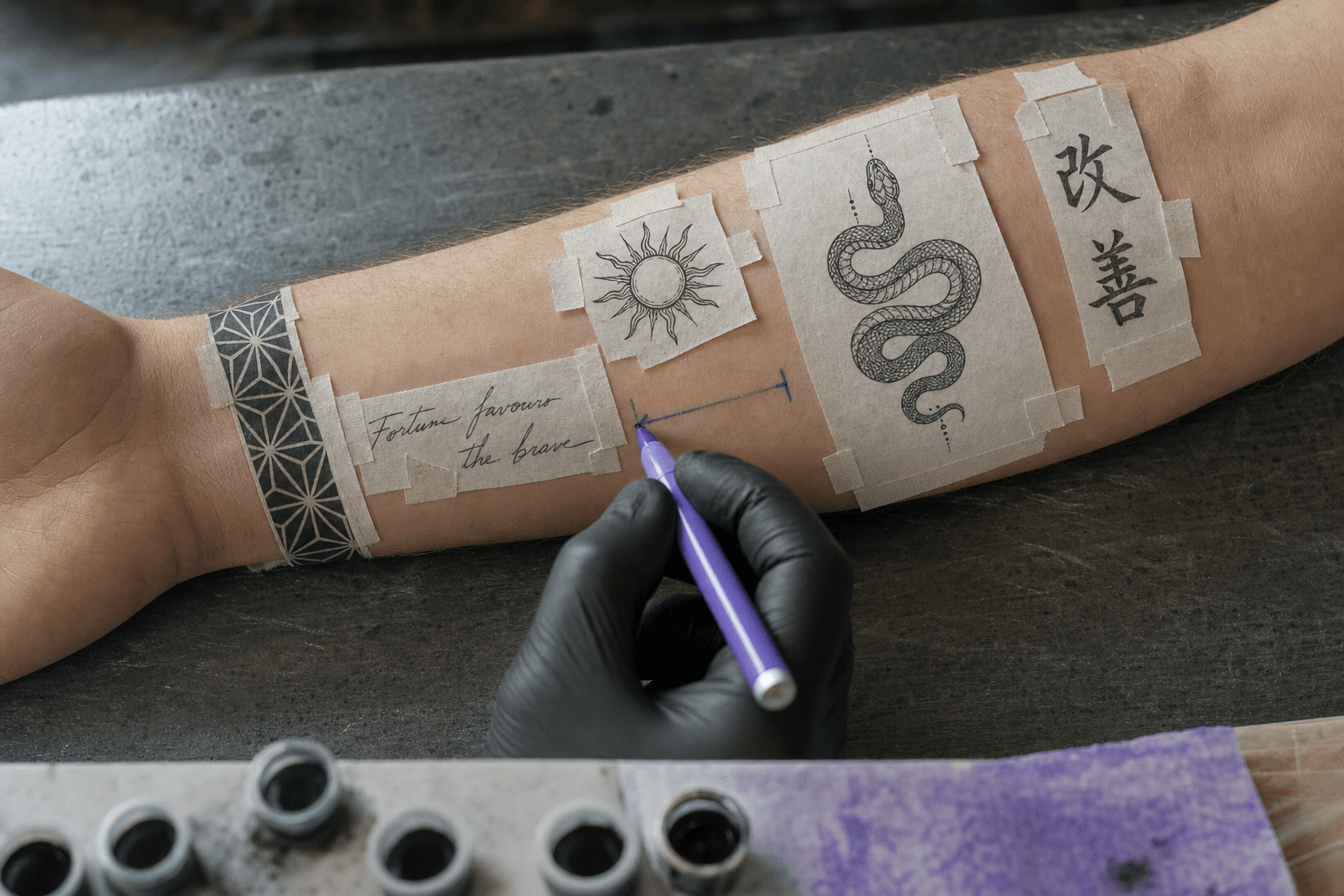
Five printed AI tattoo panels taped to a bare forearm in a tattoo studio, an artist drawing spacing arrows between them
The thing a shop can actually work from: separate panels, real gaps, marked placement. Generated with GPT Image 2 on Atlas Cloud.
The fix is not a better model. The fix is changing what you ask the model to hand you.
Key takeaways
- An AI tattoo sleeve generator gives you artwork. A shop needs a panel map: what goes where, at what size, with how much bare skin between pieces.
- 2026 sleeves are largely built in patches, not one flowing scene. Negative space between pieces is a design decision, not a gap you forgot to fill.
- Two extra runs turn a picture into a proposal: wrap the design onto your own arm photo, then rotate that arm in a short clip to see what survives the curve.
- Lettering is the single highest-frequency failure. Pin the exact string in the generation prompt AND again in the edit prompt, then zoom to 100% and read it character by character.
- The whole chain takes about ten minutes and costs less than a coffee. The chair costs four figures and multiple sessions.
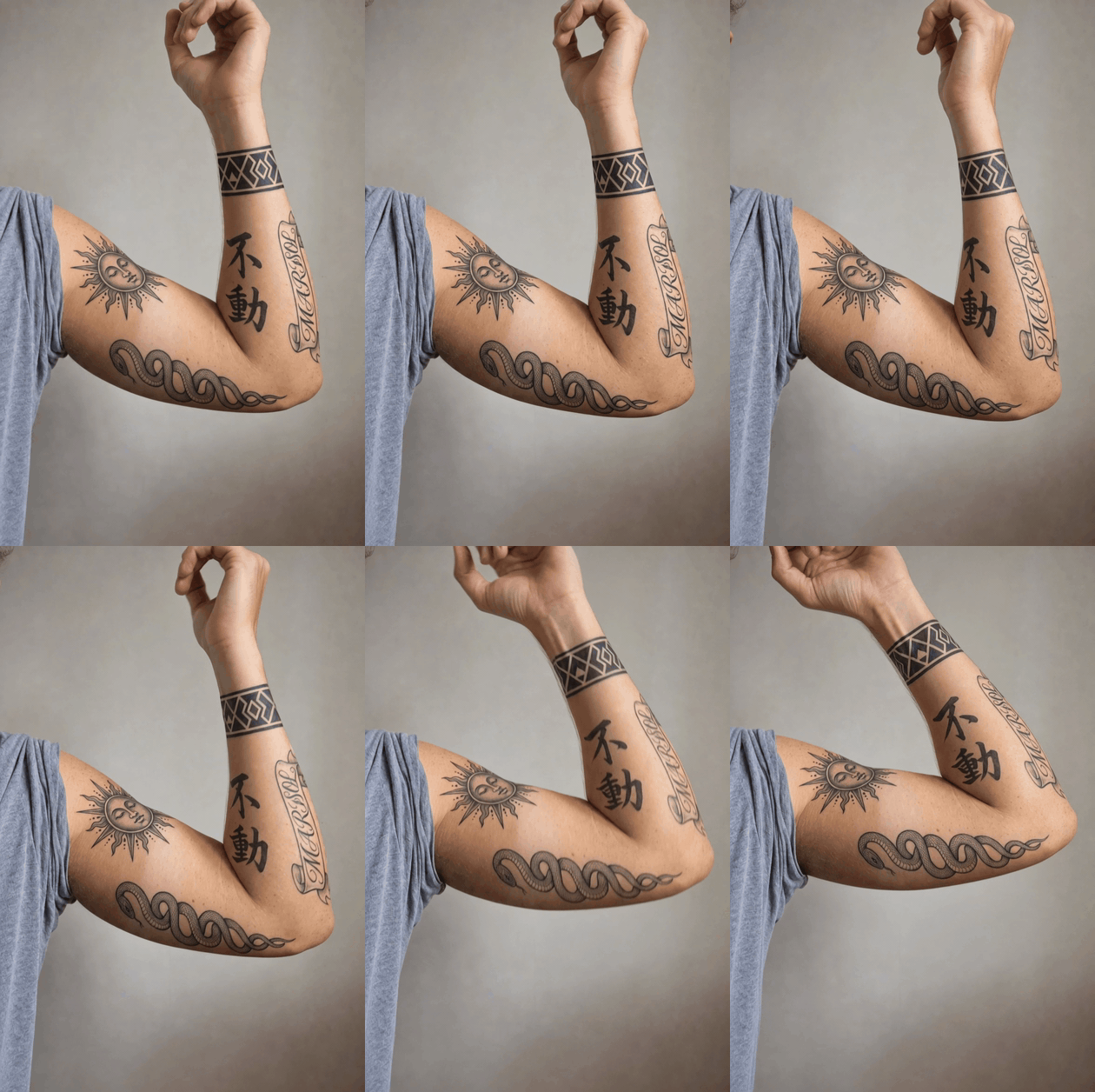
A patchwork half sleeve on a real arm rotating so the panels follow the curve and the inner-forearm script comes into view
The end of the chain: five panels wrapped onto a real arm photo, then rotated. Watch the geometric wrist band compress at the silhouette edge and the script name come around from the inner forearm. Nano Banana 2 Edit into Kling v3.0 Turbo, 5 seconds, shown here as a silent GIF.
That is the deliverable. Not a poster. A design that has already been tested against a moving limb, with lettering you can read at full zoom.
Everything below is how to make it.
Why AI Tattoo Sleeve Generator Designs Get Turned Down at the Shop
Start with the shape of the thing. Most generators default to the sleeve style of about a decade ago: one theme, left-right symmetry, edge-to-edge coverage, no bare skin anywhere. Ask for "full sleeve" and you reliably get a flowing single-scene composition.
That is not what most people are getting tattooed right now. Patchwork sleeves, also called sticker sleeves, are built from separate pieces with deliberate bare skin between them, added over time rather than committed to in one go. Studio guides describing the style are consistent on one point: the negative space between pieces is the binding element, not leftover room. It also matches how people actually collect tattoos. Pew found 32% of US adults have a tattoo and 22% have more than one, rising to 41% among adults under 30 (Pew Research Center, August 2023, n=8,480).
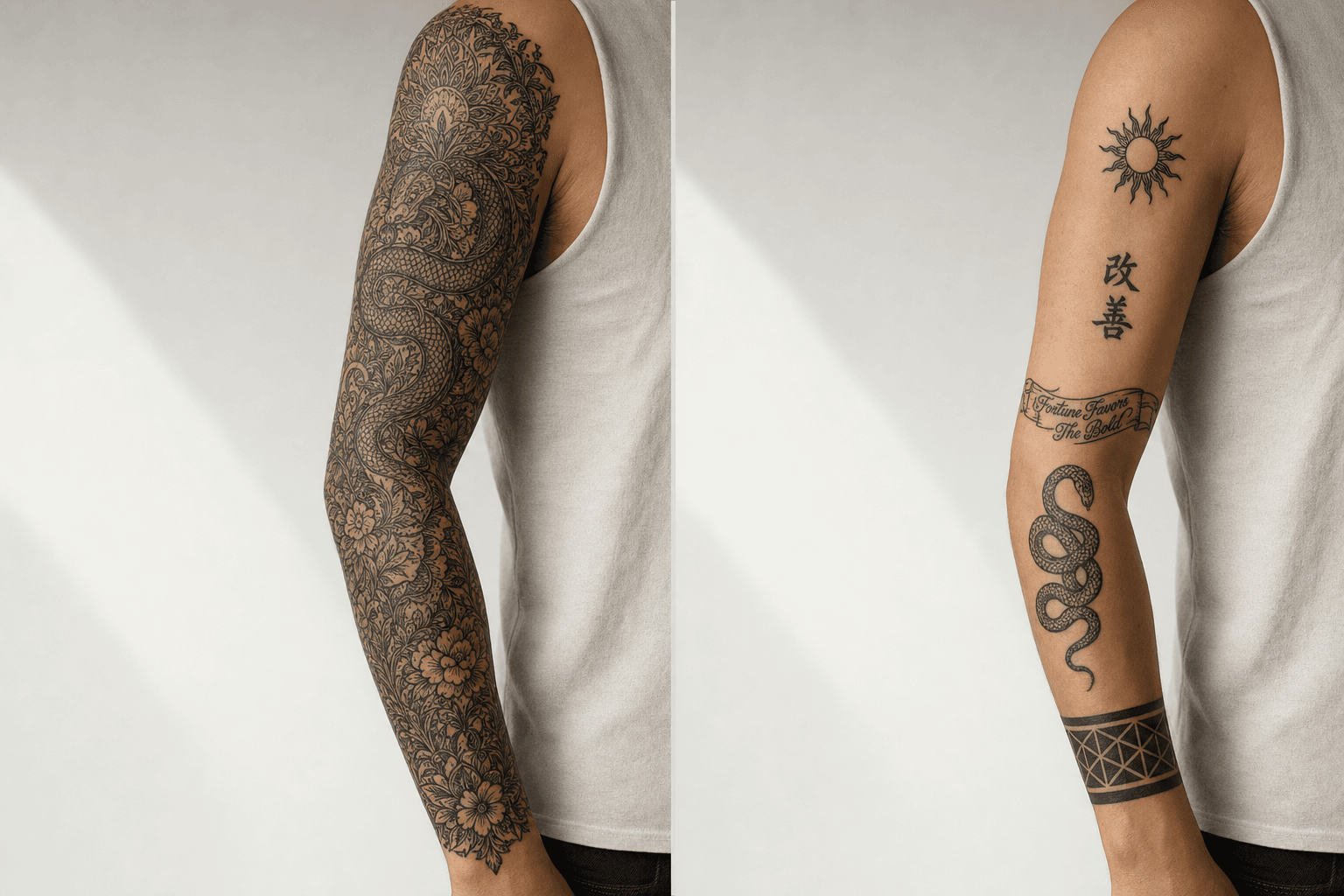
Left: a symmetrical single-theme AI sleeve illustration filling the whole arm. Right: the same arm built as separate patchwork panels with bare skin between them
Same arm, two briefs. The left is what a sleeve prompt gives you by default. The right is what gets booked. Generated with GPT Image 2 on Atlas Cloud.
Table 1: what you get by default vs what you should ask for
| Flow sleeve (the default output) | Patchwork sleeve (what to prompt for) | |
|---|---|---|
| Theme | One subject, one continuous scene | Several standalone pieces, unified by line weight and black density |
| Bare skin | Near zero, gaps read as unfinished | Deliberate, roughly one to two inches between pieces |
| Build order | Outline the whole arm, then fill | One panel per sitting, added over months |
| Generator default | Symmetrical, edge to edge, densely rendered | Never produced unless you ask for it explicitly |
| Prompt words to add | "full sleeve", "flowing composition" | "separate panels", "wide clear gaps between them", "flat lay sheet" |
Shape is only the first failure. Two more get designs turned away.
Detail density. Generators render at print resolution, so they pack in hair-thin linework that no needle holds. Paul Briske, quoted in the same ABC report, puts the constraint plainly: "Tattoos have to be done at a certain size for the details to hold over time." A design that looks incredible at 4K can heal into a grey smudge.
Text. This is the one that hurts. Pagdin's version: "There's some obvious ones where it'll spell something wrong." The client often does not notice, because the error looks like styling. That risk multiplies with an ai kanji tattoo, where you cannot spot-check a character you do not read.
The AI Tattoo Sleeve Generator Stack: Three Runs, One Browser Tab
Three runs, three different jobs, all on model pages you can open side by side on Atlas Cloud.
Table 2: the three-run chain
| Run | Model | Job | Settings | Listed page price |
|---|---|---|---|---|
| 1 | openai/gpt-image-2/text-to-image | Draw the flat panel sheet, render the lettering | quality high, 16:9 | $0.009 per image |
| 2 | google/nano-banana-2/edit | Wrap the panels onto your own arm photo | 2k, two reference images | $0.08 per image |
| 3 | kwaivgi/kling-v3.0-turbo/image-to-video | Rotate the arm, see what survives the curve | 5s, 720p | $0.095 per second |
Prices above are the page-listed rates, checked 18 August 2026. Treat the Run button quote as the real number: it accounts for quality tier and resolution, and it can differ sharply from the headline. When we last measured this chain on 17 August 2026, GPT Image 2 at high quoted about $0.17 for one image, roughly nineteen times the listed floor. Look before you click.
Two honest boundaries before you start. If you only want to see a flat design and spend nothing, the free AI tattoo generator is a text box and nothing else. Its own wording: "your first tattoo design generation is completely free, with no credit card required to try it. After that, you'll need to register or add credit to keep generating new designs." That covers ai tattoo generator from text free searches honestly: it is one free design, text in, image out, no arm upload. Steps 2 and 3 need the model pages, because they need your photo.
Second boundary: none of this outputs a stencil. No SVG, no transfer-ready file. Your artist redraws it. The point is to hand them a brief they do not have to argue with.
Step 1: Make the AI Tattoo Sleeve Generator Draw a Panel Map, Not a Poster
The whole trick is asking for a flat lay sheet of separate pieces instead of a sleeve. Three phrases do the work: five separate patchwork sleeve panels, wide clear paper gaps between them, and bold outlines that hold at small size. The first two force the negative space. The third fights the detail-density problem.
This is also where the ai tattoo text generator side of the job happens. GPT Image 2 renders type more reliably than most image models, so the lettering panels get drawn here rather than bolted on later. Any text to tattoo ai workflow lives or dies on this step: put the exact string in quotes, in caps if you want caps, and say "reading exactly".
Our running example is a five-panel patchwork half sleeve: a fine-line snake, a blackwork geometric band, a script name panel, a small ornamental sun, and two vertical kanji.
text1Tattoo flash sheet on clean off-white paper, top-down flat view, even studio light. Five separate patchwork sleeve panels laid out flat with wide clear paper gaps between them. No arm, no skin, no background scene, no watermark. 2Panel 1: a coiled fine-line snake, tall vertical, about 12 cm. 3Panel 2: a bold blackwork geometric band, horizontal, about 6 cm tall, solid black triangles with clean negative-space gaps. 4Panel 3: a script lettering banner reading exactly "MARISOL" in flowing single-weight cursive, horizontal, about 10 cm wide. 5Panel 4: a small ornamental sun with radiating rays, about 5 cm, black and grey wash only. 6Panel 5: a tall vertical panel of two Japanese kanji reading exactly 不動, stacked one above the other, clean confident brush strokes. 7All panels drawn as tattooable line art: black ink and grey wash only, bold outlines that hold at small size, no colour, no gradients finer than a needle can hold, no text labels other than the lettering inside panels 3 and 5. 8
Settings: quality high, aspect ratio 16:9. If the size field accepts free values, 1920x1088 is a good target. You can push to 3840x2160, but check the Run quote first, it jumps.
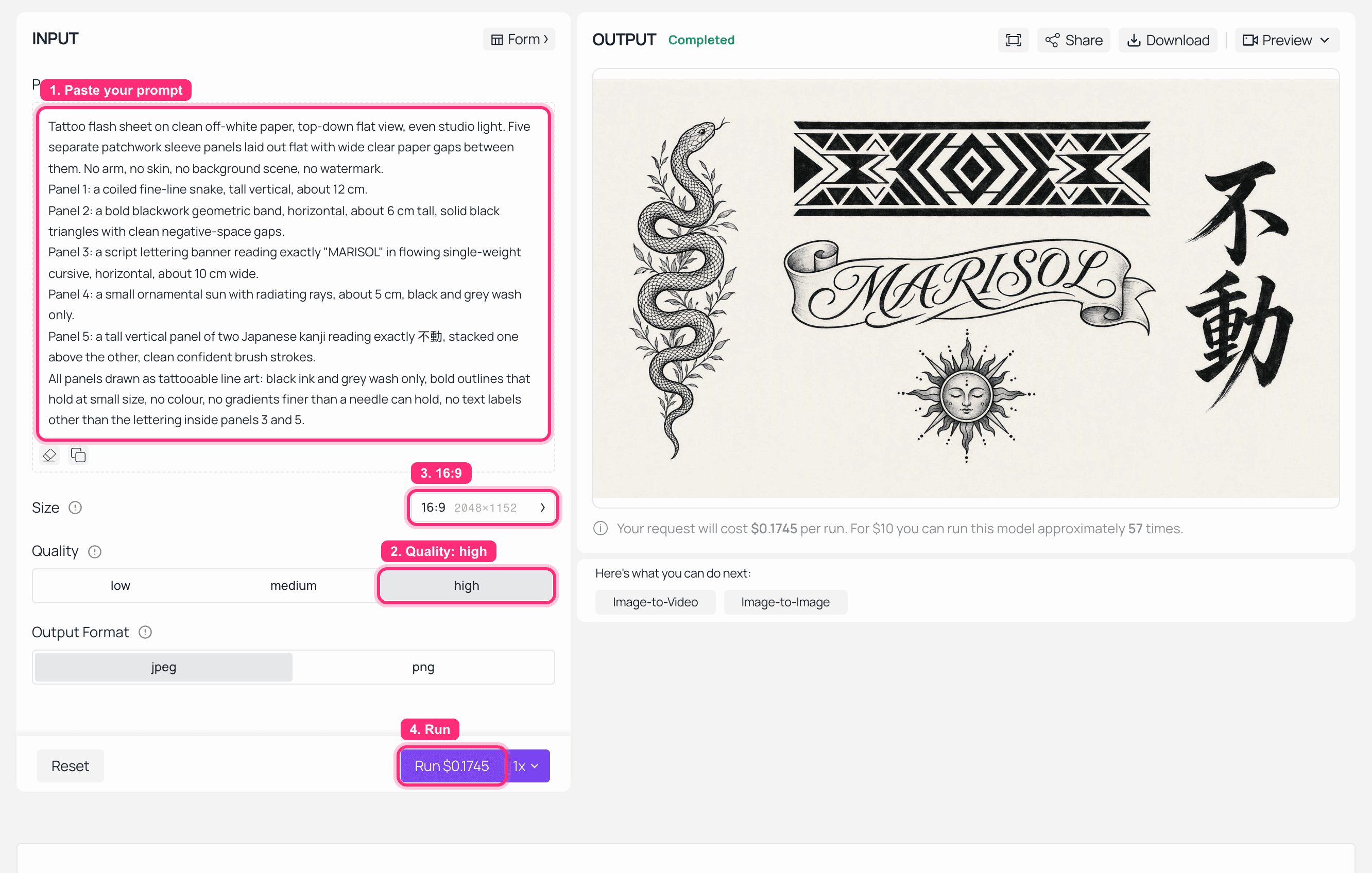
GPT Image 2 playground on Atlas Cloud with the panel sheet prompt filled in, quality set to high, and the finished flash sheet in the output panel
GPT Image 2 on Atlas Cloud: prompt loaded, quality high, the five-panel sheet rendered on the right.
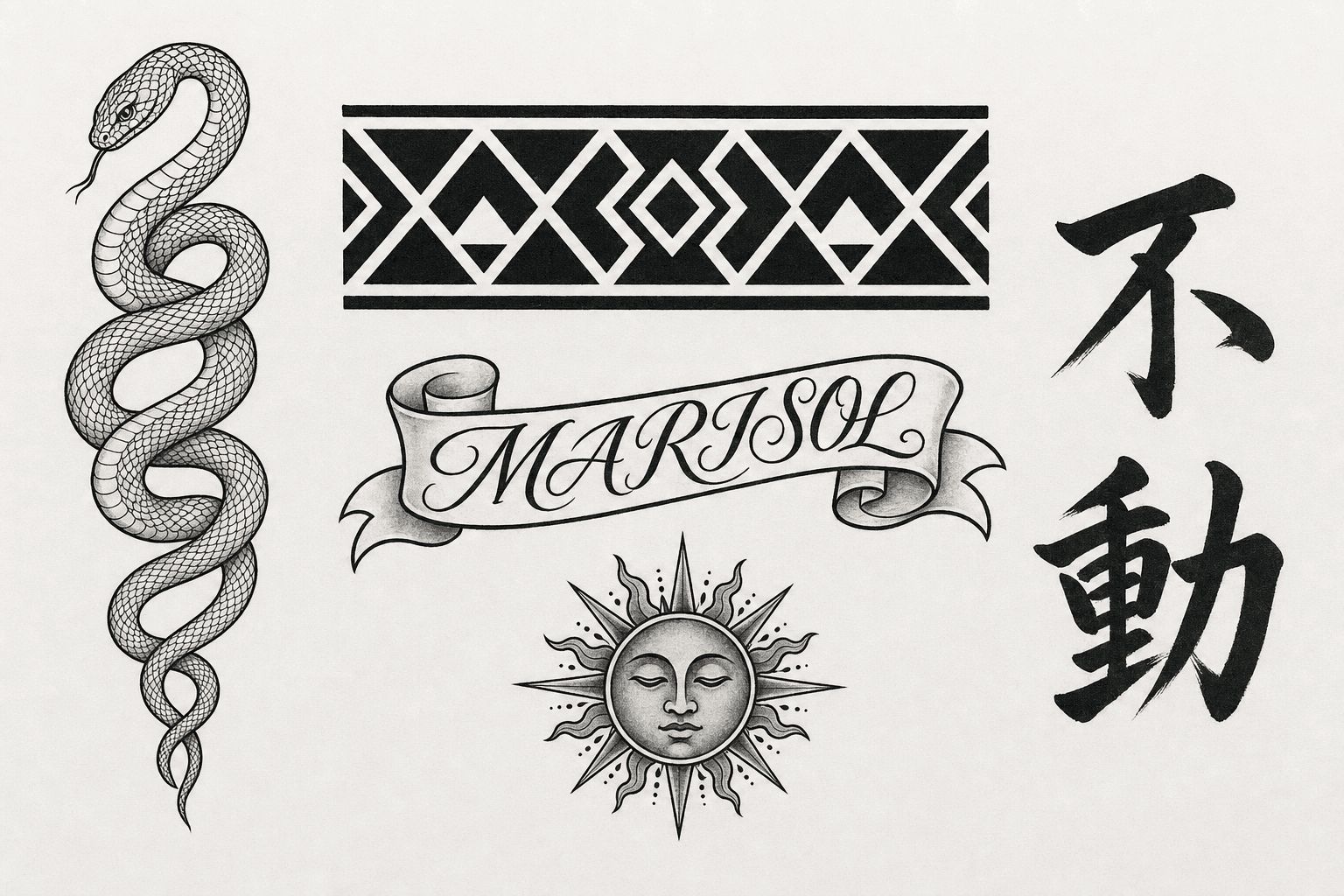
A flat tattoo flash sheet with five separate panels: a coiled snake, a blackwork geometric band, the word MARISOL in script, an ornamental sun, and two vertical kanji reading 不動
The Step 1 deliverable. Five pieces, real gaps, sizes written into the brief. Generated with GPT Image 2 on Atlas Cloud.
Before you move on, zoom to 100% and read the lettering panels. Both of them. If a letter is malformed, rerun now, because the next step will faithfully carry the error onto your skin.
Step 2: Wrap the Panels Onto Your Own Arm and Lock the Lettering
Now the design meets an actual limb. Take one photo of your own arm: natural window light, one light source, arm slightly bent, sleeve pushed to the shoulder, phone held steady. Nothing fancy. The messier and more real it is, the more useful the result.
Load two references into the edit model. Image 1 is your arm. Image 2 is the Step 1 sheet. The prompt does three jobs at once: place each panel, preserve the gaps, and repeat the exact strings so the spelling cannot drift.
text1Using image 1 as the arm and image 2 as the design sheet, tattoo the five panels from image 2 onto the arm in image 1 as a patchwork half sleeve. 2Placement: the coiled snake on the outer forearm; the blackwork geometric band as a cuff two fingers above the wrist; the script banner reading exactly "MARISOL" along the inner forearm, running wrist to elbow; the ornamental sun on the outer upper arm; the two kanji 不動 vertically on the outer forearm above the snake. 3Leave bare skin between the panels. Do not fill the gaps, do not add any new elements. 4Wrap each panel around the curve of the limb so the edges nearest the silhouette compress and disappear around the far side. 5Keep the exact skin tone, freckles, hair, pose, shadows, grain and camera of image 1 unchanged. Ink sits under the skin with slight softening, not printed on top. 6Spelling must stay exactly MARISOL. The kanji must stay exactly 不動. 7
Settings: resolution 2k, two reference images, aspect ratio matched to your arm photo (2:3 or 3:4 for a vertical shot). Do not let it default to landscape, it will crop your arm.
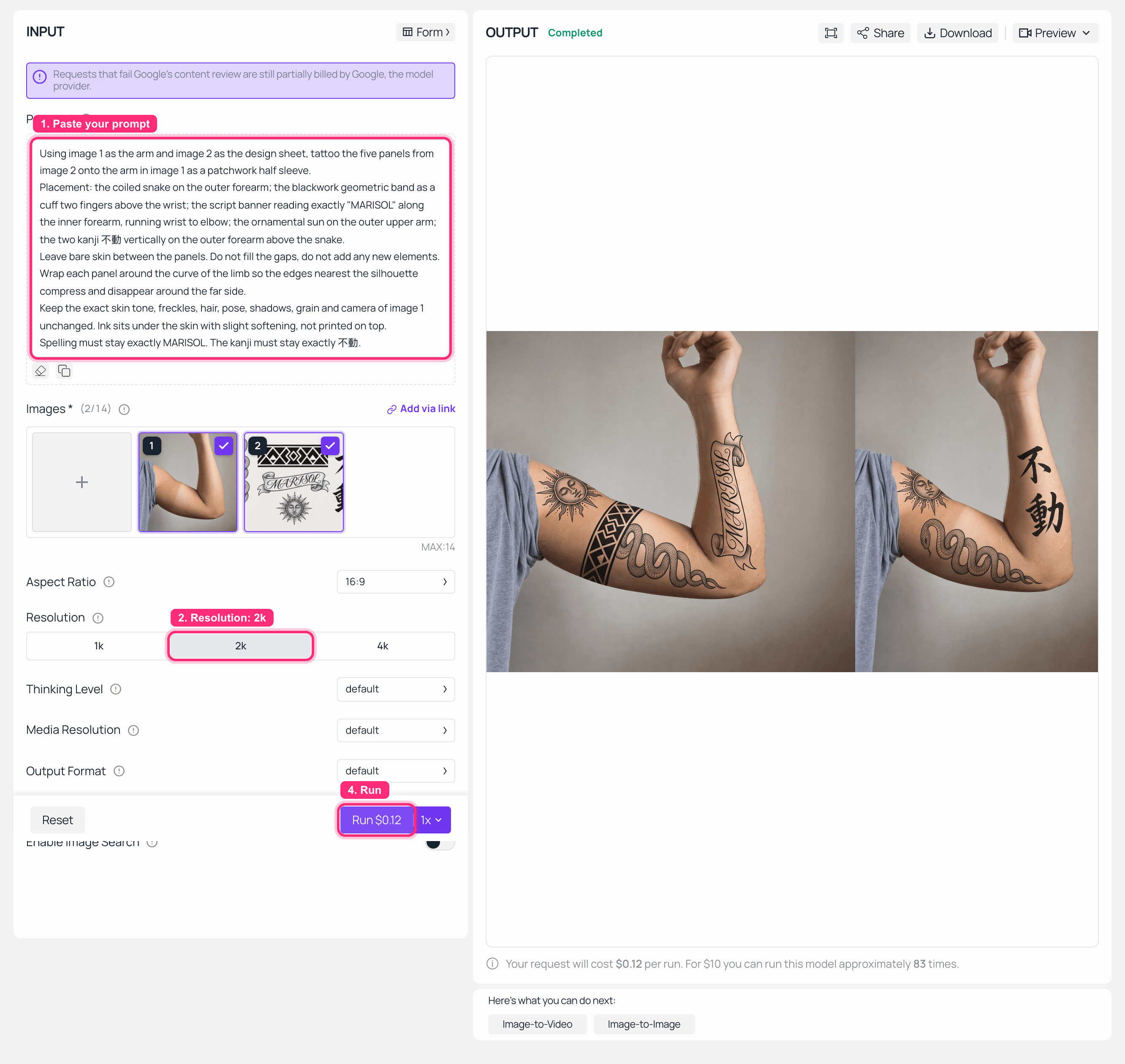
Nano Banana 2 Edit on Atlas Cloud with two reference thumbnails loaded, 2K selected, and the wrapped patchwork sleeve rendered in the output panel
Nano Banana 2 Edit on Atlas Cloud: arm photo and panel sheet loaded as references, 2K, result on the right.
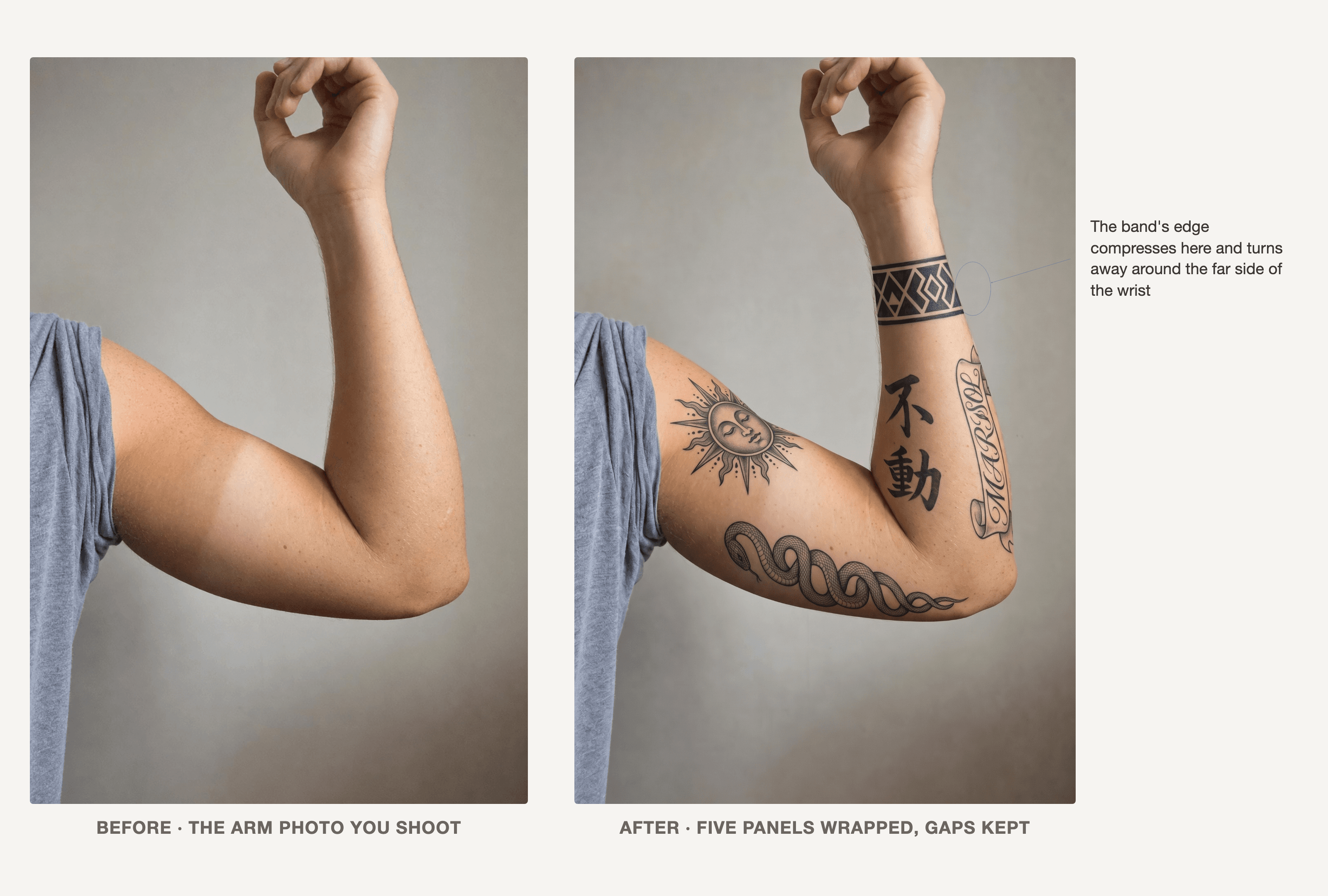
Side by side: the same bare arm photo on the left, the same arm with five wrapped patchwork panels on the right, with an arrow marking where a panel compresses at the arm's edge
Same photo, same pose, same light. The only change is the ink. The arrow marks the tell: panel edges compressing at the silhouette instead of running flat off the arm.
Two checks before Step 3. Zoom to 100% and read every character again, including the kanji, which the model can quietly reshape. Then look at the panel edges near the outline of the arm. If they run straight off the edge at full width, the model painted a decal instead of a tattoo, and you should rerun.
Step 3: Turn the Forearm and Watch What Survives
A still image hides the whole problem. Panels that look balanced from one angle can sit half on the inside of the arm, invisible in every mirror you own. Five seconds of rotation answers that for the price of a snack.
Feed the Step 2 output in as the first frame.
text1The person slowly rotates their forearm inward, then bends the elbow, bringing the inner forearm into view. Fixed camera on a tripod, no zoom, no cut. The tattoo panels stay locked to the skin and follow the curve of the arm as it turns. Natural window light. No new tattoos appear, no lettering changes. 2
Settings: duration 5, resolution 720p, image-to-video with the Step 2 result as input. One warning from experience: confirm the duration control actually committed before you press Run. On several video playgrounds a duration passed programmatically silently reverts to the default and you get billed for the default length with no way to undo it. Look at the field, then look at the quote.
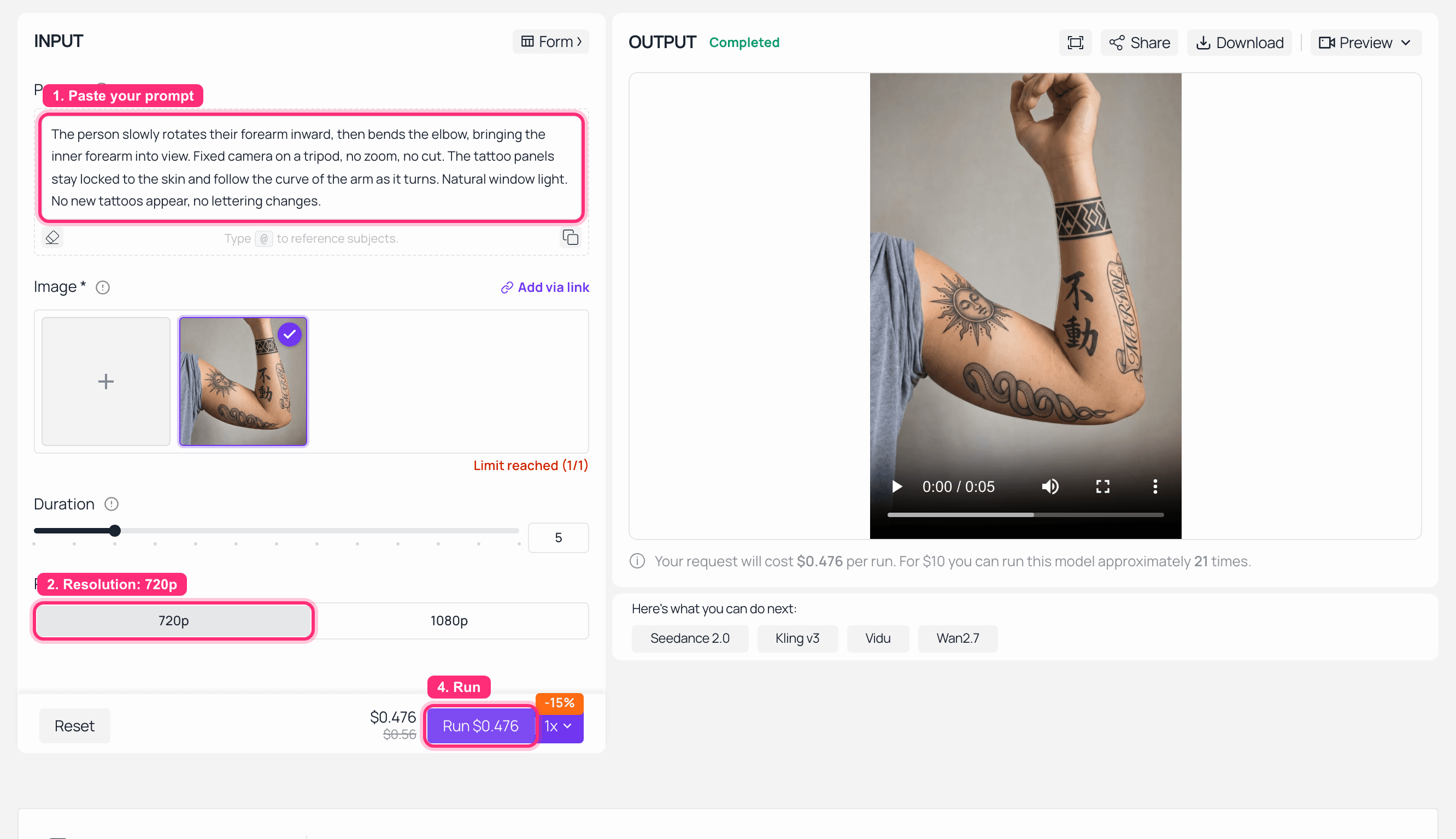
Kling v3.0 Turbo image-to-video playground on Atlas Cloud with the wrapped arm as the first frame, 5s and 720p selected, and the finished clip playing in the output panel
Kling v3.0 Turbo on Atlas Cloud: Step 2 result as the first frame, 5 seconds at 720p, finished clip in the output panel.
The output is the clip at the top of this article. Watch it once for placement and once for the lettering, and you have your answer on both. Send the artist all three: the panel sheet, the wrapped photo, the clip.
AI Tattoo Sleeve Generator Lettering: Font, Name and Kanji Variations
Lettering panels deserve their own pass. Running an ai tattoo font generator step separately, instead of accepting whatever script came out of the first sheet, is the cheapest upgrade in this whole workflow. Feed panel 3 back into the edit model and ask for the same word in four styles at once.
text1Replace the lettering panel with a 2x2 sheet of the same word "MARISOL" in four tattoo lettering styles, spelled exactly the same in all four: (1) fine-line cursive script, (2) blackletter / old english, (3) bold slab serif with clean counters, (4) single-line minimal monoline. Keep it as flat black tattoo line art on off-white paper, no colour, no background. 2
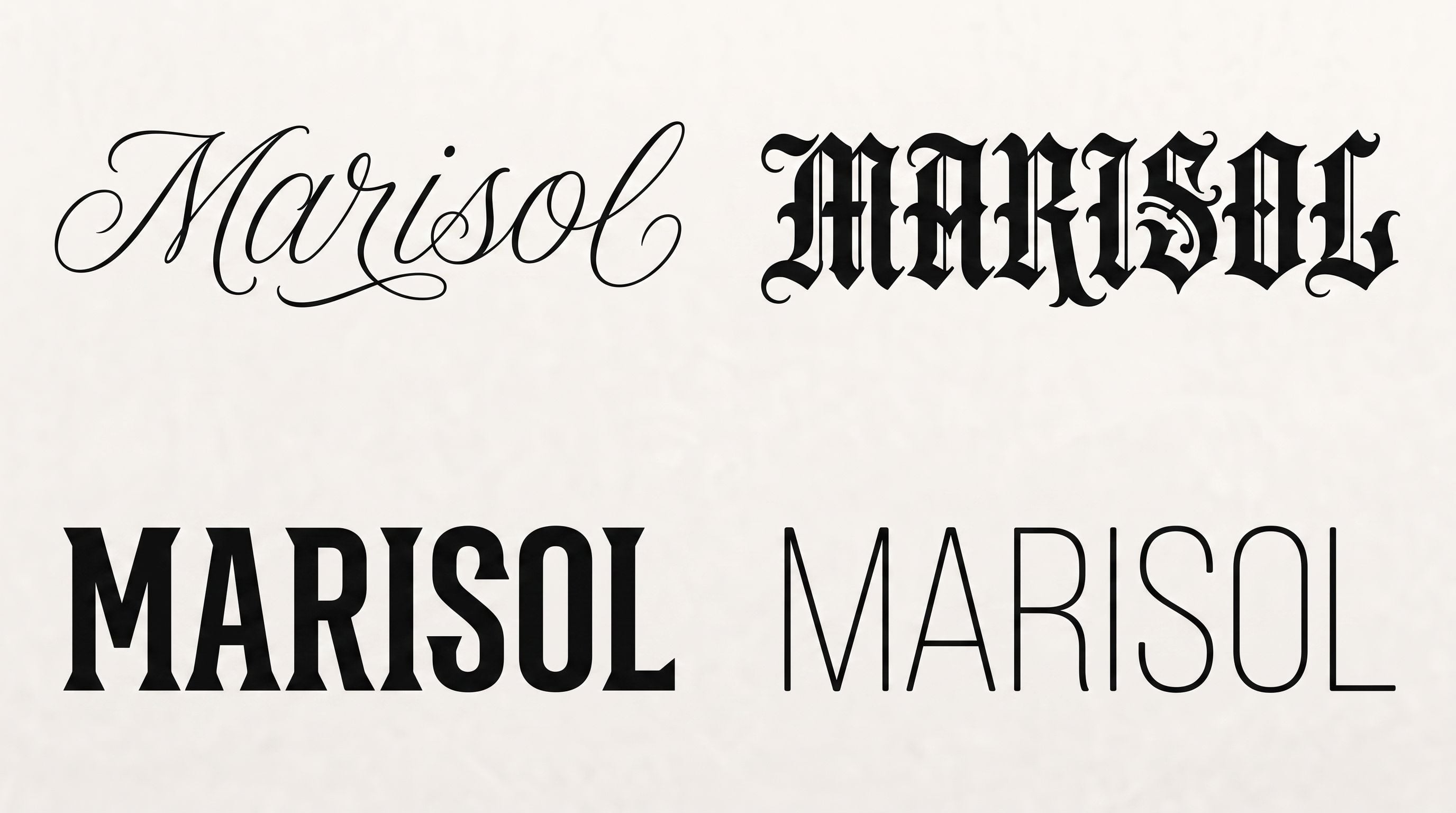
A 2x2 sheet showing the name MARISOL in four tattoo lettering styles: fine-line cursive, blackletter, bold slab serif, and minimal monoline
One word, four styles, one run. Generated with Nano Banana 2 Edit on Atlas Cloud at 2K.
Three notes on the output above.
Names. Any ai name tattoo generator run has one job, and it is not aesthetics. Check the spelling in every variant. Models drop, double and merge letters differently in each style, and blackletter is the worst offender because a broken letterform reads as decoration. An ai tattoo lettering generator pass that produces a beautiful misspelling is worse than no pass at all.
Line weight. Monoline and fine-line script hold up differently over a decade. Ask your artist which of the four survives on your skin at the size you want, since that answer is about your body, not the render.
Kanji. Treat this as a research step, not a design step. Japan Tattoo Studio in Tokyo is direct about the source of the problem: "Most incorrect tattoos originate from AI translation tools, online image searches, Chinese character references mistaken for Japanese or on-native tattoo flash designs" (Japan Tattoo Studio). Their point about why is worth keeping: translation tools handle basic communication fine, but tattoos need cultural nuance and natural phrasing. So before any kanji goes on skin, get a native speaker to confirm two separate things: that the characters mean what you think, and that the phrasing reads as Japanese rather than as Chinese pasted into a Japanese design. We used 不動 here because it is a checkable, well-attested term, and even then you should verify it yourself.
What an AI Tattoo Sleeve Generator Run Costs, and What the Chair Costs
Table 3: the full chain
| Step | Model and settings | Listed page price | What you get |
|---|---|---|---|
| 1 | GPT Image 2, quality high, 16:9 | $0.009 per image | Five-panel flat sheet with lettering |
| 2 | Nano Banana 2 Edit, 2K, two refs | $0.08 per image | The design on your own arm |
| 3 | Kling v3.0 Turbo, 5s at 720p | $0.095 per second, so about $0.48 | The rotation test |
| Chain total, listed rates | about $0.57 | A sendable proposal |
Listed rates checked on the model pages 18 August 2026. Expect the Run button to quote more at high quality tiers, as noted above, and take that quote as authoritative. Even at several times these numbers, the whole chain lands under a dollar or two.
Now the other side. Think Tank Tattoo puts full sleeves at "$1,500 to $6,000", and complex, high-detail, multi-session pieces at "$3,500 to $12,000+" (Think Tank Tattoo). They describe sleeves as multi-session labor projects built over multiple appointments, not one sitting. Rates vary by city, artist and style, so treat those as a range and not a quote.
Line the two up. Verifying a sleeve design costs roughly one run. Getting it wrong costs four figures and months of your life, plus laser or a cover-up if you decide you hate it.
A short word on what you actually hand over. Copyright status of AI-generated images is unsettled, so do not treat your output as a finished asset with rights attached. More practically: send it as a reference sheet, not a spec. Say "this is the direction and the placement, what would you change". Your artist will change plenty, and that is the value you are paying for. The AI got you to a specific, testable starting point. It does not get a vote on the linework.
Frequently Asked Questions
Can an AI tattoo sleeve generator design a sleeve my artist will actually use?
As a reference, yes. As a finished design to be copied, no. Artists reject AI images when they arrive as a demand rather than a direction. Send the three artifacts from this workflow, a panel map with sizes, a preview on your own arm, and a short rotation clip, and you have given the shop placement and scale information that a single pretty render does not contain.
Is there a genuinely free AI tattoo sleeve generator?
Partly. Free tools typically cover the flat-design step only. Atlas Cloud's tool states that your first design generation is free with no credit card, and that you register or add credit after that. It is text-in, image-out, with no arm upload. Wrapping a design onto your own photo and generating a rotation clip both need the paid model pages, because both need your image as an input.
Will an AI tattoo sleeve generator spell my name right?
Not reliably. It is the most common failure mode artists report, and the reason it slips through is that a malformed letter reads as a font choice. Defend against it three times: quote the exact string in the generation prompt, repeat it in the edit prompt, and zoom to 100% to read it character by character in every output. Then have one other person read it out loud.
Is an AI kanji tattoo safe to get?
Not on the tool's word alone. Japan Tattoo Studio attributes most incorrect kanji tattoos to AI translation tools, image searches and Chinese characters mistaken for Japanese. Use the generator for the visual composition, then verify with a native Japanese speaker on two points: the meaning of each character, and whether the phrasing is natural Japanese rather than a Chinese reading. That verification is free and takes one message.
Does a sleeve have to follow one theme, or can it be patchwork?
Both work. Patchwork is not a shortcut, though. It holds together through consistent line weight, consistent black density and a deliberate rhythm of bare skin, usually one to two inches between pieces. Randomly scattered images with no shared visual logic look like clutter, not a collection.
How do I preview an AI tattoo sleeve generator design on my own arm before booking?
One photo, one edit run, one short clip. Shoot your bare arm in window light with the arm slightly bent, feed it plus the panel sheet into the edit model at 2K, then send that result into an image-to-video model for a five-second rotation. Ten minutes total, against a sleeve that gets built across multiple appointments over months.





