

A shopper has read your bullets, zoomed into every photo and still has one question: who actually makes this? Scroll a little further down the page and Amazon gives you a row of swipeable cards under "From the brand" to answer it.
That row is the Amazon Brand Story. Below, we build one card by card for Fieldmere, a fictional small-batch body lotion brand. Every image started from one product photo and one portrait, and every line of copy fits Amazon's character limits. A fill-in template, the Seller Central steps and fixes for a story that won't show up come after.
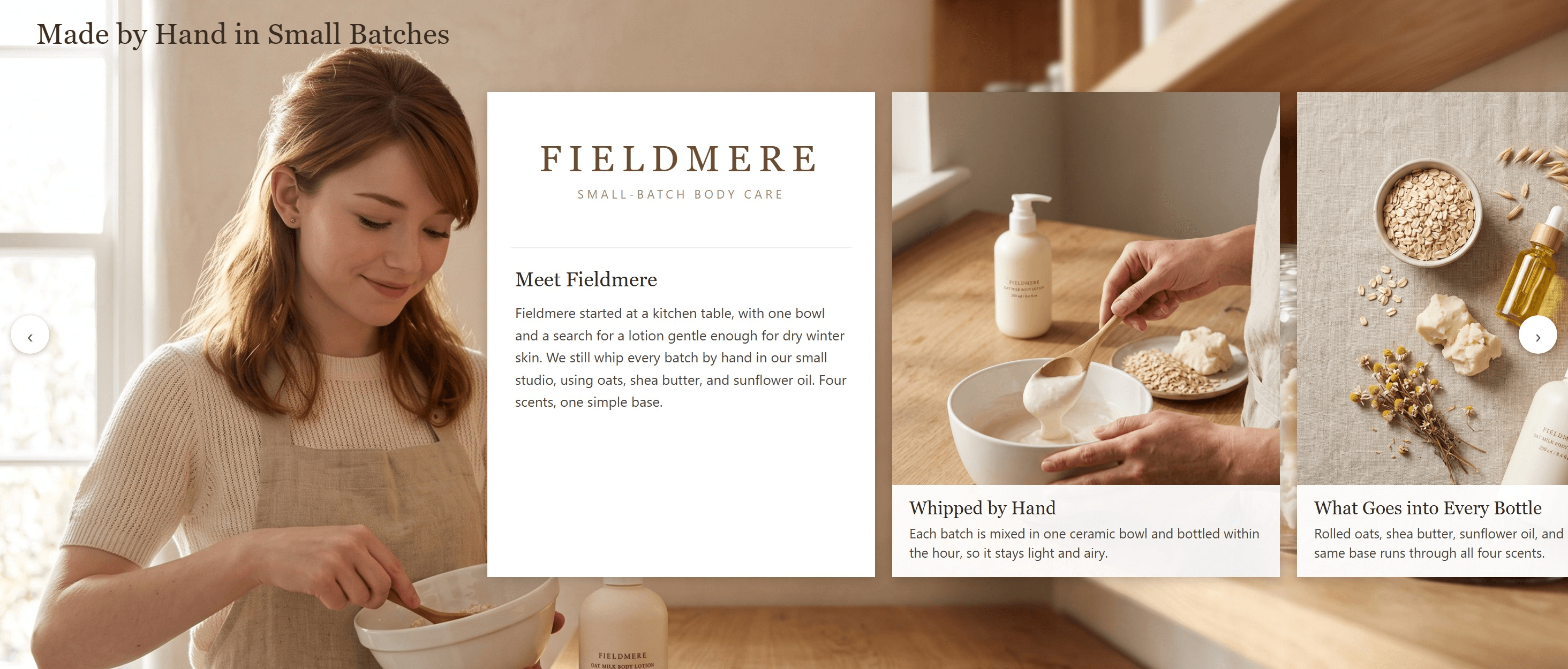
A desktop mockup of the Fieldmere Brand Story. The headline and card text go in Amazon's text fields, not in the images.
Key Takeaways
- Amazon Brand Story is a swipeable carousel under "From the brand," kept apart from product-level A+ Content.
- One Brand Story holds up to 19 cards and can run on every product your brand owns.
- Amazon's developer docs ask for a desktop background of at least 1,464 × 625 and 30-character card titles.
- Amazon's own examples keep the brand name or main subject in the left third of the background.
- The A+ Content Maker built Fieldmere's background and image cards from one lotion photo and one portrait.
What Is an Amazon Brand Story?
Amazon's A+ Content design guide calls Brand Story "a dedicated section on the product detail page under the heading 'From the brand.'" It talks about the brand as a whole: where it started, what it stands for and what else it sells.
It runs apart from a product's own A+ modules. You don't need any A+ Content on your ASINs to publish one, and the same story can sit on every product your brand owns. You build it in A+ Content Manager, so the A+ entry rules apply: a Professional selling account and a brand enrolled in Brand Registry. Our A+ content examples cover the product-level modules.
The format is a carousel. A full-width background sits behind 1 to 19 cards, and shoppers swipe through them. Amazon's 2021 launch post in Seller Forums describes "four pre-formatted layouts," one of which links to your Amazon Store.
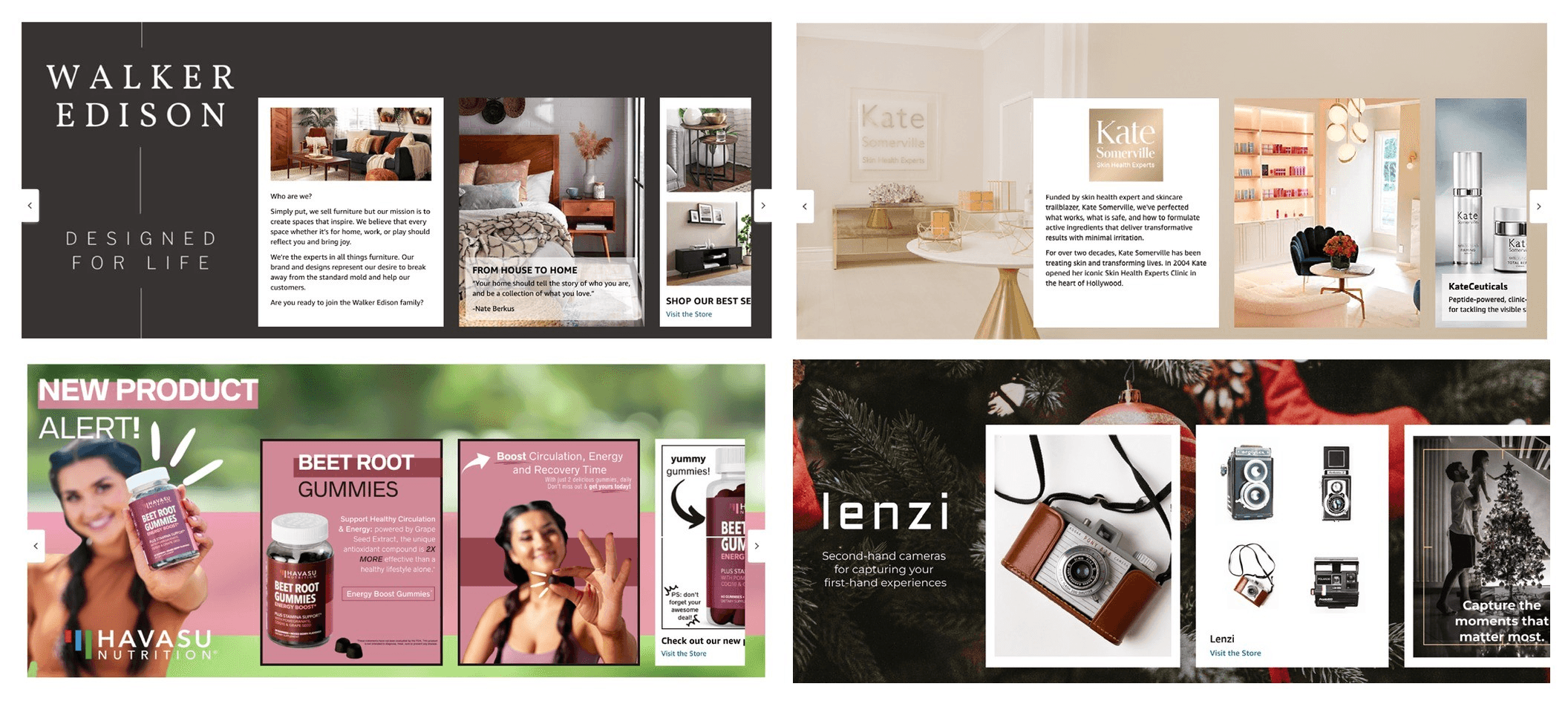
Brand Story examples from Amazon's A+ Brand Story Quick Start Guide . Amazon labels lenzi a mock brand.
Look at where things sit. In all four, the left side of the background carries the brand name or the main subject, and the first card starts between a quarter and a third of the way across. That layout shapes every image below.
Amazon Brand Story Examples, Card by Card
Fieldmere's story has six parts: the background, a logo card, two image cards, a four-product showcase and a Q&A. The image-led cards come first. The copy for the logo card and the Q&A sits in the template further down.
Background Card Example
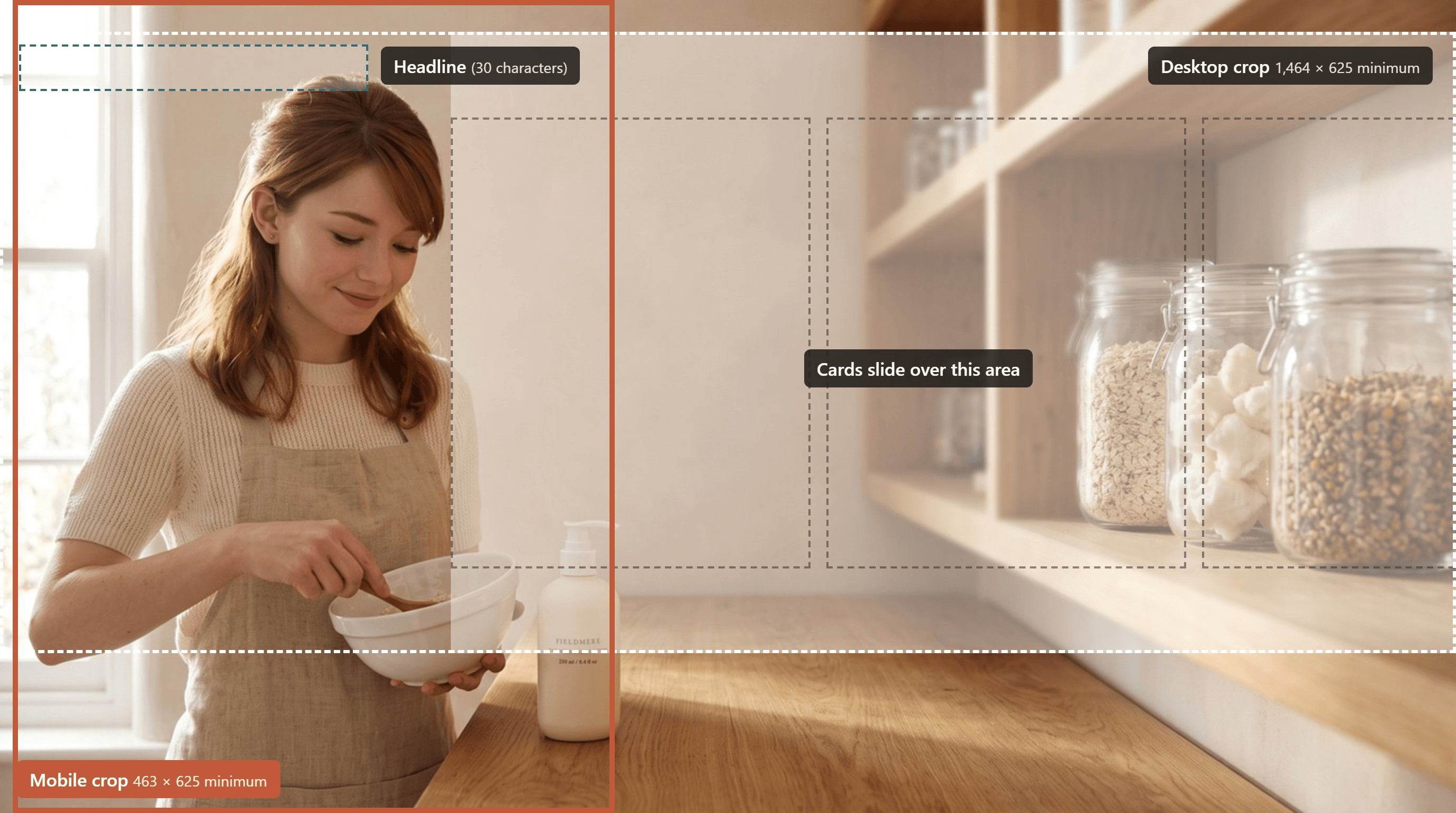
The background is the one card Amazon requires, and each Brand Story has exactly one. Amazon's developer documentation asks for two uploads: a desktop image of at least 1,464 × 625 pixels and a mobile image of at least 463 × 625. An optional headline and short description sit on top.
The cards cover most of the frame past the first third, so we asked for the maker inside the left 30%, with plain wall above her head. The headline went there: "Made by Hand in Small Batches," 29 characters. We left the description empty, since her face fills the space where it would go.
Image Card Examples
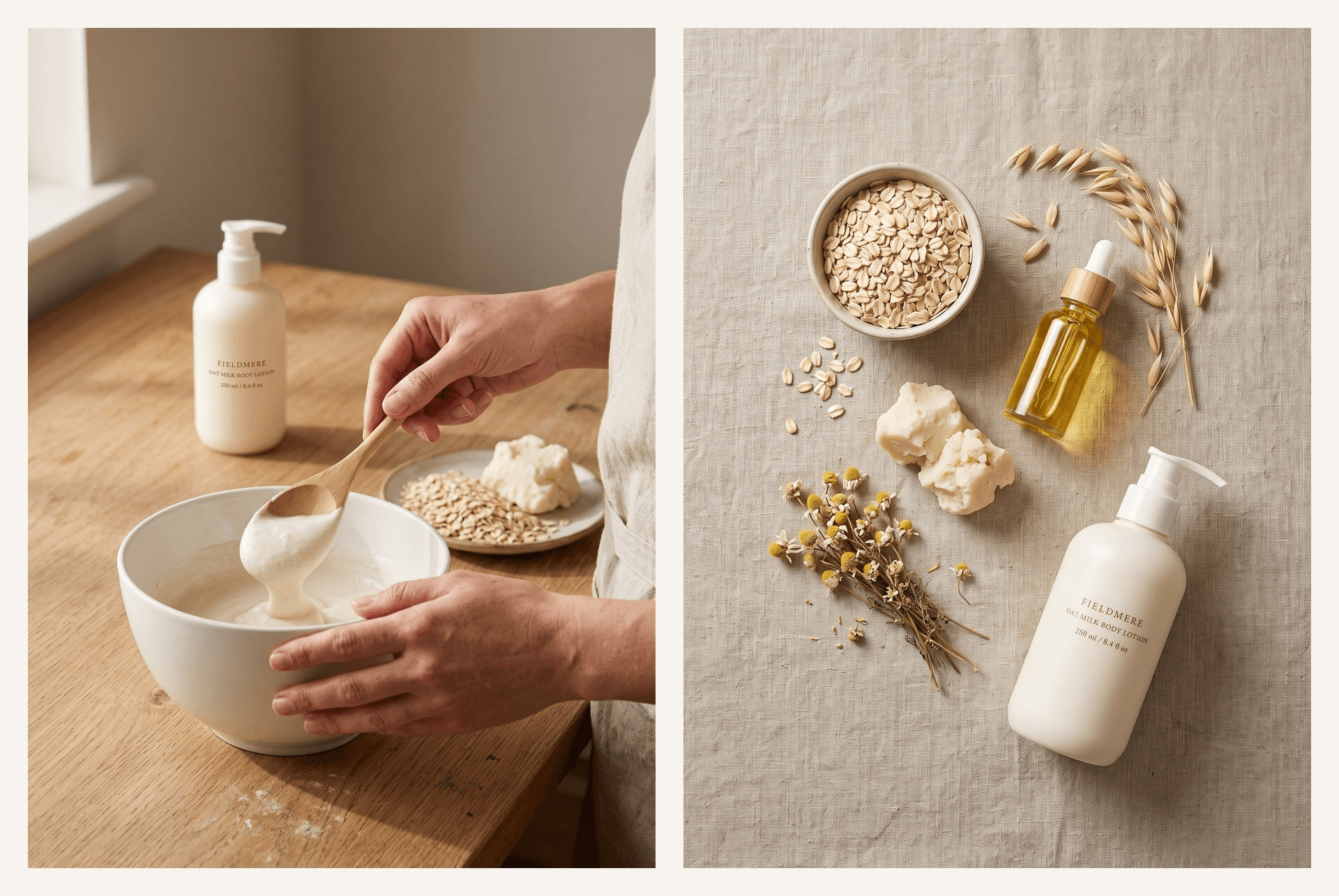
Image cards carry most of the story. Each holds one image of at least 362 × 453 pixels plus a short title and description, and a 3:4 render crops to that shape with very little loss.
Give every card one job. The left card shows how a batch gets made, and the right one shows what goes into it. Neither needs a face, so we ran both without the portrait.
Keep the words out of the pictures. Amazon's A+ content guidelines don't allow "small text that is unreadable when shown on mobile devices," while the title and description fields stay sharp on any screen.
ASIN Showcase Card Example
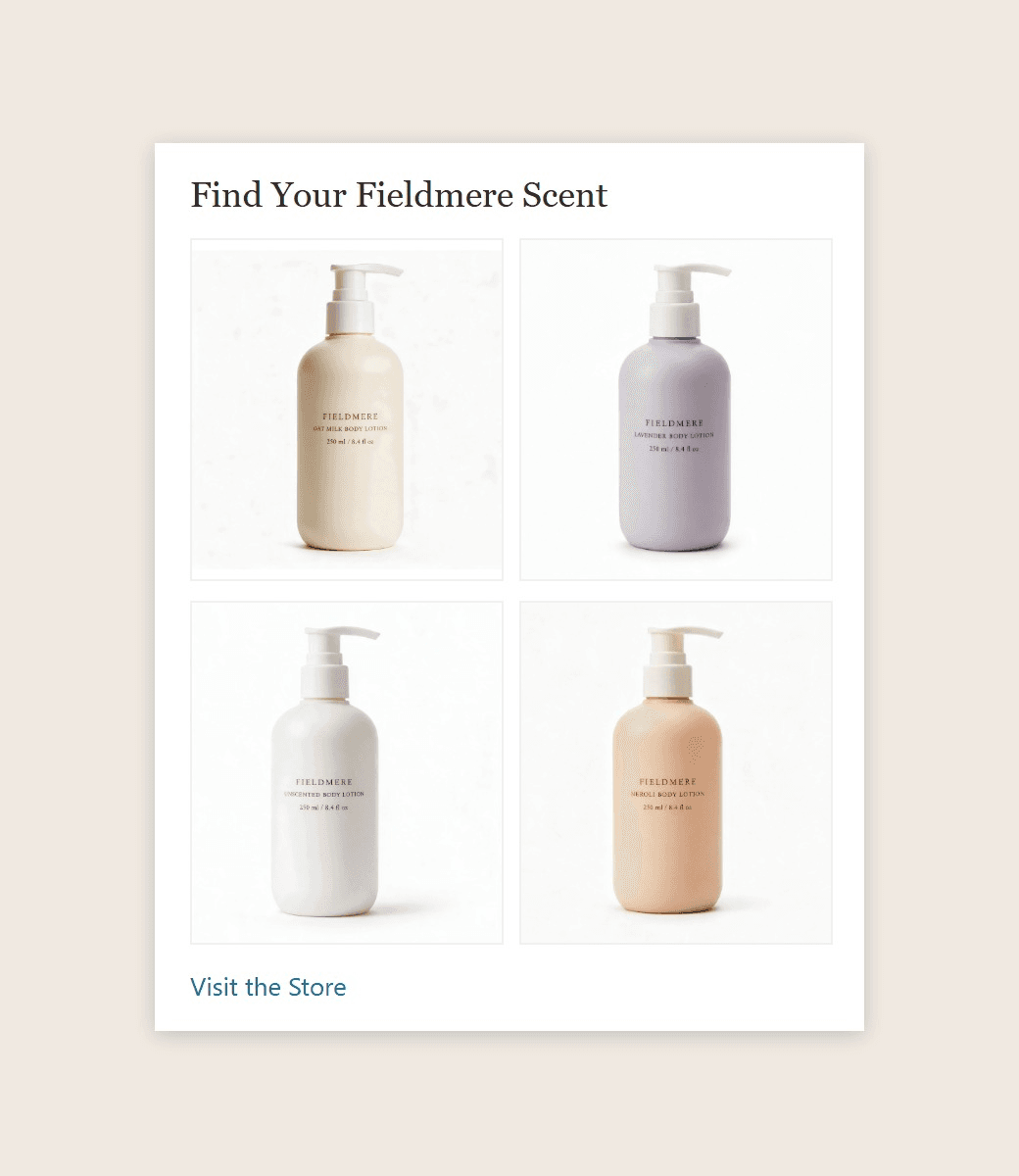
The four scent images were edited from the original bottle photo with Seedream 5.0 Pro Edit on Atlas Cloud.
This is the cross-selling card. It holds exactly four products, each with its own image, and adding your Brand Store ID links the card to your Amazon Store.
Shoot the four products the same way, on the same plain background, so they read as one family. Make them fresh shots rather than your main images, since Amazon's guidelines ask for A+ images that don't repeat the image gallery.
Make Amazon Brand Story Images From One Product Photo
A wide background, two lifestyle cards and a product lineup usually mean a day in a studio with a photographer and a model. The A+ Content Maker workflow on Atlas Cloud starts from one product photo instead and builds each scene around it, with a portrait added when a person should appear.
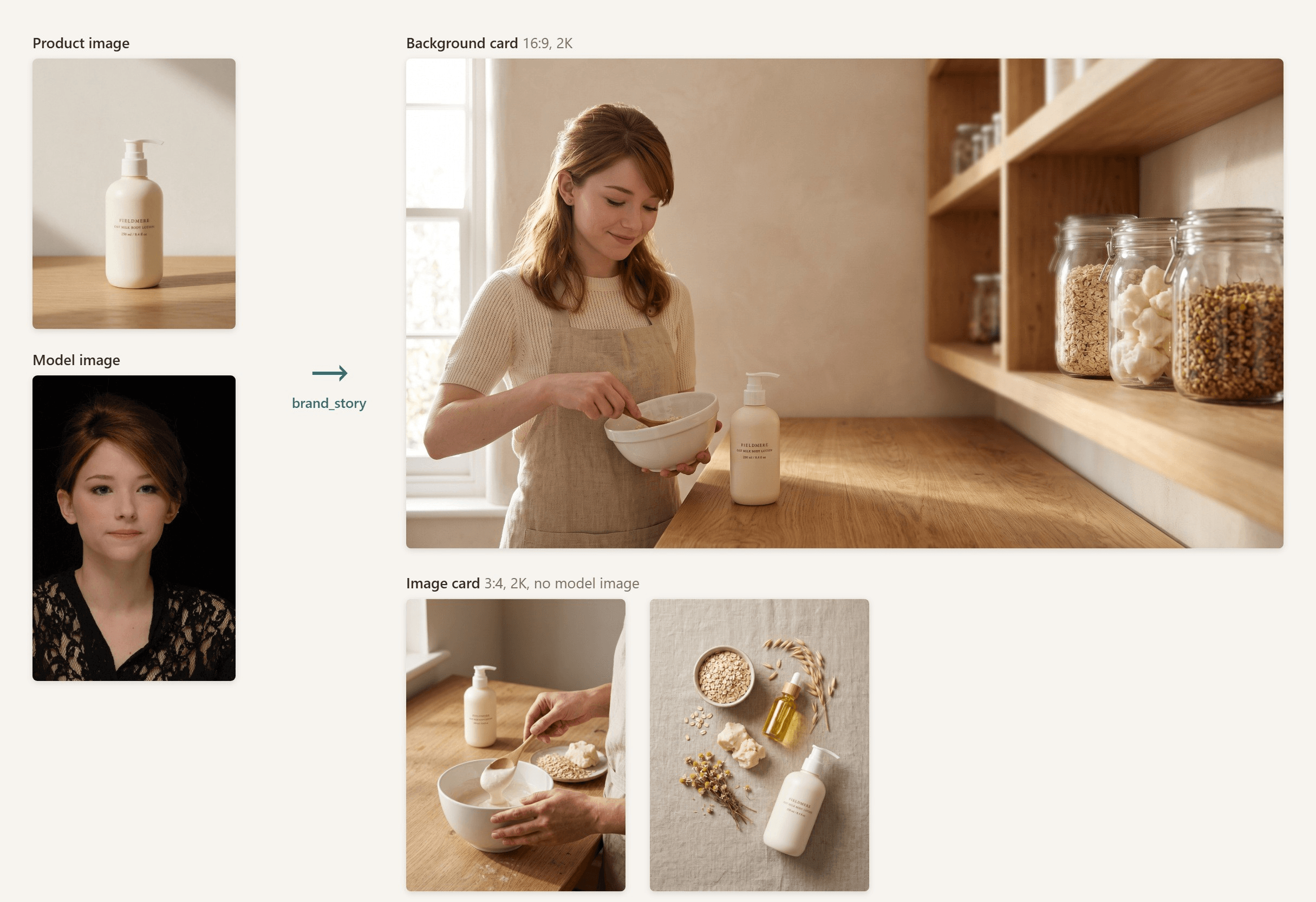
The product photo was generated with Seedream 5.0 Pro on Atlas Cloud as a stand-in for our fictional brand. The portrait is used with permission.
All three outputs kept the bottle's rounded shape and its serif label, and the background carried the face from the portrait into the studio. At 2K, a 16:9 run returns 2,752 × 1,536 pixels, enough for both background crops, and a 3:4 run returns 1,792 × 2,400 for the image cards. Resize each file to the card size before upload.
No product photo yet? Our guide to product photos on a phone covers a setup that works on a kitchen counter.
How to Generate Brand Story Images on Atlas Cloud
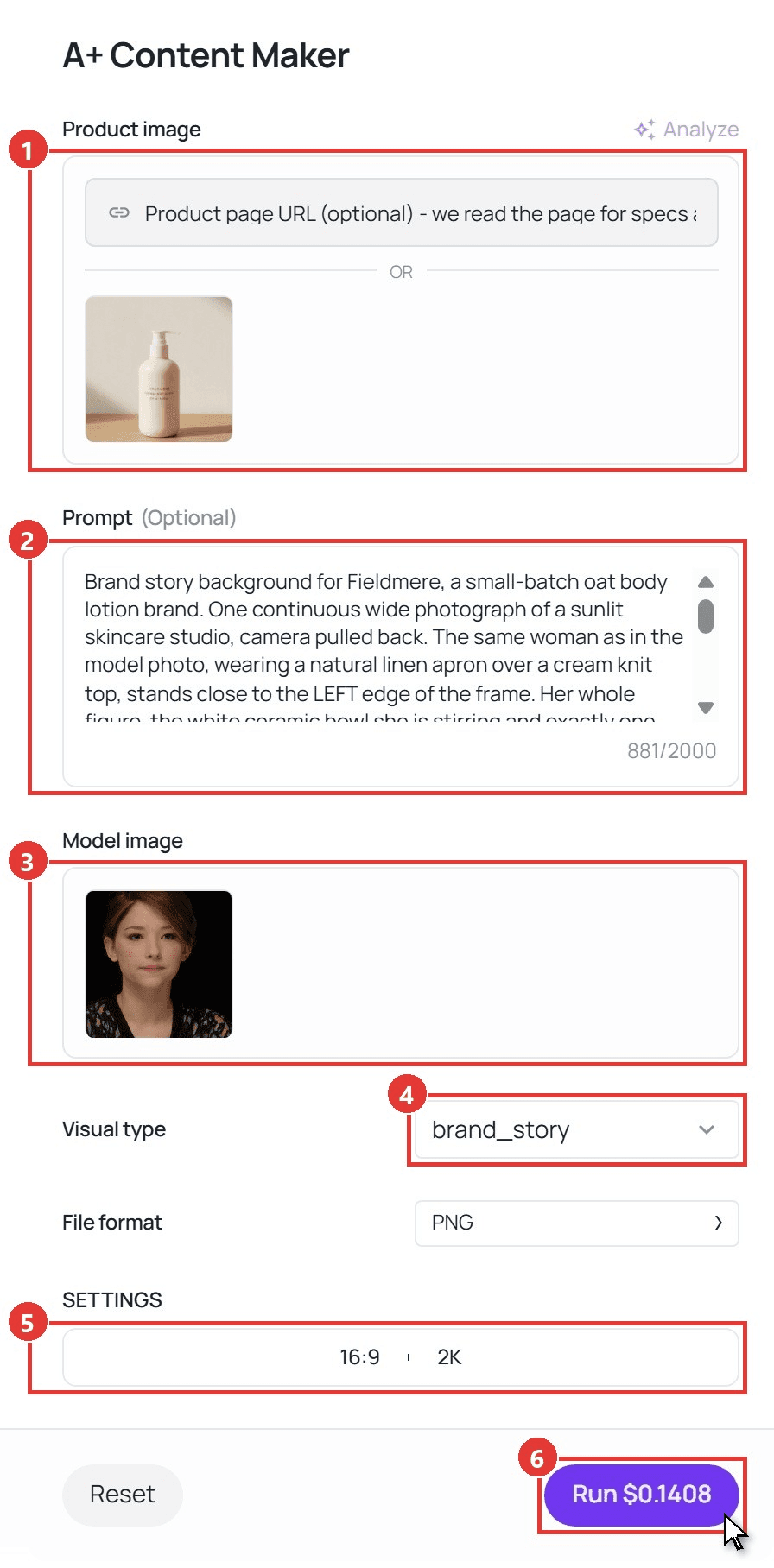
- Upload your product photo under Product image. Pick a sharp shot with a readable label, since the label carries into the scenes.
- Describe the scene in Prompt. Say where the person and the product sit in the frame and how many bottles should appear ("exactly one" stops duplicates), then end with "no words." This is the brief behind the Fieldmere background:
plaintext1Brand story background for Fieldmere, a small-batch oat body lotion brand. One continuous wide photograph of a sunlit skincare studio, camera pulled back. The same woman as in the model photo, wearing a natural linen apron over a cream knit top, stands close to the LEFT edge of the frame. Her whole figure, the white ceramic bowl she is stirring and exactly one Fieldmere pump bottle all fit inside the left 30% of the image width. She smiles down at the bowl. Above her head the wall is plain warm plaster with soft window light, room for a headline. The rest of the frame to the right is a long oak workbench and open shelves with glass jars of oats, shea butter and dried chamomile, softly out of focus. Clear headroom above her head and the bowl fully visible. Warm late-morning window light from the left, natural skin texture, realistic photography. No words, no added text.
- Add a portrait under Model image if a person should appear. Write "the same woman as in the model photo" so the face carries over. Leave the slot empty for hands-only or flat-lay cards.
- Pick brand_story under Visual type.
- Open SETTINGS and set the ratio. We used 16:9 at 2K for the background and 3:4 at 2K for the image cards, in separate runs, since each run takes one ratio.
- Click Run. The image lands in the Output panel, ready to download.
Amazon Brand Story Template Built on Amazon's Limits
Here is the full Fieldmere Brand Story as a fill-in template, with every limit taken from the same developer documentation. Amazon's A+ guidelines add three style rules for the copy: capitalize each major word in a header, use serial commas and spell out numbers under 10.
| Card | Image minimum | Title | Text | Fieldmere copy |
|---|---|---|---|---|
| Background (required, one per story) | Desktop 1,464 × 625 and mobile 463 × 625 | Up to 30 characters, optional | Up to 135 characters over 3 lines, optional | Title: "Made by Hand in Small Batches"; no description |
| Logo and description | Logo 315 × 145 | Up to 30 characters, optional | Up to 450 characters over 10 lines, optional | Title: "Meet Fieldmere"; text: "Fieldmere started at a kitchen table, with one bowl and a search for a lotion gentle enough for dry winter skin. We still whip every batch by hand in our small studio, using oats, shea butter, and sunflower oil. Four scents, one simple base." |
| Image card | 362 × 453 | Up to 30 characters, optional | Up to 135 characters over 3 lines, optional | Title: "Whipped by Hand"; text: "Each batch is mixed in one ceramic bowl and bottled within the hour, so it stays light and airy." |
| Image card | 362 × 453 | Up to 30 characters, optional | Up to 135 characters over 3 lines, optional | Title: "What Goes into Every Bottle"; text: "Rolled oats, shea butter, sunflower oil, and chamomile. The same base runs through all four scents." |
| Four-product showcase | Exactly 4 product images, 166 × 182 each | Up to 30 characters | None, plus an optional Brand Store ID | Title: "Find Your Fieldmere Scent" |
| Q&A | No image | Exactly 3 questions, up to 70 characters each | Up to 200 characters per answer over 3 lines | See the three pairs below |
Guides disagree on the Q&A card. Third-party pages give totals of 600 or 750 characters, while Amazon's spec caps each question and answer on its own, as in the table. Fieldmere's three pairs:
- Where is Fieldmere made? In our own small studio. Every batch is mixed, poured, and labeled by hand before it ships.
- Which scent suits sensitive skin? Start with Unscented. It's the same oat and shea butter base with no added fragrance.
- Will it leave my skin greasy? The shea butter is whipped until it's light, so the lotion sinks in fast and doesn't leave a film on your clothes.
Pick questions about the brand, since product details belong in the A+ modules further down the page.
How to Add a Brand Story on Amazon
The steps below follow Amazon's quick start guide, last updated in February 2023, so a menu label may have moved since.
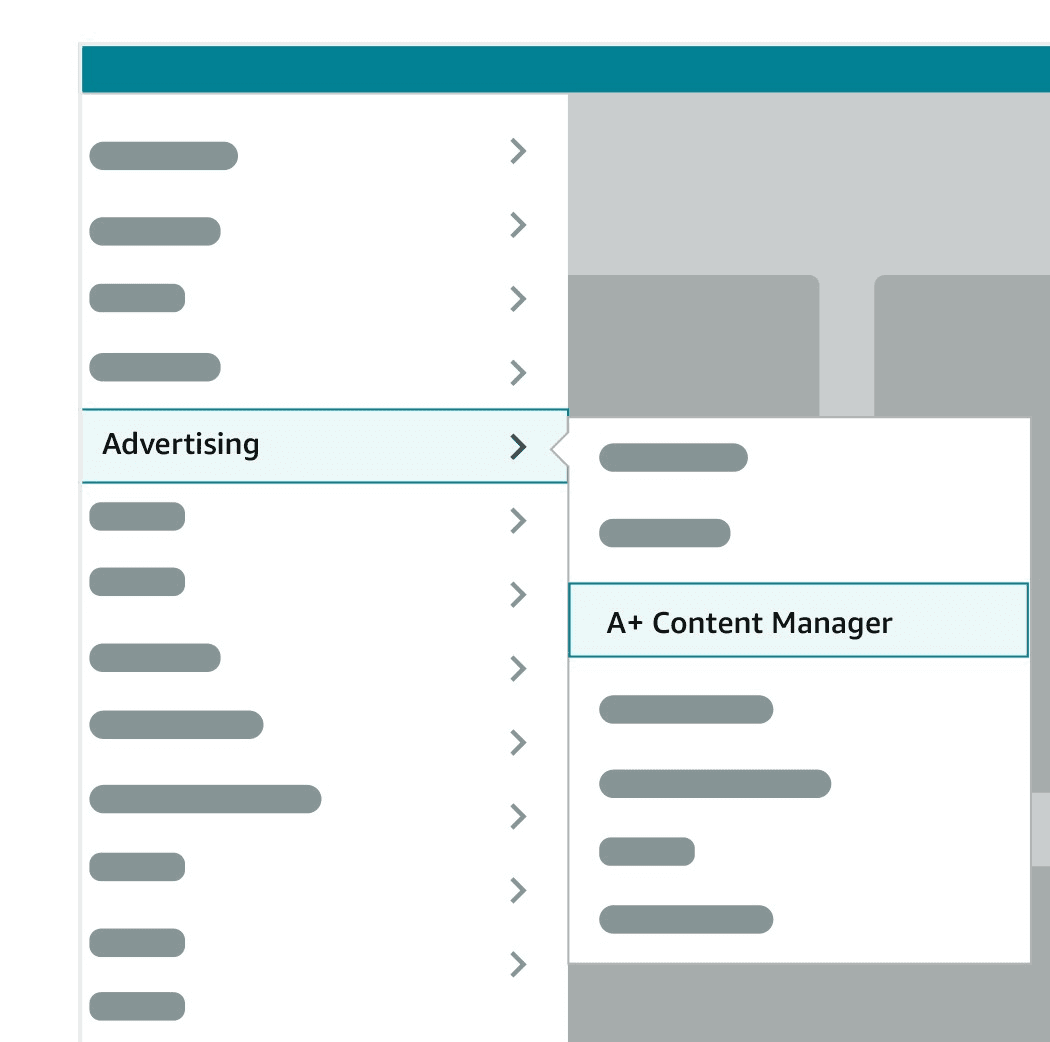
Menu illustration from Amazon's A+ Brand Story Quick Start Guide.
- Go to Advertising, then A+ Content Manager.
- Choose Start creating A+ content, then pick Brand Story.
- Fill in the Brand Carousel Background, then add your cards.
- Enter your Brand Store ID if the showcase card should link to your Store.
- Add the ASINs that should show the story.
- Submit it for review.
Review can take up to seven business days, or longer at peak times, and approved content can take up to 24 hours to go live, according to Amazon's help page on editing A+ content. You can have up to 20 submissions in review at once.
Before you hit submit, check each image file. Amazon accepts JPG, BMP and PNG in RGB, under 2 MB and at least 72 dpi, and it rejects animated GIFs.
Why Isn't My Amazon Brand Story Showing?
The cases below come from Seller Forums threads where Amazon staff replied, plus Amazon's A+ FAQ.
| What you see | What Amazon says | What to do |
|---|---|---|
| Approved, but the story shows on only some ASINs | It can take up to 7 business days to appear | Wait out the window, then check each ASIN on desktop and mobile |
| Brand Story is missing from the content types you can pick | Staff asked the seller to open a case with Seller Support | Open a case with a screenshot of the options you see |
| The story sits above Product description and you want it moved | Staff pointed the seller to a case in the Amazon Ads console | Open a case there and describe where it appears now |
| The submission won't go through because of a word | Text in images is checked against prohibited keywords, just like text boxes | Find the flagged word in your text boxes, alt text and image text, then reword it |
If none of these fit, check the ASIN list first. A Brand Story only shows on the products you added to it.
FAQ
Is a Brand Story required for Premium A+ Content?
It has been, and Amazon staff still listed it in 2026. Amazon's October 2023 eligibility update in Seller Forums set two conditions: a Brand Story published on all of your brand-owned listings, and five approved A+ Content modules in the last 12 months. In a May 2026 forum reply, Amazon staff repeated both, wording the second as five approved and published A+ submissions. Check A+ Content Manager for your own account before you plan around Premium modules.
Can you A/B test an Amazon Brand Story?
Yes, if your brand and products are eligible. Amazon announced in December 2023 that registered brands can test Brand Story content in Manage Your Experiments by creating a new experiment and picking A+ Brand Story. Change one thing per test, such as the background image, so you know what moved the result.
Do AI-generated people in Brand Story images need a label?
If the person is fully AI-generated and photorealistic, yes. Amazon's A+ guidelines ask for the keyword contains-synthetic-performer in the image's metadata, or you can tick "AI-generated people" when you upload to Creative Assets in A+ Content Manager. Photos of real people don't take the tag, even when edited with AI tools. Our Amazon image requirements guide shows how to add the keyword yourself.
Should your Brand Story match your Amazon Store?
It should feel like the same brand. Amazon's design guide suggests coordinating Brand Story with your About Us page. Reuse the same logo, colors and tone, so a shopper who taps through to your Store doesn't feel they've landed somewhere new.
Conclusion
A Brand Story works when each card answers one question a shopper has about the brand. Fieldmere's background shows who makes the lotion, the image cards show how and with what, the showcase offers the other scents and the Q&A clears up the last doubts.
Start with the background, since it sets the look for every card around it. Then fill in the template within Amazon's limits and submit. Your Amazon Brand Story runs on every product you add to it, so work you do once shows up across your whole catalog.





