

You're toweling off after a shower, running a hand over hair that feels a little thinner than it did last year, and the thought just shows up uninvited: what would I look like bald? Maybe it's a dare from a friend. Maybe it's a real question before clippers ever touch your head. Either way, you don't have to shave anything to get an answer anymore. One photo and one sentence is enough for a real preview instead of a guess.

Key Takeaways
- Typing "bald" into an AI photo editor swaps only your hair, so the face looking back at you is still recognizably yours.
- Atlas Cloud's Free AI Hairstyle Changer takes a written description instead of a preset menu, so trying a full-shave description costs nothing, no bald filter app to install.
- A bald filter and a balding filter aren't the same test: one shows a fully shaved head, the other a receding hairline years from now.
- Snapchat has real official bald lenses built in; Instagram doesn't, and TikTok's version is a trend, not one single effect.
- Roughly a third to half of men already show some pattern baldness by age 50, which is a big part of why this question gets typed so often.
What Is a Bald Filter and How Does It Work
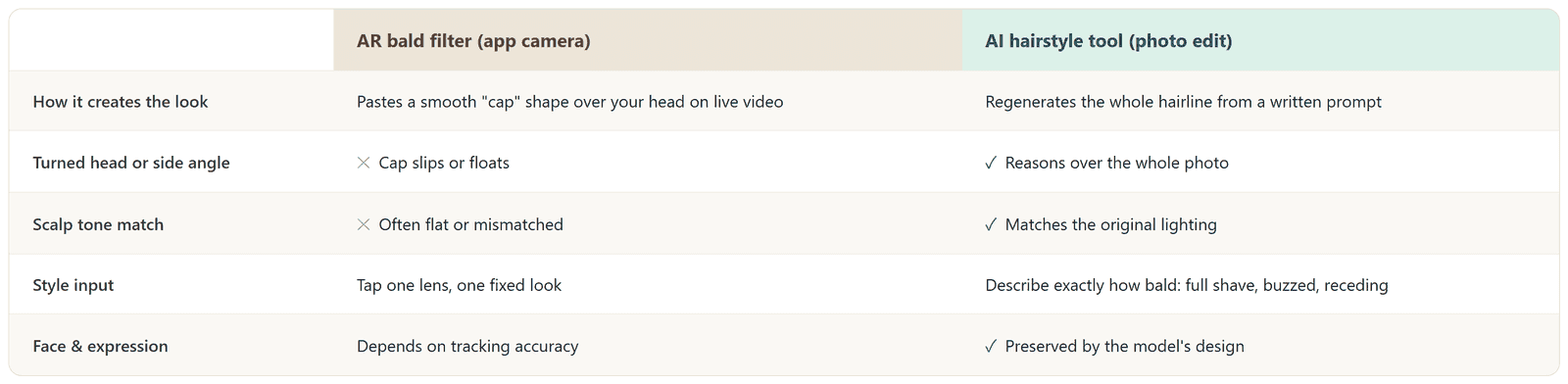
A bald filter is any tool that shows you without hair in a photo or on live video, and the two ways of building one behave very differently. An AR lens, the kind built into Snapchat or a camera app, works by tracking your face in real time and pasting a smooth, hairless shape over the top of your head. It's fast and it's fun, but the shape isn't really reading your actual hairline, it's just following where your face is.
An AI image-editing model does something closer to a rewrite. Give it a photo and a sentence describing a fully shaved head, and it regenerates that region of the image based on your actual hairline, skin tone, and lighting, the same way an AI hairstyle changer swaps in a buzz cut or a new color without touching anything else in the picture. That difference is why one version holds up when you turn your head and the other one doesn't.
See What You'd Look Like Bald With Atlas Cloud's Free AI Hairstyle Tool
Atlas Cloud hosts a set of single-purpose AI Tools built on top of its image models, and its Free AI Hairstyle Changer is a text-description tool, not a preset gallery.
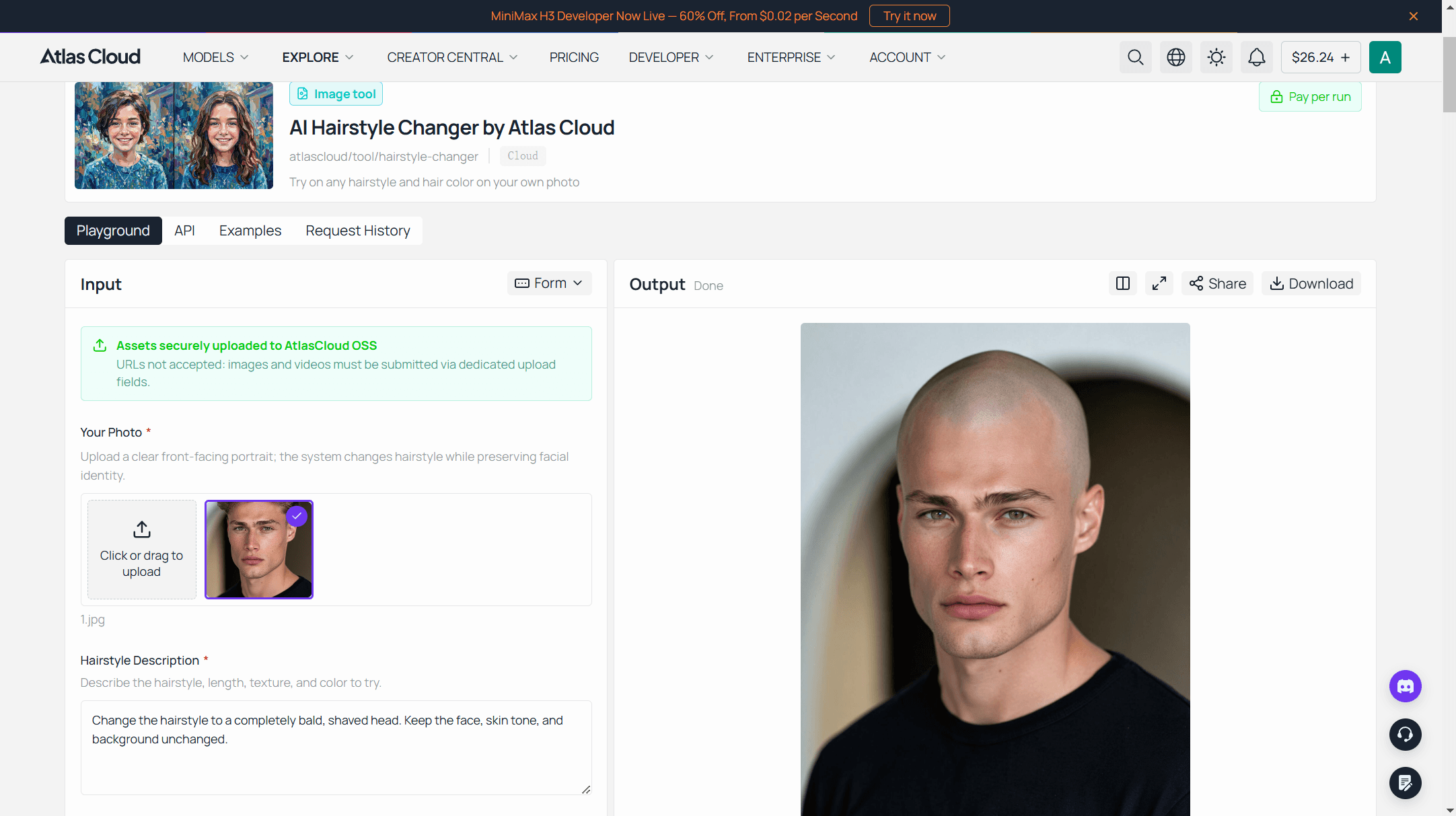
Three steps to a preview:
- Upload a clear, front-facing selfie. Good light, hairline visible, no hat.
- Describe the result as one direct sentence. A prompt like Change the hairstyle to a completely bald, shaved head. Keep the face, skin tone, and background unchanged. gives the model far less to guess at than just typing "bald."
- Generate, then look closely. Check it against the original before you decide anything means anything.
The tool's own page already lists a buzz cut and a skin fade among the cuts it handles from a written description, so a full shave is really just the far end of that same spectrum, not a separate feature. Naming the scalp shape helps too, if you know it, oval, round, a visible crown, since that's the detail a generic bald filter usually skips.
Tips for a Realistic Bald Preview
- Skip anything covering your hairline. Hats, hoods, or hair pulled forward hide exactly what the model needs to see.
- Even lighting beats a dramatic angle. A shadow across half your face tends to carry over into the scalp edit.
- Name your head shape if it's relevant. "A slightly oval scalp" reads differently than a flat description of just "bald."
- Compare it at full size, not as a thumbnail. Hairline edges and ear shadows are where an inconsistent edit usually shows first.
Build a Bald Filter Into Your Own App via API
Running one preview in a browser is fine for personal curiosity. A barbershop's booking page, a hair-loss clinic's consultation tool, or a batch job across a whole client list needs the model directly instead.
Step 1: Create an API key. Generate one from the Atlas Cloud console and keep it server-side.
Step 2: Check the schema. Seedream v5.0 Pro Edit, part of the broader ByteDance model collection on Atlas Cloud, lists its full parameter set right on its model page, no login required to read it. The fields that matter for a bald edit:
| Field | Required | Default | Notes |
|---|---|---|---|
| model | Yes | N/A | bytedance/seedream-v5.0-pro/edit |
| prompt | Yes | N/A | State "completely bald" explicitly, don't rely on "short hair" alone |
| images | Yes | N/A | 1 reference selfie is enough; up to 10 accepted |
| size | No | 2048*2048 | A portrait preset like 1328*1776 bills at the lower tier |
| output_format | No | jpeg | jpeg or png |
Step 3: Send the request and poll for the result.
plaintext1curl -X POST https://api.atlascloud.ai/api/v1/model/generateImage \ 2 -H "Authorization: Bearer $ATLAS_API_KEY" \ 3 -H "Content-Type: application/json" \ 4 -d '{ 5 "model": "bytedance/seedream-v5.0-pro/edit", 6 "prompt": "Change the hairstyle to a completely bald, shaved head. Keep the face, skin tone, and background unchanged.", 7 "images": ["https://your-cdn.example.com/selfie.jpg"], 8 "size": "1328*1776", 9 "output_format": "jpeg" 10 }'
plaintext1curl https://api.atlascloud.ai/api/v1/model/prediction/{prediction_id} \ 2 -H "Authorization: Bearer $ATLAS_API_KEY"
The first call returns a prediction ID right away; poll the second endpoint until status reads completed, then read the image out of outputs.
Bald Filter vs Balding Filter: What's the Difference
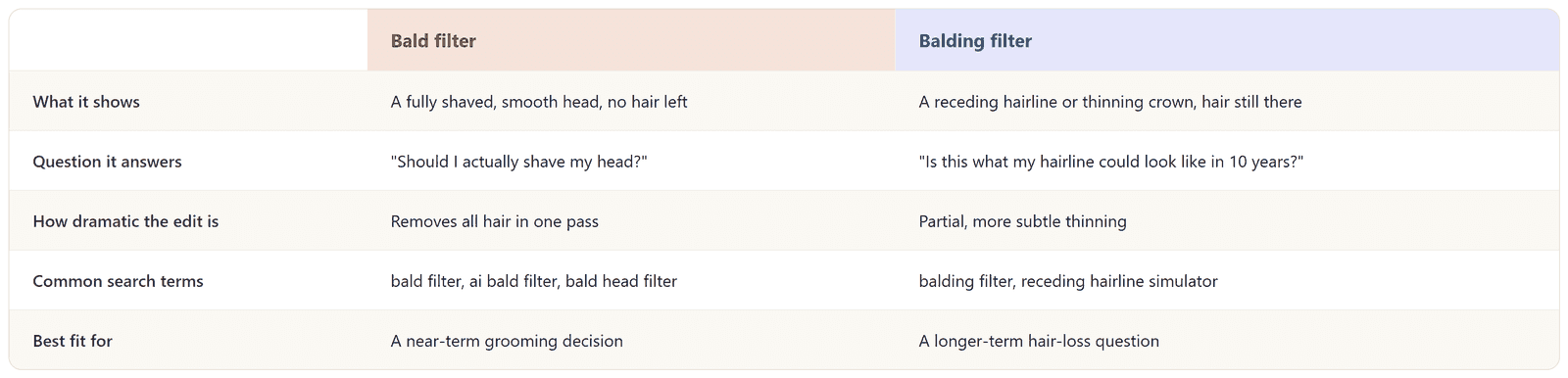
These two get typed into the same search box constantly, and they're answering different questions. A bald filter removes all of it, a full shave, nothing left. A balding filter does something more restrained: it thins the crown or pushes the hairline back, closer to early-stage male pattern hair loss than to a finished shave.
One is a near-term grooming decision. The other is closer to a forecast: what your hairline might do a decade from now, not what a razor would do tonight.
Bald Filter Apps and Bald Head Simulators Worth Knowing
Search bald filter app, bald filter online, or bald photo filter and the results all split into roughly the same three groups, and knowing which one you're actually looking at matters before you upload anything.
Dedicated bald filter sites build the entire product around this one edit, usually a quick single-purpose result with no other editing options attached. General photo-editing suites bundle a bald option in alongside dozens of other filters, background tools, and upscalers, useful if you're already in the app for something else. Developer platforms expose the underlying model directly, the route that matters if the goal is building this into an actual product instead of running it once for yourself.

One plain-language warning here: a fixed bald filter app is working from a template shape, so it tends to look most convincing on a straightforward, front-facing photo and less convincing the moment your head is tilted or your ears are partly covered by the current hairstyle. Source-photo quality turns out to matter across this entire category of tool, not just bald edits, which our free AI headshot roundup covers in more depth.
Why So Many People Search "What Would I Look Like Bald"
Part of it is pure curiosity, the same impulse behind trying on a wig in a costume shop mirror. But a good chunk of this search volume traces back to something less playful: male pattern baldness is genuinely common, and it starts earlier than most people expect.
Data from the NIH's Endotext chapter on male androgenetic alopecia puts it plainly: 30% to 50% of men show some degree of pattern baldness by age 50, and fewer than 15% show little or no baldness at all by age 70. Typing this question into a search bar is often someone doing the math on their own hairline before it becomes an obvious problem, not after.
Then there's the more practical angle: an actual grooming decision. Growing out thinning hair for another year or shaving it down to nothing are two very different looks, and neither is reversible on the same afternoon you decide. A preview that costs nothing and takes under a minute is a reasonable thing to check first.
If a full shave feels premature, our men's hairstyle try-on guide walks through which cuts suit which face shapes before committing to either direction.
Frequently Asked Questions
Is there a bald filter on Snapchat?
Yes, and it's a real built-in option, not an urban myth. Snapchat carries several official and community lenses named directly for this, including one simply called "Bald Filter", searchable from Snapchat's own lens explorer. For everything else Snapchat's camera can and can't do with a face right now, our Snapchat face swap guide covers the other identity-editing lens in the app.
Does Instagram have a bald filter?
Not as a first-party effect. Instagram's own "bald filter" topic page is really a collection of posts using TikTok effects, Snapchat lenses, or third-party apps, then reposted to Instagram Reels or Stories. There's no single dedicated in-app filter behind any of it.
Is there a bald filter on TikTok?
There's a bald filter trend on TikTok, not one single official effect. Under that tag you'll find creator-made AR effects, CapCut-based AI templates, and plenty of prank and reaction videos, some racking up millions of views, but no single filter that TikTok itself ships as "the" bald filter.
Is an AI bald filter free to use?
Atlas Cloud's Free AI Hairstyle Changer runs at no cost from a photo and a written description, the same free flow whether the request is a buzz cut or a full shave. Several general photo-editing apps also include a bald filter option in their free tier, usually alongside other effects.
Does a bald head filter work well for women?
The mechanism doesn't care about gender since it's working from a written description and your actual photo instead of a fixed menu. Results depend more on how clearly the source photo shows the current hairline than on anything else.
Is it safe to upload my photo to a bald filter app?
That depends entirely on which app. A dedicated bald filter site or a general photo-editing suite should have its own privacy policy to check before uploading, and a browser-based tool tied to an account, like Atlas Cloud's, processes the photo through that account instead of taking an anonymous upload. Read the specific service's policy rather than guess.
What's the real difference between a bald filter and a balding filter?
A full shave versus a thinning crown or a receding hairline, covered in more detail above. The two search terms get typed almost interchangeably, but they're previewing two different outcomes.
Can I use a bald head app on my phone?
Atlas Cloud's hairstyle tool and most competing bald filter sites run in a phone's browser, no app install needed, though a handful of dedicated bald head apps do exist as standalone downloads if that's the preference.
Conclusion
The honest version of what would i look like bald doesn't come from an AR cap floating over a live video feed, it comes from a model that actually looks at your hairline, your skin tone, and your face before it answers. That's the difference between something you laugh at once and something that actually helps you decide.
Start with the free version, write the shave out as one specific sentence instead of a single word, and judge the hairline and ears honestly before you read anything into the result. Whether the answer settles a real decision or just satisfies a five-minute curiosity, that's the only test worth applying to a bald filter before you trust what it shows you.





