Every tool in this category makes the same promise: upload a photo, describe or pick an outfit, get the person back in new clothes. The promises are identical; the results are not. To find the best AI clothes changer, we pulled every free-tier rule, watermark policy, and price from each vendor's own pages. Where those pages contradict themselves or publish nothing, we say so. Here is what holds up, tool by tool, starting with a full comparison table.
Key Takeaways
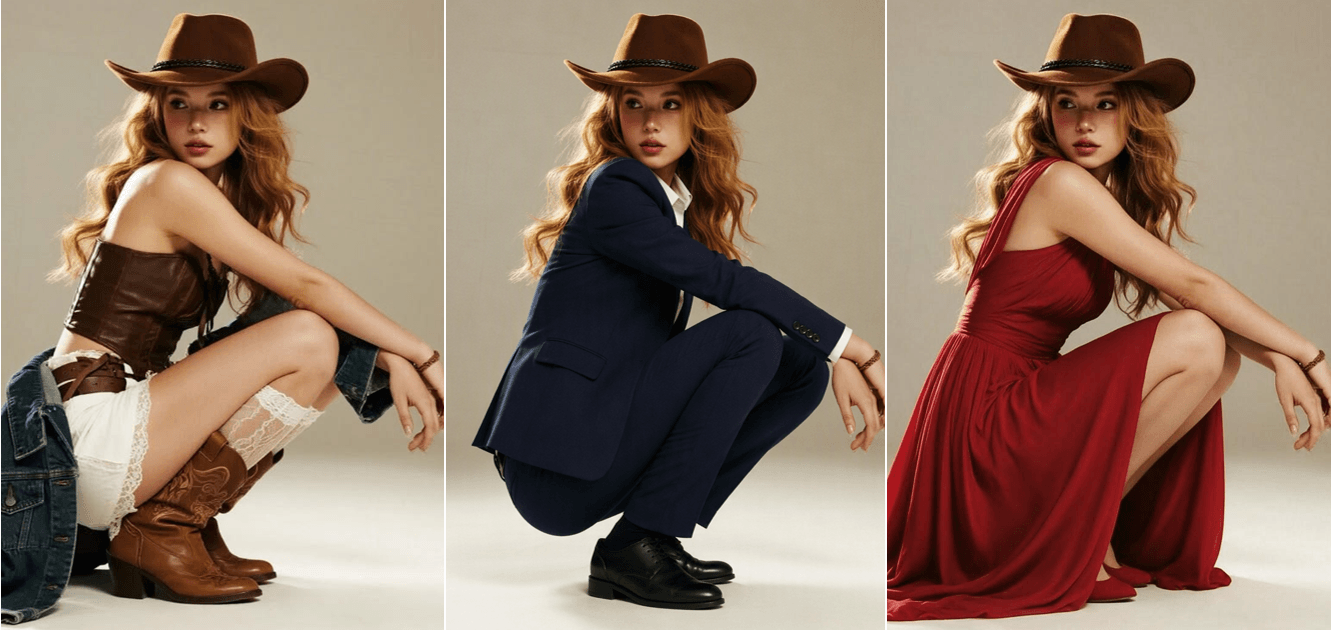
- A good AI clothes changer redraws only the outfit and keeps face, pose, and lighting untouched, so the swap reads as the original shot.
- You can change outfits free in your browser on Atlas Cloud: upload a photo, describe the new outfit, download a full-resolution result with no watermark.
- Free tiers differ more in watermark and login friction than in output quality; several vendors publish conflicting rules on their own sites, so check before you commit.
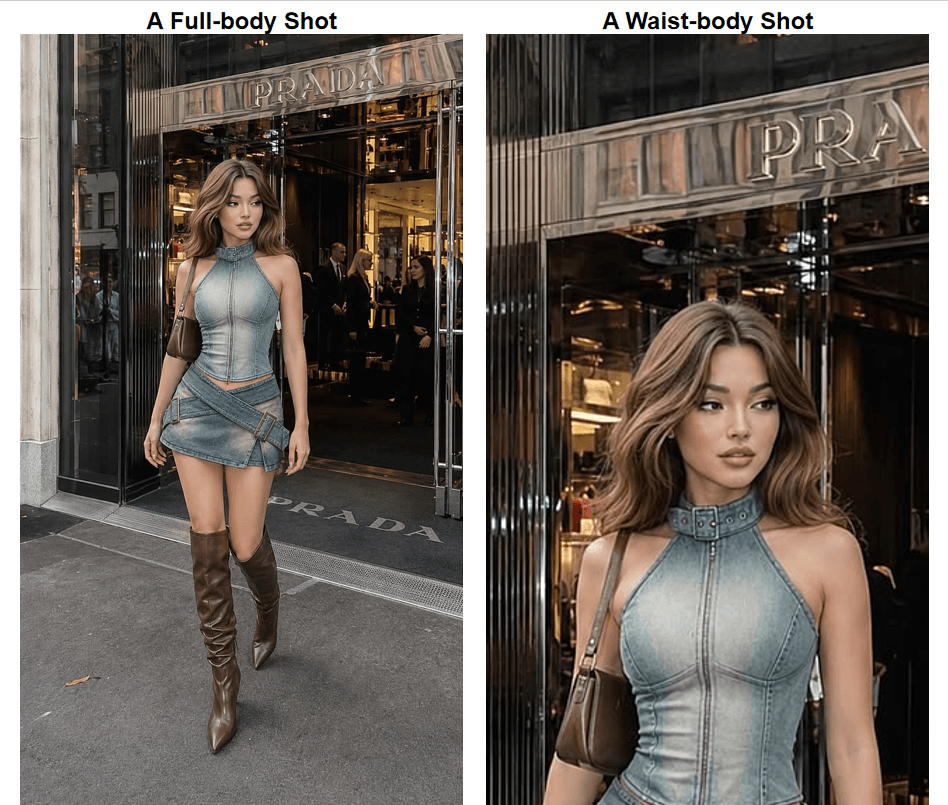
- Give any tool room to work: if the new outfit includes shoes, upload a full-body photo instead of a waist-up crop.
- Sellers can batch outfit variants from one model photo through the Atlas Cloud API instead of booking new shoots.
AI Clothes Changer Comparison Table
| Tool | Best for | Free tier (as published) | Watermark on free | Login to generate |
|---|---|---|---|---|
| Atlas Cloud | Overall quality, one-off swaps that can scale | First run free at full resolution | No | Yes (Google, GitHub, or email) |
| Fotor | Quick edits in a browser editor | Credits earned via daily tasks, no fixed number published | Yes (Basic plan exports are watermarked) | Not stated |
| YouCam | App users, preset outfit styles | 5 credits at sign-up; a clothes run costs 2 | Yes (watermark-free is a paid-plan row) | Sign-up required for credits |
| Vidnoz | Preset outfit template library | Limited free uses daily, no number published | Site pages conflict; see entry | No to generate, yes to download |
| Canva | People already working in Canva | Monthly AI allowance (up to 200 standard or 20 premium uses) | Not stated | Canva account |
| Media.io | Template plus prompt hybrid | 3 daily check-in credits | Yes (free exports watermarked) | Site pages conflict |
| insMind | Brush-and-prompt edits | Not published; shown inside the editor | Not stated | Not stated |
| Pincel | Garment-photo transfers | 20 sign-up credits; 1 image costs 2 credits | Not stated | Sign-up for credits |
| BeautyPlus | Trying all 3 input styles in one page | "At no cost" claim, no specifics published | Not stated | Not stated |
Every cell above comes from the vendor's own tool page, pricing page, or help center, checked in August 2026. "Not stated" means we could not find the rule published anywhere on their site, which is itself worth knowing before you upload a photo.
How We Tested Every AI Clothes Changer on This List
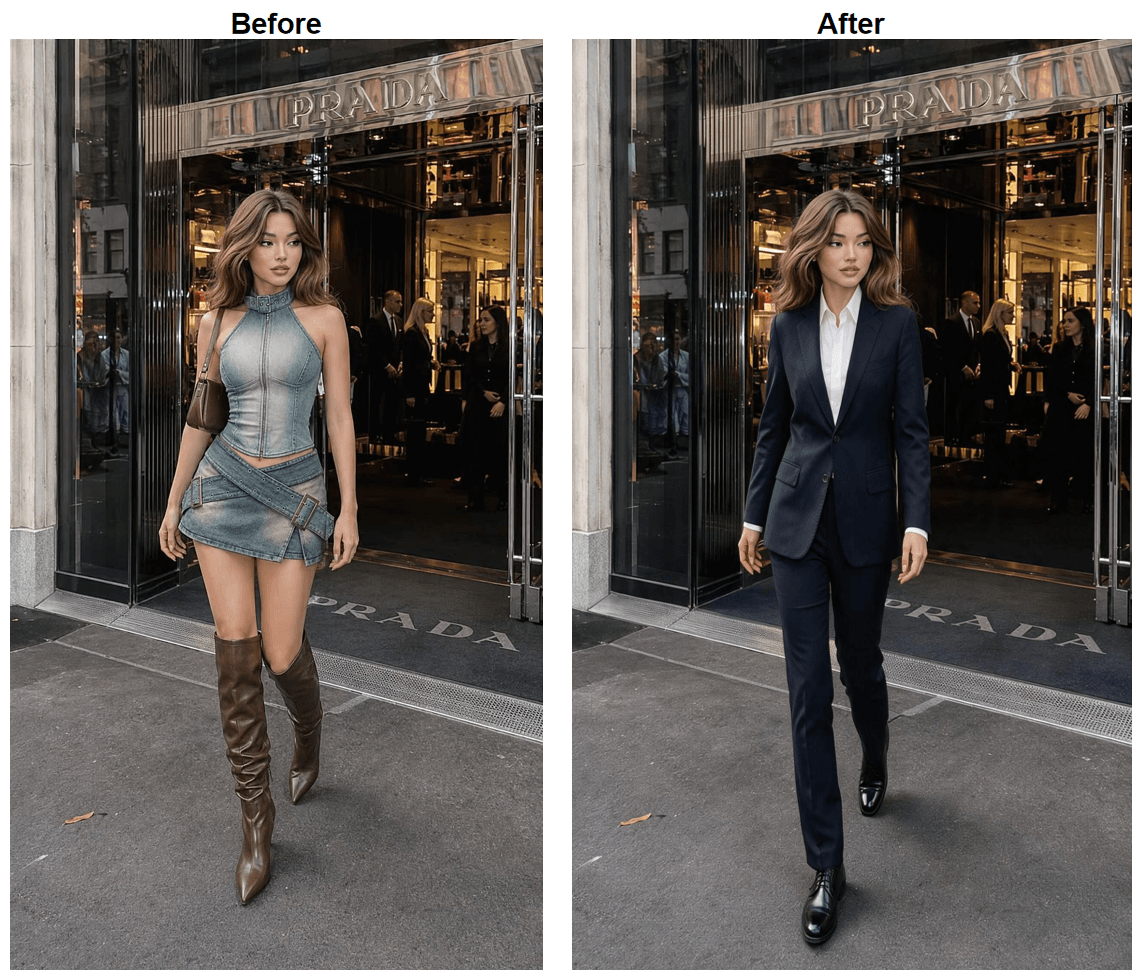
Specs tell you what a vendor promises. They do not tell you whether a blazer will come back merged with someone's fingers. So the hands-on rounds all used the same 2 photos, one full-body and one waist-up, with the same 2 outfit requests: a navy business suit and a casual streetwear set. Same person, same light, same words. The full-body frame is there for a reason: one request includes shoes, and no tool can redraw clothing the crop does not show.
Three things decided the rankings: whether the new clothing follows the body and the scene lighting, whether the face and pose survive untouched, and how much friction sits between you and a usable download. That last one is where free tiers quietly fail, through watermarks, login walls, and credit meters.
1. Atlas Cloud: Best AI Clothes Changer Overall
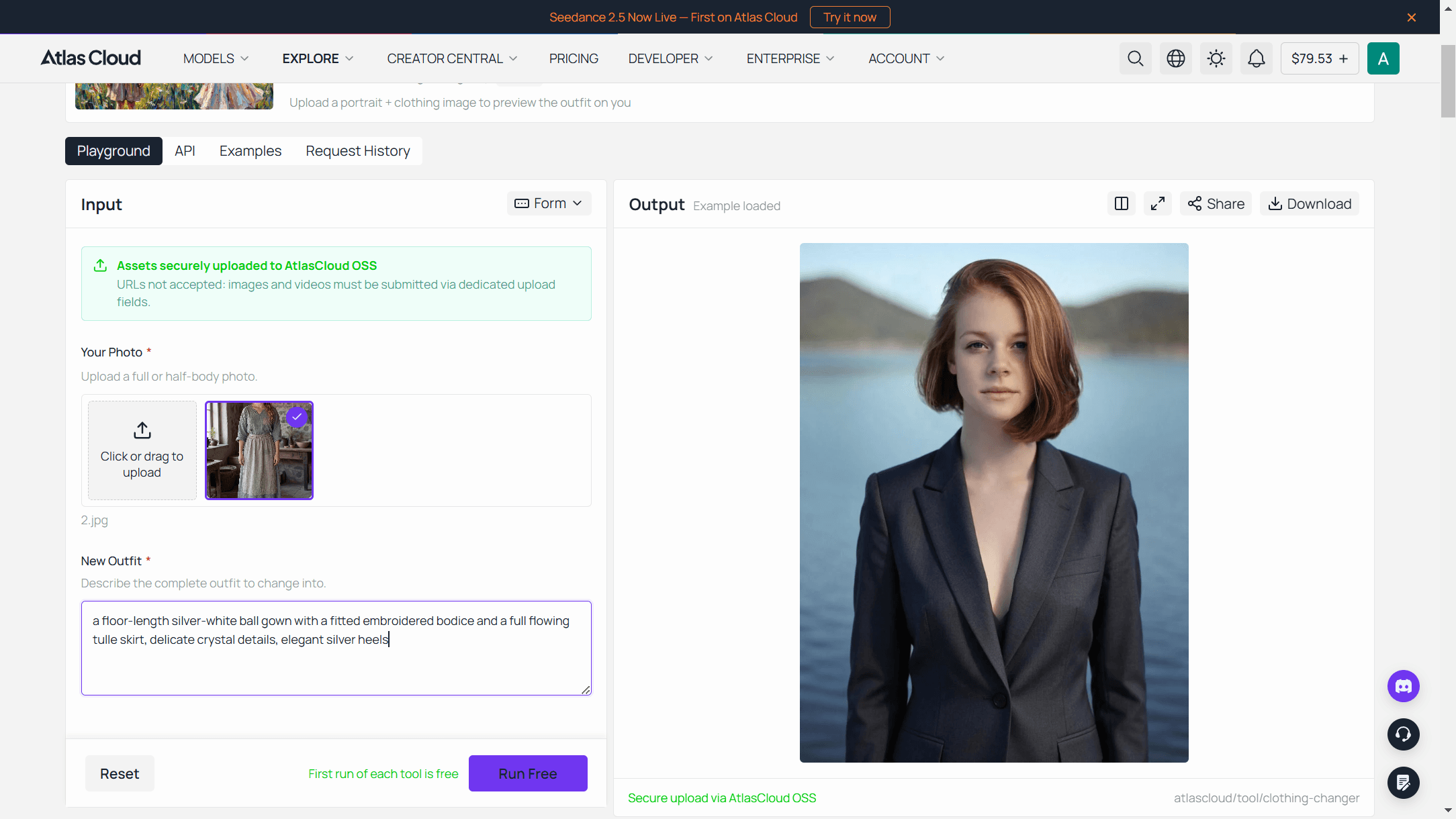
Atlas Cloud is a hosting platform for image and video models, and its Free Change Clothes AI tool is the most direct route in this list from photo to finished swap: upload, type one sentence describing the outfit, press Run Free. The page states the scope plainly: clothing is the only thing redrawn, so features and hairstyle stay put. It is one of several free utilities in the platform's AI tools collection, each a packaged front end for the platform's hosted models.
Why it stands out: The output is a 1328 by 1776 image with no watermark at any stage, delivered in a render the page clocks at roughly 40 seconds. Accepted inputs are JPG, PNG, or WebP up to 10MB.
Best for: Anyone who wants one clean, watermark-free swap right now, and anyone who suspects they will later need dozens, because the same platform escalates to a playground and an API without switching vendors. The next section covers both routes.
Pricing: One free generation comes with a quick sign-in via Google, GitHub, or email, and by the tool's own wording it arrives at the same full resolution as any paid run. After that, a balance top-up keeps you generating, starting at $19,and each outfit change costs $0.045.
The honest caveat: this is a one-good-run free tier, not a daily allowance. If you want to test 5 tools with 20 memes each, a credit-a-day service fits better. If you want one swap that looks photographed, start here.
More Ways to Swap Outfits on Atlas Cloud: Playground and API
The free tool covers the everyday case. Two more routes on the same platform pick up where it stops: one for control, one for volume.
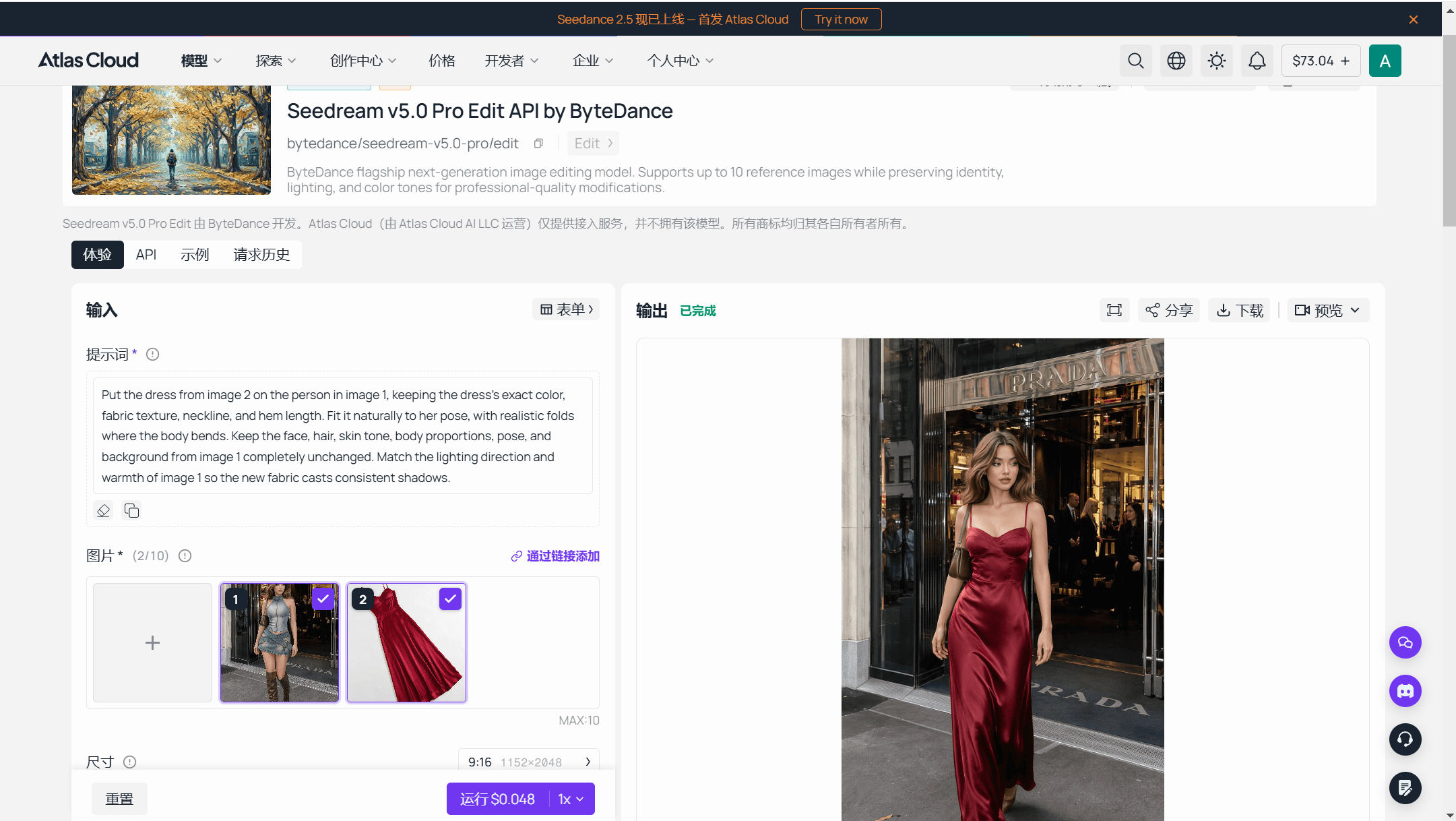
Run Seedream v5.0 Pro Edit in the Playground
The model behind serious outfit work here is Seedream v5.0 Pro Edit, a ByteDance image editing model whose page states support for up to 10 reference images while preserving identity, lighting, and color tones. In practice that means you can load your photo plus a photo of the actual garment and ask for a transfer, instead of describing clothes from memory. You also choose the output tier: an economical 1.5K tier or a premium 2K tier that reaches 2048 by 2048.
The playground shows the metered price for your exact request next to the Run button before you commit anything, which makes it the right place to validate a few shots before writing any code.
Batch Outfit Changes via API for Sellers
Free tiers and daily credits stop making sense the day you need every product in a drop shown on the same model. The API route prices per image instead: as of August 2026, a 1.5K output costs $0.045 and a 2K output costs $0.09, with the first input image included and each additional reference image adding $0.003. One model photo plus one garment photo at 1.5K is $0.048 per finished variant, so an 8-outfit drop lands under 40 cents. Production is 3 steps.
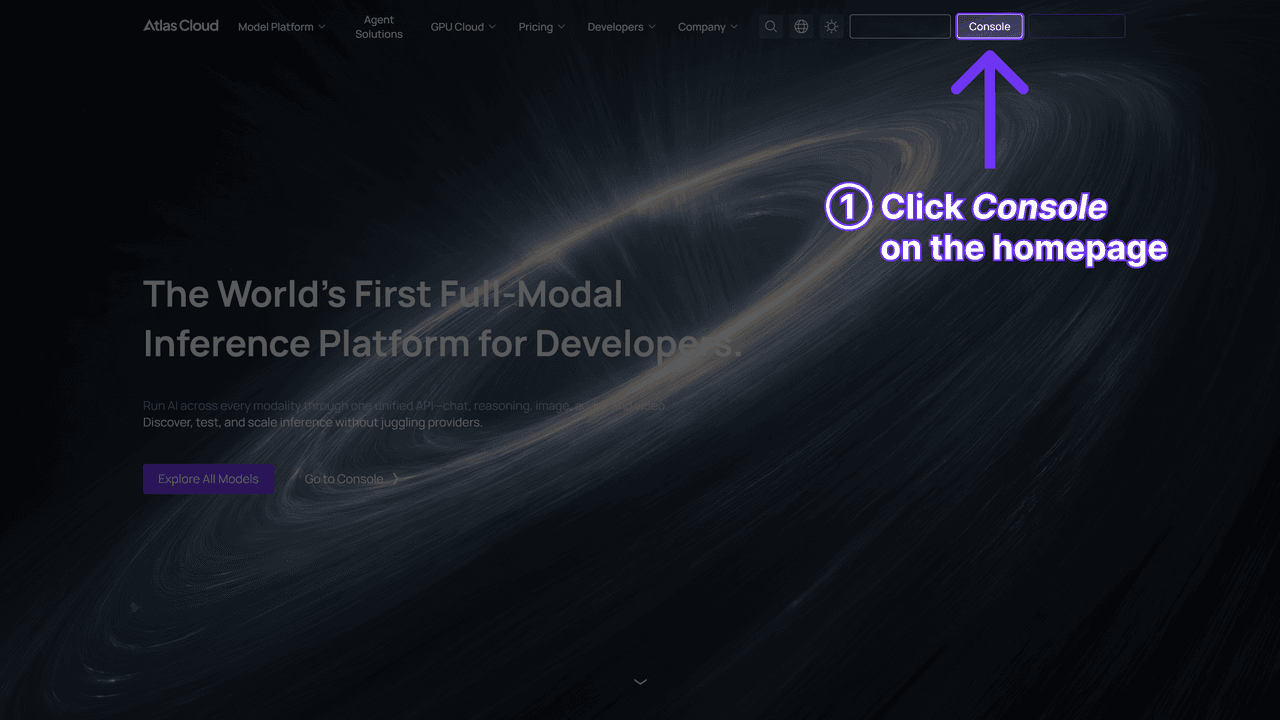
Step 1: Create an API key. Generate one in the Atlas Cloud console and keep it server-side; one key reaches every model on the platform.
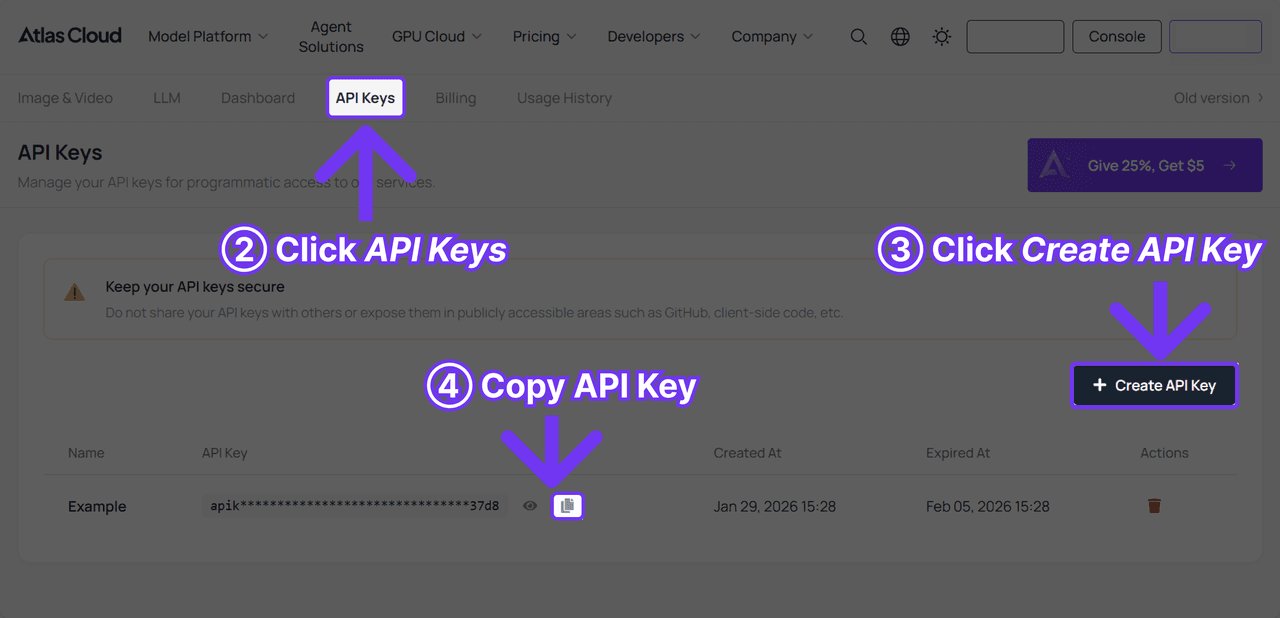
Step 2: Check the request shape. Authentication and the polling contract live in the API documentation, and the model page carries an API tab next to the playground, so the request shape is one click from where you tested it.
Step 3: Send the request and poll. Submission is asynchronous and returns a prediction id:
plaintext1curl -X POST https://api.atlascloud.ai/api/v1/model/generateImage \ 2 -H "Content-Type: application/json" \ 3 -H "Authorization: Bearer $ATLASCLOUD_API_KEY" \ 4 -d '{ 5 "model": "bytedance/seedream-v5.0-pro/edit", 6 "prompt": "Put the jacket from image 2 on the person in image 1. Keep the face, hair, pose, and background unchanged.", 7 "images": [ 8 "https://your-cdn.com/model-shot.jpg", 9 "https://your-cdn.com/garment.jpg" 10 ], 11 "size": "1328*1776" 12 }'
Poll the prediction until status reads completed, then collect the hosted image URL from outputs. Now, back to the list: how the other tools compare.
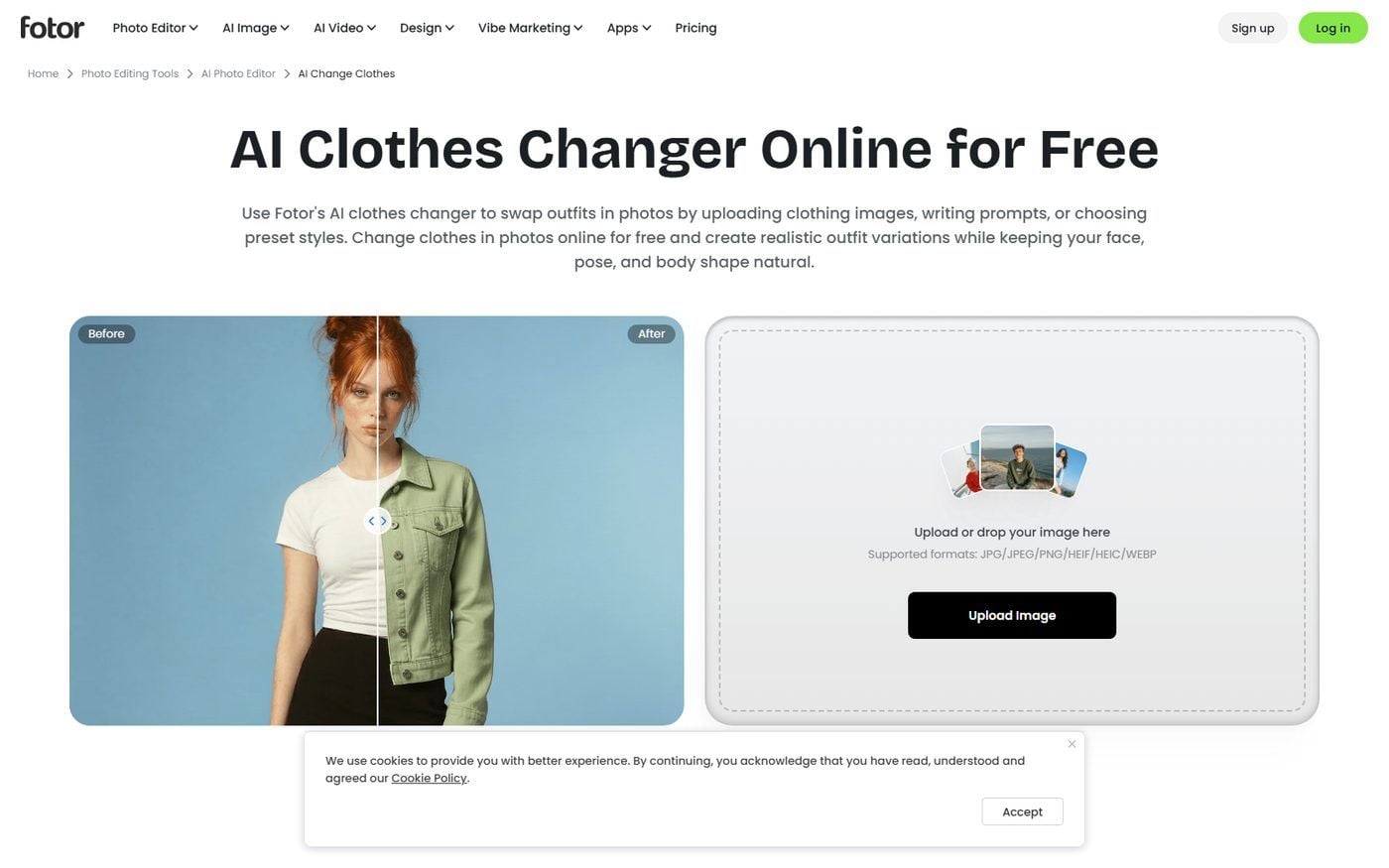
2. Fotor: Best Free Online AI Clothes Changer for Quick Edits
Fotor runs a dedicated clothes changer feature inside its browser photo editor, and it makes the boldest output claim in this roundup: downloads in up to 4K quality. That number sits on a marketing page rather than a spec sheet, so treat it as a ceiling rather than a promise.
Why it stands out: It is the best free online AI clothes changer for people who are already mid-edit, because the swap happens inside a full editor with crop, retouch, and export in the same tab. Fotor also runs on iOS, Android, Windows, and Mac, so the same account follows you off the browser.
Best for: Fast, casual swaps where a small watermark or an extra editing step is an acceptable trade for zero learning curve.
Pricing: Free usage runs on credits earned through daily tasks, and Fotor does not publish a fixed number; its help center notes activity credits usually expire in about a day. The Basic plan exports are watermarked per the pricing page. Fotor Pro is listed at $3.99 per month billed annually, which is $47.99 per year; a month-to-month price is not shown on the page we checked.
The practical consequence: credits that expire within a day reward people who show up daily, not people who want a full weekend of experiments. Decide which one you are before counting on the free lane.
3. YouCam: Best Free AI Clothes Changer for Preset Outfit Styles
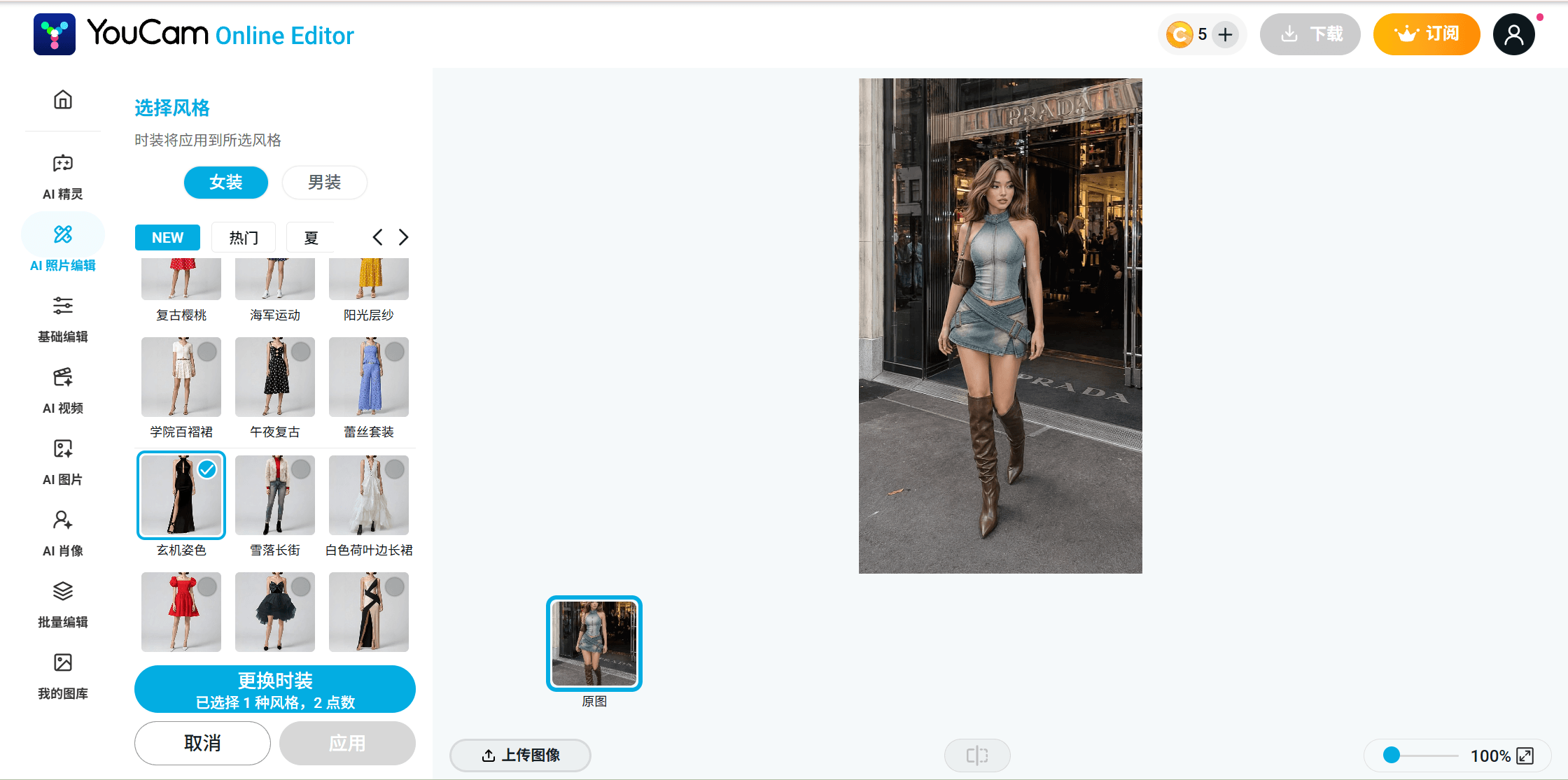
Perfect Corp's dedicated tool is a browser page literally called AI Clothes Changer, built around a wardrobe of preset outfits you click instead of a prompt you type. The same idea also ships inside the YouCam Makeup mobile app under a different name, AI Wardrobe, which the official Play Store listing credits with more than 100 outfit styles plus support for your own uploads. Start on the web if you want the tool by its proper name; the app is a companion surface, not the main event.
Why it stands out: The style-first flow. Where most tools hand you an empty text box, YouCam leans on a clickable wardrobe of preset outfits with HD rendering, which suits fashion previews more than free-form costume changes.
Best for: Anyone who would rather tap a preset style than write a description, whether that's in the browser or on a phone, and who plans a couple of test runs before deciding whether to pay.
Pricing: Sign-up grants 5 credits and a clothes run costs 2, so the practical free allowance is 2 runs. The pricing table gates the watermark-free row behind paid plans, which start at Plus with 100 credits per month; the pricing page itself does not render a fixed dollar figure, so confirm the local price before subscribing.
Budget your 2 free runs deliberately: same photo, 2 different styles, then judge fabric texture around the shoulders and hands before deciding whether the credit packs are worth it.
4. Vidnoz: Best AI Clothes Changer for Preset Outfit Templates
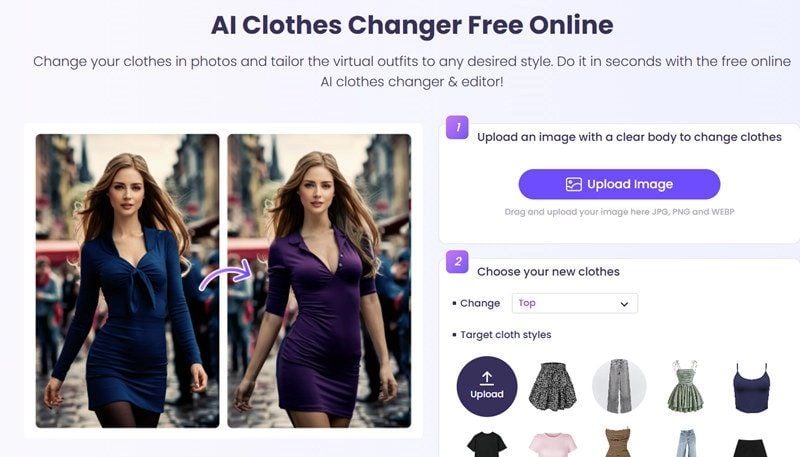
Vidnoz fields a dedicated clothes changer plus a separate library of clothing templates for virtual try-on, which makes it the strongest template catalog we verified. Upload once, then cycle the same photo through outfit after outfit without writing a word. The style grid also carries its own upload tile, so a custom garment photo slots in next to the presets instead of being a separate mode.
Why it stands out: The template library is a real product surface with its own page, not a sidebar of 6 presets. For social content that cycles through many looks, that catalog is the draw.
Best for: Template browsing at volume, and quick experiments where you do not want to sign in first, since generation runs without an account.
Pricing: The tool page describes free daily access with a limited number of free uses per day, and it never publishes that number. Downloading results requires logging in. On watermarks, Vidnoz's own pages disagree: the tool page says no watermark, while both of its pricing pages list watermark removal as a paid benefit. Subscription dollar prices load dynamically and are not published statically, so treat any specific figure you see quoted elsewhere with suspicion.
That documentation gap sums up the trade-off: a pleasant free flow, unclear fine print. Run your own test and inspect the download before building a habit on it.
5. Canva: Best AI Clothes Changer for Swaps Inside a Design Workflow
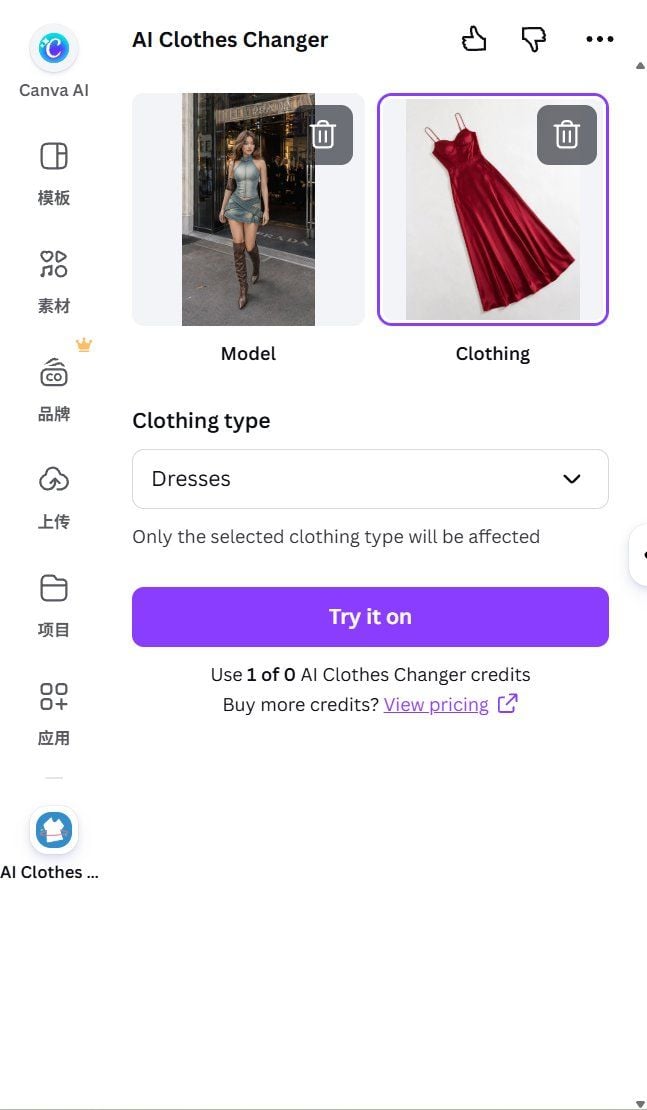
Canva has no native clothes changer built into its own editor. What it has instead is a marketplace app literally named AI Clothes Changer, which runs inside the Canva canvas: upload a model photo and a garment photo, pick a clothing type from a dropdown so only that item changes, and click Try It On. If you would rather stay inside Canva's own tools than add an app, Magic Edit, Canva's brush-and-describe editor, can attempt the same swap as a generic instruction, though it is not purpose-built for clothing transfer.
Why it stands out: It runs the transfer without leaving Canva. A product card or social template never has to travel to a separate tool and back just to change what the model is wearing.
Best for: Designers and marketers already living in Canva, for whom the swap happening next to the layout beats a better result in a separate tab.
Pricing: The app's own listing claims it is free to use with any Canva plan, but our test account showed 0 of its AI Clothes Changer credits available, with a prompt to buy more before running it. Free access may depend on account history or region, so check your own balance before counting on it. Fall back to Magic Edit instead and pricing runs through Canva's general AI allowance: up to 200 standard uses or 20 premium ones a month on the Free plan, with uploads capped at 50MB and 250 million total pixels. Canva Pro is listed at $180 per year on the US pricing page, which renders annual pricing only.
That gap between marketing copy and an actual account balance is worth remembering everywhere on this list, not just here: a page can say free while a real login screen says otherwise.
4 More AI Clothes Changers Worth Knowing
Media.io pairs preset styles with a prompt option across a couple of overlapping tool pages. Its pricing page gives free users 3 daily check-in credits with watermarked exports, while its marketing pages promise unlimited free swaps with no login; when a site argues with itself, the pricing page is the safer bet. Paid plans are listed from $7.99 per month billed annually. Not for you if: you want a dependable free lane without daily check-ins.
insMind runs a brush-and-prompt flow much like a lighter Magic Edit, on web and mobile. It publishes almost no numbers; the tool page itself says current free access, credits, and export resolution are shown inside the editor. Not for you if: you want the limits stated before you upload.
Pincel transfers an actual garment photo onto your model shot, no prompt needed, and is unusually clear about its meter: 20 free credits at sign-up with no card, 1 image costs 2 credits, so 10 free images. The Creator plan is $19 per month for 1,000 credits. Not for you if: you want to invent outfits from text rather than transfer existing ones.
BeautyPlus offers all 3 input styles on one page: brush plus prompt, a reference image, and preset templates. The page calls the web platform accessible at no cost but publishes no credit counts, watermark rules, or size limits. Not for you if: unstated limits make you nervous.
Which AI Clothes Changer Fits Your Use Case
A shortlist of 9 still leaves you a decision. Match the tool to the job:
| You are | Pick | Because |
|---|---|---|
| A seller with a product drop | Atlas Cloud API | Per-image pricing near 5 cents beats daily credit meters at volume |
| After one swap that looks real | Atlas Cloud free tool | Full resolution, no watermark, first run free |
| Cycling preset looks for social posts | YouCam or Vidnoz | Style libraries, no prompt writing |
| Already mid-design | Canva Magic Edit or Fotor | The swap happens where the layout already lives |
Two adjacent guides help from here. If you want the photo habits and prompt patterns that raise any tool's hit rate, our AI outfit swap guide documents them with test evidence, including the failure modes. If your question is really whether a garment you might buy would suit you, that is a different job; the virtual try-on explainer covers how purchase-preview tools differ from photo editors. And if the clothes you want do not exist yet, you are shopping for an AI clothing generator instead.
What Does Reddit Say About the Best AI Clothes Changer?
Ask this question on Reddit and the top replies rarely point to a dedicated clothes-changer site at all. In one recent thread, people asking for a realistic clothing swap got pointed toward general-purpose chatbots first, ChatGPT and Gemini among them, before anyone mentioned a purpose-built tool. One reply put the actual difficulty in one line: keeping folds and shadows looking natural is the hard part, which lines up with exactly what we watched for in our own tests above.
That does not mean the dedicated tools go unmentioned, or unchallenged. In another thread, someone hunting for a single free swap said they had already tried a couple of tools, Vidnoz included, without landing on one that solved their specific case. It is a reminder that a free tier working well in our tests does not guarantee it fits every photo or every outfit someone else throws at it.
A separate crowd skips hosted tools altogether. On r/comfyui, users compare notes on building their own local clothes-swap workflows with open models, trading convenience for full control over the pipeline. That is a different project from anything in this list, but it confirms the demand is broad enough to support both a five-minute browser tool and a weekend spent in a node editor.
Frequently Asked Questions
Which is the best AI clothes changer free to use right now?
For a single free result with no watermark, the Free Change Clothes AI tool on Atlas Cloud is the strongest option we verified: the first run is free at the same full resolution as a paid run. For repeated free use, Pincel's 20 sign-up credits, about 10 images, are the clearest published allowance among the third-party tools; most others meter free use in small daily amounts or leave the numbers unpublished.
Is there a best clothes changer AI free of watermarks?
On free tiers, mostly no. Fotor watermarks Basic exports, YouCam reserves watermark-free output for paid plans, and Media.io marks free exports with a watermark. The Atlas Cloud tool is the exception in our list, stating that no watermark is added at any stage. Vidnoz's pages conflict on this point, so check your own download there.
Can I use an AI clothes changer without signing up?
Usually not for the full flow. Atlas Cloud activates the free run after a quick sign-in with Google, GitHub, or email. Vidnoz generates without an account but requires login to download, which amounts to the same thing if you want the file. Credit-based tools like YouCam and Pincel attach free credits to a new account by design.
Can AI change clothes in a video, not just a photo?
The 9 tools in this list edit still photos. Video outfit changes are a different pipeline built on video generation models, and none of the vendors here advertise a working video clothes changer on the pages we verified. If a site promises one, apply the same test this article does: run its free tier on your own clip and inspect the frames before paying.
Conclusion
The comparison table is the short version: free tiers differ less in model quality than in what stands between you and a clean file. Watermarks, daily credit meters, and rules that live only inside an editor are the real rankings, and they are why the same 9 tools produce very different experiences at zero dollars.
Our verdict stands as tested. Start with the free browser tool on Atlas Cloud for a watermark-free, full-resolution first swap, keep a template app like YouCam or Vidnoz on the phone for casual looks, and move to the API the day one photo needs to become a whole catalog. That covers every job the best AI clothes changer actually needs to do in 2026.





