


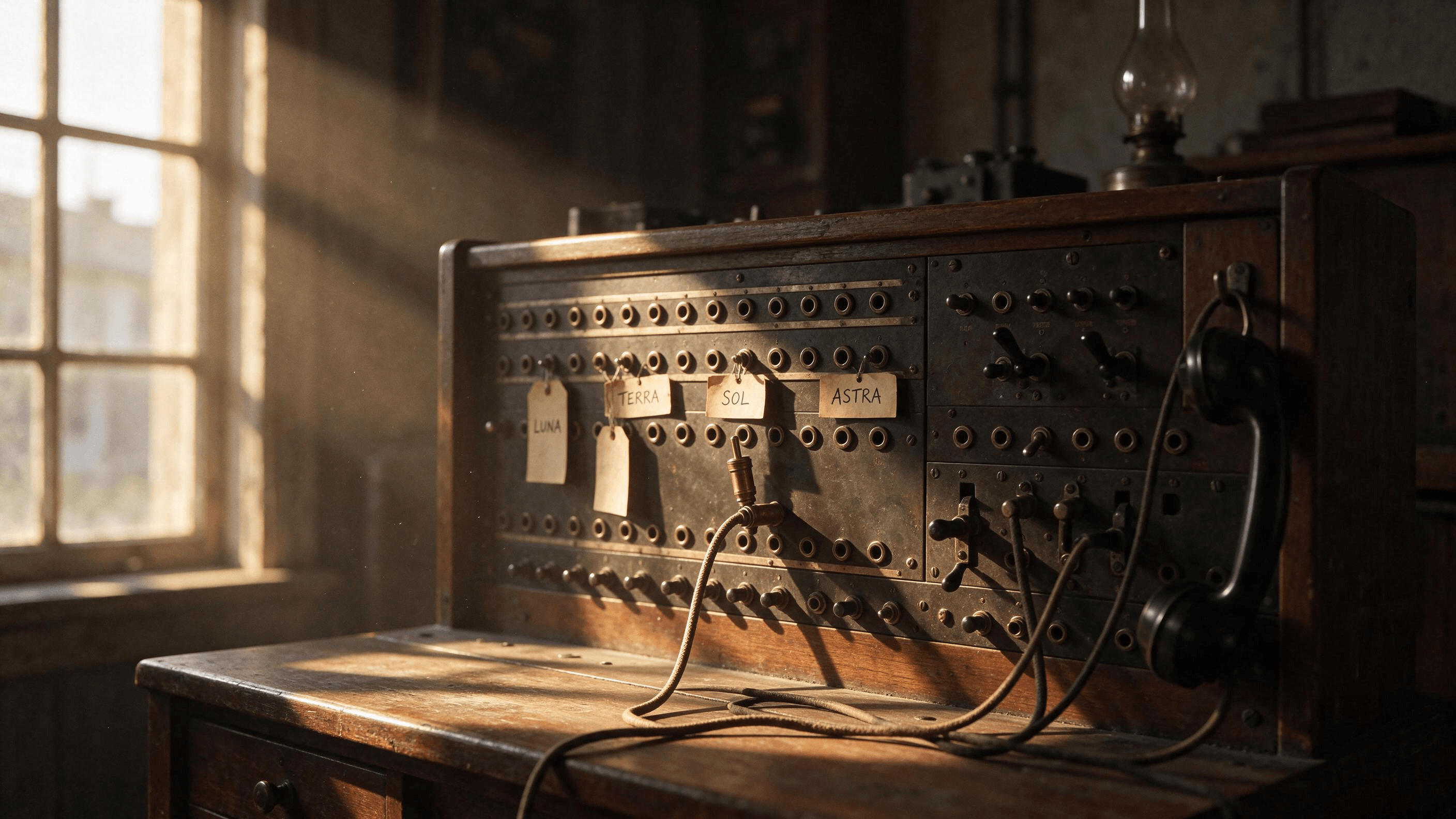
Open the model menu in ChatGPT and you get GPT-6. Switch the same app to Work and the picker lists GPT-6.2 Astra, GPT-6.2 Sol and GPT-6.1 Terra instead. One subscription, two menus, and neither tells you which name to pick.
We read OpenAI's help center and release notes, then gave four of today's ChatGPT models the same three everyday tasks, three times each. This guide maps what runs where, what changed this fall, how the four compared and how to switch.
Key Takeaways
- ChatGPT models split by surface: GPT-6 Sol and Astra run Chat, while GPT-6.2 lives in Work and Codex.
- The latest ChatGPT model, GPT-6.2, launched November 17, 2026, and regular Chat does not offer it.
- All four models we tested read the invoice and sorted the meeting notes correctly in every run.
- Rewriting for customers separated them: Sol and Astra translated lab jargon more often than Luna or Terra.
- Luna, Terra, Sol and Astra are all callable as ChatGPT API models on Atlas Cloud, whatever your plan.
ChatGPT Models Explained: What Runs in Chat, Work and the API
ChatGPT models now sit in three places, and each place keeps its own list.
In Chat, the model menu offers GPT-6, which replaced the old Latest option, plus GPT-5.6 Sol as a separate pick. The Thinking slider beside it sets effort. OpenAI's model help page says GPT-6 Sol powers Instant, Medium, High and Extra High, while the Pro level runs GPT-6 Pro, "powered by GPT-6 Astra."
Work and Codex have a separate picker. That is where GPT-6.2 and GPT-6.1 Terra live. The same help page says regular Chat "keeps its existing model choices."
The API is the third list. OpenAI's API model catalog names four flagships: GPT-6.2 Astra, GPT-6.2 Sol, GPT-6.1 Terra and GPT-6 Luna.
| Model | Where you pick it | Plans |
|---|---|---|
| GPT-6 (Sol from Instant to Extra High) | Chat model menu and Thinking slider | Plus and up; Extra High from Pro |
| GPT-6 Pro (powered by GPT-6 Astra) | Chat, Pro level of the slider | Pro $100, Pro $200, Business, Enterprise |
| GPT-5.6 Sol | Chat model menu, separate option | Plus and up |
| GPT-6 Luna | Chat default on Free and Go (see FAQ); Work and Codex | All plans |
| GPT-6.2 Astra and GPT-6.2 Sol | Work and Codex | Plus and Pro; workspaces by seat and settings |
| GPT-6.1 Terra | Work and Codex, not Chat | Plus, Pro, Business, Enterprise, Edu |
Source: OpenAI help center, release notes and pricing page, read November 19, 2026.
So Instant through Extra High are effort settings on one model, and only the Pro level swaps in another. What the upper levels cost per month is covered in our Plus vs Pro comparison.
What Is the Latest ChatGPT Model?
GPT-6.2 Astra and GPT-6.2 Sol, released November 17, 2026. They are the newest ChatGPT model pair, and they went straight into Work and Codex. New Work chats start on GPT-6.2 Sol at the Light setting on consumer plans.
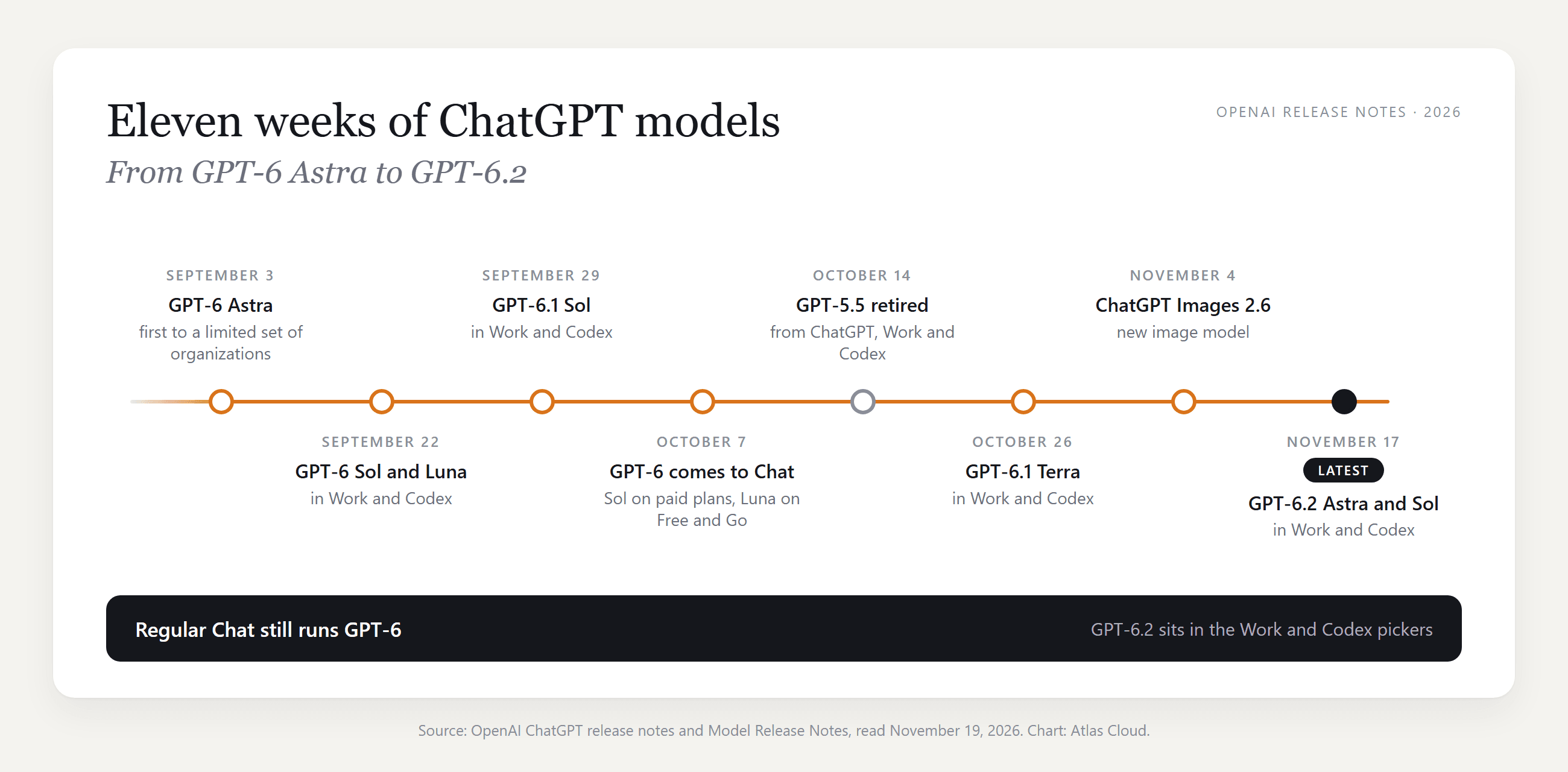
That pace explains the confusion. Seven launches and a retirement landed in eleven weeks, and four of them reached Work and Codex before, or instead of, Chat. Benchmarks, the backlash and the Astra vs Sol split are in our GPT-6.2 review.
Try the ChatGPT API Models Yourself on Atlas Cloud
Chat shows only part of the lineup: Terra and the 6.2 models never appear in its menu. On Atlas Cloud, each of them is a model string, and one API key reaches GPT-6 Luna, GPT-6.1 Terra, GPT-6.2 Sol and GPT-6.2 Astra.
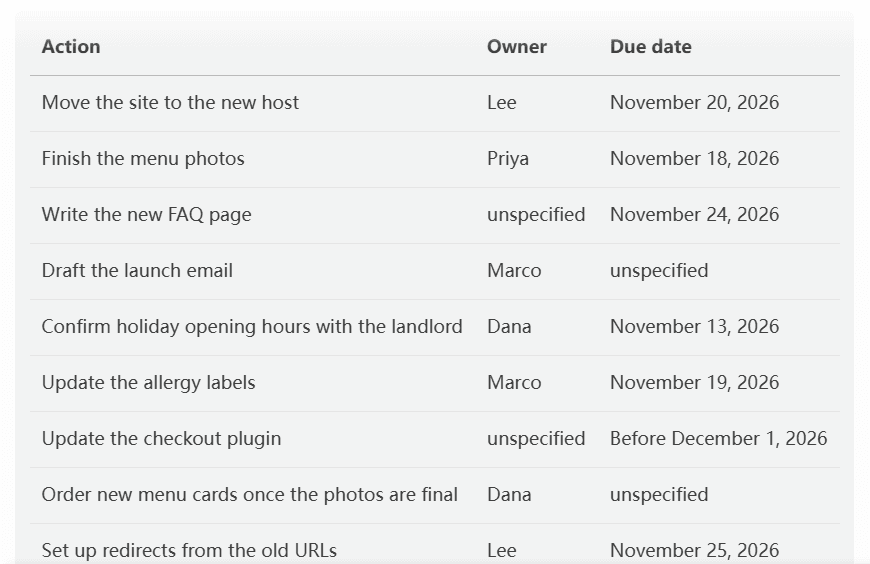
That is GPT-6.1 Terra, which OpenAI describes as fast and efficient for writing and visual work, turning fifteen lines of meeting notes into nine tasks. It gave the allergy labels to Marco, who took them over mid-meeting, and marked four missing owners or dates as unspecified instead of filling them in.
Method 1: Run GPT-6.1 Terra in the Playground
Sign in and open the GPT-6.1 Terra playground.
- Paste your instruction and notes into the message box.
- Click the send arrow.
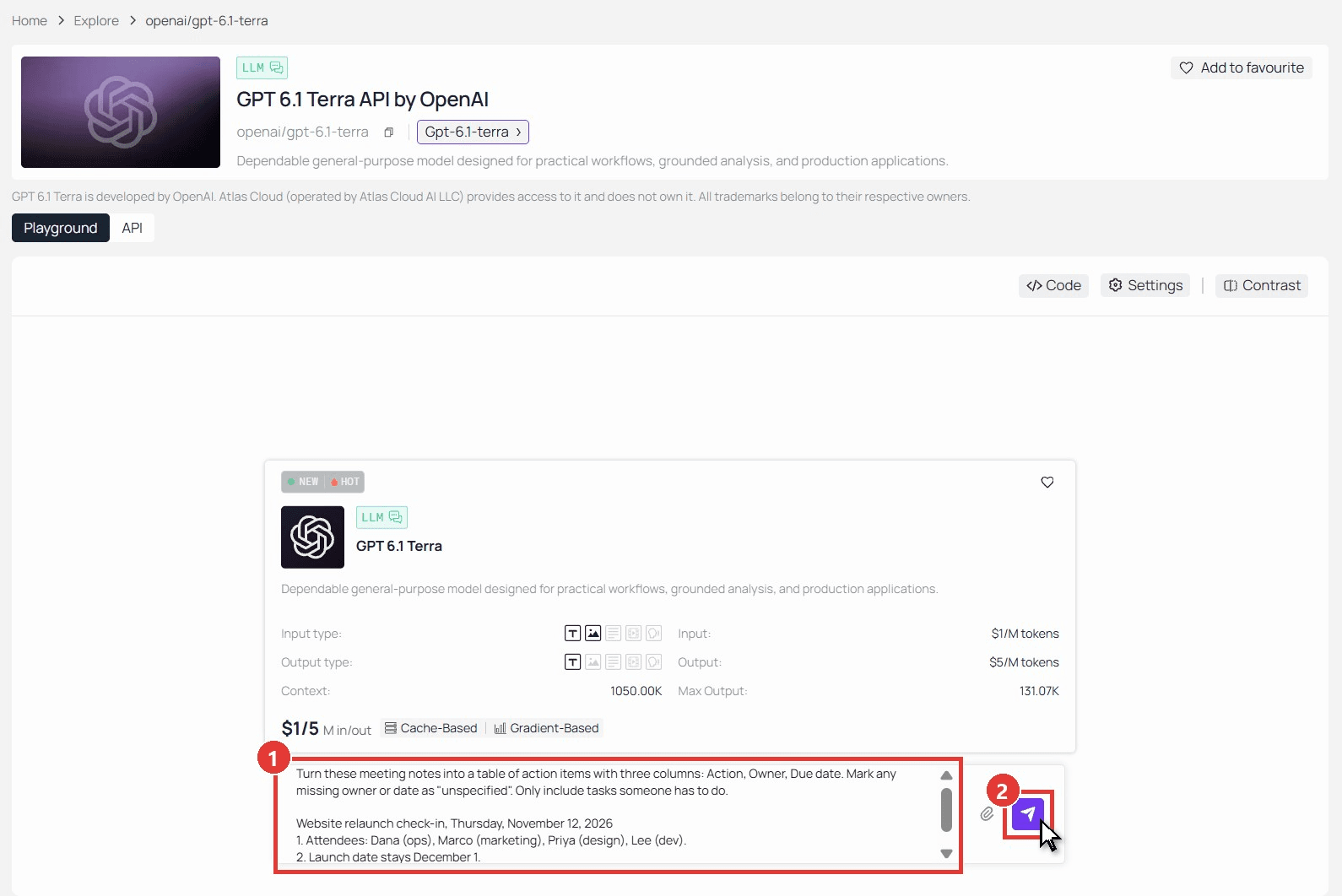
Here is the prompt from the screenshot, ready to copy:
plaintext1Turn these meeting notes into a table of action items with three columns: Action, Owner, Due date. Mark any missing owner or date as "unspecified". Only include tasks someone has to do. 2 3Website relaunch check-in, Thursday, November 12, 2026 41. Attendees: Dana (ops), Marco (marketing), Priya (design), Lee (dev). 52. Launch date stays December 1. 63. Lee will move the site to the new host by November 20. 74. Priya will finish the menu photos by November 18. 85. Discussed whether to keep the blog. Decided to keep it. 96. Someone needs to write the new FAQ page by November 24. 107. Marco will draft the launch email. 118. Dana to confirm holiday opening hours with the landlord by Friday. 129. Priya was going to update the allergy labels, but she is out next week, so Marco takes it, due November 19. 1310. Lee mentioned the checkout plugin is out of date and needs updating before launch. Nobody owns that yet. 1411. Agreed: no discount code at launch. 1512. Dana will order new menu cards once the photos are final. 1613. Lee to set up redirects from the old URLs by November 25. 1714. Marco said he might look at Instagram ads later. No decision. 1815. Next check-in: November 19.
Method 2: Call the Same Model Through the API
The API route suits a batch: a folder of invoices, a week of call notes, anything you would otherwise paste one at a time.
Step 1: Create an API key. In the console, open Settings, go to API Keys and click Create API Key. One key covers every model on the platform.
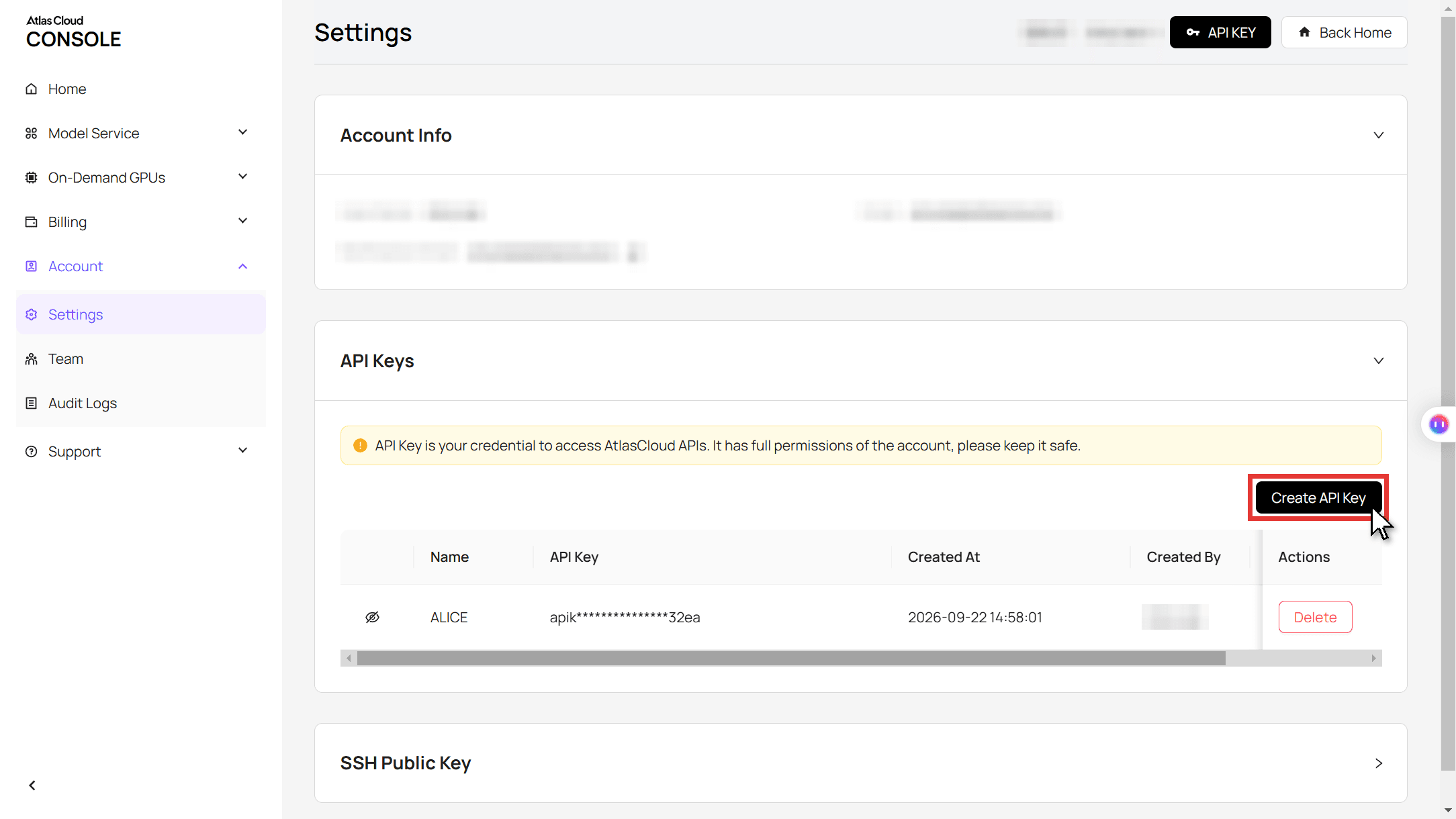
Step 2: Check the request format. The Atlas Cloud API docs list the supported LLM request formats. The OpenAI Responses format below works for all four models in this guide, including GPT-6.2.
Step 3: Send the request. This one sends an invoice image to Terra and asks for six fields. Replace the image URL with your own.
plaintext1curl -s -X POST "https://api.atlascloud.ai/v1/responses" \ 2 -H "Authorization: Bearer $ATLASCLOUD_API_KEY" \ 3 -H "Content-Type: application/json" \ 4 -d '{ 5 "model": "openai/gpt-6.1-terra", 6 "input": [{ 7 "role": "user", 8 "content": [ 9 {"type": "input_text", "text": "Extract six fields from this invoice: vendor name, invoice number, invoice date, due date, PO number and total amount due. If a value is not clearly readable, say so instead of guessing."}, 10 {"type": "input_image", "image_url": "https://example.com/your-invoice.png"} 11 ] 12 }], 13 "max_output_tokens": 16000 14 }'
The reply text sits in the output array, and the usage block counts input, output and reasoning tokens. Change the model string to openai/gpt-6.2-sol or openai/gpt-6-luna and the same request runs on the next model, with the same endpoint and the same key.
ChatGPT Models Comparison: Four Models on the Same Three Tasks
Benchmarks rank these models on hard problems. We wanted the routine kind instead:
- Rewrite. Turn a 140-word spec sheet for a fictional water filter into a product-page intro of 120 words or fewer, keeping five facts and adding none.
- Read. Pull six fields from an invoice image where a coffee stain covers the end of the PO number.
- Sort. Turn the meeting notes above into an action table, with one reassigned task and four gaps.
We wrote the pass rules before the first run, then sent each task to each model three times at default settings through the Atlas Cloud Responses endpoint.
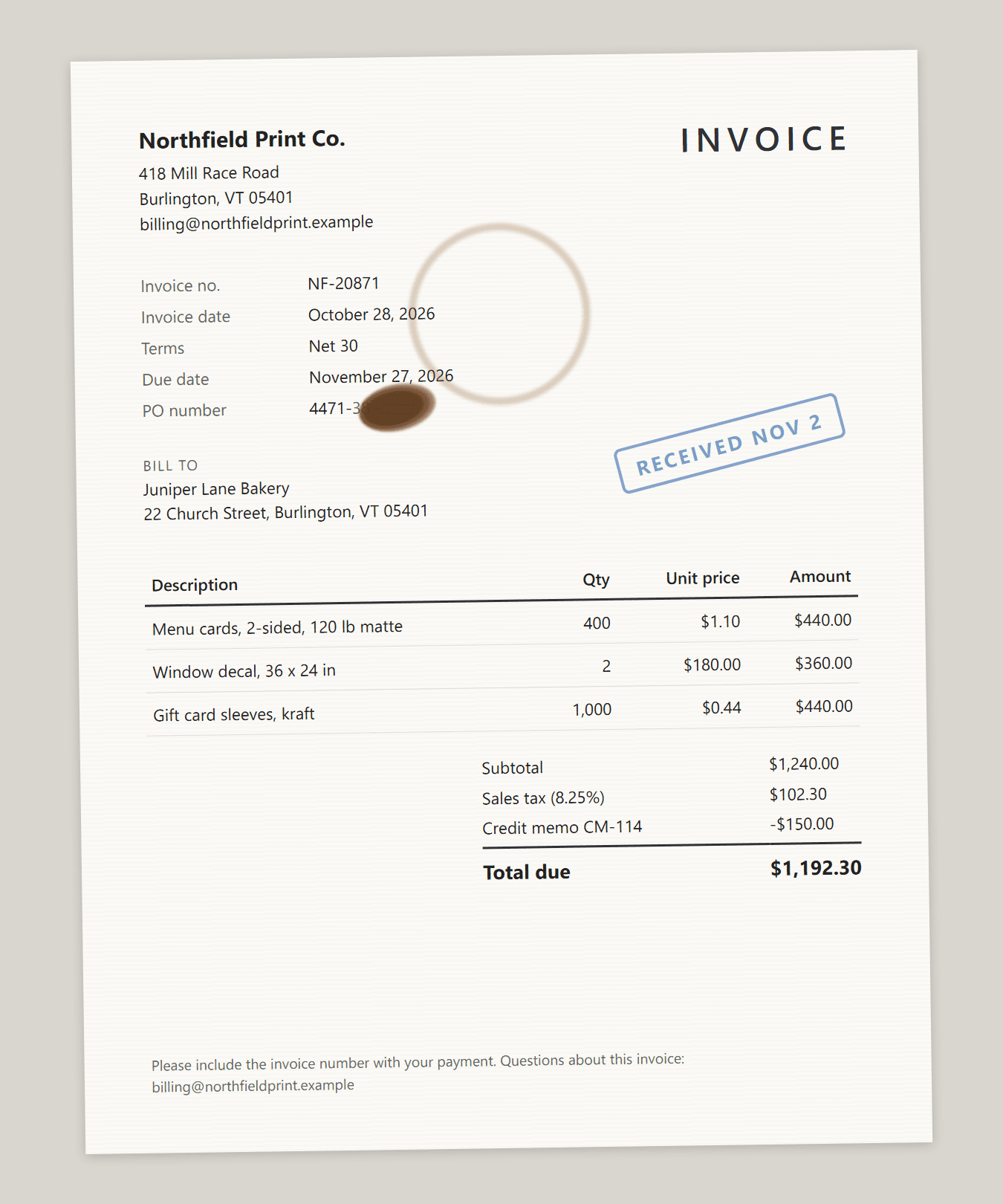
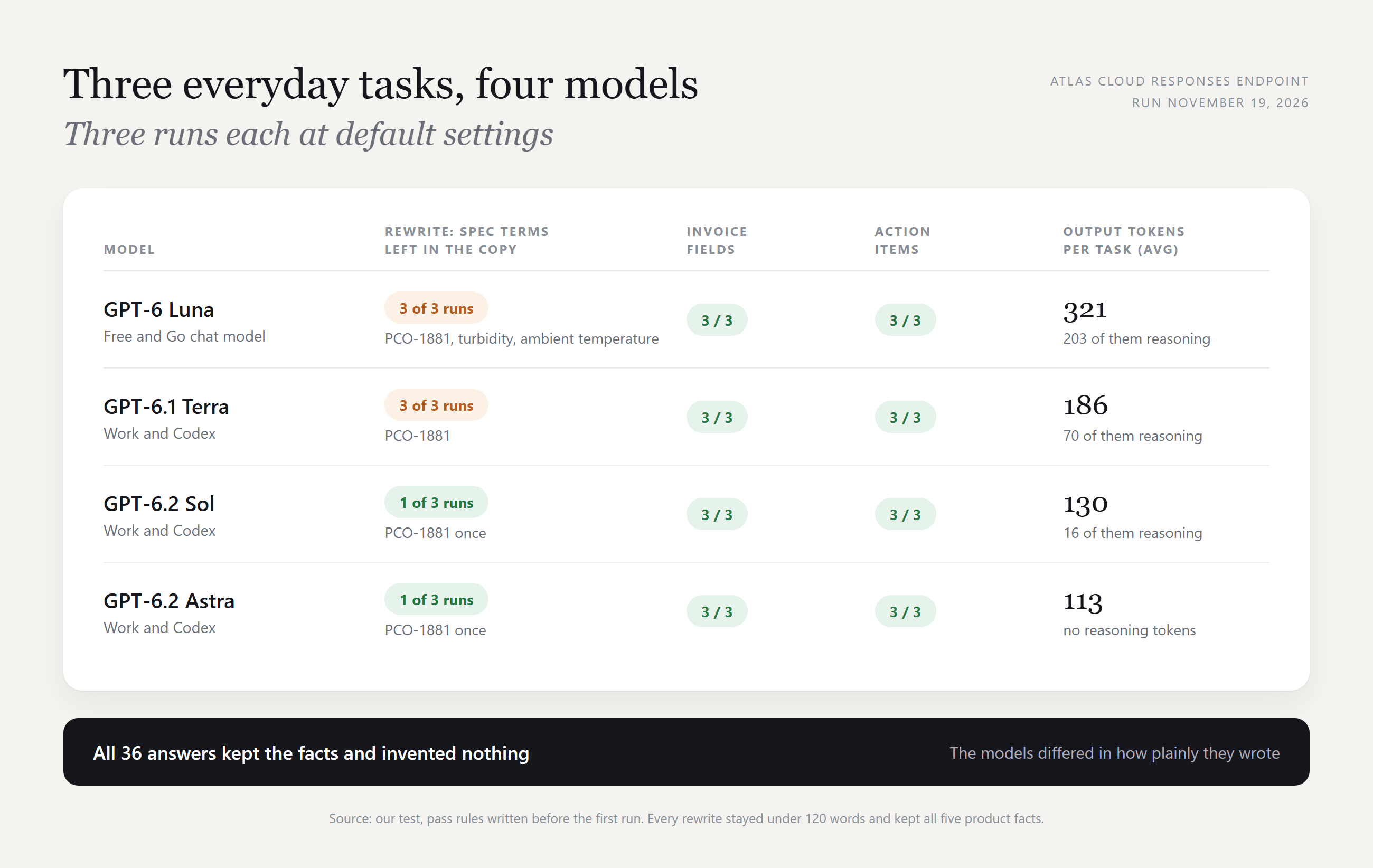
Reading and sorting went 24 for 24. Every model took $1,192.30 as the total due rather than the subtotal, and none guessed the hidden PO digits. Sol quoted the visible "4471-3" in all three runs; Terra and Astra simply flagged the field.
The rewrite is where they split. All twelve versions kept the five facts and stayed well under 120 words, and none said the filter stops viruses, a claim the notes avoid. Luna and Terra copied the bottle-thread code "PCO-1881" into all three of their versions. Sol and Astra did it once each.
Token use ran the other way from price. Luna reasoned before every answer and averaged 321 output tokens per task. Astra averaged 113 with no reasoning at all.
Three prompts and 36 runs make a spot check. On routine work like this, the gap between the four was small.
Which ChatGPT Model Is Best? Start From the Task
The best ChatGPT model for a job is the cheapest one that clears it. OpenAI's model guide suggests starting with a task you know well and comparing the result with what you need.
| Task | Our pick | Why |
|---|---|---|
| Pulling fields from documents, sorting notes | GPT-6 Luna or GPT-6.1 Terra | Both passed every run; OpenAI suggests Luna for "focused, repeatable tasks" |
| Copy a customer will read | GPT-6.2 Sol | Tied with Astra for the plainest rewrites in our runs |
| Long projects and hard trade-offs | GPT-6.2 Astra | OpenAI's pick for demanding work across code, apps and research |
| Coding | GPT-6.2 Sol, with Astra for bugs that cross services | OpenAI's guidance; both caught all eight planted bugs in our GPT-6.2 code review |
In regular Chat the choice is narrower. Paid plans pick GPT-6 and a thinking level, and only Pro, Business and Enterprise reach Extra High and the Astra-powered Pro level. Which ChatGPT model is best there mostly comes down to how long you are willing to wait.
Best ChatGPT Model for Writing
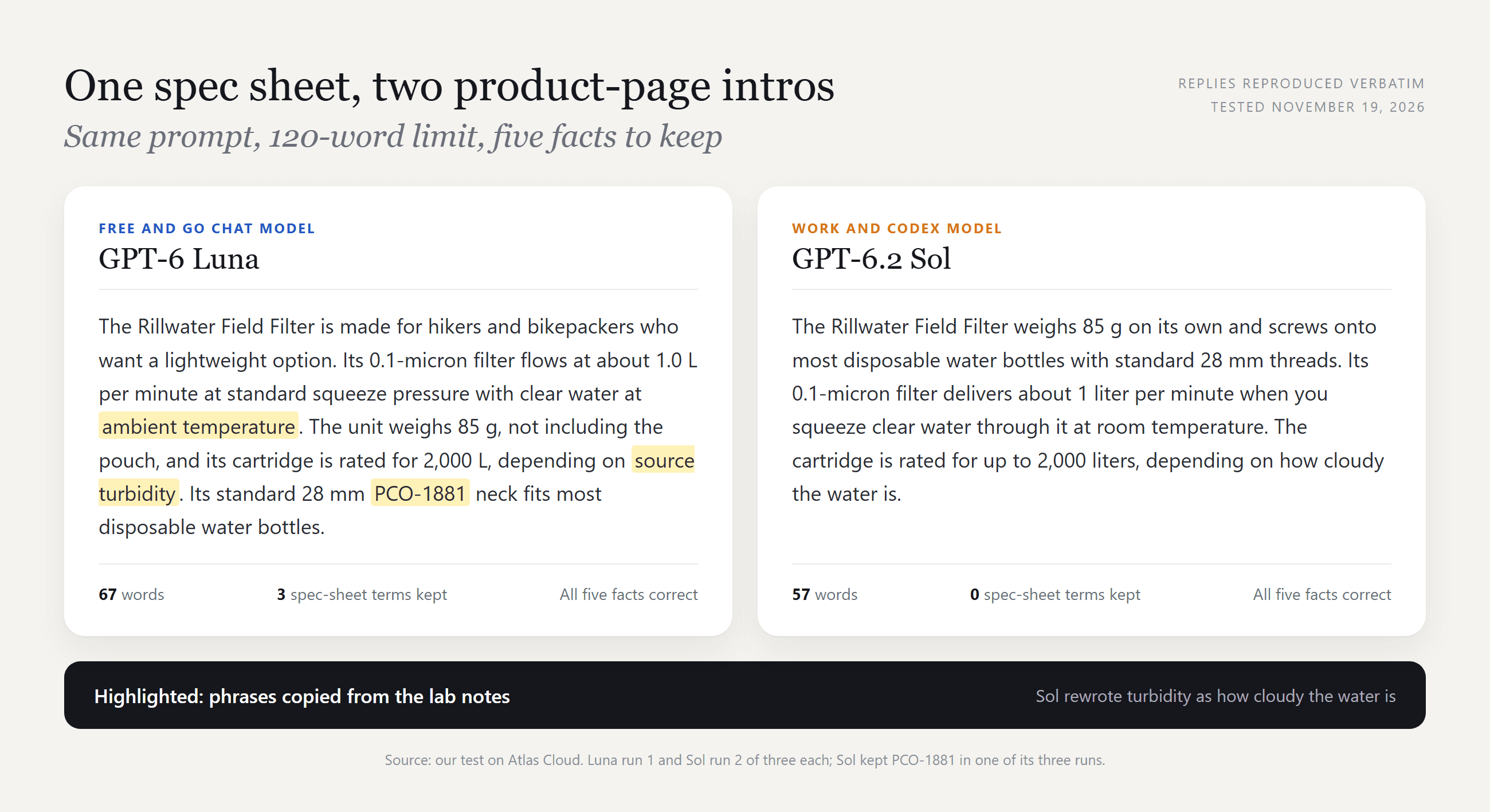
Which ChatGPT model is best for writing depends on the reader. OpenAI points to Terra for clear writing and to Sol for drafting documents.
In our rewrite, Luna kept "ambient temperature" and "source turbidity" in every version, so its copy still read like the spec sheet. Terra turned turbidity into "how cloudy the water is" and left only the thread code behind.
One extra line in the prompt, such as "replace technical codes with plain words," is cheaper than moving up a model.
Best ChatGPT Model for Image Generation
None of the chat models draws the picture. Images come from ChatGPT Images 2.6, released November 4, 2026, on every plan. Plus, Pro and Business also get Images with thinking.
So what image model does ChatGPT use? OpenAI's API catalog lists two 2.6 versions, Sunburst for detailed work and Flare for fast iteration, and doesn't say which one runs inside ChatGPT.
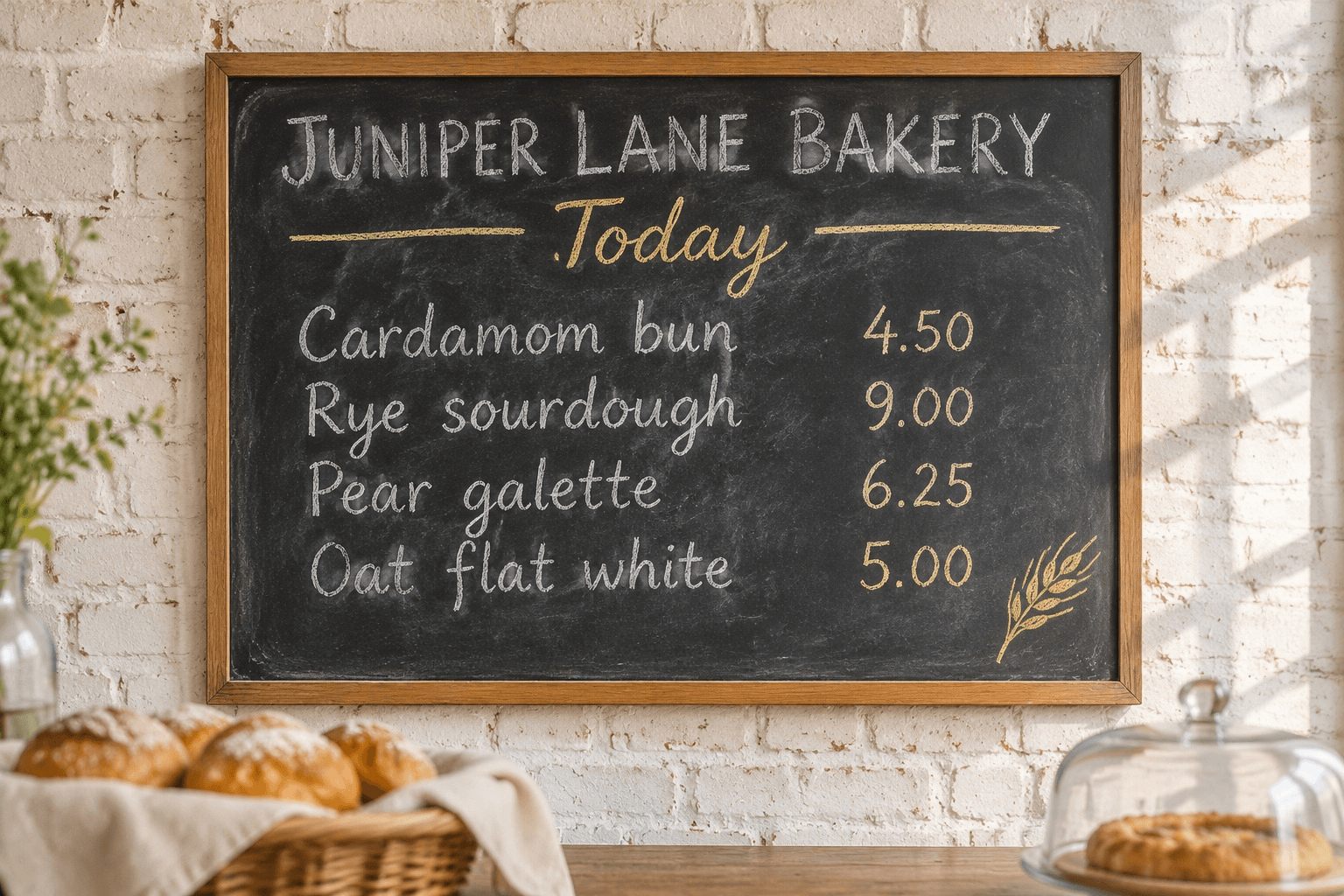
We generated that menu with GPT Image 2.6 Sunburst in one try. Every word and price came out as written in the prompt.
How to Change the ChatGPT Model on Your Plan
How to change ChatGPT model settings depends on your plan and on which part of the app you are in.
| Where | How | Who |
|---|---|---|
| Chat on the web | Open the model menu, choose GPT-6 or GPT-5.6 Sol, then set the Thinking slider | Plus, Pro, Business, Enterprise |
| Chat on Free and Go | No model menu; press Think for harder questions | Free, Go |
| Work and Codex in the desktop app | Use the model control under the composer; on the Power slider, open Advanced to pick a model | Plans with Work access |
| Older models in a company workspace | An admin turns on Enable legacy models under Workspace settings, then Models | Enterprise, Edu |
Source: OpenAI help center and model guide, read November 19, 2026.
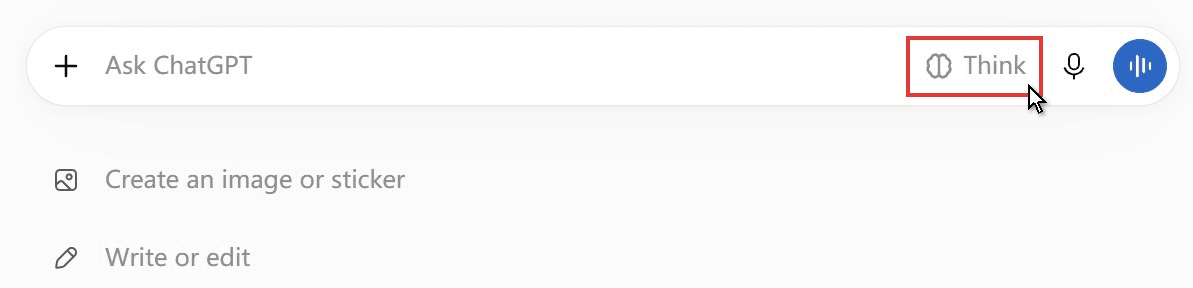
The second row is what our Free account showed on the web on November 19: a Think button and nothing to switch. When GPT-6 replaced Latest, OpenAI moved existing Latest selections to GPT-6 at the same effort and left explicit GPT-5.6 Sol picks where they were. For what each thinking level does and when to skip it, see how to stop ChatGPT from thinking.
FAQ
What model does free ChatGPT use?
OpenAI's pages disagree. The October 7 release notes say Free and Go use GPT-6 Luna, and the pricing page promises Free users unlimited text chats with GPT-6. The help article on GPT-6 still names GPT-5.6 Luna as the default and the model behind Think.
Either way, it is a Luna model. Sol, Astra and the 6.2 pair start at Plus, or by the token through an API.
Can you still use older ChatGPT models like GPT-4o or o3?
Not in regular ChatGPT. OpenAI retired GPT-4o, GPT-4.1 and o4-mini from ChatGPT on February 13, 2026, GPT-4.5 on June 27, o3 on August 26 and GPT-5.5 on October 14. Old conversations move to newer equivalents.
Plus and Pro keep a Legacy models row on the pricing page, but what it holds changes as models retire. OpenAI's notices say GPT-4o and GPT-5.5 stay in its API, and Atlas Cloud still lists GPT-5.5 and the GPT-5.6 family.
What does "Model not found" mean in ChatGPT?
ChatGPT couldn't load the model behind that chat. In mid-October 2026, users in OpenAI's community forum reported it on every chat at once, across web, desktop and iOS, and OpenAI's status page logged a widespread feature degradation that week.
If it shows everywhere, check status.openai.com before touching settings. If one model is missing from your menu, OpenAI's help center points to three ordinary causes: your plan doesn't include it, a workspace admin has limited it, or you've used its allowance until the reset.
What is the smartest ChatGPT model?
OpenAI's API catalog calls GPT-6.2 Astra its "most capable model for your hardest projects." Inside Chat, the top setting is the Pro level, GPT-6 Pro powered by GPT-6 Astra, which carries its own usage limit even on Pro plans. Smartest only pays off on tasks the cheaper models fail.
What does each ChatGPT model cost per task in the API?
As of November 19, 2026, Atlas Cloud lists GPT-6 Luna at $0.10 per million input tokens and $0.50 per million output tokens, GPT-6.1 Terra at $1 and $5, GPT-6.2 Sol at $2 and $10, and GPT-6.2 Astra at $8 and $40.
Our three tasks averaged about $0.0003 per run on Luna, $0.002 on Terra, $0.0035 on Sol and $0.013 on Astra. The invoice image made up most of the input, at about 2,700 tokens.
Conclusion
Chat runs GPT-6 at the thinking level you pick. Work and Codex carry the newer names, GPT-6.2 Astra and Sol and GPT-6.1 Terra, and the API exposes all of them. On reading and sorting, the four we tested matched each other; on plain-language writing, Sol and Astra pulled ahead.
Let the task choose the model. Start with the cheapest model that passes your own test prompt, then move up only when it fails. That habit outlasts every reshuffle of the ChatGPT models menu.




