


We gave ChatGPT the same launch brief twice, once in Chat and once in Work. Both runs came back with a Word document and a six-slide deck, and the numbers were right in both. So what is ChatGPT Work for, if Chat can already build files?
The answer sat in the details: where the files landed, what stayed off the slides, and what happened when we asked for a video next. Below is what Work mode does, how it compares with Chat, Codex and Claude Cowork, and which plans include it.

Key Takeaways
- ChatGPT Work is OpenAI's agent for multi-step tasks, launched July 9, 2026, next to regular Chat.
- In our test Chat finished the same brief faster; Work saved files in place and kept internal notes off the slides.
- Work and Codex share one usage allowance, which extends across ChatGPT for Plus, Pro and Business in December.
- Add the Atlas Cloud plugin and a Work thread can return a Seedance 2.5 video beside the deck.
- Claude Cowork works the same way: both run cloud tasks and need a desktop app for local files.
What Is ChatGPT Work?
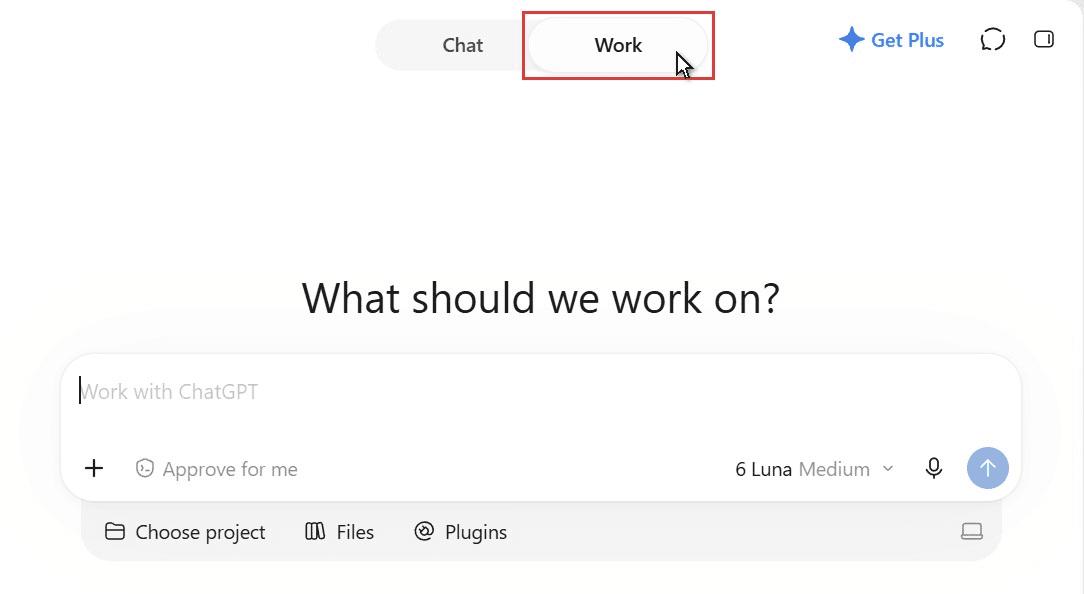
ChatGPT Work is the second mode inside ChatGPT. OpenAI's help center describes it as "an agent designed for longer, multi-step work and finished deliverables." Chat stays the place for quick questions. Work takes a goal, plans the steps, uses tools along the way and hands back something you can review.
It arrived on July 9, 2026, together with a new desktop app that puts Chat, Work and Codex in one window. OpenAI's help page for Work lists what a task can end in: a document, a spreadsheet, a presentation, a report or a Site. Along the way it reads the files you point it to and searches the web. When a step needs another tool, it calls a plugin or runs code.
Where a task runs depends on the device. On the web and on phones, Work runs in OpenAI's cloud. In the desktop app it can also open a folder on your computer and use the files inside, with your permission. Moving between the two modes takes one click on the toggle at the top of the window.
What Does ChatGPT Work Do? One Launch Kit, With Video From the Atlas Cloud Plugin
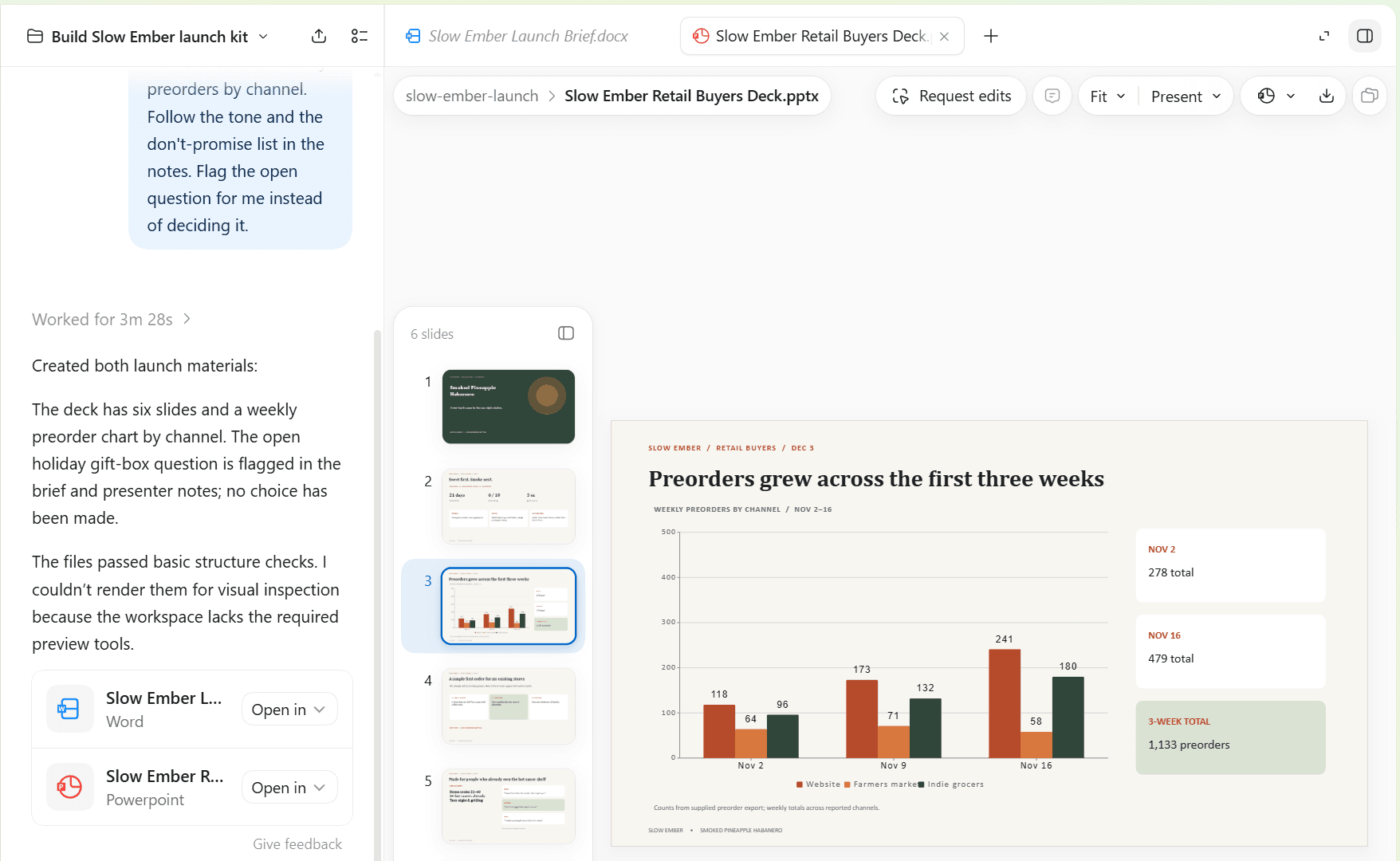
The quickest way to see what ChatGPT Work does is to hand it a job. We invented a small hot sauce brand, Slow Ember, and put two files in a folder: rough launch notes for a new sauce and three weeks of preorder counts. Then we opened that folder as a project in Work and asked for a launch kit, meaning a one-page Word brief and a six-slide deck for a retail buyers meeting.
Work narrated as it went. It read both files first, then built the documents with its own commands and checked their structure before handing them over. The run took 3 minutes 28 seconds, and the brief and the deck were sitting in the project folder, chart included.
A launch kit also needs something that moves. OpenAI's list of what Work can create covers documents, decks, spreadsheets, images and Sites, and video isn't on it. Atlas Cloud fills that gap with a plugin that connects Work to Seedance 2.5 and the rest of a 400+ model catalog.
Install it once from its Plugins Directory page. Our setup walkthrough covers each click.
In the same thread we asked for an eight-second teaser of the bottle. Work answered with a request preview that listed the model, the length, the shape and the full prompt it planned to send, then waited for one word: Submit. A little over three minutes later the finished clip was linked in the thread, and we saved it beside the deck.
How to Run the Task, Step by Step
The request goes in the same message box you use for everything else in Work.
- Tag the plugin. Type @ and choose Atlas Cloud from the list that opens.
- Describe the clip. Name the model and mode, then the length, aspect ratio and resolution, then the scene. Ask to see the request before it runs.
- Send it. Check the preview that comes back and reply Submit to start the render.
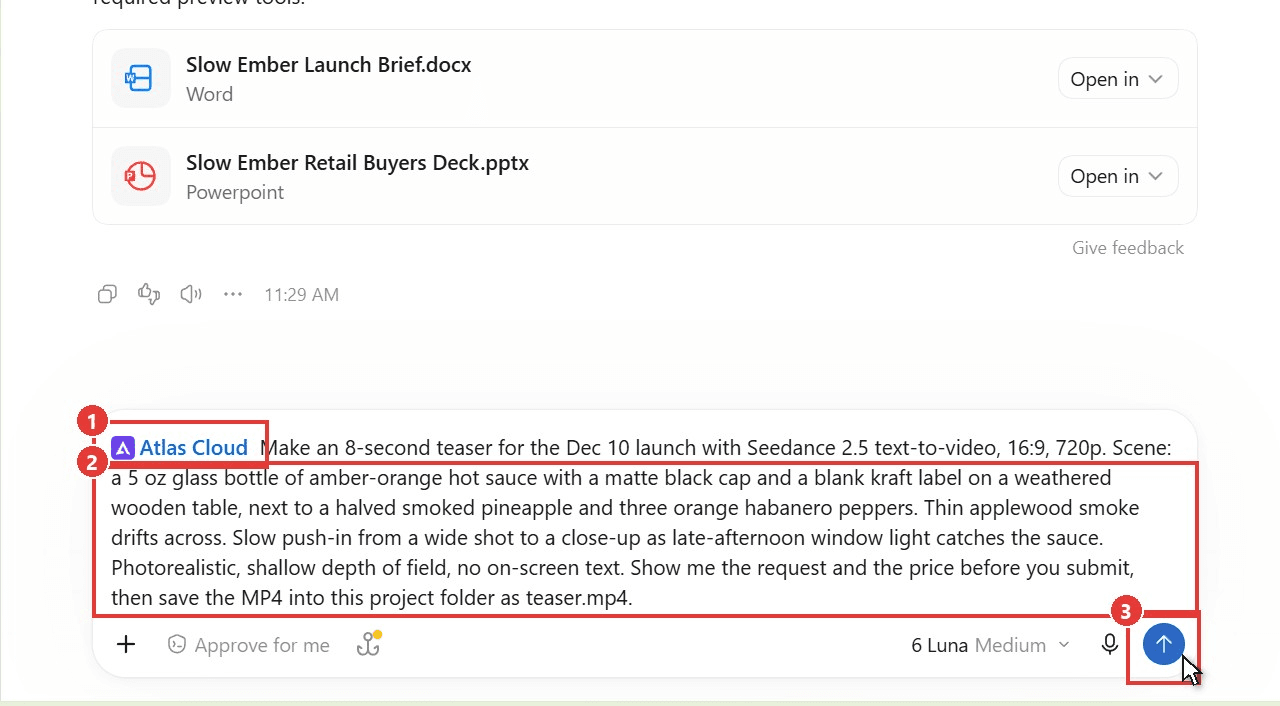
The teaser above came from a four-sentence scene description: the bottle and its props, the smoke, the camera move and the look.
ChatGPT Work vs Chat: The Same Brief in Both Modes
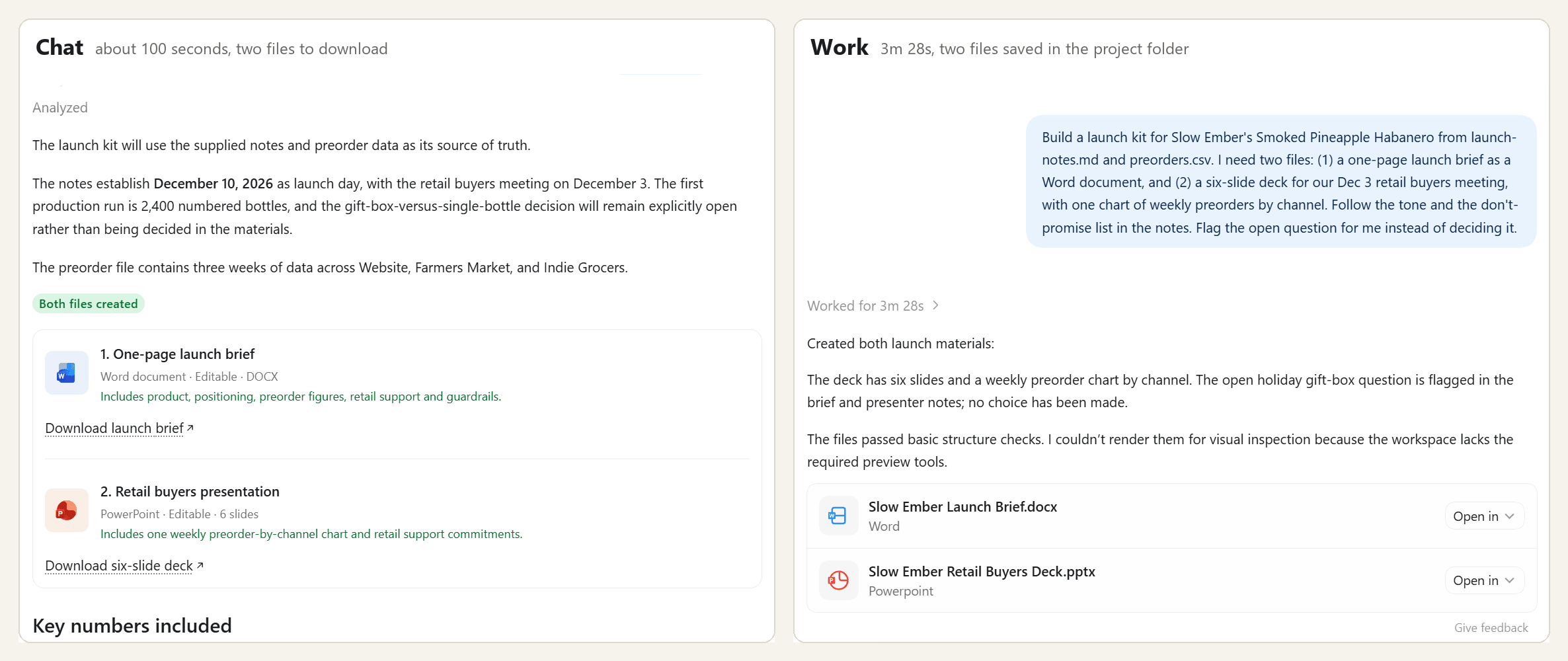
For the ChatGPT Work vs Chat question we sent the identical brief to both modes on one free account, about 20 minutes apart. Chat got the two files as uploads. Work got the folder. The brief asked for the Word document and the deck, told ChatGPT to respect a short list of things the brand must not promise, and asked it to flag one undecided question instead of answering it.
| Chat | Work | |
|---|---|---|
| Model shown | Auto | GPT-6 Luna, medium reasoning |
| Input | Two uploaded files | One local folder, trusted once |
| Time to finish | About 1 minute 40 seconds | 3 minutes 28 seconds |
| Where the files went | Download links in the reply | Saved in the project folder |
| Deck | Six slides, native bar chart | Six slides, native bar chart, speaker notes |
| Numbers | All correct | All correct |
| The undecided question | Printed on the last slide | Kept off the slides, flagged in the brief and speaker notes |
Chat was faster, and its files were just as accurate. If you can upload the source material and you need one result, Chat is enough.
Work's extra two minutes bought three things. The files landed where the project lives, with no download step.
The deck was also safer to show: Chat put the internal question and the don't-promise list on a slide meant for buyers, while Work moved both into the speaker notes. And the thread stayed open for the next task, which is how the teaser clip got made.
Uploads matter on a free account too. OpenAI's help center caps free users at three file uploads a day, and Chat spent two of them on this brief. Work read the folder directly, after one prompt asking whether we trusted it to "read, edit, and execute files here."
A caveat before you generalize: this was one run per mode, and the two modes ran different models. Read the table as a picture of how each mode behaves, and expect the details to vary from run to run.
Can You Switch a Chat to Work Mode Mid-Conversation?
Not in the desktop app we tested (version 26.1111 on Windows, free account). The toggle shows up on a new chat. Inside an open conversation, the title menu offers Rename, Pin chat, Lock chat, Archive and Move to project, with no option to change mode.
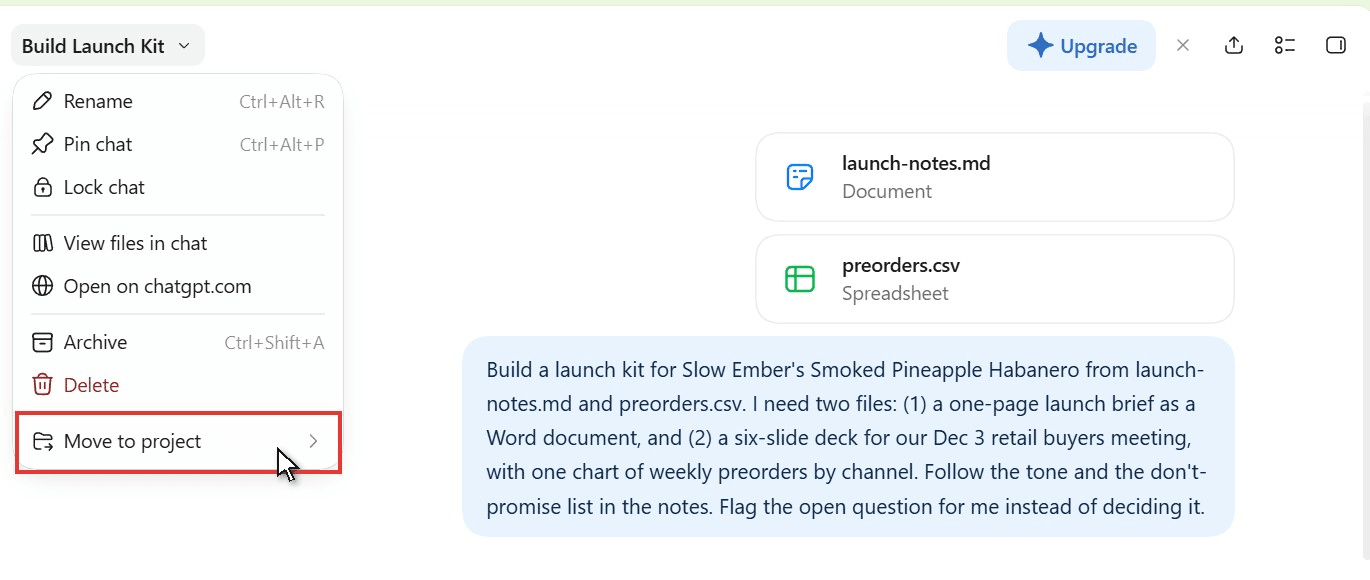
Move to project is the practical route. OpenAI's help page says that from a project you can "choose Work to start a Work chat using the project's context," so a new Work chat there starts from the same project files and instructions. Getting out of Work mode is simpler: start a new chat and click Chat on the toggle.
What Changes in December
The split between the two modes has an end date of sorts. An OpenAI help article on usage limits, updated in early November 2026, says: "Starting in December, Plus, Pro, and Business plans' usage allowance will be shared across ChatGPT and Codex as we bring the agentic capabilities of Work into the main ChatGPT experience."
Usage will be counted in tokens, so heavier models and longer tasks will use more of it. One line matters for casual users: "Instant chat will not draw from your usage." Mashable, citing TechCrunch, reported on November 2 that OpenAI had emailed users about merging the Chat and Work tabs into one experience, starting with a limited test. The help pages we read don't give a date for that part.
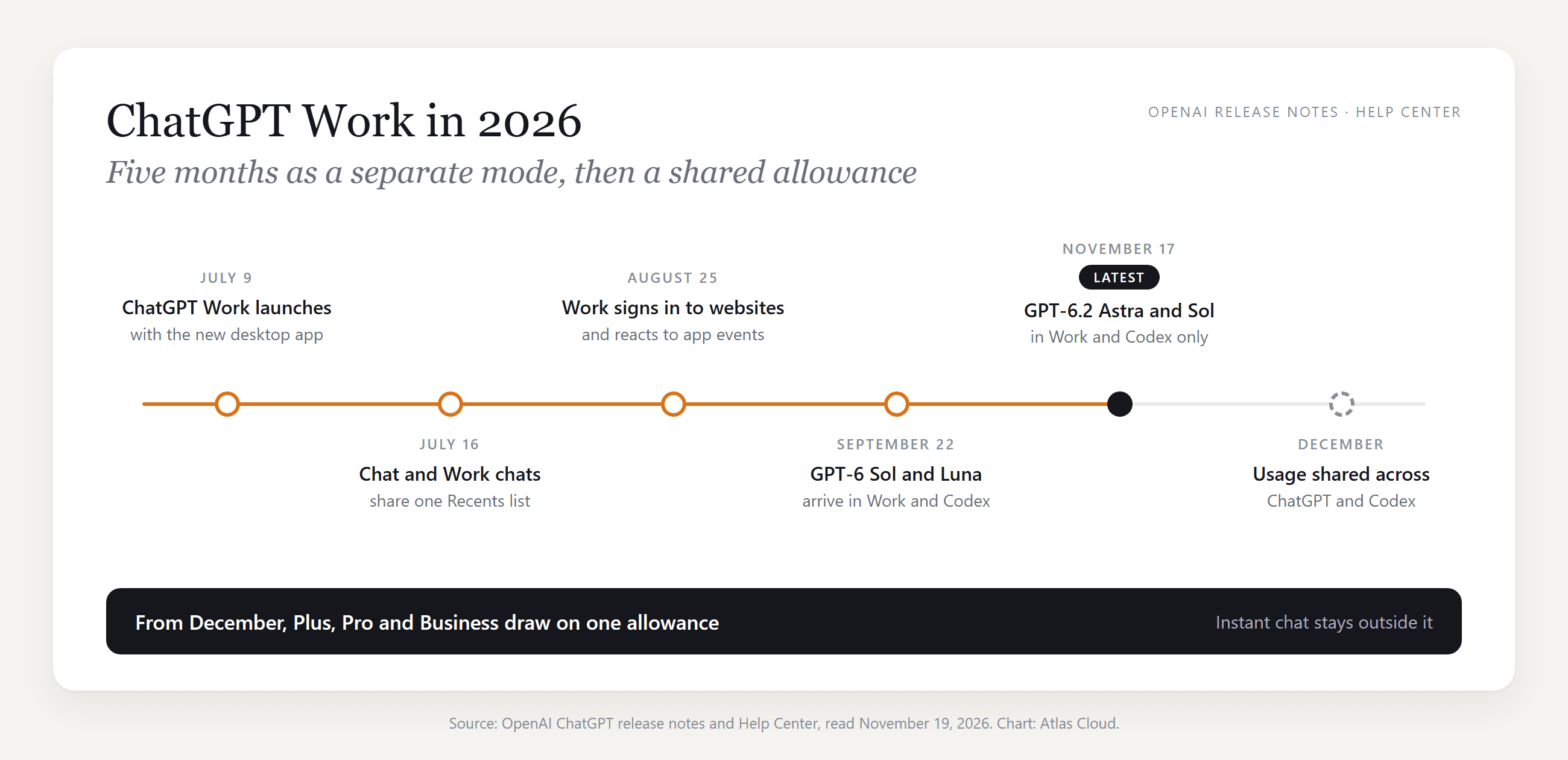
Treat the toggle as a 2026 habit. The question behind it will outlast any redesign: is this something to answer, or a job to hand off?
ChatGPT Work vs Codex: One Usage Pool, Two Views
Work and Codex are close relatives. OpenAI's getting-started guide tells people who used Codex for non-coding jobs that Work "gives you the same core capabilities with an experience designed for everyday work." The capabilities overlap. The view on top changes.
| ChatGPT Work | Codex | |
|---|---|---|
| Where you start | Select ChatGPT, then switch to Work | Select Codex in the product selector |
| Chats you see | Chat and Work conversations together | Codex chats and development projects |
| Technical detail | Git and shell commands stay hidden | Developer details such as diffs and review views |
| How the agent talks | Plain language and finished outputs | Implementation detail |
| Pull requests pane | Not available | Available when enabled |
Source: OpenAI's "Use ChatGPT" guide on learn.chatgpt.com , read November 19, 2026.
Does ChatGPT Work use Codex usage? Yes. OpenAI's pricing page for Codex opens with the sentence "ChatGPT Work and Codex share pricing, credits, and usage limits." A long research task in Work leaves less room for a coding session that afternoon.
The same page gives estimates for Plus, counted as local messages per five-hour window:
| Model | Plus, per five hours |
|---|---|
| GPT-6.2 Astra | 6 to 50 |
| GPT-6.2 Sol | 17 to 180 |
| GPT-6 Luna | 350 to 3,000 |
OpenAI calls these estimates, and adds that cloud tasks may use more of the allowance than local ones. Pro plans currently have no five-hour limit. The spread between models is wide, so save Astra for the jobs that need it.
Is ChatGPT Work Like Claude Cowork?
Yes, in shape. Both sit beside regular chat in the same app. Both take an outcome, work through the steps and return files such as spreadsheets and slide decks. Both run tasks in the cloud and need the desktop app to reach files on your computer. Anthropic got there earlier: Cowork opened as a research preview on January 12, 2026 and became generally available on April 9.
| ChatGPT Work | Claude Cowork | |
|---|---|---|
| Launch | July 9, 2026 | Research preview January 12, 2026; generally available April 9 |
| Free access | Limited, desktop app only | Paid plans only |
| Web and mobile | Plus and higher | Pro, Max, Ultra and Team; Enterprise by opt-in |
| Desktop app | macOS and Windows | macOS, Windows, Linux (beta) |
| Local files | Desktop app | Desktop app |
| After you close the app | Cloud tasks keep going | Cloud sessions keep going, laptop closed included |
| Usage | One pool shared with Codex | Uses plan limits faster than chat |
| Merging with chat | Announced for the main ChatGPT experience | Rolling out since September 16, 2026 |
Sources: OpenAI Help Center and release notes; Anthropic's Cowork help article , product page and release notes. All read November 19, 2026.
Which one to pick comes down to where your work already lives. If your files, plugins and chat history are in ChatGPT, Work starts with that context. The same holds for Claude. Free users have one more reason to start with Work, since Cowork is limited to paid plans.
How to Get ChatGPT Work on Web, Windows and Mac
Access depends on your plan and on the device in front of you.
| Plan | Desktop app (macOS, Windows) | Web and mobile |
|---|---|---|
| Free | Limited access | Not included |
| Go | Limited access | Not included |
| Plus | Included | Included |
| Pro | Included, with longer sessions | Included |
| Business, Enterprise, Edu | Set by workspace admins | Set by workspace admins |
Source: chatgpt.com/pricing and OpenAI Help Center, November 19, 2026.
On a computer, the ChatGPT Work app is the regular ChatGPT desktop app. Install it, choose ChatGPT from the menu, then click Work on the toggle. On chatgpt.com, open ChatGPT and select Work. On a phone, the same choice sits in a dropdown.
ChatGPT Work on Windows is where we ran every test in this article, on a Windows 11 laptop signed in to a free account. The toggle was there without a paid plan.
Frequently Asked Questions
Why does ChatGPT say "Work mode is unavailable for this project"?
The project is set to project-only memory. OpenAI's help page on Projects states that with project-only memory, "ChatGPT Work is not available in the project." Shared projects switch to that setting automatically and can't be changed back.
For a project of your own, open Project settings from the more options menu, choose Default memory under Memory and save. OpenAI says the change may take a few hours. For a shared one, start the Work task outside the project.
Can students still try 4 months of ChatGPT Work for free?
No. That line comes from OpenAI's 2026 Back to School offer, which gave eligible US college students four free months of ChatGPT Plus, Work included. The claim window closed on October 31, 2026. Students who claimed it in time keep their free months, and Plus renews at $20 per month afterward unless they cancel (price as of November 19, 2026).
Does ChatGPT Work run in the background?
Cloud tasks do. OpenAI's guide says a cloud task "can keep going after you close the desktop app," and you can pick it up on the web or on your phone. A task that needs files or apps on your computer is different, because the machine has to stay online for those steps. Scheduled tasks let Work repeat a job or watch for a change without you starting it each time.
Is ChatGPT Work free, or do you need a subscription?
Both answers are partly right. Free and Go accounts get limited Work access in the desktop app. Work on the web and on mobile starts at Plus, which costs $20 per month as of November 19, 2026. Our Go vs Plus comparison covers what else changes at that step.
Which models does ChatGPT Work use?
Work has its own model picker. GPT-6.2 Astra and GPT-6.2 Sol are available there on Plus, Pro, Business, Enterprise and Edu plans, with workspace admins switching them on for Enterprise and Edu. OpenAI notes that regular Chat keeps its existing model choices. Our free account showed GPT-6 Luna. For how Astra and Sol differ, see our GPT-6.2 review.
Conclusion
Our two runs ended closer than the mode names suggest. Chat built the brief and the deck in under two minutes. Work took about twice as long and handed back files saved where the project lives, speaker notes that kept an internal question away from buyers, and a thread ready for the next step.
So start in Chat for a quick file from material you can upload. Move to ChatGPT Work when the job sits in a folder, needs a plugin such as Atlas Cloud for video, or should repeat on a schedule. In December the two begin to share one allowance, and the choice gets simpler.




