On November 1 a 17-second SpongeBob clip went up on TikTok with five words stacked over every frame: "It's Time To Change Your Pfps." Five days later it had 1.9 million plays, and the hashtag page around it was a parade of SpongeBob, anime leads and cats in red hats. That is the christmas pfp switch, the yearly ritual of swapping your profile picture for a holiday one the moment November starts, and nearly every viral post we checked uses a picture of someone else's character.
This guide covers where the trend came from, how to make a christmas pfp from one photo of you with a Santa hat that keeps your face, four versions people actually search for (you, a cartoon you, a matching pair, your pet), and how to crop it so the pompom survives the circle. We ran every version from a single photo each, and the prompts are beside the results.
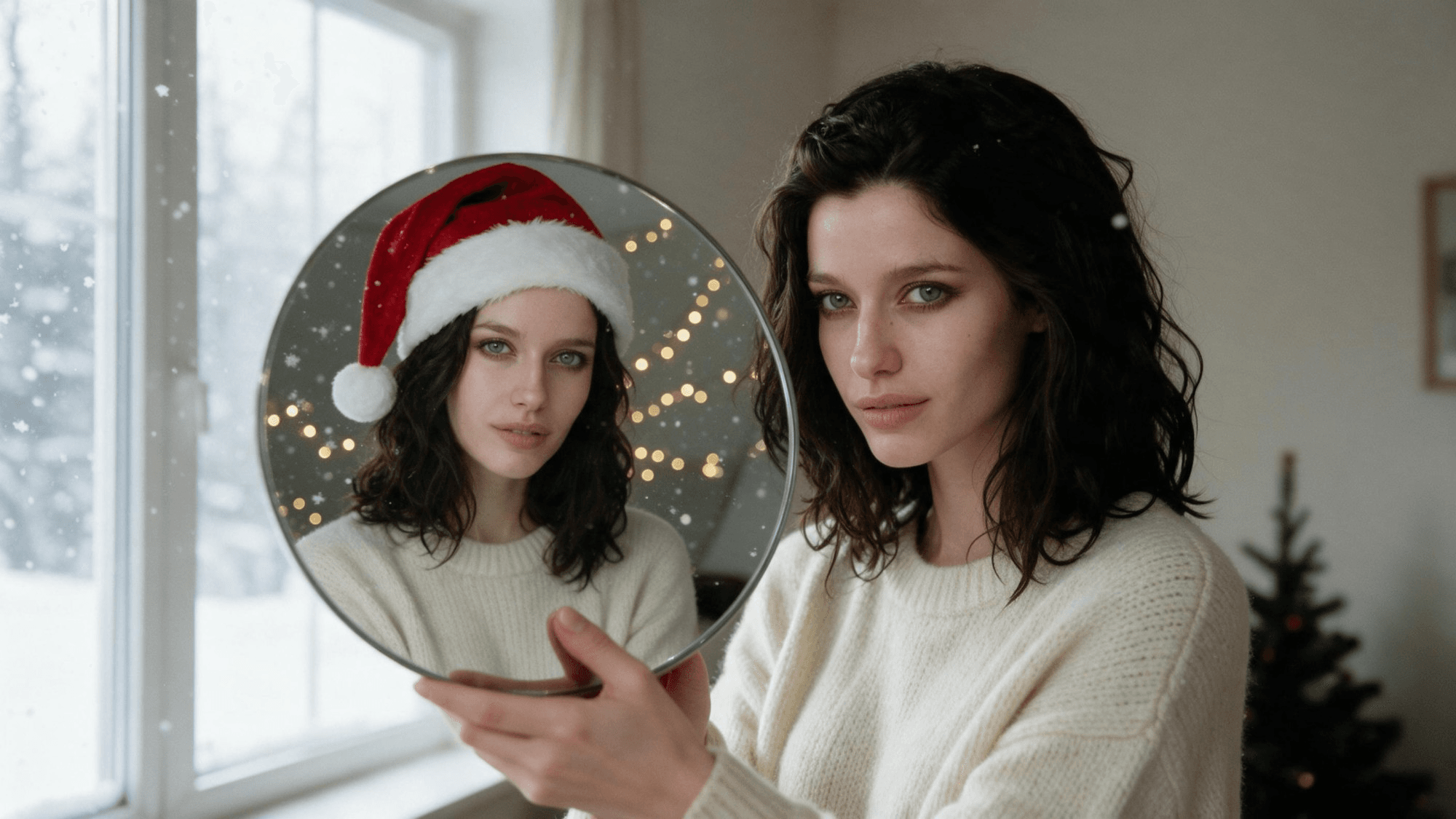
Key Takeaways
- Thechristmaspfp switch landed on November 1 this year, led by "It's time to change your pfps" posts.
- Most viral posts reuse cartoon characters;theAI version puts your own face under the Santa hat.
- Seedream 5.0 Pro in Atlas Cloud's image editor addsthehat, snow and lights while keeping your face.
- One prompt rule keeps the crop safe: face centered, whole hat in frame, room above the pompom.
- Matching pairs take two photos in one edit, and a pet gets a hat sized between its ears.
What Is the Christmas PFP Trend? (It's Time to Change Your Pfps)
A christmas pfp is any profile picture dressed for December: a Santa hat, snow, fairy lights, sometimes just a red scarf. The trend is the timing. People switch on the first day of November, often with the caption "it's time", and switch back after New Year.
This year the switch landed on schedule. The SpongeBob post by @someguynamedsean1 went up on November 1 and sat at 1.9 million plays by November 6. A day later @baixy__ posted six seconds of anime stills in Santa hats under the line "It's November which means anime Christmas pfps are back" and passed 1.6 million.
Smaller posts filled in the rest of November 1: a Bleach version is at 365,000 plays, and a "matching christmas pfp w ur friends" post of two real cats in Santa hats, shot in front of a fireplace, drew 83,600.
Last season ran the same way. A sorted collage from December 5, 2025 (Grinch, horror films, sports, dogs, matching pairs) is at 830,000 plays, and a "Christmas pfp ideas!" slideshow from November 11, 2025 is at 405,000. Of the 28 posts we pulled from the hashtag page on November 6, nearly all reuse found images of characters. The AI version flips that: the picture is you.
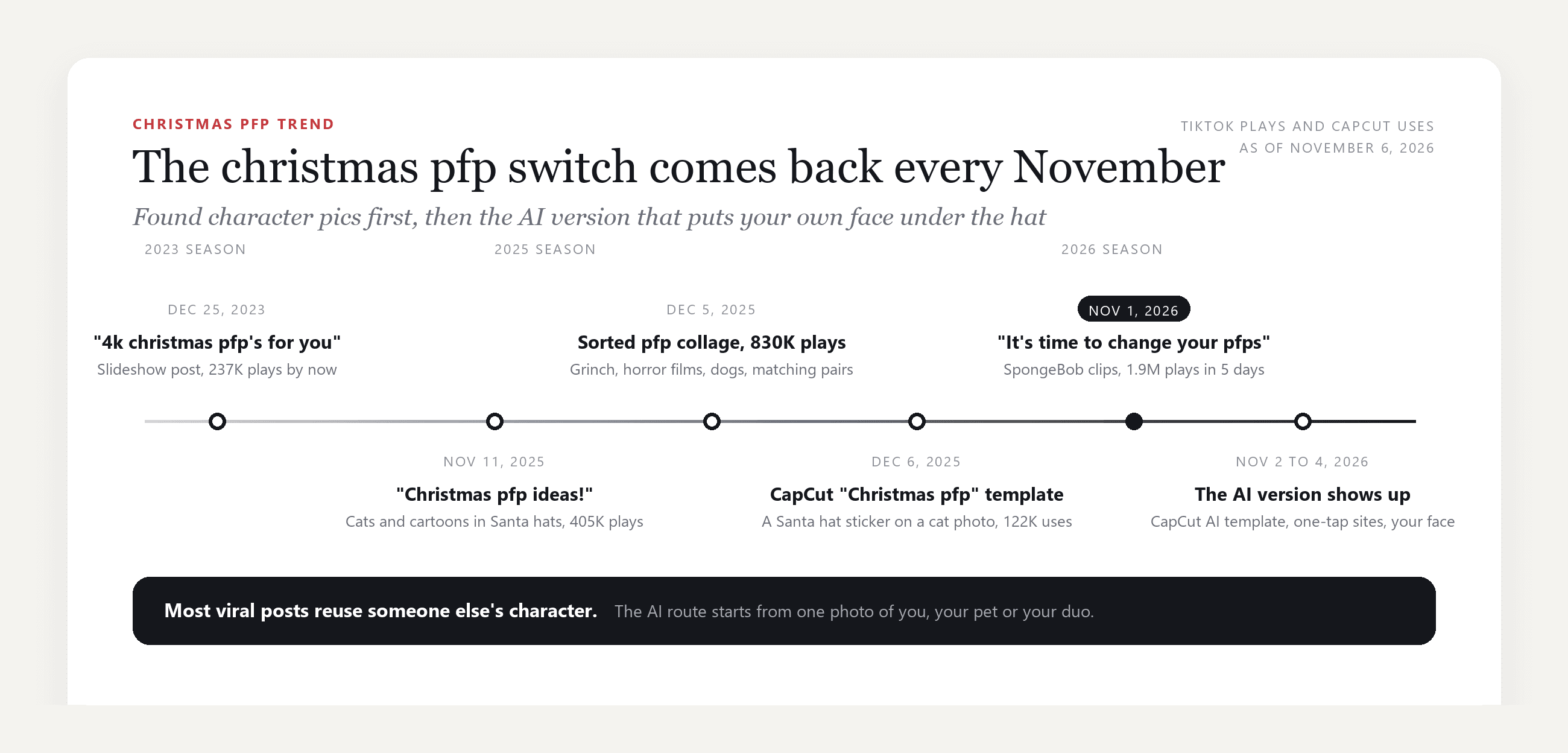
Here is what sits behind the posts, checked on the template pages on November 6, 2026:
| Template or tool | What it does | Scale |
|---|---|---|
| CapCut "Christmas pfp" template (December 2025) | Drops a Santa hat sticker and falling snow over one photo, a cat in the preview | 122,348 uses |
| CapCut "Christmas Hat Filter" (November 2023) | A recording template: lip-sync a line, then a hat and emoji overlay | 72,370 uses |
| CapCut "Christmas PFP" AI template (created November 2, 2026) | One photo in, an AI still of you in a Santa hat in a snowy village out | 1,072 uses |
| One-tap AI template site (live November 4, 2026) | Runs a fixed prompt on an image model and returns one still of you in the hat | 3 credits a photo |
The sticker route is fast, but the hat sits on top of the photo rather than in your hair. The one-tap site keeps your face but fixes the look. The route below keeps the face too, and the prompt stays in your hands, which matters once you want a cartoon, a pair or a pet.
How to Make a Christmas PFP From Your Own Photo on Atlas Cloud
Everything that makes a christmas pfp feel real is an edit, not a sticker: the hat has to sit in your hair, the snow has to land on your shoulders, and the lights have to glow behind your head instead of over it. Atlas Cloud runs ByteDance's Seedream 5.0 Pro in the Image Edit tab of its image generator, an editing model that rebuilds the scene around you while holding your features.
One photo of a man in a plain studio became this:
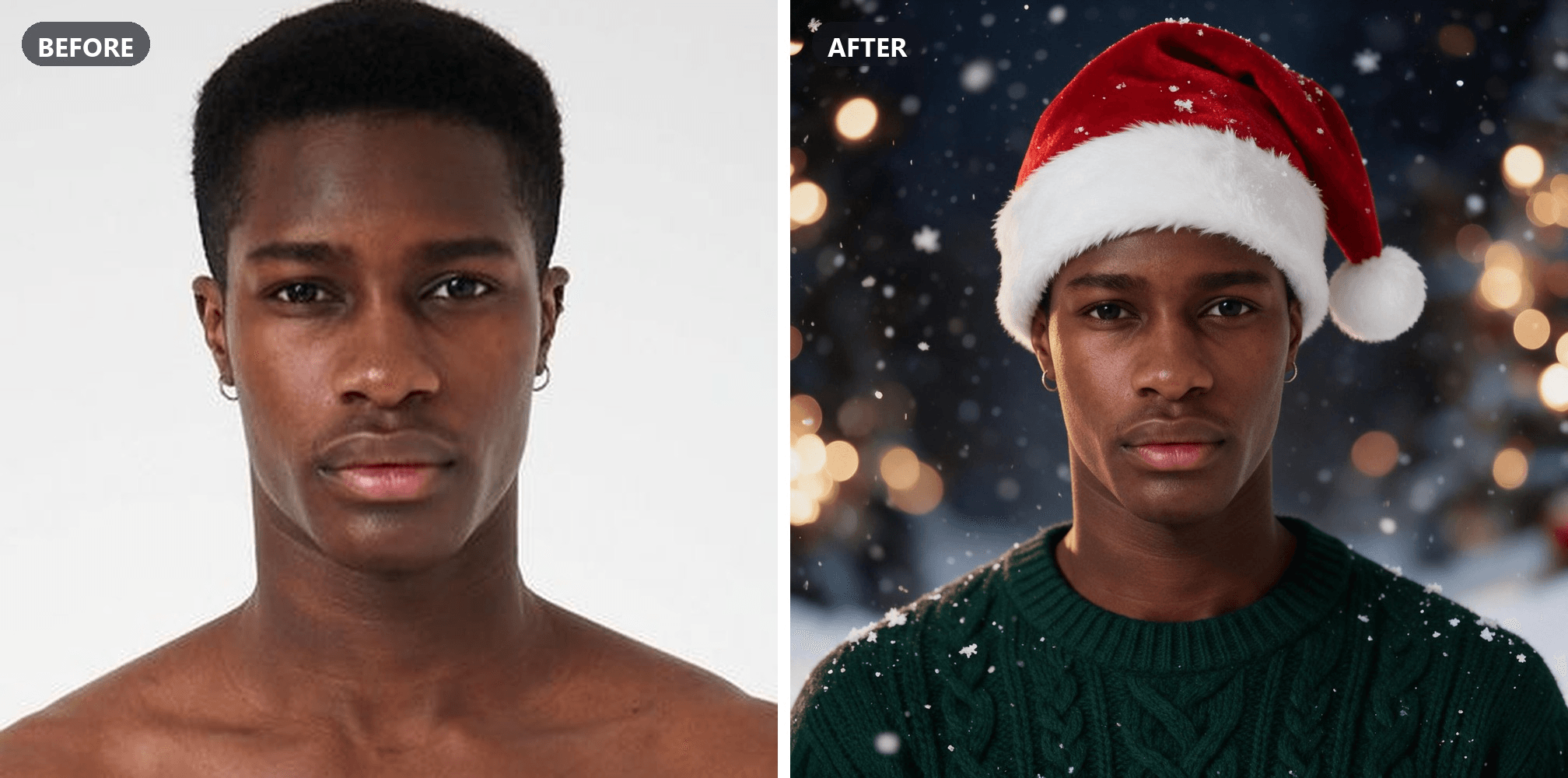
Method 1: Add a Santa Hat to Your Photo in the Image Editor
Log in, open the image generator, and five clicks get you the picture above:
- Pick the Image Edit tab.
- Open the Models row and choose Seedream v5.0 Pro.
- Upload your photo under Reference. Chest up, face to the camera, no hat or sunglasses.
- Paste the prompt below. Keep the default 2048×2048 square, the shape profile crops start from.
- Click Run.
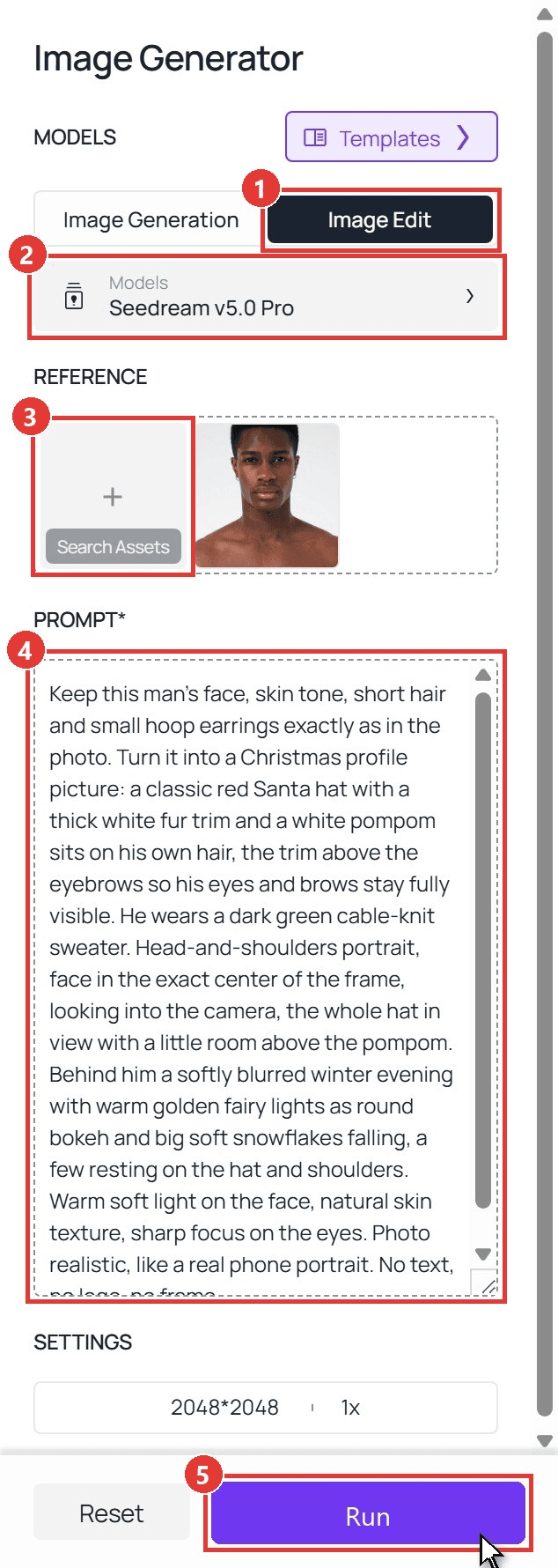
plaintext1Keep this man's face, skin tone, short hair and small hoop earrings exactly as in the photo. Turn it into a Christmas profile picture: a classic red Santa hat with a thick white fur trim and a white pompom sits on his own hair, the trim above the eyebrows so his eyes and brows stay fully visible. He wears a dark green cable-knit sweater. Head-and-shoulders portrait, face in the exact center of the frame, looking into the camera, the whole hat in view with a little room above the pompom. Behind him a softly blurred winter evening with warm golden fairy lights as round bokeh and big soft snowflakes falling, a few resting on the hat and shoulders. Warm soft light on the face, natural skin texture, sharp focus on the eyes. Photo realistic, like a real phone portrait. No text, no logo, no frame.
Three lines in that prompt do the real work. "Keep this man's face" first, because the model follows the order you give it. "The trim above the eyebrows" stops the hat from swallowing the eyes. And "a little room above the pompom" is what saves the crop later: a circle cut from the middle of a square keeps the whole hat only if the hat was not touching the top edge.
Method 2: Run the Same Edit Through the API
Step 1: Create and copy an API key in the Settings page of the Atlas Cloud console.
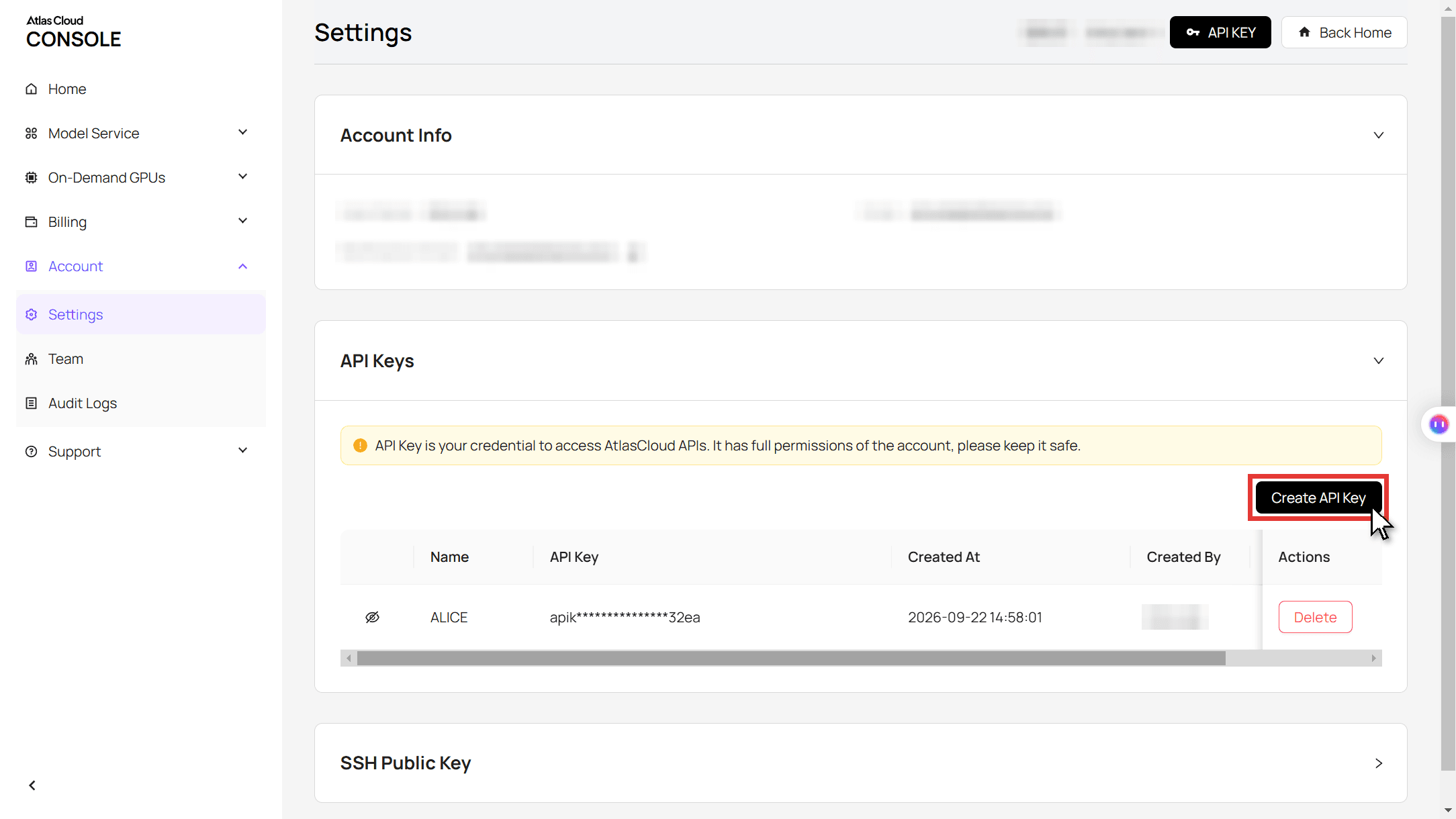
Step 2: Check the request format in the API docs.
Step 3: Submit the edit, then poll for the file. The photo goes in as a URL in the images array, the prompt is the same text as above, and size picks the square.
plaintext1curl -X POST https://api.atlascloud.ai/api/v1/model/generateImage \ 2 -H "Authorization: Bearer $ATLASCLOUD_API_KEY" \ 3 -H "Content-Type: application/json" \ 4 -d '{ 5 "model": "bytedance/seedream-v5.0-pro/edit", 6 "prompt": "Keep this man'"'"'s face, skin tone, short hair and small hoop earrings exactly as in the photo. Turn it into a Christmas profile picture: a classic red Santa hat with a thick white fur trim and a white pompom sits on his own hair, the trim above the eyebrows. He wears a dark green cable-knit sweater. Head-and-shoulders portrait, face in the exact center, the whole hat in view with room above the pompom, warm fairy-light bokeh and falling snow behind him. Photo realistic.", 7 "images": ["https://your-cdn.com/portrait.jpg"], 8 "size": "2048*2048" 9 }'
plaintext1curl https://api.atlascloud.ai/api/v1/model/prediction/<prediction_id> \ 2 -H "Authorization: Bearer $ATLASCLOUD_API_KEY"
The same endpoint and key run the other image models on Atlas Cloud. Change the model string to switch.
Four Christmas PFP Ideas: Santa Hat, Cartoon, Matching and Pet
The searches behind this trend sort into four looks, and the same Image Edit tab covers all of them. What changes is the prompt and, for the pair, the number of photos.
A Santa Hat PFP That Still Looks Like You
The classic santa hat pfp is a head-and-shoulders shot, warm light, snow in the air. The trap is the sweater: if your photo shows a tank top, say what to replace it with, or the model has no reason to change it.
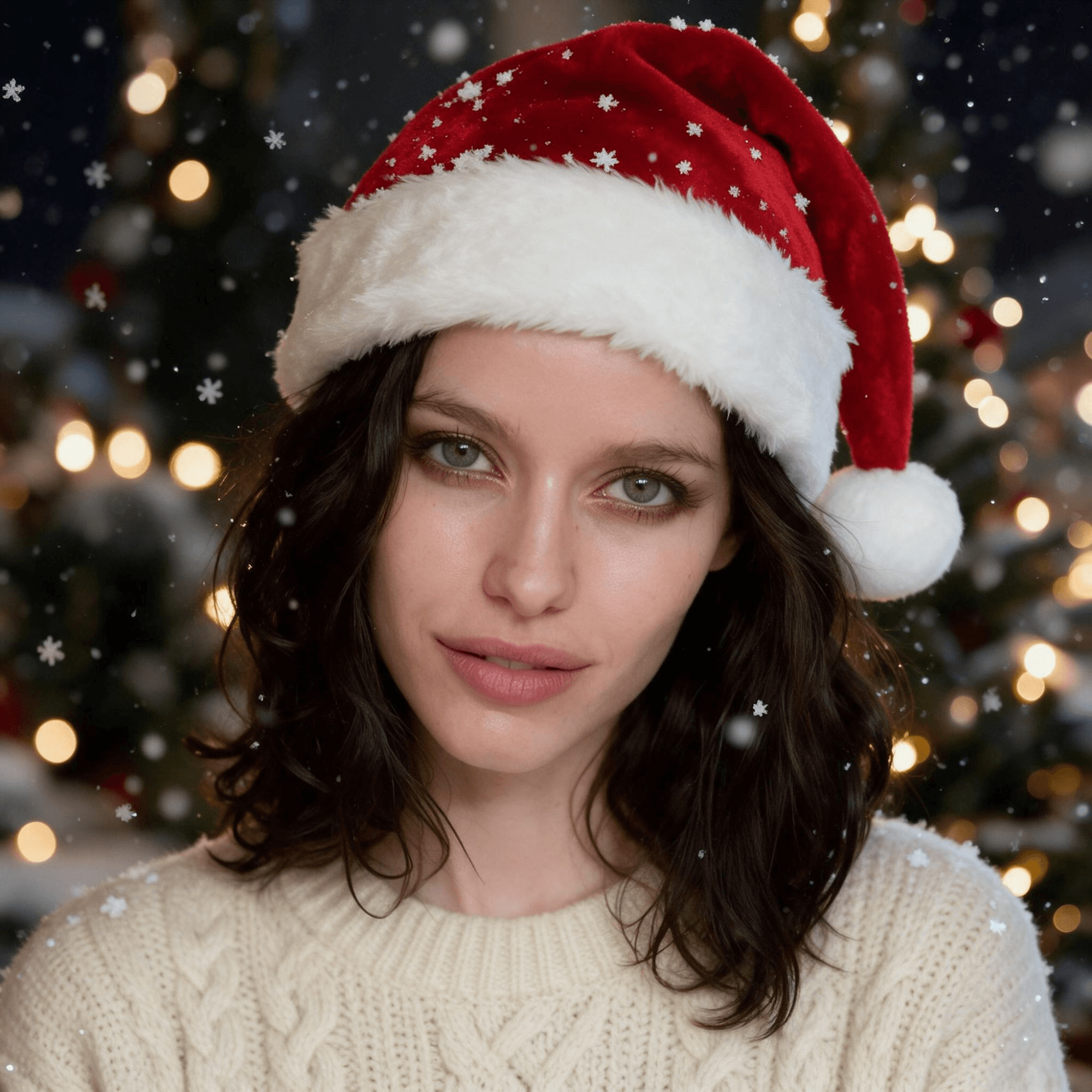
plaintext1Keep this woman's face, green eyes, skin tone and shoulder-length dark wavy hair exactly as in the photo. Turn it into a cozy Christmas profile picture: a classic red Santa hat with a thick white fur trim and a white pompom sits naturally on her own hair, the trim above the eyebrows so her eyes and brows stay fully visible. She wears a cream cable-knit sweater instead of the tank top. Head-and-shoulders portrait, face in the exact center of the frame, looking into the camera with a soft smile, the whole hat in view with a little room above the pompom. Behind her, a softly blurred winter evening with warm golden fairy lights as round bokeh, a hint of a decorated Christmas tree, and big soft snowflakes falling, a few resting on the hat and shoulders. Warm soft light on the face, a small catchlight in each eye, natural skin texture, sharp focus on the eyes. Photo realistic, like a real phone portrait taken on a winter evening. Exactly one person. No text, no logo, no frame.
A Cartoon Version of You, Not a Borrowed Anime Character
"Anime christmas pfp" is the biggest sub-search we found behind this trend, and the posts that feed it use stills from shows. A cartoon of yourself gets the same cozy, drawn feel without borrowing a studio's character. The likeness lives in a few features, so the prompt names them: hair length and color, eye color, glasses or a beard if you have them.

plaintext1Redraw this woman as a cute Christmas cartoon profile picture in a clean illustrated style: smooth dark outlines, soft cel shading, warm colors, a slightly bigger head, big friendly green eyes with a highlight, rosy cheeks, a simple small nose and mouth. Keep what makes her recognizable as simple cartoon shapes: her face shape, shoulder-length dark wavy hair, skin tone and expression. She wears a classic red Santa hat with a thick white fur trim and a white pompom over her hair, the trim above the eyebrows, and a cream knit sweater. Head-and-shoulders, face in the exact center, looking at the viewer, the whole hat in view with room above the pompom. Behind her, in the same flat cartoon style, a deep blue winter night with big round snowflakes, a small decorated Christmas tree and a string of warm colored lights. An original cartoon of this person only, not any existing anime, game or film character. No text, no logo, no frame.
Matching Christmas PFP for Couples and Best Friends
A matching christmas pfp only works if both pictures share the hat, the light and the snow, which is hard to get from two separate runs. The fix is one run with two photos: Seedream 5.0 Pro takes both as references and returns one wide image split by a thin white line, one person per half. Crop each half for its own profile, post them the same day.
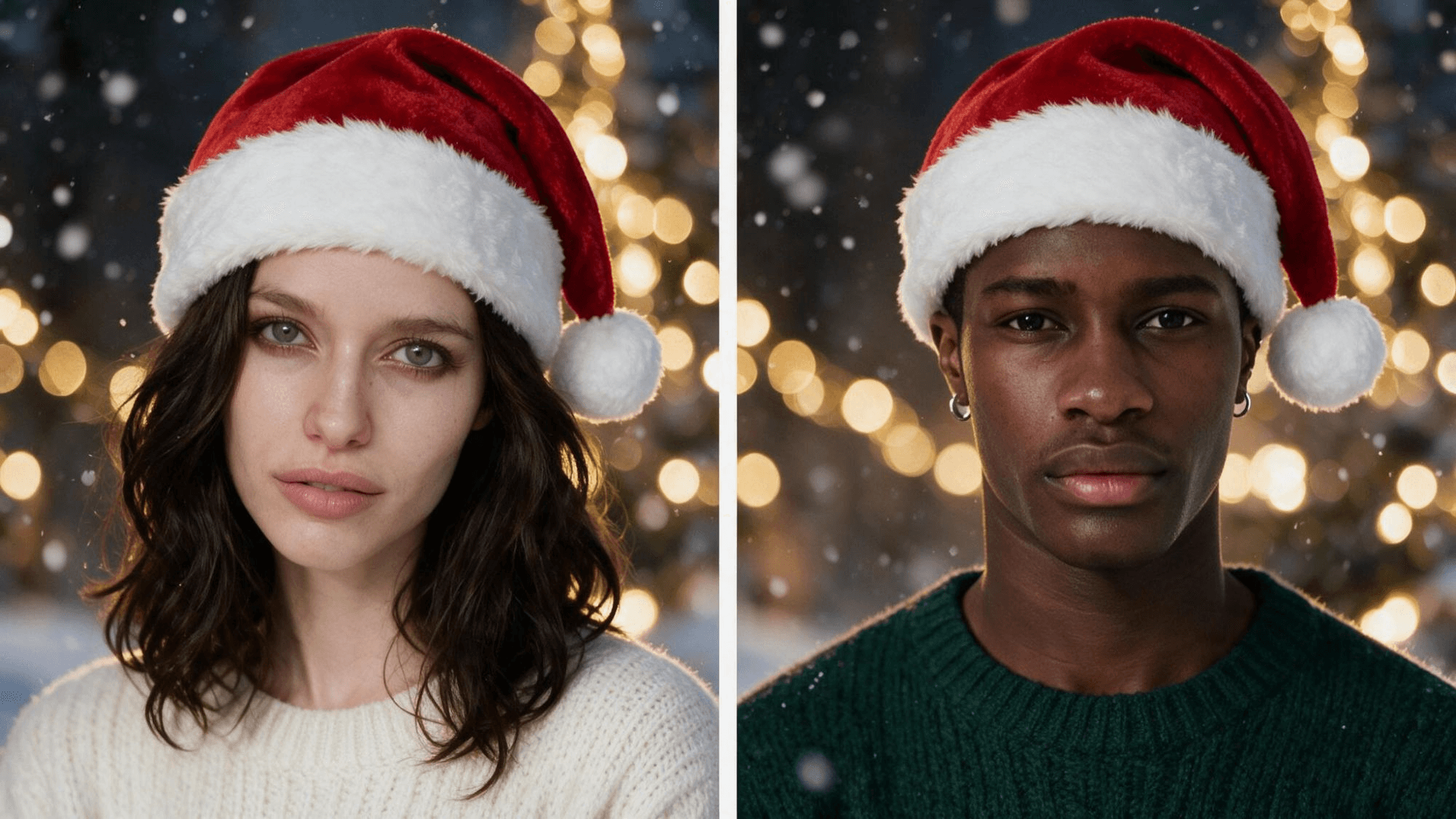
plaintext1Use the two uploaded photos. Make a matching pair of cozy Christmas profile pictures in one image: two square portraits side by side, split by a thin straight white line, so each square can be cropped as its own profile picture. The LEFT square is the woman from image 1. The RIGHT square is the man from image 2. Each square shows only its own person, with their own face, hair, skin tone and expression kept exactly as in their photo. Both wear a classic red Santa hat with a thick white fur trim and a white pompom over their own hair, the trim above the eyebrows. She wears a cream knit sweater, he wears a dark green knit sweater. In each square: a head-and-shoulders portrait, face in the center, looking into the camera, the whole hat in view. Behind each of them the same softly blurred winter evening with warm golden fairy lights as round bokeh and big soft snowflakes falling, the same light and the same colors. Never blend the two faces, never swap hair or clothes between them, never put both people in one square. Photo realistic, like two phone portraits taken on the same evening. No text, no logo, no frame; the thin white line is the only line.
Upload her photo first and his second, since the prompt points at them by order. Set the size to 2048×1152 so each half comes out close to square.
Christmas PFP for Your Dog or Cat
The pet version is where stickers struggle, because a pasted hat rarely sits between the ears. The edit does, as long as the photo shows both ears and the face points at the camera. A christmas pfp dog keeps its markings, its eye color and the open-mouth grin; the prompt says so, and it says the hat is "sized for the dog", or the model reaches for a human one.
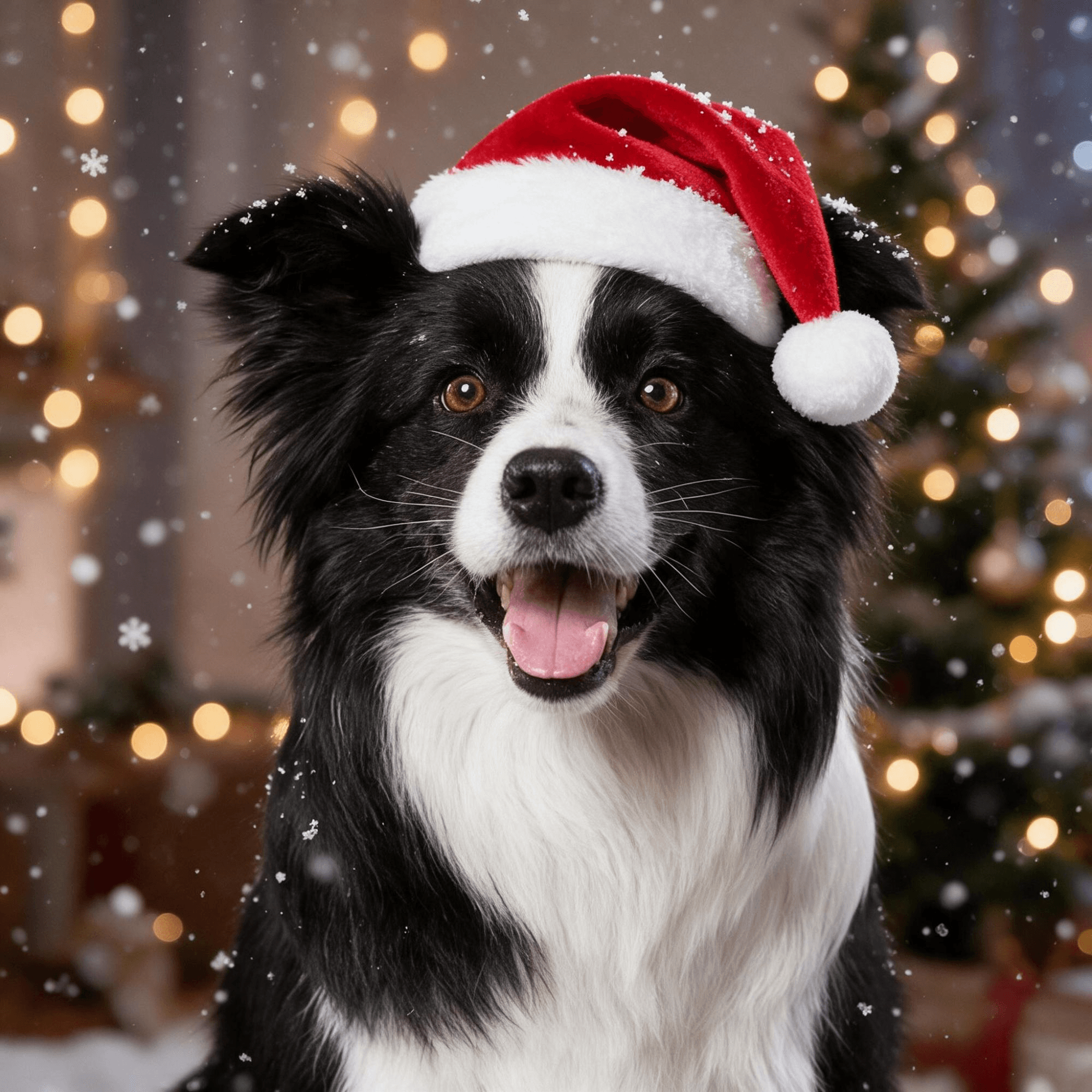
plaintext1Keep this dog exactly as in the photo: the black and white fur, the white blaze down the face, the fluffy ears, the brown eyes and the happy open-mouth expression. Turn the photo into a cozy Christmas profile picture: a small classic red Santa hat with a thick white fur trim and a white pompom, sized for the dog, sits between its ears without covering the eyes. Head-and-chest portrait, the face in the exact center of the frame, looking into the camera, the whole hat in view with a little room above the pompom. Behind the dog, a softly blurred winter evening with warm golden fairy lights as round bokeh, a hint of a decorated Christmas tree, and big soft snowflakes falling, a few resting on the hat and the fur. Warm soft light, every hair of the fur crisp, sharp focus on the eyes. Photo realistic. Only this dog, no people. No text, no logo, no frame.
Swap "dog" for "cat" and name the markings you see (an orange and white coat, a tabby stripe, green eyes) and the same prompt gives you a christmas pfp cat.
Crop It Right: Sizes for Discord, TikTok and Instagram
Every app takes your square and shows a circle cut from its middle, then shrinks it to a thumbnail in chats and comments. A christmas pfp for Discord spends most of its life at that thumbnail size. The 2048×2048 output has more pixels than any of them show, so resolution is not the problem. The hat is.
| Where you post it | How it shows | What to check before saving |
|---|---|---|
| Discord | A circle next to every message, small | The pompom is inside the circle; red hat against a dark server theme reads even at thumbnail size |
| TikTok | A circle on the profile, a tiny one on comments | Eyes sit a little above center; a hat that touches the top edge loses its pompom |
| A circle on the grid and in Stories rings | The fur trim stays clear of the ring; zoom out one notch if it clips | |
| Matching pair | Two circles on two accounts | Crop each half at the same zoom so the hats line up when the profiles sit side by side |
Open the picture in the app's crop screen, zoom until the whole hat sits inside the circle, and stop there. If the prompt left room above the pompom, you will not need to zoom at all.
Frequently Asked Questions
Is the christmas pfp trend the same as the AI Christmas photo trend?
No. The AI Christmas photo trend is a full studio portrait with candy canes and a glossy red set, and it ran through last December. The christmas pfp is a head-and-shoulders picture built for a circle crop, and it starts on November 1. Both run on the same editing model; the guide to the AI Christmas photo trend covers the portrait version and the family merge.
When do people switch to a christmas pfp?
November 1 is the unofficial date, which is why the biggest posts this year carry "it's time" or "it's November" in the caption or on screen. Some wait until after Thanksgiving, and many switch back after New Year, so a picture made now gets about two months of use.
Can I use an anime character as my christmas pfp?
People do, and the posts that go viral are full of them, but the artwork belongs to whoever drew it. A cartoon version of your own face gives you the same look without that question, and it stays yours.
How much does a christmas pfp cost on Atlas Cloud?
Seedream v5.0 Pro in the Image Edit tab showed $0.072 per image at the default 2048×2048 size as of November 6, 2026, with the first reference photo included. The matching version, which uploads two photos, showed $0.0744.
Why does the Santa hat cover my eyebrows?
Usually because the photo was taken from above, so the model reads the forehead as shorter than it is. Keep the line "the trim above the eyebrows" in the prompt, retake the photo at eye level, and run it again. Each run differs a little, so a second try with the same prompt often fixes it on its own.
Conclusion
The trend is older than this year's posts: a Santa hat on a profile picture every November, borrowed from a cartoon more often than not. The AI route changes one thing: the face under the hat is yours. It covers the four looks people search for (a Santa hat portrait, a cartoon, a matching pair, a pet) from one photo each in the Image Edit tab.
Pick a clear chest-up photo, keep the prompt rules about the trim and the room above the pompom, and the crop takes care of itself. That is the whole recipe for a christmas pfp that still looks like you.


