Most creators pick image models from static Arena leaderboards, only to watch realistic portraits collapse after three editing turns. In this real-world benchmark for GPT Image 2.5 vs Qwen Image 2.1, OpenAI wins in zero-shot photorealism, while Qwen 2.1 leads in background structural stability across iterative revisions.
Empirical Benchmark Summary
| Empirical Metric | GPT Image 2.5 | Rating | Qwen Image 2.1 | Rating |
| Zero-Shot Realism | Photorealistic skin & natural RAW lighting | ★★★★☆ (4.5) | Sharp details; slightly smooth/oily skin | ★★★☆☆ (3.0) |
| Multi-Turn Stability | Global noise & proportion shifts by Turn 5 | ★★★☆☆ (3.5) | Locked background; zero structural decay | ★★★★☆ (4.0) |
| Material Retention | Authentic dark wool & shadow texture | ★★★★☆ (4.5) | High contrast; risks glossy/plastic drift | ★★★☆☆ (3.0) |
| Editing Control | Visual pinpoints; full-canvas re-encoding | ★★★★☆ (4.0) | Painted masks & native transparent RGBA | ★★★★☆ (4.5) |
| Best Production Fit | High-end single-pass commercial assets | 4.1 / 5 | Self-hosted workflows & locked background edits | 3.6 / 5 |
Key Takeaway
- GPT Image 2.5 nails single-shot photorealism, rendering authentic skin translucency and RAW-like dynamic range in a single render. However, its full-canvas re-encoding causes global noise accumulation and anatomical foreshortening by Turn 5.
- Qwen Image 2.1 leverages a 32-layer DiT with KV cache locking to keep background geometry completely artifact-free across multi-turn edits. The tradeoff lies in localized passes: repeated target mask edits tend to over-saturate specular highlights, turning natural skin oily and matte fabrics glossy.
Go with GPT Image 2.5 when your priority is pristine single-shot realism. Reach for Qwen Image 2.1 if your pipeline requires self-hosted control, locked background edits, or native RGBA cutouts.
Single-Prompt Photorealism: Lighting Physics, Skin Textures, and Material Fidelity
Prompt-engineered creators often spend hours fine-tuning lighting prompts, only to discover that visual flaws originate from baseline rendering rather than iterative edits. Testing zero-shot visual fidelity before issuing modification instructions establishes an essential control baseline, helping photographers isolate pre-existing model limitations from true multi-turn edit degradation.
Test 1: Human Skin Micro-Details Under Harsh Direct Light
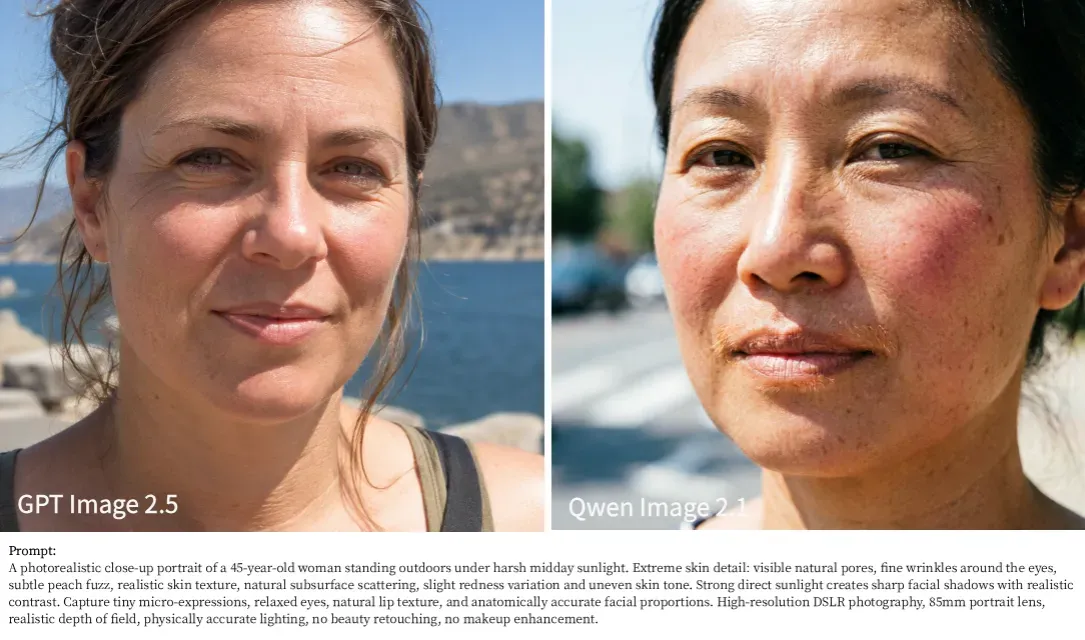
To evaluate raw rendering mechanics under stress, both models were tested using an un-retouched close-up portrait prompt featuring intense midday sunlight, skin texture variations, and anatomical micro-expressions.
Key Visual Observations & Detail Breakdown:
- Subsurface Scattering & Shadow Transitions (GPT Image 2.5 Wins):
GPT Image 2.5 simulates optical physics with strong accuracy. In an 85mm portrait setup, light diffuses naturally across the cheeks and forehead to produce authentic subsurface scattering, accompanied by smooth shadow falloff around the eyes and nose bridge.
- Literal Prompt Adherence vs. Plasticity (Qwen Image 2.1 Trade-offs):
Qwen Image 2.1 responds closely to detailed prompts, accurately rendering facial peach fuzz and uneven cheek pigmentation. However, its specular highlights can appear overly harsh, leaving an artificially oily sheen across the nose and forehead.
- Micro-Expressions & Anatomical Accuracy:
GPT Image 2.5 renders remarkably relaxed facial muscles with anatomically precise eye wrinkles and lip creases. While Qwen 2.1 achieves high surface sharpness, the skin texture displays micro-pattern repetition under zoom, revealing its synthetic diffusion roots when exposed to high-contrast lighting.
Test 2: Fabric & Material Fidelity (Wool Roughness vs. Rim Highlights)
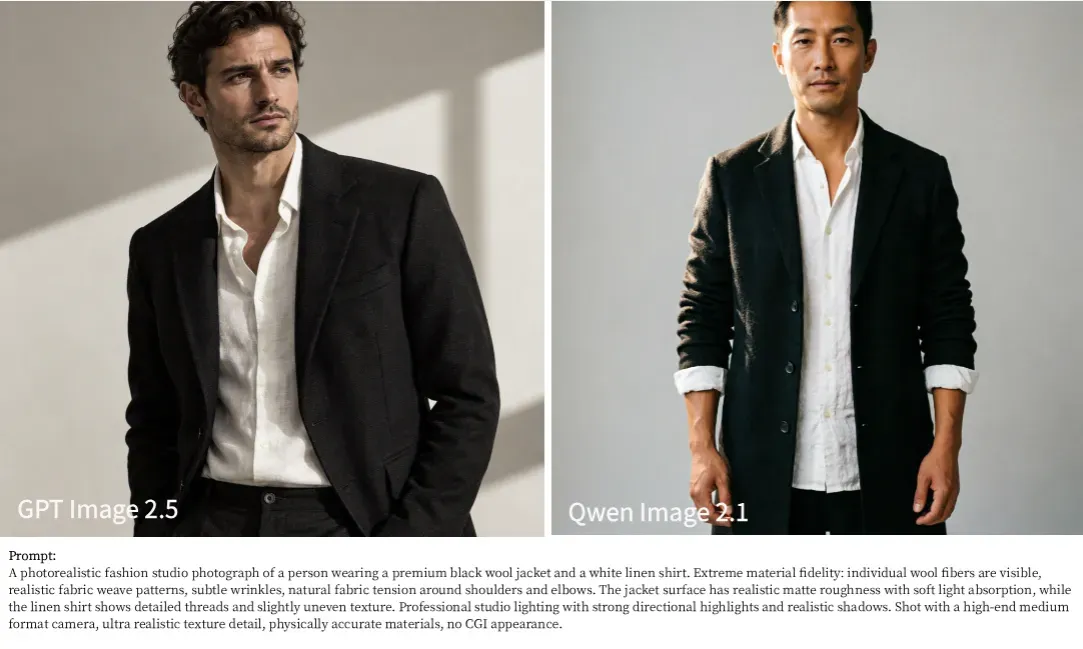
Understanding physical material interactions—such as light absorption on matte wool versus uneven slub textures on woven linen—is crucial for e-commerce and commercial fashion workflows.
Key Visual Observations & Material Response:
- Dark Fabric Separation & Shadow Depth (GPT Image 2.5 Wins):
GPT Image 2.5 handles low-frequency dark tones without sacrificing detail. Folds, lapel stitching, and subtle micro-shadows remain visible on the black wool jacket, balanced by realistic weave textures and button tension marks on the white linen shirt.
- Edge Separation & Rim Lighting Precision (Qwen Image 2.1 Strength):
Qwen Image 2.1 demonstrates outstanding control over direct directional lighting. The rim light catching the edges of the dark coat explicitly highlights microscopic wool fibers along the shoulders and arms.
- Material Density & Shadow Compression (Qwen Image 2.1 Limitation):
While Qwen 2.1 produces exceptionally sharp outer contours, its rendering of dark wool tends toward shadow compression crushed blacks in non-illuminated areas. The inner folds of the jacket lose subtle weave patterns compared to OpenAI's Sunburst tier, resulting in a flatter overall material response under shadow.
Test 3: Product Photography, Metal Brushed Textures & Specular Reflections
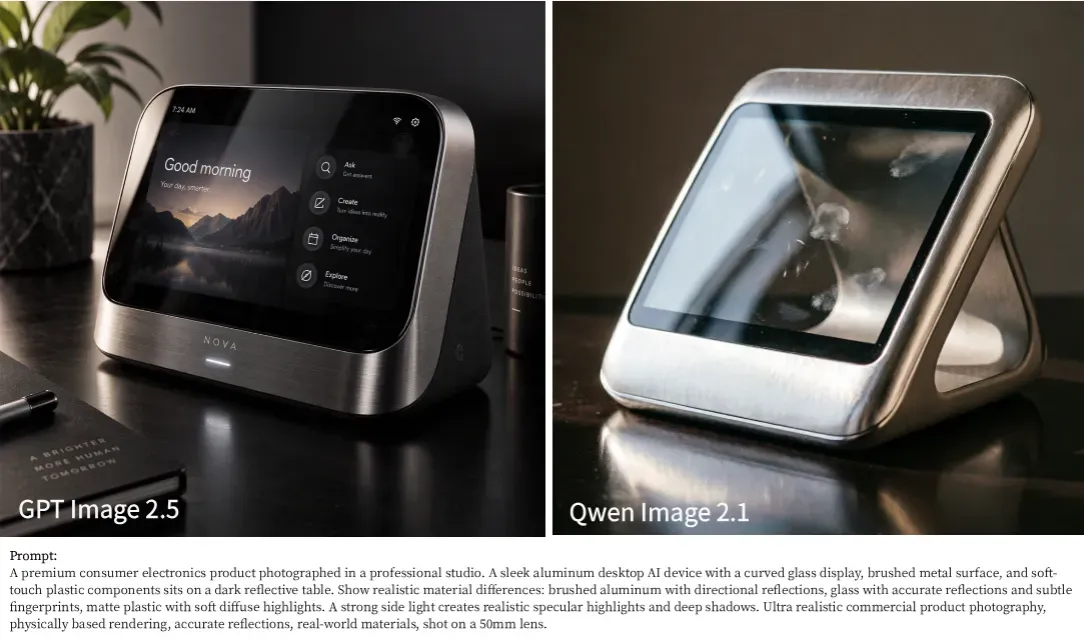
Evaluating metallic specular highlights, glass refraction, and environment reflections reveals how faithfully a model implements PBR rendering pipelines in commercial product photography.
Key Visual Observations & Optical Physics:
- Metallic Surface Physics & Anisotropic Reflections (GPT Image 2.5 Wins):
GPT Image 2.5 handles brushed aluminum with high precision. The horizontal grain on the lower bezel reflects specular highlights naturally along the texture, avoiding the flat look of painted metal. It also cleanly layers sharp, legible UI elements beneath realistic glass reflections.
- Razor-Sharp Specular Edge Highlights & Glass Smudges (Qwen Image 2.1 Strength):
As hypothesized for industrial design subjects, Qwen Image 2.1 excels in rendering high-contrast specular reflections. The direct softbox light reflection across the glass surface features clean, crisp boundary geometry. It also adheres strictly to the fingerprint smudge request, capturing micro-imperfections on the glass with high visual punch.
- Reflective Table Roll-Off & Material Differentiation:
While Qwen 2.1 renders striking highlight edges, its metal framing leans slightly toward smooth silver plastic in shadowed zones. In contrast, GPT Image 2.5 maintains clear material distinction between the brushed metallic front, dark matte plastic backing, and glossy glass display while preserving natural specular falloff on the dark tabletop.
Test 4: Complex HDR Environments, Dynamic Range & Atmospheric Haze
High-contrast environments such as backlit post-rain streets, with their reflective wet pavement and heavy shadows, clearly expose the limits of a model's exposure accuracy.
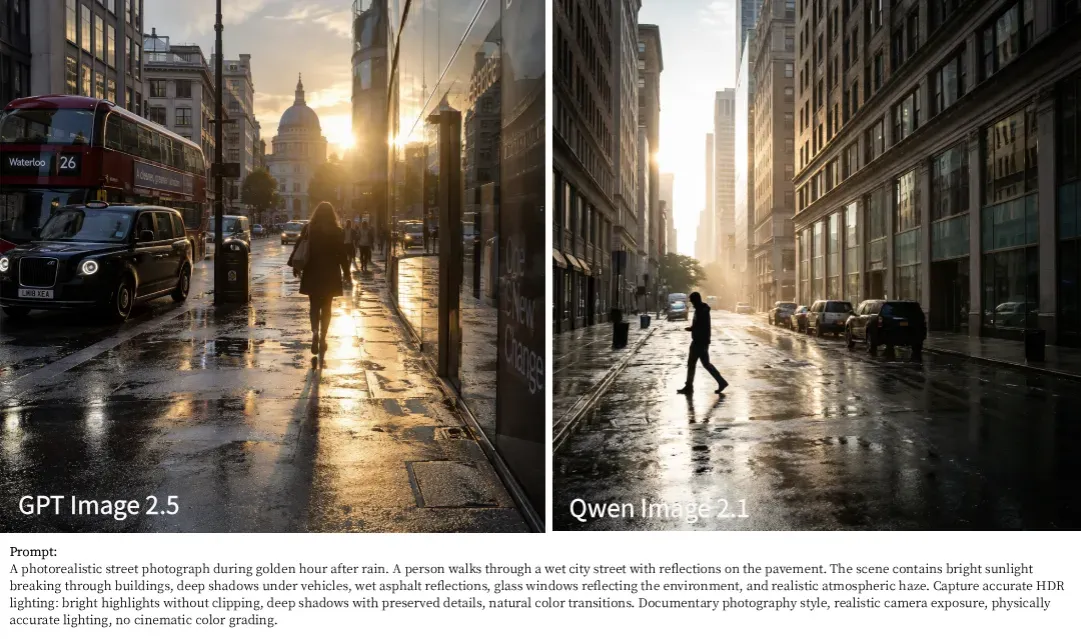
Key Visual Observations & Exposure Mechanics:
- Broad Dynamic Range & Shadow Detail Retention (GPT Image 2.5 Wins):
GPT Image 2.5 demonstrates superior camera sensor emulation, mimicking a full-frame RAW exposure. Even with direct golden hour sunlight breaking through the background architecture, it preserves remarkable shadow details beneath the double-decker bus and black cab on the left rendering clear license plate text and tire contours without blowing out bright highlights in the sky.
- Pavement Reflection Clarity & Edge Sharpness (Qwen Image 2.1 Strength):
Qwen Image 2.1 excels at rendering crisp environmental reflections. The wet asphalt in the foreground captures razor-sharp mirror reflections of walking pedestrians and tall stone facades. Its overall geometric clarity across complex building windows remains exceptionally clean.
- Highlight Clipping & Atmospheric Falloff:
While Qwen 2.1 renders striking specular streaks on wet ground, its exposure engine suffers from mild highlight clipping in intense backlighting zones—resulting in pure white light flares where the sun meets the horizon. In contrast, GPT Image 2.5 handles volumetric haze and subtle golden light roll-off with higher optical accuracy, avoiding harsh clipping artifacts.
Summary Scorecard: Photorealism Benchmark (Tests 1–4)
To synthesize our findings across the four rigorous photorealism benchmarks, the table below highlights where each model excels across eight critical visual fidelity metrics.
| Category | GPT Image 2.5 | Qwen Image 2.1 | Core Optical Difference |
| Skin pores | ✓ | GPT 2.5 renders authentic skin micro-texture and subtle pores without AI airbrushing. | |
| Micro-expression | ✓ | GPT 2.5 captures organic facial muscle tension and warmth, avoiding rigid expressions. | |
| Shadow depth | ✓ | GPT 2.5 preserves dark shadow details under vehicles and buildings with full RAW-like dynamic range. | |
| Fabric texture | ✓ | GPT 2.5 renders natural wool weave and tactile organic fiber fuzz without over-sharpening. | |
| Specular highlights | ✓ | Qwen 2.1 produces crisp, high-contrast specular reflections on wet pavement and metallic surfaces. | |
| Product materials | ✓ | GPT 2.5 achieves physically accurate diffuse/specular balance across mixed matte and glossy textures. | |
| Clean edges | ✓ | Qwen 2.1 excels in razor-sharp geometric lines, hard-surface architecture, and edge definition. | |
| Natural realism | ✓ | GPT 2.5 delivers an unedited, documentary-style camera look free from synthetic "AI gloss." |
Key Takeaway from Single-Prompt Testing:
- GPT Image 2.5 Overall Winner for Documentary Photorealism: Dominates in organic human physics skin/expressions, complex shadow depth, and natural color science. It avoids clipping high contrast scenes, making it the preferred choice for commercial portraiture, realistic street photography, and editorial design.
- Qwen Image 2.1 Best for Sharp Architecture & Hard Surfaces: Demonstrates exceptional visual punch through ultra-clean edges, crisp specular highlights, and architectural precision, though it leans toward higher optical contrast with occasional highlight clipping.
Multi-Turn Iterative Editing Stress Test: 5-Turn Degradation Benchmark
Creative directors often watch a pristine AI portrait degrade into pixelated mud after just three consecutive prompt revisions. To evaluate multi-step prompt fidelity without relying on vendor marketing claims, both systems underwent a standardized 5-turn edit stress test.
The 5-Step Benchmark Methodology
The stress test measured subject retention, background swap preservation, and turn-by-turn quality loss across five sequential edit instructions:
- Turn 1 (Base): High-detail photorealistic human portrait rendered in a studio setting.
- Turn 2 (Subject Edit): Change clothing color and jacket material while preserving facial identity.
- Turn 3 (Background Swap): Move the subject from the studio setting to an outdoor urban street at sunset.
- Turn 4 (Lighting Adjustment): Shift ambient light sources to high-contrast neon night reflections.
- Turn 5 (Micro-Detail Addition): Add realistic rain droplets and skin water reflections.
Model Performance Across Iterative Turns
Evaluating both visual engines turn-by-turn highlights key architectural differences in how latent space noise accumulates during multi-turn retouching.
| Editing Turn | GPT Image 2.5 Performance | Qwen Image 2.1 Performance |
| Turns 1–2 | Flawless subject retention and clothing texture adjustment; natural golden hour rim light wrap during Turn 2 background swap. | Crisp facial preservation in Turn 1; replaces background effectively in Turn 2, though environmental light wrap and background blur feel slightly less organic than GPT 2.5. |
| Turn 3 | Smooth background & neon relighting pass with realistic skin tone and subtle ambient glows. | Over-saturated neon highlights creating an unnaturally oily, plastic facial skin texture. |
| Turn 4 | Relights facial contours cleanly; preserves matte cotton coat texture with subtle surface moisture. | Severe Material Breakdown: Matte trench coat morphs into an unnatural glossy vinyl/plastic raincoat. |
| Turn 5 | Expands to full-body, but produces awkward body proportions and unnatural foreshortening. | Well-Proportioned Framing: Renders an anatomically accurate full-body walking pose, though persistent oily skin reflections reduce overall realism. |
Visual Iteration Progression (5-Turn Benchmark
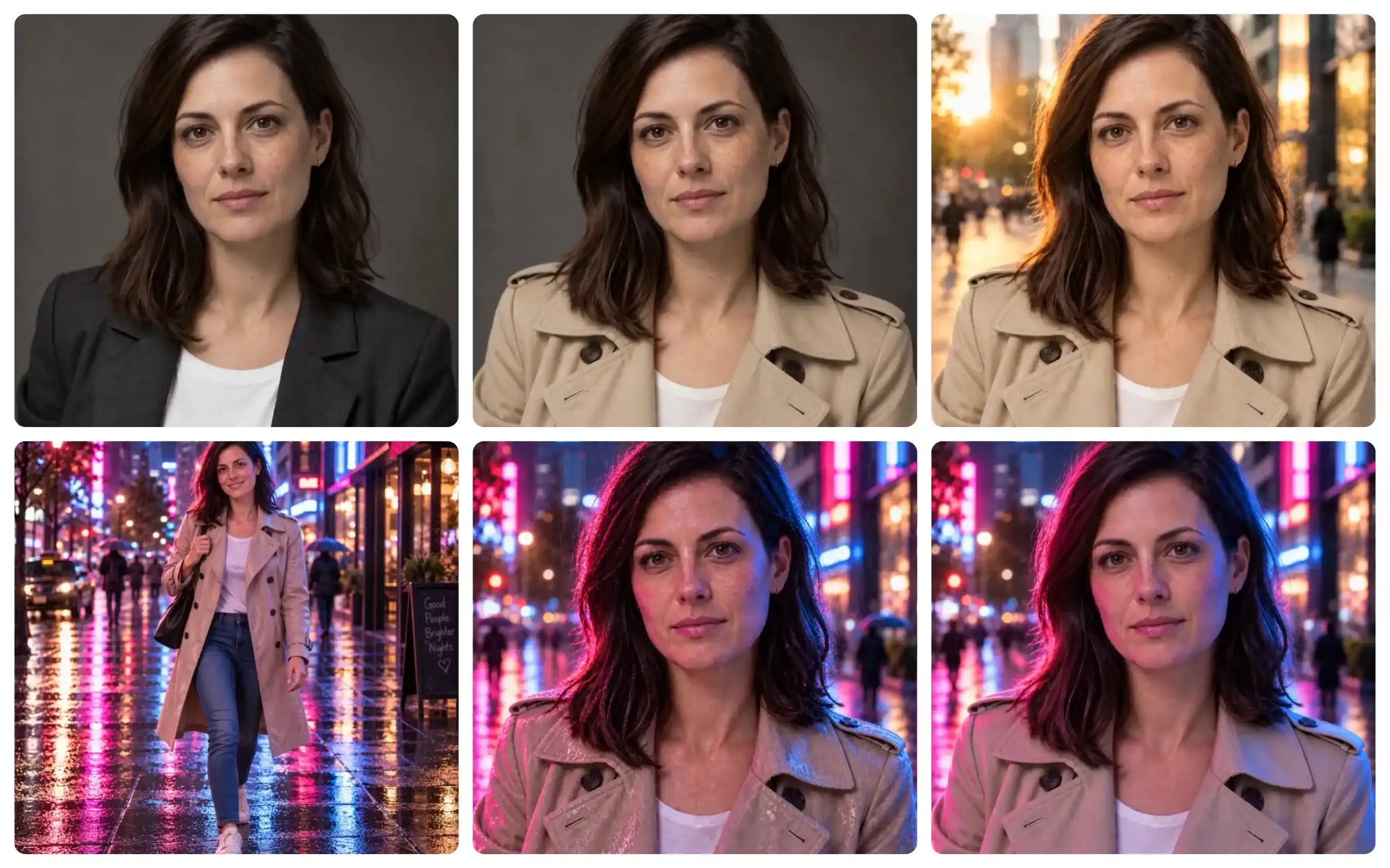
GPT Image 2.5 multi-turn iteration sequence panels 1–6 and the first image is the base image.
During GPT Image 2.5 iterative editing, the Sunburst model maintains strong facial identity and realistic light wrap through all turns. It integrates complex environmental backlighting naturally during background and relighting passes (Turns 2 & 3), seamlessly blending the subject into neon and golden hour environments without compositing artifacts or fabric texture collapse. However, during full-body expansion in Turn 5, it introduces slightly distorted body proportions and awkward foreshortening.
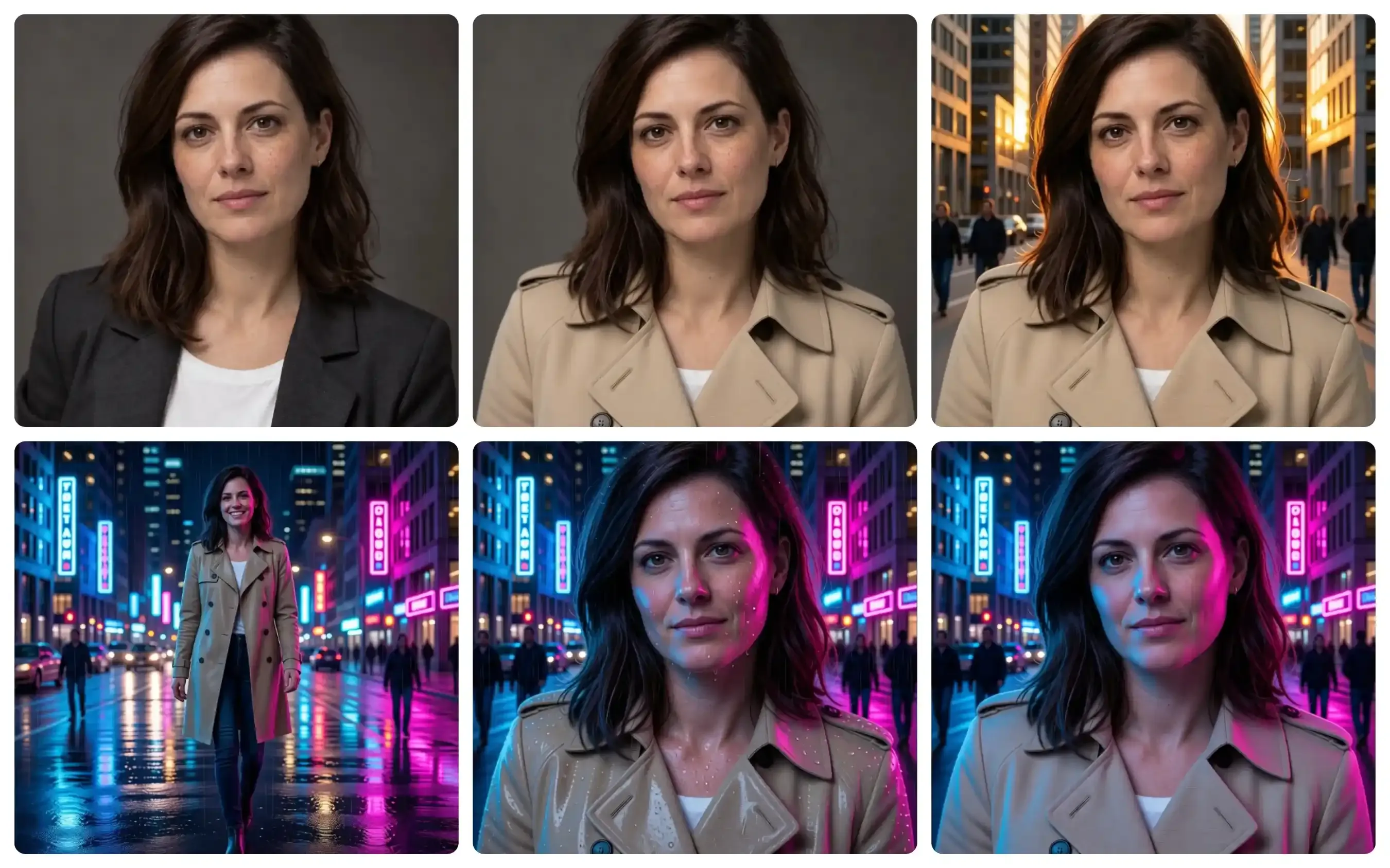
Qwen Image 2.1 multi-turn iteration sequence panels 1–6 and the first image is the base image.
In contrast, Qwen Image 2.1 handles initial subject preservation and background placement well, but displays noticeable latent drift as edits accumulate. While the Turn 2 background swap is structurally sound, its light integration is less subtle than GPT's. Subsequent relighting and rain passes (Turns 3 & 4) trigger material shifts, altering the garment's cotton texture into a high-gloss plastic raincoat alongside over-saturated skin highlights.
The "Blocky" Artifact Phenomenon: Why Iterative Image Editing Degrades Quality
Repeated prompt revisions frequently erode micro-textures turning delicate hair into blocky artifacts, over-saturating skin reflections, and mutating matte fabrics into glossy plastic. This pattern stems directly from fundamental architectural differences in how visual engines manage latent space transformations across sequential edits.
Architectural Mechanics vs. Pixel Degradation
| Technical Parameter | OpenAI GPT Image 2.5 Pipeline | Qwen Image 2.1 DiT Framework |
| Re-encoding Method | Full-canvas VAE re-encoding | Prefix KV cache reuse & chunk masking |
| Noise Accumulation | Global latent space drift | Bounded to localized editing masks |
| Observed Effect in 5-Turn Benchmark | Natural environmental light blending; subtle global noise accumulation and anatomical/proportion shifts in later turns. | High background structural rigidity; localized latent re-processing causes specular saturation (oily skin) and material breakdown (cotton to vinyl). |
| Mitigation Strategy | Extended sampling (Sunburst mode) | Mixed-granularity attention & mask isolation |
Linking Architecture to Benchmark Findings
Understanding how architectural choices influence multi-pass pixel decay directly explains our 5-turn stress test results:
- Full Latent Re-Encoding (GPT Image 2.5):
In full-frame workflows, GPT Image 2.5 re-encodes the entire latent canvas during each editing turn. As demonstrated in our Single-Prompt Photorealism tests, this global approach excels at calculating complex optical interactions—such as calculating natural golden-hour rim light across hair and skin in Turn 2. However, because every pass processes the whole canvas, diffusion noise accumulates globally over multiple turns. By Turns 4 and 5, this creates subtle high-frequency detail loss, macro-pixel quantization in shadows, and anatomical foreshortening during full-body frame expansions.
- Localized Masking & Cache Reuse (Qwen Image 2.1):
Qwen 2.1’s 32-layer Single-Stream DiT architecture utilizes chunk-level masking and prefix KV cache reuse. Static context computation locks unedited regions during denoising steps, eliminating re-encoding loss across background pixels and preserving razor-sharp architectural lines. However, because generative updates are confined and heavily processed within localized masks, repeated passes over the same sub-regions tend to over-saturate specular highlights—explaining the transition to oily skin reflections in Turn 3 and the coat's material shift from matte cotton to high-gloss vinyl in Turn 4.
While GPT Image 2.5’s Sunburst mode uses extended sampling to maintain superior light physics and organic skin texture throughout early turns, its global processing eventually causes subtle canvas-wide drift. Conversely, Qwen Image 2.1 prevents background geometry degradation by locking unedited tokens via KV cache, but requires careful prompt handling to avoid localized highlight saturation during extended retouching chains.
Editing Mechanics and Workflow Control: Comment Highlights vs Local Masking
Prompting an AI model to replace a model's jacket often results in the system redesigning the background or altering facial features. Precise input mechanics determine whether an update stays localized or corrupts the rest of the composition during iterative edits.
Comparing GPT Image 2.5 vs Qwen Image 2.1 reveals two distinct operational frameworks for maintaining multi-step prompt fidelity.
Control Interfaces and Input Mechanics
| Feature Capability | GPT Image 2.5 Canvas Tools | Qwen Image 2.1 Editing System |
| Local Target Selection | Coordinate pins & vector strokes | Painted annotations, circles, or binary mask files |
| Reference Image Anchoring | Supports up to 16 reference images | Supports up to 10 reference images |
| Pixel Isolation | Full-frame latent re-encoding pass | Prefix KV cache with chunk-level mask locking |
| Layer Output Options | Standard RGB output | Native transparent RGBA generation |
Pinpoint Annotations vs Bound Masking
OpenAI relies on coordinate pins and freehand vector strokes inside the ChatGPT interface. Placing coordinate pins through the ChatGPT comment edit feature signals semantic text updates to targeted zones, whereas a sketch-guided workflow uses drawn vector lines to direct layout geometry. Combining reference image anchoring with up to 16 input images keeps subject styles aligned across variations. However, because the underlying model re-encodes the full image canvas, minor pixel bleeding can still occur beyond the pinpoint coordinate.
Conversely, Qwen Image 2.1 enforces strict local mask editing by allowing users to paint annotations, draw colored circles around multiple editing targets, or supply separate binary mask files. Its standout capability, native transparent RGBA generation, allows creators to generate or edit transparent cutouts directly with a real alpha channel, bypassing post-processing background removal tools. While reference image anchoring supports up to 10 input images, locking unedited pixels behind explicit mask boundaries yields higher user intent accuracy and prevents unwanted global shifts.
Practical Workarounds to Prevent Artifact Accumulation during Multi-Turn AI Edits
Watching a polished commercial composite deteriorate into fuzzy pixels by the fourth prompt revision forces production teams to throw away hours of editing progress. Implementing structured multi-turn editing workarounds allows creators to maintain image clarity and avoid pixel degradation across complex revision workflows.
Production Strategies for Clean AI Image Edits
Applying four targeted production techniques helps teams prevent AI image degradation during multi-pass generation:
- Reference Re-Anchoring: Re-injecting the original Turn 1 base generation as an explicit reference image alongside the latest edit prompt forces the model to re-align facial proportions and background lighting vectors. This reference image re-anchoring technique helps reset latent drift across sequential generation passes.
- Strategic Precision Tier Selection: Executing rapid visual drafts on GPT Image 2.5 Flare reduces latency by 50% compared to earlier models. Switching to Sunburst quality tiers (
xhighormax) for final edit passes applies extended sampling times that preserve intricate details and limit re-encoding noise. - Isolated Local Masking: Utilizing Qwen Image 2.1's mask-bounded edits confines generative updates strictly inside target boundaries. Supplying an explicit binary mask or painted annotation ensures unedited background pixels completely bypass the denoising pipeline, maintaining original image sharpness.
- Single-Pass Compound Prompting: Combining multiple small edit requests into one consolidated instruction pass avoids multi-turn quality decay. Practicing compound prompting to change jacket color, background environment, and lighting angle in a single step reduces total re-encoding cycles.
Following these practical GPT Image 2.5 editing tips enables designers to deliver clean AI image edits that hold up under close inspection across multi-step commercial projects.
Final Decision Guide: Which Model Should You Choose for Your Workflow?
Choosing an image generation platform based solely on static leaderboard scores often leads to production bottlenecks when complex client revisions arrive. Selecting the best AI image model for editing depends on whether your creative team prioritizes commercial zero-shot perfection or open-weights flexibility across iterative editing pipelines.
Production Comparison Matrix
| Workflow Requirement | GPT Image 2.5 (Sunburst / Flare) | Qwen Image 2.1 (7B DiT) |
| Primary Deployment | Managed API & ChatGPT UI | Open-weights self-hosted |
| Max Native Resolution | 4K API output (up to 3840px) | 2K native output (2048px+) |
| Masking & Transparency | Visual pinpoint comments | Native transparency stickers (RGBA) |
| Multi-Turn Cost Control | Metered API pricing per generation | Free local runs on consumer GPUs |
Choosing Based on Production Pipelines
Your specific technical setup determines which model delivers higher efficiency:
- Choose GPT Image 2.5 if: Your team manages commercial photorealism workflow pipelines requiring top-tier zero-shot detail, 4K API output, and complex text rendering. Built for high-end branding, advertising posters, and seamless web usage, its Sunburst quality tiers deliver clean lighting and precise anatomical structure directly through the ChatGPT interface or managed endpoints.
- Choose Qwen Image 2.1 if: You need a self-hosted image model that runs locally on consumer hardware without per-generation API costs. Operating as an open-weights architecture, it gives developers total data privacy, native transparency stickers via 64-channel RGBA generation, and cost-effective multi-reference composition using explicit mask boundaries.
Evaluating GPT Image 2.5 vs Qwen Image 2.1 against your studio's infrastructure ensures you balance initial visual fidelity against long-term operational costs.





