


A kitten in five poses slides across a pink sunset. A sixth one rides in on a diagonal panel. Somewhere between, a giant title card slams onto the screen. That clip passed 1.5 million plays, and about 79,700 TikTok videos now use the same edit's sound.
The edit is the GTA 6 template, a CapCut intro that turns a handful of photos into the opening of a GTA VI style trailer. It went from steady to everywhere the week GTA VI launched on November 19, 2026.
The catch: it wants five or more good photos of one person, and most people have one. Below we pin down the exact template, map it second by second, and turn one selfie into five looks and a finished intro with Seedance 2.5.
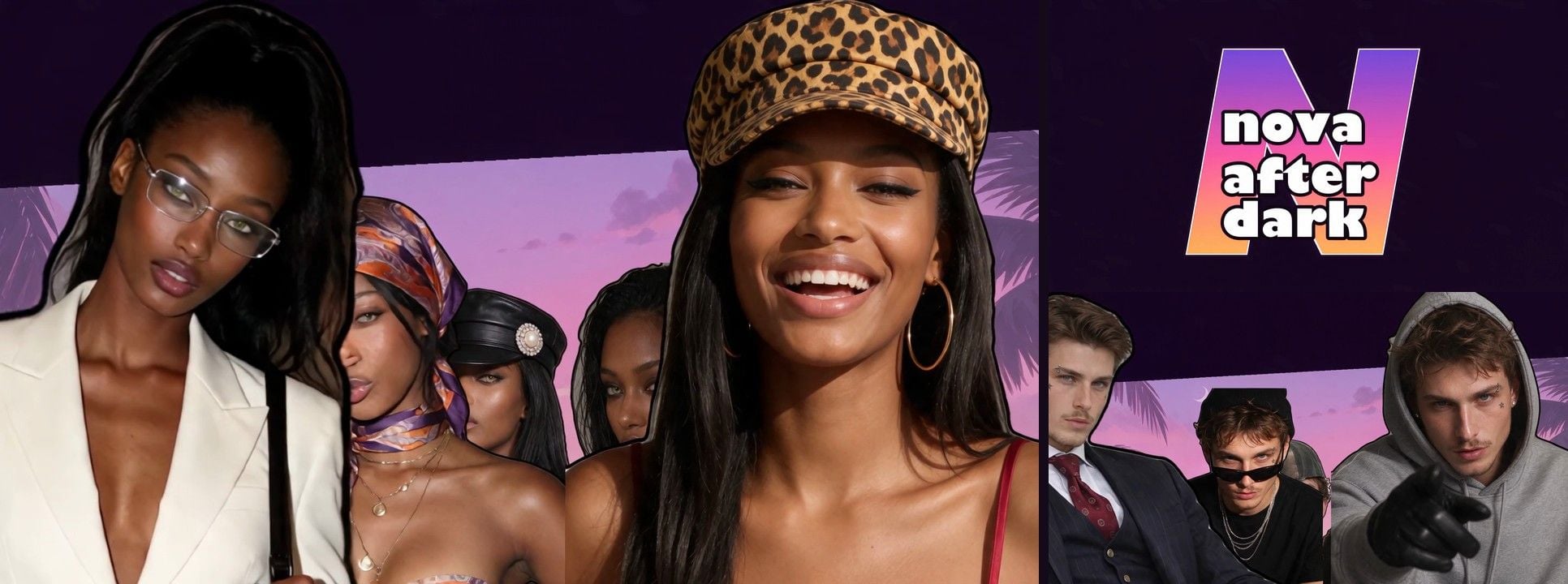
Key Takeaways
- The GTA 6 template is mostly one CapCut intro, GTA VI TREND EDIT, with over a million uses.
- It stacks five cut-outs of one person over a sunset, then slams to a big title card.
- Make five looks from one selfie with Seedream v5.5 Edit in the Atlas Cloud image generator.
- Seedance 2.5 follows the template's beat when you give it a timing draft and the five looks.
- Swap the GTA VI logo for your own title before the edit goes on a brand page.
What Is the GTA 6 Template Trend on TikTok?
It is a CapCut template, not a filter or a TikTok effect. Browse the GTA 6 intro posts on TikTok and most of the ones that link a template point to the same one: "GTA VI TREND EDIT" by the creator Zuns. People caption it "X as a GTA VI trailer" and fill it with idols, athletes, pets or themselves.
| Template detail | What we found on November 23, 2026 |
|---|---|
| Name and creator | GTA VI TREND EDIT, by Zuns on CapCut |
| Created | September 1, 2026 |
| Uses | 1,051,102 |
| Photo slots | 9 |
| Length and frame | 11.3 seconds, 16:9 |
| Videos using its sound | About 79,700 |
Two look-alikes muddy the search. A template simply called "GRAND THEFT AUTO" shows 1.8 million uses, but it pastes faces onto GTA V loading screens and dates from April 2025. The loading-screen photo effect is a separate trend too, covered in our GTA filter guide.
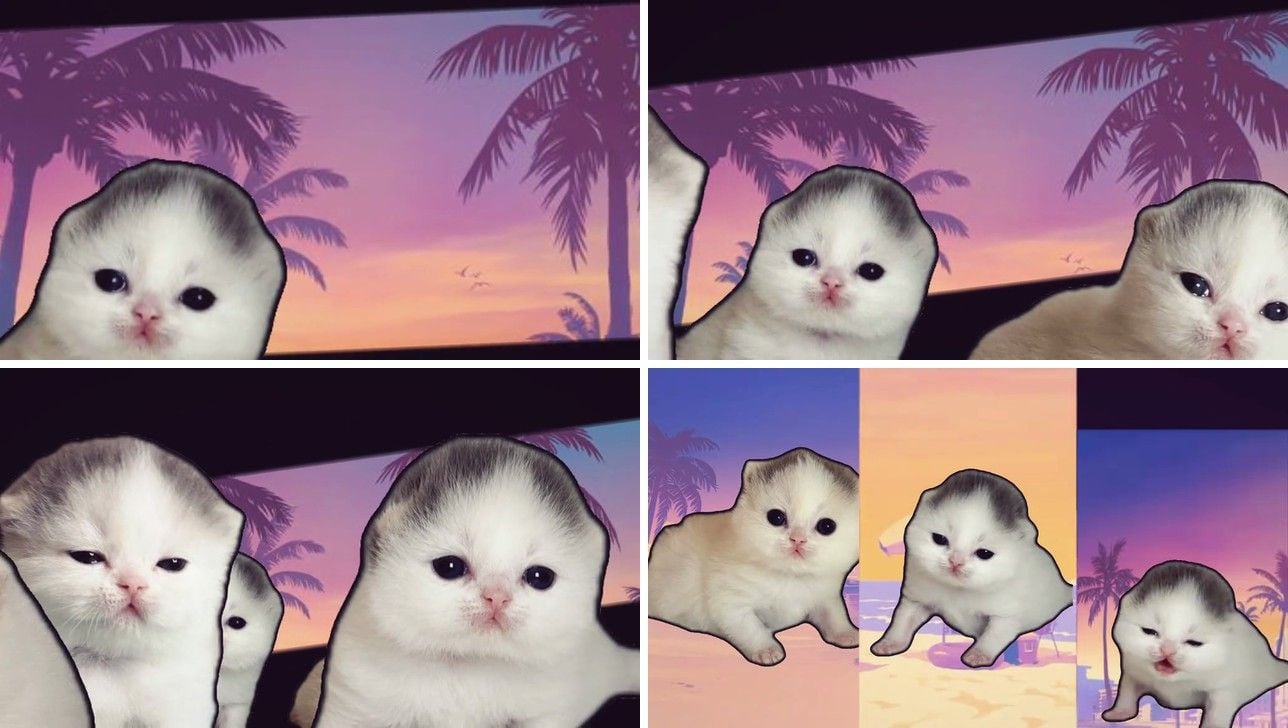
Source: @kittpidd on TikTok , September 25, 2026
How the GTA VI Trend Edit Works, Second by Second
We stepped through the template preview a quarter second at a time. Five photos build a stack, a slanted window closes around them, the title takes over, and four more photos close it out. The background never sits still: it drifts down and pushes in each time a new person lands.
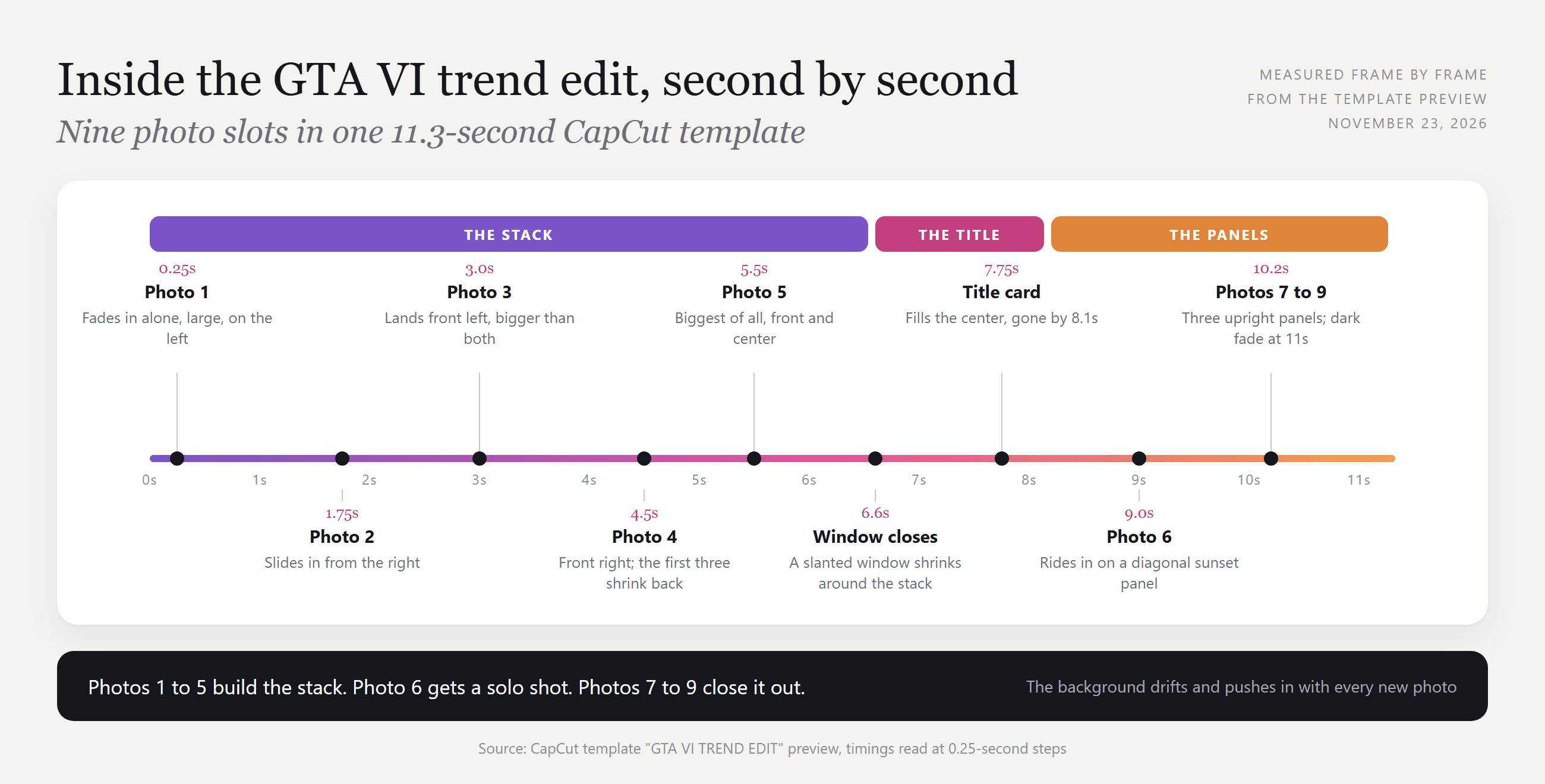
That timing is the trick: each new face lands bigger and closer than the last, right on the beat.
How to Make a GTA 6 Edit With AI on Atlas Cloud
Here is the result first. Every face in this clip comes from one selfie, and the final render came out of Seedance 2.5 on Atlas Cloud:
Three steps get you there: five looks, a timing draft, one render.
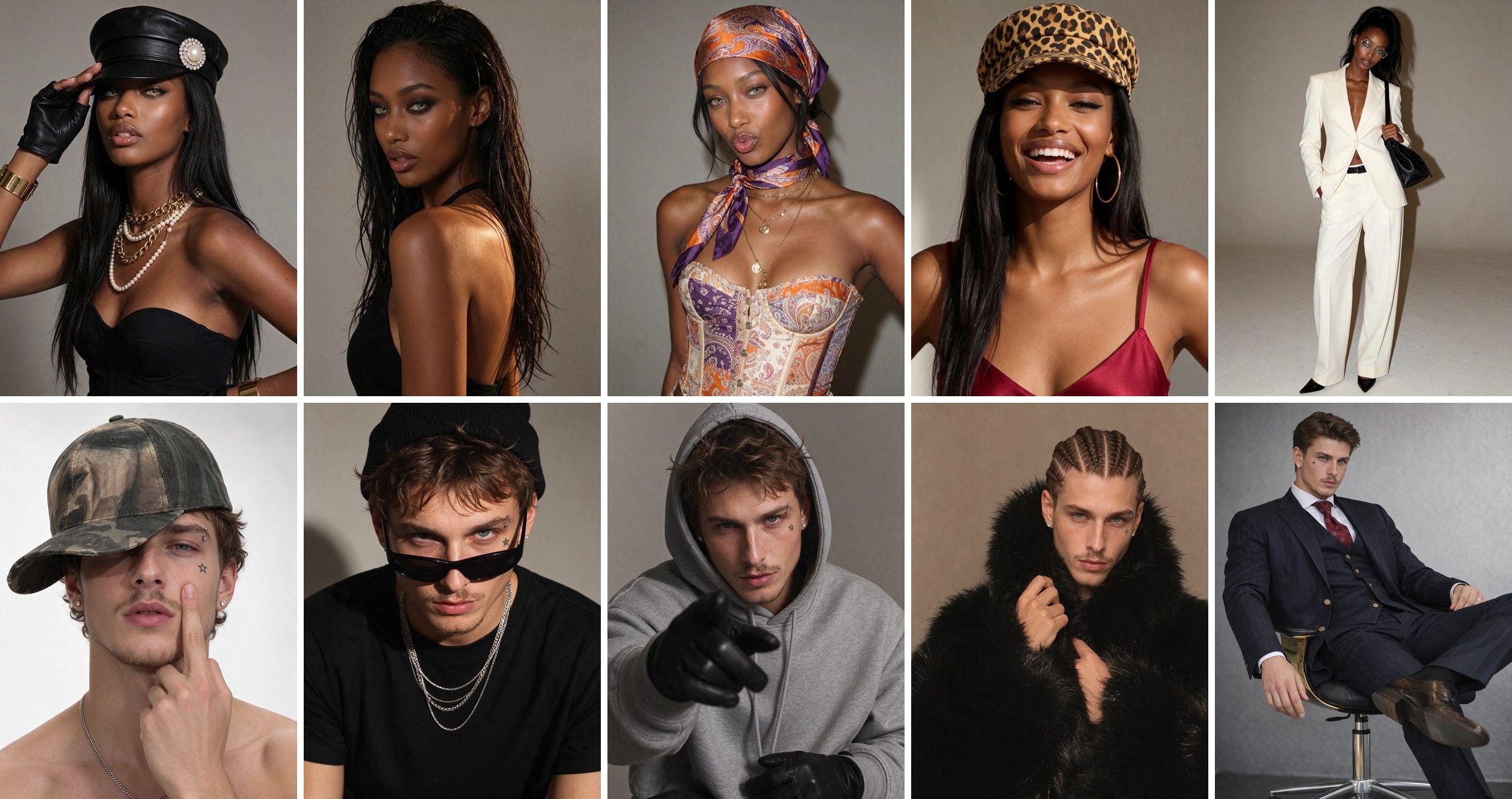
Step 1: Turn One Selfie Into Five Looks With Seedream v5.5 Edit
The trend works because the looks are wildly different. Same face, five lives. In the Atlas Cloud AI image editor, the numbers below match the screenshot:
- Open the Image Edit tab.
- Pick Seedream v5.5.
- Upload your selfie as the reference.
- Paste one look prompt.
- Set the size to 1776×2368, which is 2K at 3:4.
- Click Run, then repeat with the next look's prompt.
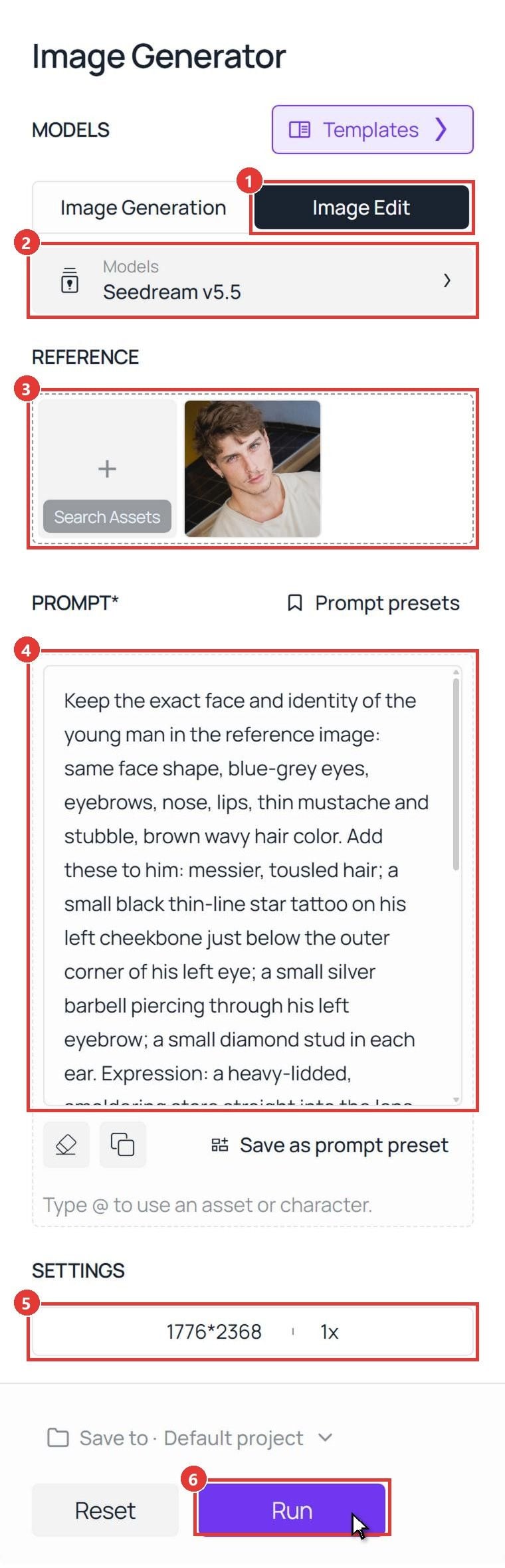
Each prompt opens with a fixed identity block (for him: face, eye color, facial hair, a small tattoo and piercings), then describes one outfit, one pose and one light. This is the hoodie look, copied exactly as we ran it:
plaintext1Keep the exact face and identity of the young man in the reference image: same face shape, blue-grey eyes, eyebrows, nose, lips, thin mustache and stubble, brown wavy hair color. Add these to him: messier, tousled hair; a small black thin-line star tattoo on his left cheekbone just below the outer corner of his left eye; a small silver barbell piercing through his left eyebrow; a small diamond stud in each ear. Expression: a heavy-lidded, smoldering stare straight into the lens, chin slightly lowered, lips relaxed and slightly parted, no smile. Change everything else. Editorial fashion portrait, waist-up. A grey heavyweight oversized hoodie with the hood up over his messy hair and black leather gloves. His right gloved hand points straight at the camera in the foreground, slightly out of focus. Eye-level camera, 50mm lens. Plain warm grey seamless studio backdrop, moody soft light from above, real skin texture with visible pores, magazine photography. No text, no logos.
For a look that is hard to describe, such as a specific cap or a fur coat, upload a styling photo as a second image. Then tell the model to take only the face and skin tone from image 1 and everything else from image 2.
Step 2: Cut Out the Looks and Lay Down a Timing Draft
The template's people are hand-cut stickers with a thin, slightly uneven black outline. We removed each background (Midjourney Remove Background on Atlas takes one call per photo), traced a black edge and cropped every look at the chest, because the frame cuts everyone off there.
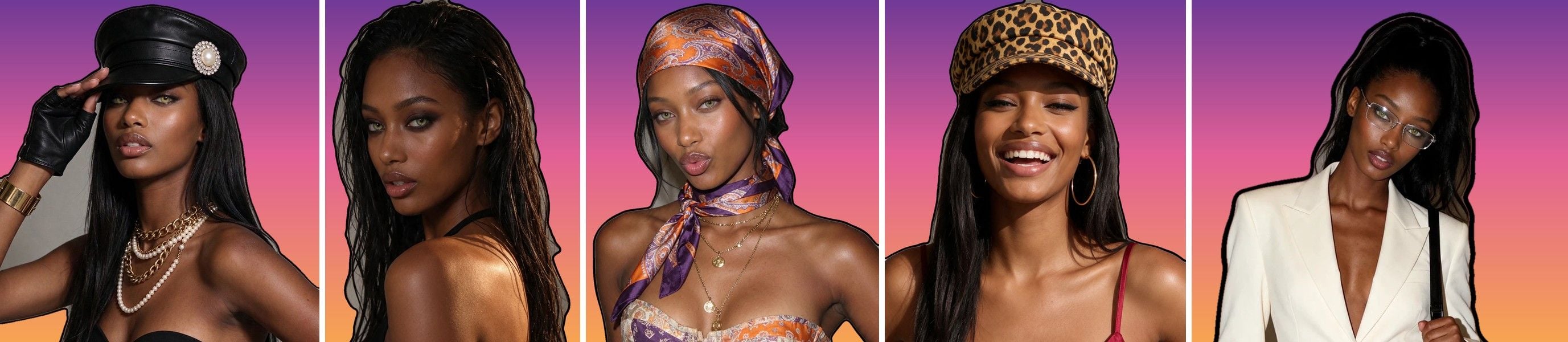
Then place them on the beat from the timeline above (0.25, 1.75, 3.0, 4.5 and 5.5 seconds), each bigger and further forward, over a sunset background, with the window and title card from 6.6 seconds and the closing panels. Any timeline editor works; we scripted ours. The draft only needs the timing right. Seedance 2.5 handles the finish.
Step 3: Render the Final GTA 6 Edit With Seedance 2.5
Open the Seedance 2.5 reference-to-video playground and follow the numbers in the screenshot:
- Paste the prompt below.
- Add the five cut-outs as reference images, in the order they appear.
- Add the draft as the reference video.
- Set Duration to Auto (-1 in the API), so the output follows the draft's length.
- Pick 1080p.
- Set Aspect Ratio to Auto ("adaptive" in the API). A prompt that edits a video needs both Auto settings.
- Turn Generate Audio off.
- Click Run.
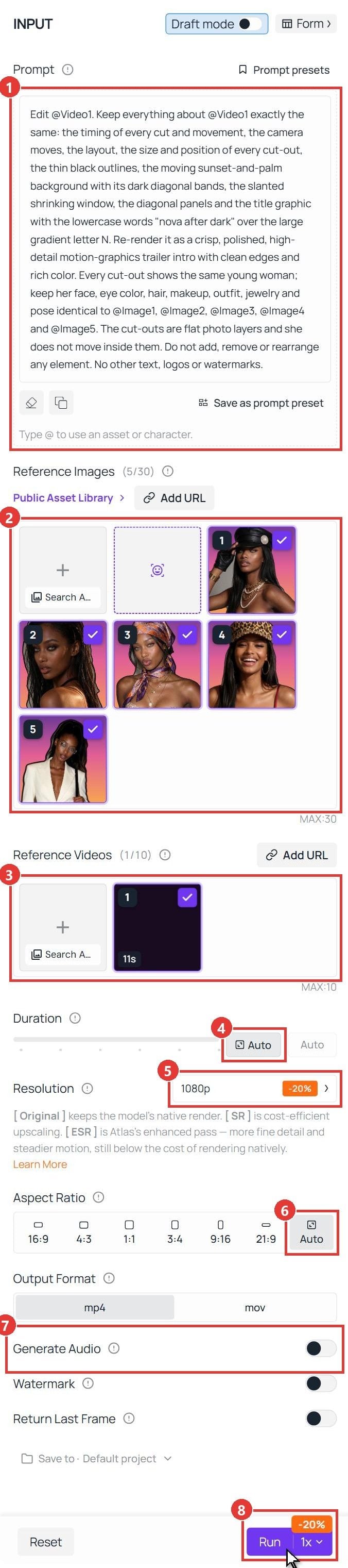
plaintext1Edit @Video1. Keep everything about @Video1 exactly the same: the timing of every cut and movement, the camera moves, the layout, the size and position of every cut-out, the thin black outlines, the moving sunset-and-palm background with its dark diagonal bands, the slanted shrinking window, the diagonal panels and the title graphic with the lowercase words "nova after dark" over the large gradient letter N. Re-render it as a crisp, polished, high-detail motion-graphics trailer intro with clean edges and rich color. Every cut-out shows the same young woman; keep her face, eye color, hair, makeup, outfit, jewelry and pose identical to @Image1, @Image2, @Image3, @Image4 and @Image5. The cut-outs are flat photo layers and she does not move inside them. Do not add, remove or rearrange any element. No other text, logos or watermarks.
With audio off, you lay the sound in afterward. Check the length first: our render ran 11.07 seconds against an 11.33-second draft, so we slowed it by 2.75% to land every cut back on the beat. The male version used the same prompt with "young man," "jax after dark," the letter J and his tattoo and piercings named:
Use the GTA Intro Template in CapCut for Free
If you already have the photos, the GTA CapCut template costs nothing to use. Open any TikTok post that uses the trend, tap the "CapCut · Try this template" link under the caption, then drop in nine photos.
Nine slots does not mean nine different photos. Five looks are enough if you place them well:
| Slot | When it appears | What works there |
|---|---|---|
| 1 | 0.25s, alone on the left | Your strongest close-up |
| 2 to 4 | 1.75s, 3.0s and 4.5s | Contrasting outfits, one per slot |
| 5 | 5.5s, front and biggest | A bold pose, like pointing at the lens |
| 6 | 9.0s, solo on a diagonal panel | Slot 1 again, or a full-length shot |
| 7 to 9 | 10.2s, three upright panels | Repeat slots 2 to 4 |
The AI looks from Step 1 drop straight into these slots too.
GTA 6 Edit Ideas Beyond Selfies: Pets, Idols and Brands
The biggest posts we found on this template are rarely selfies. They are collections of one subject seen many ways, and the caption names the subject.
| Idea | What the big posts did | Plays (Nov 23, 2026) |
|---|---|---|
| Pet | One kitten in nine photos, posted September 25, 2026 | 1.5M |
| Brand | Mercedes-AMG F1 ran "The many faces of Kimi," one driver from childhood to now | 1.5M |
| Idol fan edit | A fan account filled the slots with a K-pop group, one member per slot | 3.7M |
| Artist fan page | "Lana Del Rey as a GTA VI trailer," one singer in many photos | 1.1M |
For your own posts, stick to photos you have the right to use. If you want a full story rather than an intro, our GTA 6 Vice City Story walkthrough turns one photo into a six-shot crime cutscene.
GTA Template Copyright: The Logo, the Font and the Sound
The template drops the real GTA VI logo into the middle of your video. That logo and its stacked wordmark are protected Grand Theft Auto trademarks, and games.gg reported in July 2026 that Rockstar had begun issuing DMCA takedowns against some viral AI-made GTA 6 posts on X.
A personal TikTok is one thing. A brand page or a client video is another.
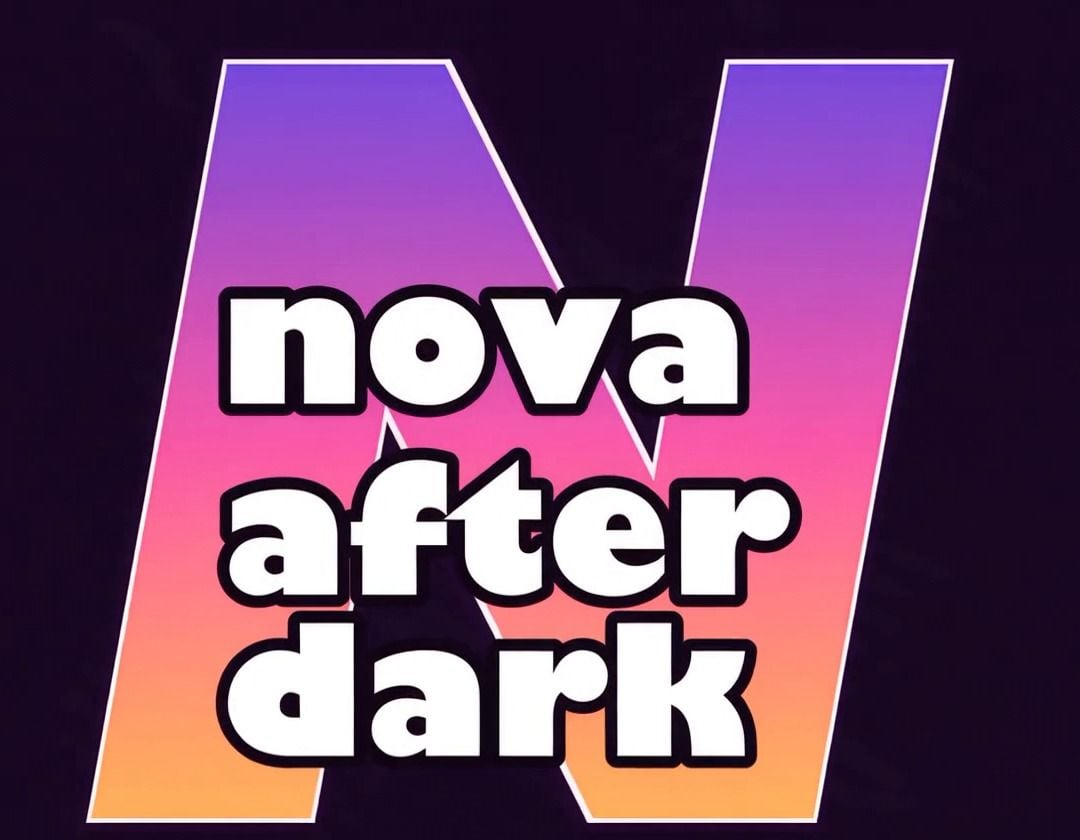
| Element | In the CapCut template | What we used instead |
|---|---|---|
| Title | The GTA VI logo | Three stacked words over a big gradient letter |
| Font | The GTA VI wordmark | Arial Black and Gill Sans Ultra Bold |
| People | Your photos | AI looks generated for this guide |
| Sound | An uploaded "original sound" with no credited track | Kept the template's sound; check its rights before using it outside TikTok |
The stacked layout and the sunset palette carry most of the look without the logo.
Frequently Asked Questions
Can I make the GTA 6 template trend for free?
Yes, through CapCut. The GTA VI TREND EDIT page shows no Pro badge or price, so the template itself costs nothing. You only pay when AI creates the looks or renders the clip, as the cost answer below breaks down.
How many photos does the GTA VI trend edit need?
The template has nine slots. Five well-chosen photos are enough, because slots 6 to 9 work fine as repeats. Nine different photos make the ending richer, so use them if you have them.
Why can't I use the GTA 6 template in CapCut?
A regional limit is one cause. When we checked from our region, CapCut showed the template's title and preview but marked it unavailable, which is different from a deleted template. Rebuilding the edit with the AI steps above gets you the same structure anywhere.
Can I use a pet instead of myself?
Yes, and pets got there early: the kitten version went up about two months before the human edits took off. Choose photos where the whole head is in frame, since every slot crops at the chest.
How much does a GTA 6 edit cost on Atlas Cloud?
As of November 23, 2026, each Seedream v5.5 Edit look at 2K costs $0.0344, 20% off the $0.043 list price. Each Midjourney Remove Background call costs $0.0857.
A Seedance 2.5 render that edits an 11-second reference video at 1080p was estimated at $22.40, 20% off $28.00, and the same render at 720p at $9.05. The final Seedance charge settles on actual usage. Five looks, five cut-outs and one 1080p render come to about $23.
Conclusion
The trend is one template doing one thing well: many faces of one person, landing on the beat, then a title card. CapCut covers it for free if you have the photos. If you don't, AI makes them, and a timing draft keeps Seedance 2.5 on the rhythm.
Start with five looks that share a face and nothing else, keep the cut-outs chest-high with a thin black edge, and put your own title where the logo would go. That is all a GTA 6 template edit needs.







