

Thirty variants for one product. That is what a modest paid social test actually asks for: 5 hooks, 3 formats, 2 durations, and your content queue is suddenly a month deep. This guide covers how to scale UGC ad creative production without building that queue. Inside: the fastest way to generate UGC video content we have tested, an API loop for batching, a matrix for planning variants so none of them overlap, and a weekly cycle that replaces tired creative before performance sags. The demos in this guide were produced from product photos and written briefs. No casting call, no shipping label.
Key Takeaways
- Scaling UGC ad creative production is a planning problem before it is a budget problem: variants come from a hook × format matrix, one brief per cell.
- The free UGC Product Ad tool turns product photos plus a one-line brief into a voiced, lip-synced vertical clip in minutes.
- The same generator runs from code, so a variant plan becomes a loop: the brief text is the variable, with up to 2 clips returned per call.
- AI clips cover variant depth and refresh speed; hired creators keep what AI cannot fake, reviews from real use and ads that run under a creator's own handle. Most accounts run both.
- A weekly generate, launch, read, replace cycle keeps an ad account fed without a production backlog.
Why UGC Production at Scale Breaks Down
The demand side grew faster than most teams' pipelines. In Collabstr's 2026 Influencer Marketing Report, drawn from 21,000 marketplace collaborations, UGC campaigns grew 133% year over year and now make up 35% of all influencer engagements on the platform, at an average of $197 per collaboration.
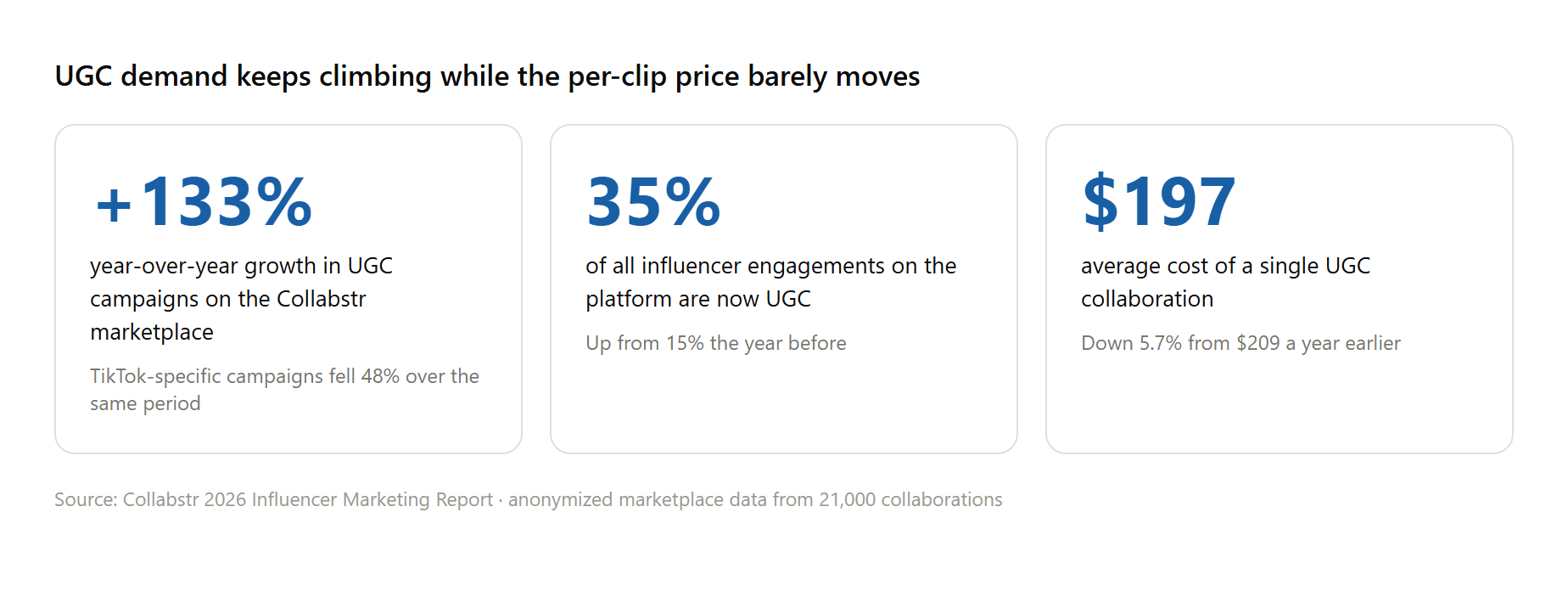
Source: Collabstr 2026 Influencer Marketing Report, anonymized data from 21,000 collaborations.
Now put that against how the traditional pipeline works. Each variant starts with finding a creator whose look fits the brand, then a brief, then shipping the physical product, then waiting for filming and a revision round, then negotiating usage rights for paid placement. None of those steps is broken.
The problem is that they run in series, and the clock resets for every new creator. UGC production at scale under this model means managing a roster the way an agency manages freelancers, which is a full-time job before a single ad has spent a dollar.
The bottleneck is structural, so the fix has to be structural too. The rest of this guide breaks how to scale UGC ad creative production into three parts: a generator that makes single variants cheap, an API that makes batches cheap, and a planning matrix that makes sure the batch is worth generating.
The Fastest Way to Generate UGC Video Content
Watch the output before reading the workflow. The clip below is a 15-second skincare testimonial: presenter, script, voice, and lip sync all generated in one pass from product reference photos and a written brief.
Generated with the UGC Product Ad tool from product photos and a scene-by-scene brief, published on the official Atlas Cloud channel.
That clip came out of the UGC Product Ad tool on Atlas Cloud, and for this article the part that matters is throughput. The path from brief to finished clip:
- Upload 1 to 4 product photos. One is enough; extra angles help the product stay consistent shot to shot.
- Write the brief. One line covering what the product is and who it is for gets a usable clip; the polished demos use scene-by-scene scripts.
- Pick from the menus: 16 ad formats, 11 opening hooks, 11 scene settings, 4 to 15 seconds, 9:16 or four other ratios.
- Generate. The clip comes back in minutes with voice and synced lips included.
Two details separate this from a toy. Uploading a photo of an authorized presenter locks that face across every clip you make, which is how a generated spokesperson stays recognizable over a whole campaign. And because hooks, scenes, and formats are menu items, the second variant costs one changed selection instead of a second production day. There is a free plan, so the first clip is a no-risk test.
The generator sits alongside the rest of the AI tools collection, which covers the surrounding chores too: cleaning up a product photo before it fronts a campaign, upscaling, background swaps.
Scale Ads With UGC Through the API
The web form is the right interface for 5 clips. At 20, you want a loop. The generator behind the tool is callable from code, and that is the practical way to scale ads with UGC: a script fires the requests while you do something else.
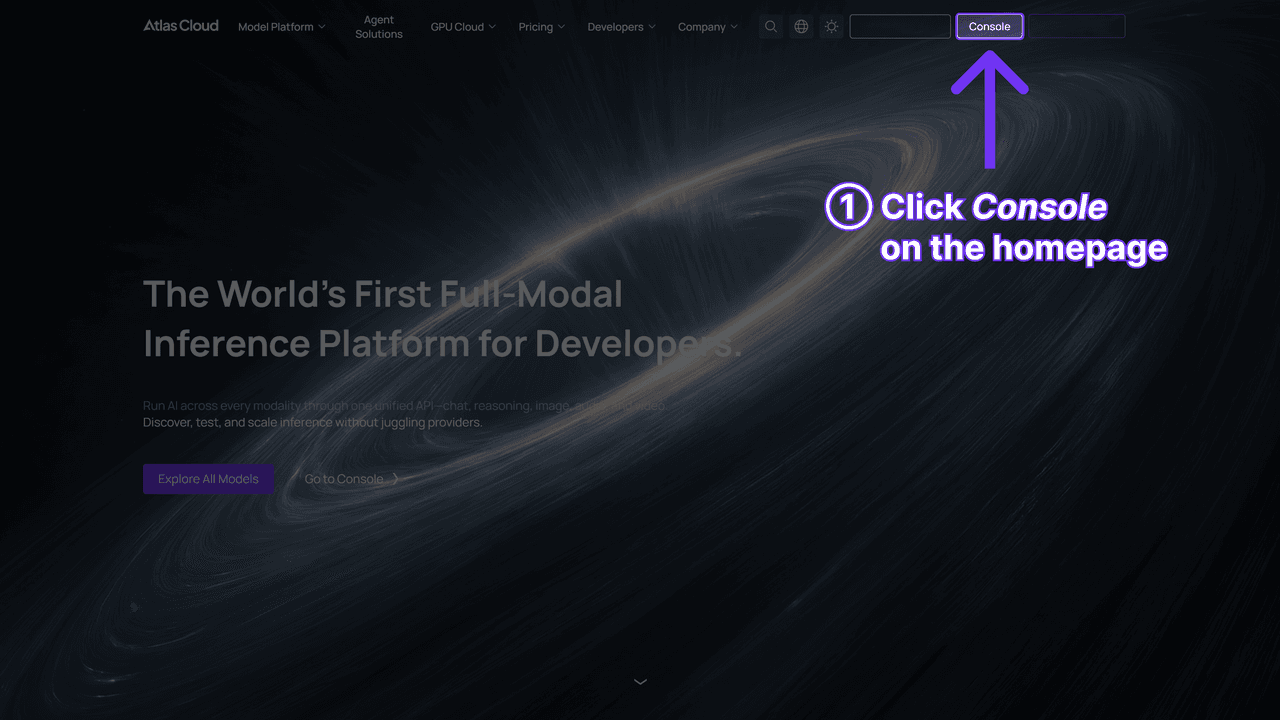
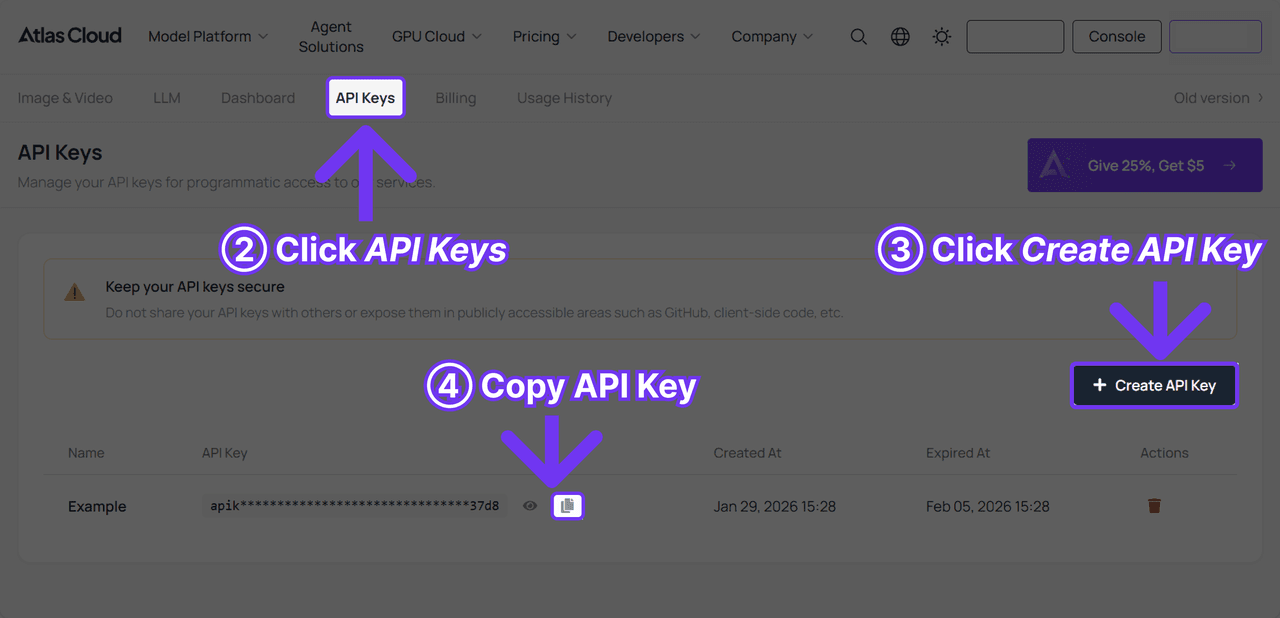
Step 1: Create an API key. Generate it in the Atlas Cloud console and keep it server-side. One key works across every model on the platform.
Step 2: Check the request shape. The API documentation covers authentication and polling. The endpoint takes a product image, an optional presenter image, and your brief; ad_type accepts creator recommendation, before-and-after, or unboxing, duration runs 4 to 15 seconds, and count returns up to 2 variants per call. The hook and scene menus belong to the web form, so through the API, the opening angle and the setting travel inside the brief text you write.
Step 3: Send the request and poll. Generation is asynchronous: the first call returns a request id, and you poll it until the clip is ready.
Bash1curl -X POST "https://api.atlascloud.ai/api/v1/model/generateVideo" \ 2 -H "Authorization: Bearer $ATLASCLOUD_API_KEY" \ 3 -H "Content-Type: application/json" \ 4 --data-raw '{ 5 "model": "atlascloud/studio/ugc-ad", 6 "product_image": "https://your-store.com/products/lumen-serum.jpg", 7 "user_prompt": "Lumen vitamin C serum for first-time buyers. Open on the pain point: dull skin in every morning selfie. Honest, unhurried tone.", 8 "ad_type": "creator_recommendation", 9 "duration": 12, 10 "ratio": "9:16", 11 "resolution": "480p", 12 "count": 2 13 }'
Bash1curl "https://api.atlascloud.ai/api/v1/model/prediction/<request_id>" \ 2 -H "Authorization: Bearer $ATLASCLOUD_API_KEY"
When status reads completed, the outputs array holds hosted video URLs. Batching is one loop away: hold the product image constant and iterate over briefs.
Bash1for brief in briefs/*.txt; do 2 submit_ugc_ad "$(cat "$brief")" # wraps the curl above 3done
Each brief file is one cell of the matrix in the next section: same serum, different opening angle. The endpoint, the auth header, and the polling pattern are identical across Atlas Cloud models, so the day you want a different generator, you change the model string and keep the rest of the script.
Build a Hook × Format Matrix to Generate UGC Ads at Scale
Question is: how do you keep clip 12 from just repeating clip 3? Volume without a plan produces 30 clips that all say the same thing. The matrix is how you generate UGC ads at scale and still end up with information: pick a handful of formats that fit the product, cross them with the hooks worth testing, and treat every cell as one brief.
Here is what that looks like for the serum. Cross three formats from the menu (UGC testimonial, Hands-on review, Unboxing ASMR) with four hooks (Pain point, Before-after reveal, Shocking stats, Freebie hook) and you get 12 variants, each with a name that tells you what it is before you press play.
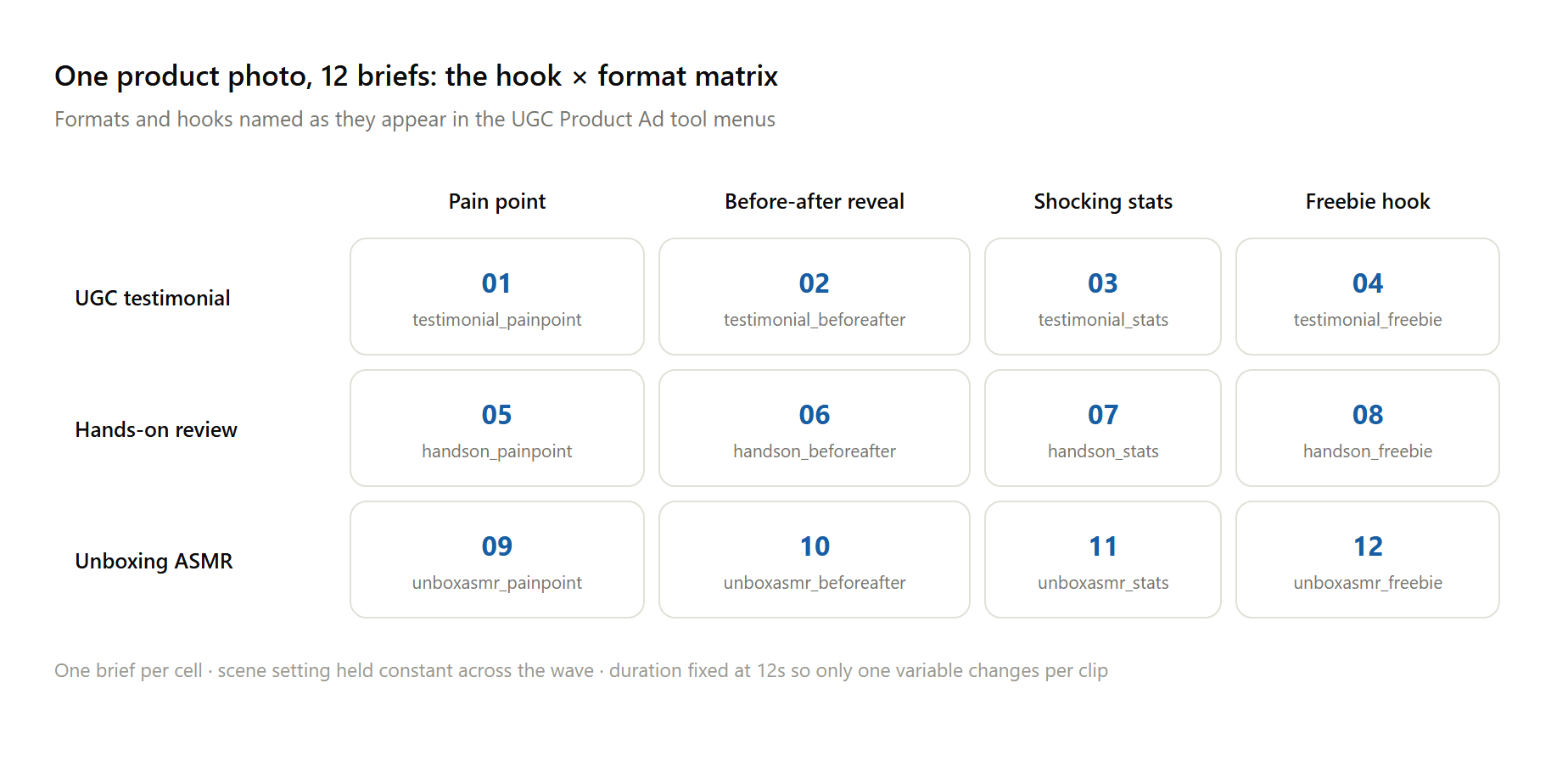
Three rules keep the matrix honest. Compare along one axis at a time: read across a row to judge hooks, down a column to judge formats. Keep the scene setting constant inside a test wave; a kitchen clip beating a bathroom clip tells you nothing about hooks. And name files by their coordinates, serum_testimonial_painpoint_12s, because four weeks from now the winning clip's filename is the only record of what it was testing.
Here is the matrix as real output, from our own runs with a different product. Both clips below started from the same amber candle jar: one filled the UGC testimonial cell, a presenter recommending it in a dim bedroom, while the other took the Giant product cell and turned the jar into a street spectacle.

Stills from two clips generated with the UGC Product Ad tool, published on Atlas Cloud's official YouTube channel, August 2026.
Feed the finished matrix into the API loop from the previous section and the whole grid generates in one sitting. One translation note: the API exposes three ad_type values rather than the web form's 16 formats, so pick the nearest one and let the brief carry the rest of the framing. A 12-cell wave that could easily swallow weeks of creator coordination becomes an afternoon of writing briefs, which is the actual work anyway.
How to Create UGC-Style Ads Without Hiring Creators
The no-creator pipeline deletes the serial steps from the first section in one stroke. What it keeps is the part buyers respond to, a person on camera talking about a product in a room that looks lived in. If you want the full background on the format itself and how audiences receive it, our AI UGC explainer covers the consumer research in depth.
Honesty about the trade-offs, from our own production runs. The tool currently outputs 480p, which holds up fine in a feed but is worth knowing before you plan a TV buy. Lip sync is most reliable with English scripts; when we fed it Japanese dialogue, audio came through while mouth movement drifted.
And a fully generated presenter cannot deliver the one thing a real customer can: a testimonial that is literally true. For whitelisted creator handles, Spark Ads, and genuine review content, hiring stays the right call.
AI Video Ads vs Traditional UGC Production
This comparison misleads when it is staged as a contest. It works better as a job description for two different tools:
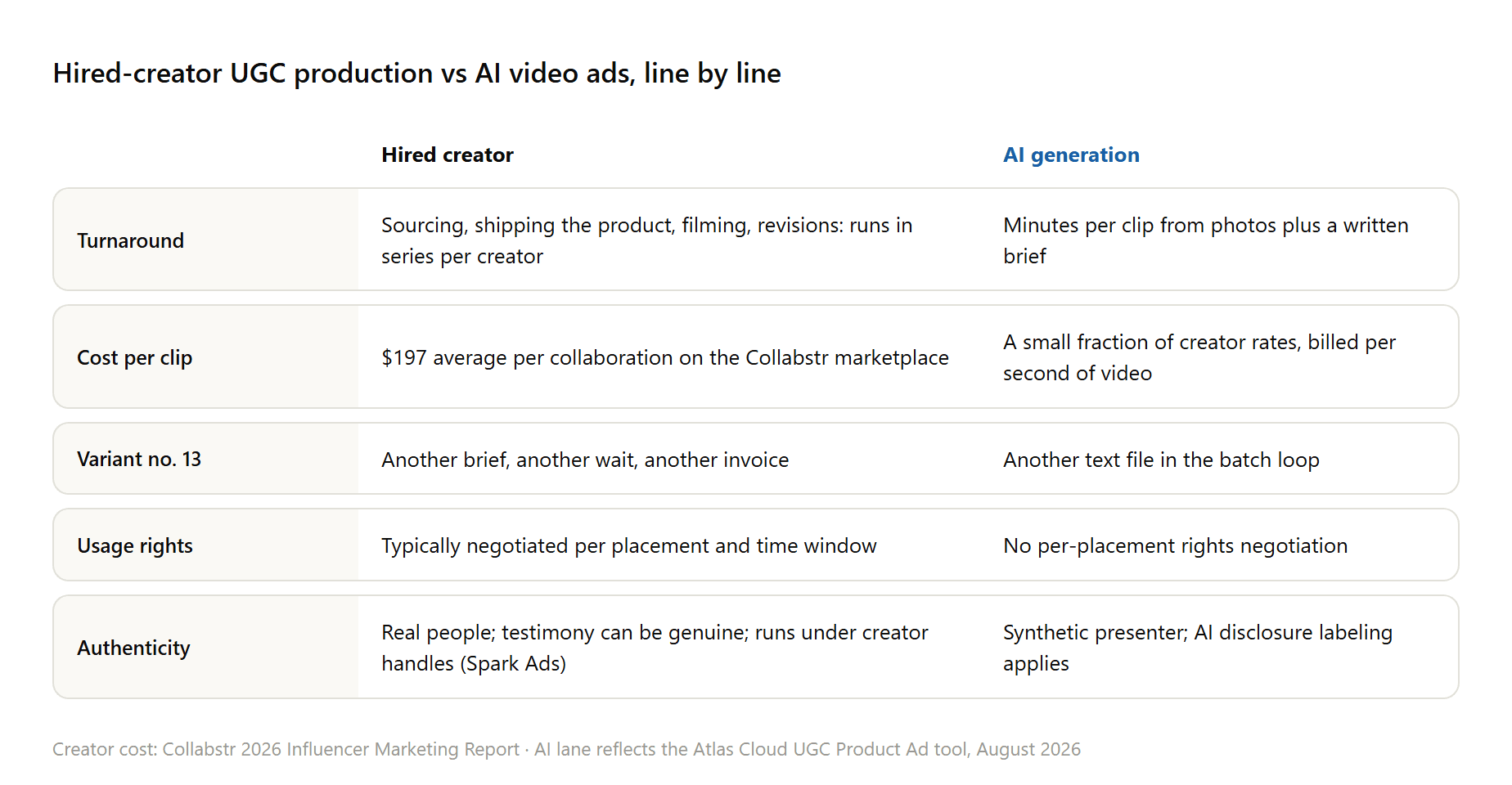
The cost row is the headline, and the per-second math behind the AI side is broken out in the FAQ. The row that actually decides budgets, though, is variant number 13: the marginal clip is where the two pipelines stop resembling each other. Teams that get this right buy authenticity from creators a few times a quarter and buy volume from the machine every week.
Fast-Paced UGC Ad Production Techniques for Paid Social
Production speed only pays off if the ad account consumes what you make. These fast-paced UGC ad production techniques are the operating habits that connect the two.
Test hooks before formats. The first three seconds decide whether anything else matters, so run one format across four hooks first, then push the winning hook into new formats. Refresh on signal, when frequency climbs or click-through starts sliding, so a replacement wave is already generated and sitting in a folder before the incumbent fades.
Remix winners instead of retiring them: keep the hook, swap the scene or the presenter, and the ad gets a second life without a fresh test budget. Quality per clip is a separate craft, script rhythm, first-frame realism, edit pacing, and it deserves its own read: our 20-minute AI UGC workflow covers it shot by shot.
A Weekly Cycle to Scale UGC Content Production for Paid Social
Ask ten media buyers for the best way to scale UGC content production for paid social and the honest ones describe a rhythm, a repeating loop that turns last week's results into next week's briefs:
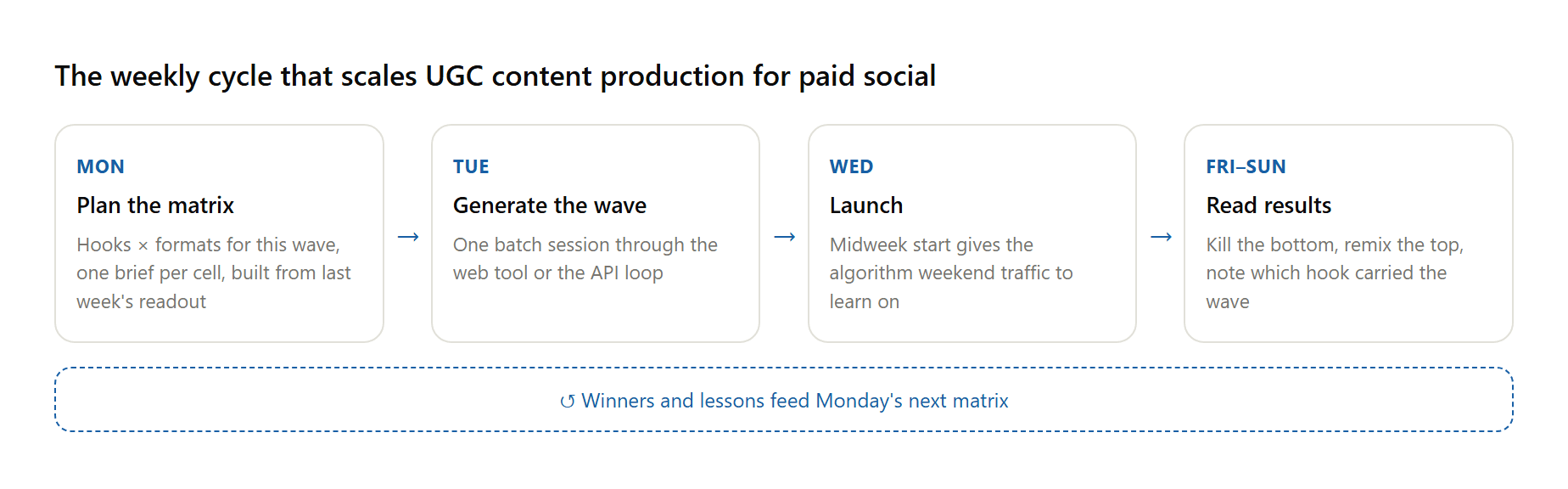
The exact days matter less than the order: results have to close the loop before the next matrix is drawn, otherwise you are producing volume without learning anything. Held to that order, the whole rhythm costs one planning hour, one batch session, and one readout per week. It also compounds, because every wave inherits what every earlier wave learned, and the generation step, the one that used to take weeks, now fits inside a Tuesday.
Frequently Asked Questions
How much does it cost to generate UGC ads at scale?
The first clip is free on the UGC Product Ad tool, and paid generation is billed by the second. As of late August 2026, generation works out to roughly $0.12 per second at 480p, so a 15-second clip lands near $1.77, with credit top-ups starting at $19. Rates can change, so treat the tool page as the source of truth.
AI video ads vs UGC production: which converts better?
No published head-to-head settles it, and results vary by account and audience. The auction judges creative one impression at a time, so the working method is empirical: run clips from both lanes against the same audience, give each a full learning phase, and compare cost per acquisition rather than click-through alone. The comparison section above maps which jobs each lane is structurally better at.
Do AI-generated UGC ads need disclosure labels?
On TikTok, realistic AI-generated content needs a label, applied through the platform's built-in tool or a sticker or caption. Meta applies an AI info label automatically when it detects GenAI ad creative; mandatory self-disclosure applies only to social issue, electoral, and political ads. Both are labeling rules; neither blocks the format.
What is the best way to scale UGC content production for paid social?
Finding the fastest way to generate UGC video content is only half the job; the other half is a loop that consumes the output. Run a system instead of a queue: plan variants as a hook × format matrix, generate each wave in one batch through a tool or API, launch on a fixed weekly rhythm, and let each readout set the next wave's briefs. The scale accumulates as the loop repeats; no single batch has to be big.
Conclusion
The teams shipping 30 UGC variants a week are not working 30 times harder than the teams shipping one. They moved the effort upstream: brief-writing and matrix planning stayed human, while generation, voicing, and lip sync became a menu or an API call. The Collabstr numbers say demand for the format keeps climbing; the pipeline above is how production keeps up without a roster to manage.
Start smaller than the ambition. One product photo, one 3 by 4 matrix, one free clip to see the output quality with your own product in frame. That first grid teaches you more about how to scale UGC ad creative production than any framework, because from the second week onward, the matrix starts writing itself.





