Your first clip looks right. In the second, the camera catches a side view and the lead suddenly looks like her cousin wearing the same coat. If you searched for kling 4 character consistency, that is probably the problem you want fixed. Current official materials focus on Kling 3.0 and Video 3.0 Omni, not a confirmed single official model called Kling 4. The useful answer is still clear: build a compact character reference set, then make each video prompt carry the action and camera work. This guide takes one character from a master image through 3 clips you can inspect, cut, and repair.
Key takeaways
- Treat “Kling 4” as a search term with mixed naming, then work from verifiable Kling 3.0 reference features.
- A repeatable character needs front, three-quarter, profile, and wardrobe evidence.
- Lock the same references, aspect ratio, and quality for every clip.
- Change one generation variable at a time: action, setting, or camera.
- Use frame-level checks to decide whether to rerun, simplify, or edit.
Kling 4 Character Consistency: Start With a Version Check
Search results attach “Kling 4” to several unrelated names and unofficial pages. That makes a version check practical, not pedantic. The February 2026 launch material from Kuaishou names Video 3.0, Video 3.0 Omni, Image 3.0, and Image 3.0 Omni. It also describes text-to-video, image-to-video, reference-to-video, and in-video editing in the 3.0 family, with video generation up to 15 seconds (Kuaishou launch release, February 2026).
| What people mean by “Kling 4” | What official materials currently show | What this guide tests |
|---|---|---|
| A current, official model name | Kling 3.0 and Video 3.0 Omni are the named 2026 releases | A reference-first character workflow that maps to available reference-to-video controls |
| A promise of a permanently locked face | Reference images and videos can carry subject information | Whether one visual identity survives 3 deliberately different shots |
| A single prompt trick | Multiple input modes have different jobs | Which input gives the model enough evidence for each task |
This distinction protects the tutorial from a common failure: blaming a version label for missing identity information. A model cannot infer a coat's back panel, a hair silhouette, or a face in profile from a flattering frontal portrait. The name on the page changes over time. The need for usable reference evidence does not.
Why Kling 4 Character Consistency Breaks in Side Views and Wide Shots
A prompt cannot show the model the back of a head
A single headshot carries a partial identity. It may establish eye color and a front hairline, but it says little about the nose bridge in profile, shoulder width, coat collar, earrings, or how hair falls behind one ear. When a prompt asks for a turn or a wide shot, the generator has to fill those gaps. That is where a believable person can become a merely similar person.
Use this working rule: the reference carries identity; the prompt carries motion. A short, disciplined prompt can still restate the few traits that matter for a quality check. It should not attempt to rebuild the whole person with a paragraph of adjectives on every run.
Four drift patterns appear most often:
- Facial geometry: jaw, eye spacing, nose profile, or beauty marks change as the camera rotates.
- Hair silhouette: a center part becomes a side part, or shoulder-length hair becomes a different cut.
- Wardrobe detail: a charcoal coat turns navy, a collar vanishes, or a textured knit becomes a plain shirt.
- Scene and prop continuity: a cup changes hand, a gallery sign becomes a different object, or a second person appears.
Community workflows report the same pressure points. Creators consistently call out clean source images, even lighting, clear facial geometry, and front or three-quarter views as helpful starting material, especially for image-to-video work (r/aivideos workflow discussion, March 2026). Treat that as practice-based advice, not a performance benchmark.
Freeze 3 variables before every Kling character run
Freeze the reference set first. Use the identical 4 files, in the same role and order, for all clips in a sequence. Do not replace one image because it looks more dramatic in a new setting. That creates a new identity source at the exact point you need stability.
Next, freeze the aspect ratio and the quality tier. A 16:9 sequence is easier to judge and cut when every frame starts with the same canvas. Finally, change only one creative variable per run. For the test below, Shot 1 establishes motion, Shot 2 changes the setting, and Shot 3 tests the difficult angle. This makes failure diagnosable rather than mysterious.
Kling 4 Character Consistency Starts With a Four-View Character Pack
Build visual DNA, not a mood board
A usable pack shows one fictional person under compatible lighting, age cues, styling, and color treatment. It is not a collection of attractive people who share a vibe. The character in this test is Mara Chen: oval face, warm brown eyes, a small beauty mark below her left eye, center-parted shoulder-length black hair, a charcoal wool coat, and a muted teal knit top.
| Reference view | What it resolves | What to inspect before upload |
|---|---|---|
| Front portrait | Face shape, hair part, beauty mark | Clear eyes, unblocked hairline, neutral expression |
| Three-quarter full body | Body proportion, shoulder line, coat fall | Same coat and knit, matching daylight tone |
| Left-side profile | Nose, jaw, ear, hair volume | Visible profile and clean coat collar |
| Wardrobe/detail view | Knit texture, lapel, stable color relationship | Charcoal outer layer and muted teal inner layer stay readable |
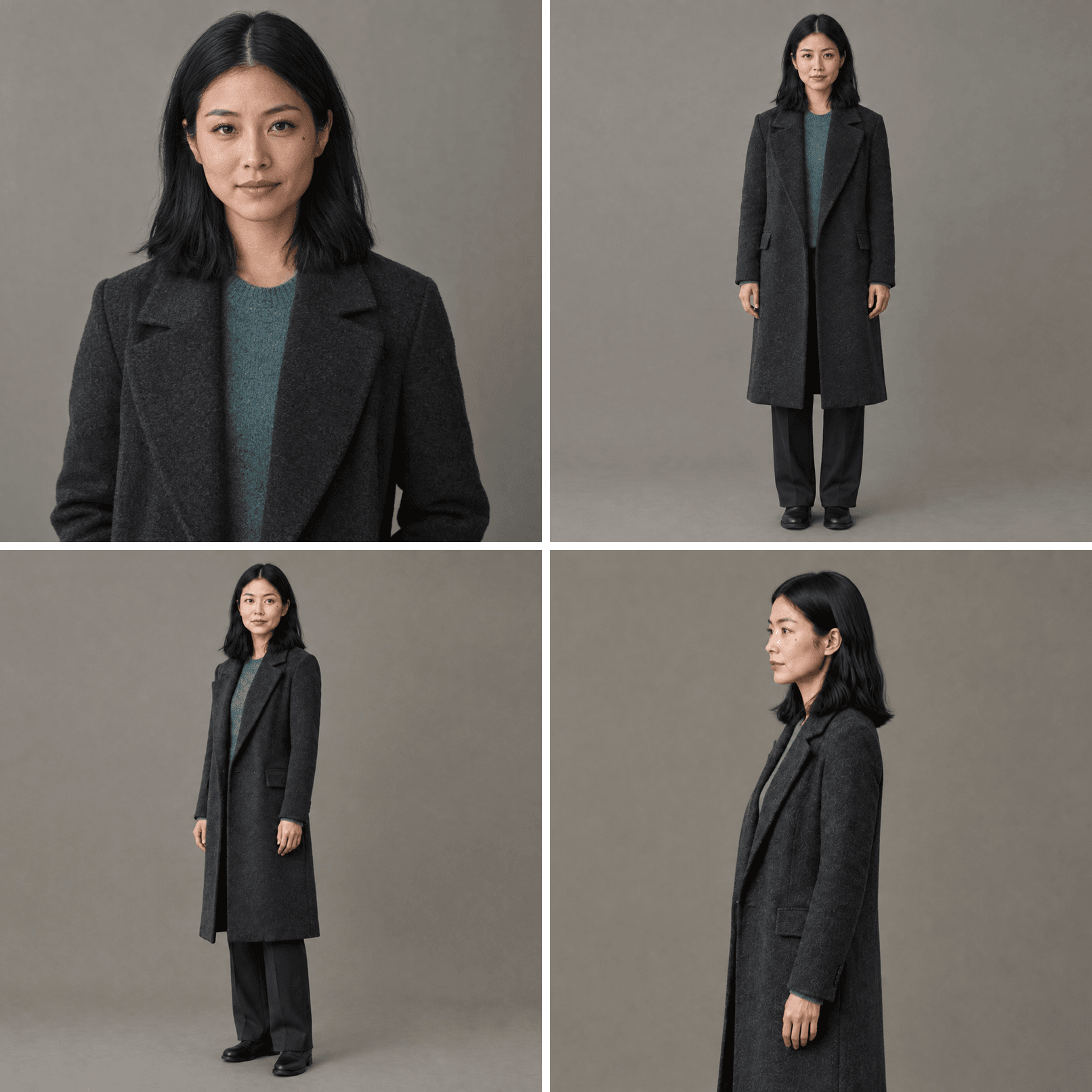 Four-view Kling 4 character consistency pack showing Mara Chen's front, three-quarter, side, and wardrobe references
The pack gives the generator evidence for the views a frontal portrait cannot supply.
For a brand character, include the identifiers viewers would notice after a cut: a fixed color, hair part, jewelry, a collar shape, or a fabric texture. Keep the background plain enough that the person remains the visual subject. The reference set should make it easy to answer, “Is this still Mara?” at a glance.
Exclude identity noise from the pack
Skip heavy backlight, sunglasses, strong beauty filters, group photos, face-covering hands, and inconsistent crops. Avoid a wildly patterned top if that pattern is not an identity feature you can verify in every shot. These are not taste rules. They reduce the number of visual decisions the generator must make when it moves the character.
The official Elements quickstart documents the underlying principle: one to 4 images can be supplied as subject elements for character consistency and multi-subject interactions (Kling AI Elements quickstart, November 2025). Four is not magic. It is a compact set that covers the angles most likely to fail.
Kling 4 Character Consistency Workflow: Lock References, Then Move
Create the identity asset before you ask for motion. In a single Atlas Cloud workspace, you can build the master and supporting views, then carry that fixed set into a reference-to-video run. Keeping the handoff close reduces accidental substitutions between tools.
Step 1: Create the canonical character image
On GPT Image 2, choose Text-to-Image, quality high, and 16:9. Select the highest available output size only if the interface confirms it. Choose the result with the clearest face, center part, beauty mark, coat, and knit, not the most theatrical pose.
plaintext1Create a cinematic, photorealistic master portrait of one original fictional character: Mara Chen, a 29-year-old Asian woman with an oval face, warm brown eyes, a small beauty mark below her left eye, shoulder-length black hair with a precise center part, and a charcoal wool coat over a muted teal knit top. Medium-full shot, neutral daylight, plain warm-gray studio background, natural skin texture, relaxed expression, no sunglasses, no hat, no other people, no text, no logos. This image will be used as the identity master for a multi-shot video sequence.
Step 2: Create 3 supporting views from the same master
Use GPT Image 2 Edit with quality high and 16:9. Upload only the canonical image for each edit. Do not add a second, similar-looking portrait. Each prompt changes the camera view while preserving the same identity source.
Front full-body prompt
plaintext1Use the uploaded master portrait as the only identity source. Create a full-body, front-facing reference image of the exact same woman. Preserve her face shape, beauty mark, center-parted shoulder-length black hair, charcoal wool coat, muted teal knit top, body proportions, neutral expression, daylight color treatment, and realistic skin texture. She stands naturally against the same plain warm-gray studio background. No text, no logos, no extra people.
Three-quarter prompt
plaintext1Use the uploaded master portrait as the only identity source. Create a full-body three-quarter view of the exact same woman, turned slightly to her left while looking near camera. Preserve the exact same face shape, beauty mark, center-parted shoulder-length black hair, charcoal wool coat, muted teal knit top, body proportions, daylight color treatment, and realistic skin texture. Same plain warm-gray studio background. No text, no logos, no extra people.
Side profile and wardrobe-detail prompt
plaintext1Use the uploaded master portrait as the only identity source. Create a clean left-side profile reference of the exact same woman, framed from knees up. Preserve the same facial profile, beauty mark placement when visible, center-parted shoulder-length black hair, charcoal wool coat, muted teal knit top, and natural daylight color treatment. Keep the coat collar and knit texture clearly visible. Same plain warm-gray studio background. No text, no logos, no extra people.
Step 3: Generate the first moving proof clip
Open Kling Video O3 Reference-to-Video. Upload the same 4 references, then select Reference-to-Video, 16:9, 1080p, 8 seconds, and the highest available Pro quality. Confirm those settings in the interface before running.
plaintext1Use all uploaded reference images as one and the same character, Mara Chen. In a quiet early-morning city street, Mara walks past a small coffee window while carrying a plain paper cup. She briefly looks toward the window, smiles naturally, then continues walking. Start as a chest-up medium tracking shot and smoothly shift to a three-quarter side view as she passes the camera. Preserve her exact facial structure, small beauty mark, center-parted shoulder-length black hair, charcoal wool coat, muted teal knit top, and realistic daylight color treatment. One person only, stable hands, no wardrobe change, no text, no logos.
Kling 4 Character Consistency Across 3 Shots
Shot 1: Kling character consistency in motion
The city-walk prompt above starts at chest-up scale, follows Mara past the coffee window, then shifts to three-quarter side view. That sequence asks for readable movement and an angle change without stacking a run, a crowd, a 360-degree turn, or a complicated interaction into the opener. The result is evidence that the character can move before the sequence tries to impress.
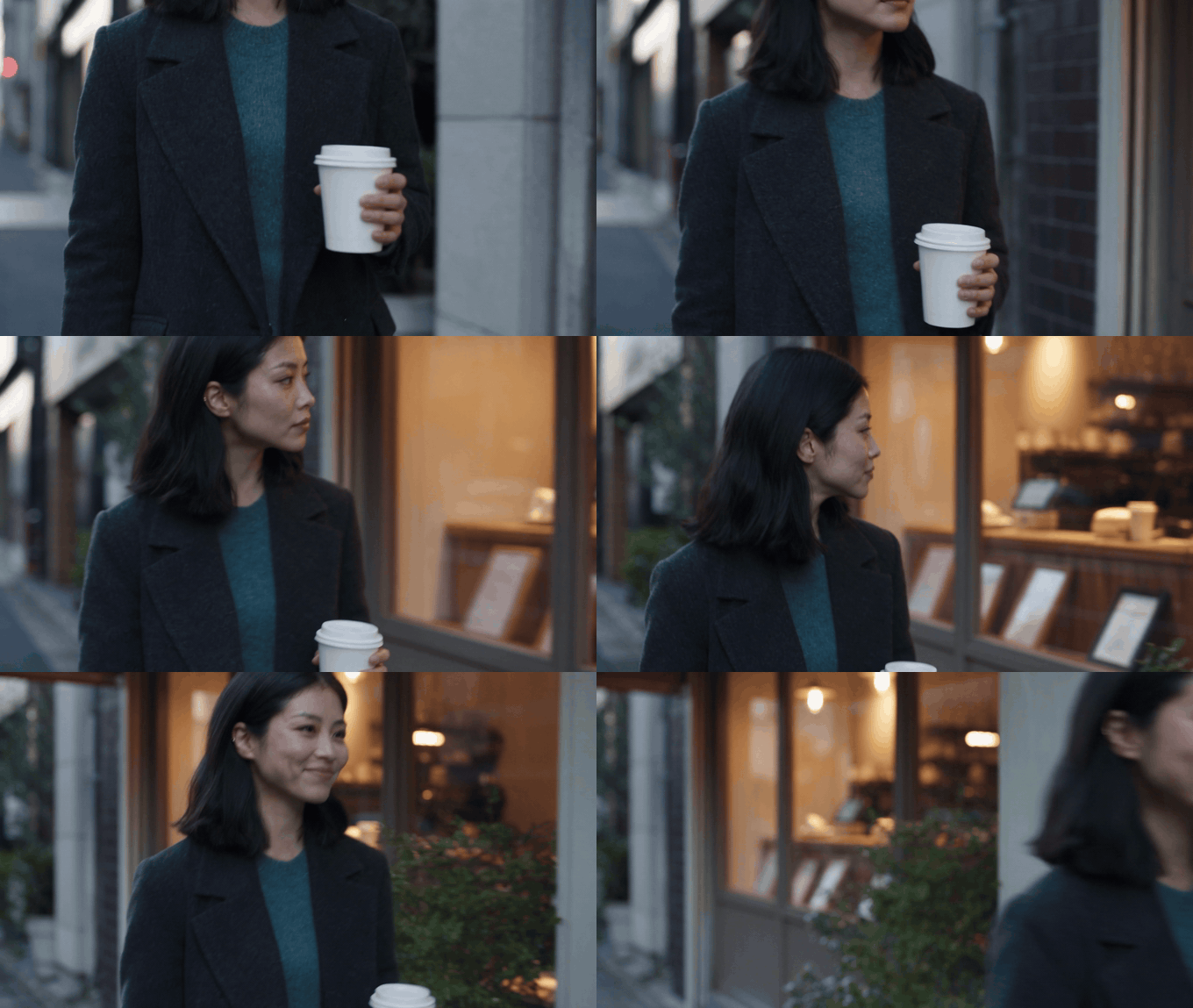
Mara Chen city walk reference-to-video proof with a medium tracking view changing to a three-quarter side view
Shot 1, shown as a silent GIF: a lateral walk and angle change test the same identity in motion.
Shot 2: Kling character consistency across a new setting
Reuse the 4 image files and the same video settings. Change the environment and action, while leaving Mara's identity untouched. This is a stronger test than producing another street clip because the viewer must recognize the person without the original scene doing any of the work.
plaintext1Use all uploaded reference images as one and the same character, Mara Chen. Outside a contemporary art gallery in soft late-afternoon light, Mara pauses at the entrance, looks up at the building, then turns toward camera with a small thoughtful smile. Begin with a medium-wide shot and make one slow lateral camera move into a clean medium close-up. Preserve her exact facial structure, small beauty mark, center-parted shoulder-length black hair, charcoal wool coat, muted teal knit top, and realistic skin texture. One person only, no outfit change, no text, no logos, no extra limbs.
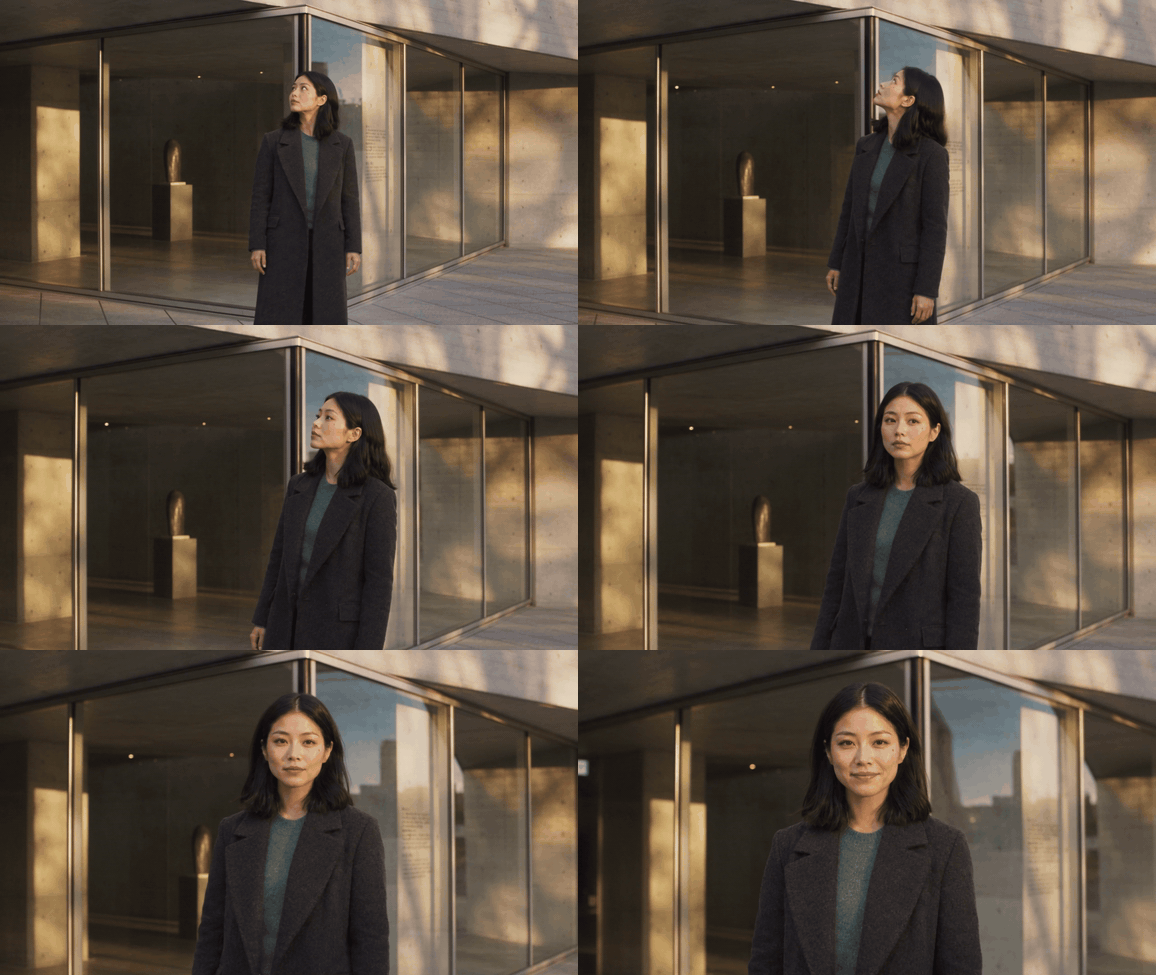
Mara Chen gallery reference-to-video proof reusing the same 4 character references in a new scene
Shot 2, shown as a silent GIF: the same references carry Mara from a coffee window to a gallery entrance.
Shot 3: Kling character consistency at the angle that exposes drift
Run this test before you build a longer story. A close profile is more revealing than a distant shot because viewers can compare the jawline, hair part, beauty mark, coat collar, and expression. Keep the movement modest so a failed identity check points to references rather than an overloaded action brief.
plaintext1Use all uploaded reference images as one and the same character, Mara Chen. In the gallery lobby, Mara stands still beside a softly lit concrete wall, first shown in left-side profile. She slowly turns her head about 30 degrees toward camera, blinks once, and gives a restrained smile. Start in a close profile shot and end in a clean three-quarter close-up. Preserve her exact side profile, beauty mark, center-parted shoulder-length black hair, charcoal wool coat, muted teal knit top, and realistic skin texture. No sudden camera movement, no wardrobe change, no text, no logos, no other people.
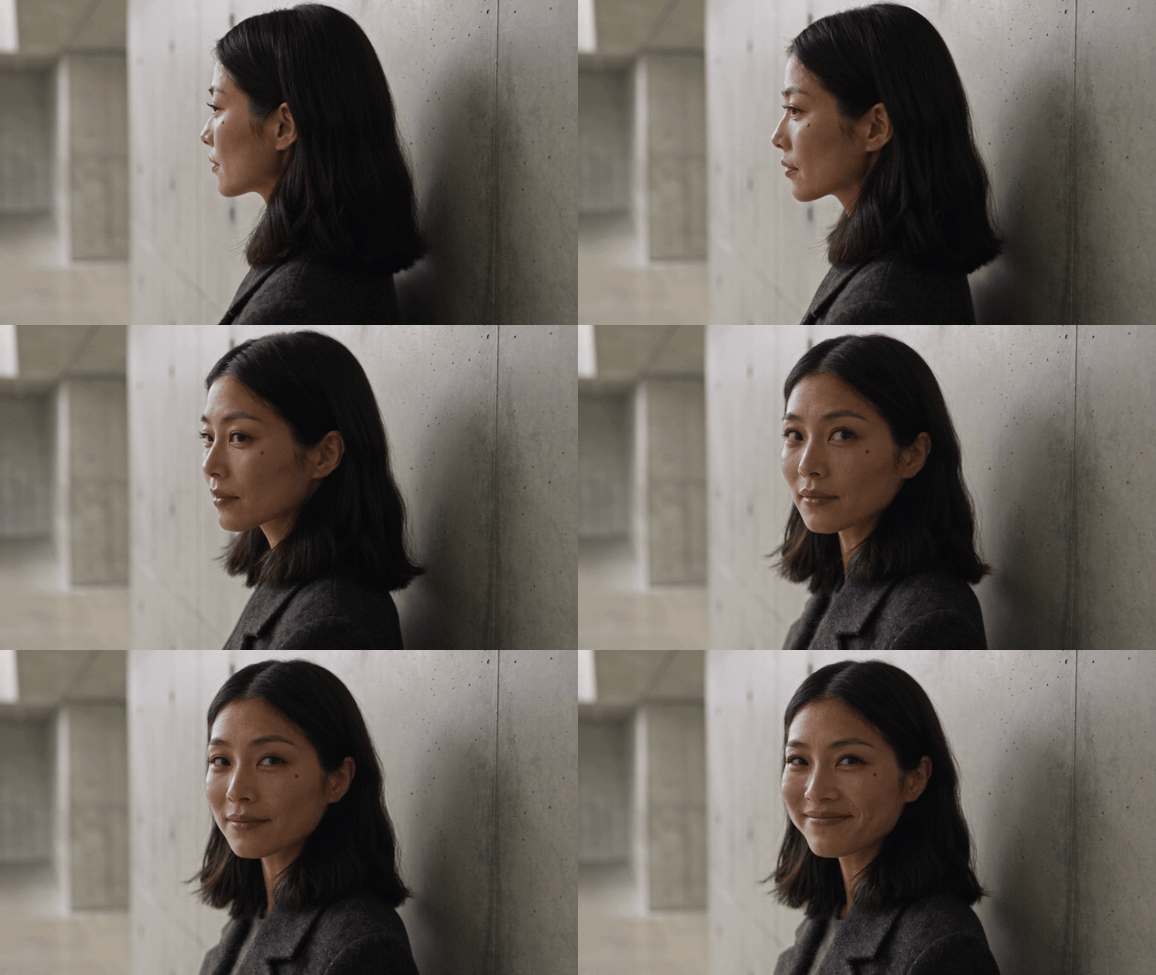
Mara Chen gallery-lobby profile proof moving into a three-quarter close-up
Shot 3, shown as a silent GIF: a close left-side profile moves into a restrained three-quarter expression test.
The 3 clips are intentionally small. They validate an identity asset and continuity method before you spend time assembling dialogue, action, or a longer multi-shot sequence.
Kling 4 Character Consistency QC: Fix Drift Before You Edit
Do not judge a clip from its most flattering thumbnail. Scrub through it, pause at the beginning, midpoint, and end, then compare the selected frames side by side. This check answers the production question that matters: can an editor cut these clips together without pulling the viewer out of the story?
 Three-shot character consistency QC contact sheet comparing Mara Chen's city-walk close-up, gallery view, and left-side profile
Clear frames from all 3 shots make identity, hairline, and wardrobe continuity visible before editing.
| Frame-level check | Pass condition | If it fails |
|---|---|---|
| Face proportions | Jaw, eye spacing, nose, and beauty mark remain recognizable | Add or replace the clean profile reference |
| Hairline and silhouette | Center part and shoulder-length shape survive the angle change | Use a clearer side view with no wind or occlusion |
| Wardrobe identity | Charcoal coat, muted teal knit, lapel, and texture persist | Add a tighter detail view and simplify lighting |
| Hands and props | One cup, plausible grip, no extra fingers | Reduce hand action or keep the prop in one hand |
| Environment | New setting reads as intended without new people | Reduce background instructions and rerun |
| Cut point | Adjacent clips share a believable person and outfit | Cut on a stable pose or rerun the weaker shot |
Use this repair order. First improve the reference pack. Second reduce the action. Third remove scene clutter. Only then revise prompt wording. Repeating “same person” ten times usually adds less value than giving the system a clean image of the person from the missing angle.
| Symptom | Do not start by | First repair |
|---|---|---|
| Side profile becomes a different face | Adding more facial adjectives | Add a clean side-profile reference |
| Coat changes color | Writing only “same outfit” | Add the wardrobe/detail image and hold light constant |
| Wide shot has an unreadable face | Requesting a more complex camera move | Make a closer, lower-motion proof shot first |
| Shot 2 does not match Shot 1 | Swapping in a “better” new reference | Reuse the original set and fixed parameters |
Which Kling Mode Fits a Recurring Character?
There is no universally best input mode. Choose the one that supplies the evidence your shot needs. Reference-to-Video earns its extra setup when the same character must survive different scenes. Image-to-Video can be faster for one short action that begins from a carefully composed still. Frames constrain a transition, while video reference can add motion and voice context when you have permission to use that source material.
| Goal | Best starting mode | Why it fits | Main risk |
|---|---|---|---|
| Reuse a character across different scenes | Reference-to-Video | Multiple angles carry identity evidence | Inconsistent source images compound drift |
| Animate one controlled still | Image-to-Video | The opening composition is already set | Profile and wide views may still need more references |
| Join two story beats | Start and end frames | Constrains the beginning and ending state | Complex middle action can still wander |
| Carry actor movement and voice traits | Video reference | Supplies dynamic character evidence | You need rights and consent for the source clip |
For pricing, avoid planning from a headline number. Modes, duration, resolution, and discounts can change. Check the current rate on the model page before each production batch, then calculate from the actual settings you commit. The Atlas Cloud model catalog is the right place to compare current options without turning a character test into a price claim.
Kling 4 Character Consistency FAQ
Is Kling 4 an official Kling AI model name?
Official materials currently name the Kling 3.0 family and Video 3.0 Omni. “Kling 4” appears in search usage, but this article does not treat it as a verified unified official release name.
How do I keep the same character across Kling video scenes?
Make a consistent 4-view pack, upload the exact same pack for every scene, freeze ratio and quality, and modify one creative variable per run. Review each result before extending the sequence.
How many reference images should I upload for Kling character consistency?
Use 4 when you need front, three-quarter, profile, and clothing information. For a simple single view, fewer may work, but they give the generator less evidence when the camera changes.
Why does my Kling character’s face change in profile or wide shots?
Those shots expose identity information a frontal image does not show. A clean profile and a lower-motion test clip make the missing evidence easier to fix.
Should I use Image-to-Video or Reference-to-Video for a recurring character?
Start with Reference-to-Video for a recurring character across scenes. Choose Image-to-Video when a single starting composition matters more than broad identity coverage.
How much does Kling character-consistent video generation cost?
Prices change by mode, duration, resolution, and current promotions. Confirm the quote in the live model interface for the precise run you intend to make.
Build the 4-view pack first, then run the 3-shot test before committing to a longer narrative. That is the dependable path to kling 4 character consistency: evidence for identity, restrained prompts for motion, and a QC decision before the edit.





