

A single brushstroke can feel alive in a still image. The hard part of kling 4 Chinese calligraphy animation is making the ink move without changing the character you meant to show. Start with verified calligraphy artwork as the image reference, then ask for restrained ink and paper motion while keeping the glyph fixed. As of October 14, 2026, Kling 4 is announced by Kling AI but is not confirmed as an active, priced model in Atlas Cloud’s live catalog; the workflow below also explains how to use the listed Kling 3.0 image-to-video route.
Key takeaways
- For a specific Chinese character, start with a clean, correct source image and use image-to-video.
- Ask for one or two subtle motions, then inspect the whole clip for stroke changes.
- Use text-to-video to explore an ink mood when the exact character shape does not matter.
What Kling 4 Can Do for Chinese Calligraphy Animation
Kling AI’s current Kling 4 guide describes stronger multilingual text generation, including Chinese, alongside expanded video controls. It also says the full Kling 4 model is scheduled for October 2026, with early access to the creation experience rolling out earlier. Those announcements make calligraphy an interesting use case, but they do not guarantee that one exact glyph will remain unchanged in every frame. ( Kling 4.0 guide, September 2026)
Treat text generation and text preservation as separate tasks. A model may render Chinese text more capably while still reshaping a particular brush character during motion. A verified reference image gives the generator a concrete form to follow, and a simple motion brief gives it fewer competing changes to invent.
Choose Image-to-Video for a Specific Chinese Character
| Starting point | Best use | Main risk |
|---|---|---|
| Text-to-video | Exploring ink atmosphere or a loose concept | The model may invent or distort the character |
| Image-to-video | Animating verified calligraphy or artwork | Fine strokes can still shift during motion |
| Reference or keyframe workflow, if offered | Planning a controlled reveal | Inputs and availability depend on the live model interface |
For a named character, the source image does the most important accuracy work. An earlier-version ink-painting walkthrough uses a reference image with Kling 3.0 Omni, while creator discussions about animating 2D art also emphasize preparing a strong image and keeping motion simple. These are useful workflow clues, not proof of Kling 4 behavior. (2D animation discussion, 2026)
Prepare the Calligraphy Image Before Animation
Use one clearly written character, strong contrast, and enough paper margin that movement will not crowd the frame. Check the source at full size first: if the glyph is ambiguous or has a stray mark, fix the artwork before animation.
The character Yong (永) is a useful reference because it is a real calligraphic glyph with varied stroke forms. This Wikimedia Commons CC0 image gives you a concrete source-art example to inspect before preparing your own verified character.
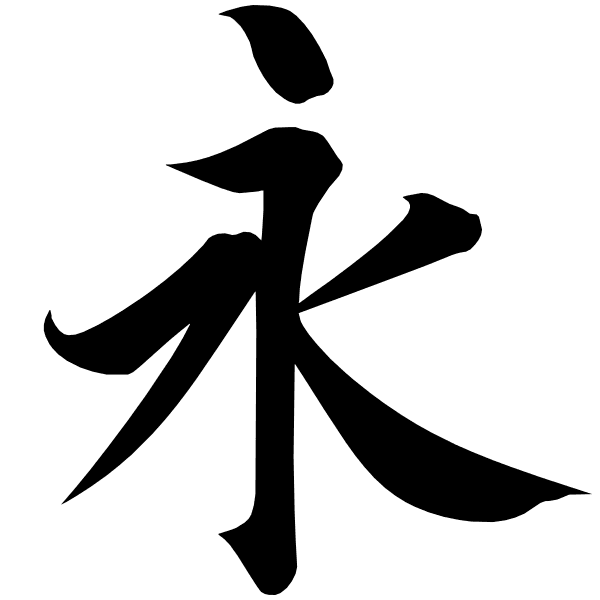
The Chinese calligraphy character Yong used as a verified source-art example
Source artwork: Yong from Wang Xizhi's Lanting Xu, Wikimedia Commons, CC0.
Choose one motion goal:
- Living finished character: keep all strokes in place while ink edges bloom or paper shifts gently.
- Brush-writing action: show the brush making a specific stroke, with the understanding that stroke order and final form need closer inspection.
Avoid asking one short clip to both preserve a finished glyph and rewrite it stroke by stroke. For calligraphy that must be correct, upload verified art instead of asking a video model to invent the character.
Kling Chinese Calligraphy Animation Workflow
Use these steps when Kling 4 appears as an active model in the Atlas Cloud model catalog. At the time checked, the production Kling 4 model ID, supported inputs, controls, and price were not confirmed there. The catalog does list Kling 3.0 image-to-video options; choose the exact active submodel shown on the Kling 3.0 page if you want to try the method now.
- Open the verified model detail page and confirm it supports image-to-video. Use the active model ID and controls shown there.
- Upload your checked calligraphy image as the reference or starting frame.
- Choose the shortest practical duration and a standard or high-quality option available in that interface. Settings differ by route, so do not assume Kling 4 controls match Kling 3.
- Paste the prompt below, then generate one clip.
- Review the entire result for glyph deformation, added writing, and movement that obscures the ink.
- If the glyph changes, correct the source art first. If motion overwhelms it, simplify the prompt to one visible action.
Copy-ready image-to-video prompt
Animate the uploaded calligraphy image in a single overhead shot. Keep the Chinese character 永 exactly as it appears in the source image: preserve every stroke, its shape, position, thickness, and spacing throughout the clip. Fresh ink gently spreads only along the existing stroke edges, revealing the texture of the rice paper. A light breeze softly moves the paper edges while the character remains centered and fully legible. Natural side lighting, visible ink and paper motion, steady camera. Do not draw, erase, rearrange, or add any strokes. No new characters, seals, captions, cuts, or zoom.
Example: The Yong Character in Motion
The source image above supplies the character's shape. In this five-second result, the paper folds move and the ink edges appear to breathe while 永 remains recognizable. Some stroke edges shift during the motion, so inspect the entire clip if exact glyph fidelity matters.
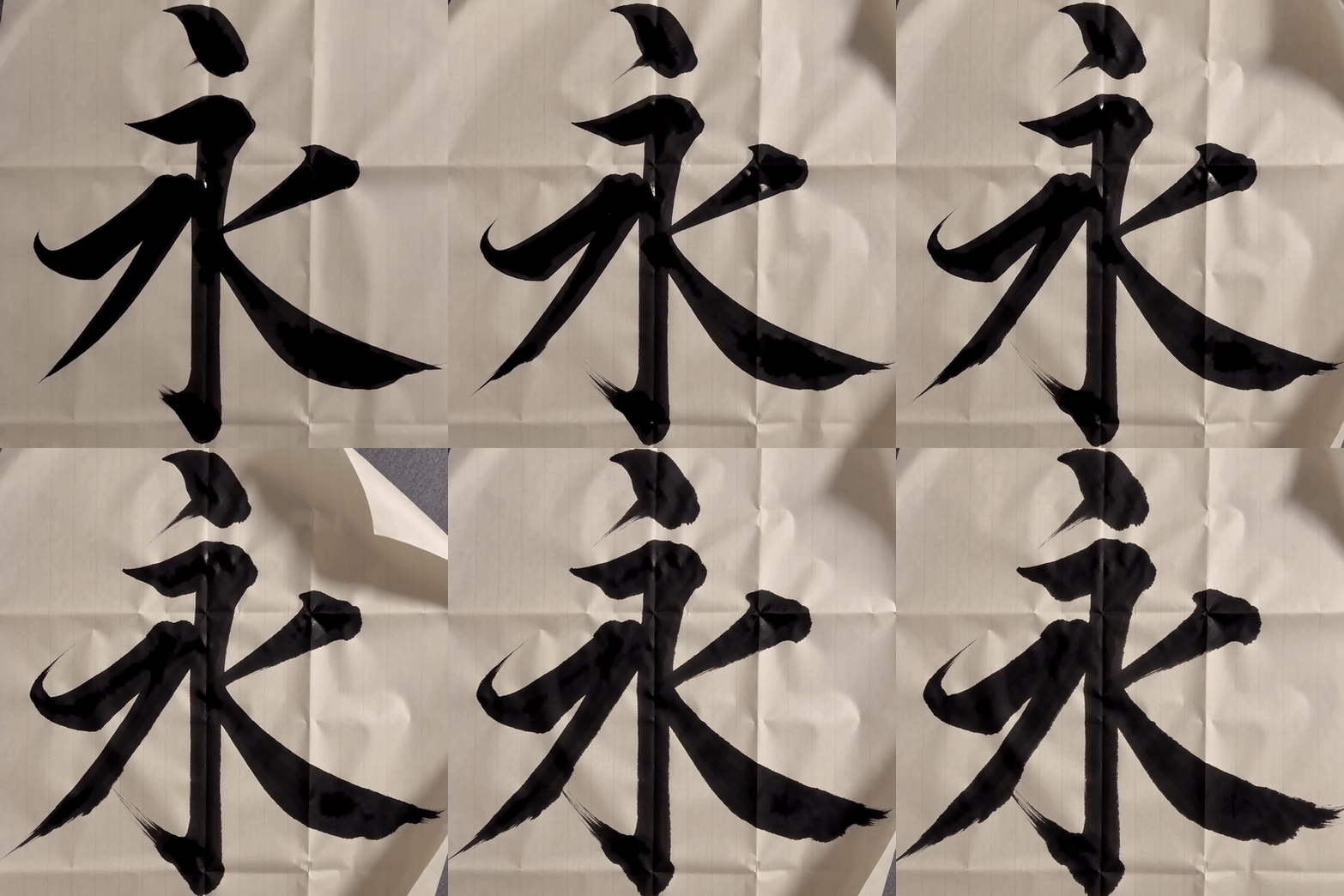
Five-second example animating the Yong calligraphy character with moving paper and ink
Generated result from the Yong source artwork. Compare the moving strokes with the original image above before using the clip in work that requires exact calligraphy.
This clip illustrates the workflow; its result does not establish performance for other versions or routes. If you are exploring mood without requiring correct characters, try text-to-video instead:
A quiet Chinese calligraphy studio, viewed directly overhead. A single bold black brushstroke slowly forms across textured rice paper, with visible bristle texture and a subtle ink bloom. The brush lifts at the end; the completed abstract stroke remains still and does not become additional writing. Warm side light, restrained motion, one continuous shot, uncluttered composition.
The official Kling prompt guide recommends a clear subject and action with a simple scene. Keep the source prompt compact enough to make the intended movement easy to identify. (Kling prompt guide, accessed October 2026)
Check the Output Before You Keep It
Use this quick review after generation:
- Does the same intended character remain legible from beginning to end?
- Did the model add a seal, caption, or extra stroke?
- Is the motion visible without covering the glyph?
- Does the camera remain overhead and steady?
If the first check fails, replace or repair the reference image. If the other checks fail, remove extra actions and retry with a simpler motion request.
Is Kling 4 Available on Atlas Cloud?
As of October 14, 2026, Atlas Cloud’s live catalog shows Kling 3.0 routes, including standard and Pro image-to-video entries. Its Kling V4 preview does not confirm a callable production model ID, supported controls, or final price. Availability can change, so check the Kling model listing before planning a production run. The page is a practical place to confirm the route and current options when you need to test calligraphy motion today.
Kling Pricing for Calligraphy Clips
No Kling 4 price was verified in the live Atlas catalog on the date above. The catalog displayed these starting rates for Kling 3.0 image-to-video routes during the check; the final charge depends on the chosen route and settings.
| Catalog route | Task | Displayed starting rate on October 14, 2026 |
|---|---|---|
| Kling 3.0 Standard Image-to-Video | Image-to-video | $0.071 per second, displayed with 15% discount from $0.084 |
| Kling 3.0 Pro Image-to-Video | Image-to-video | $0.095 per second, displayed with 15% discount from $0.112 |
| Kling 4 | Not confirmed | No verified price listed |
These are catalog starting rates, not a quote for every resolution or configuration. Open the relevant model detail page and check its live pricing before generating. The displayed Kling 3.0 discounts may change.
Frequently Asked Questions
Can Kling 4 generate readable Chinese calligraphy?
Kling AI has announced improved multilingual text generation that includes Chinese. That is not a guarantee of exact character preservation through motion. Use a verified calligraphy image when the glyph must be correct, then inspect every part of the clip.
Should I use text-to-video or image-to-video for one Chinese character?
Use image-to-video for a specific character or existing artwork. Text-to-video is useful for a general ink style or abstract brushstroke when the exact character does not matter.
How do I stop Kling from changing the character during animation?
Begin with clean, high-contrast source artwork and ask for limited movement around existing strokes. If the form still changes, repair or replace the source image and simplify the action. Prompt wording alone cannot guarantee a fixed glyph.
Can Kling animate a brush writing stroke by stroke?
You can prompt for a brush action, but accurate stroke order and final glyph form need review. For a short clip, avoid combining several writing actions with ink effects and camera moves.
Is Kling 4 available on Atlas Cloud, and what does it cost?
The live catalog check on October 14, 2026 did not confirm an active Kling 4 model ID or price. Kling 3.0 image-to-video entries were listed with starting rates shown above. Recheck the current model page before generation.
What should I do if Kling 4 is not listed yet?
Use an active Kling 3.0 image-to-video route if its detail page fits your needs, or prepare the source artwork and prompt while waiting for the catalog to change. The same source-first approach applies to kling 4 Chinese calligraphy animation when the route becomes available.





