

A night portrait can look moody and still fail: the face disappears into shadow while neon signs clip into white patches. This kling 4 cinematic night portrait video guide gives you a prompt built around readable skin, controlled highlights, and camera views that reveal both the person and the night setting. It also separates Kling 4's announced status from what Atlas Cloud currently lets you run.
Key takeaways
- Keep both eyes and natural skin detail readable with soft cafe light while preserving the dark street ambience.
- Plan front, side, wider rear, and three-quarter views so the camera reveals the person and the setting.
- Start from a clean portrait still when face and wardrobe consistency matter, then inspect the darkest and brightest frames.
- Kling 4 is in official early access, but Atlas Cloud's V4 listing remains Coming Soon as of October 14, 2026. The references and rehearsal here are not verified Kling 4 output.
Can You Make a Kling 4 Night Portrait Video on Atlas Cloud?
Not through a confirmed Kling 4 endpoint at the time checked for this article, October 14, 2026. Kling's official announcement says Kling 4.0 is entering early access, while the Atlas Cloud Kling V4 status page labels the model as coming soon and leaves its endpoint specifications and price unconfirmed. Early access at Kling does not mean the model is available through every provider.
The guide below is a Kling 4 preparation workflow. If you test the prompt before the Atlas route becomes available, treat that output as a rehearsal, not a Kling 4 result. Check the current model catalog before starting a paid generation.
The Kling 4 release announcement describes features such as native 30-second generation and 10-bit HDR, but it also marks some output options as coming soon. Treat those as official product announcements, not settings you can assume are enabled in Atlas's future V4 route. (Kling AI, September 30, 2026)
What Makes a Kling 4 Night Portrait Feel Cinematic?
A convincing night portrait balances four things: a face the viewer can read, a background that still feels dark, a small human action, and camera movement that supports the moment. The word cinematic alone does not tell a video model how to balance any of them.
Build the prompt in this order:
- Person and expression: identify an adult subject and the emotion to preserve.
- Setting and light sources: name the practical key light on the face and the cooler ambient light behind it.
- Continuous action: give the subject one or two small movements that can happen naturally.
- Camera path: name the front, side, and wider views, then state how the camera moves between them.
- Exposure and continuity: ask for facial detail, controlled highlights, and stable wardrobe and identity.
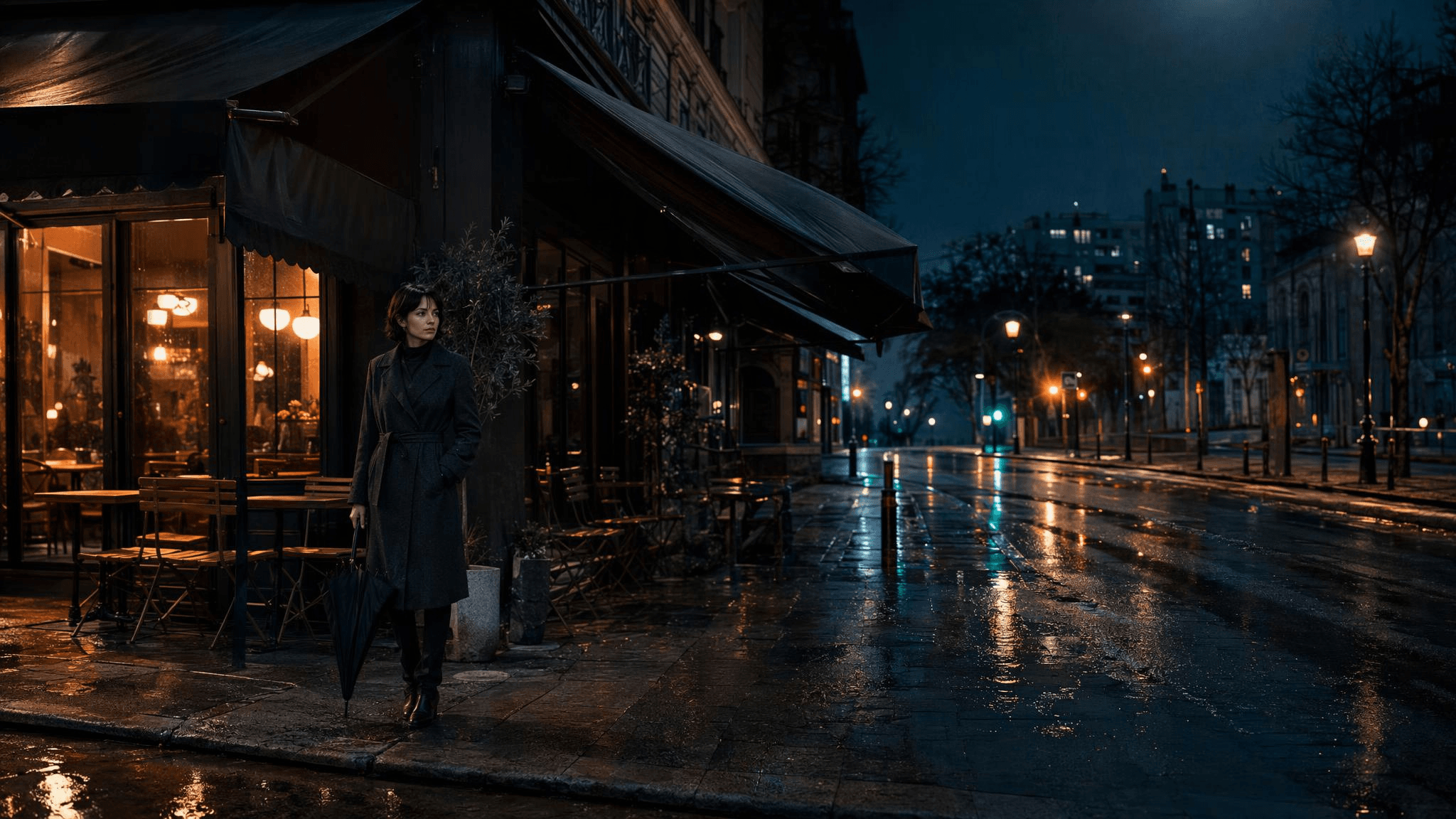 Wide night scene reference showing the cafe awning, subject, closed umbrella, wet pavement and controlled street lights
This independently generated concept still maps the cafe light, umbrella, and wet street in one frame. It is a scene and exposure reference, not a frame from the motion rehearsal below.
A recent Kling text-to-video guide uses the same practical building blocks: subject, movement, scene, camera language, and lighting. For this shot, the light source and its effect on the face matter more than adding lens jargon. (Kling AI, November 24, 2025)
Choose Text-to-Video or Image-to-Video for a Night Portrait
Use text-to-video when you are still exploring the person, location, and mood. It lets you discover a composition without first creating a reference still. Expect to inspect identity and clothing consistency carefully because the prompt alone does not lock a specific face.
Use image-to-video when the opening face, coat, or framing already matters. Choose a clean still with visible eyes, a simple background, and enough separation between the subject and the darkest areas. Upload a portrait only when you have permission to use it.
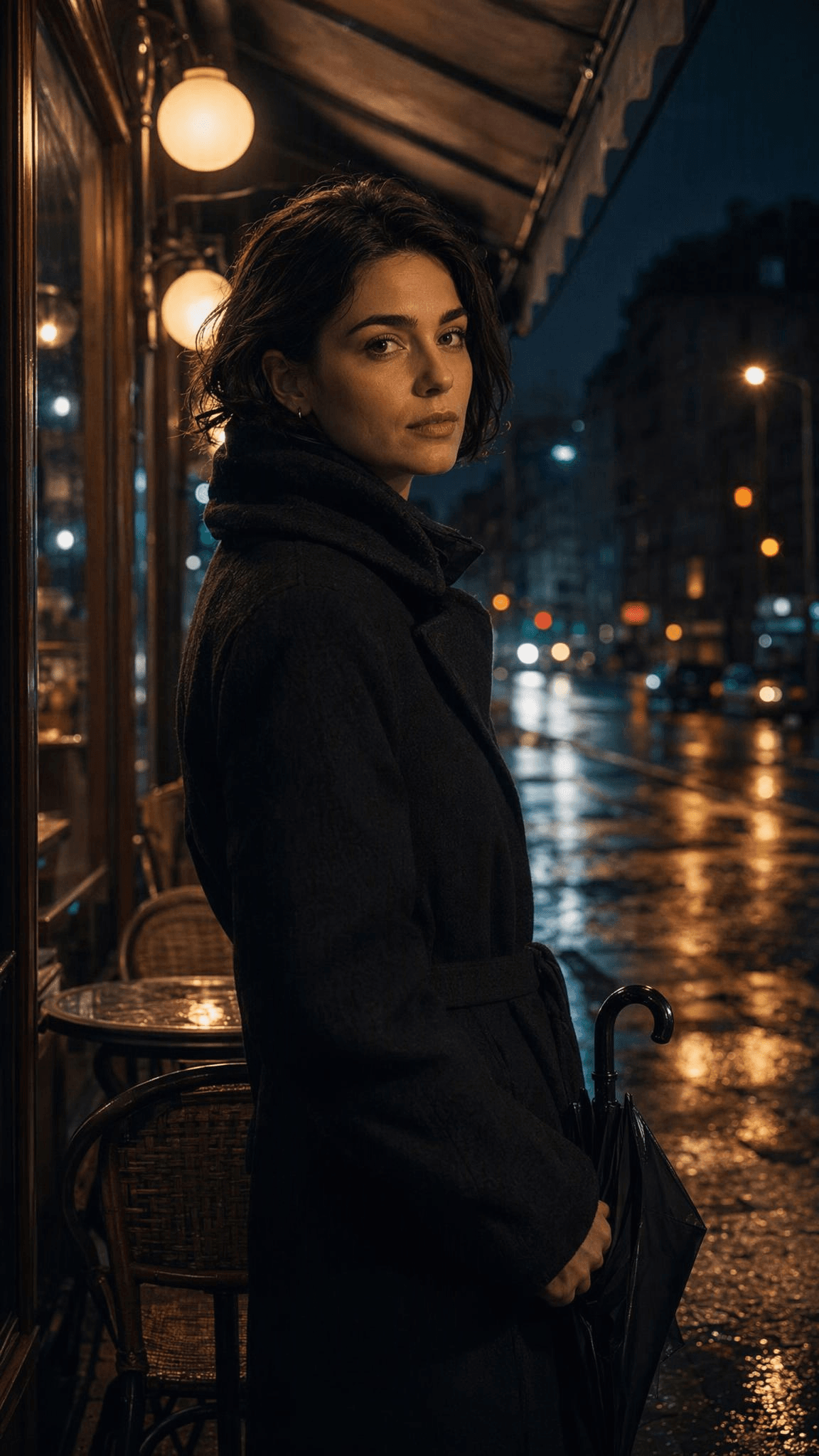
Night portrait reference with a woman in a charcoal coat, readable face, cafe light and closed umbrella
The portrait still makes the starting face light and coat easy to inspect before motion. The text-to-video test later in this guide was generated separately, so its person and wardrobe should be judged on their own frames.
| Your starting point | Better first route | Main trade-off | Check after generation |
|---|---|---|---|
| You have an idea, but no chosen face or framing | Text-to-video | More room to explore, less control over exact appearance | Does the face stay readable and coherent? |
| You have an approved portrait or finished opening frame | Image-to-video | Stronger visual anchor, but motion must suit the still | Does the face and clothing remain stable as the subject moves? |
| You need to test the night lighting before committing to motion | Make or select a still first, then animate it | Adds a preparation step | Does the key light already reveal the eyes and skin? |
Copy This Kling 4 Cinematic Night Portrait Prompt
Paste this as a starting point. The prompt guides a single portrait moment rather than promising exact model behavior:
A 10-second, 9:16 cinematic night portrait of one adult woman in her late 20s, in a dark charcoal coat beneath a city cafe awning after rain, holding a closed black umbrella. Warm cafe light keeps both eyes, cheeks, and natural skin detail readable; cool blue wet street and small amber bokeh remain detailed, with no blown highlights. From 0-3 seconds, show a frontal medium view as she turns toward the street. From 3-6 seconds, truck sideways to her right profile as she opens the umbrella; show real hand and umbrella motion, with no zoom. From 6-8 seconds, use a wider view from behind her shoulder to reveal the wet pavement, cafe window, and distant traffic as she steps forward. From 8-10 seconds, move to a three-quarter front view as she glances back. Keep the same person and coat, natural rain and reflections, controlled exposure, and a restrained teal-and-amber grade. No static push-in, text, logos, or extra people.
Review a Short Motion Rehearsal
You can rehearse the camera and exposure directions before Kling 4 is available through Atlas Cloud. The clip below tests the shot structure only; it does not demonstrate Kling 4 performance or supported controls. Check the live settings and quote for any tool you use before generating.
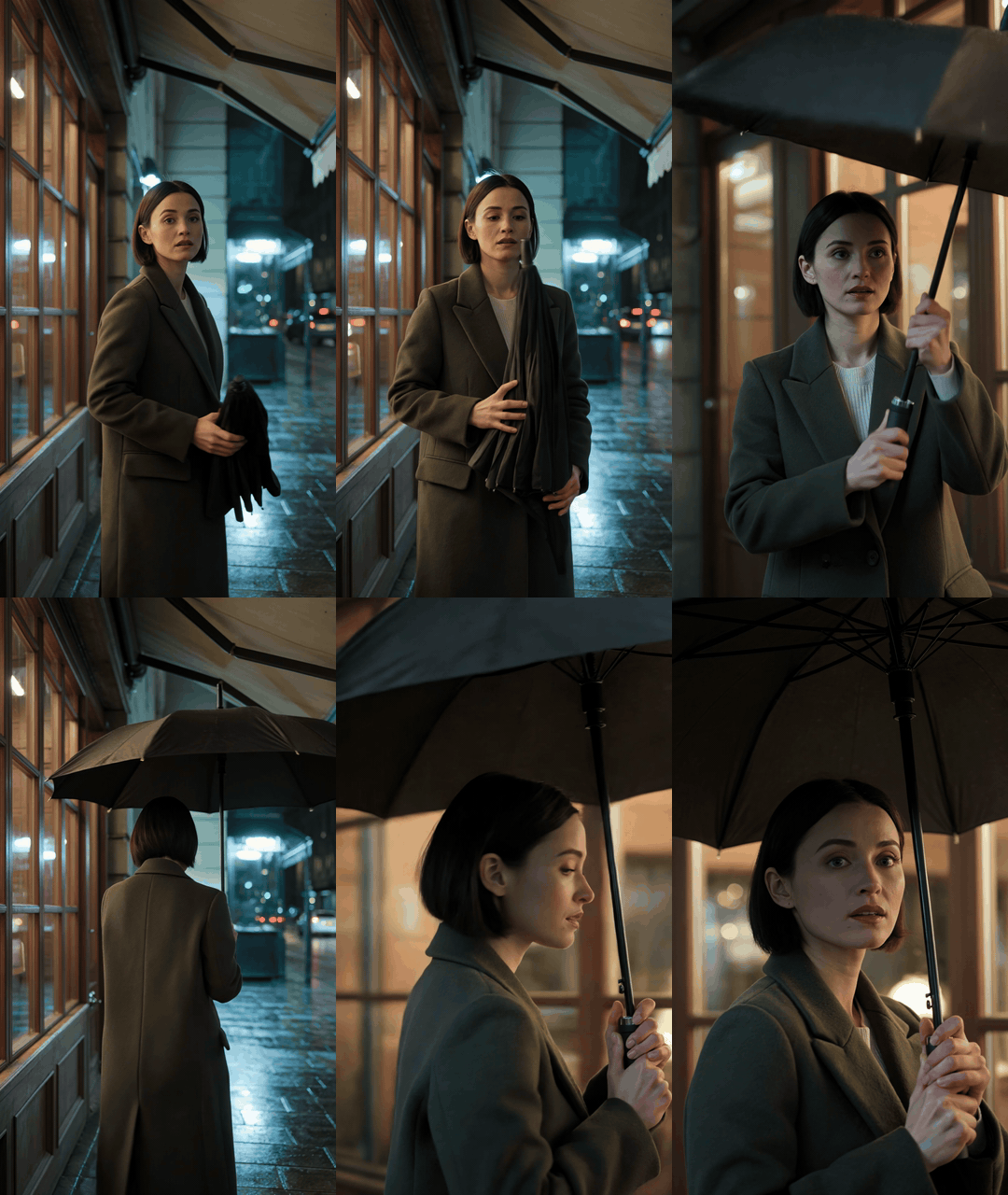
Night portrait motion rehearsal showing a front view, umbrella opening, rear street view, and three-quarter return
Illustrative rehearsal: This 10-second, 9:16 clip changes from a front view to an umbrella action, a wider rear view of the street, and a three-quarter return. The umbrella briefly blocks the face, so the next pass should keep it lower or move the camera around its edge. It is not Kling 4 footage.
For Atlas testing, select a currently runnable route and confirm its controls and quote on the live detail page. A duration, ratio, or resolution written in this prompt does not establish that Kling 4 supports it on Atlas Cloud. The rehearsal above cannot establish Kling 4's output quality, settings, or price.
Refine the Prompt in Three Passes
Change one family of instructions per rerun. That makes it easier to see whether the adjustment helped.
| Symptom | Change this prompt detail | Keep fixed |
|---|---|---|
| Face disappears in shadow | Strengthen the soft cafe practical light and say it illuminates both eyes and cheeks evenly | Background color and camera path |
| Neon or streetlights become white blobs | Reduce the number of bright signs and specify distant, controlled highlights | Face lighting and subject action |
| Person or coat changes mid-shot | Repeat the same hairstyle and coat once, then simplify the action | Lighting and framing |
| Movement feels busy or stiff | Keep the gaze turn and remove either the breeze or the camera arc | Subject identity and light |
Pass 1: Check face exposure, eye detail, and whether the background still reads as night. Do not judge the teal-and-amber grade before the face is visible.
Pass 2: Fix only the lighting problem. If the face is dark, adjust the key light. If signs clip, constrain the background highlights. Avoid changing both at once.
Pass 3: Fix motion or continuity. Keep the distinct front, side, and wider views, but simplify how the camera travels between them, or remove one small action. If a reference still is available, switch to image-to-video rather than adding more identity adjectives.
Check Exposure and Motion Before Export
Review the clip at normal playback size, then pause on the brightest and darkest moments. A portrait can look fine in a thumbnail but lose detail during movement.
- Can you read the expression in the darkest frame?
- Do the eyes retain natural catchlights without looking painted on?
- Do cafe lights, signs, and car lamps keep detail instead of turning into flat white patches?
- Do the same face, hairstyle, and coat persist from start to finish?
- Does the camera move help reveal the expression, or does it distract from it?
- Do shadows show visible banding, flicker, or disappearing facial detail?
A stable result does not require extra camera moves. Keep the useful take, note which prompt change produced it, and use that version as the baseline when Kling 4 becomes available on your chosen platform.
Kling 4 Night Portrait Video FAQs
Is Kling 4 available on Atlas Cloud right now?
Atlas Cloud's Kling V4 page says 'Coming Soon,' and it does not publish a confirmed V4 model ID, settings, or price. Kling's own announcement says the model entered early access on September 30, 2026. These are separate availability states.
What is the best prompt for a cinematic night portrait video?
Start with a clear subject and expression, then name the face's practical key light, the darker background ambience, one small subject action, and one camera movement. The copy-ready prompt above gives you a complete version to adapt.
Should I use text-to-video or image-to-video for a portrait?
Choose text-to-video to discover a scene when you do not have a final face or composition. Choose image-to-video when an approved portrait or opening frame needs to remain recognizable.
How do I keep a person's face consistent in a night video?
Use one clean reference image if the model supports image-to-video, keep the face lit in the opening frame, and limit the subject to a small action. Repeating the hairstyle and clothing once can help, but a prompt cannot guarantee perfect identity consistency.
What resolution, duration, and price does Kling 4 support on Atlas Cloud?
Atlas Cloud has not published confirmed V4 endpoint settings or pricing. Check the Kling V4 status page and its live controls before generating. Do not infer duration, resolution, aspect ratio, or price from the example prompt or rehearsal.
A Kling 4 cinematic night portrait video is easier to evaluate when you separate what the prompt asks for from what a rehearsal actually shows. Keep the face readable, keep the motion purposeful, and verify live settings before treating a test clip as evidence.





