You need a usable shot tonight, not a rumor about a version number. Kling 4 controlled camera movement is a sensible search, but the dependable route today is to direct one short shot in a live model, then judge whether its perspective actually moves through space.
Kling V4 is not a verified, runnable camera-control feature at the time of writing. Current Kling 3.0 workflows can still produce controlled product shots when you lock the frame first, give the camera one job, and test the path before building a sequence. This guide uses one source image and three repeatable camera paths: orbit, lateral track, and crane reveal.
Kling 4 Controlled Camera Movement: The Honest 2026 Answer
Kling V4 should not be the subject of a practical camera-movement tutorial yet. The Kling V4 listing on Atlas Cloud says it is coming soon, and its page does not publish a runnable model ID, parameters, price, or confirmed V4-only controls. Treating an anticipated version as a production tool creates bad briefs and worse expectations.
For a camera test you can run now, use Kling v3.0 Pro Image-to-Video with one composed source frame. Kling's current 3.0 guide documents Image-to-Video, start and end frames, native audio, multi-shot support, and flexible 3-to-15-second output. It also states that turning off Multi-Shot produces a single shot, which is the right starting condition for this exercise (Kling VIDEO 3.0 Model User Guide, February 2026).
Key takeaways
- Lock the composition before asking the camera to move.
- Give one 8-second clip one primary camera intention.
- Write subject action, spatial anchors, camera path, and pacing as separate sentences.
- Run a small test, inspect parallax, then make the delivery version.
The useful question is whether the model can follow one camera instruction without changing the scene's geometry. A working result has visible parallax, a stable horizon, and a subject that stays recognizably anchored. A simple digital enlargement does not pass.
Kling 4 Controlled Camera Movement vs Motion Control
Camera direction, Motion Control, Motion Brush, and start/end frames are related tools with different jobs. They are easy to mix up because each can affect what moves on screen.
| Mechanism | Primary job | Good use | Watch for |
|---|---|---|---|
| Prompted camera direction | Guides the viewer's path through a scene | A single orbit, lateral track, or crane rise | Too many direction words create competing paths |
| Camera Movement control | Applies a selectable view movement and displacement | Fast tests of basic horizontal, vertical, zoom, pan, tilt, or roll moves | It is a camera tool, not a subject-animation tool |
| Motion Control | Transfers a reference performer's action to a character | A person, animal, or avatar with a defined action | It does not by itself lock the entire background or lens path |
| Motion Brush | Assigns movement or stillness to selected image regions | Small local motion, such as a sleeve, leaf, or hand | A motion path on a fixed object may be interpreted as camera movement |
| Start and end frames | Defines opening and closing compositions | A matched transition with consistent perspective | Mismatched lens feel or subject scale can break interpolation |
The official Camera Movement guide describes six basic controls and four combined Master Shots. Those presets are useful vocabulary and a fast way to test a direction. A custom prompt earns its value when it adds physical context: where the camera begins, what it passes, and what should be visible at the end.
Motion Control belongs in a different brief. It primarily uses a reference action to drive a character. Motion Brush belongs in a local-animation brief. If the creative request says "the shoe stays on the ledge while the camera moves left to right," start with Image-to-Video and a precise camera path. Do not add a human-motion reference to solve a camera problem.
The same distinction helps with planning. Text-to-Video asks the model to invent the scene and the move at once. Image-to-Video gives it a fixed product, landmark, and depth layout before the move begins. For planned product motion, that extra anchor is usually the more controllable first test.
Kling 4 Controlled Camera Movement Prompt Formula
Use four labeled prompt blocks. The labels are not magic syntax. They make a creative brief easier to inspect and make it obvious which variable to change after a failed run.
plaintext1Subject and action: 2Scene and spatial anchors: 3Camera path: 4Constraints and pacing:
Subject and action names one subject and one small observable change. "A hand tightens the laces once" is stronger than "dynamic product interaction." It gives you an action to inspect without asking the model to invent a second event.
Scene and spatial anchors identify the objects that establish depth. A ledge, a window frame, a shelf edge, a distant ridge, and a horizon make a lateral or forward move legible. They also give you a test: if foreground and background do not shift differently, the result may be a zoom rather than physical travel.
Camera path needs a start, one route, a direction, a restrained amplitude, and an end framing. "Start front-left, orbit clockwise 25 degrees, move slightly closer, end medium close" is auditable. "Cinematic camera motion" is not.
Constraints and pacing prevent a short clip from becoming an unplanned edit. Ask for one continuous shot, a level horizon, and one smooth acceleration profile. Use negative phrases such as "no cut" and "no sudden acceleration" as a small guardrail. They cannot replace a positive camera description.
Camera prompts for orbit, track, and crane shots
| Move | What a passing result should show | Best spatial condition | Common false positive |
|---|---|---|---|
| Dolly in | Foreground, product, and background change relative position | Clear depth in front of and behind the subject | A digital zoom with no parallax |
| Orbit | The visible side of the subject changes while the subject stays rooted | Breathing room around both edges of the subject | Subject rotation with an otherwise fixed camera |
| Lateral track | Background slides sideways relative to the subject | Strong side anchors, such as a ledge edge or window frame | A pan that keeps every depth plane aligned |
| Crane reveal | The camera height changes and occlusion clears | A foreground object that can hide then reveal the subject | An upward crop or zoom without a changing point of view |
Before the video test, make one spacious source frame with clear spatial layers and a quiet story. This tutorial uses GPT Image 2 Text-to-Image at high quality and 16:9. Generate one image and reuse that exact frame for all three Kling tests, changing only the camera path.
Source frame: a traveler and black cat on a rain-soaked station platform
plaintext1A cinematic 16:9 still in a quiet European railway station at blue hour just after rain. An adult woman traveler in a deep teal wool coat sits on the right half of a long dark-green wooden platform bench. A sleek black cat sits alert beside her on the bench, looking toward the tracks. A closed amber leather suitcase rests on the wet stone floor in the near foreground, clear of both subjects. Behind them, an empty rain-darkened platform leads toward a stationary vintage deep-red passenger train in the middle distance. Repeating iron columns and warm station lamps recede toward a softly lit glass-and-iron roof. Reflections shimmer on the stone, fine rain is visible beyond the platform canopy, and the far end of the station fades into cool blue mist. Keep the full bench, woman, cat, suitcase, train, and strong receding platform lines in frame with generous room on both sides. Natural face and hands, realistic black-cat anatomy and fur, believable damp stone and wool, elegant restrained film lighting, quiet intimate mood, no text, no logo, no watermark, no extra people, no extra animals, no cropped limbs, train remains stationary.
Reject a source image if the cat's face or paws are malformed, the traveler or bench is cropped, the suitcase blocks the subjects, or the platform has no visible depth. Save the chosen image as 04-traveler-black-cat-station-source.jpg; use that exact source image for every shot below.
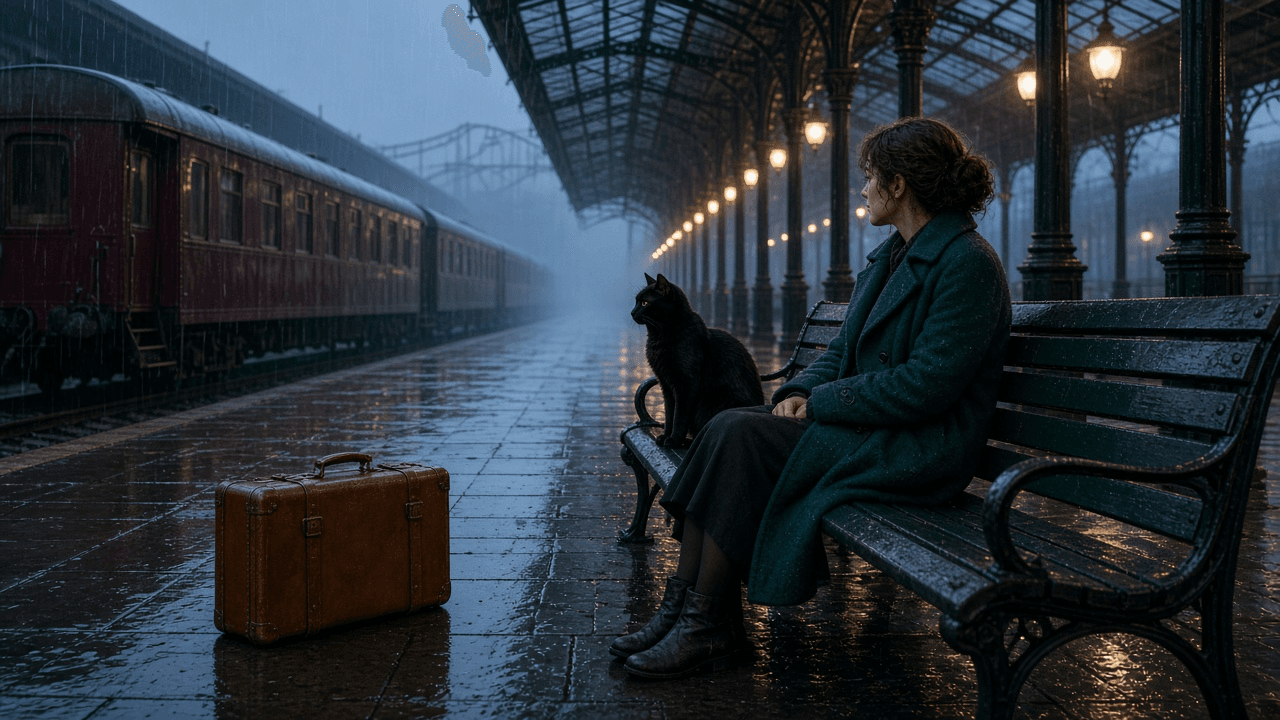 Rainy railway-station source frame with a traveler, black cat, amber suitcase, and stationary red train
Shared Image-to-Video input: the traveler and cat sit at the bench, with the suitcase, iron columns, and stationary train creating clear near, middle, and far planes.
Kling 4 Controlled Camera Movement: 3 Repeatable Narrative Shots
Use the same source frame, 16:9, 1080p, 8 seconds, highest available quality, and audio off for each test. Re-upload the source image for every run and keep multi-shot off. Keep the traveler, cat, train, lighting, and scene fixed while you change only the Camera path block.
For each video, open Kling v3.0 Pro Image-to-Video, upload the source frame, select the highest available quality, set 16:9 and 1080p, set 8 seconds, turn audio off, and keep multi-shot off. Confirm the form's actual settings before you submit. A setting shown in your brief but not committed in the form is not a test result.
A 25-degree orbit around the traveler and cat
Shot goal. Reveal a little more of the bench and the train's side while keeping the traveler and cat together as the center of attention. The station columns and train should shift relative to the subjects to show real parallax.
plaintext1Subject and action: the traveler remains seated on the same green bench. She rests one hand on the closed amber suitcase handle. The black cat sits beside her and turns its head once toward a warm station lamp, then settles. 2 3Scene and spatial anchors: preserve the wet stone floor and suitcase in the near foreground, the bench, traveler, and cat in the middle ground, and the stationary deep-red train, repeating iron columns, and glass roof in the far background. Keep the blue-hour rain and warm station lamps unchanged. 4 5Camera path: start at a front-left medium-wide view of the traveler and cat. Orbit clockwise exactly 25 degrees around the bench at a steady distance and seated eye-level height. End at a stable three-quarter view that reveals slightly more of the train along the platform. The camera physically moves through the foreground, middle ground, and background to show parallax. The train remains stationary. 6 7Constraints and pacing: one continuous shot, level horizon, smooth constant speed, stable face and cat anatomy, no cut, no sudden acceleration, no extra person, no extra animal, no moving train, no text, no logo.
Acceptance test. The columns and train should shift behind the traveler and cat while their visible side changes slightly. If the subjects only grow larger, keep the source and action unchanged and rewrite only the Camera path as a physical orbit.
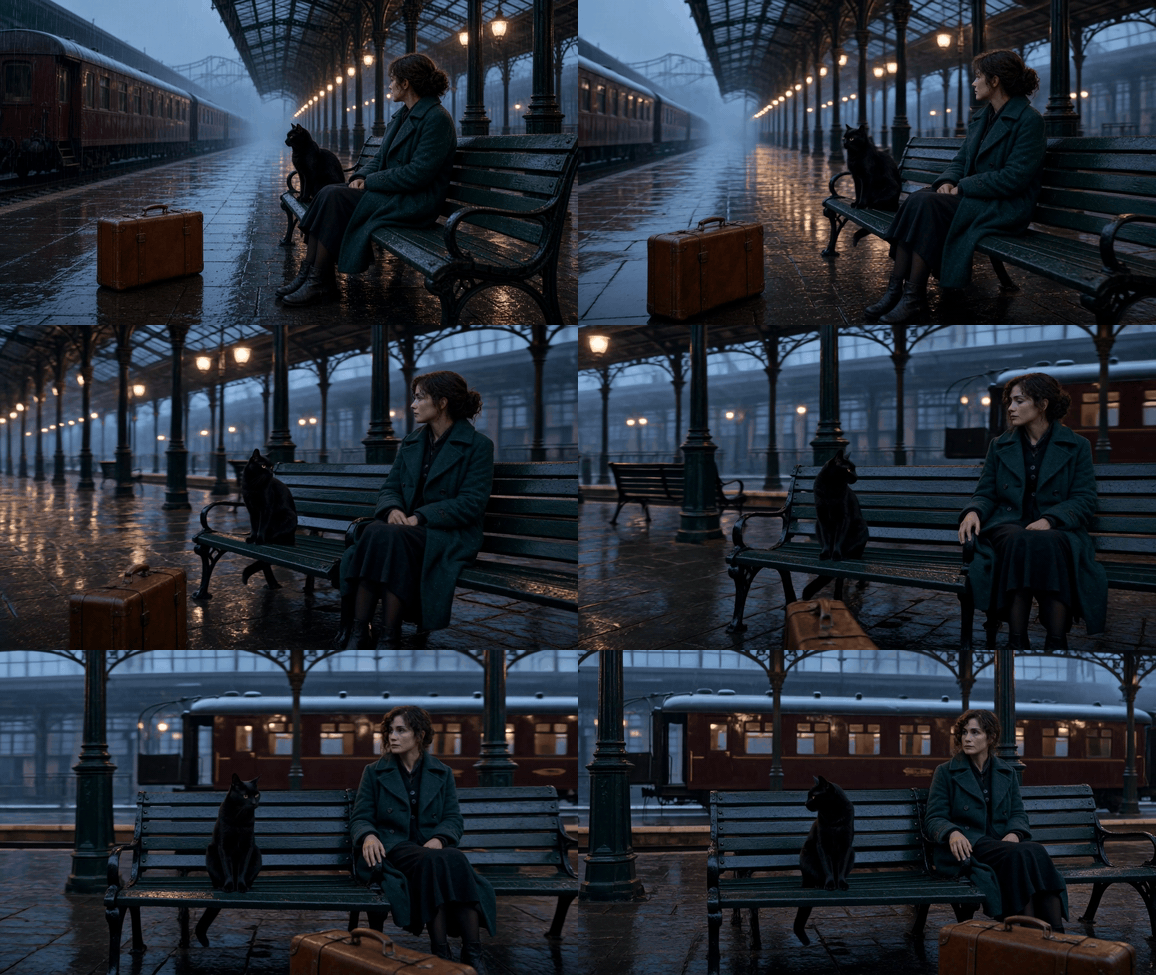
Kling V3.0 Pro orbit around the traveler and black cat on a rainy station platform
Orbit result: the viewpoint moves around the bench while the station columns and train shift behind the seated pair. The GIF preserves the rain-lit station mood and makes the change in perspective visible.
A lateral track along the wet platform
Shot goal. Travel sideways at a constant height, revealing the station's receding columns and train windows while keeping the seated pair anchored on the bench.
plaintext1Subject and action: the traveler stays seated on the green bench. The black cat leans forward once to look toward the tracks, then returns to a calm seated pose. The traveler remains still. 2 3Scene and spatial anchors: preserve the amber suitcase in the near foreground, the bench and subjects in the middle ground, and the stationary deep-red train, repeating iron columns, and glass roof in the far background. Keep the rain reflections and blue-hour light unchanged. 4 5Camera path: begin to the left of the bench at the traveler's seated eye level. Track physically from left to right in one straight horizontal path, passing the foreground suitcase and bench while keeping the traveler and cat near the center of frame. Maintain the same height, lens feel, and distance. End with a different set of train windows and iron columns visible behind them. The train remains stationary. 6 7Constraints and pacing: one continuous shot, level horizon, no orbit, no crane, no zoom, no cut, stable face and cat anatomy, no extra person, no extra animal, no moving train, no text, no logo.
Acceptance test. The suitcase and nearest columns should travel sideways faster than the distant train and roof structure. If all layers move together, the result is a pan rather than a lateral track.
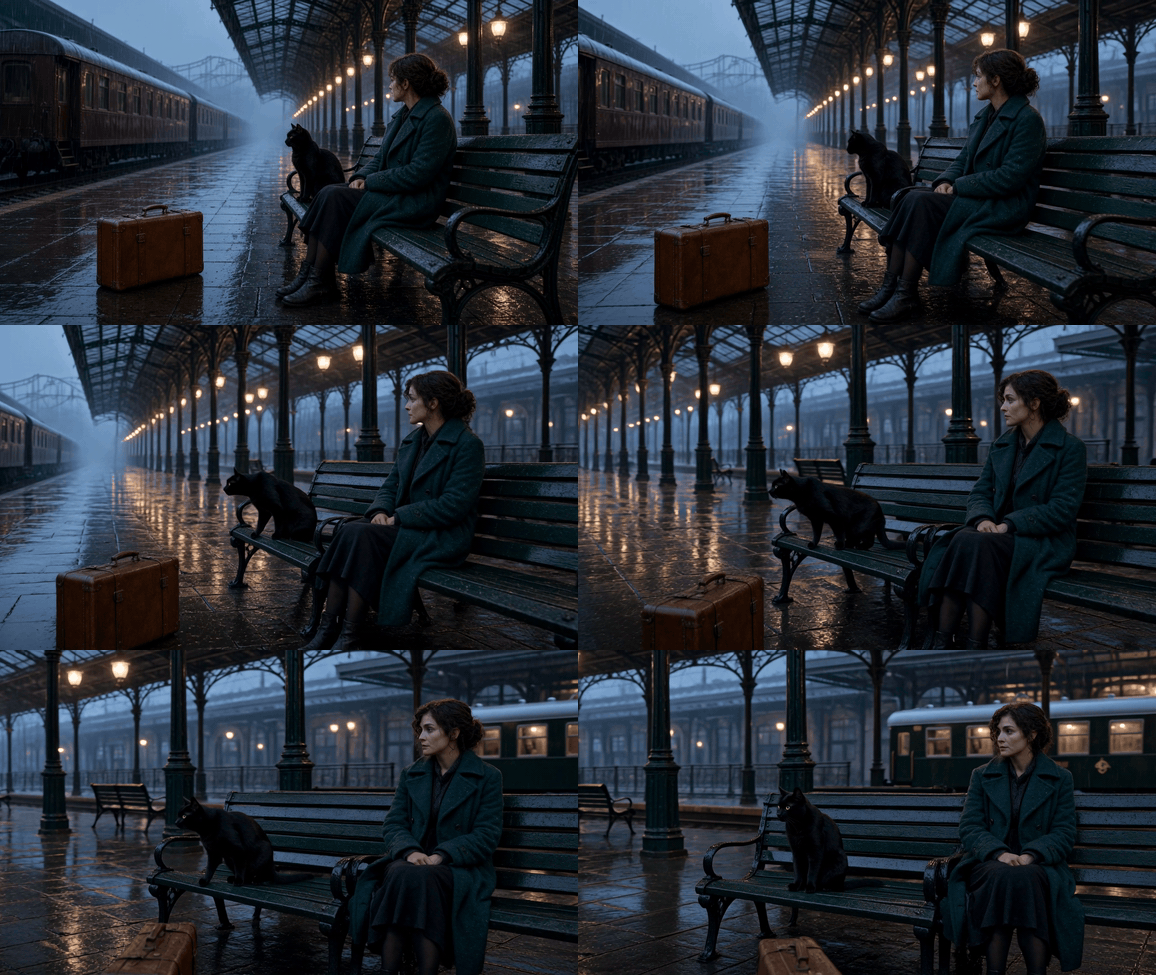
Kling V3.0 Pro lateral track past the traveler and black cat on the wet platform
Lateral-track result: the camera travels along the platform at a steady height as the cat leans toward the tracks. Compare the suitcase and nearby columns with the distant train to judge relative movement across depth.
A crane reveal from the suitcase to the station roof
Shot goal. Begin low behind the suitcase, then rise to reveal the traveler, cat, train, and iron roof. The new view should come from camera height, not a digital enlargement.
plaintext1Subject and action: the traveler stays seated on the same green bench. The black cat looks once toward the traveler, then sits calmly beside her. Keep both subjects in the same positions. 2 3Scene and spatial anchors: preserve the amber suitcase and wet stone floor in the near foreground, the bench and subjects in the middle ground, and the stationary deep-red train, iron columns, and glass roof in the far background. Keep the rain-darkened blue-hour atmosphere and warm lamps unchanged. 4 5Camera path: start low behind the amber suitcase, with the suitcase edge and wet floor filling the lower foreground and partially hiding the traveler and cat. Rise smoothly in one restrained vertical crane movement until the full seated pair, the stationary train, and the glass-and-iron roof are visible. End at a stable wide view from slightly above seated eye level. The camera only rises; it does not pan, orbit, or zoom. The train remains stationary. 6 7Constraints and pacing: one continuous crane reveal, level horizon, stable face and cat anatomy, no cut, no sudden acceleration, no extra person, no extra animal, no moving train, no text, no logo.
Acceptance test. The traveler and cat should be revealed because the viewpoint clears the suitcase. If they only grow larger, simplify the retry to the low start, one vertical rise, and stable wide end frame.
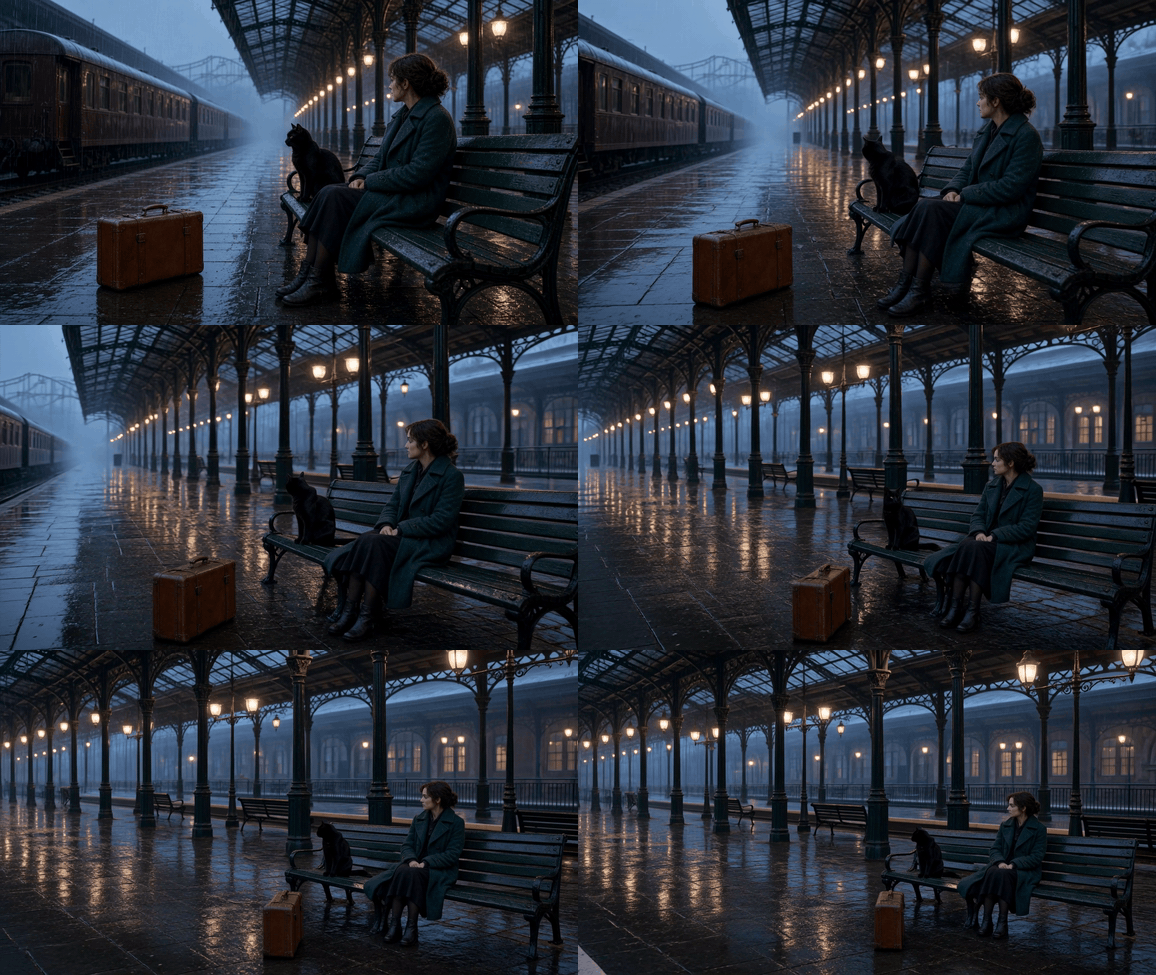
Kling V3.0 Pro crane reveal above the suitcase to show the traveler, cat, and station roof
Crane result: the rising viewpoint reveals more of the station roof and platform. The changing visibility of the floor, bench, and roof gives you anchors to check that the camera gains height instead of only enlarging the scene.
When Kling 4 Controlled Camera Movement Fails
Most bad outcomes are diagnostic. Change one variable on the next run, then compare the new output against the same acceptance test. That discipline produces a useful record of what the model followed instead of a pile of unrelated experiments.
| Symptom | Likely cause | Change only this next time |
|---|---|---|
| Dolly becomes zoom | No depth anchors or an abstract path | Name foreground, middle ground, background, and physical travel through them |
| Camera goes the wrong way | Conflicting direction terms | Keep one direction and write a plain "from X to Y" path |
| Product or face warps | Subject action and camera motion are both too ambitious | Reduce the action to one small gesture and keep Image-to-Video |
| Frame shakes | Orbit, pan, zoom, and crane instructions fight each other | Retain one move and shorten the action chain |
| Locked shot still drifts | The brief describes a composition, not a support | Use "locked-off tripod shot" and limit subject motion to a small area |
| Start/end transition tears | End frame has a different lens feel, height, light, or scale | Rebuild the end frame to match the start before asking for interpolation |
One community report about a forward-motion Kling prompt also warns that long negative lists and inconsistent start/end cues can work against a clean result. Treat it as an individual production observation, not a model benchmark (r/KLING discussion, 2026).
Some failures remain outside a prompt's power. Identity after complex occlusion, a product that exits and re-enters frame, multiple independent actions, and a long continuous narrative can still destabilize. Break that kind of brief into short shots with one visual intention each, then edit them together.
Use a source-versus-output side-by-side after a run to judge changed traveler-and-cat angles and shifting suitcase, columns, train, and roof layers. Keep the motion clip in the article as the primary proof, since a still cannot establish the path on its own.
Kling 4 Controlled Camera Movement on Atlas Cloud Today
Use the live model pages as the operating boundary. Start with GPT Image 2 when you need a stable, spacious source composition. Move to Kling v3.0 Pro Image-to-Video when you need one short, inspected camera path. Keep Kling V4 on a watchlist until its live page publishes a usable model ID and verified controls.
This sequence fits a product team because it produces a source asset, three apples-to-apples camera tests, and a clear retry record. It also keeps a marketing brief honest. You can share the exact source frame and prompt block with an editor instead of claiming that a future version delivered the shot.
Do not calculate a fixed cost per delivered video from a public starting price. Resolution, duration, quality, and live discounts can change. Review the current quote and settings on the relevant Atlas Cloud run page before each production batch, then keep the approved source frame and successful prompt as reusable creative assets.
If you already have a suitable image, begin at the Image-to-Video step. If you do not, create the source frame first. The shortest path to dependable kling 4 controlled camera movement results today is a controlled Kling 3.0 test, not a speculative V4 workflow.
Kling 4 Controlled Camera Movement FAQ
Is Kling 4 available for controlled camera movement yet?
Not as a verified live workflow in this guide. Atlas Cloud lists Kling V4 as coming soon and does not publish confirmed V4 parameters. Use a current Kling 3.0 model for production tests, then check the V4 page again when it becomes live.
What is the difference between Camera Movement and Motion Control?
Camera Movement directs the viewer's path and framing. Motion Control primarily transfers a reference action to a character. Use the former for a planned orbit or track. Use the latter when a performer or avatar needs to follow a reference motion.
How do I stop a dolly shot from turning into a zoom?
Describe actual depth: a near object, the subject, and a distant background. State that the camera physically advances through those layers, then check for parallax. If the result still zooms, change only the camera-path sentence before changing the image.
Should I use Image-to-Video or Text-to-Video for camera control?
Use Image-to-Video when composition, product geometry, and spatial anchors matter. Text-to-Video is useful for exploration, but it asks the model to invent the scene and camera path together.
How do I keep the camera completely still in Kling?
Ask for a "locked-off tripod shot," keep the horizon level, prohibit cuts, and give the subject a small localized action. A still camera can still drift, so judge the run by fixed background anchors rather than the wording alone.
What is the best current Kling model on Atlas Cloud for controlled product shots?
For the single-source, single-move workflow shown here, Kling v3.0 Pro Image-to-Video is the current practical choice. Keep the model, source frame, resolution, duration, and audio setting fixed while comparing paths. That gives your team evidence they can repeat.





