If you are searching for a kling 4 credit burn rate workflow, do not start by hunting for one universal number. A verified public Kling 4 rate card is not available yet. The useful workflow is available now: set a small draft budget, validate the shot logic, then spend on one delivery render with the settings that actually matter.
For live Kling VIDEO 3.0, the official meter is driven by duration, resolution, Native Audio, and Voice Control. A 10-second video may plausibly cost 60, 80, 90, or 120 credits before Voice Control. The difference is the settings, not necessarily a pricing error. Your pre-run quote is the final authority.
Key takeaways
- Use V3.0 figures to plan V3.0 work only. Kling V4 still needs its own live quote.
- Make a short silent draft answer one question: action order, subject stability, or camera direction.
- Repair one named failure per retry so a missed cap twist or extra hand does not trigger a full rerun.
- Write down the exact route, settings, and pre-run quote before a delivery render consumes the remaining budget.
Kling 4 Credit Burn Rate: The Short Answer
Kling V4 is a future-facing search term rather than a live, documented credit product at the time of writing. Treat it as a reminder to confirm the model selector and quote immediately before you run. Do not publish a V4 cost estimate from an unofficial rate table, and do not assume that a V3.0 setting carries over unchanged.
The current, documented baseline is VIDEO 3.0. Its official guide says it supports 720p and 1080p, with Native Audio on or off, plus an optional Voice Control charge. The guide also gives concrete 5-second examples: 30 credits for 720p without Native Audio and 60 credits for 1080p with Native Audio. Those examples are far more useful than a vague claim that Kling is "cheap" or "expensive". (Kling VIDEO 3.0 Model User Guide, February 2026)
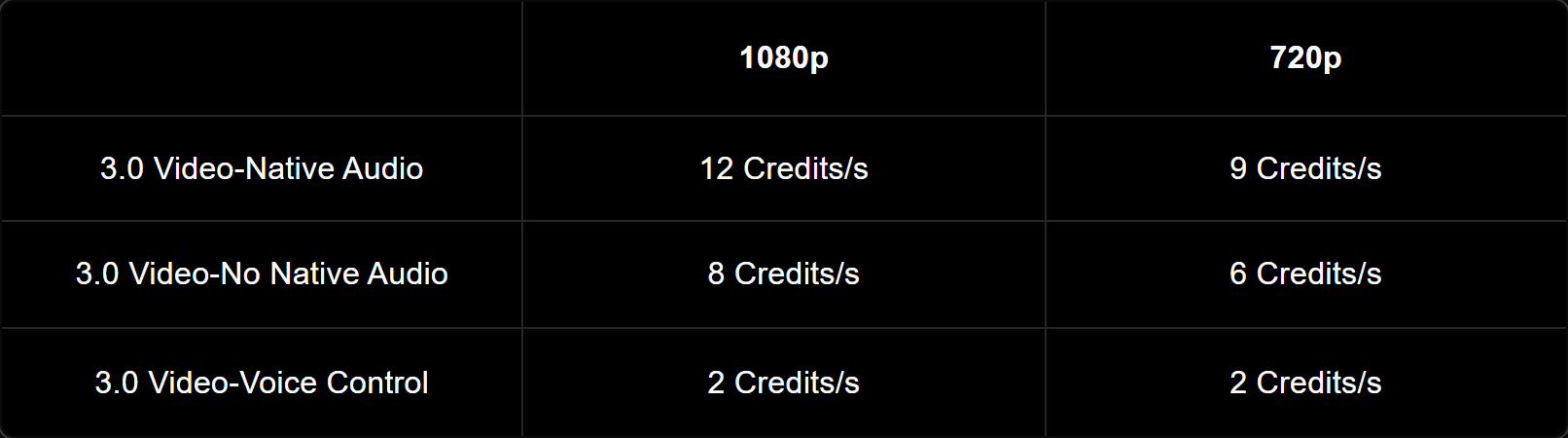
Official Kling VIDEO 3.0 pricing table showing 720p and 1080p credit rates
Official guide evidence: the live V3.0 rate matrix separates resolution, Native Audio, and Voice Control. It is not a Kling 4 promise.
For a current route you can open Atlas Cloud, choose the relevant live Kling playground, and read its submitted quote before committing. That is especially useful for a team that needs to compare a draft route and a final route in the same browser without treating dollars and credits as the same unit.
Why a Kling 4 Credit Burn Rate Is Not One Number
Kling credit burn rate changes with resolution, length, and sound
The V3.0 guide provides a simple rate structure. Multiply the seconds by the selected per-second rate, then add Voice Control only if you switch it on. A 5-second 720p silent motion test is therefore 30 credits. A 10-second 1080p Native Audio delivery is 120 credits. A 15-second clip simply multiplies that rate over more seconds.
This is why a creator can see a 60-credit quote and another creator can see a 120-credit quote for what both describe as "a 10-second Kling video." They may have selected different resolution, audio, or voice settings. A subscription allocation, an app purchase, or a hosted route can add another layer of difference.
Do not convert one platform’s credits into another platform’s dollars
Kling app credits, plan allowances, and a hosted platform’s pay-as-you-go quote are separate ledgers. One credit on one page has no reliable universal dollar exchange rate on another page. Do not build a budget spreadsheet by converting a community screenshot into a platform price.
Use the quote that the exact route shows before submission. Atlas Cloud’s model directory is useful for locating the available routes and their starting per-second context, but the playground quote is still the number to record for the selected market and settings. Save a screenshot or put the quote in the job name. That small habit makes later cost reviews much less speculative.
It also prevents a common failure-review mistake: treating a technical failure, a policy rejection, and an unsatisfying composition as the same reason to regenerate. Before you run again, record the job ID or timestamp, the quoted cost, the selected settings, and one failure label. If the service did not produce a usable output, check the route’s current failure and refund policy rather than assuming a second click is a free correction. If the clip simply missed the brief, the next draft should repair one named condition.
Kling 4 Credit Burn Rate Calculator: Plan the Shot Before You Generate
Use the following calculator for the documented Kling VIDEO 3.0 rates. It answers the 5-, 10-, and 15-second questions without pretending to price Kling V4.
| Setting | Credits/s | 5s | 10s | 15s | Best use |
|---|---|---|---|---|---|
| 720p, no Native Audio | 6 | 30 | 60 | 90 | Camera direction, framing, and action drafts |
| 720p, Native Audio | 9 | 45 | 90 | 135 | Tests where sound changes the decision |
| 1080p, no Native Audio | 8 | 40 | 80 | 120 | Silent delivery or later sound design |
| 1080p, Native Audio | 12 | 60 | 120 | 180 | Delivery where picture and in-shot sound matter |
| Voice Control add-on | +2 | +10 | +20 | +30 | A controlled character voice is required |
The matrix applies the official VIDEO 3.0 guide’s rate examples. It does not establish a Kling 4 burn rate, a subscription entitlement, or a dollar price.
Here is the working budget for a first product-video test:
3 × (5 seconds × 6 credits) + (10 seconds × 8 credits) = 170 credits
That is a hard cap, not a spending target. If draft 1 proves the motion, stop. If draft 2 fixes the only meaningful failure, stop. The cap exists to prevent a fourth or fifth near-identical attempt from quietly consuming the final-render budget.
For a 15-second product story, do not stretch the same budget formula until it becomes accidental. First ask whether the audience needs a 15-second continuous action or whether the edit can use a clean 10-second delivery cut. Longer clips raise both the direct rate and the amount of action that must remain coherent. If the longer duration is necessary, set a separate cap before you touch the duration control. The workflow is a decision framework, not a guarantee that every product brief belongs in the same 170-credit envelope.
Kling 4 Credit Burn Rate Workflow: The 170-Credit Planning Cap
Before opening a generator, write a brief that can pass or fail. Keep it on the same page as the prompt. A vague brief invites vague retries because nobody can tell whether the next clip is actually better.
| Must pass | Out of scope for this test | Stop rule |
|---|---|---|
| Shoe remains centered and recognizable | Brand lettering, 4K, narration | Change one variable per retry; maximum 3 drafts |
| One right hand tightens the laces once | Multi-shot storyline | Move to final after the action passes |
| No extra shoes, hands, or laces appear | Multiple languages or character voice | Log the failure type before a final retry |
The draft’s job is to rule out bad motion, not to create a publishable ad. This distinction protects your credit burn rate. A soundless 720p test can tell you whether a shoe stays stable, whether the hand enters at the right moment, whether the laces tighten once, and whether the camera moves laterally rather than drifting forward. It cannot prove that an expensive audio delivery will be correct, and it does not need to.
Give the brief one decision owner. For a social marketer, that may be the person responsible for the first-frame hook and visible product. For a creative lead, it may be the person who decides whether the physical action reads plausibly. If two people are evaluating different things, split those checks before the first run. A single clip should not be asked to settle composition, brand copy, character performance, multilingual dialogue, and packaging close-ups at once. Each additional decision creates another reason for a costly rerun.
This is also a useful review ritual for small teams. The operator writes the failure in one sentence, such as “a lace passes through the hand” or “the camera becomes a push-in.” The next prompt repairs that condition only. A complete rewrite changes too many variables and prevents anyone from learning what actually improved the result.
Kling 4 Workflow: Run a Cheap Draft, Then One Final
The following is a V3.0 workflow you can reproduce now. It deliberately avoids a V4 tutorial because there is no verified live V4 rate card or completed output to teach from.
Step 1: Run the Kling V3.0 Pro motion draft
Open Kling V3.0 Pro Text-to-Video. Select 9:16, 5 seconds, sound off, and keep multi-shot off. This short validation run checks the visual logic before you commit to a longer delivery version.
Paste this prompt exactly:
plaintext1A 5-second vertical product-motion draft. One unbranded cobalt-blue trail running shoe is centered on a warm light-gray concrete plinth in a clean daylight studio. The camera makes one smooth 20-degree lateral move from left to right. A single right hand enters once from the right, pulls both shoelaces together once to tighten the shoe, then exits. The shoe stays centered; its shape, cobalt-blue fabric, gray laces, and rubber sole remain unchanged. Crisp woven fabric texture, realistic shoelace tension, soft daylight, gentle grounded shadow, one continuous shot, no text, no logo, no extra shoe, no extra hands, no cuts, no dialogue, no music.
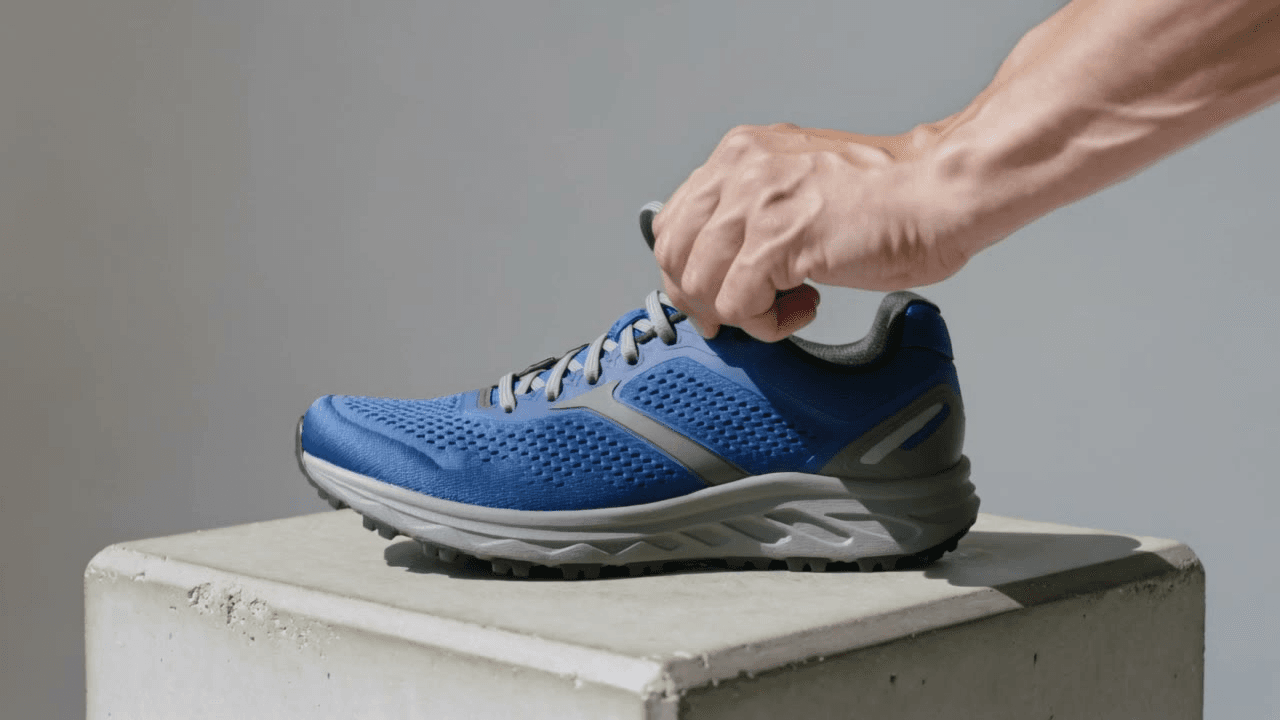 Completed 5-second Kling v3.0 Pro draft showing one right hand tightening a cobalt-blue trail shoe
Completed 5-second Kling v3.0 Pro draft: the frame lets the reviewer check shoe stability, one plausible hand, and a single lace-tightening action before moving to the delivery version.
Check in this order: stable shoe, one right hand, one complete lace pull, then a lateral camera move. A slow push-in can look polished while failing the actual brief. Run again only if a check fails, and limit the total to 3 drafts.
Step 2: Repair one failure without rewriting the shot
Use this only when the lace or hand structure fails. Keep the framing, duration, aspect ratio, and settings unchanged. That restraint makes the next result diagnostic rather than random.
plaintext1Keep one cobalt-blue trail running shoe and one right hand only. The shoe stays centered while the hand enters once from the right, pulls both gray shoelaces together once, then exits. Preserve the light-gray concrete plinth, soft daylight, camera direction, framing, woven fabric, textured rubber sole, and grounded shadow. One continuous 5-second shot, no extra shoes, no extra hands, no text, no logo, no cuts, no dialogue, no music.
Do not simultaneously alter the action, light, camera, duration, and framing. If you do, the revised clip will not tell you which instruction corrected the failure. If the motion passes, move to the final route even if the draft is not an asset you would publish.
This controlled-repair approach is particularly useful for product shots because the object gives the team a stable reference. Keep the plinth, shoe position, and camera direction locked. Then change a single phrase such as “one right hand only” or “pulls both shoelaces together once.” If a repair fails twice, revisit the brief rather than escalating to the delivery render. The team may be asking one continuous shot to carry an action sequence that needs a different product angle or a shorter action.
Step 3: Render one Kling V3.0 Pro delivery version
Once the shot logic passes, open Kling V3.0 Pro Text-to-Video. Select 9:16, 10 seconds, sound off, and keep multi-shot off. Read the live quote before you submit. This delivery version is longer, so it needs a clear reason to carry the extra duration cost.
plaintext1A 10-second vertical product video. One unbranded cobalt-blue trail running shoe is centered on a warm light-gray concrete plinth in a clean daylight studio. From 0 to 3 seconds, the camera makes a smooth, slow 20-degree lateral move from left to right, keeping the shoe centered and fully visible. From 3 to 7 seconds, a single right hand enters once from the right and pulls both gray shoelaces together once to tighten the shoe. From 7 to 10 seconds, the hand exits naturally while the camera settles on the stable side profile of the same shoe. Preserve the cobalt-blue woven fabric, gray laces, textured rubber sole, and soft grounded shadow. Realistic lace tension and hand motion, one continuous scene, no text, no logo, no extra shoe, no extra hands, no cuts, no dialogue, no music.
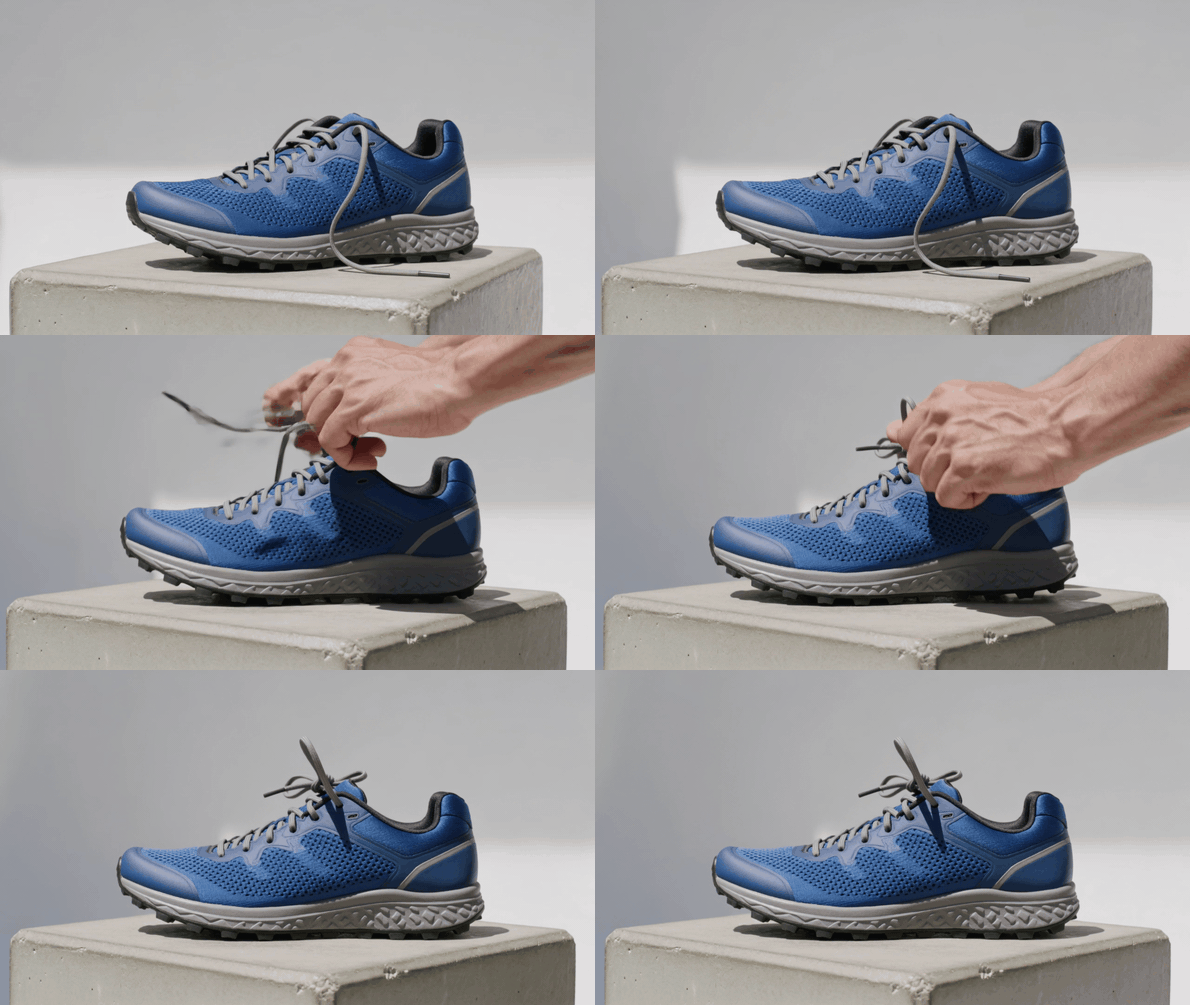
Completed Kling v3.0 Pro 10-second delivery version showing the cobalt-blue shoe and one lace-tightening action
Final visual delivery: the GIF shows the single lateral move, one hand entry, and one completed lace-tightening action. The original downloaded MP4 remains the source file.
Review the delivery render for the same action order that passed in the draft. This case keeps sound off so it can ship as a GIF; only turn on Native Audio when synchronized sound changes the creative decision or final cut.
Before delivery, inspect the clip at the crop that will actually publish. A 9:16 social placement can reveal a centered object that becomes cramped after captions, a UI overlay, or platform-safe margins are added. Check the first second, the hand entry, the lace pull, the final stable shoe profile, and the final frame. If the shot fails a product requirement, log it as a final-render exception. Do not spend the old draft budget again without assigning a new cap and a specific reason for the additional attempt.
Step 4: Give every new product concept its own small draft cap
The approved shoe render does not prove that a different product action will work. Start the next concept with its own short, silent draft instead of carrying over confidence and immediately buying a delivery render. This second case checks a bottle, a hand, a cap, and a pour in one continuous shot; it earns an upgrade only if those four things read clearly at draft cost.
Open Kling V3.0 Pro Text-to-Video. Select 16:9, 8 seconds, sound off, and keep multi-shot off. Record the live quote before you run it.
plaintext1An 8-second horizontal product-motion draft. One unbranded clear glass bottle of sparkling water stands upright on a sunlit pale-stone kitchen counter, with one plain clear tumbler beside it. The camera makes a smooth 20-degree arc from left to right, starting in a close medium shot and ending in a slightly wider view. A single right hand enters once from the right, twists off the silver cap once, places that same cap on the counter, then pours sparkling water into the tumbler. Fine bubbles rise naturally. Keep the same bottle, one hand, one tumbler, and the pale-stone counter throughout. Realistic glass reflections, physically believable liquid motion, warm morning light, one continuous scene, no readable text, no logo, no extra bottles, no extra hands, no cuts, no dialogue, no music.
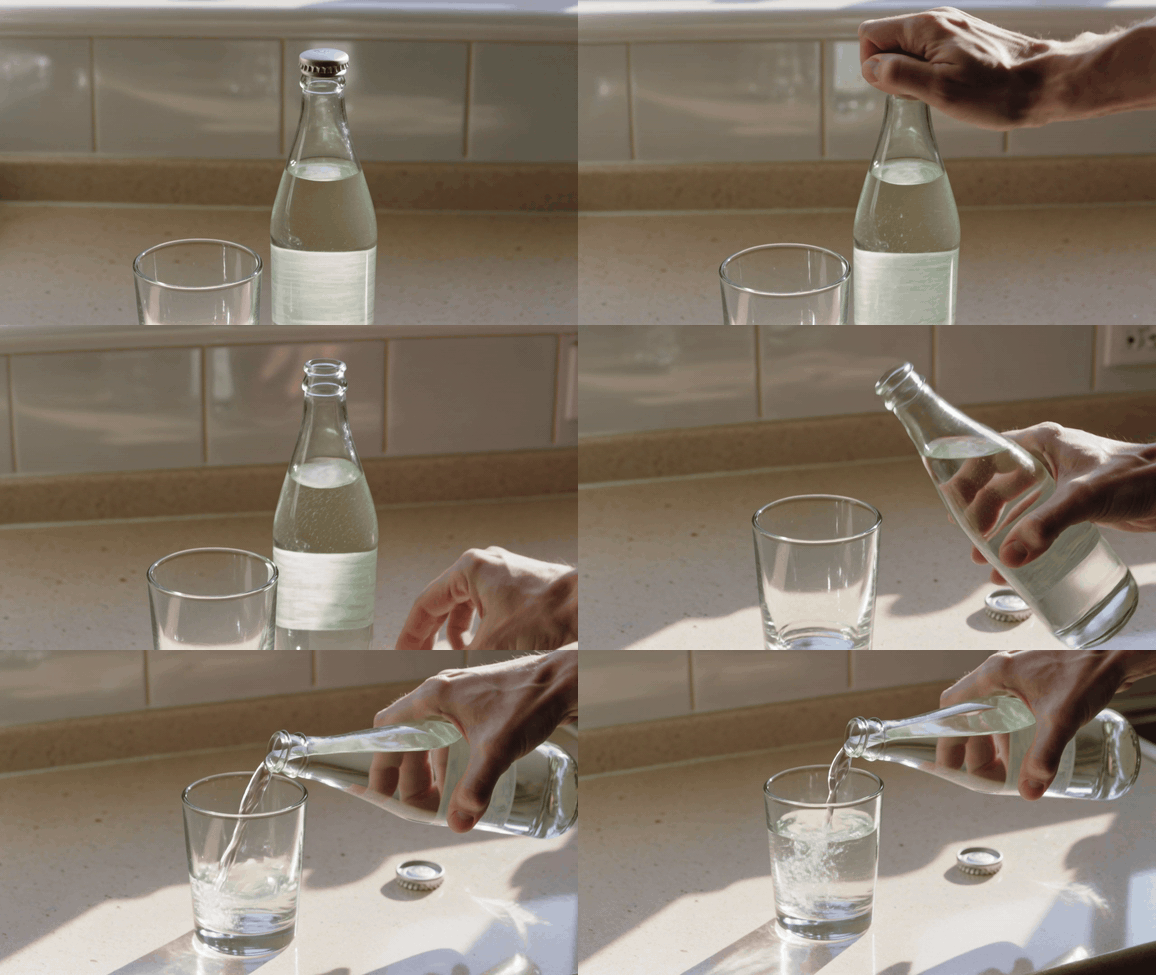
Completed Kling V3.0 Pro bottle test: one hand opens the clear bottle and pours it into a tumbler
Completed Kling V3.0 Pro 8-second horizontal draft: the bottle remains stable while one hand opens it and pours into the tumbler. The case verifies the cap removal, clean pour, and product legibility before a more expensive delivery render.
Review the new case independently: stable bottle, one cap removal, a clean pour, then a camera move that still keeps the product legible. If one item fails, revise that item only and retain the same eight-second cap. The cost discipline is the lesson: a new concept starts with a new diagnostic draft, never an automatic final render.
Kling 4 Credit Burn Rate: When Sound, 1080p, and 4K Earn Their Cost
Use 720p with sound off while validating action, framing, and prompt logic. Reduce resolution before reducing duration if the gesture needs 5 seconds to make sense. A two-second draft often removes the very motion you were trying to evaluate.
Use 1080p without Native Audio when the picture needs to ship but the audio will be replaced in post. Use 1080p with Native Audio when synchronization is the creative evidence, such as a pour, spoken line, or sound-led product moment. Add Voice Control only when the identity or delivery of a character voice is actually part of the brief.
Do not select 4K to repair bad action. Resolution can improve delivery flexibility, but it cannot make an extra hand, missing cap, or wrong camera direction logically correct. The official V3.0 guide documents 720p and 1080p in its rate table, so treat any higher-resolution option as a separate current-route decision and read its quote before you budget it.
Kling 4 vs Kling 3: What You Can Actually Run Today
Kling 3.0 launched on February 5, 2026. Kuaishou describes its Video 3.0 series as supporting video up to 15 seconds, Native Audio, and a broader multimodal workflow. (Kuaishou launch release, February 2026)
V4 should remain a status check, not an invented tutorial. The Kling V4 listing currently signals a coming release. When the route becomes live, replace the V3.0 matrix with the official V4 card, run the same draft/final pattern once, and capture the real quote. Do not copy this article’s V3.0 credits into a V4 purchase request.
That is the forward-compatible part of the workflow. The discipline persists even when the model, rate, or controls change: write the pass/fail brief, make the smallest draft that can answer it, stop after the answer, then pay for the render the delivery actually needs.
Frequently Asked Questions
Is Kling 4 available, and does it have a published credit burn rate?
There is no verified public Kling 4 credit-rate table to use here. Check the live model page and pre-run quote at the moment you need it. Until then, use the documented V3.0 matrix only for V3.0 planning.
How many credits does a 5-second Kling video use at 720p?
For documented VIDEO 3.0 settings, 5 seconds at 720p without Native Audio is 30 credits. With Native Audio it is 45 credits. Voice Control adds 10 credits over five seconds if enabled.
Does Native Audio increase Kling credit burn rate?
Yes. In the official V3.0 matrix, 720p moves from 6 to 9 credits per second and 1080p moves from 8 to 12 credits per second when Native Audio is on. Use it when the synchronized sound changes the creative or delivery value.
Should I draft in 720p before rendering a Kling video in 1080p?
Usually, yes. A short silent 720p draft is a practical way to validate the motion and composition without paying for full delivery settings. Move to 1080p when the draft has cleared the pass/fail checks.
How many credits should I budget for my first Kling product-video test?
Start with a ceiling, not an estimate. In the documented planning matrix, the workflow caps three 5-second 720p silent drafts plus one 10-second 1080p silent final at 170 credits. Stop earlier whenever the draft has answered the motion question.
What should I check before regenerating a Kling video that failed or looks wrong?
Name one failure: subject stability, action order, extra objects, or camera direction. Change only the prompt constraint that addresses that failure. A single controlled repair preserves learning and protects the kling 4 credit burn rate workflow from turning into an open-ended retry loop.





