A product film can look polished for 2 seconds and still fail the moment the bottle turns. One changed letter in a wordmark, a label that slides across the bottle, or a made-up line of packaging copy makes the clip unsafe for a product page or paid ad.
The short answer is that kling 4 product logo stability is not yet a publicly verified production capability. As of September 28, 2026, Kling V4 is listed as coming soon. That means teams should not treat third-party specifications, price claims, or logo examples as proof. They can, however, prepare a controlled benchmark now and run the same test when the released model has a real model ID and billing page.
Key takeaways
- Verify the version before evaluating its output. A preview page is not a production release.
- Start with an approved product packshot in Image-to-Video, not a text-only recreation of packaging.
- Review the whole clip at 0%, 25%, 50%, 75%, and 100%.
- One wrong primary-logo character fails a branded-delivery gate, even if the opening frame is sharp.
Kling 4 Product Logo Stability: What Is Actually Available in 2026?
Start with model identity. The live Kling V4 status page describes the model as coming soon and says final controls, output specifications, and rates will be published after Kuaishou confirms them. It does not establish a V4 endpoint, input schema, price, duration limit, or packaging-text result.
That distinction matters because search pages often mix an anticipated version with the capabilities of current models. A claim about 4K, keyframes, discount pricing, or logo fidelity becomes useful only after you can connect it to an official V4 model ID and reproduce it with your own asset. A sharp-looking social clip is not an acceptance test.
| Claim | What is verified on September 28, 2026 | What a buyer should do now |
|---|---|---|
| Kling V4 availability | The public Atlas Cloud page says coming soon. | Do not route production work or approval claims to V4 yet. |
| Kling V4 logo stability | No public V4 packaging benchmark is available here. | Define a frame-based gate before launch. |
| Current Kling reference workflow | Kling 3.0 has official reference and consistency features. | Run it as a baseline, without treating it as a V4 proxy. |
| Kling V4 price | No confirmed V4 rate is published. | Check the live model page and the run quote on launch day. |
Kling 3.0 is useful as a current baseline because Kuaishou has publicly described reference-based video workflows and improved handling of branded text. Its release material is a vendor claim, not evidence that your bottle, label, camera move, or market will pass. The Kuaishou Kling 3.0 release says Video 3.0 supports reference images and describes branded text as a commercial use case. Treat that as a reason to test, not a substitute for testing.
Kling 4 Product Logo Stability Is Not the Same as a Sharp Opening Frame
For branded product video, stability has several parts:
- The primary logo has the exact characters, contours, spacing, color, and orientation from the approved source.
- The mark remains attached to the same physical label area as the camera moves.
- Label boundaries, cap shape, bottle proportions, and visible product color remain coherent.
- Highlights, depth of field, reflections, and occlusion do not erase or reshape the mark at the point of highest motion.
These are separate checks. A logo may remain readable while its label drifts. A bottle may retain its outline while the wordmark becomes pseudo-text. A frame can be visually attractive and still fail a trademark or brand-review requirement.
Use three inspection moments at minimum: the opening frame, the point of maximum camera or product movement, and the final frame. The five-frame grid later in this article makes that review repeatable. It also prevents a common reporting error: selecting the prettiest screenshot and calling the full video stable.
Kling 4 Product Logo Stability: The 5 Failure Modes That Matter
Packaging puts small, high-stakes geometry into a moving scene. A team needs names for the failures, because each one suggests a different remedy.
| Failure mode | What it looks like | Why it matters | First response |
|---|---|---|---|
| Character substitution | A correct wordmark turns into a near-match or pseudo-text. | A changed letter can invalidate branded delivery. | Fail the run and reduce movement or use compositing. |
| Wordmark warp | The logo stretches, bends, breaks, or gains uneven spacing. | It changes the approved mark even when letters look familiar. | Compare against the source at 100% view. |
| Label drift | The mark slides relative to the bottle or crosses a seam. | The model loses physical attachment. | Keep the product more front-facing. |
| Optical loss | Highlight, shadow, blur, or reflection swallows the mark. | A real label can become unusable without changing letters. | Simplify lighting and increase front-label visibility. |
| Invented back label | A turn reveals non-existent copy or a changed SKU panel. | It creates factual and compliance risk. | Limit rotation or replace that area in post. |
Product geometry deserves its own column in the review. A bottle cap that changes height, a pump that becomes a dropper, or a label that gains a different aspect ratio can make the logo comparison meaningless. Inspect the object first, then inspect the brand mark on that object.
Why Small Packaging Copy Fails First
The main logo, a large product name, an ingredient list, and a barcode are not equivalent tasks. Small print has fewer pixels, more dense character relationships, and often sits on curved or reflective material. It also tends to face away from the camera first.
Set 2 acceptance levels before anyone generates:
- Primary brand level: primary logo and the largest product-name text must be correct in every sampled frame.
- Regulated-copy level: ingredients, legal copy, dosage, barcode, and SKU text must be treated as exact artwork. If those details must be readable, use approved compositing, product photography, or 3D rather than asking a generative clip to recreate them.
No prompt provides a guarantee for small packaging text. The best prompt gives the test a fair, controlled condition. The sign-off rule decides whether the result can move forward.
Build a Controlled Benchmark Before You Generate
Build the fixture before the launch rush. Use only a packshot that your team owns or is licensed to use, plus the approved logo artwork used for review. Do not use a competitor product, an unlicensed retail image, or a fictional customer story as a public proof point.
For transparency, the image below is an internally authored, non-production test fixture used to demonstrate the acceptance zones in this article. It is not presented as a customer product or evidence of a model pass. In production, replace it with your approved packshot and retain the untouched original alongside every output.
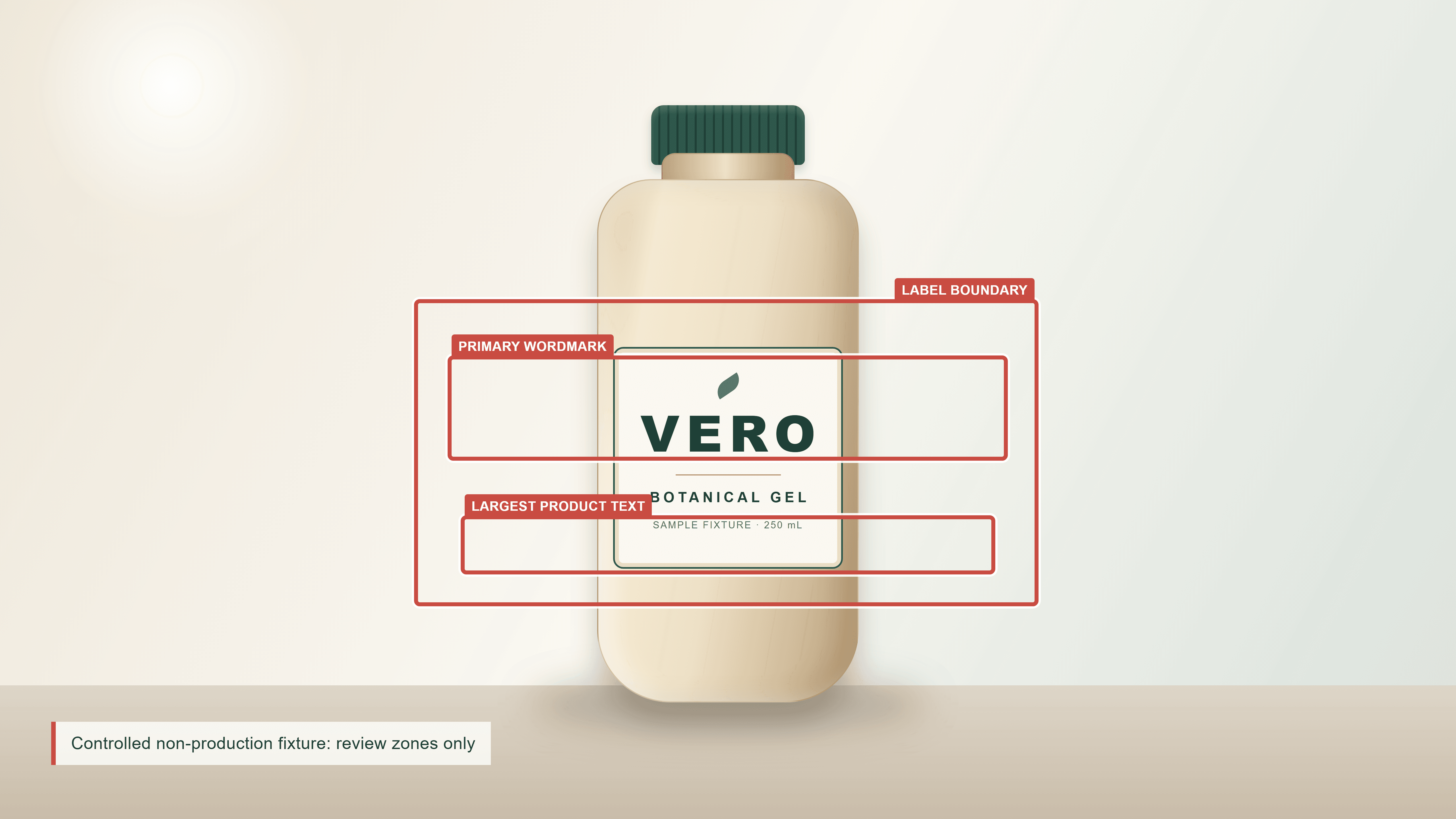 Annotated non-production product packshot for a Kling 4 product logo stability benchmark, showing logo, largest copy, and label-edge review zones
Controlled fixture: the red outlines identify the primary wordmark, largest visible product text, and label boundary that reviewers compare through the full clip.
Choose a source image with these conditions:
- PNG or JPG, at least 2,048 px wide before upload.
- A single upright product, with the front label fully visible.
- The primary mark large enough to read at normal inspection size.
- No glare, hand, prop, or foliage crossing the label.
- A 16:9 composition where the product occupies roughly 55% to 70% of frame height.
Save the production file as approved-product-packshot.png. Do not retouch the reference between the low-motion and stress tests. The entire value of the benchmark comes from holding the input constant.
Kling 4 Product Logo Stability: The Test Fixture and Acceptance Grid
Run 2 rounds. Round A is a low-motion display shot. Round B adds one controlled camera arc and a small product turn. Neither round should introduce a second scene, a person, a hand, a cut, or a fast rotation. Those variables make attribution harder.
| Check | Baseline requirement | Pass condition | Failure example | Next action |
|---|---|---|---|---|
| Primary logo | Source is crisp and fully visible. | Every character and mark contour matches the source in all 5 samples. | One letter changes or joins a neighboring letter. | Fail for branded delivery. |
| Wordmark geometry | Source spacing is measurable. | Shape and tracking do not stretch or curve. | Center of the wordmark bends around the bottle. | Reduce motion or composite. |
| Label attachment | Label edges are visible. | Logo stays on the same package region. | Mark slides above or below the label. | Fail and simplify the shot. |
| Product geometry | Cap, bottle, and label are defined in source. | No unexplained cap, shape, or proportion change. | Cap changes type or bottle widens mid-clip. | Fail and rerun a simpler move. |
| Sampling | Full source clip retained. | 0%, 25%, 50%, 75%, and 100% are reviewed. | One attractive still is used as proof. | Incomplete review, not a pass. |
Record the number of runs, failures, and failure type only after a real run. This article does not publish a made-up pass rate. A useful future comparison puts the actual V3 and V4 outputs beside the same grid, rather than assigning a winner from a promotional clip.
Kling 4 Product Logo Stability Workflow: A Current Kling V3.0 Baseline
This is a baseline workflow, not a claim that Kling 3.0 predicts Kling V4. The value is procedural: the same approved source, prompt pair, duration, and inspection points can be rerun when a V4 playground is genuinely available.
Image-to-Video is the stronger starting condition for a branded packshot because the approved image anchors visible geometry. Text-to-Video asks the model to redraw a package from language alone, which adds another source of variation before motion begins. Kling's current Element Library also documents reference elements as a consistency aid for products and scenes, although that does not eliminate a frame-level review requirement (Kling Element Library User Guide, February 2026).
The animated case below uses Kling V3.0 Pro Text-to-Video. It uses a simple geometric mark instead of small packaging text, so viewers can see whether the visible logo stays attached and keeps its shape through camera motion. Run it at 16:9, 8 seconds, sound off, with multi-shot off.
Case: Hold a Geometric Logo Stable Through a Bottle Turn
plaintext1An 8-second horizontal premium studio product video. One matte deep-forest-green reusable aluminum water bottle stands upright and centered on a warm off-white stone plinth. Its front panel carries one large ivory logo only: three evenly spaced, solid curved wave arcs arranged horizontally. The mark contains no letters, numbers, words, or tiny detail. From 0 to 2 seconds, hold a clean front product view. From 2 to 6 seconds, the camera makes one smooth, shallow 12-degree arc from left to right while the bottle remains upright and turns no more than 8 degrees. From 6 to 8 seconds, the camera settles on the same front panel, with the full three-arc logo still visible. Soft daylight, subtle grounded shadow, realistic powder-coated metal, one continuous scene, no hands, no props, no cuts, no readable text, no extra bottles.
plaintext1Negative prompt: letters, words, numbers, fake typography, extra logos, duplicated logo, missing wave arc, changed arc shape, drifting logo, rotating-away front panel, warped bottle, label swap, hands, props, subtitles, captions, watermark, scene cut, fast camera movement
This is a visibility test for a simple graphic mark. A pass shows that one logo remains complete, proportionate, and attached to the same front panel through the movement. It does not prove that small packaging copy would be equally stable; test exact wordmarks and regulated text later with Image-to-Video and the approved source image.
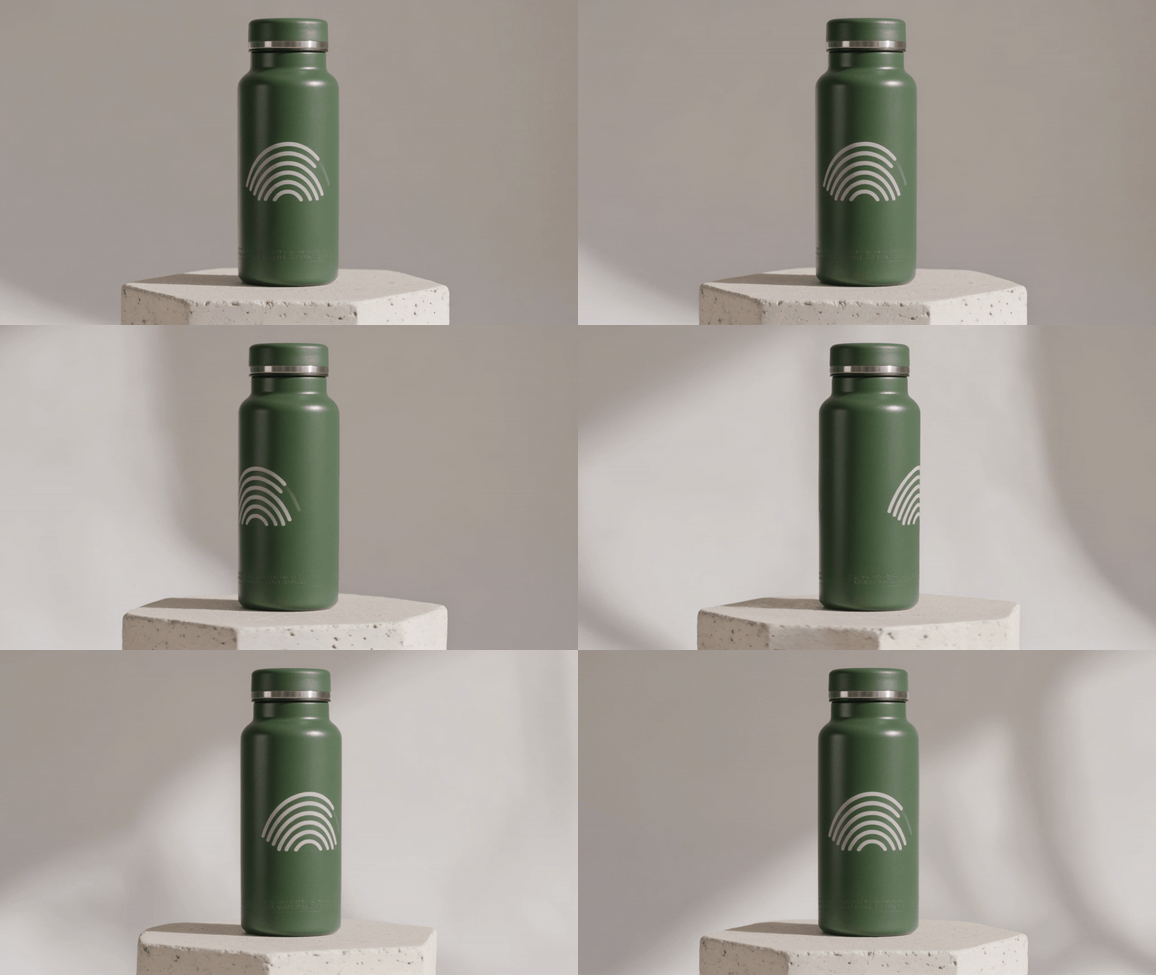
Completed Kling V3.0 Pro geometric-logo bottle-turn test
Observed 8-second Kling V3.0 Pro output: the wave emblem is visible at the opening and final product views, but it separates around the bottle during the middle turn and does not retain the requested three-arc construction. Mark this run as a logo-stability fail. The full GIF makes the failure visible; one favorable still would hide it.
Second GIF Case: Test a Flexible-Pouch Logo During a Handled Lift
Use Kling V3.0 Pro Text-to-Video. Select 16:9, 8 seconds, sound off, and keep multi-shot off. This case tests flexible packaging under a controlled hand movement, rather than a hard bottle under a camera turn.
plaintext1An 8-second horizontal premium studio product video. One soft warm-ivory refillable skincare pouch stands upright and centered on a pale peach surface. Its flat front panel has one large cobalt-blue geometric logo only: a solid diamond centered inside a thin cobalt-blue circle. The mark contains no letters, numbers, words, or fine print. From 0 to 2 seconds, hold a clean straight-on view of the pouch and the complete logo. From 2 to 5 seconds, one left hand enters once from the left, grips only the upper unprinted corners, lifts the pouch about 5 centimeters, and holds it still without touching or covering the front logo. From 5 to 8 seconds, the hand sets the same pouch back in its original position and exits. Keep the camera locked in one front-facing view. Soft diffused daylight, realistic flexible pouch material, one continuous scene, no extra hands, no props, no cuts, no readable text, no extra packages.
plaintext1Negative prompt: letters, words, numbers, fake typography, extra logos, duplicated diamond, missing circle, changed diamond shape, drifting logo, stretched logo, warped pouch, hand covering logo, extra hands, props, subtitles, captions, watermark, scene cut, camera pan, camera zoom
This case introduces a flexible material and one controlled hand interaction. Review the logo when the pouch is lifted, not only before and after it moves: a mark that stretches, shifts, duplicates, or disappears while the pouch is handled fails the same branded-delivery gate.
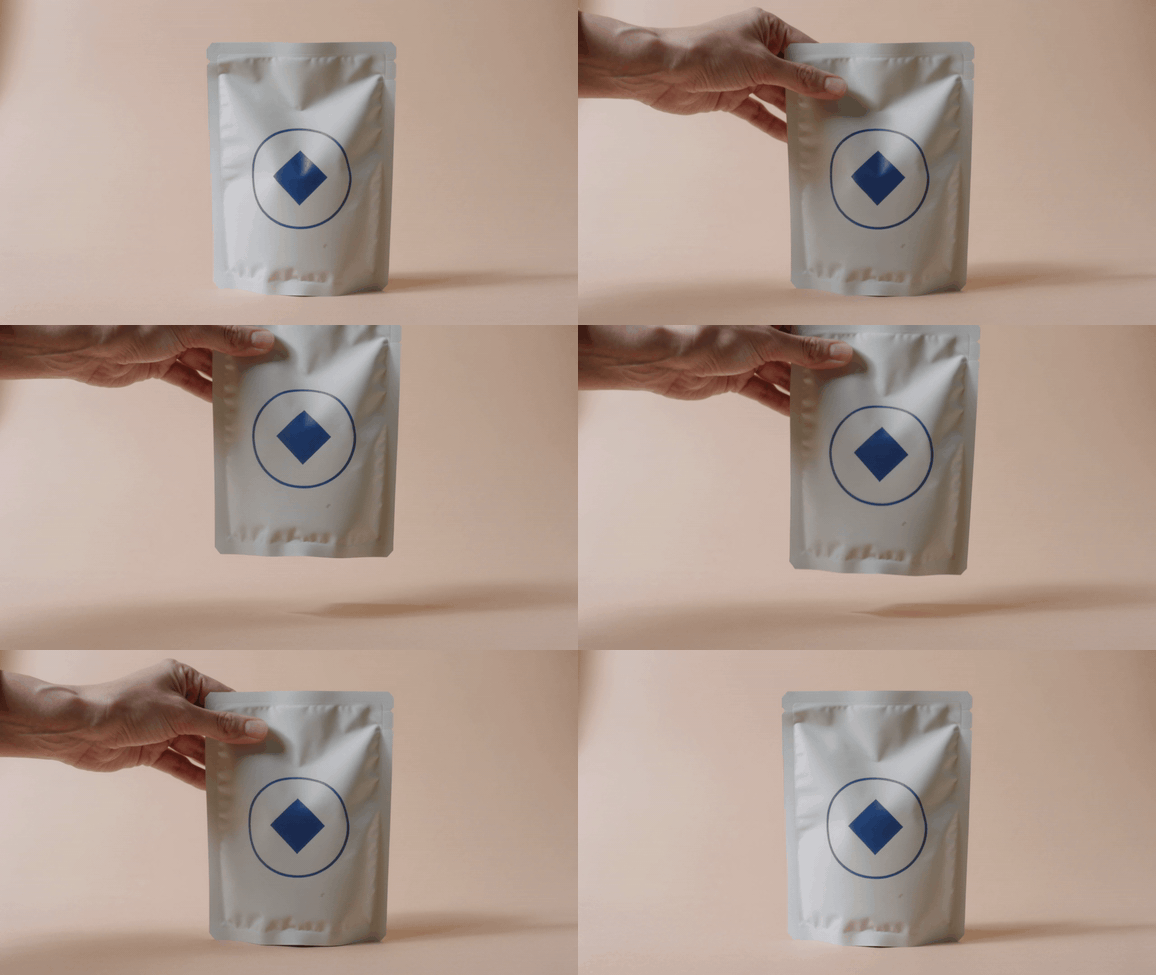
Completed Kling V3.0 Pro flexible-pouch logo-lift test
Observed 8-second Kling V3.0 Pro output: the circle-and-diamond mark stays complete and centered while one hand lifts and returns the flexible pouch. In the sampled opening, lift, and return moments, the hand stays clear of the logo and the mark does not stretch, duplicate, or drift. Mark this constrained geometric-logo test as a pass; retain the source MP4 for full frame review.
Kling 4 Product Logo Stability Results: How to Judge a Pass or a Fail
Do not call a run successful until the full silent output is available for review. A completed source video is required before the review system can make a logo-stability statement; a clean-looking setup screen or a single still cannot substitute for it.
Keep the complete source video and sample five full-resolution frames at 0%, 25%, 50%, 75%, and 100%. Do not crop a favorable moment into a success proof. The observed geometric-logo run above is a recorded fail; rerun the same brief only when you want to test whether a single constrained change fixes the mark.
Export each original video intact. Sample five full-resolution frames at 0%, 25%, 50%, 75%, and 100%, and place the approved packshot beside them. Review the following in each sample:
- Primary logo character correctness and mark shape.
- Largest visible product text.
- Label boundary and relative logo location.
- Cap, bottle silhouette, and label proportions.
- Highlight, shadow, reflection, and motion blur over the logo.
- The highest-motion point, not only the first and last frame.
Use 3 decision labels:
| Decision | Use case | Gate |
|---|---|---|
| Pass for concept use | Internal boards or low-risk ideation. | Product remains recognizably coherent, but the asset is not approved as final branded artwork. |
| Pass with review | A non-critical social asset after human review. | Primary mark is correct in sampled frames and the brand owner accepts the context. |
| Fail for branded delivery | Ads, product pages, retail, regulated material, or any exact-mark requirement. | Any primary-logo error, label drift, invented copy, or product-geometry change. |
Kling 4 Product Logo Stability: A Frame-by-Frame Sign-Off Rule
Do not repair the evidence with a final screenshot. If frame 47 changes a primary-logo letter, retain the source run and mark the branded-delivery test as failed. A production team can still use the motion as an internal mood reference, but it should not enter an approved asset library under the original SKU.
Keep a small audit record with the approved input image, logo artwork, model name and version, run date, prompt, negative prompt, committed settings, original output, five sampled frames, and reviewer decision. This record supports creative handoff and brand review. It is not legal advice.
When Prompting Is Not Enough
Prompts can reduce risk. They cannot turn a generative output into a dependable replacement for an exact-brand production pipeline. Move to approved compositing, photography, or 3D when any of these conditions apply:
- The mark must be pixel-accurate or a trademark owner requires exact artwork.
- Legal, ingredient, dosage, barcode, or SKU copy must remain readable.
- The product rotates far enough to show a second label panel.
- Hands, water, props, or reflections cross the label.
- The same precise package must appear across multiple shots or markets.
Use this practical decision path. For a concept film, run the Image-to-Video test and keep the branded-delivery result separate from the visual idea. For a simple non-critical asset where the primary mark is correct, let a brand owner review the entire output. For retail detail pages, regulated copy, or precision SKU work, begin with an approved post-production or product-imaging route.
This protects the creative team from spending 20 retries on a requirement that belongs in compositing. It also gives the reviewer a clear reason for the production choice: exact brand marks are source artwork, not a generative suggestion.
Pricing, Availability, and Launch-Day Retest
Keep V4 and V3 separate in planning documents. V4 is a coming-soon target with no confirmed production price in the source checked for this article. Current V3.0 Pro Image-to-Video can supply a baseline, but its quote, discount badge, and billing unit can change. Before approving a run, inspect the current per-run cost in the playground and confirm the live Atlas Cloud model directory. Do not copy an old quote into a campaign budget.
On launch day, do five things in order:
- Confirm the official V4 model ID, detail page, input schema, output controls, and billing unit.
- Upload the exact same approved packshot used for the V3 baseline.
- Run the same bottle-turn and flexible-pouch cases without adding new variables.
- Extract the same five frame positions and score against the same acceptance grid.
- Publish only the observed run count, pass count, failure types, and conditions. Do not write a V3-to-V4 conclusion until both test sets exist.
For teams that want one place to rerun current and future family routes, Atlas Cloud keeps the practical task focused: use the available baseline now, then repeat the same controlled brief when the next route is actually live. The benchmark, rather than launch-day excitement, should decide whether a video is ready to ship.
Kling 4 Product Logo Stability FAQ
Kling 4 Product Logo Stability: Is Kling 4 Available Yet?
Not as a publicly verified production route in the source checked for this article. Kling V4 is listed as coming soon, and confirmed V4 controls, rates, and packaging-fidelity results should appear with the released model page. You can prepare the benchmark now and use a current Kling 3.0 Image-to-Video route as a procedural baseline. Keep the V3 result labeled as V3. It does not establish what V4 will do.
Can Kling 4 Keep a Product Logo Pixel-Perfect in Every Frame?
No responsible team should promise that before a released model and controlled run exist. Even after release, treat pixel-perfect trademark reproduction as a separate production requirement. Test the full clip, inspect the exact wordmark and label attachment across five frames, and fail the branded-delivery gate for any changed character or mark contour. Use approved compositing or product imaging when exact artwork is mandatory.
Why Does Product Packaging Text Distort in Kling Video?
Text is dense visual structure, and packaging adds curved surfaces, highlights, reflections, depth changes, and motion. Smaller copy has fewer pixels and usually becomes unreadable before a large primary logo does. A reference image helps establish the source condition, but it does not remove the need for inspection. Keep camera movement limited during evaluation so the team can identify whether motion, rotation, lighting, or geometry triggers the first failure.
Is Image-to-Video Better for Kling Branded Products?
For this benchmark, Image-to-Video is the better test condition because it begins with the approved packshot. That gives reviewers a defined label, logo, cap, and bottle shape to compare across the clip. Text-to-Video may be useful for an early concept, but it asks the model to create packaging from language before it animates it. Use it only when exact packaging is not the delivery requirement.
Kling Product Logo Stability: Safest Camera Movement
Begin with a single shallow 8-degree camera arc while the product stays upright and front-facing. That reveals whether the model preserves the label under modest movement. Then run a second 15-degree arc with a limited 10-degree product turn. Avoid cuts, hands, deep reflections, fast spins, and props until the basic test is documented. Those additions can wait until a simple controlled motion has passed review.
Kling Product Logo Stability: When to Use Compositing
Choose compositing, photography, or 3D when a mark must be exact, when regulated or SKU copy must remain readable, when the product rotates substantially, or when the same package recurs across multiple shots. Generative motion can still help a creative team explore lighting, background, or camera intent. The approved logo and packaging layer can then be maintained in the production path built for exact source artwork.
Kling 4 product logo stability is therefore a test plan before it is a performance claim. Verify the release, run the controlled asset, inspect the whole video, and let the acceptance grid decide whether the clip ships.





