

A video can fail even when each still looks plausible. A person's face changes halfway through, the setting shifts between shots, or the camera reaches a beat before the action does. Kling 4 reference images and keyframes address different parts of that problem. References hold facts that should survive the clip. Keyframes show the visual destination at a particular moment.
The photographs below make that distinction concrete. One set follows the same woman through a sunlit greenhouse. Another keeps a farmhouse, cypress tree, lavender rows, and sunset in view while the framing changes. These are user-supplied still photographs for planning and comparison, not frames from a completed Kling 4 video.
Key takeaways
- References preserve identity, wardrobe, environment, and lighting direction.
- Keyframes define visual states that must appear at specific moments.
- Use the fewest keyframes that make a beat verifiable.
- Write the prompt for motion between frames, not another description of every still.
Kling 4 Reference Images and Keyframes: The 30-Second Answer
| Input | Job in the generation |
|---|---|
| Reference image | Holds durable facts: subject identity, clothing, scene layout, materials, lighting direction, and color. |
| Keyframe | Specifies a timed visual state: a wide opening, an action, a camera distance, or a final composition. |
Kling's official guide describes full Kling 4 as supporting up to 10 keyframe images and native 3 to 30-second generations. It says the workflow can combine keyframes with reference assets, which serve different jobs: timing and consistency (Kling's Multiple Keyframes guide, September 2026).
Those are full-model capabilities, not a promise that every Flash access path exposes the same controls. Ask what must remain true throughout the clip and what must change at a known beat.
Kling 4 Reference Images vs Keyframes: Give Every Image One Job
The first greenhouse still establishes the woman's short dark bob, white blouse, sage skirt, stone path, arched glass door, and warm light entering from the left. Those are reference facts. The later stills change her distance from the camera and her action. They are useful candidate states for a timeline.
 Greenhouse subject reference: a woman in a white blouse and sage skirt stands on a stone path, with an arched glass door and warm light behind her.
Reference photograph, supplied by the user. Keep the subject, clothes, greenhouse layout, and light direction consistent across the planned clip.
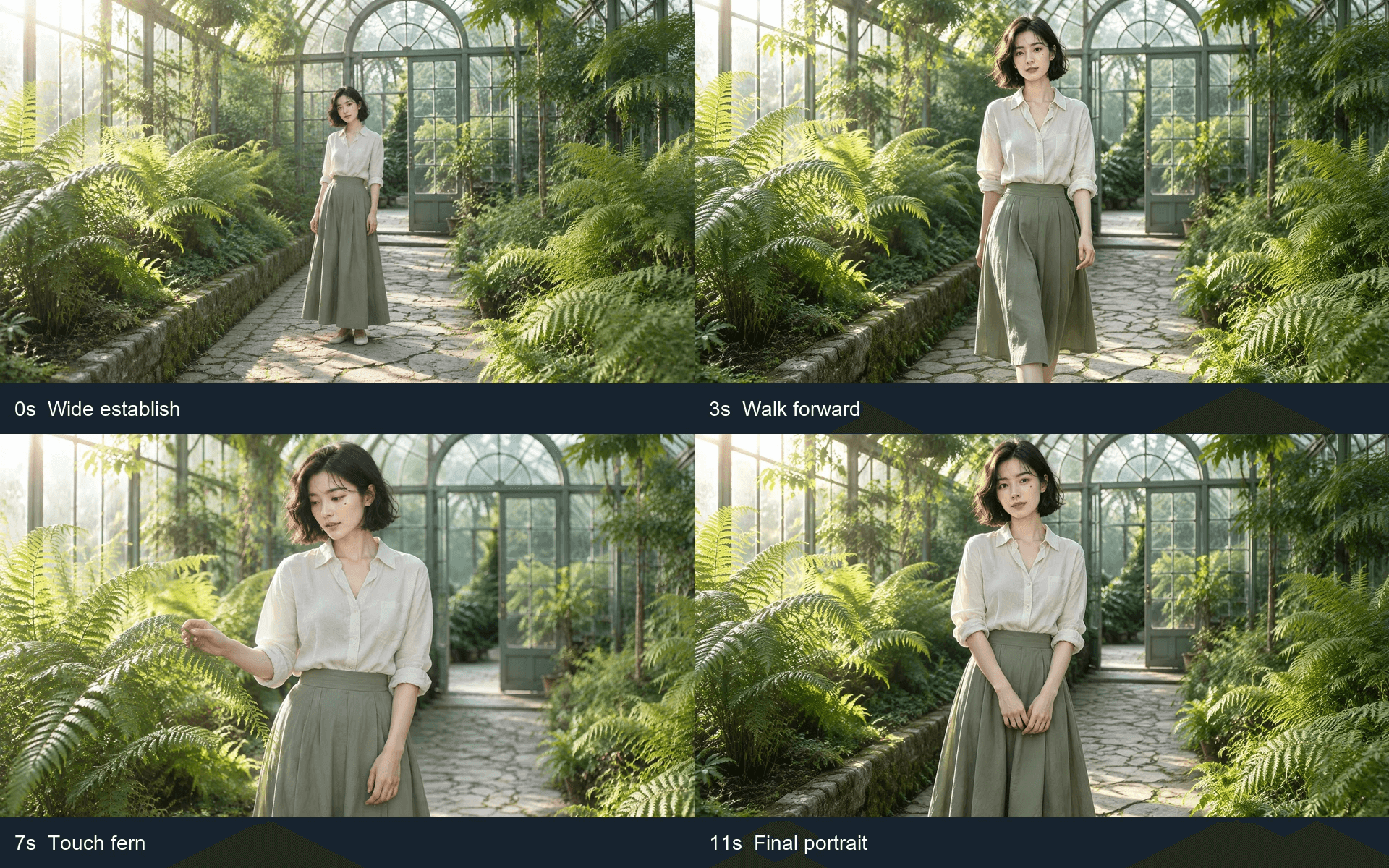 Four greenhouse candidate stills: a wide establishing view, a walking view, a hand touching a fern, and a final portrait.
Four user-supplied candidate stills arranged as 0s, 3s, 7s, and 11s planning beats. Their labels describe a proposed sequence; they do not prove that Kling generated these frames or will interpolate the actions exactly.
| Time | The viewer should see | Keyframe responsibility | Reference responsibility |
|---|---|---|---|
| 0s | Woman full-length on the greenhouse path | Wide establishing composition | Same face, bob, blouse, skirt, door, and light |
| 3s | Woman moving toward the camera | Forward movement and medium framing | Same subject and clothes |
| 7s | Woman reaching toward a fern | Hand action and closer camera distance | Same greenhouse and light direction |
| 11s | Woman settled in a final portrait | Resolved pose and composition | Same subject identity and color treatment |
The photos are not perfectly identical. The skirt folds and foliage shift slightly between images. Inspect those differences before upload; a reference cannot guarantee that every detail will stay fixed in generated motion.
Build Kling 4 Keyframes Before You Write the Prompt
Start with a four-beat map rather than filling every available slot. Each keyframe should answer one acceptance question: what must a viewer see at this moment? If there is no distinct answer, omit the frame.
The lavender set shows why. The first photograph establishes the stone farmhouse, cypress, curved path, lavender rows, distant hills, and low sun. Four additional photographs preserve much of that scene but vary the path framing only modestly. They work as candidate compositions, not automatically as four useful timed keyframes.
 Lavender scene reference: a farmhouse and cypress beside a winding path through lavender fields at sunset.
User-supplied location reference. The farmhouse, cypress, lavender rows, hills, and sunset direction are durable scene facts.
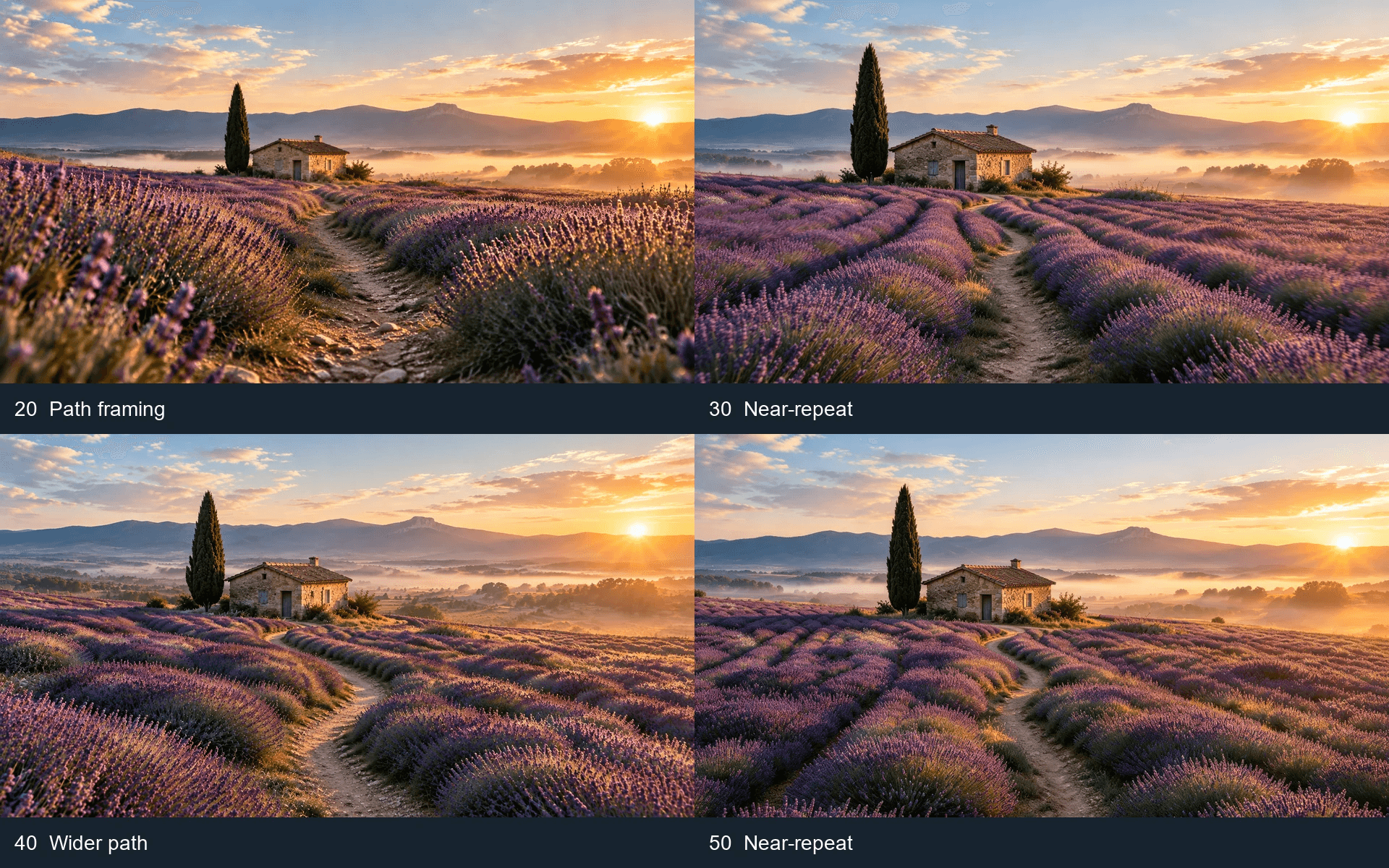 Four lavender framing candidates that retain the farmhouse, cypress, path, and sunset with small differences in composition.
The four remaining user-supplied lavender photos. The near-duplicates make the removal test visible: use a frame only when its composition or action gives the timeline a meaningful new state.
The removal test
- Remove a proposed frame.
- Read the two remaining neighboring beats.
- Add it back only if an important visible state would otherwise be untested.
Kling's planning example makes the same point: more keyframes do not automatically mean more control. The model needs room to generate movement between meaningful milestones. For the lavender scene, an opening wide view and a clearly different final view may direct a camera move better than four almost identical stills.
How to Use Kling 4 Reference Images and Keyframes: A 4-Beat SOP
Step 1: Choose one locked subject reference
Use the first greenhouse photograph as the identity and setting reference. Keep the short bob, white blouse, sage skirt, glass door, stone path, and left-side sunlight in one consistent description. If you need to create a new reference plate, GPT Image 2 on Atlas Cloud can make a 16:9 still. Review the result and lock one image before planning the sequence.
plaintext1Create a 16:9 photographic reference plate of one woman with a short dark bob, 2white blouse, and sage-green skirt in a lush greenhouse. She stands on a 3stone path before an arched glass door. Warm sunlight enters from camera left. 4Natural proportions, one person, consistent face and clothing, no text.
The supplied greenhouse photograph already fills this role. There is no need to regenerate it merely to follow the example.
Step 2: Assign four distinct visual beats
Use the four-photo greenhouse panel as a planning storyboard. When making actual keyframe inputs, review each full-size still and retain only the ones that define a visible change.
0s keyframe
plaintext1Preserve the woman's face, short dark bob, white blouse, sage skirt, 2greenhouse path, arched door, and left-side sunlight. Wide 16:9 view. 3She stands full-length on the path. No second person or text.
3s keyframe
plaintext1Preserve the same subject, outfit, greenhouse, and light direction. 2Medium 16:9 view as she walks naturally toward the camera on the path. 3Keep her face and clothing consistent. No second person or text.
7s keyframe
plaintext1Preserve the same subject, outfit, greenhouse, and warm light. 2Closer 16:9 view as she gently touches a fern with one hand. 3Natural hand anatomy and unchanged identity. No text.
11s keyframe
plaintext1Preserve the same subject, blouse, skirt, arched door, foliage, 2and left-side sunlight. Settle into a calm final portrait on the path. 3No new objects, second person, or text.
Step 3: Upload each image in its Kling 4 role
In a full Kling 4 interface, upload the fixed greenhouse photograph as a reference asset and the chosen timeline stills as keyframes. The transition prompt covers motion, pace, and camera path between the states.
plaintext10-3s: Begin with the wide greenhouse view. Track forward gently as the 2woman walks toward the camera along the stone path. 3 43-7s: Keep her face, bob, blouse, skirt, arched door, and sunlight stable. 5Move closer as she slows and reaches toward a fern. 6 77-11s: Show one natural hand-to-fern interaction, then let her relax 8into the final portrait. Preserve the same greenhouse and color grade. 9 1011-12s: Hold the resolved composition briefly. One continuous scene, 11smooth motion, natural anatomy, no cuts, no new people, no text.
Choose 16:9, 12 seconds, and the highest available quality. Run one candidate first. Check identity, action order, hand anatomy, and final composition before generating more candidates. A set of stills is a plan, not evidence that the resulting motion passed those checks.
Step 4: Run a reference-consistency preflight
Atlas Cloud should not be presented as a live full Kling V4 multi-keyframe endpoint today. You can preflight the reference pack with Kling Video O3 Pro Reference-to-Video. Upload the locked greenhouse still and only the necessary identity or scene references. Do not upload four time states and call them Kling 4 keyframes.
plaintext1Use the supplied greenhouse photographs as one consistent subject and scene. 2Create a 6-second 16:9 shot. The same woman with a short dark bob, white 3blouse, and sage skirt walks along the stone path, slows by the ferns, 4and gently touches one leaf. Keep the arched glass door, foliage, 5left-side sunlight, face, and clothing stable. Natural hands, one 6continuous camera move, no second person, no text.
For this preflight, choose 16:9, 6 seconds, Pro, and the highest available resolution. Its value is diagnostic: it can reveal whether the references and motion instruction agree before V4 availability changes. It does not establish how full V4 keyframe timing will behave.
Kling 4 Keyframes That Drift: 5 Failure Modes and Fixes
| Failure mode | What causes it | Practical fix |
|---|---|---|
| Conflicting identity facts | The reference has a short bob while a keyframe shows a different face or hairstyle. | Choose one subject reference and inspect every proposed state against it. |
| Too many changes in one beat | A keyframe changes person, clothes, location, light, and lens together. | Split only the must-see change into a separate beat. |
| Keyframes used as a mood board | Each input uses a different grade or subject variant. | Lock one reference first, then edit or select from it. |
| Near-duplicate keyframes | Several frames change only a small crop, as in the lavender panel. | Keep the views that mark a visible transition and remove redundant frames. |
| Flash and full-model assumptions | A rollout tier may not expose the full input workflow. | Verify the product page and interface on the day you run it. |
Input order deserves attention too. A community multiple-reference test changed only the image order and saw a different result. Label, order, and keep your pack stable (Reddit multiple-reference test, March 2026).
Kling 4 Reference Images on Atlas Cloud: What You Can Test Today
Checked October 13, 2026. The Kling V4 status page says Coming Soon. It does not expose a production V4 model ID, a verified multi-keyframe request schema, or a production V4 price. Do not publish a tutorial screenshot that pretends otherwise.
| Workflow | Current status | Useful action now |
|---|---|---|
| Full Kling 4 multi-keyframes | Official guide describes the feature; Atlas V4 is Coming Soon. | Prepare a coherent reference and a selective storyboard. |
| Kling 4 Flash | Access and controls can differ by rollout. | Check the current interface before assuming multi-keyframes are available. |
| Atlas O3 reference preflight | Available reference-to-video workflow. | Test subject identity and scene stability with a short run. |
The model library is a place to keep the pack ready when V4 changes state. Migrate only after the live schema documents the inputs you need. Check the exact model page before production planning because rates and temporary promotions can vary.
Kling 4 Reference Images and Keyframes FAQ
How many keyframes can Kling 4 use?
The official guide says full Kling 4 supports up to 10 keyframe images in one generation. Use fewer when fewer states define the story clearly.
Are reference images the same as start and end frames?
No. Start and end frames specify visual states at the beginning and end. Reference images preserve ongoing identity, clothing, environment, or style. Multiple keyframes add timed states between the endpoints.
Should I use all 10 keyframes?
No. Add a frame only when it represents a visible state you need to inspect. The near-duplicate lavender views show why a large image set need not become a large keyframe set.
Can Kling 4 Flash use the full multi-keyframe workflow?
Do not assume it can. Flash access and controls may differ during rollout. Confirm the current interface and release notes before planning around a specific control.
Is Kling 4 available on Atlas Cloud yet?
As checked on October 13, 2026, the Atlas V4 page says Coming Soon. You can use the Kling O3 reference preflight to test a coherent pack before kling 4 reference images and keyframes become a live Atlas workflow.





