

A helmet changes shape between shots, the station layout flips, and the signal arrives before the character finds it. A kling 4 sci-fi short film creation workflow works best when you decide what must stay fixed and where the story turns before generating. Kling 4 now offers single generations up to 30 seconds and up to 10 keyframes, according to its official announcement. The model still needs clear story logic and references. This guide turns one original premise into a four-beat plan, a copy-ready prompt, a produced example, and a practical Kling V3 test path on Atlas Cloud while its V4 route remains marked coming soon.
Key takeaways
- Build one short around one character, one location, and one reveal.
- Treat keyframes as story-state anchors, not a frame-by-frame script.
- Check character, set, screen direction, and action continuity before editing.
- Kling 4 is in official early access, but Atlas Cloud’s V4 listing remains Coming Soon as of October 14, 2026.
What Kling 4 Changes for Sci-Fi Short Films
Kling’s September 30 announcement describes native video generation up to 30 seconds, up to 10 keyframe images, multimodal references, and prompts up to 8,000 tokens. Those announced capabilities suit a compact science-fiction story: a longer continuous event can hold a reveal, while references and keyframes can specify what the character and set look like and when a change should happen. These are published feature claims, not a result from our own Kling 4 run. Actual controls and output behavior depend on the interface and should be checked in the model being used (Kling 4.0 announcement, September 30, 2026).
The useful distinction is simple: references help preserve identity and design; keyframes mark important states; the prompt describes the action between them. Kling’s own multiple-keyframe guide recommends using only the milestones that clarify a sequence, rather than filling every available slot (Kling multiple-keyframe guide, September 30, 2026).
Plan a Kling 4 Sci-Fi Story Before You Generate
Use a premise that can be understood in one viewing. In The Last Signal, Mara is the lone communications engineer on a lunar relay station. She receives a distress transmission from an abandoned orbital station and discovers that the recorded sender is an older version of herself. The reveal gives the short a clear turn without requiring a cast, location changes, or a second subplot.
Give the Sci-Fi Short Film One Clear Turn
| Time | Story beat | What the viewer needs to see |
|---|---|---|
| 0–8 sec | Establish the lunar station and Mara’s watch | Moon through the circular window; Mara at the console; a weak amber signal begins |
| 8–21 sec | Mara isolates the transmission | She leans in; a waveform resolves; the source image appears |
| 21–30 sec | The sender is Mara herself, from the future | The older recording is recognizable; Mara chooses to transmit; the amber light holds on the ending |
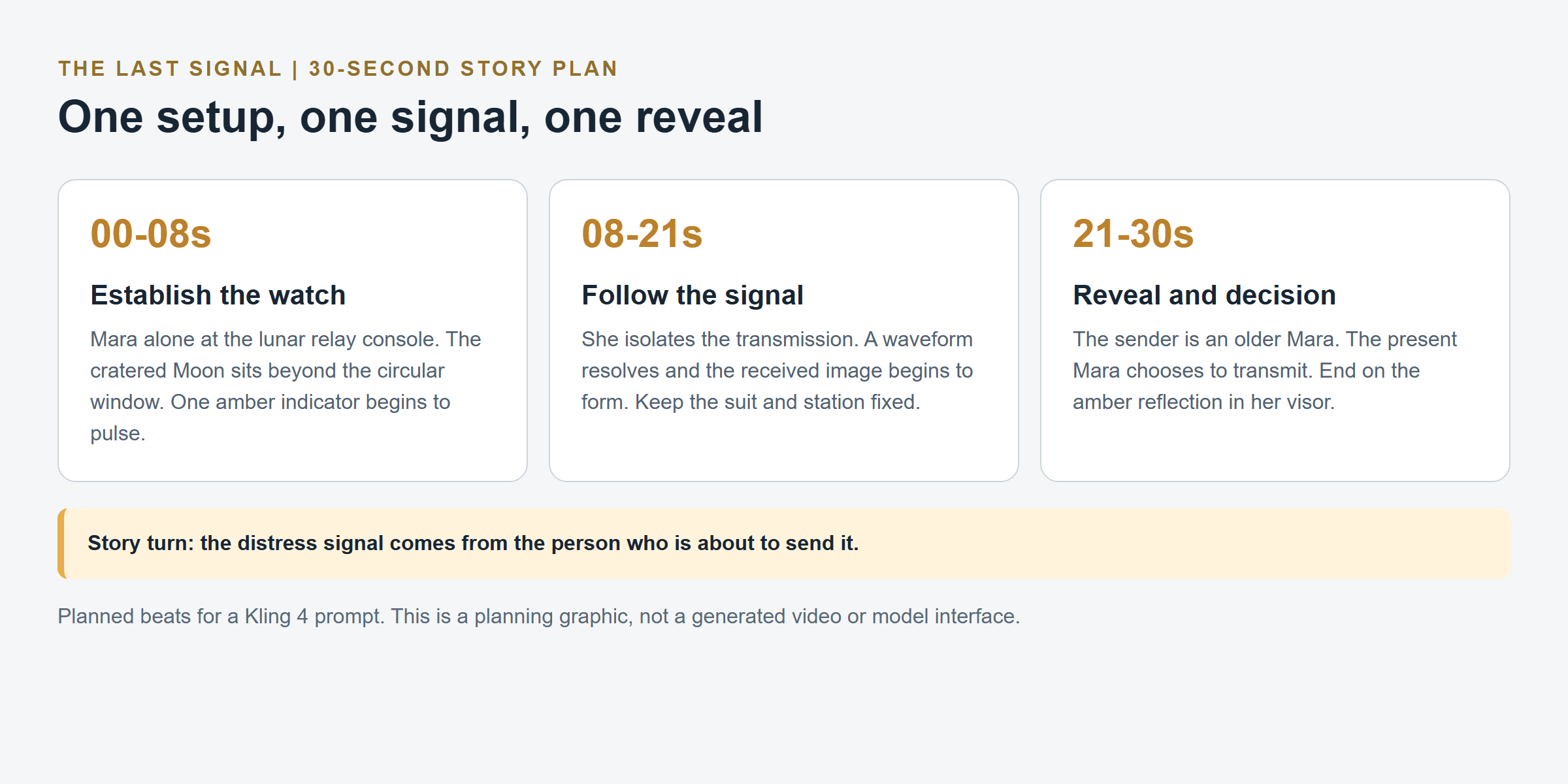 Three-act 30-second beat sheet for the Kling 4 sci-fi short film, with the reveal in the final act
The 30-second beat sheet places the identity reveal after the signal analysis, leaving time for Mara’s decision.
Lock the Character and Sci-Fi World
Write one short continuity note and reuse it in the prompt and references:
- Mara: early 30s, ivory pressure suit, one narrow amber stripe on the shoulder, clear visor.
- Station: compact lunar relay room, circular observation window, fixed console and screen positions.
- Light and palette: cool blue instrument light, one amber emergency beacon, consistent light direction.
- Story change: the distress recording reveals an older Mara; costume and station design stay the same.
Change one or two elements at a time. If a shot changes the suit, camera axis, lighting, and set layout together, it becomes harder to tell which change caused a continuity break.
Build the Timeline Around Four Story States
Start with four visual anchors: the opening station, the signal arriving, the older Mara appearing in the transmission, and the final decision to send. Each anchor should show a distinct state the audience needs to recognize. You do not need a new keyframe for every hand movement or camera adjustment.
| Anchor | Frame should establish | Keep fixed |
|---|---|---|
| Opening | Mara seated at the console; Moon visible through the window | Suit, window, console geometry, blue light |
| Signal | Amber indicator has begun pulsing; Mara turns toward it | Character and camera axis |
| Reveal | Older Mara is visible in the received recording | Same suit silhouette and station layout |
| Ending | Mara reaches transmit; amber reflection remains in her visor | Beacon color and spatial direction |
Kling’s guide describes keyframes as visual milestones and notes that prompts should explain what happens between them. It also advises keeping keyframes and references consistent. A community thread about Kling 4 keyframes shows creators still asking how to use the feature in practice, which is a reminder to test a small, clear set before adding more (Kling AI community discussion).
Copy-Ready Kling 4 Sci-Fi Short Film Prompt
The following is a planning prompt for Kling 4. Match its duration, frame inputs, ratio, resolution, and audio options to the actual Kling 4 interface you use. Four timed beats do not imply that you must upload four images.
plaintext1Create a 30-second cinematic science-fiction short titled “The Last Signal.” Keep one protagonist and one location throughout: Mara, a lunar communications engineer in her early 30s, wearing the same ivory pressure suit with a narrow amber shoulder stripe and a clear helmet visor; the interior of a compact lunar relay station, with a circular observation window, cool blue instrument light, and one amber emergency beacon. Preserve Mara’s face, suit design, station layout, screen positions, lighting direction, and color palette across every shot. 2 30–7 seconds: Wide establishing shot from inside the quiet relay station. The Moon’s cratered horizon is visible through the circular window. Mara sits alone at the console. A weak signal indicator begins to pulse amber. Slow, controlled camera drift; no cuts before the signal appears. 4 57–14 seconds: Medium over-the-shoulder shot as Mara isolates the signal. The screen shows only abstract waveform shapes and a simple blinking source marker, with no readable text. She leans closer; the amber beacon reflects across her visor. Keep her suit and the console layout unchanged. 6 714–22 seconds: Close shot on Mara listening, followed by a restrained point-of-view view through the console display. The received signal resolves into a recorded image of Mara in the same suit, visibly older and exhausted, speaking silently through a damaged transmission. Let the realization land through Mara’s stillness; avoid exaggerated facial movement. 8 922–30 seconds: Return to a medium shot. Mara looks from the transmission to the outgoing signal control. She reaches toward it, pauses, then presses transmit. End on the amber signal reflected in her visor as the station falls quiet. Hold the final composition for one second. 10 11Grounded science-fiction cinematography, deliberate pacing, subtle practical movement, realistic reflections, restrained performance, coherent spatial geography, no sudden costume or set changes, no extra characters, no rapid montage, no logos, no subtitles, no legible interface text, no unexplained camera jumps. Use quiet station ambience and a restrained low-frequency signal tone only if native audio is available.
Before running it, confirm that the interface accepts the requested duration and timeline format. If it does not, adapt the time ranges to the available controls and split the story into shorter shots rather than assuming a particular feature is present.
The Last Signal: A Produced 30-Second Case
The looping GIF below follows the planned arc: Mara detects a signal, sees an older version of herself in the recording, and chooses to send a reply. Watch it once for the story, then compare it with the three separately generated scene stills below. Those stills are planning references, not frames extracted from the GIF. The GIF is silent.
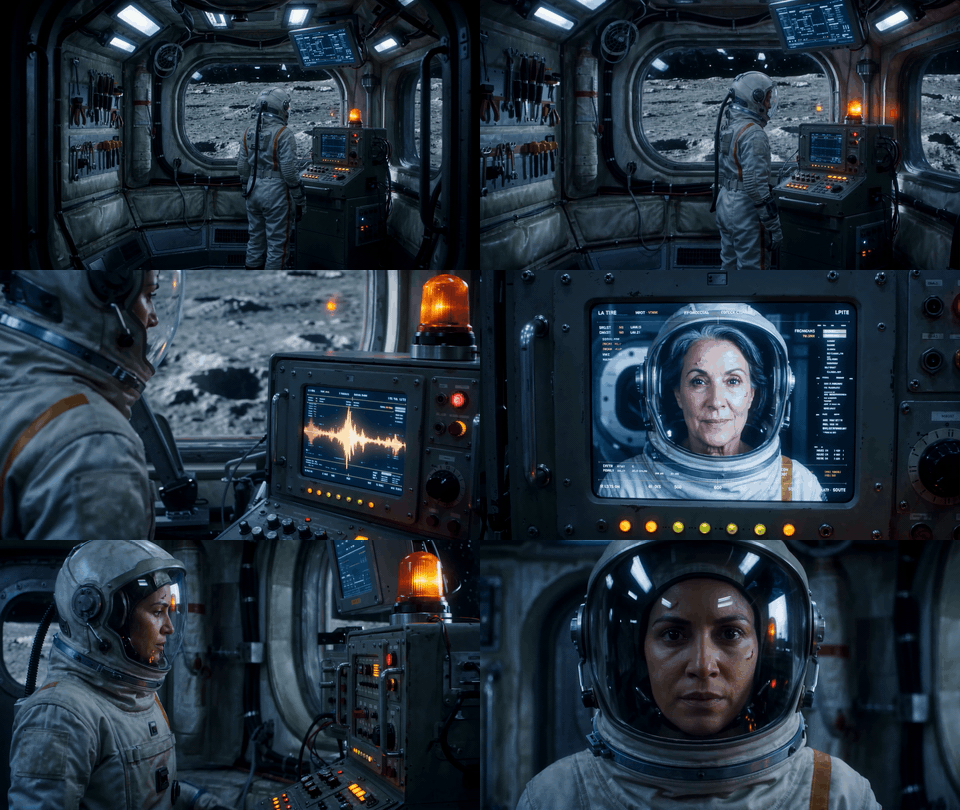
Thirty-second looping GIF of The Last Signal: a signal arrives, older Mara appears, and Mara operates the transmitter
Establish Mara and the Station
The opening still gives the viewer one face, one console, and a clear view of the lunar surface. That makes the station geography easy to read before the signal arrives.
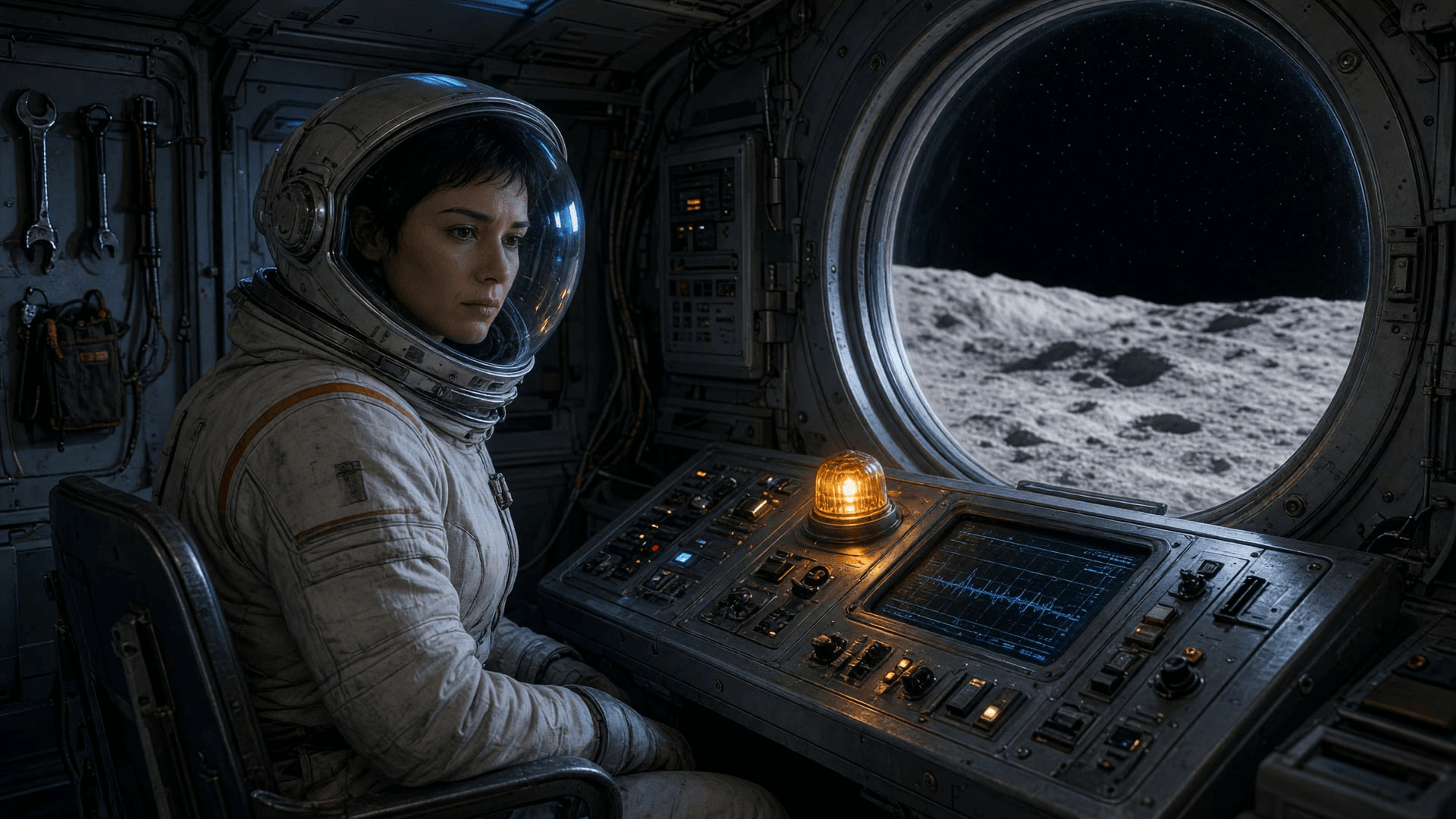
Separately generated opening still of Mara at a lunar relay console beside a circular observation window
The GIF's opening uses a wider, rounded window and a different console layout. The story location remains recognizable, but the set does not match this still exactly. If exact continuity matters, feed the approved station image into a reference-capable workflow and check the first generated frame before continuing.
Make the Identity Reveal Readable
The second still places Mara beside the received video portrait, so the viewer can compare faces without reading interface text. Its age difference is subtle; the GIF makes the older sender more distinct around the middle of the clip.
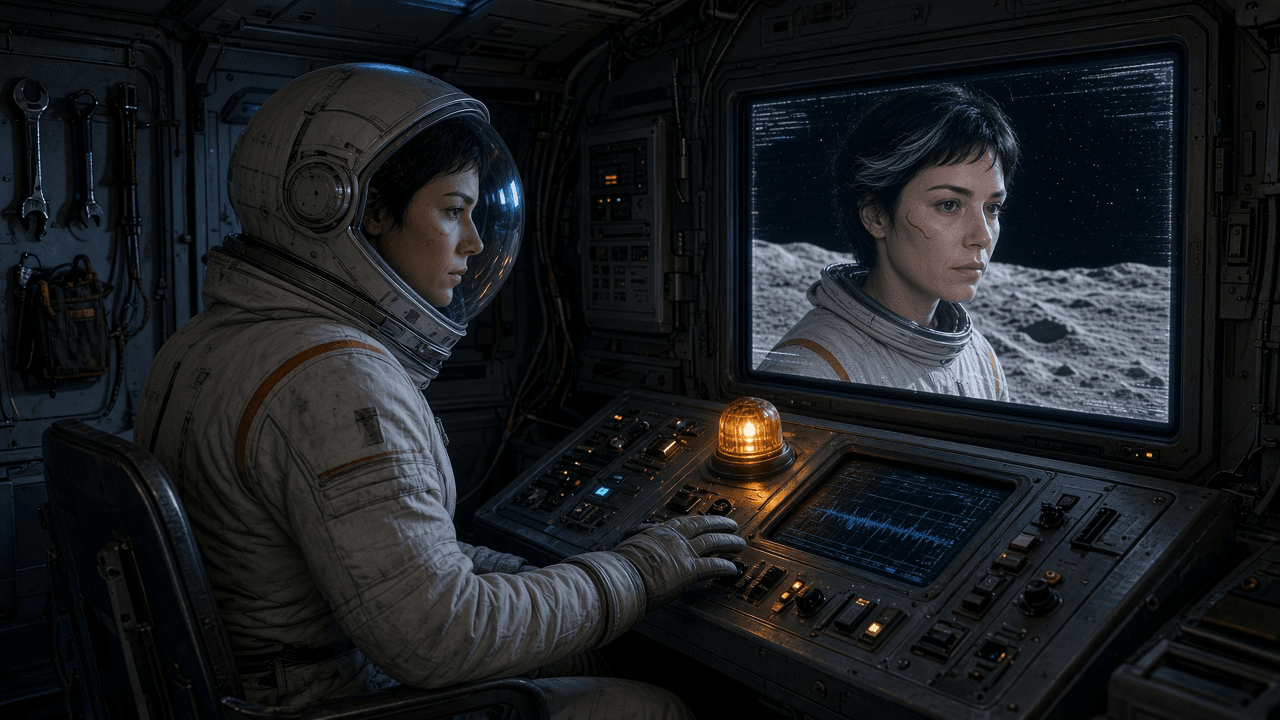
Separately generated still of Mara watching a recorded version of herself on the station monitor
The GIF also draws small pseudo-text around the transmission. It should be treated as visual noise, not as readable story information. The older face and Mara's reaction carry the reveal.
Show the Decision as a Physical Action
The final still puts Mara's gloved hand and the engaged transmit lever in the foreground. This makes the ending about a choice she acts on, rather than another view of the monitor.
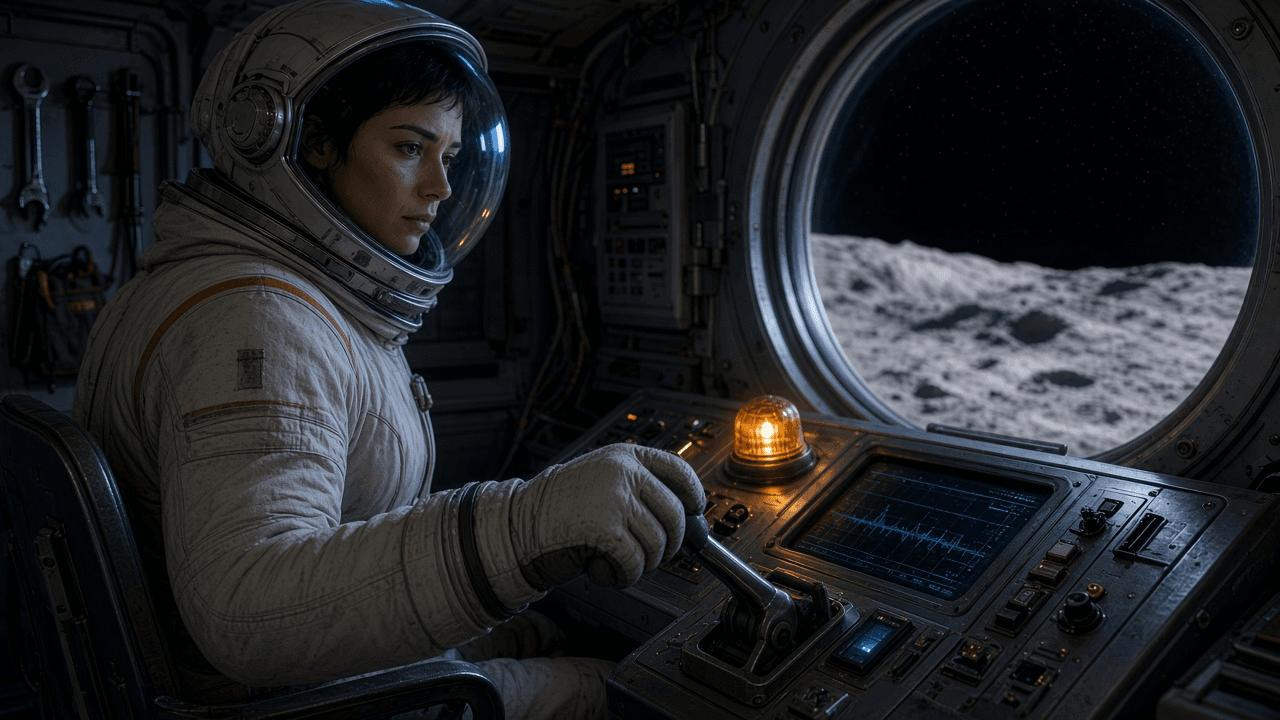 Separately generated ending still of Mara engaging a physical transmit lever as an amber beacon glows
In the GIF, Mara uses a different control to transmit. Both versions communicate the same decision, but the prop changes between the still and the moving scene. Keep the stills as references to the intended beats; judge the finished clip by what it actually shows.
Run the Available Test on Atlas Cloud
Atlas Cloud’s English Kling V4 listing is currently marked Coming Soon. Kling’s own announcement says it entered early access on September 30 with a wider rollout planned for October. These are separate availability statements: official early access does not mean the Atlas route is already runnable. Check the Atlas page again before assigning a V4 production task.
For a short test today, Atlas lists Kling V3.0 Standard and Pro text-to-video. Standard is the lower-priced option for testing the premise and shot blocking; Pro is a higher-priced tier to consider when you want to inspect detail and motion. Neither is Kling 4. Check the live playground for supported duration, resolution, aspect ratio, and audio settings before submitting a prompt.
| Use | Atlas route | Listed price as of October 14, 2026 |
|---|---|---|
| Check V4 route status | Kling V4 | Not listed; Coming Soon |
| Test a short text prompt | Kling V3.0 Standard | $0.084/sec list; $0.071/sec displayed after 15% discount |
| Review a higher-tier text-to-video take | Kling V3.0 Pro | $0.112/sec list; $0.095/sec displayed after 15% discount |
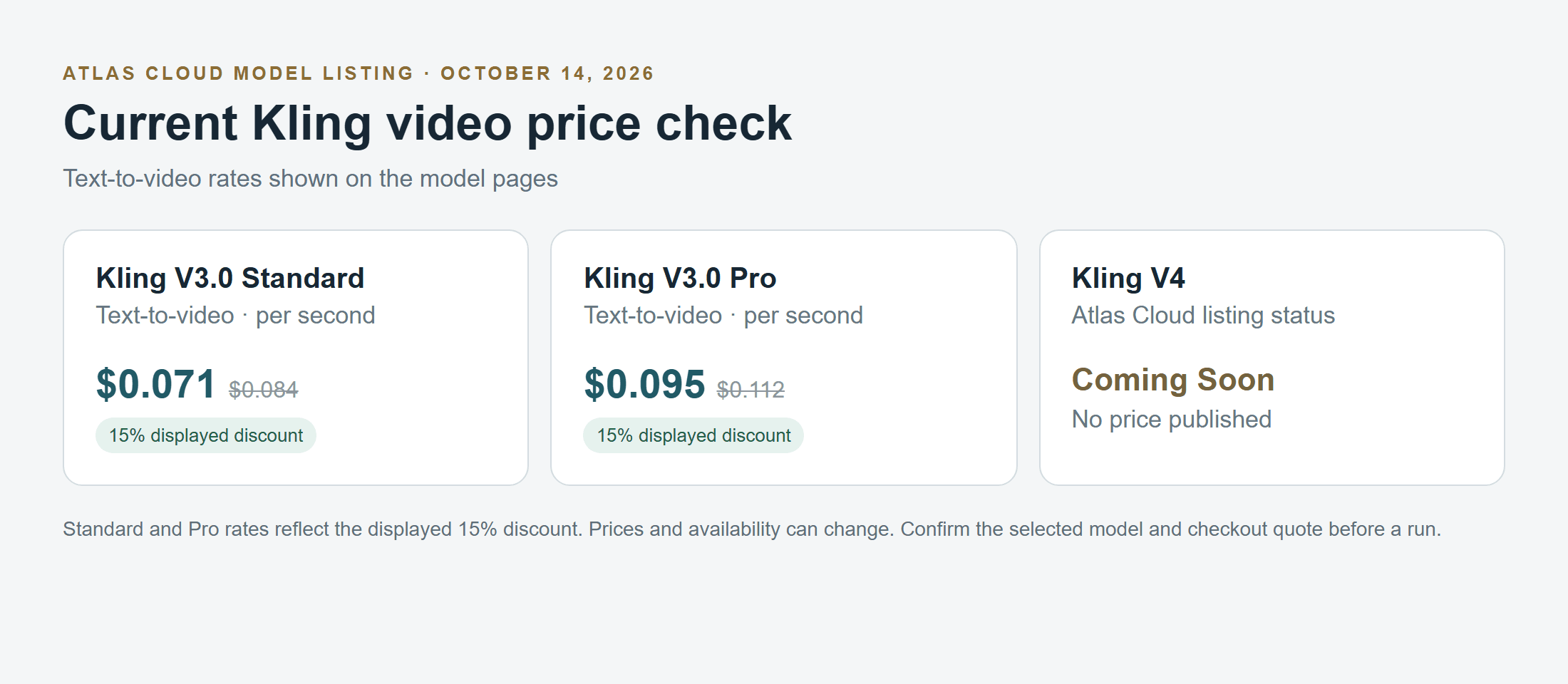 Atlas Cloud Kling V3.0 Standard and Pro text-to-video prices compared with the unpriced Kling V4 Coming Soon listing
Price comparison transcribed from Atlas Cloud's current model listings on October 14, 2026. The V4 route has no published price.
The Atlas model listing shows the prices above for the named text-to-video tiers. A single 5-second test at the displayed discounted rates is about $0.36 on Standard or $0.48 on Pro, before any retries. Your final cost depends on the selected model and settings shown at submission. Recheck the listing and checkout quote before generating.
Kling V3 Fallback Prompt for a Short Sci-Fi Shot
Use this as a single-shot test of the opening moment, not as a V4 demonstration. Choose an available clip length and output format in the actual playground.
plaintext1A cinematic science-fiction establishing shot inside a compact lunar relay station. Mara, a lunar communications engineer in an ivory pressure suit with one narrow amber shoulder stripe and a clear helmet visor, sits alone at a console beside a circular observation window overlooking the cratered Moon. A weak amber signal light begins pulsing on the console; Mara turns toward it and leans closer. Slow, steady camera drift from a wide interior view to a medium over-the-shoulder composition, one continuous shot, realistic reflections on the visor, cool blue instrument light balanced by the amber warning beacon, restrained suspense, coherent station geometry, no other people, no costume changes, no cuts, no readable text, no logos.
A short V3 test can tell you whether the opening composition is worth developing. It cannot establish how Kling 4 handles the full 30-second sequence. Open the Kling V3.0 Standard text-to-video route to inspect its current controls.
Review Each Take Before Editing
Watch each take once for story comprehension, then again for continuity. Check:
- Does Mara keep the same face, visor, stripe, and suit silhouette?
- Do the console, circular window, and beacon remain in their established positions?
- Does her movement follow the same screen direction across connected shots?
- Does the amber signal appear before she reacts to it?
- Can viewers understand the reveal without reading fake interface text?
- Does the final image give Mara’s decision enough time to register?
When a take fails, change one variable in the next prompt. For example, request a fixed camera to address spatial drift, or slow Mara’s reach to make the transmit action readable. Keep the stable takes and replace only the failed shot. Review generated dialogue, interface text, and audio separately; the story can communicate the reveal through the recorded face and Mara’s reaction without relying on legible UI.
Cost and Availability
There is no Atlas Cloud V4 price to quote while its listing remains Coming Soon. Do not estimate it from Kling V3. As of October 14, 2026, Atlas displays Kling V3.0 Standard at $0.084 per second list price and $0.071 per second with the displayed 15% discount; Pro is $0.112 list and $0.095 discounted. The discounted totals above are for the V3 tiers only. Repeated generations add to the spend, and the final checkout quote is authoritative.
A 30-second film plan does not mean every experiment must run for 30 seconds. Validate the character and opening composition in a short V3 test, then plan the intended Kling 4 timeline for the interface and route that are actually available to you.
Frequently Asked Questions
Can Kling 4 make a complete sci-fi short film?
Its announced 30-second generation and keyframe controls can support a compact story arc. You still need to define the story, references, and continuity, then review the generated sequence. A 30-second generation is a short scene or micro-short, not a substitute for editing a longer film.
How many keyframes should I use for a 30-second Kling 4 video?
Begin with the fewest states that make the story legible. For The Last Signal, four useful states are the opening, signal arrival, identity reveal, and final decision. Kling announces support for up to 10, but that is a maximum, not a target.
How do I keep a character consistent across Kling shots?
Reuse the same character reference and concise appearance description. Keep costume, environment, light direction, and screen direction fixed unless the story calls for a change. Add one deliberate change at a time and replace only the shots that break continuity.
Can I use Kling 4 on Atlas Cloud now?
Atlas Cloud’s English Kling V4 page currently says Coming Soon. Its Kling V3.0 Standard and Pro routes are listed as available alternatives. Confirm the live model page before starting a run.
What is the difference between Kling 4 and Kling 3 for short films?
Kling 4’s official announcement describes native generations up to 30 seconds and up to 10 keyframes, among other features. Atlas Cloud currently lists Kling V3.0 tiers with 5–10 second clip ranges in its family listing. Treat V3 as a current shot-testing route, not as proof of V4 behavior.
How much does a Kling sci-fi video cost on Atlas Cloud?
The displayed discounted Kling V3.0 text-to-video prices are $0.071 per second for Standard and $0.095 per second for Pro as of October 14, 2026. Atlas has not published a V4 price on its Coming Soon listing. Check the selected route and final quote before generating.
Planning a kling 4 sci-fi short film creation around one character, one location, and four visual states gives the story a clear spine. Test the opening with the Atlas V3 route if useful, then move the full prompt to Kling 4 only where that route is actually available.





