If a shot has several actions, a camera move, and a required ending, the main question in kling 4 vs kling 3 is whether the newer controls reduce retries. Kling 4.0 launched on October 15, 2026, with single-pass video up to 30 seconds, as many as 10 keyframes, and up to 15 combined reference assets. Those are workflow changes, not proof that every output looks better.
For a short, simple shot, Kling 3 may remain the practical choice. For a longer performance with changing emotion, body movement, and camera angle, Kling 4 is the more relevant model to test. Below are two 30-second cases: a castle action scene from text and a macaw rescue animated from one shared image. Each case includes both delivered videos and two selected frames per model. The paired frames show specific successes and misses; four clips are too few for a general model ranking.
Key takeaways
- Kling 4 adds up to 30 seconds in one pass, 10 keyframes, and 15 combined reference assets.
- Kling 3 Standard text-to-video allows 3–15 seconds per generation on Atlas Cloud; a 30-second video needs an extension or an explicitly edited sequence.
- More control can reduce shot splitting, but it cannot guarantee continuity, product accuracy, or correct dialogue.
- Four approximately 30-second videos and eight selected frames show the action, object handling, and camera changes in both cases.
Kling 4 vs Kling 3 at a glance
Kuaishou describes Kling 4.0 as an update focused on motion, control, and professional output. Its launch announcement specifies generation up to 30 seconds, up to 10 keyframe inputs, and up to 15 combined reference assets across images, videos, subjects, and voices. The 15-item limit is combined, not 15 images plus 15 videos. The announcement describes a reference mix that can include up to 10 images, 5 videos, and 7 subjects (October 2026).
Kling 3 is not one setting. Its family includes Standard and Pro text-to-video, Turbo, image-to-video, dedicated 4K endpoints, and Kling Video O3 endpoints with separate reference and edit modes. The table compares broad launch claims with endpoint-specific Kling 3 distinctions. Where a mode-specific limit is not established, it is marked as endpoint-dependent rather than guessed.
| Decision point | Kling 4.0 | Kling 3 family |
|---|---|---|
| Maximum single-pass duration | Up to 30 seconds, per Kuaishou’s launch announcement | Up to 15 seconds for the Kling v3.0 Standard text-to-video endpoint used in this case |
| Keyframes | Up to 10 keyframe inputs announced | First/last-frame control on selected image-to-video modes; do not assume a multi-keyframe workflow |
| References | Up to 15 combined assets, including image, video, subject, and voice references | O3 reference-to-video lists up to 7 reference images plus optional video; other endpoints differ |
| Audio | Voice references are described; generation and controls depend on selected mode | Native audio is listed for several endpoints; lip-sync options depend on mode |
| Resolution | Release says 4K, 1080p, and 21:9 support; confirm the selected endpoint | 4K and standard modes are separate listings |
| Availability | Atlas Cloud’s model catalog marks Kling 4 live; confirm the mode on its page | Multiple Kling 3 endpoints are listed |
| Price checked Oct. 28, 2026 | $0.157/s standard and $0.11/s discounted for Kling 4 Text-to-Video | Kling 3 Standard T2V lists $0.084/s standard and $0.071/s discounted |
The key change is a longer timeline with more ways to anchor it. A 30-second performance can be attempted in one Kling 4 generation. The Kling 3 Standard endpoint used below tops out at 15 seconds, so a 30-second deliverable requires extension or editing. Whether Kling 4 saves time depends on the action order and continuity in the actual output. Kuaishou's Kling 3 announcement and Atlas Cloud's Kling 3 Standard documentation state that shorter limit.
What the Kling 4 upgrade changes in a real workflow
A 30-second generation ceiling matters when an action needs time to read. In the castle case below, a royal courier must react to a falling crystal seal, vault a balustrade, catch it, roll out of the landing, cross the ballroom, and fit the seal into an astrolabe while the camera changes perspective. Kling 4 can attempt those beats in one 30-second generation when that option is exposed. Kling 3 Standard requires extension or editing to deliver 30 seconds.
That is a workflow advantage, not a guarantee that the courier completes every action in order. The model may skip the roll, move the seal to the wrong hand, change her costume, or introduce an unexpected cut. Inspect each required beat and the transitions. A 30-second generation that needs several retries can cost more than two short, successful clips.
Keyframes solve a different problem. They let a creator specify visual states at selected moments, such as a wide castle-ballroom entrance at the start and the seal seated in the astrolabe at the end. These anchors can make intent clearer than a paragraph alone. They do not make every in-between movement deterministic, so inspect transitions and subject details rather than judging only the first and last frames.
Reference capacity helps when a brief has several visual constraints. A campaign might need one product, a character, a location, and a movement reference. Kling 4’s 15 combined reference assets create room for that mix on paper. More inputs can also compete. Use only references that define required facts, and tell the model what each one contributes.
Kuaishou also announced up to 10-bit HDR, plus support for 4K, 1080p, and 21:9 output. These are launch claims, not proof that each setting is enabled in every interface or endpoint. Check the selected mode and the delivered file before planning a color pipeline or wide-screen export around them.
Which model fits your video task?
Short, simple shots
For a single action with a stable camera, start with the Kling 3 endpoint that matches the delivery requirements. If the brief is “a cup turns once on a table,” 30-second output and multiple keyframes may add little. A shorter render may be cheaper and easier to review.
Standard text-to-video gives a useful price reference for a basic prompt-led clip. Pro or a dedicated 4K mode targets different quality or resolution needs, so do not compare those rates with Kling 4 as if settings were identical. Keep the prompt, duration, aspect ratio, resolution, and audio choice aligned where the interfaces allow it.
Longer scenes and multiple story beats
Try Kling 4 when a deliverable needs sustained motion, several actions, or a defined final pose. It is worth evaluating when splitting the brief would create continuity work: matching lighting, camera position, and product appearance across separate clips.
Describe the sequence in timed beats, but keep the number of events realistic. For a 15-second ad, use a start state, two meaningful actions, and a final state. Avoid assigning a new camera move to every beat unless the shot needs it. Then inspect whether the model followed the order, maintained the object, and ended where requested.
If the output changes shots unexpectedly, compare it against your edit plan. An extra cut may work for a montage and fail a single-take product demo. The launch release describes improved camera handling, but the result for your prompt decides whether that feature helps.
Product, character, or motion references
Kling 4 is a natural candidate when a brief combines a product reference with a character sheet or motion video. A small team could provide a product image, a wardrobe reference, and a clip showing the intended hand movement. The output still needs review for costume detail, proportions, and identity drift.
Kling 3 O3 also offers reference-to-video options. Atlas Cloud lists up to 7 reference images and optional video input for that mode. So the question is not simply whether Kling 3 supports references. It is whether the exact endpoint accepts the input mix your task needs, and whether Kling 4’s additional capacity improves adherence enough to matter.
Start with a minimal reference set. Add another image only when it communicates information the first cannot. Near-duplicates can make conflicts harder to diagnose rather than improving consistency.
Dialogue and sound
Audio deserves a separate check. Kling 3 pages describe native audio generation on relevant endpoints and multilingual lip-sync features, but those claims do not guarantee accurate words, speaker assignment, or mouth timing in every clip. Kling 4’s launch announcement includes voice references among its inputs; verify whether the endpoint generates audio and exposes the controls required for your job.
For a dialogue-led ad, score the speech separately from the picture. Check the exact words, pronunciation, speaker identity, lip sync, and background sound. If any are contractual, generate a short proof shot before committing to a longer scene. A coherent clip with the wrong line is not usable.
Kling 4 price and availability on Atlas Cloud
Atlas Cloud’s live catalog labels Kling 4.0 available. The current Text-to-Video listing shows $0.157 per second standard and $0.11 per second discounted, a displayed 30% discount. Confirm the selected endpoint’s settings and rate immediately before budgeting.
For comparison, the Atlas Cloud Kling 3 page lists Standard text-to-video at $0.084 per second before discount and $0.071 per second with a displayed 15% discount. At that rate, a 10-second Standard clip costs $0.71 before any account-level adjustments. That estimate applies only to that endpoint. Kling 3 Pro, Turbo, 4K, and Kling Video O3 have different modes and rates.
| Atlas Cloud endpoint | Listed rate | Discount shown | 10-second estimate | Scope |
|---|---|---|---|---|
| Kling Video 4.0 Text-to-Video | $0.157/s standard, $0.11/s current | 30% | $1.10 | Catalog rate; confirm selected resolution and settings |
| Kling v3.0 Standard Text-to-Video | $0.084/s standard, $0.071/s current | 15% | $0.71 | Standard T2V endpoint only |
These are per-second estimates from the catalog checked October 28, 2026. They do not normalize output quality, resolution, or the number of attempts needed.
To compare spend fairly, use equal durations and the closest matching text-to-video modes. At listed discounted rates, a 10-second Kling 4 Text-to-Video clip is about $1.10 and a 10-second Kling 3 Standard text-to-video clip is about $0.71. This is a useful reference, not a quality-normalized benchmark: output settings and model tiers differ. Then compare cost per usable clip, not only the cost of the first run. If one version takes four attempts and another takes two, add the actual cost of every attempt.
Atlas Cloud’s catalog puts multiple Kling endpoints in one place for evaluation. Start from the Atlas Cloud model catalog, then check the Kling 4.0 listing in the model explorer or Kling 3 endpoint family for the exact mode and current rate. Treat a displayed discount as temporary and recheck it before a run.
Case one: a 30-second castle rescue with a changing camera
The first test takes place inside a lavish castle ballroom at stormy twilight. A crystal seal slides from an upper landing; a royal courier races to intercept it and restore it to a bronze astrolabe. The shot demands a vault, an airborne catch, a controlled roll, precise footwork across reflective marble, and a final object placement. Her expression moves from surprise to resolve to relief. Gilded arches, ruby banners, sapphire stained glass, chandeliers, and candlelight make changes in color and architecture easy to spot.
Use Kling Video 4.0 Text-to-Video and Kling v3.0 Standard Text-to-Video. Submit the identical English creative prompt below to the first generation on each model. Set both to 16:9 and the closest shared resolution, disable generated speech and on-screen text, and keep other controls at their defaults. Choose exactly 30 seconds for Kling 4 if its selected interface offers that length. Kling 3 Standard allows up to 15 seconds in one generation, so its final 30-second video must be marked as extended if the interface supports extension, or edited from two 15-second generations if it does not. Do not label the latter a single take or a direct one-pass quality comparison.
Shared prompt, copy exactly for the initial generation in each model:
plaintext1Create a 30-second cinematic fantasy-action film in one continuous 16:9 shot inside an opulent castle ballroom at stormy twilight. The black-and-ivory marble floor reflects gilded arches, ruby velvet banners, sapphire stained-glass windows, crystal chandeliers, and warm candles. Blue lightning briefly lights the windows. One adult royal courier with dark braided hair wears a midnight-blue velvet coat with gold embroidery, ivory gloves, and black leather boots. One palm-size eight-point crystal seal with an amber core is the object she carries. Keep her face, costume, seal, and the ballroom layout consistent. 2 3Opening: Start high and wide from the upper landing. A gust through an open window makes the seal slide off a display pedestal. The courier notices it; her eyes widen, then her jaw sets with determination. She sprints up three steps, plants one foot, vaults a waist-high marble balustrade, and reaches toward the falling seal. The camera cranes down with her and becomes a smooth lateral track. Keep her full body, the seal, and the floor spatially clear. 4 5Middle: She catches the seal with her right gloved hand in midair, turns her shoulders to control her momentum, lands on one knee and her left palm, then rolls once over her shoulder and rises without losing the seal. She runs diagonally across the ballroom, side-steps a fallen silver chair, and pivots around a column. Track low beside her feet, then orbit from her back-left side to a front three-quarter view. Keep the seal visibly in the same hand and the marble floor solid beneath every step. 6 7Closing: She reaches the raised throne dais, takes three steps, and presses the seal into a matching recess in a large bronze astrolabe. Its rings rotate and a restrained gold-and-blue beam travels across the stained glass. Move to an over-the-shoulder close-up for the precise insertion, arc around to her face as she exhales and gives a small relieved smile, then pull back to a high wide view showing the same castle ballroom and the now-still astrolabe. Hold the final composition long enough to read it. Smooth, motivated camera changes; expressive but natural face; athletic movement with credible weight and anatomy; no teleporting, no extra people, no duplicate seal, no costume change, no abrupt cuts, no speech, no subtitles, no logos.
The beat labels describe the desired finished film, while the duration is set in each model's controls. If extending Kling 3, use its first generated clip as the continuation source and carry the remaining beats forward; record the extension prompt and every extra generation alongside the shared initial prompt. If extension is unavailable, generate a second 15-second clip for the latter beats, edit the two clips into a 30-second sequence, and show the seam. That comparison tests the workflow needed to deliver the same brief, with a separate 15-second matched-length check for model output quality.
Four frames from the two finished videos
The first pair captures the balustrade beat at 00:06 in both source clips. Kling 3 shows the courier airborne with the crystal seal in her hand; Kling 4 shows her bracing on the rail, with the seal outside this frame. The difference is visible in the full motion as well, and it should be judged as prompt adherence for this take rather than a general model score.
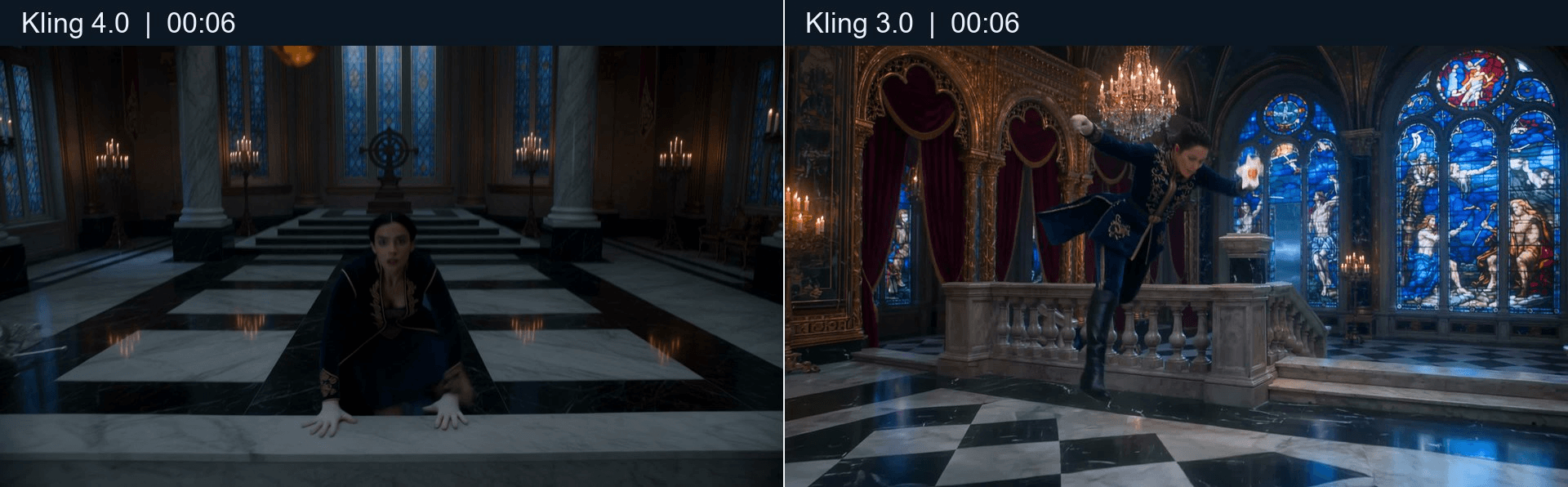
Same brief, same timecode. Left: Kling 4.0; right: Kling 3.0. The right-hand frame makes the vault and held object easier to verify.
The second pair is the astrolabe action: Kling 4 at 00:22, Kling 3 at 00:20. Both show a gloved hand placing the amber-centered seal. The Kling 3 seal keeps the requested eight-point crystal form more clearly. The Kling 4 room is much darker and less ornate than the prompt's ruby-and-sapphire ballroom; Kling 3 shows the banners and stained glass more distinctly.
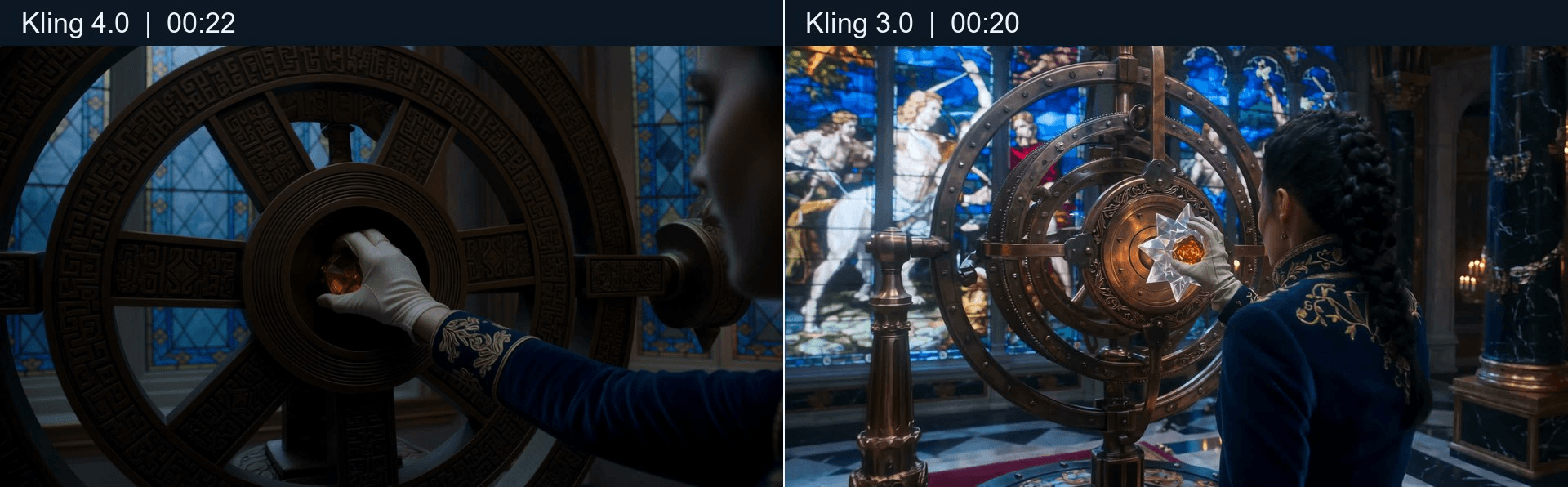
Frames selected for the matching object-placement beat rather than equal timestamps. Left: Kling 4.0; right: Kling 3.0.
Text-to-video results
Kling 4.0 text-to-video, 30 seconds.
Kling 3.0 text-to-video, 30 seconds.
Case two: animate one image with the same starting frame
The text-to-video test asks both models to invent the entire scene. This second case holds the opening image constant. A scarlet macaw must rescue a glass terrarium that is slipping from a cart inside a floating botanical observatory. The task tests whether the bird, object, orchids, architecture, and vivid lighting remain recognizable while it dives, grips, banks, lands, and changes camera angle. The bird's alertness and relief should read through its eyes, head, and posture, without giving it a human face.
Create one 16:9 starting image using the image prompt below. Save that exact image file and upload the same file to Kling Video 4.0 Image-to-Video and Kling v3.0 Standard Image-to-Video. Do not create a separate starting image for each model. Paste the identical motion prompt into both video models, use the closest shared resolution and audio setting, and record the actual settings. This is an image-to-video comparison; the model that made the starting image is preparation, not one of the two video results.
Starting image prompt, for creating the one shared first frame:
plaintext1Create one photorealistic cinematic 16:9 image inside a floating botanical observatory above a sea of sunset clouds. Copper ribs and teal glass panes curve overhead; crimson orchids, indigo leaves, and tiny amber lights fill the deep background. An adult scarlet macaw with accurate wings, talons, and beak perches on a copper rail at the left foreground, looking intently toward a small clear glass terrarium on a tilted brass cart at the right. Inside the terrarium is one luminous blue orchid rooted in dark moss. The terrarium is close to the cart's edge but has not fallen yet. Leave open flight space between bird and cart so the action can begin from this frame. A warm coral sunset glows through the glass while turquoise shadows shape the bird's feathers and the glass object's edges. Keep the macaw, terrarium, orchid, cart, rail, and observatory distinct and physically coherent. One bird, one terrarium, no humans, no duplicate wings or talons, no text, no logos, no collage.
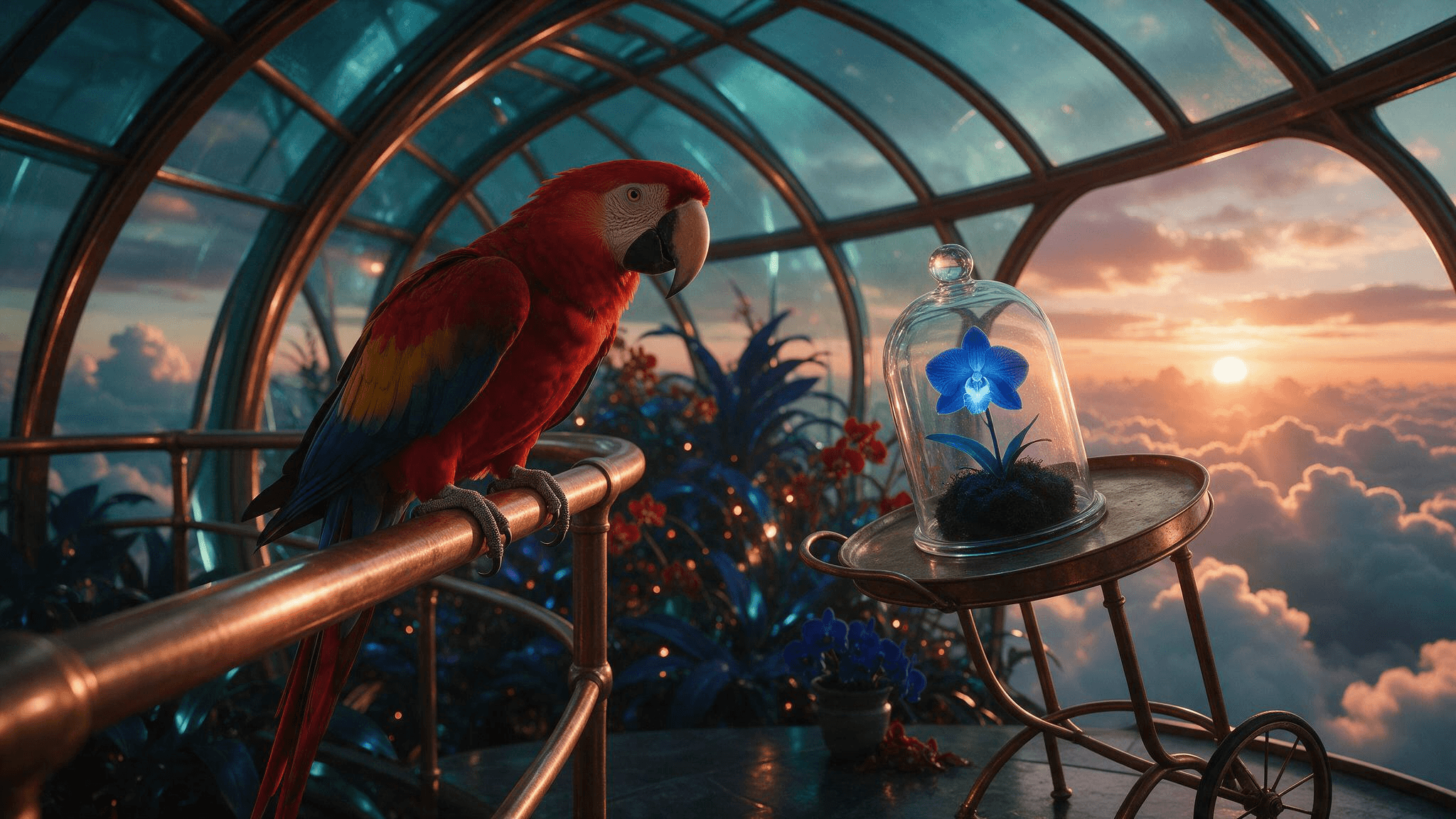
The shared 16:9 starting image for the image-to-video case. Both clips visibly begin from this composition.
Shared image-to-video motion prompt, paste exactly into both models:
plaintext1Animate the supplied first frame into a fluid cinematic rescue in the same floating botanical observatory. Preserve the scarlet macaw's feather markings, accurate bird anatomy, the single glass terrarium with its blue orchid, the copper rail and cart, the teal glass roof, and the coral sunset throughout. No new animals or people. 2 3Opening beat: A gust sways the hanging orchids and the cart rolls slightly; the terrarium begins to slip. The macaw notices it, turns its head sharply, widens its eyes, lifts its wings, and launches from the rail. Start in the original wide view, then smoothly track toward the bird from a low three-quarter angle. Its wingbeats move air through nearby leaves; the glass object remains visible ahead of it. 4 5Middle beat: The macaw dives across the open space, catches the terrarium by its brass carrying loop with its talons before it falls, then banks in a graceful arc around one copper support. Follow the dive with a controlled side track that becomes a brief quarter orbit. Show believable wing flex, body weight, glass reflections, swinging momentum, and the orchid remaining inside the terrarium. Keep the grip and object connection clear. Avoid a simple zoom or a static hover. 6 7Closing beat: The bird descends toward a broad wooden worktable, lands with a small adjustment of its wings, and gently sets the terrarium upright. The camera rises for a short overhead view of the observatory, then comes down to a close three-quarter view as the macaw blinks and relaxes its feathers. The orchid brightens softly; the bird gives one curious head tilt. Pull back to reveal the floating garden and layers of coral, gold, teal, crimson, and indigo in the sunset clouds. Continuous readable action, expressive animal posture, purposeful camera-direction changes, natural motion, no sudden cuts, no morphing anatomy, no broken glass, no speech, no subtitles, no logos.
Duration and comparison: Request exactly 30 seconds from Kling 4 when the image-to-video interface offers it. Kling 3 Standard cannot create that length in one pass, so make its 30-second deliverable by extension if supported or by editing shorter generations, and identify the method. Also compare the first matched 15 seconds to judge prompt following without the long-form workflow difference.
Four frames from the image-to-video pair
At the carry beat, Kling 4 at 00:16 and Kling 3 at 00:14 both show the scarlet macaw moving the glass enclosure with the blue orchid still inside. Kling 3 frames the talons and top loop more clearly. Kling 4 shows the enclosure below the bird, but the grip is harder to read at this moment.
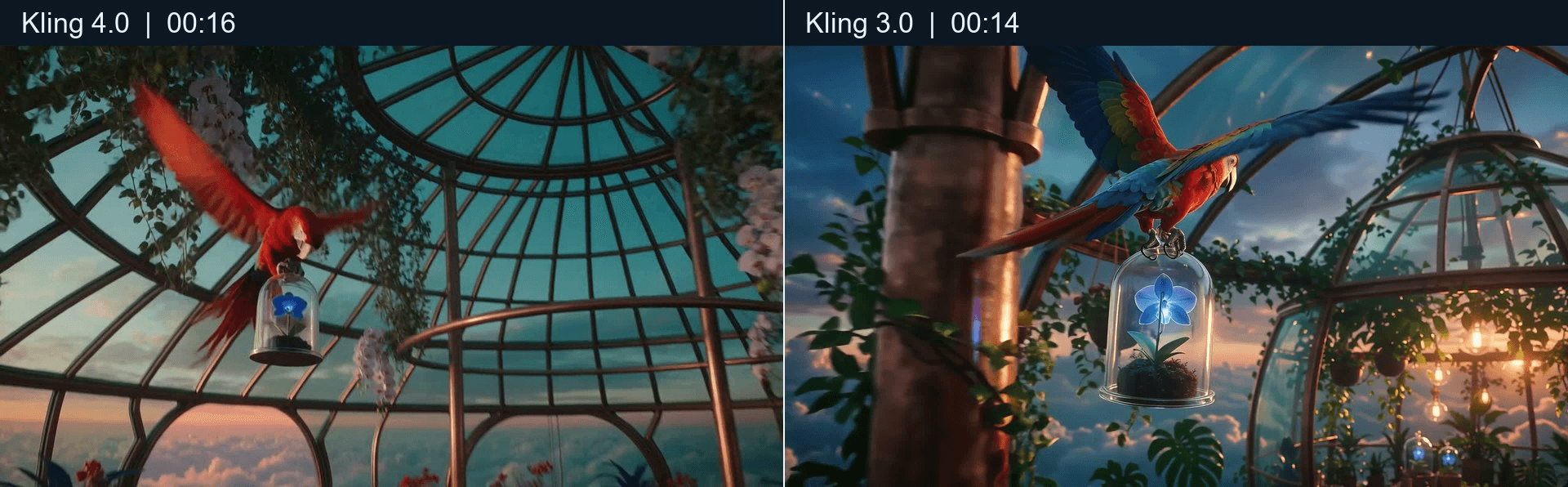
Two real frames selected for the matching carrying action. Left: Kling 4.0; right: Kling 3.0.
At 00:22 in both clips, the macaw and orchid enclosure are on the worktable. Kling 4 keeps the curved teal observatory structure prominent behind them. Kling 3 uses a closer view of the bird and orchid; its longer flight sequence also moves outside the original conservatory before returning to the table. Both complete the broad rescue arc, although neither still frame alone proves the glass object's exact path through the landing.
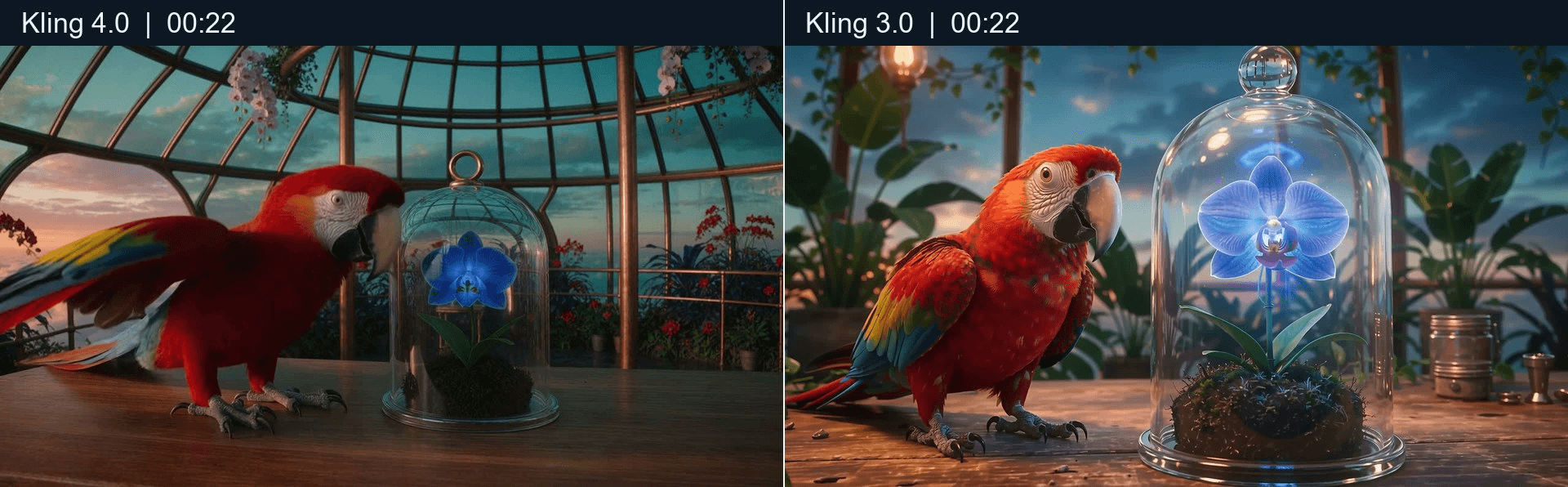
Same timecode and destination, with different framing. Left: Kling 4.0; right: Kling 3.0.
Image-to-video results
Kling 4.0 image-to-video, 30 seconds.
Kling 3.0 image-to-video, 30 seconds.
The shared first image lets the viewer compare how each take develops the bird, blue orchid, glass enclosure, and observatory. Check the full clips for the talon-to-loop connection, the enclosure's movement, the change in camera direction, and the return to the worktable.
Final verdict: when should you switch?
Choose based on what the shot asks the model to control. Kling 4 is the stronger candidate to test for longer single-pass scenes, several key moments, and a larger reference mix. Kling 3 remains a reasonable starting point for short clips and established workflows, especially when the matching endpoint’s price is clear.
| Your project | Start with | Verify |
|---|---|---|
| One short action, simple framing | Matching Kling 3 mode | Cost and first-pass usability |
| Several timed actions in one 30-second shot | Kling 4 single pass; Kling 3 extended or edited | Correct order, ending, and seams |
| Product plus character or motion references | Kling 4, then compare with O3 where inputs align | Identity, product detail, reference support |
| Dialogue or localized speech | Exact audio-enabled endpoint | Words, voice, lip sync, background sound |
| Tight per-clip budget | Lowest suitable endpoint, then compare usable-result cost | Current rate, retries, resolution |
For kling 4 vs kling 3, the useful next step is the shared castle test above or another paired shot that causes real rework. Move that shot to Kling 4 if its added controls produce more usable takes at an acceptable cost. Keep straightforward shots on the endpoint that already clears your delivery bar.
Frequently Asked Questions
Is Kling 4 better than Kling 3?
Kling 4 adds longer single-pass generation, more keyframes, and greater combined reference capacity. That better equips it for complex timed shots on paper. In the supplied castle pair, Kling 3 shows the requested vault and ornate stained glass more clearly, while both clips reach the astrolabe ending. One pair does not establish a general winner.
Can Kling 4 generate longer videos in one pass?
Kuaishou’s October 2026 release says Kling 4 supports native generation up to 30 seconds in one pass. Confirm the duration choices available on the specific endpoint before planning around the maximum.
Can Kling 4 use multiple keyframes or reference videos?
The announcement specifies up to 10 keyframe inputs and up to 15 combined reference assets. Video inputs are among the described references. The selected endpoint determines which combinations you can submit.
How much does Kling 4 cost on Atlas Cloud?
Atlas Cloud listed Kling 4 Text-to-Video at $0.11 per second after a displayed 30% discount on October 28, 2026, or about $1.10 for 10 seconds. Kling 3 Standard text-to-video was listed at $0.071 per second after a displayed 15% discount, or about $0.71 for 10 seconds. Recheck both rates before running.
Should I still use Kling 3 for short videos?
Yes, when the exact Kling 3 endpoint meets the shot requirements and its cost per usable result works for the project. A new version is a reason to test, not a requirement to migrate every clip.





