

A clip can look convincing at full speed and fail the moment you pause it: coffee enters a cup but the level never rises, fingers merge into a handle, then a turning actor returns with a different coat. Kling 4.0 AI Video Physics Bugs and Motion Deformation should be treated as launch-day acceptance problems, not proof that a new model has eliminated physics errors.
Use this guide to inspect contact, shape, and occlusion before a bad take reaches an editor or client. Kling's official partner material presents 4.0 as an upgrade for dynamic motion, audio, resolution, and control, but that is an official claim rather than an independent physics benchmark (Kling official partner hands-on review, October 2026).
Key takeaways
- Test one primary action and one contact chain per take.
- Check whether an object remains the same object before judging its style.
- Reduce conflicting motion before adding more prompt detail.
- Split a shot when shape accuracy is part of the approval criterion.
- Keep the same benchmark brief when you compare models or rerun a take.
What Counts as a Kling 4.0 Physics Bug?
A physics bug is a continuity error that breaks the action a viewer is trying to read. Deliberately elastic animation is fine when the brief calls for it. A mug changing geometry during a grounded product shot is not.
| Symptom class | Why a viewer notices | Check at |
|---|---|---|
| Gravity and trajectory | A foot floats, acceleration jumps, or an object has no believable landing | Start, force, contact, and stop |
| Contact and collision | A hand penetrates a prop, a block does not react, or liquid has no volume response | The exact contact frame |
| Shape and material | Fingers, rims, fabric, tires, or product edges melt, stretch, or switch form | Before, during, and after motion |
| Occlusion and camera | A person or prop returns from overlap with the wrong identity or location, sometimes hidden by a cut | Every reveal after overlap |
Single-frame beauty is not an acceptance standard. Scrub the sequence through the action's setup, contact, and recovery. This makes Kling 4.0 AI Video Physics Bugs and Motion Deformation a production check rather than a vague complaint.
The 60-Second Physics Bug Acceptance Test
Use these four eight-second clips to inspect different points where motion can break. When repeating a test, keep the duration, aspect ratio, and camera complexity consistent. The clips illustrate an inspection method, not a controlled performance benchmark.
Contact and Trajectory Check
The skateboard jump makes the action chain easy to follow: approach, takeoff, curb clearance, landing, and roll-away. Check whether the feet stay with the board, the board clears the curb, and the wheels meet the road before the rider continues.

Skateboarder jumps over a curb and rolls away in one continuous shot
Case 1: inspect foot-to-board contact, curb clearance, wheel contact at landing, and the direction of the roll-away.
Liquid and Container Check
The water pour puts a transparent stream, a rising fill level, and hand-to-glass contact in the same shot. Follow the stream from pitcher to glass, then check whether the glass and its contents stay consistent when the person lifts it.

A person pours water into a glass and then lifts the filled glass
Case 2: inspect the water stream, fill level, glass rim, hand contact, and continuity during the lift.
Body and Cloth Deformation Check
The dancer takes a few steps, turns, and stops. Compare the face, arm positions, leg count, and coat silhouette before the turn, during the overlap, and after the coat settles.
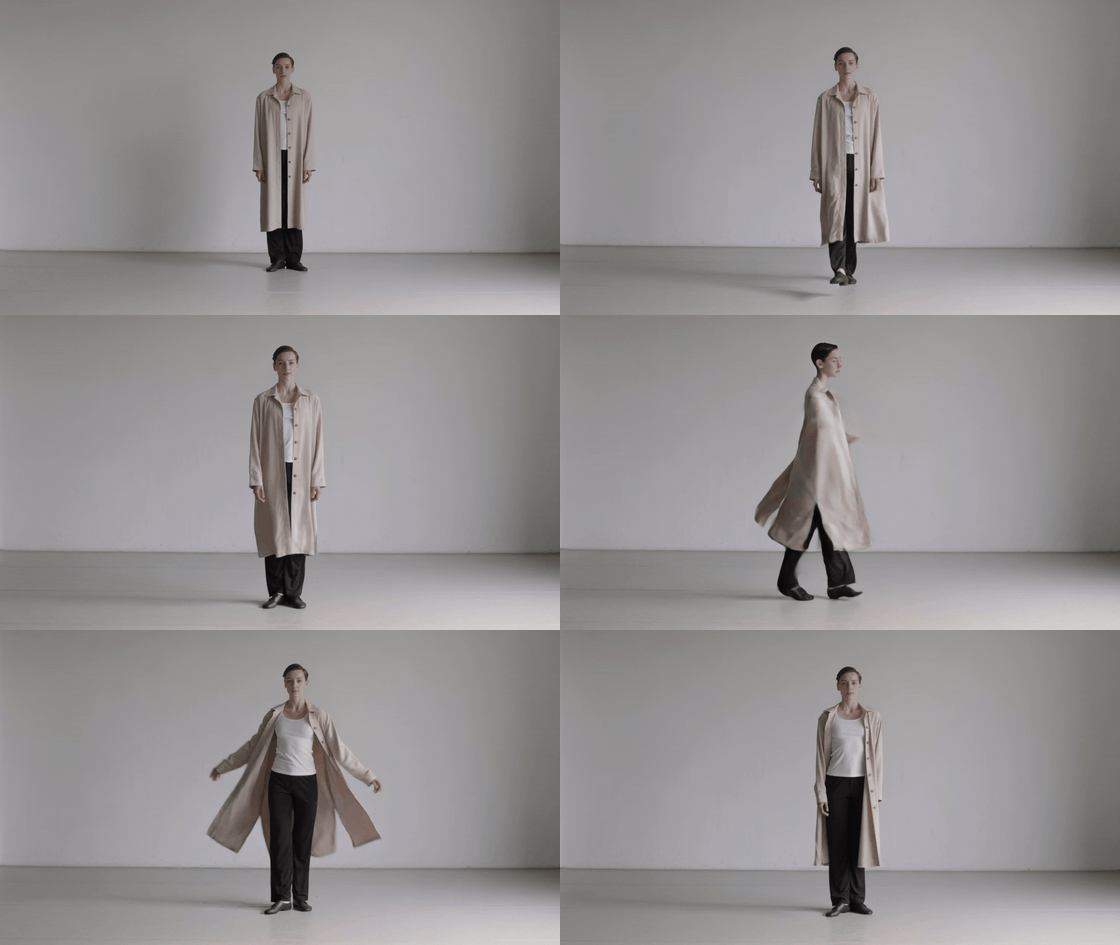
Dancer turns in a long coat and stops facing the camera
Case 3: inspect body proportions, limb continuity, coat motion, and the final pose after the turn.
Mechanical Gear Mesh and Rotation Check
Watch the contact point between the teeth: the gears should rotate in opposite directions, the smaller gear should turn faster, and neither axle should shift. Also check whether each tooth keeps its shape as it passes through the mesh.

Two brass gears on a workbench, with a large and small gear meshed on fixed axles
Case 4: inspect tooth contact, opposing rotation, fixed axles, and how both gears slow.
7 Fixes for Kling 4.0 Motion Deformation
Start with the first change that removes a conflict. Repeating the same crowded request usually spends more runs without making the shot easier to solve.
| Symptom | Likely conflict | First fix | Split the shot when |
|---|---|---|---|
| Fingers merge with a prop | Fine hand action, occlusion, and camera movement happen together | Lock one stable grip and reduce camera movement | The prop must survive product or client review |
| Cloth enters the body | Running, rotation, and strong wind compete | Keep either running or turning as the main action | The brief needs a fast full-body spin |
| Liquid turns gelatinous or passes through ice | Liquid, transparency, reflection, and collision stack up | Use one container and one liquid action | Exact fill level or collision is the product proof |
| A turn changes face or clothing | A large turn combines with a camera orbit | Use a stable reference, name the preserve items, and reduce the turn | The actor must turn 180 degrees or more |
| The model cuts to another view | The prompt asks for several angles | Specify one continuous shot and one camera path | The story truly changes time or place |
| A prop changes shape or its label drifts | Fine detail is distant or moving too fast | Enlarge the prop and avoid text as a critical detail | Packaging or lettering must be exact |
| Feet float or lose the floor | Ground, pace, and camera movement are underspecified | State surface, cadence, shadow, and weight transfer | The scene includes complex stunts or collisions |
Early Flash users have reported better fast action while also describing unexpected cuts and imperfect element consistency. Treat that as individual early experience, not a model-wide measurement (Kling 4.0 Impressions So Far, September 2026).
A Copyable Physics-First Prompt
Write the shot in the order the generator has to resolve it: scene geometry, stable subjects, one action chain, one camera path, physical response, then preservation constraints. Long negative lists cannot repair a scene that demands too many things at once.
Use this skeleton before you add style language:
plaintext1Scene geometry: [fixed ground, scale, starting positions, light] 2Subject and stable object identity: [who and what must remain unchanged] 3One primary action: [one action with a clear start and finish] 4Contact and response: [touch point, force, direction, reaction, stop] 5One camera move: [one continuous path, framing, no cuts] 6Three critical preservation constraints: [shape, identity, count, position]
The four prompts below match the four clips above. Use 8 seconds and 16:9 for each, and keep the original result so that visible errors are not hidden by a revised take.
Prompt 1: Skateboard Curb Contact
plaintext1An 8-second realistic video in a single continuous shot. A skateboarder rides along a sidewalk, jumps over a low curb, and lands on all four wheels before rolling away. Track the skater from a three-quarter side view, moving gently with them. Show the feet staying on the board, the board rotating under the rider, the wheels contacting the pavement, and the rider absorbing the landing. Daylight, ordinary street setting, natural speed. No cuts, slow motion, text, or logos.
Prompt 2: Water Pour and Glass Lift
plaintext1An 8-second realistic video in a single continuous shot. A person pours water from a clear glass pitcher into an empty drinking glass on a wooden table, sets the pitcher down, then lifts the filled glass. The camera moves slowly from a front three-quarter view toward the side. Keep both hands, the pitcher, the glass, the water stream, and the changing water level visible throughout. Natural indoor daylight. No cuts, text, or logos.
Prompt 3: Dancer Turn and Coat Recovery
plaintext1An 8-second realistic video in a single continuous shot. A dancer wearing a loose long coat takes three steps, makes one full turn, and stops facing the camera. The camera arcs gently around the dancer as they turn. Keep the dancer's face, arms, hands, legs, and coat visible. The coat follows the turn and settles after the dancer stops. Simple studio background, even lighting, natural human speed. No cuts, slow motion, text, or logos.
If the turn is the weak point, revise only that interaction:
plaintext1Keep one dancer, the same face and long coat, and a single continuous turn. Reduce the camera move to a small arc. Preserve the number and position of both arms and legs. Let the coat follow the body and settle after the dancer stops. One continuous shot, no cuts, no new objects.
Prompt 4: Brass Gear Mesh and Rotation
plaintext1Create an 8-second photorealistic video in 16:9, one continuous shot. Show two exposed brass gears on fixed axles in a clean workshop. The larger gear has about twice the diameter of the smaller gear, and their teeth visibly mesh. The large gear rotates clockwise through one full turn while the smaller gear rotates counterclockwise through about two turns. Keep both axles stationary and both gear shapes consistent; the teeth stay engaged without passing through each other. The camera makes a gentle 30-degree arc from a three-quarter view toward a slightly higher angle, keeping the contact point visible. Both gears slow together and stop. Natural metal reflections and stable contact shadows. No people, hands, water, fabric, vehicles, text, logos, cuts, duplicate gears, or sudden camera jumps.
When to Split a Kling 4.0 Shot Instead of Regenerating
Split the shot when it asks for two occlusions, fine hand interaction, a large camera move, and a material change at once. That combination creates too many moving constraints for a clean approval take.
- Product shape is contractual: make a wide action shot, then a stable product close-up.
- A character must turn 180 degrees: end the first shot in a controlled transition pose, then begin the next from the new facing direction.
- Liquid collision must be exact: use a dedicated liquid or product insert instead of asking it to share a performance shot.
Teams can store the same acceptance brief and rerun it from the Atlas Cloud homepage as they compare available models. That protects the test design from being rewritten every time a promising release appears. It is a workflow convenience, not a claim that one model will solve every physics case.
What You Can Verify Today Before Calling It a Fix
The four clips above show where to inspect contact, liquid volume, body or cloth continuity, and mechanical rotation. They do not establish a performance result for any specific generation configuration. Confirm the active version, mode, controls, availability, and price in the live selector before making a product claim.
| Status | What this article can support | What still requires verification |
|---|---|---|
| Shown in the clips | Four distinct motion checks and the visual points to review | The exact generation configuration |
| For later comparison | A repeatable test brief | Active version, modes, resolution, duration, reference controls, and price |
| After a target version becomes selectable | Rerun all four prompts at the same duration and ratio | Report observed results only after inspecting those outputs |
Use the Atlas Cloud model directory to verify the live listing before you schedule a production test. Avoid publishing a price or feature matrix based on a placeholder page.
Community keyframe discussion supports a cautious approach: keep key materials simple and consistent in perspective, proportions, and lighting, then describe the transition rather than stacking reference demands. Those are user workflow suggestions, not official feature documentation.
Frequently Asked Questions
Does Kling 4.0 fix AI video physics bugs completely?
No verified evidence supports that conclusion. Use this as a launch-day acceptance test, not proof that Kling 4.0 has eliminated physics errors. Test contact, shape, and occlusion in the actual mode you plan to use.
Why do hands and props deform in Kling AI videos?
Hands are dense, articulated shapes. Add a prop edge, an overlap, rotation, and camera movement, and the request can contain several competing spatial constraints. Stabilize the grip and camera first.
How can I reduce motion deformation in a Kling 4.0 prompt?
Name fixed geometry, preserve identity, describe one action chain, state the contact response, and specify one camera path. Keep the important constraint close to the action it governs.
Should I use a longer prompt to fix Kling 4.0 physics?
Only when extra words clarify sequence or preservation. More adjectives and more simultaneous actions can raise the conflict count. A shorter, ordered prompt often makes failure diagnosis easier.
When should I split an AI video shot instead of regenerating it?
Split when accurate product geometry, a large turn, detailed hand interaction, multiple occlusions, or a precise liquid event must all survive one take. Two simple shots give an editor cleaner approval points.
Is Kling 4.0 available on Atlas Cloud, and how much does it cost?
Check the live model listing before committing a budget. At the time of this article, V4's production configuration and final pricing remain pending on Atlas Cloud. The Kling 4.0 AI Video Physics Bugs and Motion Deformation checklist remains useful because it keeps the comparison conditions stable when V4 becomes selectable.





