

A 10-second generation is not the same as a 10-second finished video. The cost of usable footage can include retries, replacement shots, and editing time. This Kling 4.0 video cost calculator gives you a reliable way to estimate those costs without presenting an unverified rate as an official price.
As of October 16, 2026, Kling’s official announcement describes Kling 4.0 as entering early access and lists features such as native generation up to 30 seconds and up to 10 keyframes. The official pages reviewed for this article do not publish a numeric 4.0 API rate or a universal per-generation credit quote. Treat any calculator result as an estimate based on the rate you enter, and check the actual quote shown for your account and settings before committing. (Kling 4.0 announcement)
Key takeaways
- There is no verified universal Kling 4.0 price to plug in here; leave its rate blank until an official or account-specific quote is visible.
- For a verified per-second quote, multiply output seconds by the displayed rate, then multiply by total attempts.
- Budget for approved footage by including expected retries and editing separately.
- Kling V3 prices on Atlas Cloud are current V3 references, not Kling 4.0 forecasts.
Kling 4.0 video cost calculator: what can you estimate today?
You can estimate a budget today, but the result is only as reliable as the rate and billing unit you enter. Keep three kinds of information separate:
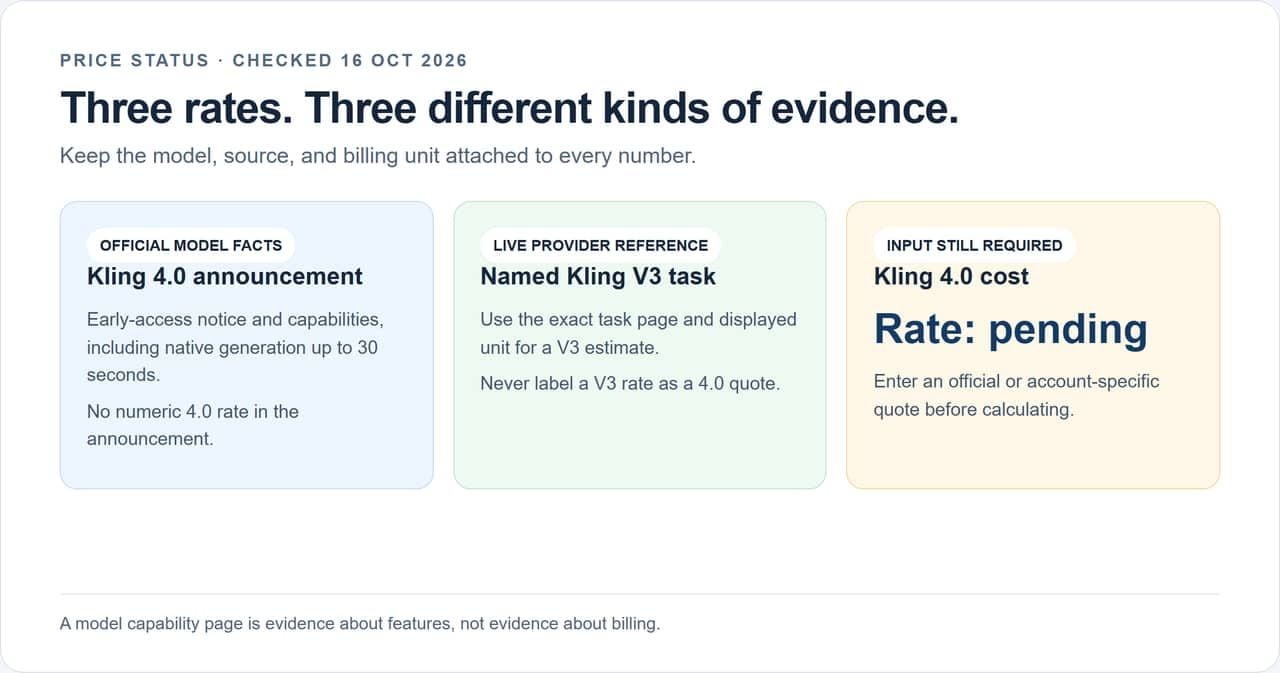
Price status at a glance: a verified V3 quote is useful for a V3 scenario, while the Kling 4.0 rate remains an input to verify.
| Price status | What it tells you | Can it price Kling 4.0 exactly? | How to use it |
|---|---|---|---|
| Official Kling 4.0 feature announcement | Early-access status and published capabilities | No numeric rate stated in the announcement | Confirm the model and features, then check the quote in your account |
| Live provider rate for a named Kling V3 task | Price currently displayed for that V3 task and provider | No | Estimate a V3 task or use it as a clearly labeled reference |
| Unverified 4.0 price on a third-party page | A claim whose billing source and terms may be unclear | No | Do not enter it as fact; verify against the official checkout or API documentation |
| Your account’s pre-generation quote | The charge for the selected model, inputs, and settings | Yes, for that quoted request | Record the model, settings, unit, and date beside the quote |
Kling’s announcement supports capability statements, not a cost formula. A 30-second maximum output does not establish whether the model charges per second, per job, or by credits that vary by settings. Likewise, early access means availability can depend on rollout or account eligibility. Confirm access and the charge in the product before budgeting a production run.
For API work, look for an official developer rate card or a returned estimate tied to the exact model and request. For a web subscription, use the credit estimate shown in the generation interface and the plan’s current credit terms. If neither is available, retain a blank rate field. A blank field is more useful than a precise-looking number with no verified basis.
The practical workflow is simple: choose the exact product route, capture the displayed quote, then calculate the total attempts. If you are evaluating a provider that lists current Kling V3 tasks, its live model page can show task names and displayed V3 starting rates. Those rates are not official Kling 4.0 prices.
What changes the cost of a Kling video?
The request’s billing unit determines what you multiply. A provider may show a per-second rate for an API task, while a consumer interface may deduct credits per generation. Those units cannot be compared directly until you know the credit allocation and the cash price paid for it.
Before comparing two quotes, record:
- Model and task: for example, Kling V3 Standard text-to-video versus Kling O3 reference-to-video.
- Output duration: quote units may be per second, per task, or tied to a selected duration.
- Resolution or quality tier: include it only when the quote or rate card distinguishes it.
- Audio and references: note whether audio, image references, video input, or editing changes the charge.
- Attempts: include first passes and reruns, not just the clip you keep.
- Account terms: note plan, credit bundle, region, promotion, and quote date.
Do not assume that every setting affects Kling 4.0 cost in a particular direction. The official feature announcement describes controls and outputs, not their billing effect. Compare only quotes tied to the same model, task, duration, and settings. If a page shows “from” pricing, open the task details and check the actual tier that matches your request.
Count a source image as a separate asset
This cafe still was generated as the input for a later image-to-video request. It fixes the woman, amber bottle, white cup, and window setting before motion begins. Its image-generation charge belongs on its own budget line, separate from the seconds billed for video.
 Source image made in the Atlas Cloud test environment. The displayed image-task quote was $0.036 on October 16, 2026; this is an input cost for this example, not a Kling 4.0 video price.
Inspect the motion output before counting it as usable
The same still was supplied to a nine-second image-to-video request. The output changes from a front three-quarter view to a window-side profile and then an overhead product close-up. Check whether the character, bottle, and hand action survive those cuts; a charged attempt is not automatically an approved clip.

Generated with Kling V3 Pro image-to-video in the Atlas Cloud test environment. The displayed quote for this request was $0.8568 on October 16, 2026. Record it with the source-image charge and any retries; neither quote establishes Kling 4.0 pricing.
The calculator: estimate cost per clip and per month
Use one of these formulas after you have a quote. Keep the unit in the spreadsheet so nobody mistakes a credit estimate for cash spent.
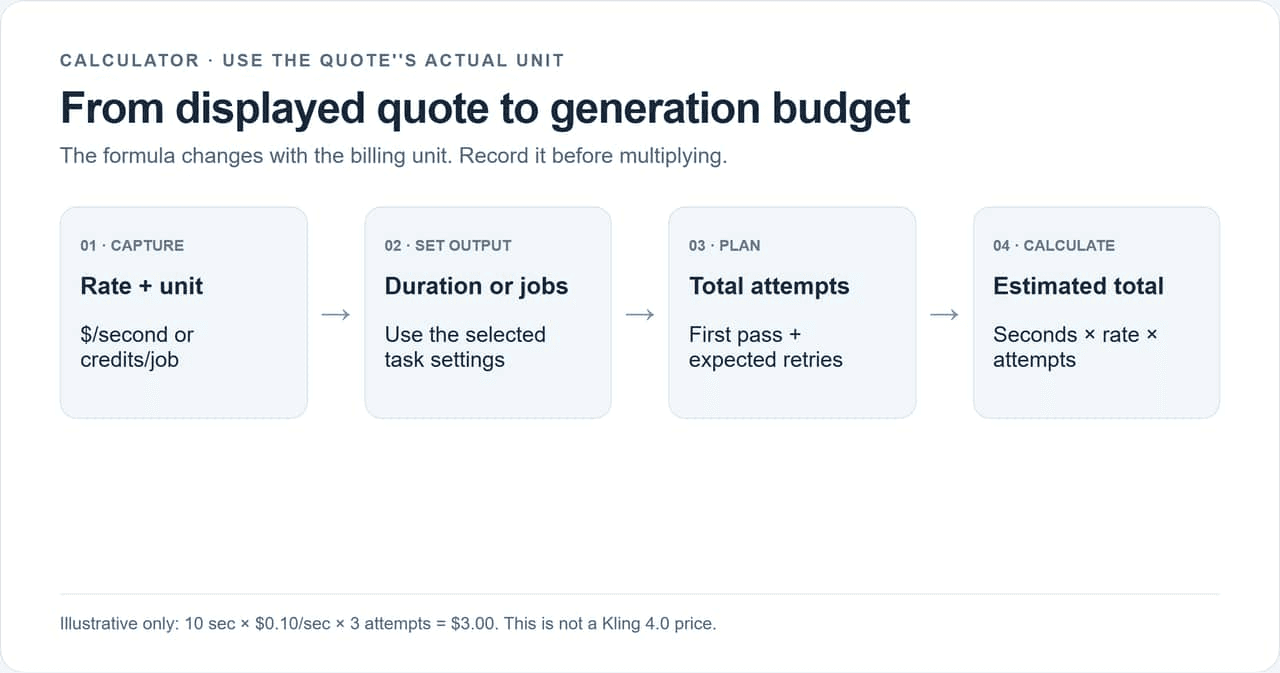 Enter a verified quote and attempt count to calculate a scenario; blank Kling 4.0 rates stay visibly unresolved.
| Input or result | Per-second quote | Credit quote |
|---|---|---|
| Rate | Displayed dollars per second | Displayed credits per generation |
| Output | Requested seconds | Requested generation |
| Attempts | First pass + expected reruns | First pass + expected reruns |
| Generation budget | Seconds × dollars per second × attempts | Credits per generation × attempts |
| Monthly estimate | Per-generation budget × planned generations | Total credits; convert to cash only with confirmed plan terms |
Use a verified per-second rate
Generation budget = output seconds × verified rate per second × expected attempts.
For a hypothetical 10-second clip, suppose a verified rate were $0.10 per second and you planned 3 total attempts. The arithmetic would be 10 × $0.10 × 3 = $3.00. This is an illustrative input only, not a Kling 4.0 quote. Replace it with the rate shown for the exact task you intend to run.
If the quote is per task rather than per second, use task quote × attempts. Never multiply a per-task charge by seconds.
Convert a confirmed credit quote into a budget
Expected credits = credits per generation × expected attempts.
If a real interface showed 80 credits per generation and you expected 3 attempts, the run would use 240 credits. To calculate a cash allocation, use credits consumed ÷ confirmed plan credits × plan price. For example, 240 ÷ 6,000 × $60 = $2.40 allocated value. These figures are hypothetical.
That allocated value is not necessarily new cash spent. A subscription may already be paid, unused credits may expire, and a top-up may have a different unit price. Report the credit balance consumed and the cash payment separately.
Keep unknown Kling 4.0 rates editable
Until a numeric rate is verified, use this row in a spreadsheet:
| Model | Task | Seconds or credits per job | Quote unit | Attempts | Estimated generation cost |
|---|---|---|---|---|---|
| Kling 4.0 | Enter selected task | Rate pending | Unit pending | Enter estimate | Not calculated |
This keeps the calculation reusable. Once a price is visible, add the rate, unit, settings, source, and date. Do not let a spreadsheet silently inherit a V3 or third-party value into a 4.0 row.
For a monthly plan, multiply the expected cost per finished deliverable by the number of deliverables. Run separate scenarios for 10, 50, and 100 videos rather than assuming every video needs the same number of attempts. A product loop with a fixed camera may take fewer revisions than a multi-shot story with dialogue, but your own history should determine the assumption.
You can also calculate a range. Set a low case using your observed average attempts, a planning case using the median, and a high case that includes your rework reserve. Multiply each by planned monthly output. If you have not logged enough jobs to estimate attempts, label them as assumptions and avoid presenting the high case as a prediction. This range helps a small team decide whether to shorten the shot list, reduce the number of versions, or pause production when the budget ceiling is reached.
For an example with 50 videos, do not simply multiply the hypothetical $4.00 shot-budget illustration by 50 unless every deliverable uses the same 15-second structure and assumed rate. Instead, count planned approved seconds, apply the exact task quote, and add the retry reserve. This keeps a batch forecast connected to the creative brief rather than turning one scenario into a false universal unit cost.
Budget for accepted footage, not just generations
A useful budget asks how much it costs to obtain the footage you approve. Consider a 15-second social ad with 3 planned shots, each 5 seconds long. If your working assumption is 2 attempts per shot, the generation budget is 6 shot attempts. Add a separate reserve for a replacement shot or a failed request. These attempt counts are planning inputs, not industry averages.
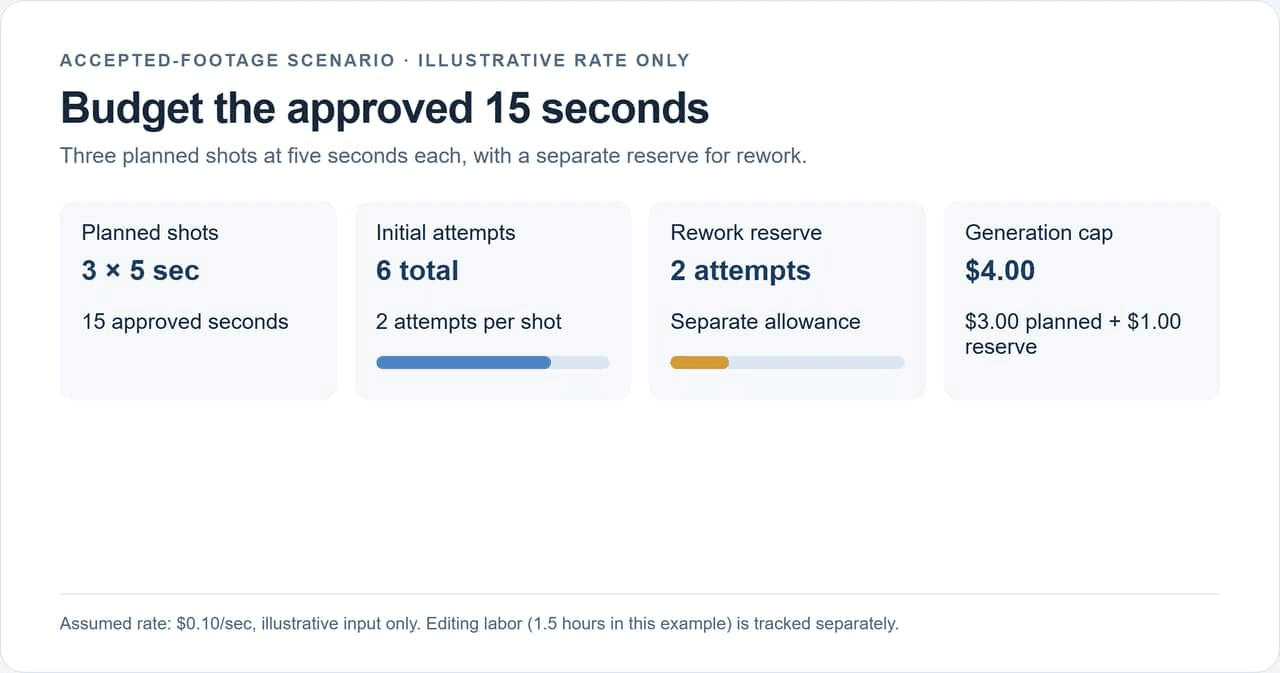 An illustrative 15-second deliverable budget separates the initial attempts, rework reserve, and editing labor.
| Budget line | Example input | Calculation |
|---|---|---|
| Approved video length | 15 sec | 3 shots × 5 sec |
| Planned shot attempts | 6 | 3 shots × 2 attempts |
| Verified rate | Illustrative: $0.10/sec | Replace with current task quote |
| Planned generation spend | $3.00 | 6 × 5 sec × $0.10 |
| Rework reserve | Illustrative: 2 more attempts | 2 × 5 sec × $0.10 = $1.00 |
| Editing time | 1.5 hours | Track separately from model charges |
| Budget ceiling | $4.00 generation spend | Pause or simplify shots when reached |
The example’s rate is illustrative input only. It does not describe Kling 4.0 or any current provider rate. The point is the structure: six initial attempts cost $3 under the assumed rate, a two-attempt reserve adds $1, and editing remains a labor cost. The model charge for the example is therefore capped at $4 before any other production expenses.
See what a three-shot draft requires
This 9-second test clip shows a woman, an amber bottle, and a cafe across three camera angles: table-level, side view, and overhead. It is a separate creative test, not the 15-second budget scenario above. Review each cut for product continuity and usable action before marking an attempt as approved.

Generated in the Atlas Cloud test environment with Kling V3 Pro text-to-video. The displayed quote for this nine-second request was $0.8568 on October 16, 2026; it is not a Kling 4.0 rate.
Estimate attempts per approved shot
Set a retry cap per shot and an overall generation ceiling before production begins. Define “approved” in practical terms: subject identity holds, action is usable, framing fits the edit, and the clip meets the campaign’s technical requirements. Without a shared approval rule, one person may accept a clip that another sends back for another generation.
Once a shot reaches its cap, change the prompt, reference, or shot design, or use another verified workflow. Blindly repeating a failed setup makes the budget harder to predict. Track the reason for each retry so you can distinguish a prompt issue from an unsuitable duration or a task that does not match the desired result.
Separate credit allocation from cash paid
If you use a credit plan, report both “credits used” and “cash paid this month.” A simple spreadsheet allocation can help compare plans, but it assumes all included credits are used. Unused subscription credits may have no cash recovery value, while top-up credits may have different terms.
For an API, record billed usage from the invoice or usage dashboard rather than estimating cash from a subscription’s credit ratio. For an account-based generation tool, capture the displayed credit cost at submission and reconcile it with the balance after the task. These two records reveal whether a quote changed or a retry consumed a different amount.
Kling 4.0 vs. Kling 3.0 pricing: what is safe to compare?
Kling V3 can provide a current, verifiable reference when its task page displays a rate. It cannot predict Kling 4.0’s rate. The models may have different capabilities, task definitions, pricing units, and rollout terms, so copying a V3 number into a 4.0 budget would create false precision.
As checked October 16, 2026, Atlas Cloud’s Kling V3 page displayed a starting rate of $0.071 per second for Kling V3 Standard image-to-video and $0.095 per second for Kling V3 Pro text-to-video and Kling V3 Turbo text-to-video, each shown with a 15% discount from $0.112. Other tasks on the same page have different rates, including 4K and O3 options. These are page-displayed Atlas Cloud rates for named V3 tasks on the check date; they may change and should not be generalized across the family.
For example, a 5-second Kling V3 Standard image-to-video estimate at the displayed $0.071-per-second rate is $0.355 for one attempt, before retries. A 5-second 4K or O3 request can have a different rate. Open the exact task and settings before using a number in a budget. Start at Atlas Cloud, then use its live Kling model listing to recheck the currently listed tasks and displayed prices. The listing is a V3 reference, not a 4.0 estimate.
Compare V3 and 4.0 only after matching the task as closely as the interfaces allow. Label the result “V3 reference scenario” until a 4.0 quote is visible.
A practical budget workflow for creators and teams
A repeatable record turns early estimates into a forecast based on your own work. For the first 5 to 10 jobs, log every attempt, including rejected footage. That sample is small and specific to your prompts, review standard, and settings. It is useful for your next estimate, not a universal success rate.
Use columns like these:
| Date | Model and task | Input type | Duration and settings | Displayed quote | Credits or cash billed | Approved? | Attempts | Approved seconds | Edit hours |
|---|---|---|---|---|---|---|---|---|---|
| YYYY-MM-DD | Exact model / task | Text, image, reference video | Seconds, resolution, audio | Rate + unit | Record actual | Yes / No | Count | Count | Hours |
After each batch, calculate:
- Average attempts per approved shot = total attempts ÷ approved shots.
- Generation cost per approved second = total generation charges ÷ approved output seconds.
- Monthly forecast = expected approved seconds × your observed cost per approved second, plus an explicit rework reserve.
Review the assumptions when the model, task, or settings change. Recheck displayed prices before a new campaign, after a promotion ends, and whenever the provider changes its model catalog. A saved screenshot or invoice reference beside the row makes the quote auditable later.
The useful output of a Kling 4.0 video cost calculator is therefore a range with traceable inputs, not a single unsupported “price per video.” Start with the official or account-specific quote when available, use a V3 rate only for a clearly labeled V3 scenario, and set a ceiling based on approved footage.
Frequently Asked Questions
Does Kling 4.0 have an official API price yet?
The official pages reviewed for this article identify Kling 4.0 and its capabilities, but did not provide a numeric 4.0 API rate. Check the official developer pricing and the quote for the exact model before making a commitment. Access and pricing can change as rollout progresses.
Can I estimate Kling 4.0 cost with Kling 3.0 pricing?
You can use a V3 price to model a separate reference scenario. Do not label the result as a Kling 4.0 estimate unless you explicitly identify it as a assumption. A newer model’s rate may differ.
Is a credit allocation the same as cash spent?
No. Credits measure account usage. A cash allocation based on a plan’s price assumes you use the included credits and ignores differences in top-ups, expiration, taxes, and unused balances. Track actual payment separately.
Should failed generations be included in a video budget?
Include every billed attempt, even if the result is rejected. If a failed task is refunded, record the refund and the net charge rather than assuming every failure is billed or refunded.
How often should I recheck Kling model prices?
Check before each new budget or production batch, especially when promotions, task options, or model availability may have changed. Save the date and exact task alongside the quote so later comparisons remain meaningful.





