

A haircut is one of the few decisions that plays out on your own face, in public, for weeks at a time. That's a lot to commit to based on a photo of a stranger's fade that someone else posted online. A Men's Hairstyle Try-On tool exists to close that gap: upload a photo, describe the cut, and see it on your own jawline and hairline before a single hair actually gets cut.
This guide covers how that kind of tool works under the hood, a free version you can test in the browser right now, honest guidance on which cuts suit which face shapes, a look at the man bun specifically, and what separates a hairstyle app worth using from one that just wastes your upload.
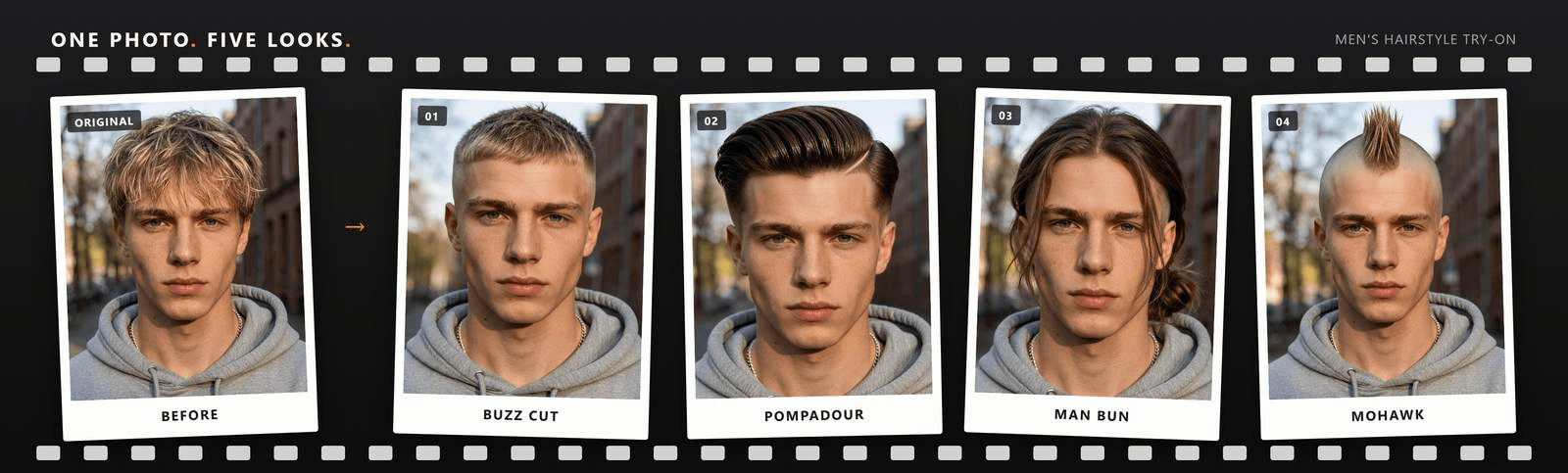
Key Takeaways
- Atlas Cloud's AI Hairstyle Changer is free to try: upload a photo and describe the haircut in your own words instead of clicking through a preset gallery.
- It changes hairstyle and hair color in the same pass, running on ByteDance's Seedream v5.0 Pro Edit image model.
- Face shape (round, oval, square, diamond, long) still decides which cuts will actually look right on you, no matter how clean the render is.
- The man bun is worth its own test before you grow one out, and it comes up under several names: man bun filter, man bun generator, man bun simulator.
- Developers can wire the same model into a barbershop or grooming app through the Atlas Cloud API rather than sending clients to a consumer tool.
Why Men Are Trying On Haircuts Online Before Sitting in the Chair
Typing hairstyle try on men into a search bar is really an attempt to close the distance between a photo of someone else's fade and what that same cut will do to your own face. Hair texture, jawline, hairline shape, even how your ears sit, all of it changes how a haircut actually reads once it's not on a stranger.
Worth saying plainly: no render replaces a barber's hands, and hair that curls or thins differently than a sample photo will always behave a little differently in real life than it does in a still image. What a try-on tool is actually good for is narrower than a guarantee: ruling out the cuts that clearly won't work before you spend a haircut appointment finding that out yourself.
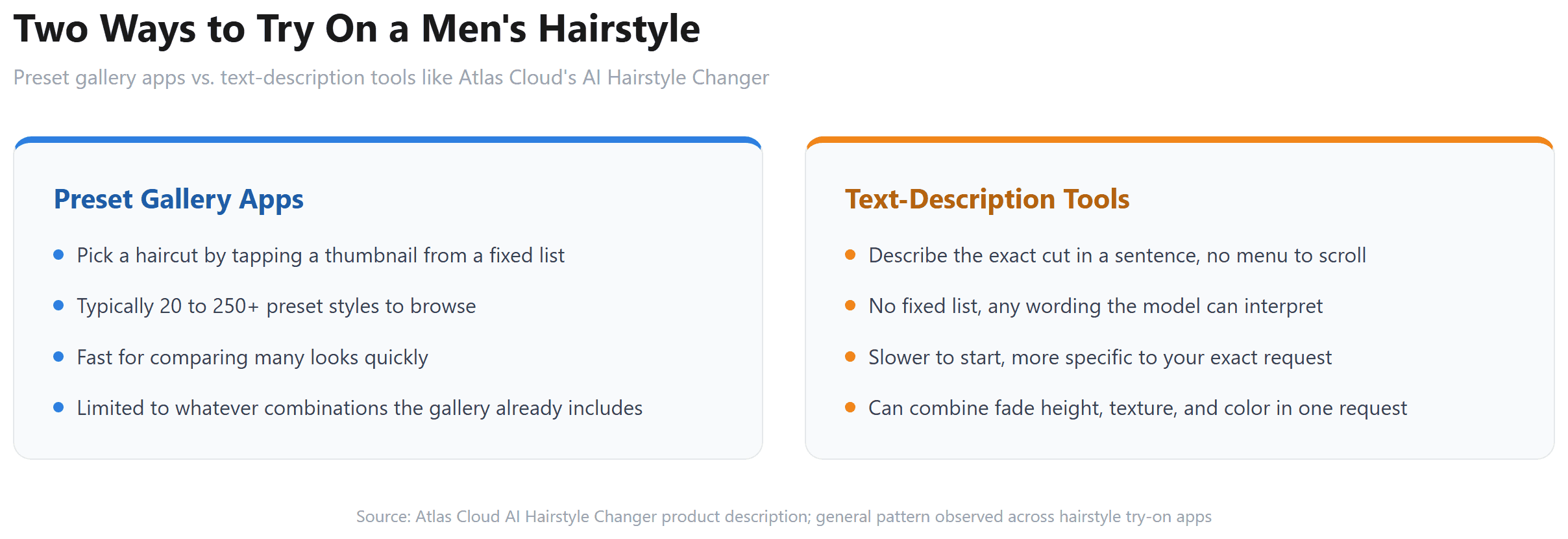
The mechanism behind these tools splits into two camps, and it changes what you can actually ask for. Gallery-based apps hand you a fixed list of presets, tap a thumbnail, done. Description-based tools take a sentence and generate from it. Atlas Cloud's hairstyle tool sits in the second camp: there's no style menu to scroll, just a text field where you describe the cut, and the model builds it on your photo. That means you can ask for a specific fade height and a color change in one line, something a fixed gallery of 40 or 100 thumbnails usually can't offer as a single combination.
Try On Men's Hairstyles Free With Atlas Cloud's AI Tool
Before spending anything, test one haircut for free and judge it yourself. Atlas Cloud hosts the image models behind this kind of edit, and its AI Hairstyle Changer packages the whole thing into one page: upload a photo, write what you want, generate. It sits alongside dozens of other single-purpose tools on Atlas Cloud's free AI tools lineup, if a haircut isn't the only thing you want to test on a photo.
Signing in with Google, GitHub, or email unlocks the free run, the same account system that covers every tool on the platform. Once you're in, the flow is quick enough to run a few times in a row while you compare cuts.
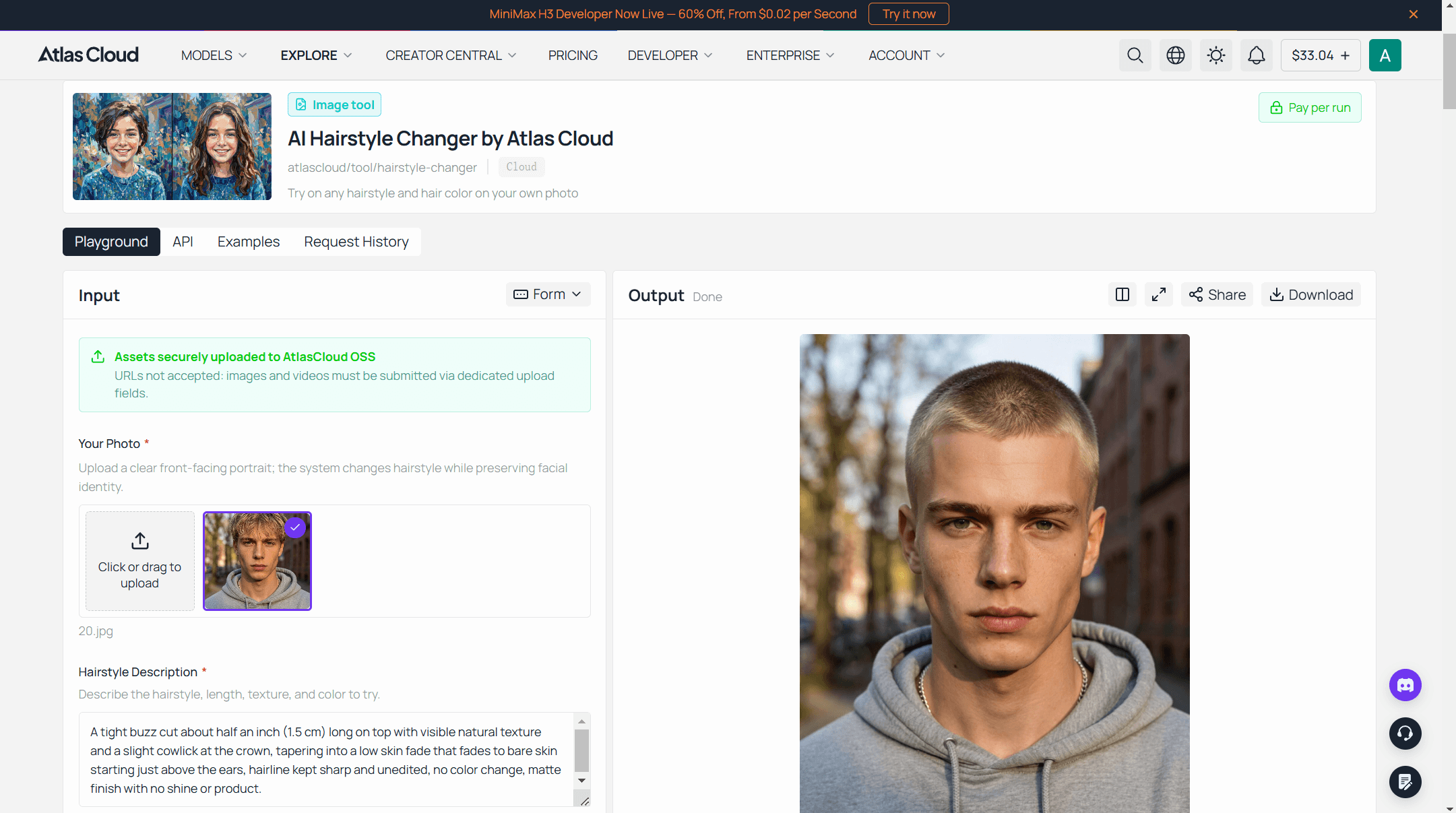
Method 1: Try On a Cut With the Free AI Hairstyle Changer
- Pick the right photo. Face the camera directly, even lighting, hairline and ears visible. Skip hats, low resolution shots, and anything where hair is pulled back or cropped out of frame.
- Upload it.
- Describe the cut in one sentence. Length, texture, fade height, part, and color if you want one changed too. "A short textured crop with a low skin fade on the sides, slightly longer on top with natural texture" gives the model far more to work with than "a nice haircut."
- Generate and compare. Look closely at the hairline and the ears, the two spots most likely to give away an inconsistent edit.
- Download.
Method 2: Build a Hairstyle Try-On Feature With the Atlas Cloud API
A single browser tool covers one photo at a time. A barbershop booking page, a grooming brand's site, or a batch job across dozens of client photos needs the model directly. The current fit for this edit is Seedream v5.0 Pro Edit, one of several image models in the ByteDance collection on Atlas Cloud, tuned to hold a face, skin tone, and lighting steady while it rewrites everything else in the instruction.
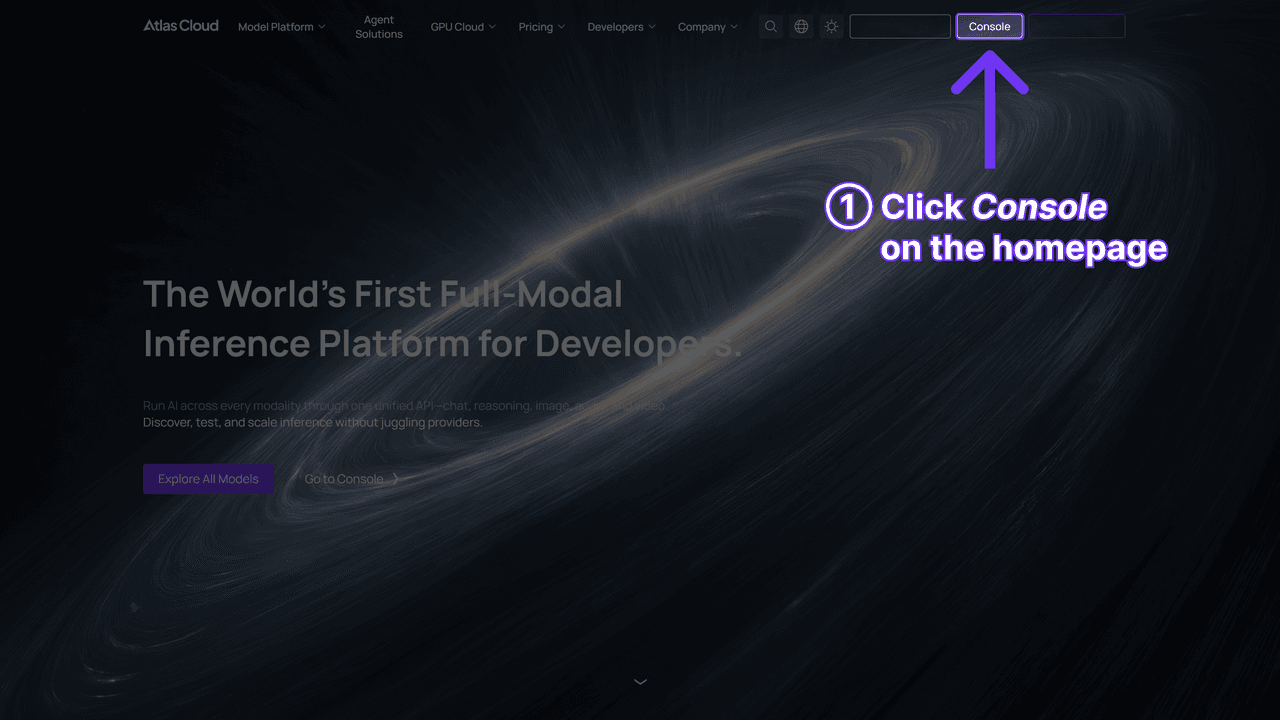
Step 1: Create an API key. Generate one in the Atlas Cloud console and keep it server-side.
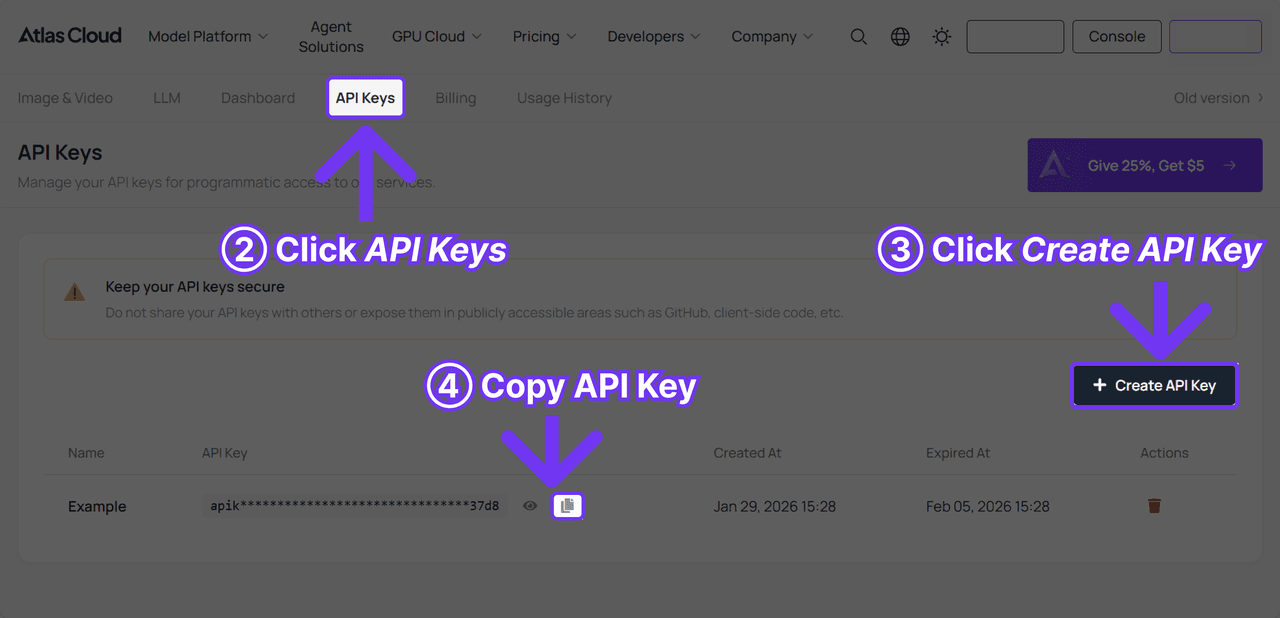
Step 2: Check the request shape. Authentication and the polling contract live in the API documentation, and the model publishes its own schema at bytedance-seedream-v5.0-pro-edit.json, listing accepted output sizes and reference image limits.
Step 3: Send the request and poll.
plaintext1curl -X POST https://api.atlascloud.ai/api/v1/model/generateImage \ 2 -H "Content-Type: application/json" \ 3 -H "Authorization: Bearer $ATLASCLOUD_API_KEY" \ 4 -d '{ 5 "model": "bytedance/seedream-v5.0-pro/edit", 6 "prompt": "Change this man'''s hairstyle to a short textured crop with a low skin fade on the sides. Keep his face, skin tone, and the background unchanged.", 7 "images": [ 8 "https://your-cdn.com/client-photo.jpg" 9 ], 10 "size": "1328*1776" 11 }'
Which Men's Haircut Actually Suits Your Face Shape
An AI mens haircut render only answers half the question. The other half is whether that cut suits the face underneath it, and that part hasn't changed since long before any of this software existed. A few general starting points, not rules a stylist can't override:
- Round (cheeks are the widest point): height on top with shorter, tighter sides adds a vertical line instead of more width.
- Oval (forehead, cheekbones, and jaw are close in width): the most forgiving shape. Buzz cuts, fades, and longer textured tops all sit fine.
- Square (a strong, angular jawline): a textured crop or a soft fringe on top balances the angles without fighting them.
- Diamond or heart (cheekbones wider than a narrower jaw or chin): a bit of fringe or volume at the forehead balances a narrower lower face.
- Long or rectangular (face noticeably longer than it is wide): shorter on top with more width at the sides shortens the look; a tall pompadour stretches it further.
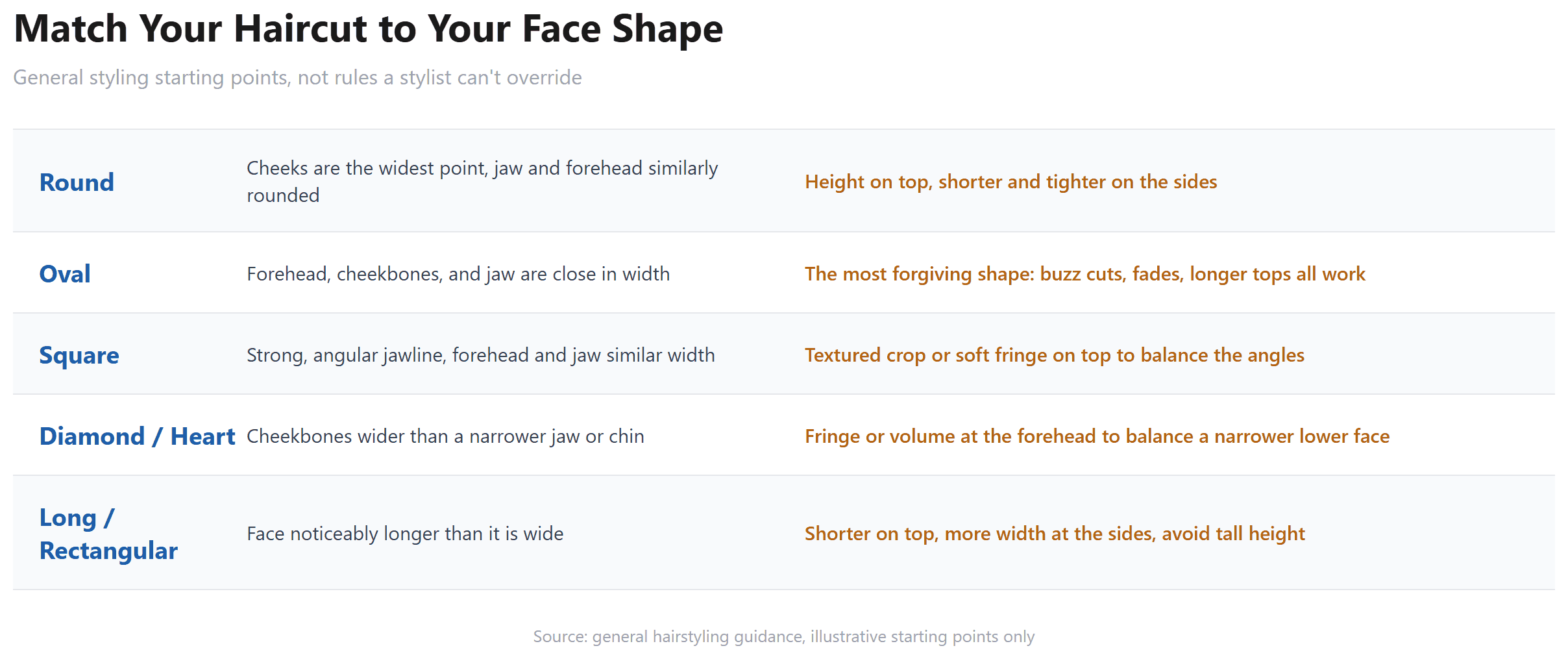
Run the same face through a hairstyle try-on tool with two or three of these directions and the guesswork mostly disappears. You're not asking "would this suit me" in the abstract anymore, you're looking at it.
Try the Man Bun Filter Before You Commit to Growing One Out
The man bun sits in its own small corner of this search, showing up as a man bun filter, a man bun generator, and a man bun simulator depending on who's typing. The tool underneath is usually the same one covering every other cut, just pointed at a longer style.
The honest catch is the input photo. If your hair right now is short, a man bun render is guessing at length and texture your photo doesn't actually show, so treat that result as a rough shape rather than a promise. If you already have a few extra months of growth, the same request gets noticeably more reliable, because the model has real hair to work from instead of inventing it.
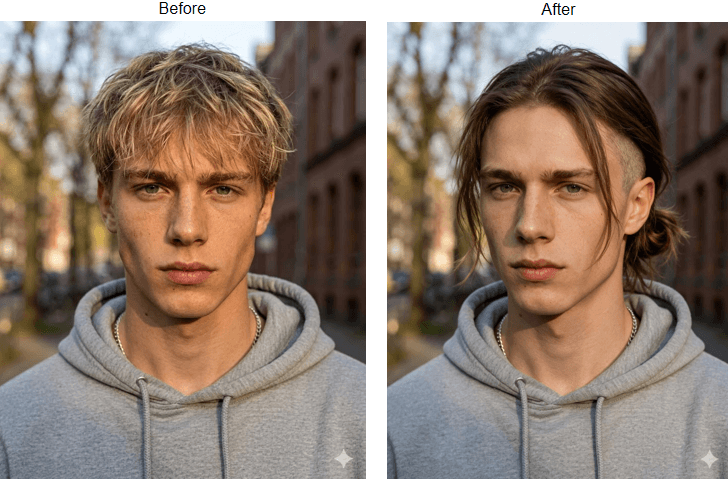
A request that tends to hold up: describe the bun height, how tight or loose it sits, and whether any strands frame the face, the same level of detail that makes a fade render come out right.
What Actually Makes a Men's Hairstyle App Worth Trying
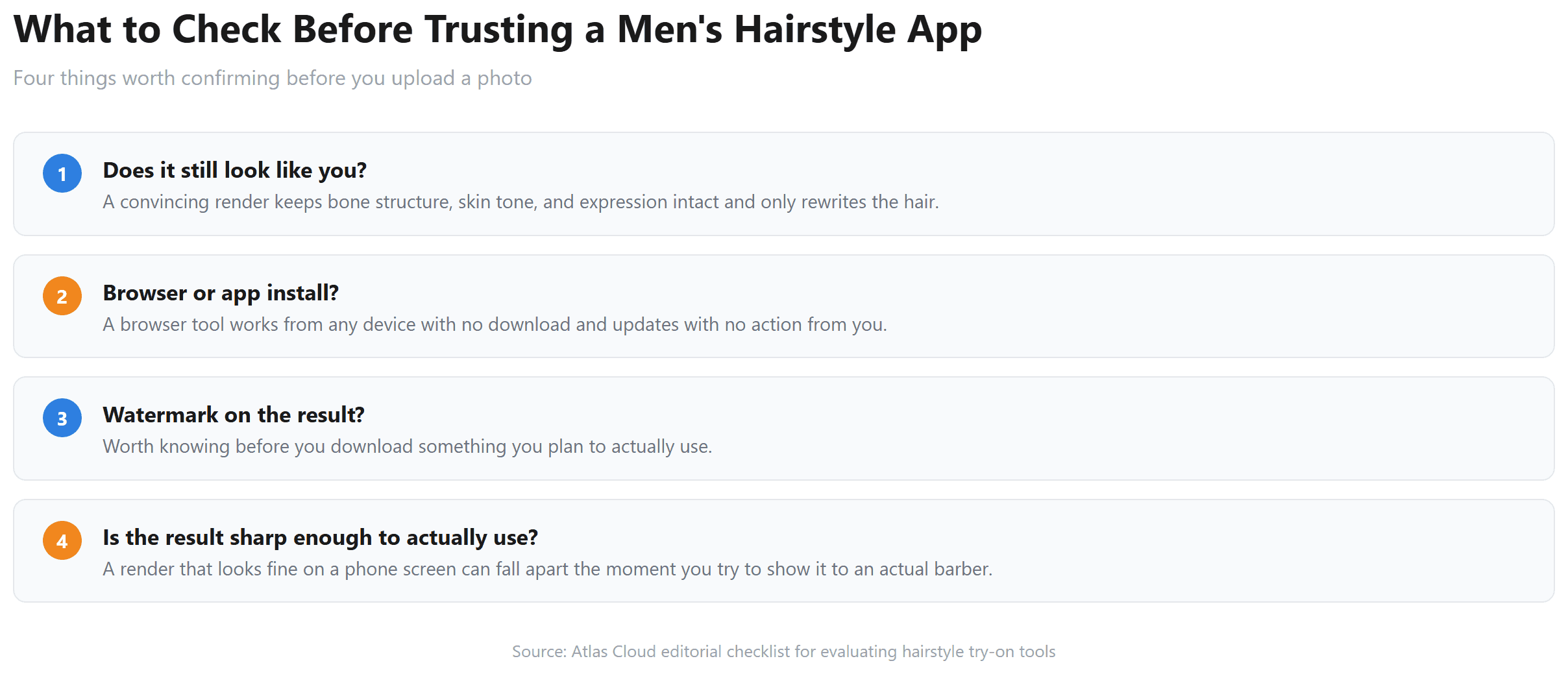
Search hairstyle apps for men and most results are mobile apps with a library of a hundred or more preset cuts to tap through, worth a browse if you don't have a specific cut in mind yet. A few other things are worth checking before you commit a photo to any of them:
- Does it still look like you? A convincing render keeps your bone structure, skin tone, and expression intact and only rewrites the hair.
- Browser or app install? A browser tool works from any device with no download and updates without you doing anything.
- Watermark on the result? Worth knowing before you download something you plan to actually use.
- Is the result sharp enough to actually use? A blurry or low-resolution render might look fine on a phone screen and fall apart the moment you try to show it to an actual barber.
If a hairstyle render is step one before a real haircut, the same underlying idea, upload a photo and preview an edit before committing to it, shows up elsewhere on Atlas Cloud too. An outfit swap runs the same kind of identity-preserving edit on clothing instead of hair, and a selfie-to-headshot converter applies a similar rewrite when the goal is a polished profile photo rather than a new cut.
Frequently Asked Questions
Is there a free hairstyle try-on app for men?
Yes. Atlas Cloud's AI Hairstyle Changer runs in the browser and includes a free generation once you sign in with Google, GitHub, or email. No app install required.
Do I need to create an account to try on a hairstyle?
Yes, signing in is what unlocks the free generation, the same account that works across every tool on Atlas Cloud. It's not an open, account-free demo, and it's worth knowing that going in rather than assuming otherwise.
What's the difference between a hairstyle filter and a haircut simulator?
Mostly branding. A hairstyle filter usually implies a quick, single-tap effect, closer to a social media filter. A haircut simulator implies something closer to a real preview, matched to your actual face and hair. In practice, both terms get used for the same category of tool, including this one, so search either and expect overlapping results.
Does an AI hairstyle changer work with curly or textured hair?
Because it works from a written description and your own photo rather than a fixed list of presets, it isn't limited to a narrow set of textures the way a small preset gallery can be. Texture accuracy specifically hasn't been something we tested exhaustively ourselves, so if that detail matters most to you, a free first run on your own photo is the cheapest way to check it.
Can a man bun try-on work if my hair is currently short?
It can generate one, but treat the result as a rough shape rather than an exact preview. The model is inferring length and texture your current photo doesn't show. A few months of real growth first makes the same request noticeably more reliable.
Can I change my hair color at the same time as the hairstyle?
Yes. The tool handles hairstyle and hair color changes in the same request, so a single description like "a textured crop, dyed dark auburn" covers both in one generation.
Is my uploaded photo stored anywhere?
The photo is processed through your Atlas Cloud account to generate the result. For the exact retention terms, check Atlas Cloud's privacy policy directly rather than assuming, since that's the authoritative source rather than any summary here.
Conclusion
The gap between a photo of someone else's haircut and what that same cut does to your own face is exactly what makes this search common in the first place. Closing it doesn't take a salon visit anymore, just a clear photo and one specific sentence describing the cut.
Start with the free run, write the haircut as one detailed sentence rather than a vague request, and check the render against your actual face shape before you read too much into it. If the results hold up and one photo at a time stops being enough, the same edit is one API call away. Either way, a Men's Hairstyle Try-On only works as well as the description you type, so be specific, check the hairline and ears honestly, and keep the version that actually looks like you.





