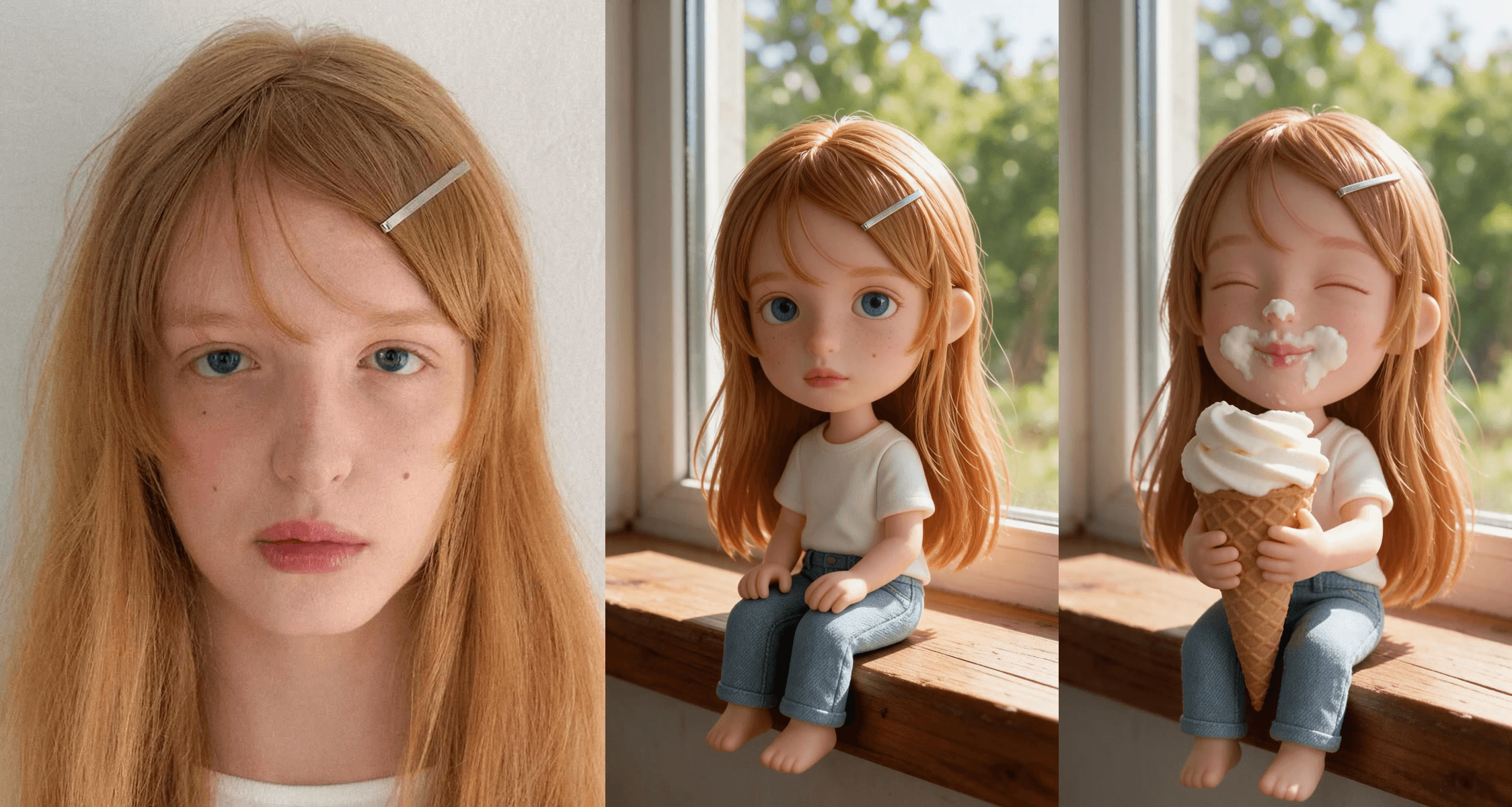
A giant finger pokes her cheek. She scowls, then spots the cone coming. Ten seconds later she has cream on her nose, a grin on her face, and she is walking off along the windowsill with her prize. That palm-sized girl is somebody's selfie, and she is the mini me AI trend in one clip.
Here is which templates make it, how we rebuilt it from one photo, and the palm version where the tiny you fights back.
Key Takeaways
- The mini me AI trend turns one selfie into a palm-sized version of you that eats, sulks and walks off.
- The ice cream windowsill version runs on one CapCut template, used more than 222,000 times since July.
- The palm version is TikTok's AI Tiny Me effect, where the tiny you swats a giant finger away.
- Two runsinthe Atlas Cloud video generator recreate the ice cream clip from your own selfie.
- Write the hand, the cone and each reaction by the second, so the tiny youstaystiny to the last frame.
What Is the Mini Me AI Trend?
You upload one photo. AI turns you into a figure about the size of your hand, with a big head, a small body and your own face, hair and clothes. Then a real-looking giant hand starts messing with you.
Two scenes carry the trend on TikTok. In the first, the tiny you sits on a window ledge, gets poked, is handed an ice cream cone and ends up with cream all over the face. In the second, the tiny you sits on an open palm and reacts to a finger that will not leave it alone.
The ice cream scene comes from a CapCut template that its creator, Guer723, titled with the Chinese word for ice cream. It was created on July 21, 2026 and had 222,620 uses when we checked on November 2. Here is the template's own preview:
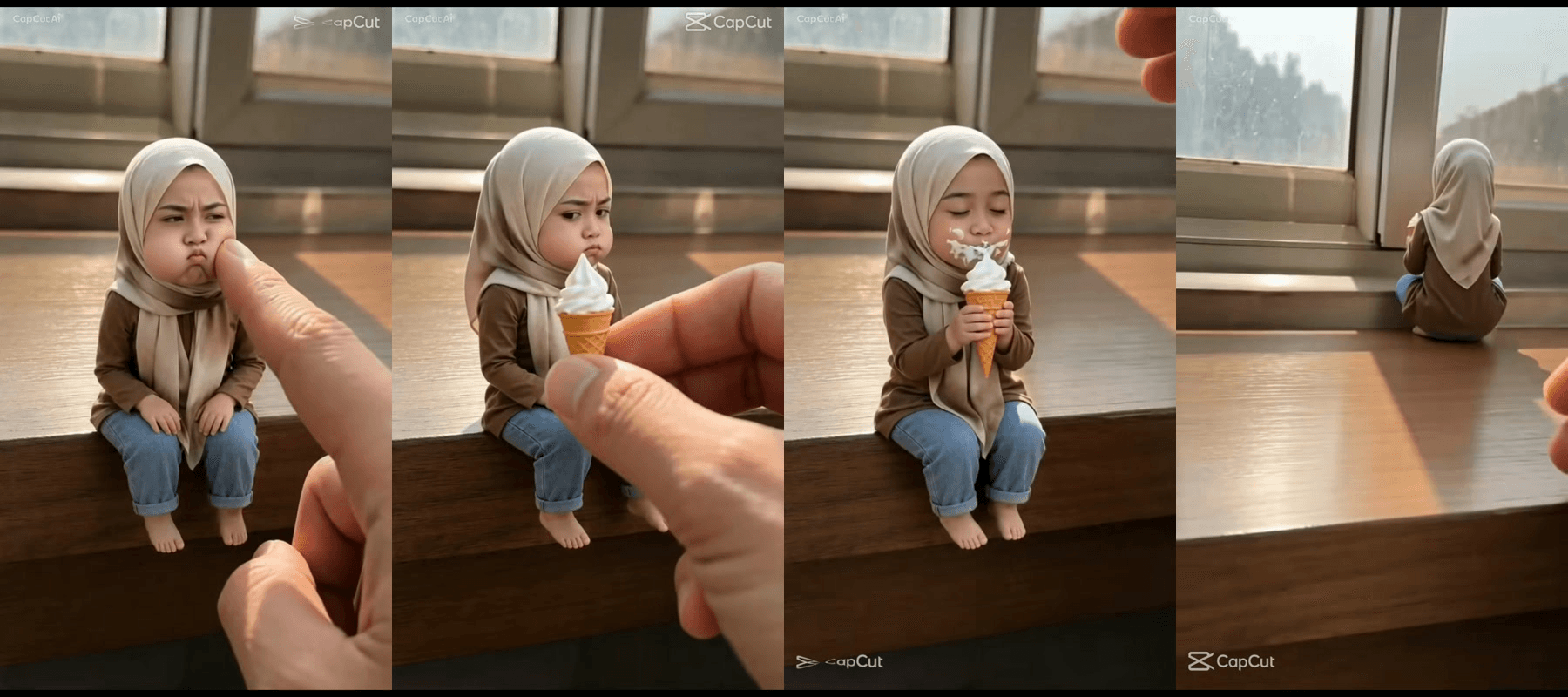
Frames from the CapCut template preview by Guer723.
The biggest post we found on it is a two-person edit shared on August 9, with 2.8 million plays. Its caption, "Mini version of me unlocked", shows up almost word for word under most of the copies we checked.
How to Do the Mini Me Trend With AI
To make your own, you need two things: a still of the tiny you in the scene, and that still brought to life by a video model that follows timing.
Atlas Cloud handles both in one workspace. Seedream 5.0 Pro turns a selfie into the figure on the windowsill. Seedance 2.5 takes that still as the first frame and acts out the poke, the cone and the walk-off. This is our result, made from the portrait in the hero image:
Every beat landed where we wrote it. The hair clip, the bangs and the freckles stayed put through the poke, the cone and the cream.
Prefer a ready-made preset? The Templates panel in the video generator has Shoulder Mini-Me ("A tiny 1:8 clone pops onto your subject's shoulder, waves, and taps their cheek") and Palm Miniature Spa, where a big-headed miniature of you gets a spa treatment on an open palm. Both are cousins of this trend with their own scenes.
Method 1: Make Your Mini Me in the Atlas Cloud Generator
Sign in to the AI video generator. The image generator sits in the same left menu.
Part 1: shrink your selfie into a figure. In Image Generator:
- Open the Image Edit tab.
- Pick Seedream v5.0 Pro under Models.
- Upload a clear, front-facing photo of yourself.
- Paste the figure prompt below.
- Under Settings, pick 9:16, which shows as 1584*2816.
- Click Run.
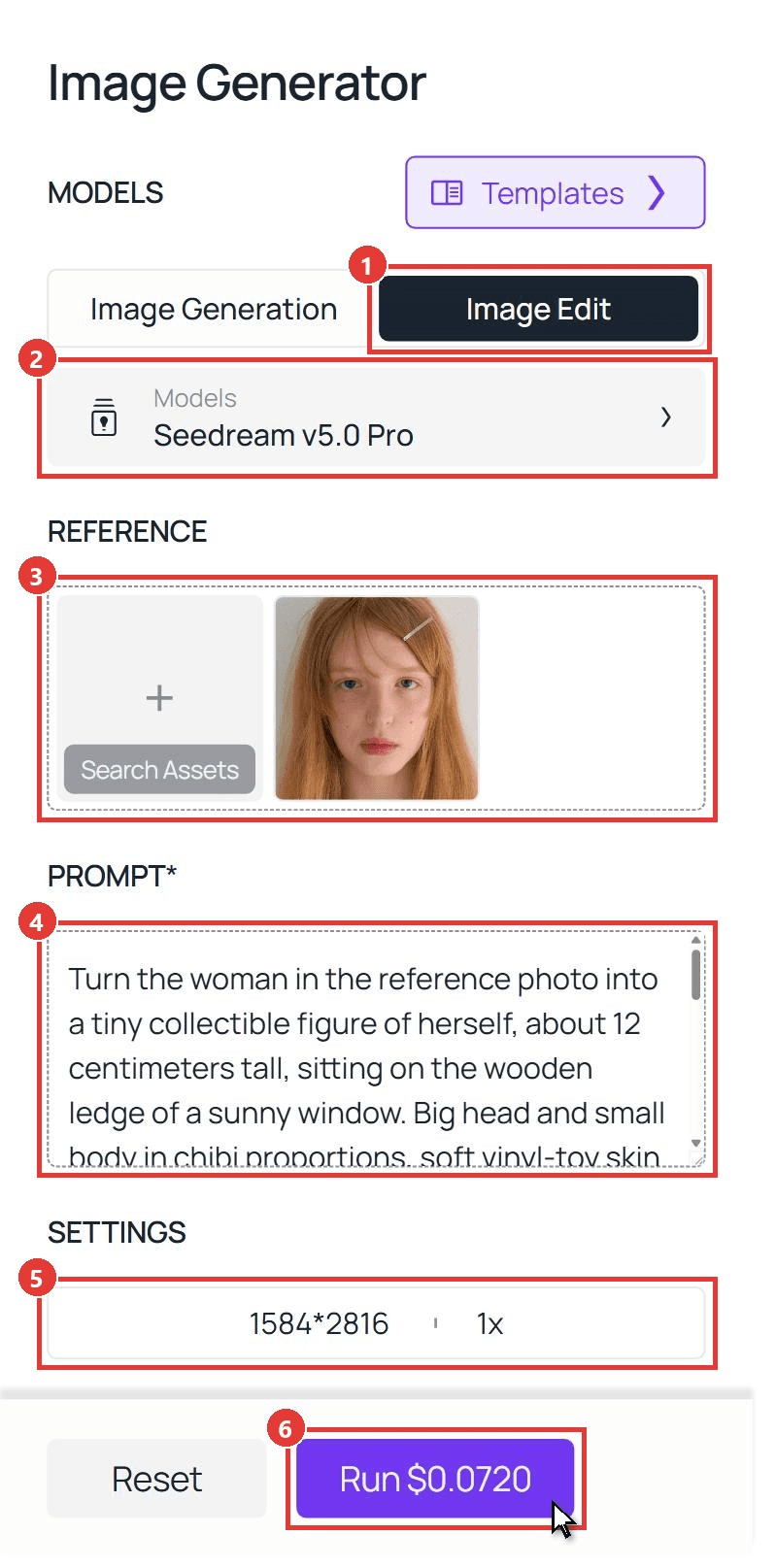
plaintext1Turn the woman in the reference photo into a tiny collectible figure of herself, about 12 centimeters tall, sitting on the wooden ledge of a sunny window. Big head and small body in chibi proportions, soft vinyl-toy skin with realistic texture, same face, same blue eyes, same freckles and small moles on her cheeks, same long straight ginger hair with bangs and the same thin silver hair clip in her bangs, white crew-neck T-shirt, light blue jeans, bare feet dangling over the edge of the ledge. She sits with her hands on her knees and looks into the camera with a slight pout. Warm afternoon sunlight from the window behind her, blurred green trees outside the glass, shallow depth of field, photorealistic macro photo, vertical 9:16, no hands in frame, no text.
Swap the hair, eyes and outfit for your own. Keep "no hands in frame", since the giant hand arrives in the video.
Part 2: bring the figure to life. Switch to Video Generator:
- Open the Video Generation tab.
- Keep Seedance 2.5 under Models.
- Upload your figure image to First Frame.
- Paste the scene prompt below.
- Pick 1080p.
- Type 10 in the Duration box.
- Leave Audio on.
- Click Run.
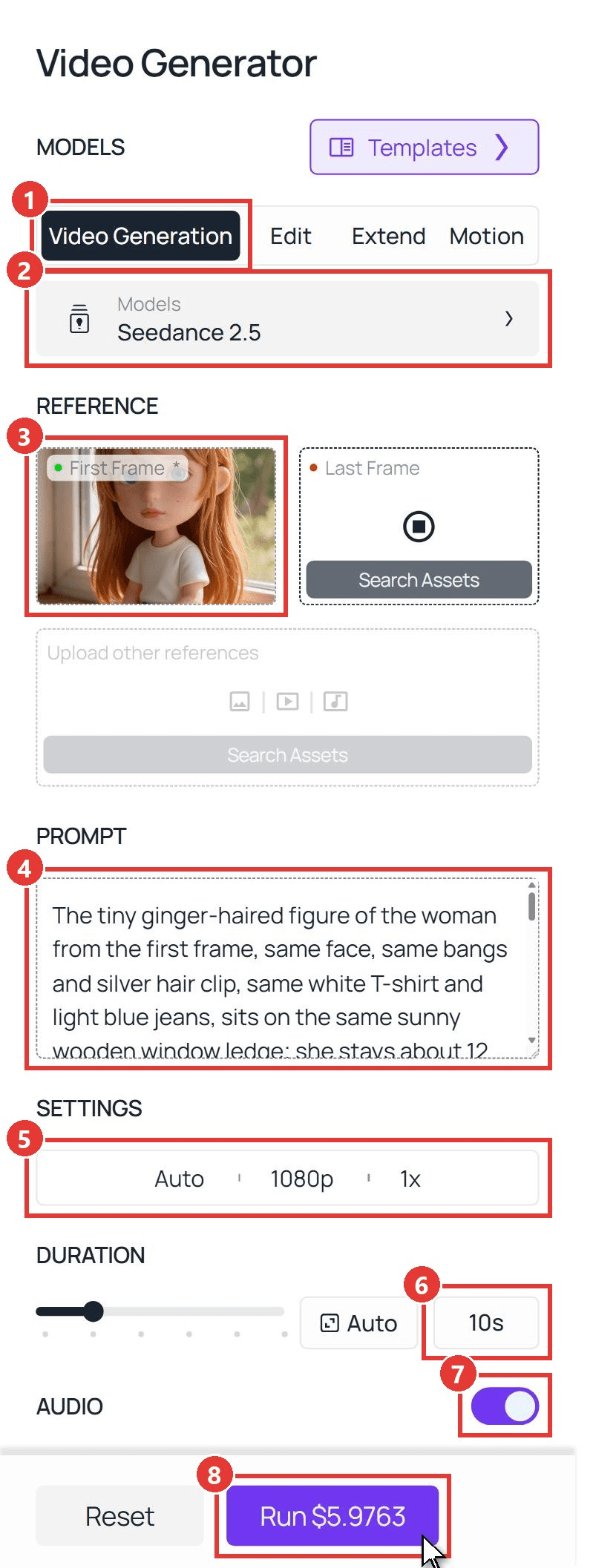
plaintext1The tiny ginger-haired figure of the woman from the first frame, same face, same bangs and silver hair clip, same white T-shirt and light blue jeans, sits on the same sunny wooden window ledge; she stays about 12 centimeters tall for the whole clip, and the camera does not move. 0-2s: a giant real human index finger enters from the right and gently pokes her cheek; she puffs her cheeks and frowns at it. 2-4s: she reaches both arms toward the camera as a giant hand brings in a vanilla soft-serve ice cream cone almost as big as her upper body. 4-6s: she grabs the cone with both hands, licks it, and her eyes light up with a big open-mouth smile. 6-8s: she takes a huge bite and white cream smears across her nose, cheeks and chin; she closes her eyes and grins, hugging the cone. 8-10s: she hops down from the edge onto the windowsill, turns and walks away along the sill with the cone, then sits down by the glass with her back to the camera. Photorealistic macro look, warm afternoon light, soft shadows, no text on screen, her mouth never talks.
Two lines do the heavy lifting. "She stays about 12 centimeters tall for the whole clip" is there so she does not grow when the cone shows up. "Her mouth never talks" let us leave Audio on while her lips stayed still. Our guide to writing Seedance 2.5 prompts covers more timing lines like these.
Method 2: Generate the Mini Me Video Through the API
Making a mini me for every friend in the group chat, or adding it to an app? The API chains the same two models.
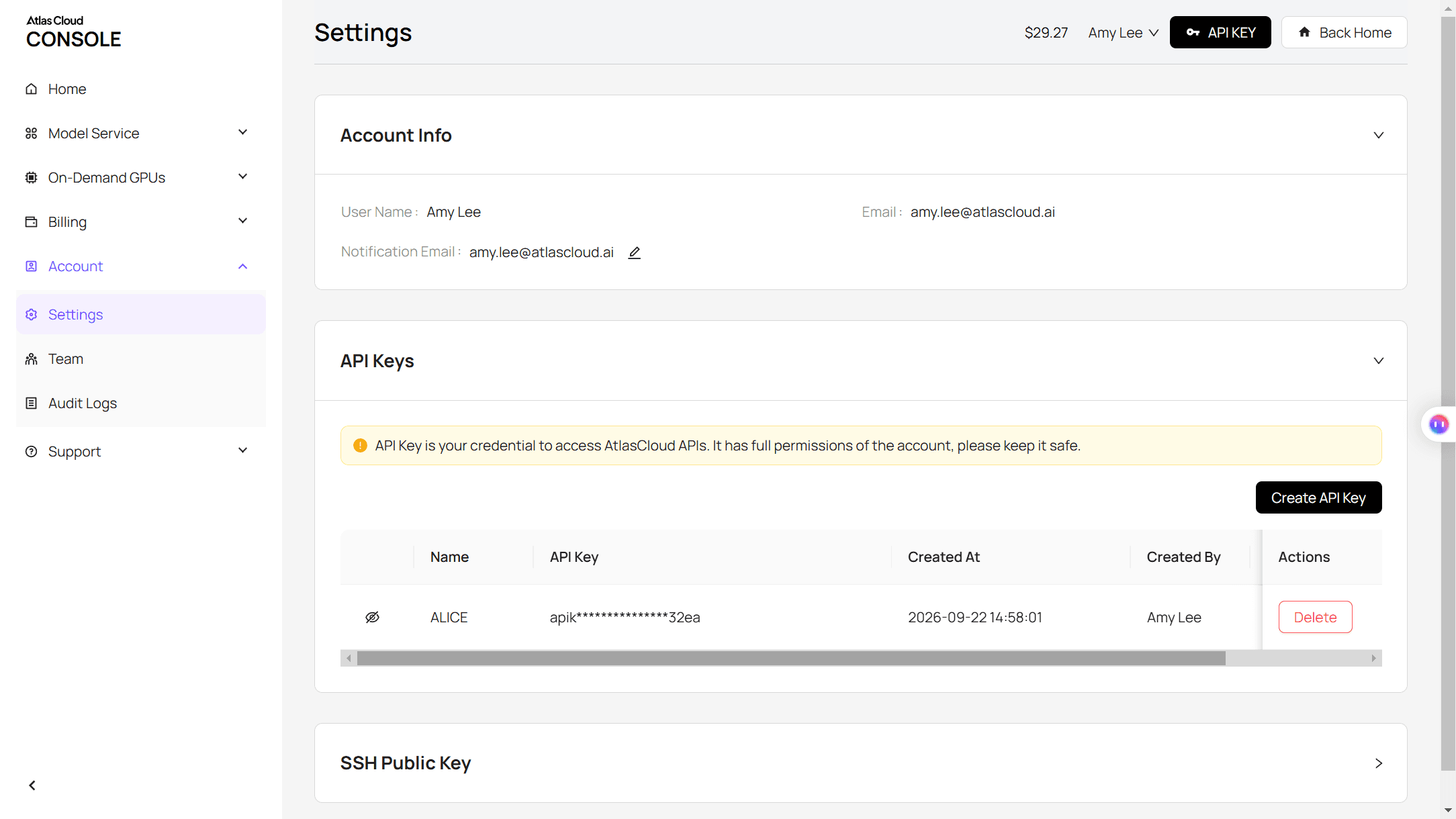
Step 1: Create an API key. In the console, open Settings and create a key under API Keys. One key covers every model.
Step 2: Check the request format. The Atlas Cloud docs cover authentication. Each model page lists its parameters in the API tab.
Step 3: Send the requests and poll. First, the figure:
plaintext1curl -X POST https://api.atlascloud.ai/api/v1/model/generateImage \ 2 -H "Authorization: Bearer $ATLASCLOUD_API_KEY" \ 3 -H "Content-Type: application/json" \ 4 -d '{ 5 "model": "bytedance/seedream-v5.0-pro/edit", 6 "prompt": "<paste the figure prompt here>", 7 "images": ["https://your-cdn.com/your-selfie.jpg"], 8 "size": "1584*2816" 9 }'
Poll the prediction ID until it reads completed, then take the image URL from outputs:
plaintext1curl https://api.atlascloud.ai/api/v1/model/prediction/<prediction_id> \ 2 -H "Authorization: Bearer $ATLASCLOUD_API_KEY"
Then send that image URL as the first frame:
plaintext1curl -X POST https://api.atlascloud.ai/api/v1/model/generateVideo \ 2 -H "Authorization: Bearer $ATLASCLOUD_API_KEY" \ 3 -H "Content-Type: application/json" \ 4 -d '{ 5 "model": "bytedance/seedance-2.5/image-to-video", 6 "prompt": "<paste the scene prompt here>", 7 "image": "<figure image URL from the first request>", 8 "duration": 10, 9 "resolution": "1080p", 10 "generate_audio": true 11 }'
Poll it the same way. The video keeps the 9:16 shape of the figure image. Both calls share one key and one base endpoint, so switching models on Atlas Cloud means changing one string.
AI Tiny Me: The Palm-Sized Mini Me Video
The second scene puts the tiny you on someone's hand. TikTok's AI Tiny Me effect is built for it, and its page listed 492,600 videos on November 2. In the creator's demo, the figure sits cross-legged on a palm, gets patted on the head, crosses its arms and pushes the finger away.
We kept that grumpy middle and gave it a softer ending. Same two-step method, with a man's portrait this time:
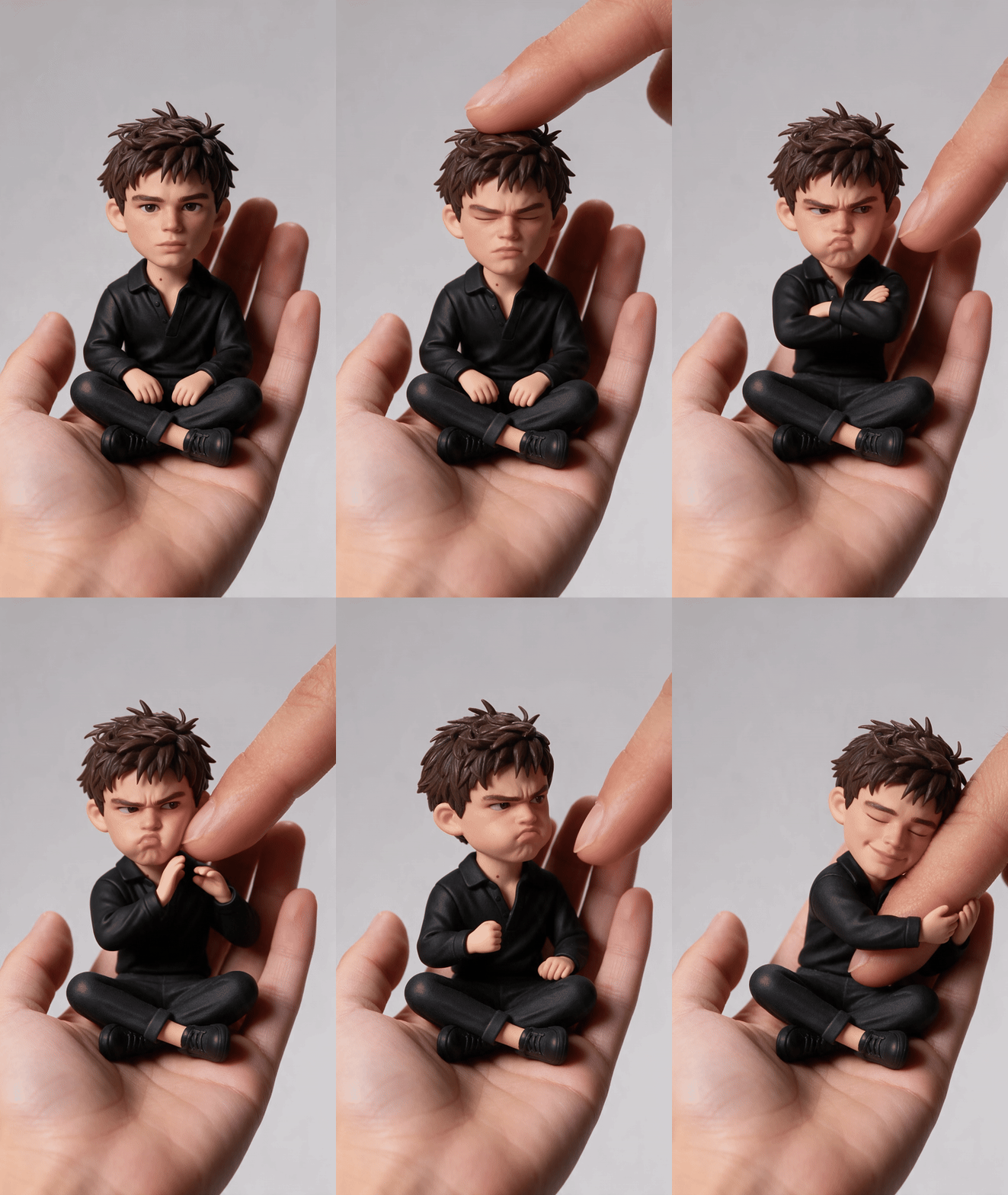
For the still, describe the figure sitting cross-legged on "the open palm of a large real human hand that enters from the bottom of the frame", on a plain light grey background. Then use this scene prompt:
plaintext1The tiny figure of the young man from the first frame, same face, same messy dark hair, same black shirt, sits cross-legged on the same open palm against the same plain light grey background; he stays tiny on the palm for the whole clip and the camera does not move. 0-2s: he looks into the camera with a serious face. 2-4s: a giant index finger from the other hand comes in from the upper right and pats the top of his head twice; he squeezes his eyes shut and scowls. 4-6s: the finger pokes his cheek; he crosses his arms and pouts. 6-8s: he uncrosses his arms and shoves the finger away with both hands, then shakes a small fist at it. 8-10s: the finger comes back slowly; he softens, wraps both arms around the fingertip and hugs it, resting his cheek on it with a small smile. Photorealistic vinyl-toy figure, soft studio light, no text on screen, his mouth never talks.
The shove came at second six and the hug at second eight, right on schedule. A palm scene also works as a reaction format: swap the hug for a sneeze, a nap or a tiny dance. If you want the version where an adult shrinks into a baby on a hand, our AI baby filter guide covers that one.
Mini Me Templates and Filters Behind the Trend
If you would rather tap a template than write a prompt, these are the mini me versions with real numbers behind them. Counts were taken on November 2, 2026.
| Template or effect | Where | Uses | What happens |
|---|---|---|---|
| Ice cream (Chinese title), by Guer723 | CapCut template | 222,620 | Windowsill figure gets poked, takes a cone, smears cream, walks off. 10 seconds |
| AI Tiny Me, by jahirsotomayorft | TikTok effect | 492,600 videos | Figure on a palm gets patted, sulks, pushes the finger away. 12 seconds |
| Tiny cute, by BatToS | CapCut template | 204,677 | Doll-like figure on a palm, poked on the cheek, scrunches her face. 5 seconds |
| Trend véo má cute, by Thùy Phương Lee | CapCut template | 4,034,115 | A selfie turns into a chubby figure standing on a palm, cheek poked. 7 seconds |
| Mini yo, by marivel molina | CapCut template | 2,543 | Figure on the lid of an iced coffee cup hugs the straw, then sulks |
The trade-off is the usual one. A template locks the scene, the hand and the timing, so clips made from it tend to look alike. A prompt lets you choose the room, the outfit and the ending, like the hug above.
Mini Me vs. Mini Me and Me Now: Same Name, Different Trend
CapCut's own mini me trend page puts a different trend at the top. Three things share the name:
| Trend | What you upload | What you get | Biggest example we found |
|---|---|---|---|
| Mini me AI (this guide) | One current selfie | A tiny figure of you reacting to a giant hand | Ice cream template, 222,620 uses |
| Mini me and me now | A childhood photo plus a current one | Child you and adult you side by side or in one frame | CapCut template me & my younger, 1.3 million uses |
| #minime | Nothing generated | A real video with a sister or daughter who looks like you | Real-life posts on the tag reach millions of plays |
The childhood version is a photo trend with a nostalgic sound. The mini me AI version is a short comedy scene. If a friend asks for "the mini me trend", ask which one they saw before you start.
Frequently Asked Questions
What app does the mini me AI trend use?
The ice cream clip is a CapCut template, and the palm clip is mostly TikTok's AI Tiny Me effect. Neither is required. Any setup that can turn a selfie into a figure and then animate it from a first frame, like the Seedream plus Seedance 2.5 pair above, can rebuild the scene and change it.
Is mini me AI related to Mini-Me from Austin Powers?
Only by name. Mini-Me is the small clone of Dr. Evil in the Austin Powers films, played by Verne Troyer. The phrase stuck around as slang for a smaller copy of someone, which is exactly what this trend makes of you.
Can I make a mini me from a couple photo?
Yes. The 2.8 million-play post we cited features two people, one after the other. For two figures in one scene, upload both photos as references in the image step and describe each figure, then name who reacts at which second in the video prompt.
How long should a mini me video be?
The templates run 5 to 12 seconds. Ten seconds fits a full arc: the poke, the reward and the exit. A shorter clip fits one reaction. Going longer means writing more beats into the prompt.
How much does a mini me AI video cost on Atlas Cloud?
With the 20% discount running now, the 9:16 figure from Seedream v5.0 Pro Edit costs $0.072 (list price $0.09). A 10-second 1080p Seedance 2.5 clip from that first frame comes to about $5.98 (list price $7.47), with or without audio. That puts one finished mini me AI video at roughly $6.05. At 720p the clip drops to about $3.04.
Conclusion
The trend runs on one simple idea: you, small enough to hold, getting bullied by a hand and winning anyway. CapCut and TikTok give you the two famous versions in a tap, cone and finger included.
Writing your own gives you every choice the templates make for you: the scene, the outfit, the treat, the ending. Start from the two prompts here, swap in your photo, and your mini me AI clip ends the way you decide.


