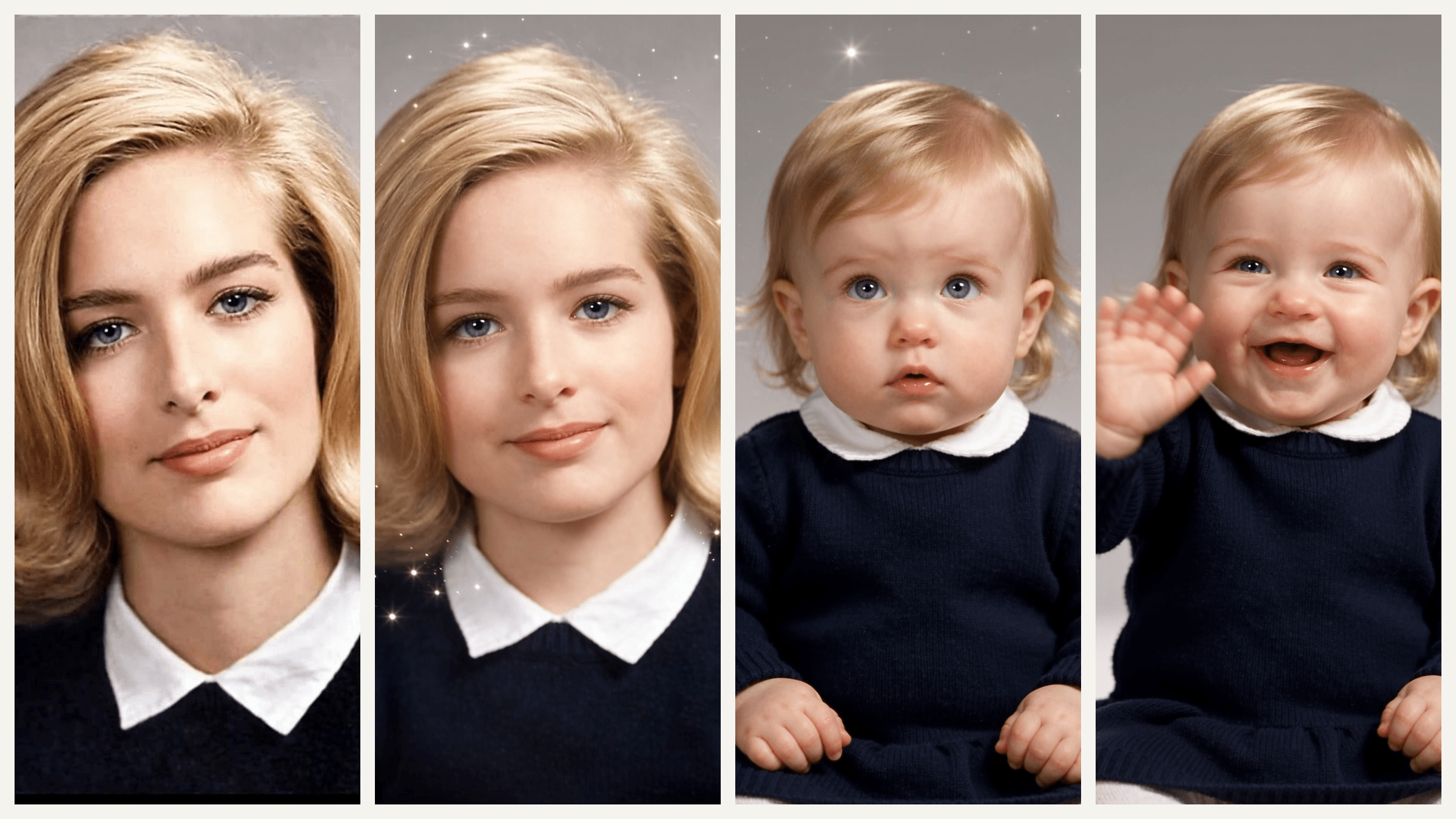
A woman in a navy sweater smiles at the camera. Three seconds later she is a two-year-old in the same sweater, and by second nine she is waving. That clip came from one photo and one prompt, and it is where the baby filter has ended up in 2026: a 10-second AI video instead of a face lens.
Below: the three things people now mean by "baby filter," the CapCut templates behind the two AI versions, and how we made both of them, with the photos and prompts included.
Key Takeaways
- The baby filter started as a live face lens and became a 10-second AI video trend in 2026
- Two CapCut AI baby dance templates, SLAYING DANCE FLOOR and Aidance, passed 3.8 million combined uses
- Atlas Cloud's AI video generator turns one baby photo into a dancing clip with Seedance 2.5
- One portrait and a timed prompt turn an adult into a toddler on camera, same face, same sweater
- A clear front-facing photo keeps the baby's face steady from the first step to the last frame
What Is the Baby Filter Trend in 2026?
Three effects share the name. The oldest is the live lens that gives you baby features while you record, the kind a 763,000-play "Baby filter" post from July still uses. The two newer branches are AI videos made from a photo.
| Branch | What you upload | What you get |
|---|---|---|
| Live baby face lens | Nothing, it reads your face | Your own recording with baby features |
| AI baby dance | One baby photo | The baby dancing to a beat for 10 to 26 seconds |
| Baby version of you | One adult portrait | You turning into a toddler, or a palm-sized mini you |
| Future baby | One photo of each parent | A still baby photo, covered in our guide to what your baby will look like |
The AI baby dance is the biggest branch by template use, and the palm-sized baby version of you sits on the single biggest template count. Both are in the table further down.
How to Make an AI Baby Dance Video on Atlas Cloud
You need a baby photo and a video model that accepts it as a reference. Atlas Cloud has both on one account, so we built a baby from two parent portraits and had it dancing in a nursery with Seedance 2.5 at 1080p. This is the clip.
Method 1: Make the Baby, Then Make It Dance
Step A, the baby photo. Have one already? Skip ahead. If not, the free AI Baby Face generator blends two parent portraits into one baby: sign in, upload one front-facing photo of each parent in the Two Parent Photos box, and click Run. Only upload photos you have permission to use.
Ours came back with the father's dark wavy hair and the mother's blue eyes, as a 1536 by 1536 image.
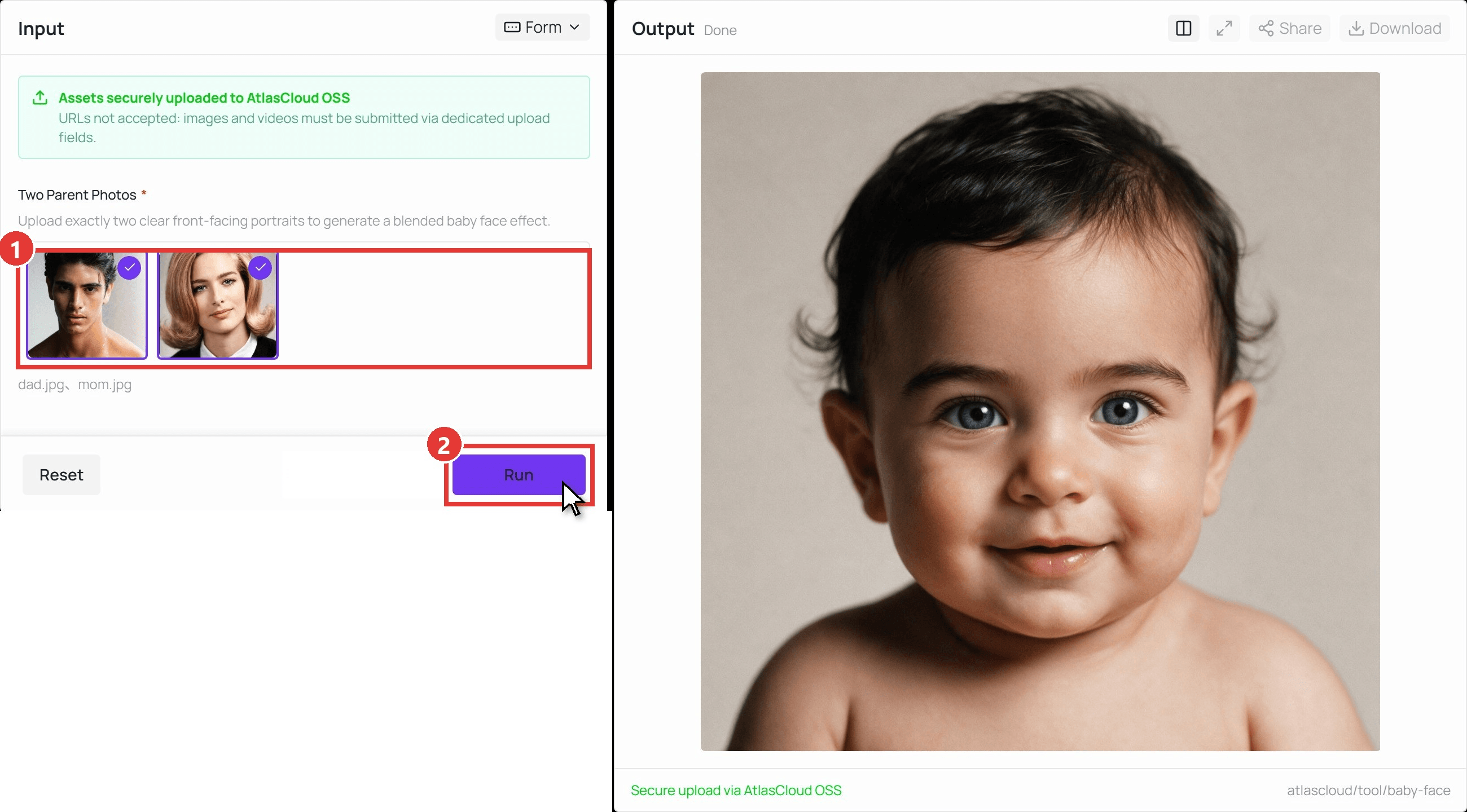
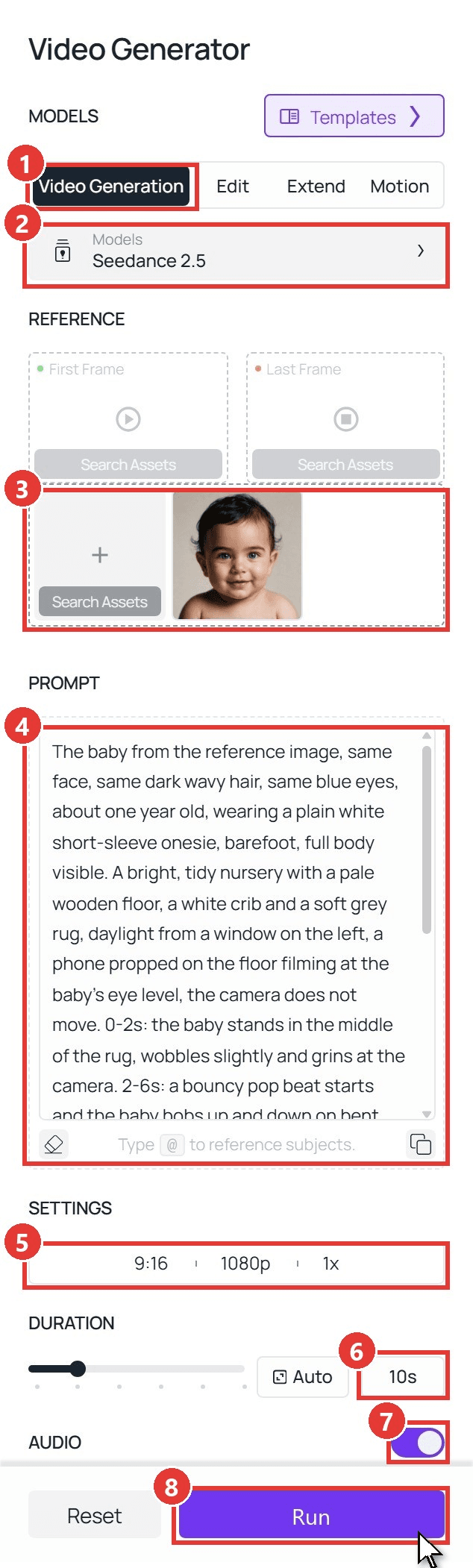
Step B, the dance. Open the AI video generator and follow the numbers:
- Open the Video Generation tab.
- Keep Seedance 2.5 under Models.
- Upload the baby photo in the box for other references, below First Frame and Last Frame. Leave both frame slots empty so the clip can open on the whole room.
- Paste the prompt below.
- Under Settings, pick 9:16 and a resolution: 720p for test runs, 1080p for the version you post.
- Type 10 in the Duration box.
- Keep Audio on for the beat and the giggles.
- Click Run.
plaintext1The baby from the reference image, same face, same dark wavy hair, same blue eyes, about one year old, wearing a plain white short-sleeve onesie, barefoot, full body visible. A bright, tidy nursery with a pale wooden floor, a white crib and a soft grey rug, daylight from a window on the left, a phone propped on the floor filming at the baby's eye level, the camera does not move. 0-2s: the baby stands in the middle of the rug, wobbles slightly and grins at the camera. 2-6s: a bouncy pop beat starts and the baby bobs up and down on bent knees, pumps both chubby arms and sways side to side in time with the beat. 6-8s: the baby spins a clumsy half turn, squeals with laughter and claps. 8-10s: the baby does one big bounce, lands on both feet and throws both arms up, beaming at the camera, and stays standing to the final frame. Realistic baby proportions and skin, natural toddler balance, no text on screen. Sound: a bouncy upbeat pop beat, baby squeals and giggles.
Change the first sentence to match your photo: hair, eye color and what the baby wears. Our clip took 4 minutes 55 seconds to generate.
Method 2: Send the Same Baby Through the API
Making a clip for every baby in the family group chat, or adding a baby dance button to an app? The API takes the same photo and prompt.
Step 1: Create an API key. In the console, open Settings and create a key under API Keys. One key works for every model.
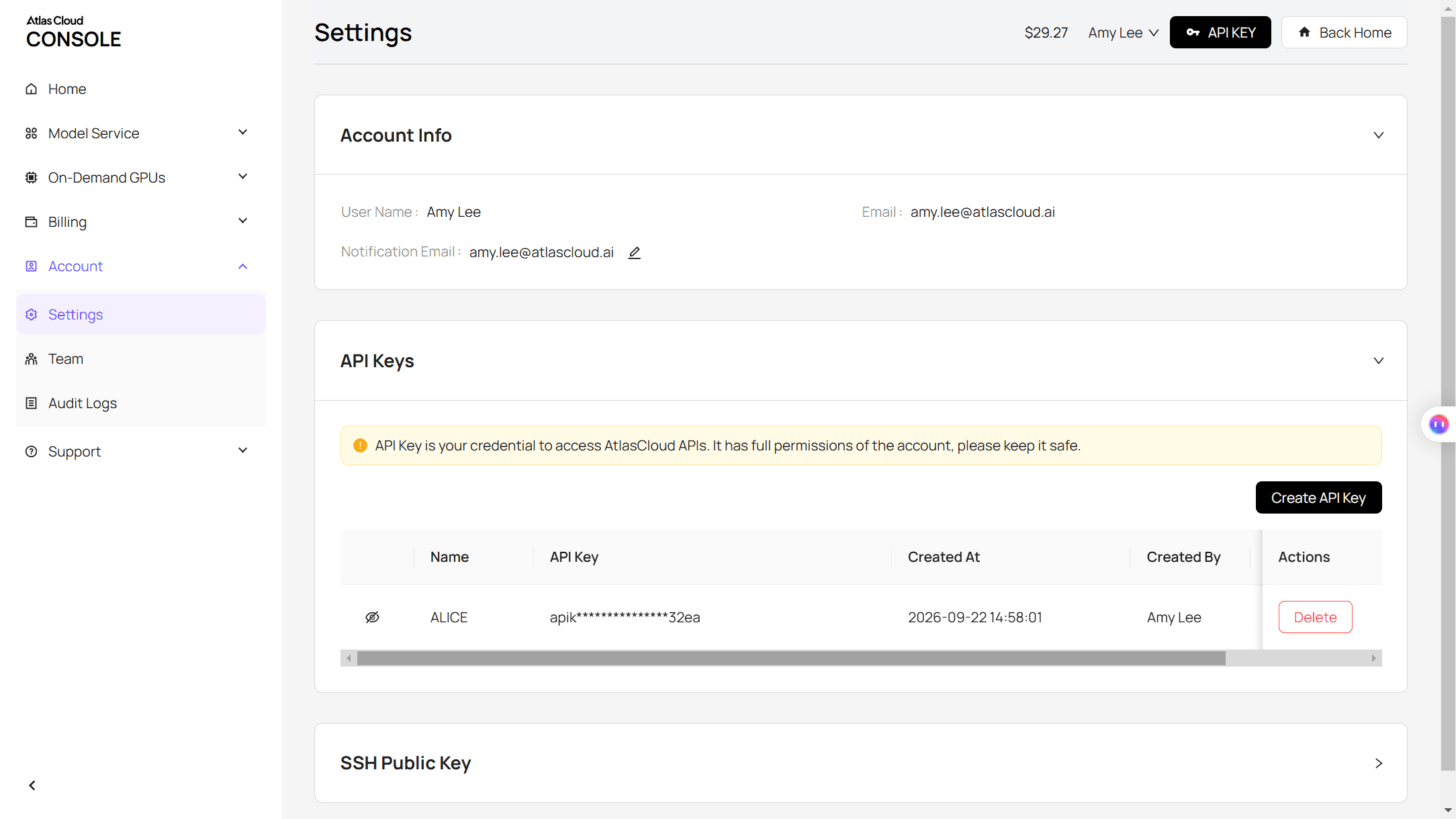
Step 2: Check the request format. The Atlas Cloud docs cover authentication and the video endpoint.
Step 3: Send the request and poll. The baby photo goes in the reference_images array:
plaintext1curl -X POST https://api.atlascloud.ai/api/v1/model/generateVideo \ 2 -H "Authorization: Bearer $ATLASCLOUD_API_KEY" \ 3 -H "Content-Type: application/json" \ 4 -d '{ 5 "model": "bytedance/seedance-2.5/reference-to-video", 6 "prompt": "<paste the Method 1 prompt here>", 7 "reference_images": ["https://your-cdn.com/baby.jpg"], 8 "duration": 10, 9 "resolution": "1080p", 10 "ratio": "9:16", 11 "generate_audio": true 12 }'
Poll the returned prediction ID until the status reads completed, then download the clip from the outputs array:
plaintext1curl https://api.atlascloud.ai/api/v1/model/prediction/<prediction_id> \ 2 -H "Authorization: Bearer $ATLASCLOUD_API_KEY"
The endpoint and key stay the same across every video model on Atlas Cloud. To try another one, change the model string.
See Yourself as a Baby: The AI Baby Face Filter Video
The second branch runs the other way: an adult portrait goes in and the person on screen turns into a toddler. Put the portrait in the First Frame slot, not the reference box, because the video has to start on your actual photo. The output keeps the photo's shape, so crop to 9:16 first for a vertical clip, and write the change as timestamps rather than only the end state.
In our run the switch happened between seconds 2 and 5, the toddler kept the sweater, collar and blue eyes, and the wave landed at second 9 as written. The palm-sized version behind the CapCut template with the biggest use count in our table works the same way, with the shrink and a hand rising into frame written into the prompt:
Prefer a preset? The Templates panel in the same generator lists Shoulder Mini-Me, "A tiny 1:8 clone pops onto your subject's shoulder, waves, and taps their cheek." A cousin of the palm trend, not a copy of it.
AI Baby Dance Video Prompts to Copy
Both transformation prompts ran as written, at 1080p and 10 seconds with Audio on. Replace the first sentence with your own photo's details and keep the timestamps.
Baby version of you:
plaintext1The young woman from the first frame, same face, same blonde flipped bob, same navy sweater with a white collar, plain grey studio backdrop, tight head-and-shoulders framing, the camera does not move. 0-2s: she looks into the camera with a calm half smile. 2-6s: her face and body smoothly shrink into a chubby-cheeked toddler version of herself, about two years old, same blonde hair and blue eyes, same navy sweater and white collar now oversized on her, same backdrop and lighting. 6-8s: the toddler blinks, looks around in surprise and puffs out her cheeks. 8-10s: she giggles and waves one small hand at the camera, and stays a toddler to the final frame. Realistic skin and hair texture, soft studio light, no text on screen. Sound: quiet studio room tone, then a toddler giggle.
Palm baby:
plaintext1The young man from the first frame, same face, same dark wavy hair, same thin gold chain, bare shoulders, plain grey wall, warm window light, the camera does not move. 0-2s: he looks straight into the camera with a serious expression. 2-5s: he shrinks into a tiny chubby chibi version of himself about 15 centimeters tall, big head, same hair, same gold chain, standing on the open palm of a large hand that rises into frame from the bottom. 5-8s: a finger from the other hand gently pokes his cheek; he puffs his cheeks, frowns and swats the finger away. 8-10s: he crosses his arms and pouts at the camera, and stays tiny on the palm to the final frame. Realistic skin texture, soft natural light, no text on screen. Sound: quiet room tone and a short squeaky huff.
In the dance prompt from Method 1, these are the lines worth swapping:
| Line in the prompt | Swap it for | Why |
|---|---|---|
| "plain white short-sleeve onesie" | The outfit in your photo | The model dresses the baby from the text |
| "a bright, tidy nursery" | Your living room, a stage, a garden | Each CapCut template uses a different room |
| "a bouncy pop beat" | A slower beat, a lullaby, clapping | The audio track comes from this line |
The full structure, subject, action, scene, camera and sound, is in our Seedance 2.5 prompt guide.
Which Baby Filter CapCut Templates Started the Trend?
We traced the templates behind the biggest TikTok posts and checked each template page on October 30, 2026. Names appear as their creators wrote them.
| Template | Creator | Posted | Uses | What happens |
|---|---|---|---|---|
| SLAYING DANCE FLOOR | CHIE | Jan 21, 2026 | 2,187,961 | A 3D-cartoon girl in pink dances under stage lights for 26 seconds, the look behind the "AI sway dance" tutorials |
| Aidance | Mila69429 | Aug 9, 2026 | 1,653,711 | A photoreal baby in a head scarf bounces and laughs, bottle in hand, 12 seconds |
| Oh | PY KANG | Aug 3, 2026 | 810,019 | A baby in a bear-print sleeper dances holding a cup of juice, 11 seconds |
| cute baby dance | Zahra Gallery | Jan 4, 2026 | 139,840 | A toddler in dungarees pulls faces and dances; a tutorial post using it reached 1.9 million plays |
| Trend véo má cute | Thùy Phương Lee | Jan 15, 2026 | 4,034,061 | A selfie becomes a chubby mini figure on an open palm, cheek poked by a finger, 7 seconds |
Every row is one photo in, 7 to 26 seconds out. A 304,900-play tutorial from June promises the clip in 10 seconds, and a smaller how-to gives the recipe in its caption: a clear front-face picture, an image-to-video tool, a dance prompt. Method 1 is that recipe with the prompt written out.
Why Some AI Baby Videos Look Creepy
The failures we hit while testing traced back to the photo or to something the prompt left unsaid.
| What goes wrong | Fix in the photo or prompt |
|---|---|
| The baby's face drifts away from the photo | Use a sharp, front-facing portrait with the hairline visible, and open the prompt with "same face" |
| The body stays adult-sized under a baby head | Write the age and "realistic baby proportions" into the prompt |
| Eyes change color mid-clip | Name the eye color in the first sentence |
| A hand or finger warps as it enters frame | Give the hand its own two-second slot and keep it slow |
| The clip ends before the move does | End the last slot with "stays standing to the final frame" |
Frequently Asked Questions
Is the TikTok baby filter the same as the AI baby dance?
No. The TikTok and Snapchat baby filter is a live lens that gives you baby features while you record. The AI baby dance is a generated video: you upload a baby photo and a model animates it, so the baby does things it never did on camera.
What app has the AI sway dance?
The "AI sway dance" tutorials point to the CapCut template SLAYING DANCE FLOOR, a 3D-cartoon dance under stage lights. For the same kind of clip without a fixed template, follow Method 1 and describe the stage and the dance in the prompt.
How long should an AI baby dance video be?
The popular templates run 7 to 26 seconds. Ten seconds fits a full routine, bounce, spin, clap and finish, and is what our clip uses. Seedance 2.5 accepts up to 30 seconds in one run if you want the whole song.
Can I use a photo of my own child?
Yes, if you hold the rights to it; the baby face tool's page says to upload only media you are authorized to use. To keep a real child's face out of it, do what we did: generate the baby from two parent portraits first, then animate that.
How much does an AI baby dance video cost on Atlas Cloud?
The first baby face generation is free on a free account, and later runs cost under a dime each. A 10-second dance clip from Seedance 2.5 comes to $3.02 at 720p or $5.94 at 1080p with the current 20% discount (list prices $3.77 and $7.42). The toddler and palm clips, made from a first frame at 1080p, come to $5.98 each.
Conclusion
The baby filter has split into three things, and only the oldest still happens live on your phone. The two AI versions, the baby dance and the baby version of you, both start from a single photo and a prompt with timestamps; the CapCut templates with millions of uses ask for the same single photo and hide the rest.
Build the baby from two portraits if you would rather not use a real one, drop it into the video generator with the dance prompt, and a 10-second clip is back in about five minutes. Write your own transformation into the first frame instead, and you have the baby filter the way 2026 does it.


