


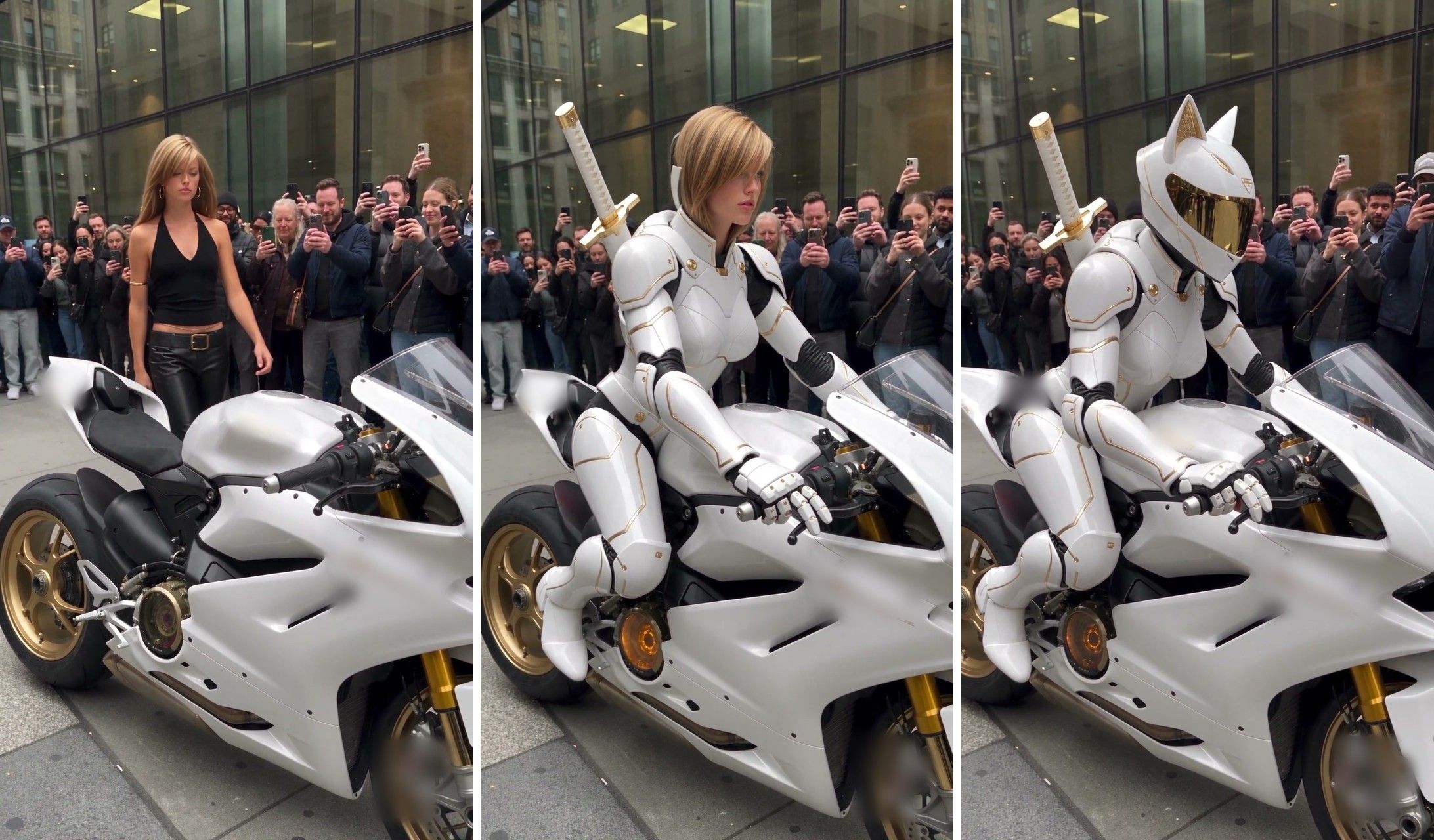
A crowd on a financial district sidewalk holds up their phones. Someone swings a leg over a parked superbike, and the bike starts climbing onto them, plate by plate, until a helmet snaps shut and the rider tears off down the street.
That is the motorcycle mecha trend, and in late November 2026 it is all over TikTok, mostly as tutorials in Spanish, English and French. Below: the two AI clips it grew from, the templates that actually match, and a prompt that rebuilds the whole scene from one photo.
Key Takeaways
- The motorcycle mecha trend traces back to an AI clip posted on October 19, 2026.
- A red-and-blue remake from November 7 is the version both one-photo templates copy.
- CapCut's Motorcycle template and Hypic's Mecha Ride each need only one photo.
- One full-length photo in the Seedance 2.5 video generator rebuilds the bike, street and crowd.
- Make the armor climb from the boots up and close the helmet last.
What Is the Motorcycle Mecha Trend?
The versions we watched follow four beats: a person walks up to a concept bike, the bodywork unlatches, armor wraps them from the feet up, and they ride away as a mecha rider while strangers film.
The earliest clip we traced is a gold "Faisal" bike posted on October 19, 2026. Its caption calls it "AI-generated fictional VFX", and it has passed 2.7 million plays. The look the templates copy came later: a red-and-blue remake from November 7, with a rider in a white tee, a revolving-door lobby and a crowd of office workers.
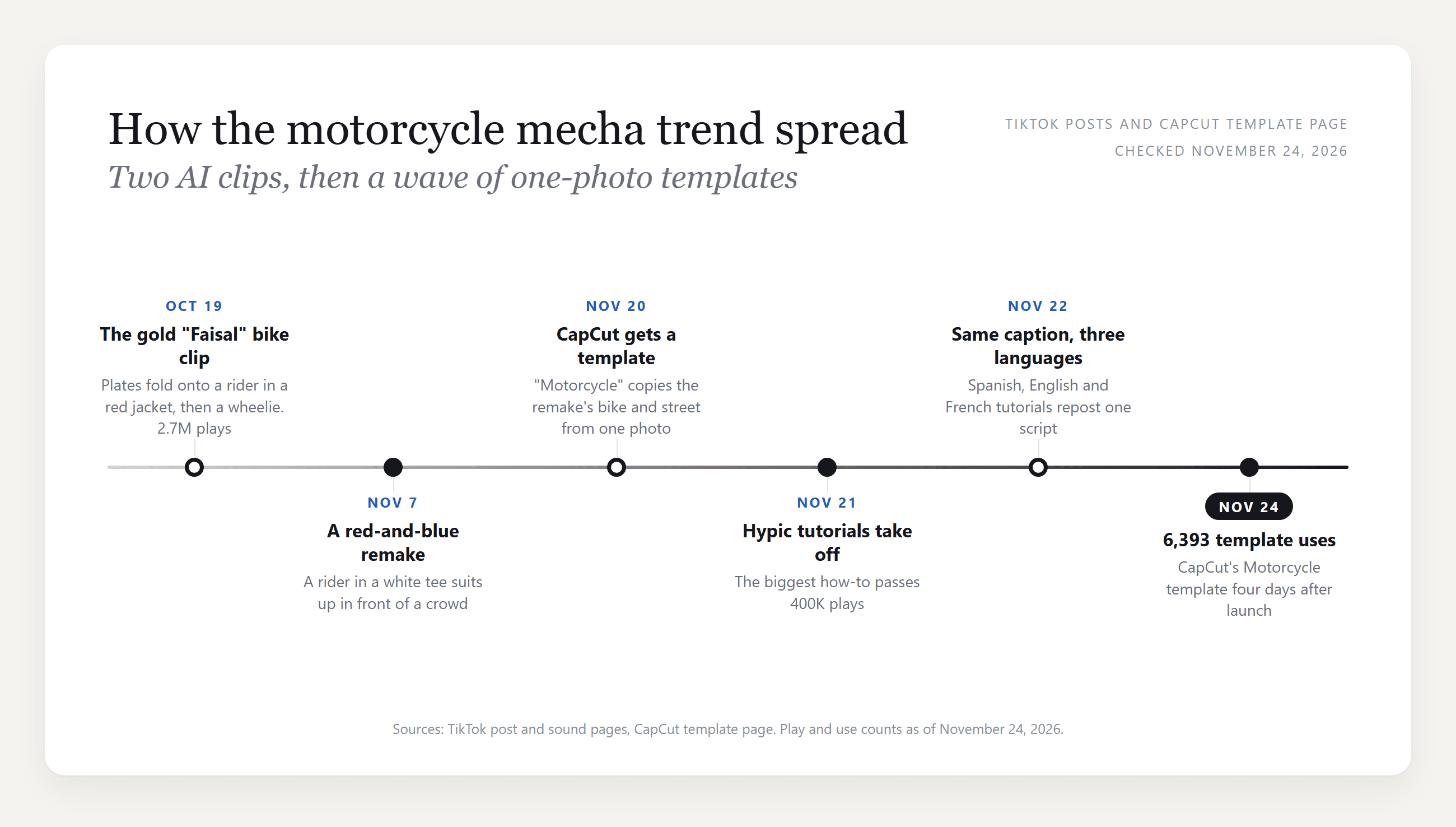
After the templates landed, at least ten accounts we checked posted the same caption, in Spanish, English or both, and recorded the steps on a phone.
How to Make a Motorcycle Mecha Transformation With Seedance 2.5
The templates swap your face into a fixed scene. A prompt lets you pick the bike, the colors and the street.
Atlas Cloud runs Seedance 2.5, which takes a reference photo and builds everything around the person in it. We gave it one full-length photo of an original character and got this 15-second clip:
Her face, hair and leather trousers carry over from the photo. The boots armor up at about 6.5 seconds, the chest by 8.5, the sword locks onto her back at 9.5, and the fox-eared helmet closes at 10.5. At 12 she pulls away to the right, and the camera follows her down the sidewalk. The sound comes from the same render.
Method 1: Use the Video Generation Tab
Use a full-length photo with a clear face, since the armor builds from the boots up. Ours shows an original character made with Seedream 5.0 Pro.
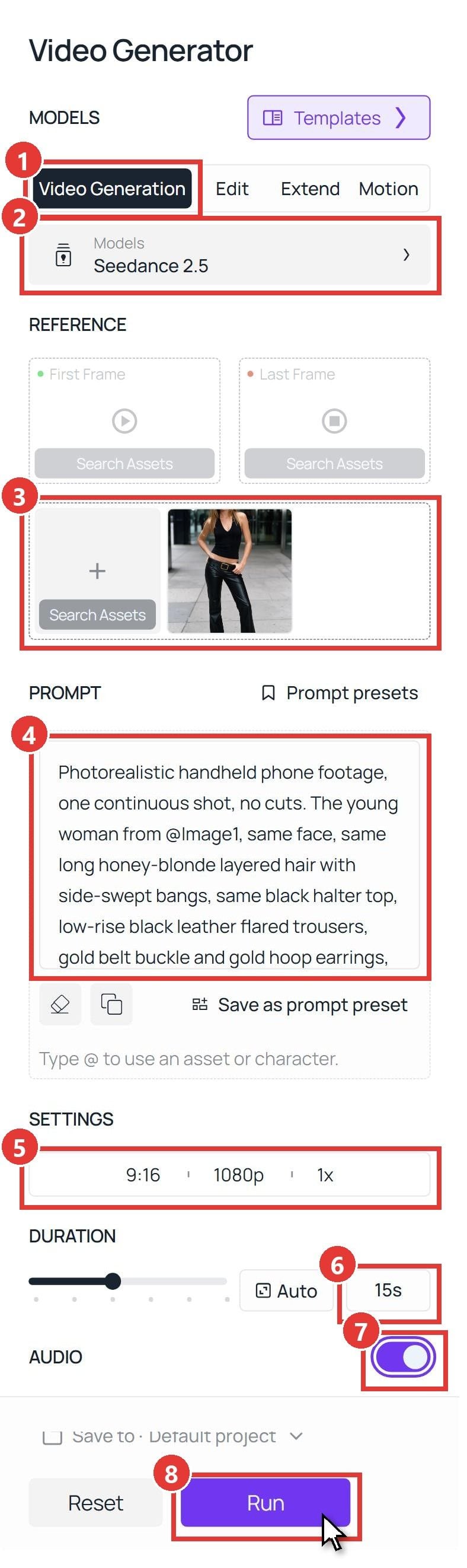
Sign in, open the AI video generator, and follow the numbers:
- Open the Video Generation tab.
- Keep Seedance 2.5 under Models.
- Leave First Frame and Last Frame empty and add your photo in the reference slot below them. The prompt calls it @Image1.
- Paste the prompt below.
- Under Settings, choose 9:16 and 1080p.
- Type 15 in the Duration box.
- Keep Audio on.
- Click Run.
plaintext1Photorealistic handheld phone footage, one continuous shot, no cuts. The young woman from @Image1, same face, same long honey-blonde layered hair with side-swept bangs, same black halter top, low-rise black leather flared trousers, gold belt buckle and gold hoop earrings, walks up to a parked concept superbike on a wide city street in front of a modern glass building on an overcast afternoon. The bike is parked side-on to the camera with its front wheel pointing to the right edge of the frame. It is an original design: glossy pearl-white fairings with fine brushed-gold trim, an exposed gold and bronze engine, gold-spoked wheels, no lettering, no logos. A crowd stands on the sidewalk behind her, filming with their phones. Fixed camera at waist height in a medium-wide shot, the whole bike in frame, space above her head. She swings a leg over and sits, grips the handlebars and presses a button by her thumb; the engine glows warm gold. The pearl-white fairings unlatch and fold onto her one by one: boots, shins, thighs, hips, waist, chest, then shoulders and forearms, each plate clicking into place. The armor looks like a high-end collectible figure: sleek, elegant and shaped to her figure with a narrow waist, layered glossy pearl-white plates with fine gold filigree lines along every edge, small gold rivets, gold knee and elbow joints. Her face and long hair stay visible while the armor climbs. A slim sword in a white scabbard with a gold guard locks diagonally across her back. Last, a sculpted pearl-white helmet closes over her head from the collar, shaped like a fox head with two tall swept-back ears and a smooth mirrored gold visor. She leans forward and twists the throttle. The bike moves forward, front wheel first, toward the right edge of the frame, and the camera pans right to follow as she rides away down the street, her back and the red tail light toward the camera. The bike only ever moves forward, never backward. Sound: engine rumble, servo whirs, metal clicks, crowd gasps and cheers, no music, no speech. No text, no subtitles, no logos.
Rewrite the second sentence for your own photo: gender, hair, outfit. To save credits while you tune the prompt, switch on Draft under Settings for a 480p preview before paying for 1080p.
Method 2: Send the Same Prompt Through the API
Building a "mecha me" button into an app? The API takes the same photo and prompt.
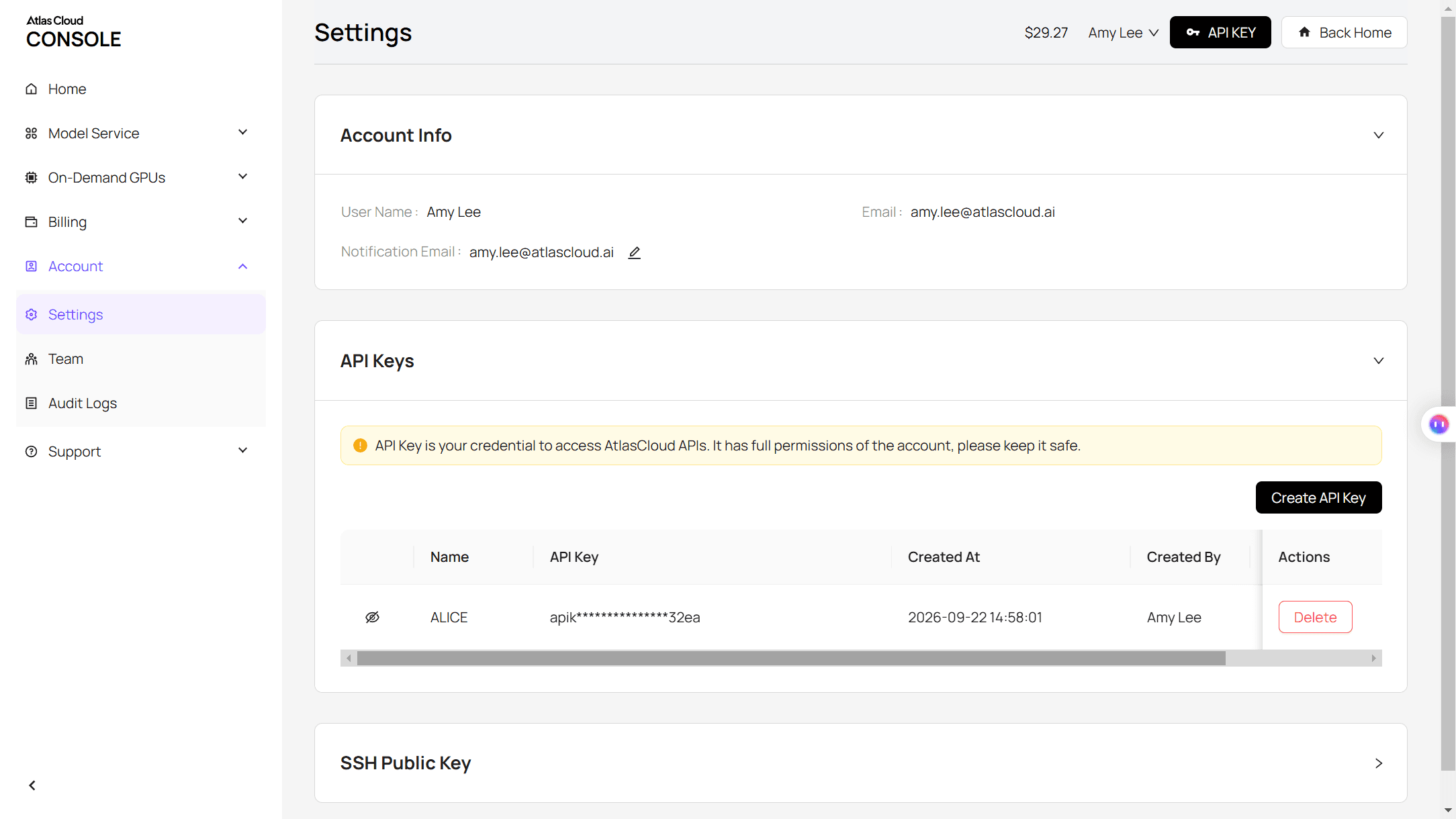
Step 1: Create an API key. In the console, open Settings and create a key under API Keys. One key covers every model.
Step 2: Check the request format. The Atlas Cloud docs cover authentication and the video endpoint.
Step 3: Send the request and poll. Your photo goes in the reference_images list:
plaintext1curl -X POST https://api.atlascloud.ai/api/v1/model/generateVideo \ 2 -H "Authorization: Bearer $ATLASCLOUD_API_KEY" \ 3 -H "Content-Type: application/json" \ 4 -d '{ 5 "model": "bytedance/seedance-2.5/reference-to-video", 6 "prompt": "<paste the Method 1 prompt here>", 7 "reference_images": ["https://your-cdn.com/your-full-length-photo.jpg"], 8 "duration": 15, 9 "resolution": "1080p", 10 "ratio": "9:16", 11 "generate_audio": true 12 }'
Poll the returned prediction ID until the status reads completed, then download the clip from the outputs array:
plaintext1curl https://api.atlascloud.ai/api/v1/model/prediction/<prediction_id> \ 2 -H "Authorization: Bearer $ATLASCLOUD_API_KEY"
The endpoint and key stay the same for every video model on Atlas Cloud. To try another one, change the model string.
Which Motorcycle Transformation Templates Match the Original?
Two do. We opened the templates linked from the trend's tutorial posts and watched each preview on November 24, 2026. The main CapCut one is Motorcycle by Tamirah483, created November 20, with 6,393 uses so far.
| Template | App | What the preview shows | Match? |
|---|---|---|---|
| Motorcycle | CapCut | One photo, 10 seconds, the red-and-blue bike and street from the November 7 remake | Yes |
| Mecha Ride | Hypic | One photo, a red-and-blue mecha rider on the same bike | Yes |
| Jet Mode AI | CapCut | A motorcycle that turns into a fighter jet and takes off | No, though one English tutorial links it |
| Transform Robot | CapCut | A standing person turning half robot, no bike | No |
| motor jadi robot | CapCut | A two-clip square template from an Indonesian wave in February 2025 | Older trend |
Atlas Cloud's own template library has Cyborg Suit-Up Fight, where your subject armors up and fights in an industrial hall. It has no bike, so use the prompt above for this one.
Hypic Mecha Ride vs the CapCut Motorcycle Template
Both start from a TikTok post. If the link does not show, the tutorials tell you to copy the post link and reopen it from the creator's profile.
| Step | CapCut Motorcycle | Hypic Mecha Ride |
|---|---|---|
| Start | Tap the CapCut link at the bottom left of a post | Tap the Hypic link at the bottom left of a post |
| Open | Use template in CapCut | The green button, then the white one |
| Upload | One photo | One photo |
| Finish | Tap Next | Wait a few seconds |
Mecha Suit Tips for a Cleaner AI Transformation Video
Four lines in the prompt did most of the work. The frames below are from our run at roughly 6.5, 8.5, 10.5 and 14.5 seconds.
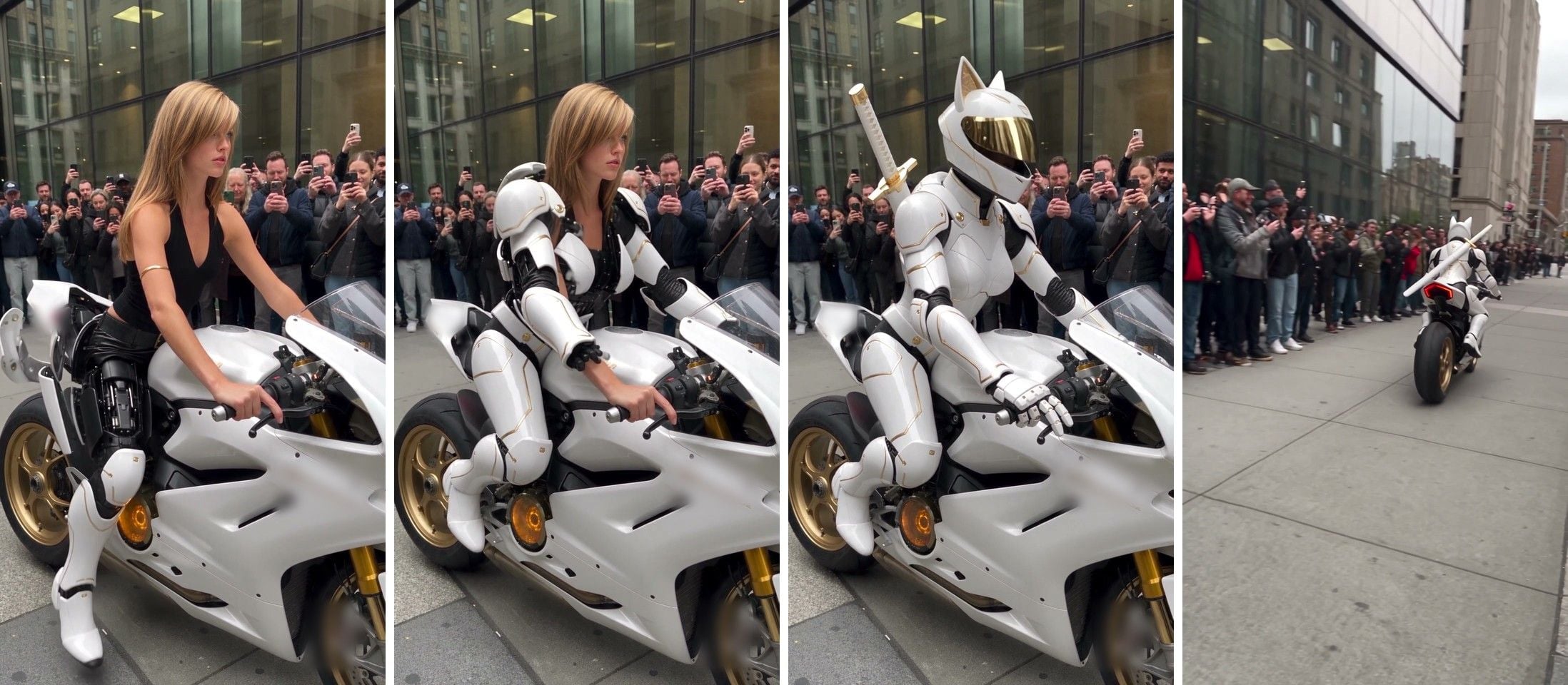
- List the order. "Boots, shins, thighs, hips, waist, chest, then shoulders and forearms" gave a clean build from the bike upward.
- Keep the face until the end. Saying her face stays visible kept her recognizable until about 10 seconds.
- Set the bike's direction. "Front wheel pointing to the right edge of the frame" plus "the bike only ever moves forward" made her ride off front wheel first, with the camera panning to follow.
- Design your own suit. Both source captions mention Iron Man. Pearl-white plates with gold edges, a fox-eared helmet and a sword on the back give this one its own look, and "no logos" keeps it yours to post.
For longer or multi-shot versions, our guide to writing Seedance 2.5 prompts covers timecodes and shot lists.
Frequently Asked Questions
Do I need a photo of myself on a motorcycle?
No. Both templates take one photo of you, and ours showed someone standing on a sidewalk. The bike, street and crowd come from the prompt.
Is there a robot filter or transformer filter that does this live?
Not for this trend. The clips are generated after you upload a photo, through CapCut and Hypic templates or a video model. The tutorial posts we opened link templates, and none carries a TikTok effect.
Can I do a bike transformation with a car or a bicycle?
Swap the superbike sentence for your vehicle and say which panels become armor. We only tested the motorcycle, so expect a few test runs. For a toy turning into a full-size car instead, see our toy car tutorial.
Can I make one with a friend's photo?
Only with their permission. The clip shows a real face in a public scene and can spread far once posted. Atlas Cloud's own API notes say the same about real people's likenesses.
How much does one motorcycle mecha clip cost on Atlas Cloud?
The Run button showed $11.19 for our 15-second 1080p clip with audio on November 24, 2026, which is 20% off the $13.98 list price. Draft previews at 480p cost less, so test the timing there first.
Conclusion
The trend took about five weeks to go from one AI clip to a stack of one-photo templates and tutorials in three languages. The templates give everyone the same scene, so the clips that stand out are the ones with their own suit and street.
If you want your own motorcycle mecha clip with your colors and your street, write the prompt instead of waiting for a template. One full-length photo is enough, as long as the armor climbs in order, the helmet closes last and the bike only rolls forward.







