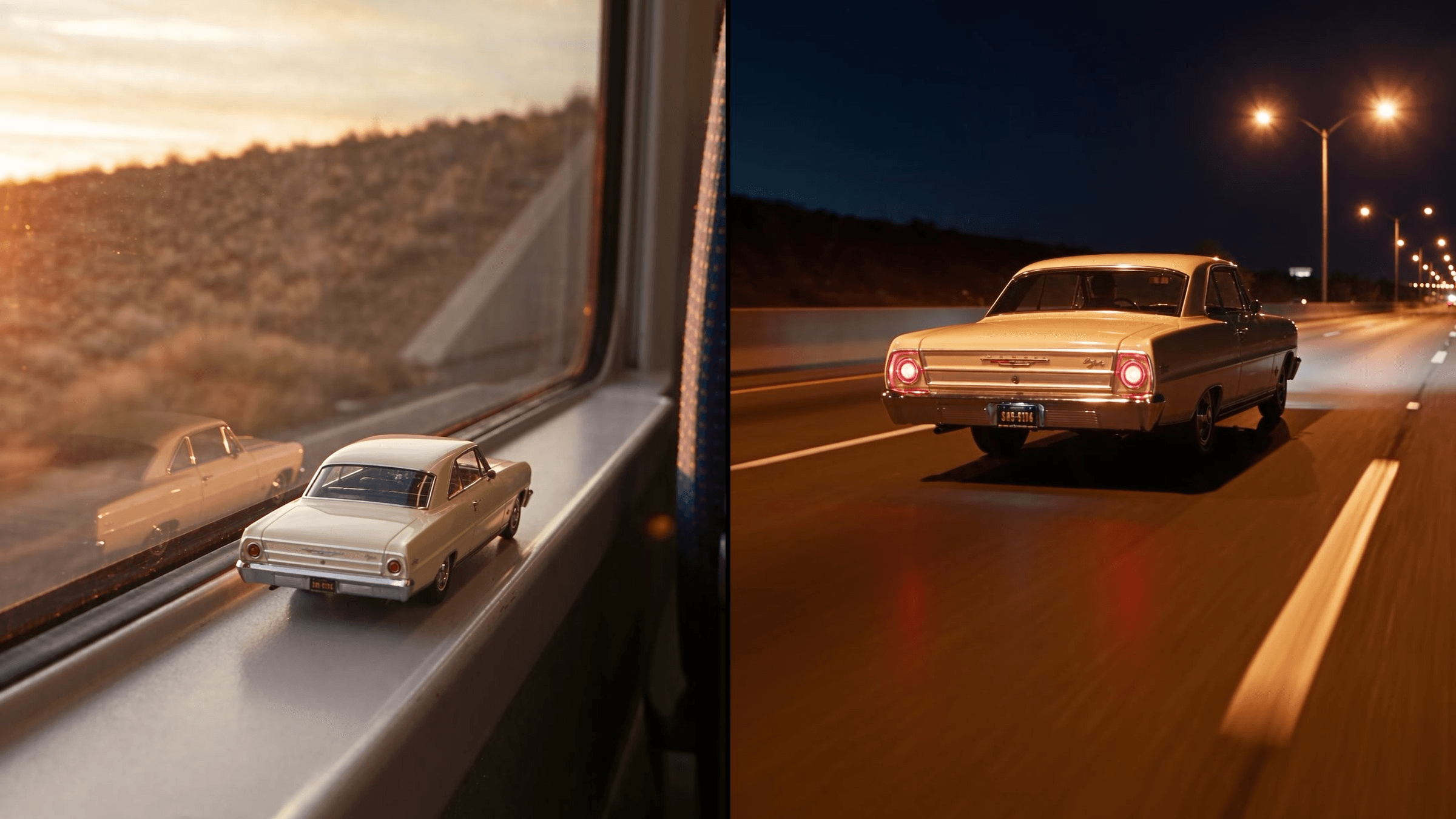
Sunset, a moving train, and a tiny model of your car parked on the window ledge. The train dives into a tunnel, the toy's tail lights flick on, and a second later it drives out of the tunnel as the real thing. That is the toy car to real car AI trend filling Reels and TikTok this week. Four template sites already offer a one-tap version. You can also build it yourself from one photo, and this guide shows both.
Key Takeaways
- The train window version of the trend traces back to an Instagram reel posted on October 19, 2026.
- A toy on a train window ledge lights up in a tunnel and drivesout as thereal car.
- Four AI templates copy that clip, and they differ in length, sound and ending scene.
- One sharp photo of your car is enough for the AI video generator.
- State which way the toy faces from the first frame, so it drives off the same way.
What Is the Toy Car to Real Car AI Trend?
Toy-to-real edits are old. Creators used to film a toy and then the real car from the same spot, and cut between the two. The AI version needs no real footage at all.
The clip everyone is copying now came from Turkish video editor Umutcan Çelikiş, who posted the original train window reel on Instagram on October 19, 2026. A small blue sedan sits on the window ledge of a train at sunset. In the tunnel it comes alive and drives off as the full-size car. By October 27 it had about 415,000 likes, and many replies were a single word: Prompt.
The answer is an AI video model. One car photo is enough, since the model builds the toy, the train and the road around it.
The Train Window Toy Car Transition, Second by Second
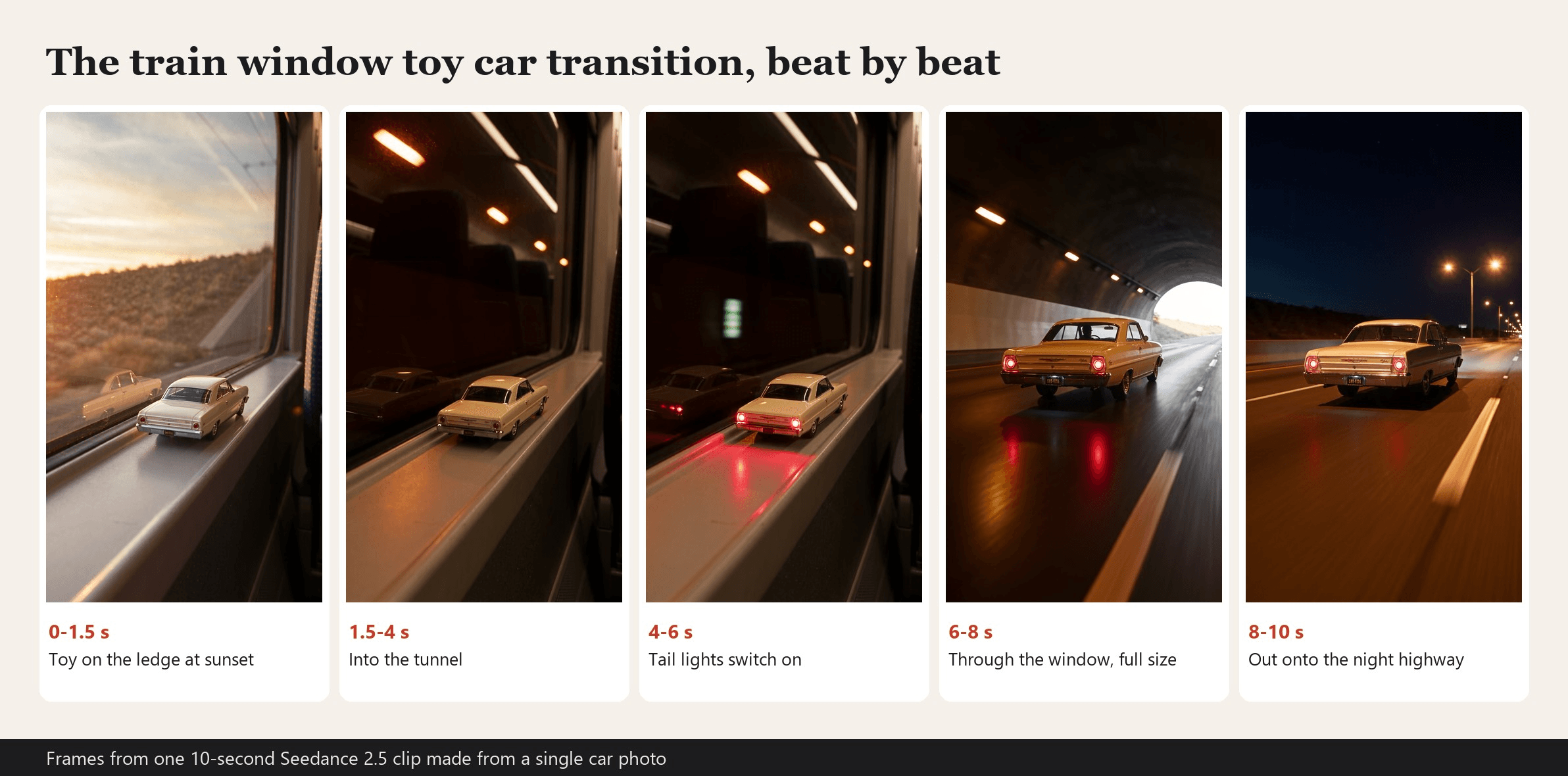
MakeViral and Viberot both break the clip into the same five beats on their template pages. Here they are from our own 10-second run:
| Seconds | What happens |
|---|---|
| 0 to 1.5 | Warm sunset outside the window. The toy sits still on the ledge. |
| 1.5 to 4 | The train enters the tunnel and the window goes dark. Tunnel lights streak past. |
| 4 to 6 | The toy's tail lights switch on and throw red light across the ledge. |
| 6 to 8 | The camera glides through the glass. The ledge becomes the road and the toy becomes the real car. |
| 8 to 10 | The car bursts out into white light and keeps driving down a highway at night. |
The tail lights are the hinge. They are the first sign that the toy is alive, so give them a full two seconds.
How to Make a Toy Car to Real Car Video With Seedance 2.5
Atlas Cloud runs Seedance 2.5, the model one of the template sites below names on its own page. We gave it a single side-view photo of a cream 1960s coupe and the prompt from Method 1. This is the clip it returned:
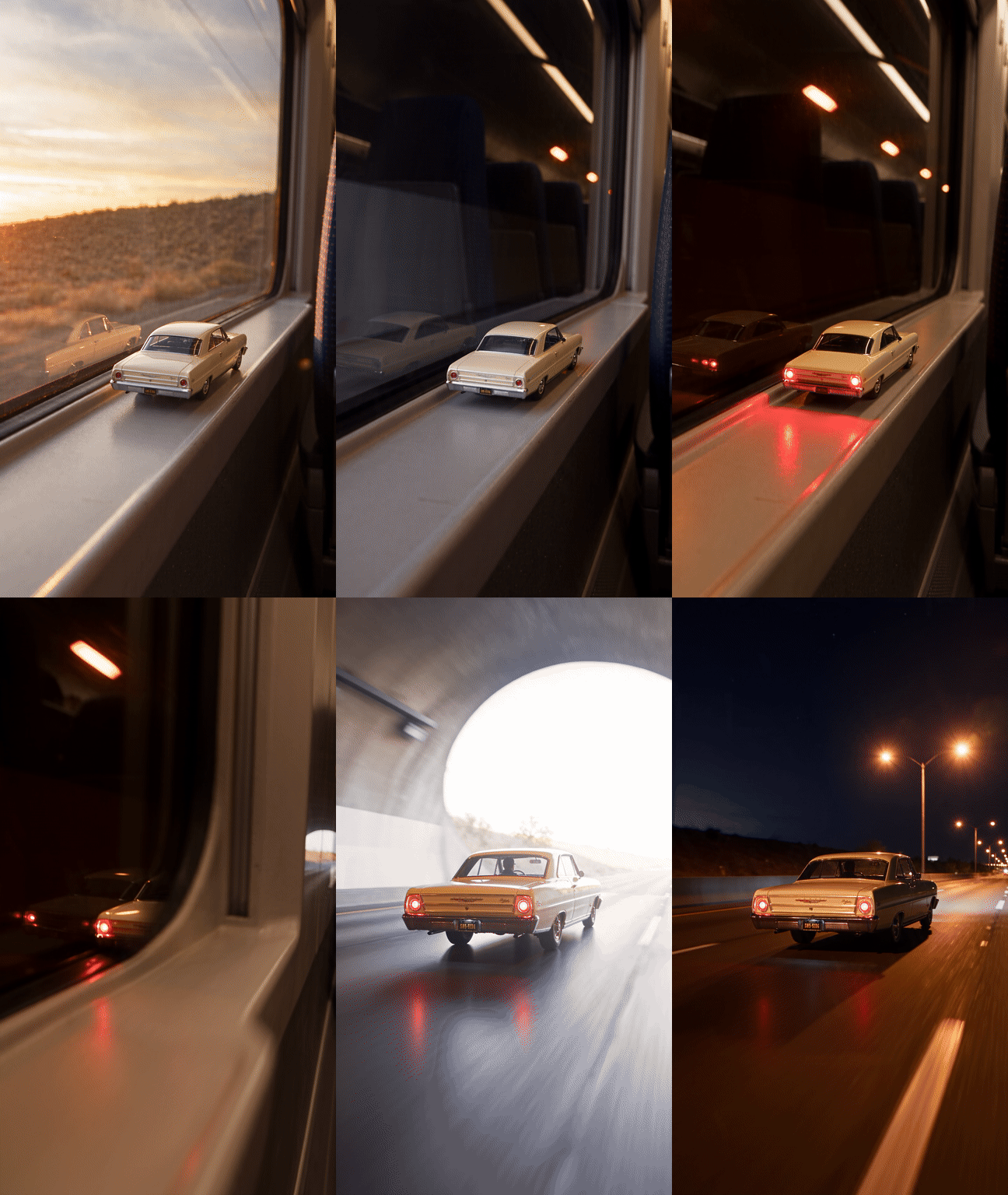
The paint, chrome trim and whitewall tires carry over from the toy to the full-size car, and the camera never cuts. It came back in about four minutes at 1080p, with train rumble and an exhaust note generated alongside the picture.
Method 1: Use the Video Generation Tab
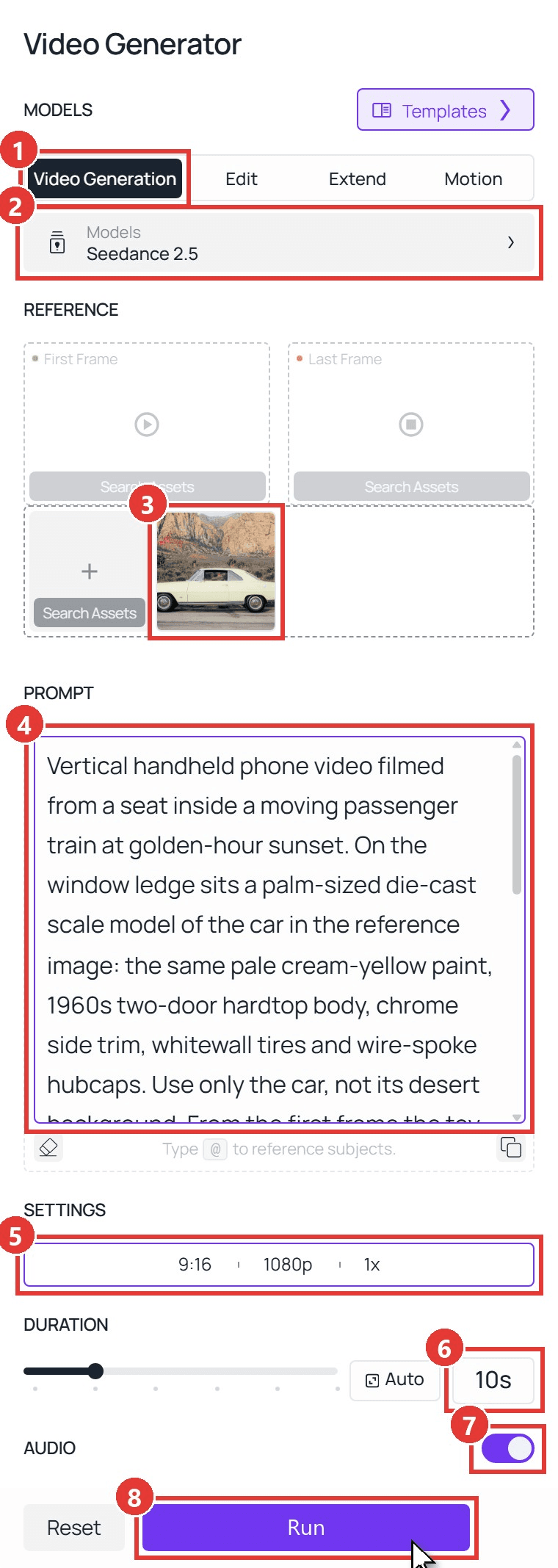
Sign in, open the Atlas Cloud Video Generator, and follow the numbers on the screenshot:
- Stay on the Video Generation tab.
- Pick Seedance 2.5 under Models.
- Upload your car photo under Upload other references. Leave First Frame and Last Frame empty.
- Paste the prompt below.
- Open Settings and choose 9:16 and 1080p.
- Set Duration to 10s.
- Leave Audio on.
- Click Run.
plaintext1Vertical handheld phone video filmed from a seat inside a moving passenger train at golden-hour sunset. On the window ledge sits a palm-sized die-cast scale model of the car in the reference image: the same pale cream-yellow paint, the same 1960s two-door hardtop body, chrome side trim, whitewall tires and chrome wire-spoke hubcaps with red centers. Use only the car, not its background. From the very first frame the toy is seen from behind at a rear three-quarter angle: its trunk and tail lights face the camera and its nose points forward along the ledge. The toy never turns around. 20-2s: warm sunset light, dry hills and a concrete retaining wall rush past outside the glass; the toy stands still on the ledge. The train plunges into a tunnel and the window goes dark. 32-4s: orange tunnel lights streak past outside the glass; the toy sits on the ledge in dim cabin light. 44-6s: the toy car's red tail lights switch on by themselves and glow, throwing red reflections on the ledge. 56-8.5s: in one continuous move the camera glides forward through the window; the window frame slides out of view, the ledge becomes the tunnel road, and the toy grows into the real full-size car, which drives away down the lit tunnel. 68.5-10s: the car bursts out of the tunnel into a flash of white light and cruises down an empty highway at night under tall orange street lights, filmed from behind and slightly to the side. 7Exactly one car, the same car in every frame. No people, no hands, no badges, lettering or number plates, no text, no logos. Sound: train rumble and rail clacks, a whoosh as the tunnel hits, a soft engine start when the tail lights glow, then a deep exhaust note on the highway.
Swap the car description in the second sentence for your own: paint color, body style, wheels, anything visible in your photo.
Method 2: Send the Same Prompt Through the API
Making clips for a car club, a dealer lot or a detailing shop? The API turns a folder of car photos into a batch.
Step 1: Create an API key. In the console, open Settings and create a key under API Keys. One key covers every model.
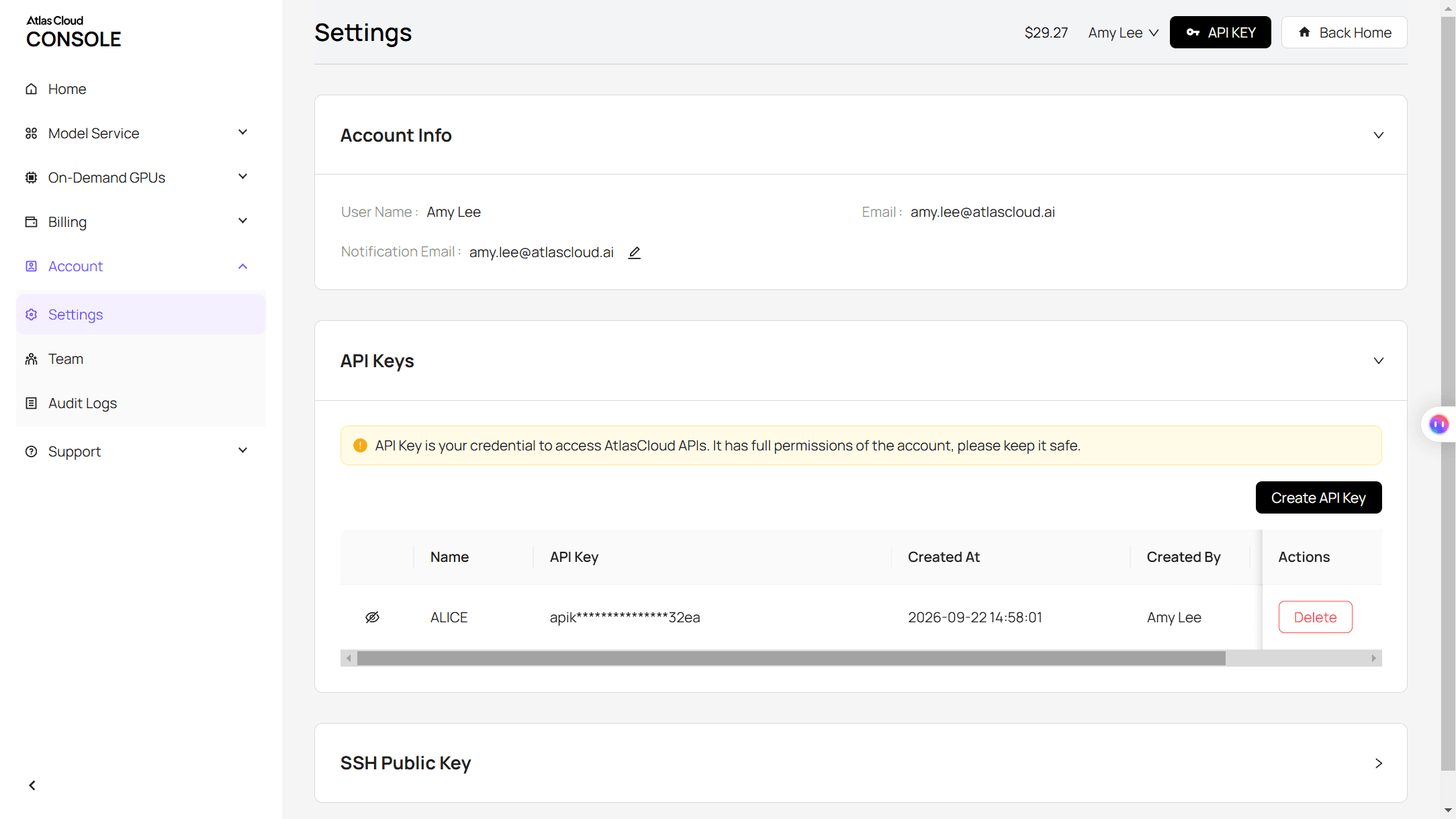
Step 2: Check the request format. The Atlas Cloud docs cover authentication. The Seedance 2.5 reference-to-video page lists every field on its API tab.
Step 3: Send the request and poll. Photos go in the reference_images array, and "@Image1" in the prompt points at the first one:
plaintext1curl -X POST https://api.atlascloud.ai/api/v1/model/generateVideo \ 2 -H "Authorization: Bearer $ATLASCLOUD_API_KEY" \ 3 -H "Content-Type: application/json" \ 4 -d '{ 5 "model": "bytedance/seedance-2.5/reference-to-video", 6 "prompt": "Vertical handheld phone video filmed from a seat inside a moving passenger train at golden-hour sunset. On the window ledge sits a palm-sized die-cast scale model of the car in @Image1 ... cruises down an empty highway at night.", 7 "reference_images": ["https://your-cdn.com/your-car.jpg"], 8 "duration": 10, 9 "resolution": "1080p", 10 "ratio": "9:16", 11 "generate_audio": true 12 }'
Poll the returned prediction ID until the status reads completed, then download the clip from the outputs array:
plaintext1curl https://api.atlascloud.ai/api/v1/model/prediction/<prediction_id> \ 2 -H "Authorization: Bearer $ATLASCLOUD_API_KEY"
The endpoint and key stay the same for every video model. To test another one, change the model string.
Which Toy Car to Real Car AI Templates Match the Original?
We opened each template page on October 27, 2026, and watched the preview clips we could download. All four take one photo of your car and copy the train window shot. They part ways on length, sound and the final scene:
| Site | Template name | Length | Sound | Ending | Model named on the page |
|---|---|---|---|---|---|
| MakeViral | Toy Car to Real Car AI Trend | 10 s, 720p, 9:16 | The reel's original song | Night highway | Seedance 2.5 |
| Viberot | AI Toy Car to Real Car | 10 s, 480p or 720p, 9:16 or 16:9 | Silent, you add a sound when posting | Sunset highway in its preview | Not stated |
| Flowlio | Toy Car to Real Car Transition AI | About 25 s, up to 1080p, 9:16 | Original sound | Slow reveal in a covered parking deck | "Tuned for this trend" |
| LightX | Train Window Transition | 9:16, three variants | Not stated | Night highway (Classic Tunnel Exit) | Not stated |
The Flowlio version runs longer because it keeps the parking deck reveal from the full original reel. MakeViral stops at 10 seconds. Credit prices change week to week during a trend, so compare what each clip contains.
Is There a Toy Car to Real Car CapCut Template?
We did not find one. Our search of CapCut's template library turned up generic train transitions and tunnel effects, and no toy-to-real version. Dreamina, the AI video app from CapCut's parent company, has a train window car page, but it offers copy-paste prompts rather than a one-tap template.
So the CapCut-style option here is the template sites in the table above, or a prompt you run yourself.
A Toy Car to Real Car Prompt That Keeps Your Car Identical
Viewers check one thing: is the toy really the same car? Here is what our single photo produced in both roles:
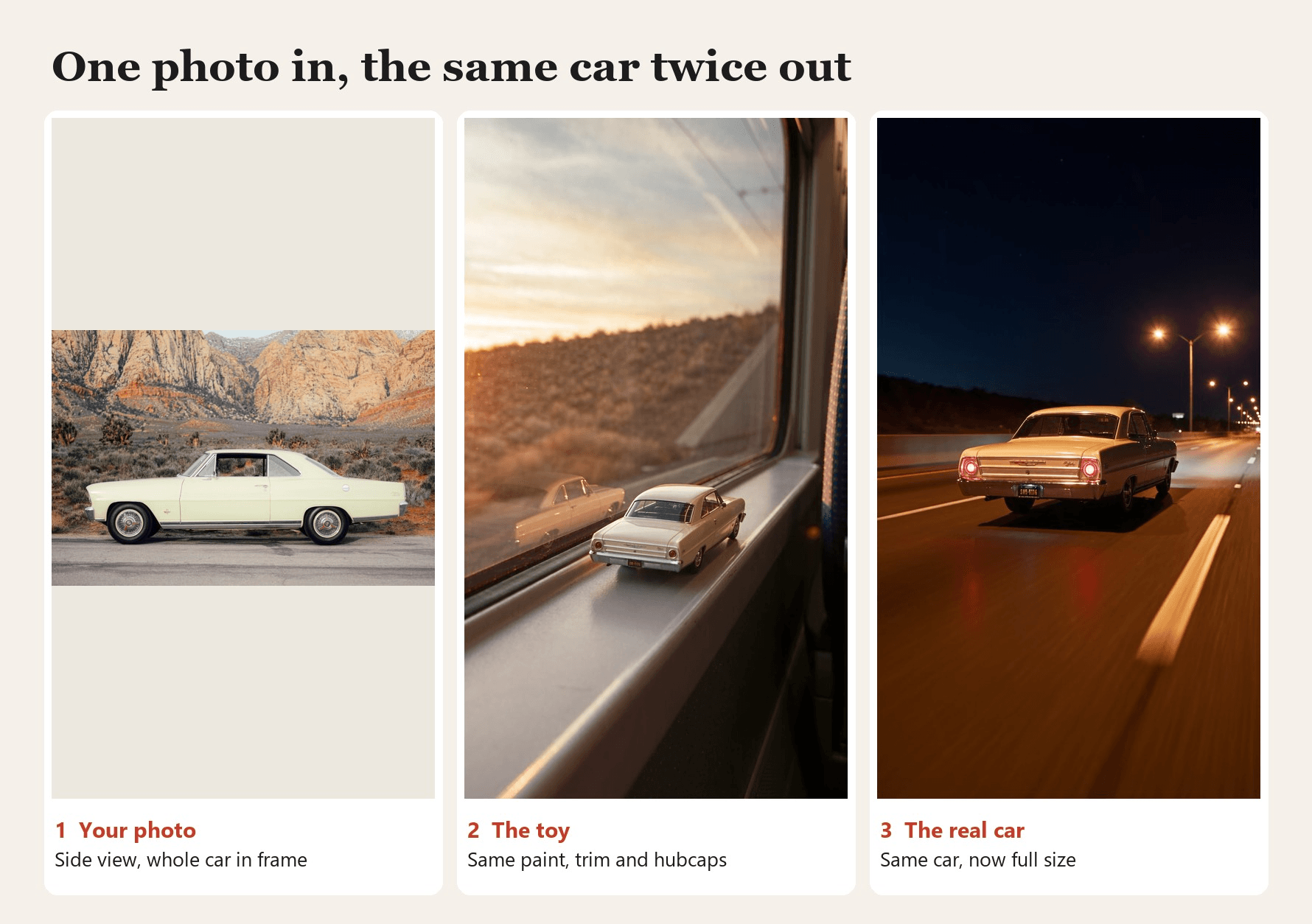
The facing direction matters more than it looks. The real car drives away from the camera, so the toy should already sit tail toward the lens, nose pointing down the ledge. Our prompt states that from the first frame: "From the very first frame the toy is seen from behind... The toy never turns around."
The rest of the prompt follows a few rules:
| What you want | Line that handles it |
|---|---|
| The toy faces the way the real car will drive | State the facing direction from the first frame |
| Toy and real car match your photo | Name paint, body style, trim and wheels from the photo |
| Only the car carries over from the photo | "Use only the car, not its background" |
| No brand logos or plate numbers | "No badges, lettering or number plates" |
| One car, no people in shot | "Exactly one car" and "no hands" |
Which photo works best? A sharp daylight shot with the whole car in frame. A side view worked for us. The template sites recommend a rear three-quarter angle because the clip shows the car mostly from behind. Seedance 2.5 reads time codes well, so one sentence per beat is enough. Our guide to writing Seedance 2.5 prompts explains why.
Toy Cars Turning Into Real Cars: Ideas Beyond the Train Window
The photo you upload does not have to be a real car. Start from the die-cast toy you kept since childhood, and the clip turns it into a full-size car on the highway. We used a red 1970s-style sedan toy photographed on an old dashboard:
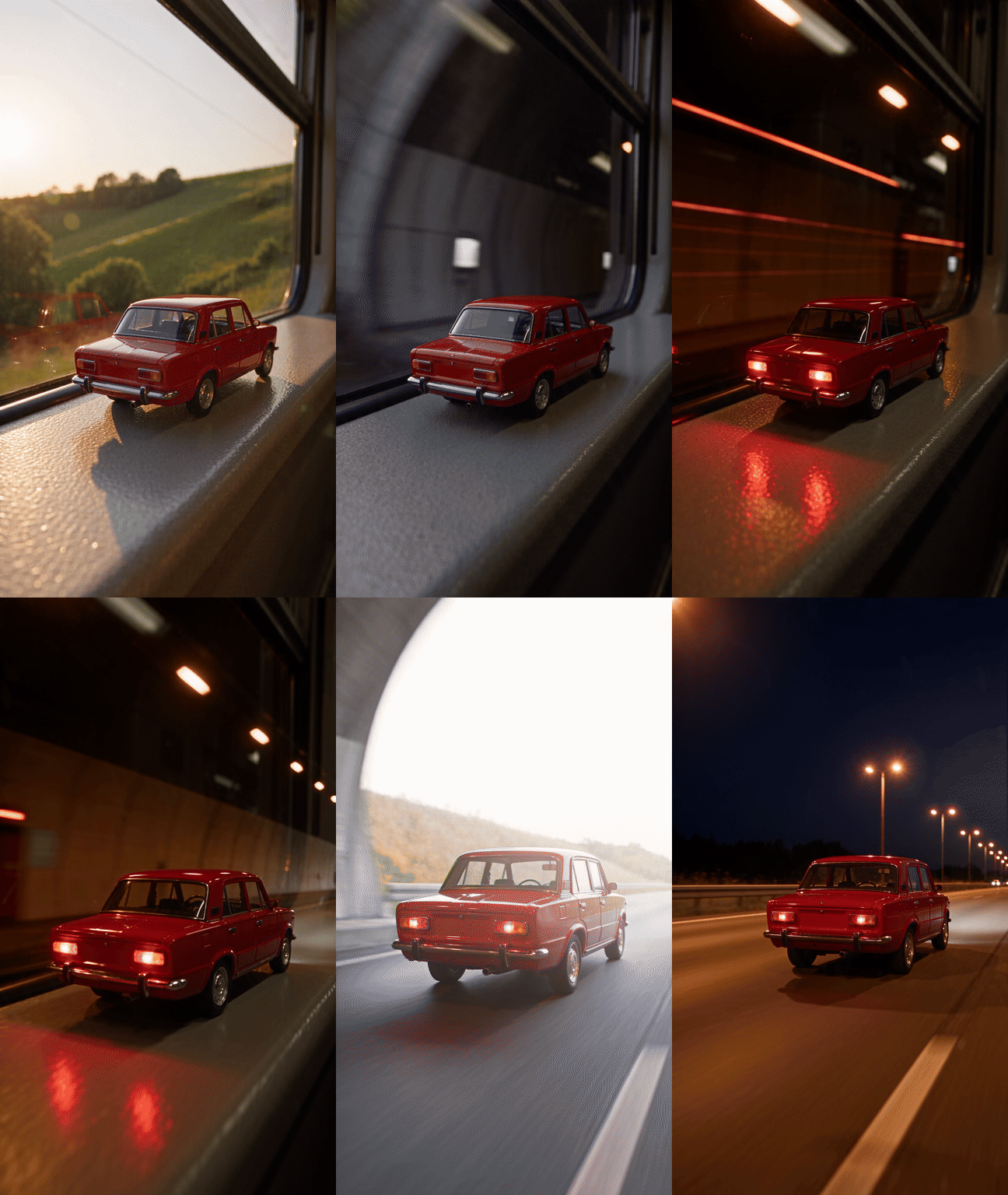
Toy car photo by Stepan Konev on Unsplash. Cream coupe photo by Wesley Tingey on Unsplash.
The prompt only changed in two places. The car description now says "the small die-cast toy car from the reference image," and the real car is written as "the real full-size cherry-red boxy sedan with the same chrome trim."
A few more directions people are already posting:
- Keys day. Use a photo from the day you picked up the car, and end on the open road instead of a highway.
- The dream car. Start from a photo of the car you want to buy, so the toy grows into your next car.
- Dealers and detailers. One photo per car on the lot gives each listing its own reel.
Want the longer 25-second cut with a parking deck reveal? Generate the 10-second clip first, then continue it with a second shot. Our AI video extender guide walks through joining clips without a visible seam.
Frequently Asked Questions
Is toy car to real car AI free?
Not per clip on the pages we checked. MakeViral, Viberot and Flowlio all charge credits for each video, and Viberot's 20 free monthly credits fall short of its 64-credit 480p run. LightX did not list a price on its template page.
Can I use a photo of a die-cast or scale model?
Yes. Shoot it from low, close to its own eye level, so it reads like a real car. Describe its paint and wheels in the prompt the same way you would for a full-size car.
Does it work with a motorcycle or a truck?
Sedans, coupes, hatchbacks and SUVs sit naturally on a window ledge. Motorbikes and big trucks can look odd at toy scale, so add a line on how the vehicle should stand, such as "on its kickstand."
Why does my car lose its badge and plate?
Our prompt asks for that on purpose, and MakeViral and Viberot say the same on their pages. It keeps brand logos and real plate numbers out of a clip you plan to post.
How much does one toy car to real car AI clip cost?
On Atlas Cloud, our 10-second Seedance 2.5 clip at 1080p with one reference photo cost $5.94, and the same clip at 720p costs $3.02. Both prices include a 20% discount running on October 27, 2026 (list prices $7.42 and $3.77).
Conclusion
The trend runs on five beats: a toy on a sunset ledge, a dark tunnel, two red tail lights, a push through the glass, and the open road. Templates package those beats behind one button, each with its own length and ending. Writing the prompt yourself lets you choose the car, the facing direction, the sound and where it ends up.
Pick a sharp photo, describe the car exactly, tell the model which way the toy faces, and run it at 9:16. If one beat misses, fix that line and run again. That is all a good toy car to real car AI clip needs.


