


You can make a Seedance 2.5 Flash headphone ad video from a product reference photo, with a timed shot list and optional generated sound. The practical limits matter: Seedance 2.5 Flash outputs up to 720p, and a reference image does not guarantee that every ear pad, headband joint, or cable stays correct across cuts.
A commercial can look convincing until the second shot introduces a thicker headband or quietly removes the wire. For a small brand, that change can make an otherwise useful clip unsuitable for a product page. Review the actual object before choosing the music or writing the headline.
This guide gives you 3 original, copy-ready prompts for the same real headphones: a 30-second window-side commercial, an 8-second vertical detail hook, and an 8-second desk ad with a foreground reveal. Each has a distinct job. Use the reference checklist and review method to decide whether a result represents your product closely enough to publish.
The examples below include a 30-second commercial with sound and two complete 8-second clips presented as silent GIFs. The downloaded files show the resulting compositions and motion; the written shot timings remain creative instructions rather than a guarantee of frame-exact cuts.
Key takeaways
- Use a product identity reference when you want a new setting, rather than treating the photo as a required first frame.
- Set duration, resolution, aspect ratio, and sound in the form; use the prompt to describe shots and actions.
- Seedance 2.5 Flash's native ceiling is 720p. An enlarged export does not become native 1080p.
- Check the product across every cut and during motion before accepting a commercial.
What Seedance 2.5 Flash Can Do for a Headphone Ad
Seedance 2.5 Flash suits a product ad brief that needs several views of one recognizable object within a short running time. You can request an establishing shot, a detail view, and a closing composition in one generation. A 30-second output can contain cuts; generating one file does not mean shooting one continuous take.
For this task, the documented limits are 4–30 seconds, 480p or 720p output, optional synchronized audio, and multimodal references. Seedance 2.5 Flash accepts up to 10 images, 5 video references, and 5 audio references. This workflow uses one image so the reader can reproduce it without collecting a separate motion or music reference.
The official documentation distinguishes Seedance 2.5 Flash from the full Seedance 2.5 model, which offers higher output resolutions. (BytePlus model documentation, accessed November 17, 2026.)
| Capability | Meaning for a headphone commercial | What you still need to check |
|---|---|---|
| 4–30-second generation | Request a complete ad or an independent short hook | Actual file length and shot pacing |
| 480p/720p output | Use 720p for this product-detail brief | Fine markings and delivery requirements |
| Product image references | Define the object while requesting a new environment | Shape, joints, pads, and cable continuity |
| Generated sound | Request ambience and a restrained music bed | Timing, unwanted voices, and abrupt endings |
| Timed scene instructions | Describe several shots in one prompt | Actual cuts can differ from the requested schedule |
Choose Seedance 2.5 Flash after checking where the asset will appear. A 720p concept may be useful for a small product-page player or creative review, while a client requiring native 1080p needs another production route. Do that check before spending time refining a shot that cannot meet the delivery specification.
Keep the version name attached to your records. A full Seedance 2.5 example does not establish what Seedance 2.5 Flash produced, even when both examples share a prompt. Save the selected model, inputs, and downloaded file together. That makes later revisions and handoffs easier to evaluate.
Start with a Headphone Reference That Can Survive Close-Ups
Show the Product Details the Ad Must Preserve
Pick a photo where the complete product is visible and the distinctive parts remain readable when enlarged. A hand covering a hinge, a black pad against a black background, or a reflection across a printed marking leaves the model with less visual evidence.
A dramatic photograph can therefore be a weaker identity reference than a plain product shot.
Before uploading, write a short list of features that a buyer would notice: the headband's construction, pad profile, outer housing, visible connectors, and wire routing. Separate visible facts from assumptions. A photograph cannot establish an unseen internal driver layout, and a visible cable does not support a claim about battery life or wireless features.
The example source is Cooper55566's 1337 × 962 photograph of Koss Porta Pro headphones, whose file page identifies it as the uploader's work under CC0. Keep the original and its source record with the project.
A reusable photo does not imply that the headphone manufacturer commissioned or approved an AI commercial. (Wikimedia Commons, accessed November 17, 2026.)
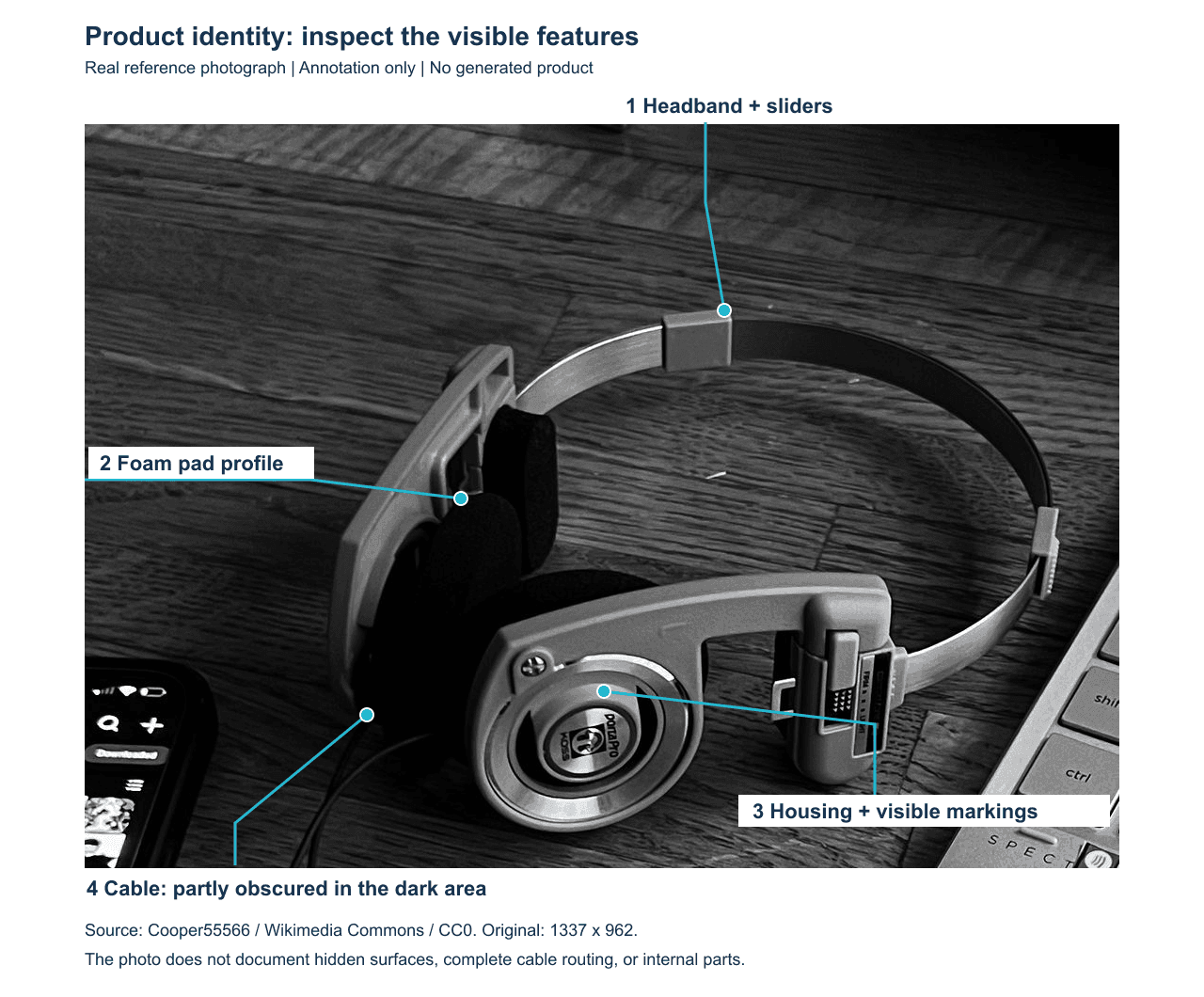
The real photo shows a metal band and marked housing, with some pad and cable detail obscured. The proposed AI concepts are independent and are not commissioned brand advertisements.
The downloaded photograph has a visible metal headband, adjustment pieces, foam pads, and a marked circular housing. Its monochrome treatment does not establish the product's original colors, and dark areas obscure part of the wire. Keep that limitation in the brief rather than interpreting the missing detail as freedom to redesign it.
For your own commercial, photograph the cable connection and both pads under clearer light if those details must survive close-ups. Keep the same physical unit across reference photos. A second angle should clarify the existing product rather than introduce a different revision or accessory.
Choose a Product Reference for a New Setting
Use Reference-to-Video when the photograph defines the headphones and the ad needs a different environment. A first-frame workflow also anchors the opening composition, which is a separate creative decision. For this brief, the new wooden desk and window should not require the source photograph to be the opening frame.
Upload the photograph as the first product reference and check its visible reference marker. The prompts use @Image1, the notation documented for the selected model. If your interface inserts another marker, use the interface's actual token consistently. Remove unrelated sample references so the model receives a clear product identity.
Stay near the photographed angle when exact structure matters. A sweeping orbit that reveals the back of a housing asks the model to fill in missing information. Request another real product photograph if that view is essential; a longer description cannot supply measurements that the reference never showed.
Build a 30-Second Headphone Ad with One Timed Prompt
Set the Format Before You Write the Shot List
For this walkthrough, the intended workspace is Atlas Cloud. Select its Seedance 2.5 Flash Reference-to-Video playground, upload the single photograph, and remove preset media and text. Confirm the model name includes Seedance 2.5 Flash before continuing.
Choose 720p, 30 seconds, 16:9, and sound on. Request MP4 if the form exposes an output-format control. Leave frame rate at its default when there is no separate selector, then inspect the downloaded file. Writing “30-second” in the prompt does not verify what the duration control committed.
The window-side desk gives the sequence a stable location. Soft daylight helps you judge surface and shadow continuity, while ordinary city buildings provide background context without asking for a second story. Restrained camera arcs limit the amount of unseen product geometry the model must infer.
Six shots give the viewer a clear progression: recognize the whole object, inspect a detail, understand the headband and pads, follow the cable, see a natural hand-held demonstration in the room, and return to a readable product view. The final hold also gives an editor somewhere to place exact brand copy later.
| Requested time | Shot's job | Product checkpoint |
|---|---|---|
| 0–4s | Establish the complete headphones | Correct number of parts and contact shadow |
| 4–9s | Show the visible housing and pad | Stable shape and markings |
| 9–14s | Connect headband and both pads | No change in assembly |
| 14–19s | Follow the cable toward the product | Wire remains attached and continuous |
| 19–25s | Show a seated adult lifting, presenting, and replacing the headphones | Connected shoulder-to-hand anatomy, natural grip, stable product, and attached cable |
| 25–30s | End with a clear complete view | Recognizable product and space for later copy |
Paste the 30-Second Headphone Ad Prompt
plaintext1Create a 30-second photorealistic headphone product advertisement. 2 3@Image1 is the sole product identity reference. Show this exact pair of headphones throughout. Preserve the visible headband construction, ear-pad shape, earcup geometry, markings, materials, and cable arrangement. Do not add features or invent hidden components. 4 5Setting: a real wooden desk beside a large apartment window overlooking ordinary city buildings at late afternoon. The headphones rest naturally on the desk except during the brief hand-held demonstration, then return to the same position. Use soft window light, restrained contrast, realistic surface reflections, and consistent color throughout. 6 7Use six clearly separated shots with motivated cuts: 80-4s: Desk-level three-quarter view. Track smoothly sideways to reveal the complete headphones and their contact shadow. 94-9s: Cut to a closer side view. Make a restrained lateral arc around the visible earcup, keeping its shape and markings stable. 109-14s: Cut to a slightly higher angle showing the headband and both pads. Move diagonally across the desk without revealing an invented underside. 1114-19s: Cut to a low view beside the visible cable. Track along the desk toward the headphones; keep the cable connected and physically continuous. 1219-25s: Cut to a steady medium view of an adult seated beside the same desk, framed from below the neck to the desktop with the face outside the frame. Keep the right shoulder, upper arm, elbow, forearm, wrist, and hand visibly connected throughout. In one continuous, unhurried action, the right hand gently grips the top of the headband, lifts the headphones a few centimeters above the desk, and tilts them slightly toward the camera to show the visible earcup and both pads. Keep the fingers clear of the product markings. The cable hangs naturally under gravity, stays attached, and rests partly on the desk without snagging. Set the headphones gently back in their original position before the cut. Use natural joint angles and a physically plausible grip; preserve the product shape and avoid revealing unseen surfaces. 1325-30s: Cut to a clean front three-quarter product view. Settle smoothly and hold the complete headphones clearly in frame for the final two seconds. 14 15Audio: quiet room ambience beneath a warm, understated instrumental electronic groove at approximately 96 BPM. Layer a soft rounded kick, dry rim clicks, a lightly syncopated bass line, delicate shaker subdivisions, and warm electric-piano seventh chords. Add a catchy, repeating four-note plucked-synth melody with a small answering phrase; introduce a subtle variation after the midpoint so the music feels developed rather than like a bare loop. Keep the groove relaxed, the volume even, and the arrangement spacious, with no dramatic build, drop, or sudden mood change. Place gentle percussive accents near the cuts without interrupting the musical phrase. Let the final chord and melody resolve and decay naturally during the last two seconds. No dialogue, no singing, and no claim about how these headphones sound. 16 17No floating product, no detached or floating hands, no missing arm segments, no extra limbs or fingers, no fingers merging with the headphones, no exploded parts, no extra headphones, no generated captions, no added logos, and no changes to the product design.
Review the Result Shot by Shot
Watch the complete downloaded video once for the sequence, then replay each cut at a slower speed. Note actual cut times beside the requested schedule. If the model combines two shots, assess whether the merged shot still communicates the intended product detail. Exact timestamp compliance and product correctness are separate decisions.
Compare the beginning, middle, and ending of each camera move. A pad that is correct in the first frame can change thickness halfway through an arc. Inspect the cable where it crosses itself and where it meets the housing. Those checks are more useful than judging a single attractive closing frame.
Listen separately for ambience continuity and the requested accents. A sound generated near a cut may still land late, and an acceptable visual sequence may need a new music edit. Keep the source file intact so an editor can make that decision without losing the original audio.
The downloaded main clip is 30.08 seconds at 1280 × 720, with an audio track. Its later sequence includes a hand lifting the headphones by the headband and returning them to the desk. Compare that action with the requested framing and grip rather than assuming the written anatomy constraints were followed exactly.
Complete window-side commercial, 30.08 seconds. Play with sound to review the accompaniment; the later hand-held sequence shows the pickup, presentation, and return to the desk.
Try 2 Shorter Headphone Ad Concepts for Different Placements
An 8-Second Product Detail Hook
Choose the vertical hook when the opening job is to make the product recognizable in a narrow frame. The full headphones appear first, followed by a closer pad view and a wider closing composition. Beginning with a detail alone could leave a viewer unsure what the advertisement is selling.
Set 720p, 8 seconds, 9:16, and sound off. Upload the original photograph again rather than extracting an input from the long ad. That keeps the creative tied to the real object and avoids carrying a generated design error into another generation.
plaintext1Create an 8-second photorealistic vertical headphone product ad. 2 3@Image1 defines the exact headphones. Preserve the visible headband, ear pads, earcup geometry, markings, materials, and cable. Keep one complete pair resting naturally on a wooden desk beside a real apartment window. 4 50-2s: Begin with a clear three-quarter view of the complete headphones. Track sideways at desk height. 62-5s: Cut to a close view of the visible earcup and pad. Make a smooth, restrained lateral arc so the surface and pad depth are readable. 75-8s: Cut to a higher three-quarter view showing the complete product. Move diagonally into a clean final composition, leaving uncluttered space above it. 8 9Keep soft natural window light and the same restrained color treatment in all three shots. Movement must include real changes of viewpoint, not only a zoom. 10 11No hands, no floating parts, no duplicated earcups, no disconnected cable, no new product features, and no generated text or additional logos.
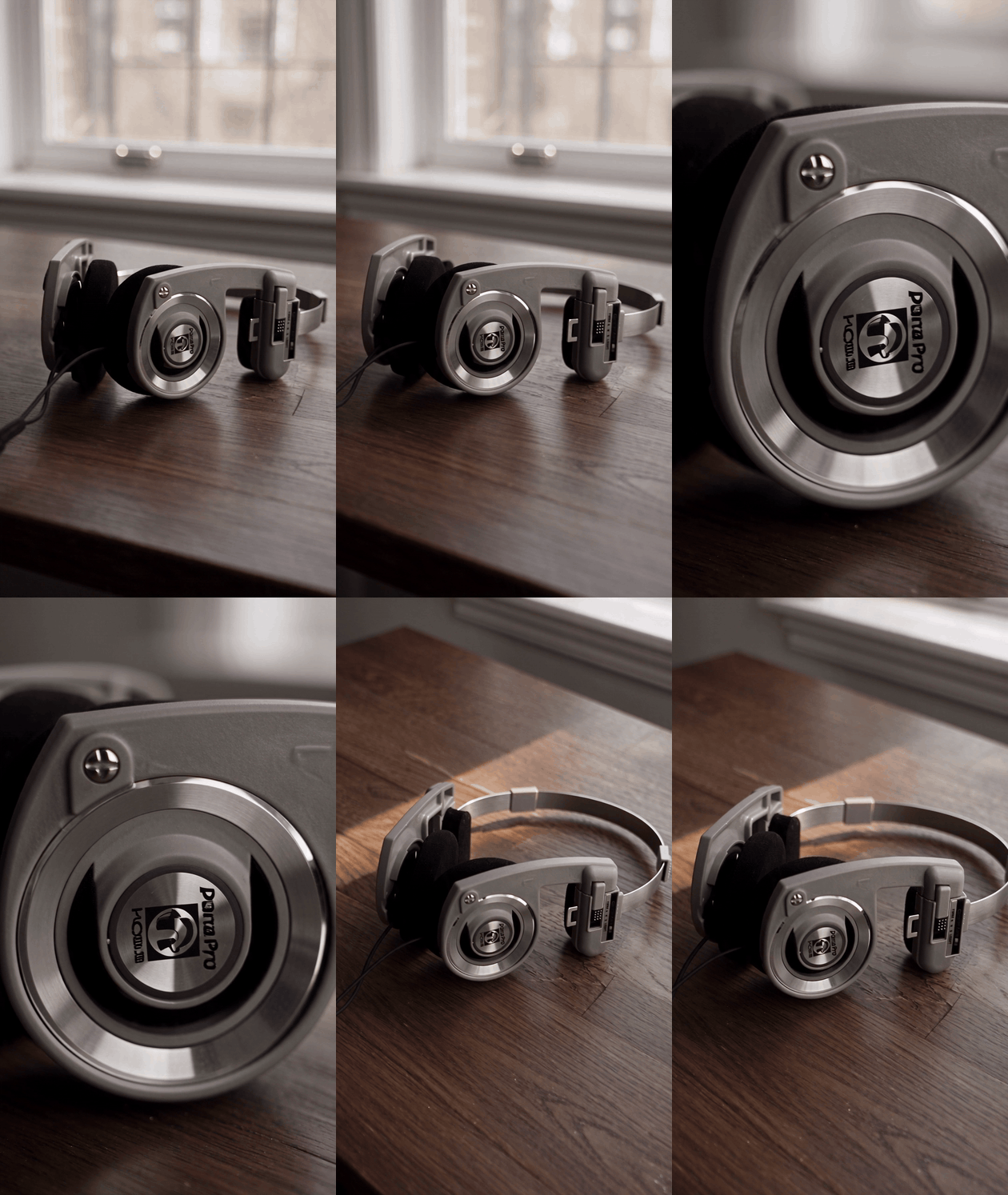
Complete 8.06-second vertical clip, converted to a looping silent GIF. The sequence moves from a whole-product view to an earcup detail and an elevated closing composition.
The requested sideways track and arc should change the viewer's relationship to the object. A clip that only enlarges the same frame does not satisfy this brief. Review the downloaded source before converting it to a GIF; conversion cannot repair missing viewpoint changes.
Keep enough background above the closing product for later copy, while watching the bottom edge for a clipped cable. The intended empty space is a composition choice, not a promise that every platform's overlay will fit. Check your chosen placement's current preview with the finished edit.
An 8-Second Desk Ad with a Foreground Reveal
Choose this direction for a reveal with more foreground depth. A blurred lamp introduces a foreground layer, the middle shot brings the pad closer, and the wider ending re-establishes the object. The downloaded sequence also shows why desk contact needs a motion check: the close view appears to lift the headphones above their shadow despite the instruction to keep them resting on the desk.
Set 720p, 8 seconds, 16:9, and sound on when following the original prompt below. This is a separate generation from the original photo. The article presents the complete clip as a silent GIF to compare framing and motion. Review the original MP4 separately when judging the requested audio accents.
plaintext1Create an 8-second photorealistic headphone advertisement in a real home workspace. 2 3@Image1 is the exact product reference. Preserve the visible headband construction, pad shape, earcup geometry, markings, materials, and cable arrangement. The headphones remain resting naturally on the same wooden desk beside a window. 4 50-3s: Start in a medium three-quarter view. Track laterally past a softly out-of-focus desk lamp in the foreground, revealing the headphones clearly. 63-5s: Cut to a close side view of the visible earcup and pad. Continue with a short, smooth camera arc. 75-8s: Cut to a wider elevated three-quarter view. Show the complete headphones and their natural contact shadow, then settle into a readable closing frame. 8 9Audio: continuous quiet room tone. Start a restrained instrumental rhythm at the first reveal. Place one short percussive accent at the cut at 3 seconds and another at the cut at 5 seconds. Let the final note decay naturally through the ending. 10 11The soundtrack is an advertising accompaniment, not a demonstration of the headphones' acoustic performance. No dialogue, no singing, no noise-cancellation effect, no floating product, no duplicated parts, and no generated text.
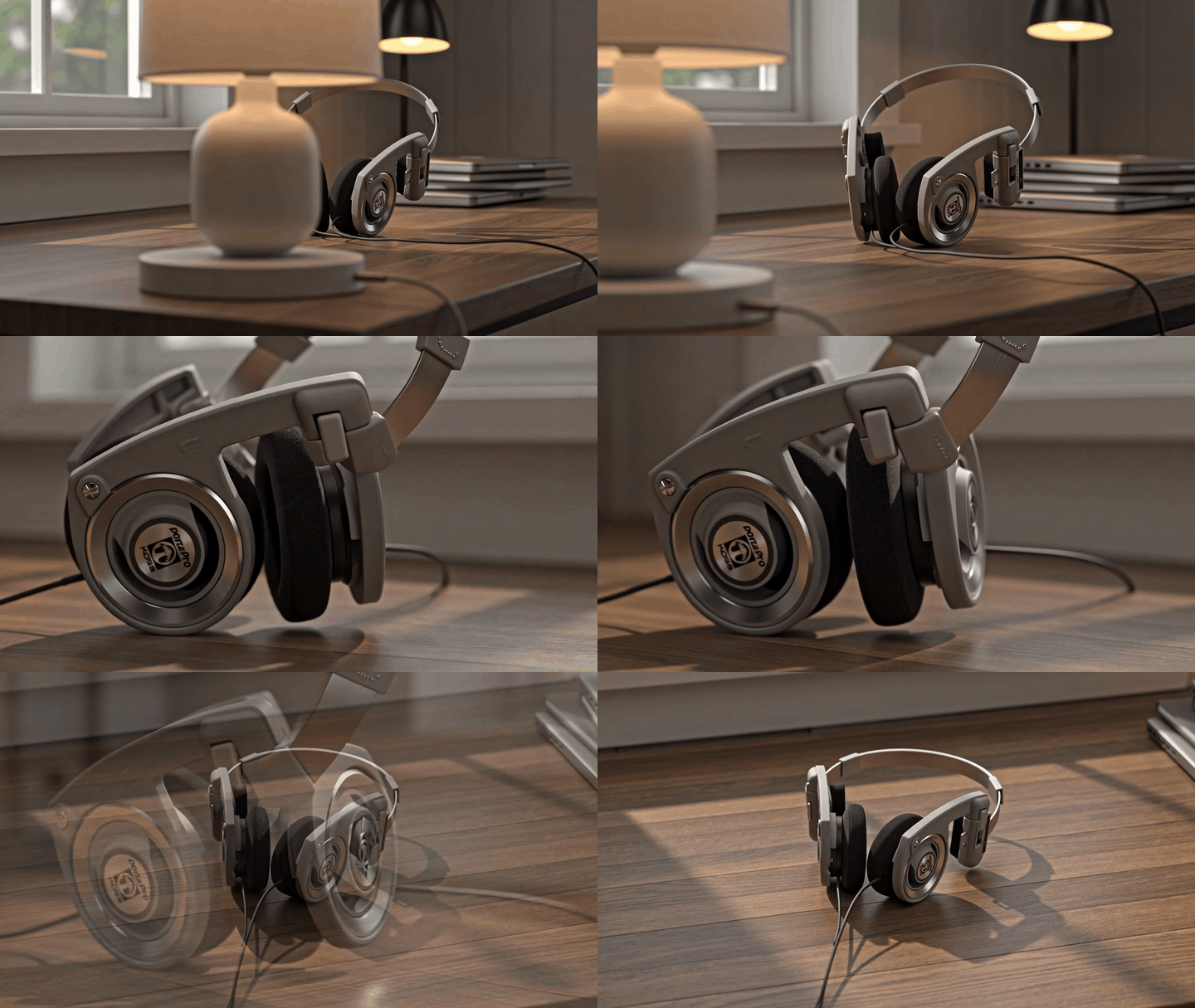
Complete 8.04-second desk-ad clip, converted to a looping silent GIF. The close view illustrates a desk-contact error to check before approving a product ad; the GIF does not reproduce the source soundtrack.
In the original MP4, compare the accents with actual edits, even when they occur at different times from the prompt. A musical hit can support a visible transition without proving exact timestamp control. These concepts offer different creative treatments; neither establishes a higher click-through rate or a sales improvement without a real campaign test.
Two Public Seedance 2.5 Headphone Projects to Study
Two public creator projects offer different ways to make headphones the center of a short film. Their authors identify Seedance 2.5 as the model. Neither source identifies the Seedance 2.5 Flash variant, so these examples provide creative planning references rather than verified Seedance 2.5 Flash results.
AXIS: Keep the Headphones Recognizable Across Changing Scenes
Creator Oduwaye Ayotomiwa describes a 15-second advertisement for AXIS, a fictional headphone brand, in his original project breakdown. He reports planning six timed beats, three characters, and changing backgrounds while keeping the headphones in frame. His preparation included character reference sheets and a product sheet showing the headphones from three angles. (Accessed November 18, 2026.)
AXIS headphone concept video by Oduwaye Ayotomiwa. Source: the creator's original LinkedIn post.
For the desk commercial in this guide, the useful production choice is the product sheet. A real front, side, and three-quarter photograph can clarify the housing and headband before the camera or a hand changes their angle. Write what each reference defines, then give each shot a specific framing and transition. That is an adaptation of the creator's planning approach; it does not establish that the same result will repeat with a single reference photo.
Headphones On. World Off.: Give the Listening Moment a Visual Payoff
Creator Ольга Мирошниченко shares a project titled Headphones On. World Off. in her original project post. She describes a stylized 3D cartoon made with Seedance 2.5 as one continuous tracking sequence. In the story, a character puts on headphones and a chaotic grey city becomes a warmer, more vibrant environment. Her post also links to the creator's YouTube Short. (Accessed November 18, 2026.)
Complete Headphones On. World Off. film by Ольга Мирошниченко. Source: the creator's original project post.
For a headphone brief, this suggests giving the wearing action a clear before-and-after story beat. Decide what changes in the surroundings, color, and accompaniment while preserving the product's identity. The cartoon treatment is a separate creative direction from this guide's photorealistic desk ad. Its changing world expresses a character's experience; it supplies no measurement of noise cancellation or audio performance.
Fix Product Drift, Broken Motion, and Unconvincing Sound
Check the Headband, Pads, Markings, and Cable
Treat each cut as a fresh product inspection. Compare headband thickness and joints, pad depth and outline, housing shape, readable markings, and cable attachment. For a wired reference, a disappearing wire changes what the viewer sees as the product. A brief error still matters if the ad freezes there in a placement preview.
Inspect intermediate motion as well as clean frames. Watch whether the desk contact point slides, a pad merges into the housing, or a reflection adds a second pair. Pause just before and after each transition, then scrub through the move. A contact sheet helps comparison, while the full video reveals errors between its selected frames.
Frames sampled from the main clip at 0.5, 4.5, 9, 14, 22, and 27 seconds. Use them to compare product structure across views, then play the video to inspect the motion between samples.
Set acceptance rules around the intended use. A missing cable or changed housing should trigger a new generation for a product-identification ad. An otherwise accurate clip with a weak ending may be salvageable in editing. Record that distinction so a visually pleasant draft does not quietly become an approved product representation.
Reduce the Difficult Action Before Adding More Instructions
When an arc introduces a new housing shape, shorten the arc before adding a longer list of adjectives. The narrower move reduces the amount of unseen structure the model must invent. Keep the image, duration, and other shots unchanged so you can evaluate the effect of that one revision.
| Observed issue | Possible cause | Change for the next attempt | Cost implication |
|---|---|---|---|
| Housing changes during an arc | Too much unseen geometry | Keep the shot near the reference angle | Another generation; inspect the other shots again |
| Cable disappears | Thin feature lost during movement or occlusion | Shorten the move and keep the connection visible | Re-run if product identity is affected |
| Extra headphones in a reflection | Reflective setting adds ambiguity | Request matte wood and no mirror-like reflections | Another generation with a simpler setting |
| Pad changes shape between cuts | Inconsistent interpretation across views | Reduce the viewing-angle change | Re-check every pad view |
| Audio accent misses a cut | Requested timing was not followed exactly | Align the accent in a real editor | Editing time; generation may be unnecessary |
For a problematic camera move, replace that shot instruction with: `Keep this shot close to the viewing angle in @Image1.
Use a short lateral camera move and do not reveal unseen product surfaces.For reflection duplication, use:Use a matte wooden surface with a soft contact shadow and no mirror-like reflections.` These are revision instructions, not demonstrated repair results.
Listen for uninterrupted room tone, unwanted voices, and a music ending that cuts off abruptly. Generated accompaniment cannot establish the headphones' frequency response, isolation, or noise-cancellation performance. Keep any actual performance claim tied to separate product evidence. Approve, edit, or re-run only after both the visible product and the intended sound treatment pass review.
Budget for Usable Ads, Not Just Generated Seconds
Separate the public starting price, the configured quote, and the settled task charge. On November 17, 2026, the Atlas model directory displayed Seedance 2.5 Flash from $0.109/second, against $0.167/second, with 35% off and a banner ending November 30. The selected model's detail page also listed $0.109/second.
These are dated public listings, not a verified bill for this guide's 720p settings.
Before submitting, read the quote after selecting resolution, length, image input, and audio. Save that amount with the committed settings. A catalogue's “from” label alone does not establish the final charge for a 30-second commercial. Do not multiply it into a promised production budget without the configuration-specific quote.
| Concept | Downloaded source | Article format | Submit-to-complete time | Settled charge |
|---|---|---|---|---|
| Window-side commercial | 30.08s, 1280 × 720 | Video with audio | Not recorded | Not recorded |
| Product-detail hook | 8.06s, 720 × 1280 | Silent GIF | Not recorded | Not recorded |
| Foreground-reveal desk ad | 8.04s, 1280 × 720 | Silent GIF | Not recorded | Not recorded |
Use cost per usable ad = total actual charges for related attempts ÷ accepted finished ads. Include rejected attempts belonging to that creative. If no output passes, report the money spent and zero accepted ads; an average cost per accepted ad is undefined.
The three downloaded files were added on November 18, 2026. File duration and dimensions can be checked locally, but the files do not establish generation latency, attempt count, or a settled charge. Those fields remain unrecorded rather than estimated from clip length.
Keep editor time and output fees as separate budget lines. A sound adjustment may take less work than another generation, while a changing product usually requires a more fundamental revision. This is where your acceptance checklist affects spending: it tells you which problems require another model run.
Any test-environment balance movement belongs in a clearly labeled test record. It does not prove a production payment. Likewise, a vendor's speed claim cannot replace timing this specific task from submission through completion, with download time recorded separately if it matters to the handoff.
Finish the Ad for Social Feeds and Product Pages
Keep Product Detail Clear in the Final Crop
A 16:9 product-page ad and a 9:16 feed creative need different framing. Cropping the center of the horizontal commercial may remove a pad, cut the headband, or leave no room for copy. The independent vertical prompt gives the model an opportunity to compose for that placement from the beginning.
Review the whole vertical clip at the size a viewer will actually see. Check whether both pads remain understandable during the detail shot and whether the wire gets lost against the desk. A sharp enlarged still cannot establish that those details remain readable throughout motion.
Export dimensions need accurate labels. A 1280 × 720 landscape source enlarged to 1920 × 1080 remains an upscaled source. For a portrait source, record the actual width and height rather than assuming the word “720p” describes its orientation. Preserve the original download beside the delivery version so the next editor can inspect it.
Add Exact Copy and Brand Assets in Post
Add approved logos, product names, prices, and calls to action in a real editor. This keeps spelling, font choice, and timing under human control. A prompt requesting no added logos does not remove the need to inspect existing markings on the generated headphones.
Watch the export once muted to judge product recognition and pacing, then once with sound to judge the mix and ending. Check the uploaded preview as well: compression and surrounding interface elements can change how easily a buyer reads the product. Retain a clean version without text for later placements.
For your next Seedance 2.5 Flash headphone ad video, start with one photograph and choose the creative that matches the placement. Use the model playground linked above, save the selected source file and run record, and approve product identity before spending time on final copy.
Campaign performance then belongs to a real audience test with your own offer and landing page.
Frequently Asked Questions
Can I reuse another creator's headphone ad as a motion reference?
Check the source material's permission and the scope of your intended use before uploading it. Public visibility alone does not establish permission to reuse a commercial. This workflow avoids that dependency by describing camera moves in text and using a product photograph whose source page provides a reuse license.
Keep the source record with the project.
Can Seedance 2.5 Flash generate an accurate exploded view of headphones?
A generated exploded view can suggest a visual concept, but it does not establish the actual internal construction. A product photo rarely shows the driver assembly, wiring, fasteners, or their dimensions. Use verified engineering material and a controlled production method when an ad must show how the headphones are built.
Do not label invented components as product facts.
Can I rerun the same prompt and get the identical ad?
A new generation can change camera motion, cuts, product interpretation, or sound. Keep the chosen video instead of treating the prompt as an editable timeline that recreates it exactly. Save the reference, full prompt, settings, task identifier, and original output together; those records support a revision brief without promising an identical rerun.
How do I prompt a natural hand-held headphone shot?
Describe the person's position, the framing, the grip, and the complete action. For this desk setup, seat the person beside the product and frame below the neck while keeping the shoulder, upper arm, elbow, forearm, wrist, and hand connected and visible. Request one gentle lift by the headband, a small tilt toward the camera, and a return to the desk. Keep the cable attached with natural slack. During review, check the joints, fingers, contact points, and product shape throughout the movement; an anatomy instruction still needs a visual check.
Can I change the music after generating a Seedance 2.5 Flash headphone ad?
Yes. Keep the existing picture edit and replace its soundtrack in a video editor when the visuals already work. Fit the music to the actual cuts, keep the level even, and leave time for the ending to resolve. If the generated music and room ambience share one mixed track, muting that track removes both, so add the ambience back separately if needed. Export a video for an ad that needs sound. A GIF carries no soundtrack, even when its source MP4 contains audio.




