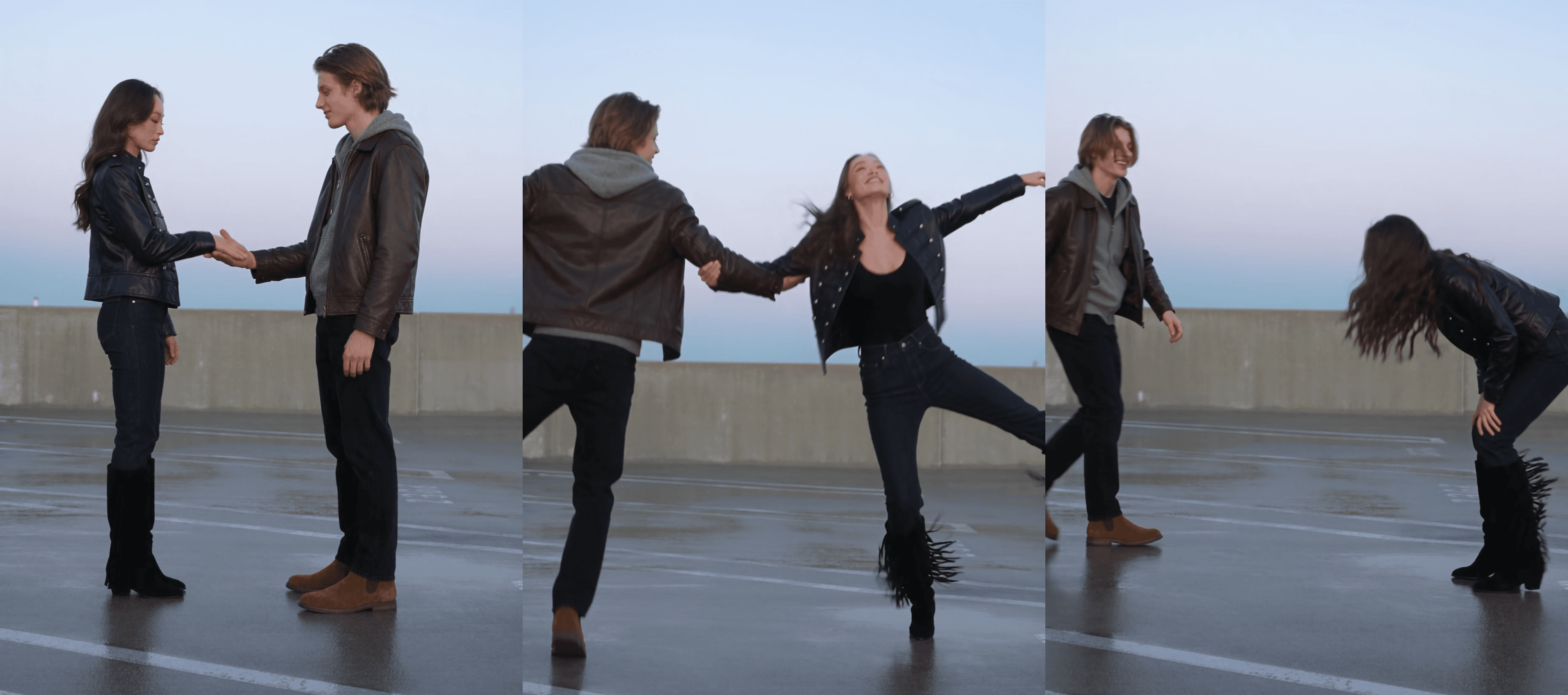
Two people face each other on an empty floor. One reaches out, the other hesitates, then takes the hand. By the five-second drum they are spinning around each other, arms flung wide, until someone laughs and lets go.
That is the last dance trend, a two-person routine set to a 2014 track by Vocaloid producer Maretu. It began as an animation meme in August 2026 and became a live-action cosplay dance by late September.
We traced the song, timed the moves against the sound, checked the CapCut templates, and made a 15-second AI version from two photos. The prompt is below.
Key Takeaways
- The last dance trend pairs a two-person hand-in-hand spin with Maretu's 2014 track "fpd ff7 botsu 8."
- It began as an animation meme in August 2026 and turned into a live-action cosplay dance by late September.
- The CapCut templates on the sound are editing shells, so turning photos into the dance takes an AI video model.
- The routine has three parts: reach and take hands, tug apart twice, then spin faster from the 5-second drum.
- Two full-body photos and a timed prompt in the Atlas Cloud Video Generator give you a 15-second version.
What Is the Last Dance Trend on TikTok?
The last dance trend is a partner dance with a fixed structure: reach and take hands, tug apart, then spin around each other hand in hand, with the phone propped up and both dancers in frame head to toe.
It lives in two formats. The animation version came first: artists draw two characters into the routine, often on a red-curtain stage, as a farewell. In the stick-figure base they trace from, one character's head turns black at the end, a goodbye that gives the name its meaning.
The live-action version took the same steps off the page in September through cosplayers, siblings and couples. The biggest live-action post we found is a solo danced with an invisible partner, at 9 million views on November 9.
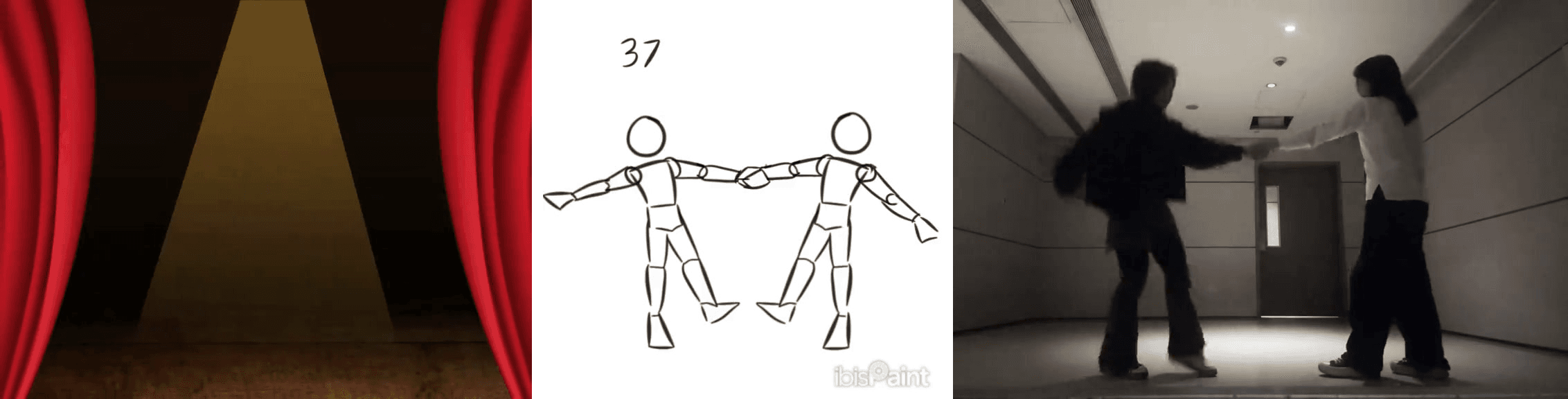
Left to right: the animation background shared in late August, the stick-figure base from September 21, and a live-action duet posted September 25.
The Last Dance Trend Song: Maretu's "fpd ff7 botsu 8," Also Called Botsu 8
The song is older than the trend. Maretu uploaded "fpd ff7 botsu 8" to SoundCloud on September 19, 2014. "The Last Dance" is a nickname fans attached when the track resurfaced in 2026, and "Botsu 8" is the short form you will see in captions. Know Your Meme traces the comeback to a July 2026 YouTube re-upload; an English cover with fan-written lyrics followed in early October.
On TikTok the track exists as several sounds. Pick the original sound attached to the animation background post, which had 84,700 videos on November 9; the cosplay duet's own sound (16,400) and the English cover (2,700) are cut differently. The live-action posts we timed on it play it from the very start, so a 15-second clip lines up with it without trimming.
How to Make the Last Dance Trend AI Video From Two Photos
Here is our 15-second run: two photos in, one parking-deck duet out, with the spin starting on the drum.
Atlas Cloud runs Seedance 2.5, ByteDance's video model that takes up to 30 reference images and lets you tag each one in the prompt. One full-body photo per dancer and a prompt timed to the second kept both faces through the spin in a single run.
Method 1: Pair the Two Dancers in the Atlas Cloud Video Generator
Sign in, open the Video Generator, and follow the numbers in the screenshot.
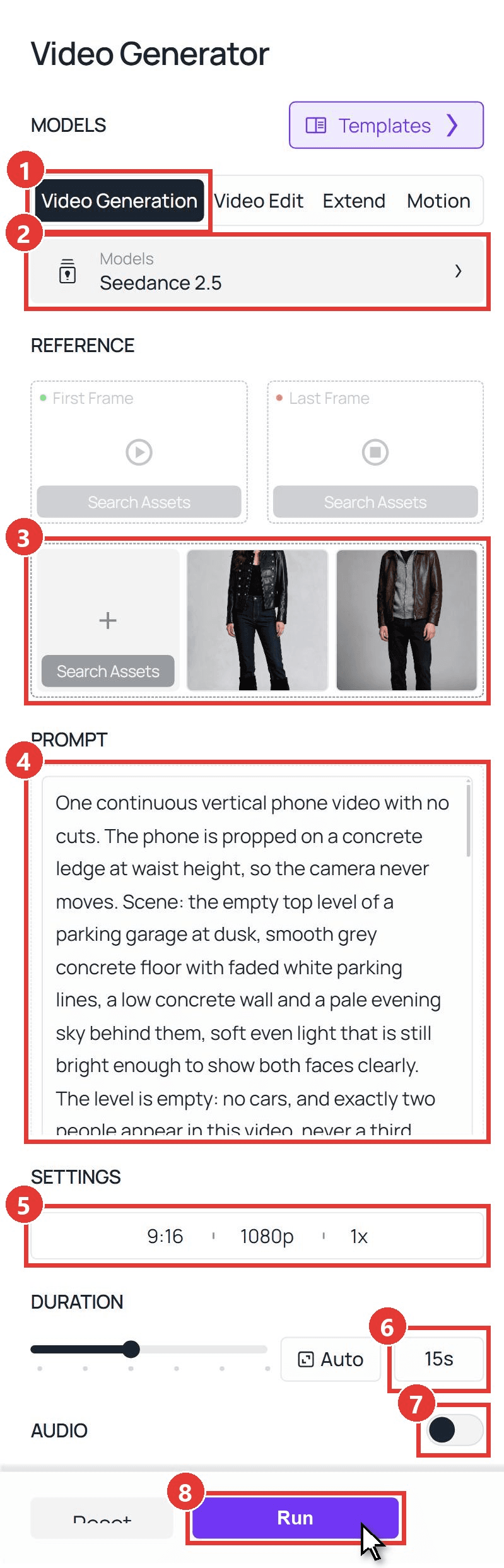
- Click the Video Generation tab.
- Keep the model on Seedance 2.5.
- Leave First Frame and Last Frame empty. Under Upload other references, add the dancer who starts on the left first, so the two become @Image1 and @Image2.
- Paste the prompt. Ours:
plaintext1One continuous vertical phone video with no cuts. The phone is propped on a concrete ledge at waist height, so the camera never moves. Scene: the empty top level of a parking garage at dusk, smooth grey concrete floor with faded white parking lines, a low concrete wall and a pale evening sky behind them, soft even light that is still bright enough to show both faces clearly. The level is empty: no cars, and exactly two people appear in this video, never a third. 2@Image1 is a young woman with long wavy brown hair worn down, in a black military-style leather jacket with silver buttons over a black top, dark indigo jeans tucked into black fringed suede knee-high boots. @Image2 is a young man with medium-length light brown hair parted in the middle, in a dark brown leather jacket over a grey zip-up hoodie with the hood down, a black T-shirt, black straight jeans and brown suede Chelsea boots. Keep each face, hairstyle and outfit exactly as in their photo for the whole video. Both are shown head to toe for the entire clip, about two thirds of the frame height, with space above their heads, and neither of them ever leaves the frame. 3They are two friends filming the last dance trend for fun, not a polished performance: loose, full-body, a little dizzy, grinning at each other, never perfectly in sync. 4[0-2.5s] They stand two steps apart facing each other, turned side-on to the camera, the woman in the black military jacket on the left and the man in the grey hoodie on the right. The woman in the black military jacket stands slumped with her head down. The man in the grey hoodie steps forward and reaches out his right hand toward her. She looks up, hesitates for half a second, then takes his hand. 5[2.5-5s] Holding both hands, they lean their upper bodies back away from each other until their joined arms are straight, like a gentle tug of war, then pull back in close, then lean back again. Two tugs. 6[5-9s] On the beat they each let go with one hand, keeping the other pair of hands joined. They fling the free arm straight out to the side and kick the outside leg out, so each body opens into a star shape, then they circle clockwise around each other for one full turn, bodies passing close and crossing in the middle, arms and legs opening wide again on the far side, her long hair and the fringe on her boots swinging out with the turn. 7[9-13s] Two more circles around each other, faster each time, boots scuffing on the concrete; halfway through they let go, each spins half a turn alone, they catch hands again and keep circling, swapping sides so the woman in the black military jacket ends up on the right. 8[13-15s] They lose the rhythm, slow down dizzy and stop. The man in the grey hoodie staggers one step backward, still inside the frame, while the woman in the black military jacket bends over with her hands on her knees, laughing. 9Realistic, natural body motion with momentum and weight, clear faces, no text or captions on screen.
- Open the settings bar and pick 9:16 and 1080p.
- Type 15 into the duration box.
- Switch Audio off. The sound goes on when you post.
- Click Run.
The bracketed times follow the sound: the star shape opens on the 5-second drum and the ending lands on the hit at 13.45 seconds. Use full-body photos; we turned two head-and-shoulders portraits into full-length studio shots with an image model first. More timing patterns are in our Seedance 2.5 prompt guide.
Method 2: Send the Last Dance Request Through the API
Building a duet feature where two people each upload one photo? The same model sits behind one endpoint.
Step 1: Create and copy an API key. Open Settings in your Atlas Cloud console, click Create API Key and copy it right away; the list masks it afterwards.
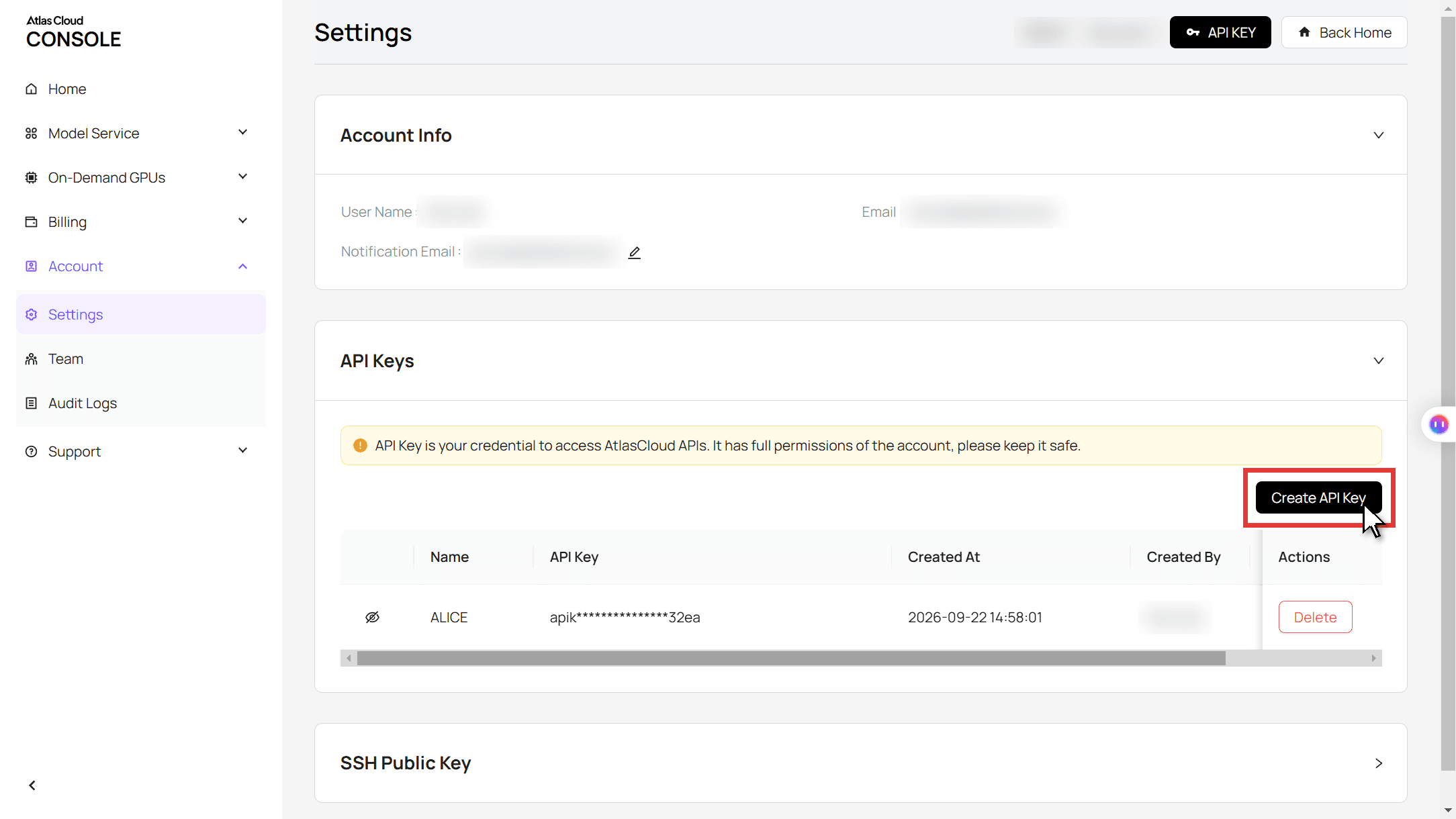
Step 2: Check the request format. The API docs list every field for the Seedance 2.5 reference-to-video model, which is what the Video Generation tab calls when you add reference photos.
Step 3: Submit the job and poll for the result. List the left-hand dancer first in reference_images so the tags match the prompt:
plaintext1curl -X POST https://api.atlascloud.ai/api/v1/model/generateVideo \ 2 -H "Authorization: Bearer $ATLASCLOUD_API_KEY" \ 3 -H "Content-Type: application/json" \ 4 -d '{ 5 "model": "bytedance/seedance-2.5/reference-to-video", 6 "reference_images": [ 7 "https://your-cdn.com/dancer-left.jpg", 8 "https://your-cdn.com/dancer-right.jpg" 9 ], 10 "prompt": "One continuous vertical phone video with no cuts... (paste the full Method 1 prompt)", 11 "duration": 15, 12 "resolution": "1080p", 13 "ratio": "9:16", 14 "generate_audio": false 15 }'
The response carries a prediction ID. Poll it until the status reads completed and the clip URL appears in the outputs array:
plaintext1curl https://api.atlascloud.ai/api/v1/model/prediction/<prediction_id> \ 2 -H "Authorization: Bearer $ATLASCLOUD_API_KEY"
Video models on Atlas Cloud share this endpoint, key and polling loop. Swap the model string and its fields, and the same code runs a different model.
Last Dance Trend Tutorial: Reach, Tug, Then Spin
Want to film it for real? Three moves, and the sound tells you when to switch. We timed the stick-figure base and the biggest live-action posts frame by frame against the original sound.
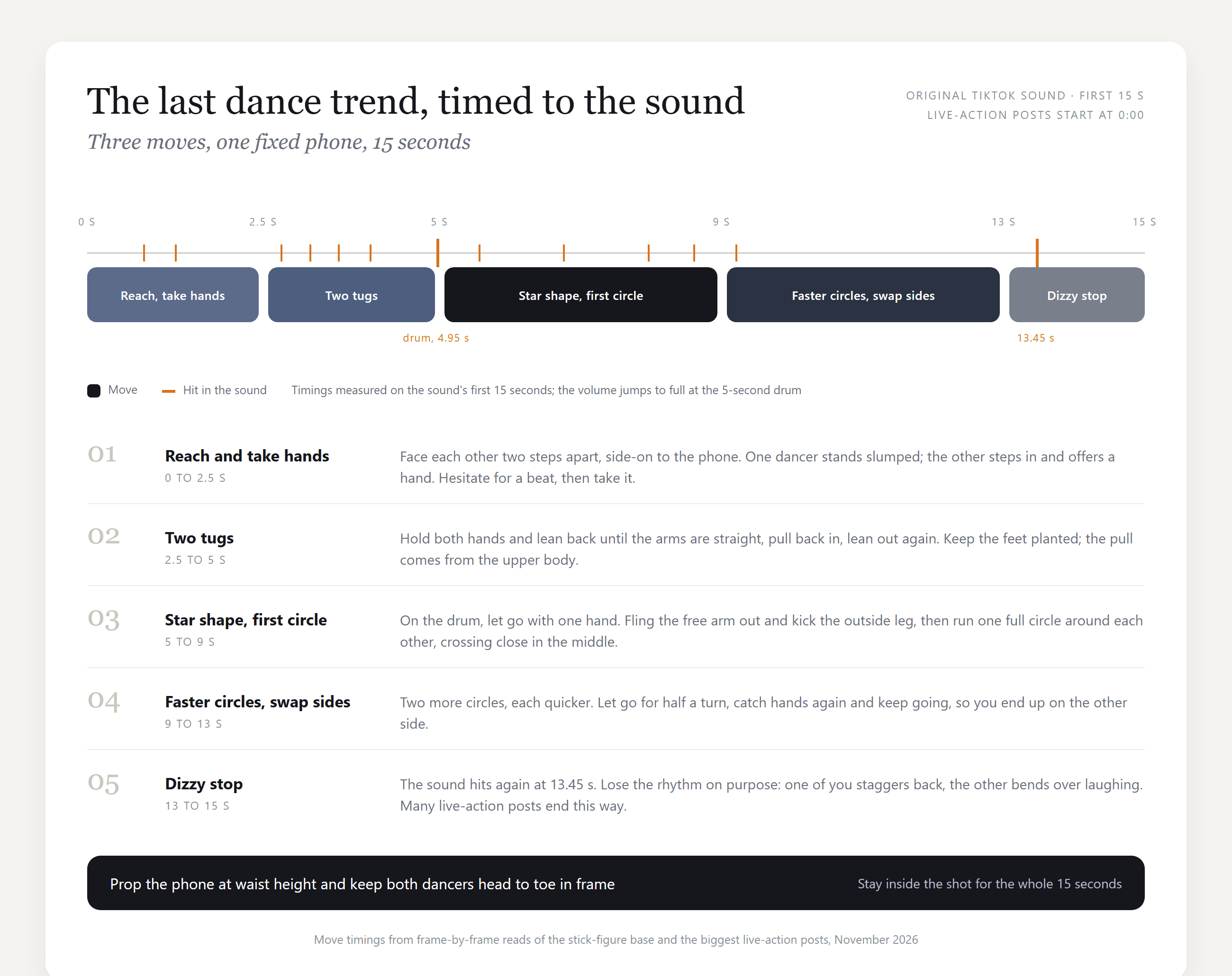
Three things the timeline can't show:
- Lean, don't pull. Feet stay planted in the tug section; the stretch comes from leaning back until the arms go straight.
- Open on the drum. Free arm and outside leg fly out together on the five-second hit, then the circle starts.
- Let the ending fail. The posts people share end with a stumble or a laugh; the hit at 13.45 seconds is the cue.
Where the Last Dance Trend Came From: Animation Meme to Live Action
No single creator owns this one, and the Know Your Meme entry created on November 2, 2026 says the same. The dates come from the posts themselves, with view counts as of November 9.
| Date (2026) | What happened | Reach |
|---|---|---|
| July 17 | Earliest upload of the Maretu track as a TikTok sound that we found | 14,200 videos on the sound |
| August 28 | Red-curtain animation background shared for anyone to use | 7.0 million views |
| September 15 | Earliest million-view live-action duet we found | 2.6 million views |
| September 21 | Stick-figure base for animators | 913,000 views |
| September 25 | Cosplay duet, now the biggest two-person post | 7.3 million views |
| September 29 | Solo version danced with an invisible partner | 9.0 million views |
| October 24 | CapCut filter-edit template for your own footage posted on the sound | 180 uses |
The animation line kept its red curtain and its goodbyes. The live-action line kept only the spin, which is the version the AI clip copies.
Which CapCut Templates Match the Last Dance Trend?
Search CapCut for the sound and two templates belong to the trend. Neither makes the video for you.
| Template | Posted | What it does | Uses (Nov 9) |
|---|---|---|---|
| Thelastdance | Oct 24, 2026 | Warm filter, a "THE LAST DANCE" player caption and a REC frame over your own footage | 180 |
| The last danc | Oct 27, 2026 | The stick-figure base split into 11 slots for animators to draw over | 575 |
Two others share the name: a 36-slot character slideshow and a template whose page is now empty.
The filter edit expects a clip you already shot; the base expects you to draw. We found no CapCut template or TikTok effect that turns photos into the dance as of November 9, which is why the photo route above runs on a video model.
Frequently Asked Questions
What does the last dance trend mean?
The animations read it as a goodbye: one last dance before someone leaves, dies or changes, which is why the stick-figure base ends with a character's head turning black. The live-action version keeps the spin and drops the sadness, so many real-life posts end in laughter.
Can you do the last dance trend by yourself?
Yes, and the biggest live-action post we found is a solo that mimes the pull and the spin. For an AI version, upload one photo and rewrite the prompt so the partner is invisible and the pull shows only in the dancer's body. For a two-person trend built around solos, see our ba ba ba dance guide.
Which sound goes on the AI clip?
Use the original sound from the animation background post, the one with more than 84,000 videos. Every live-action clip we timed on this sound starts it at 0:00, so add it with no offset and the drum lands on the star shape.
How much does a 15-second last dance AI video cost on Atlas Cloud?
With two reference photos at 9:16, a 15-second clip costs $8.90 at 1080p or $4.52 at 720p, both 20% off list prices of $11.12 and $5.65 as of November 9, 2026. The Run button shows the exact figure before you start, so test at 720p and rerun the keeper at 1080p.
Conclusion
Strip away the cosplay and the red curtain and the last dance is three moves in a fixed order: reach, tug, spin. The sound sets the changes, which is why a clip timed to the five-second drum looks like the real thing even when the dancers came from two photos.
Pick two full-body pictures, decide who stands on the left, and paste the prompt. Add the original sound when you post, and the last dance trend is yours in one run.


