When you upload an existing selfie to TikTok and look for Bold Glamour in the editing tools, you won't find the original effect available to apply directly to the saved photo. TikTok designed Bold Glamour as a real-time AI-powered beauty effect that processes facial features during recording, rather than a standard post-upload photo filter. Its realistic makeup finish comes from AI-based image processing, not simply overlaying a 3D face mesh on your camera feed.
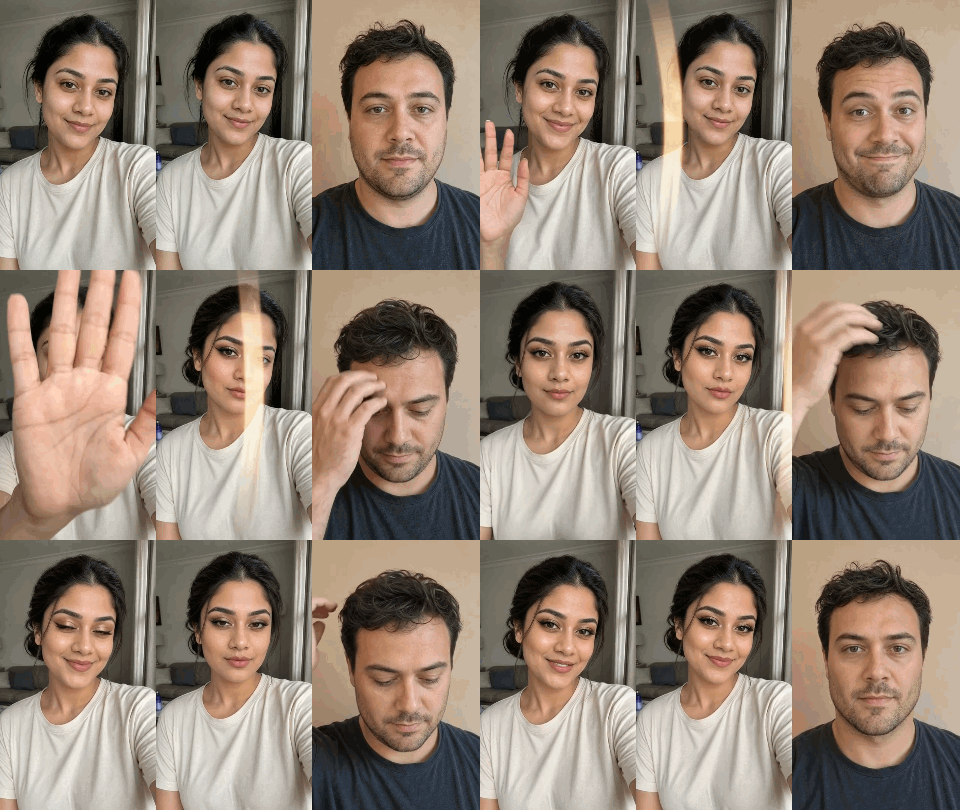
You don't have to reshoot live in the app to jump on this trend. Whether you need a crisp still or a quick transition clip, here are 3 easy ways to slap the filter onto your existing photos.
- Prompt-to-Edit Tools (Best for keeping your real face): Drop your photo into GPT Image 2.0 or Nano Banana and just type out the look you want. You get the warm glow and clean studio skin without those aggressive cookie-cutter filters shaving off your jaw or shrinking your nose.
- CapCut Templates (Fastest for video): If you just want a quick before-and-after video, drop in one photo, let the template sync the beat switch, and post it straight to Reels.
- TikTok Green Screen (Fastest for live reactions): Drop your photo in as a backdrop and record over it. Easy for quick interaction, though it sacrifices original photo resolution.
Three Ways to Put the Bold Glamour Look on an Existing Photo And Which One Holds Up
Preset masks don't adapt to your face. Side angles and warm indoor lights will displace the lip border and turn skin texture into flat wax.
Before you spend time exporting a blurry image, it is easy to pick the right tool by comparing the four main options side by side:
| Method | Works with Existing Photos? | Preserves Facial Proportions? | Customization Options | Typical Output |
| Prompt-Based AI Image Editing | Yes | Can be prompted | Flexible makeup and skin adjustments | High-resolution still image |
| CapCut "Bold Glamour" Templates | Yes | Depends on the template and source media | Limited; template-dependent | Short transition video |
| Online Beauty Editors (Pokecut, LightX) | Yes | Depends on the tool and settings | Presets and manual adjustments | Edited still image |
| TikTok Green Screen | Yes (as background) | Original photo remains unchanged | No direct beauty adjustments | Recorded video |
When a CapCut Template Is Enough And When It Breaks
If your goal is posting a quick before-and-after reveal with trending audio, open CapCut and search for templates: Bold Glamour or before, after makeup. You can turn imported photos or clips into a short transformation video.
Templates don't let you change much. The timing and transitions are already set. Some need multiple clips instead of one photo, and some replace your background. You also can't edit the makeup—like your cheekbones, brows, or jawline.
Why One-Click Browser Filters Flatten Your Features
Online beauty editors like Pokecut and LightX let you recreate the Bold Glamour look from an existing selfie. Their controls handle the edit differently. Pokecut applies a fixed makeup preset, while LightX gives you separate sliders for feature adjustments, makeup tones, and effect intensity.
Standard filters don't let you mix and match. You can't boost cheek contour without the app also reshaping your nose and jawline.
How to Apply a Custom Bold Glamour Filter to a Saved Photo
Next, use an AI image-editing tool to apply the "Bold Glamour" makeup look to photos from the photo album.
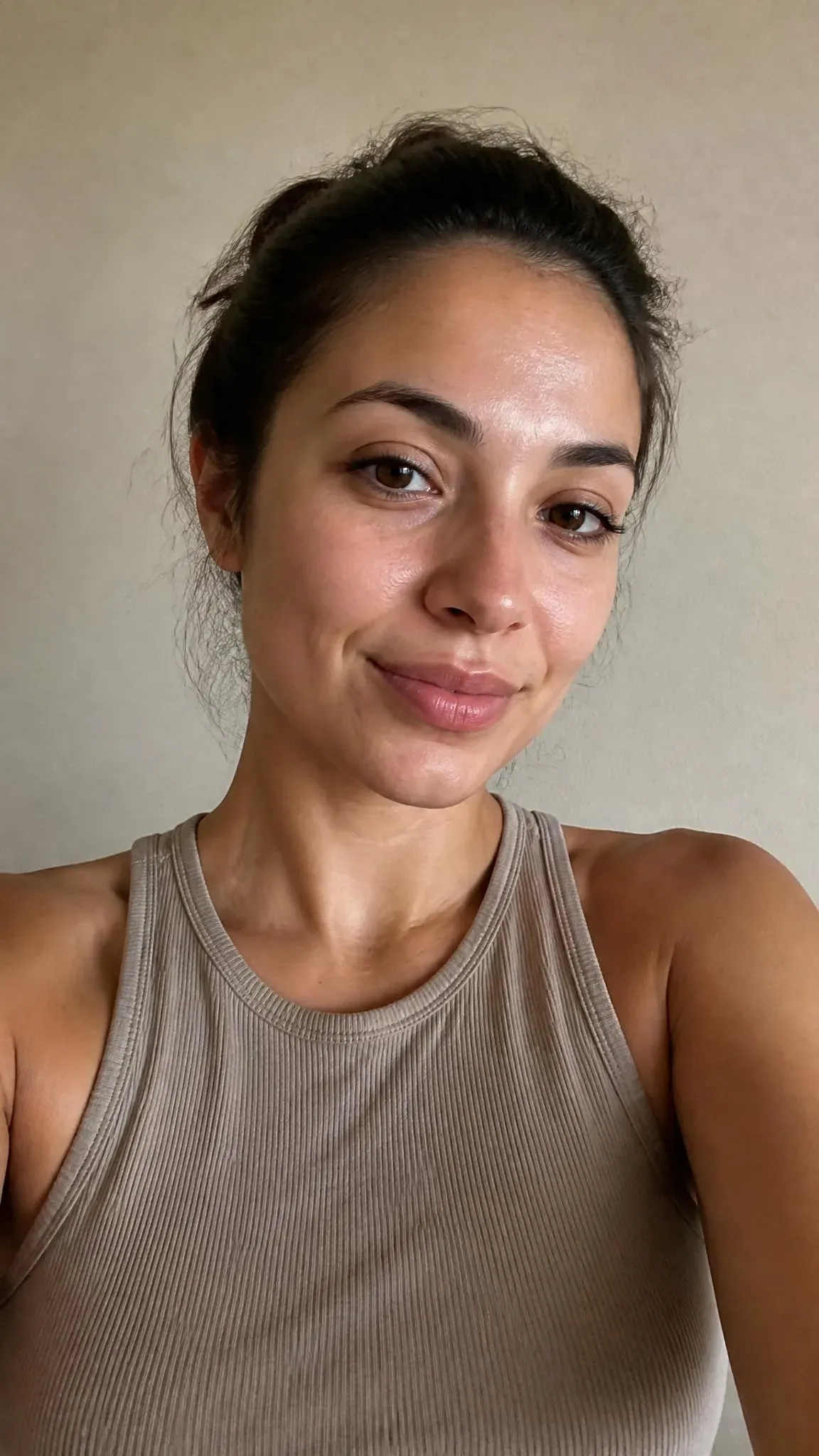
Step 1: Pick a Camera-Roll Photo With Clean Facial Landmarks
AI image editors read light, shadow, and edge boundaries from your source file. A photo that hides key facial landmarks forces the model to guess what lies underneath, which leads to unnatural features.
-
Use a front-facing or slight three-quarter angle: Extreme side profiles make it harder for the model to balance symmetrical brow arches and lip borders.
-
Keep the jawline and chin unobstructed: Avoid selfies where your hand rests against your cheek, hair falls across one eye, or oversized sunglasses cover your brow bone.
-
Start with even indoor or daylight exposure: If your original photo has a heavy neon purple or deep orange shadow across half the face, crop tightly around the head and shoulders or pick a cleaner shot so the AI does not mistake dark shadows for contour makeup.
Step 2: Select an Image Editing Model Built for Portrait Retouching
You need a model that can paint on makeup and re-light your skin while leaving your face alone. Here are three that work:
- Seedream 5.0 Pro (up to 2K): Go here for intense glam. It's really good at targeting small spots, so you can push deep cheek contour and dark brows without blowing out the rest of the shot.
- Nano Banana 2 (up to 4K): Use this if your prompt is long. You can pile on changes—eyes, lips, lighting—and it won't mess with your hair or clothes.
- GPT Image 2 (~$0.005 per edit): The subtle option. It takes plain English edits easily, which makes it great for fixing skin or tweaking makeup when you don't want a heavy filter face.
Upload the same photo to all three and run identical prompts to see which style you like better.
Step 3: Lock Your Bone Structure in the Base Prompt
When you write edit prompts, avoid words like "make me look glamorous" or "beautify face." Models interpret abstract beauty terms as permission to narrow your jaw, shorten your philtrum, and replace your features with a generic stock face.
Put what to freeze first, list the makeup and lighting in the middle, and end with a line telling it not to blur your skin.
It usually finishes in seconds. Zoom in next to the original upload and check your eye corners, nose bridge, and beauty marks. If your face looks right, download the image.
Three Copy-Ready Prompts to Control Your Glamour Filter Intensity
When you control the edit with a text prompt, changing a few surface descriptors lets you dial the finish from full evening contour to barely-there studio lighting without altering your underlying bone structure.
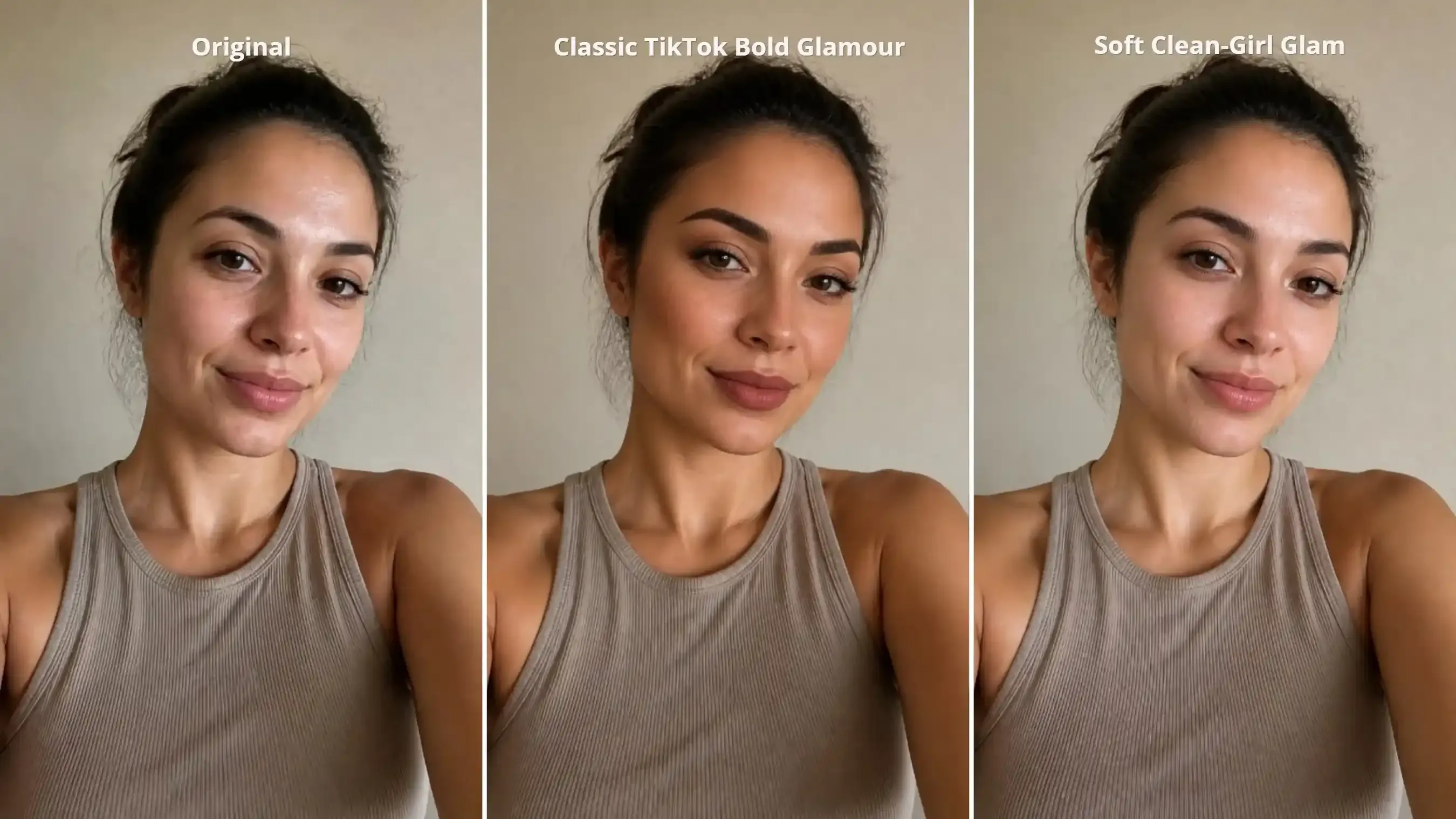
1. Classic TikTok Bold Glamour (Sculpted Contour and Matte Lip)
This prompt recreates the signature high-contrast TikTok look: carved cheekbone shadows, crisp brow arches, bright eye catchlights, and a full velvet-matte lip.
plaintext1Keep the original facial structure, nose, eye spacing, jawline, hair, clothing, and background unchanged. Apply the classic TikTok Bold Glamour look with deep warm-bronze cheekbone and jawline contour, sharply defined arched brows, tightlined upper lashes, subtle bright eye catchlights, and velvet-matte rose-brown lips. Even out the complexion with warm-toned makeup while preserving natural pores and beauty marks. No plastic-looking skin or excessive smoothing.
How to customize it: Swap matte rose-brown lip for warm terracotta matte lip on deeper or golden skin tones, or cool berry-mauve matte lip on cooler undertones so the lip shade does not clash with your natural complexion.
2. Soft Clean-Girl Glam (Studio Lighting Without Heavy Makeup)
If the standard Bold Glamour contour feels too theatrical for an everyday profile photo or LinkedIn headshot, this variation strips back the heavy bronzer and opaque lipstick. It focuses on diffused studio lighting, under-eye brightening, and brushed-up brows.
plaintext1Preserve the exact facial proportions, nose shape, jawline, eye color, hair, and background from the reference photo. Apply a subtle soft-glam retouch: brighten dark shadows under the eyes, brush and define natural eyebrow hairs without harsh edges, add a soft champagne shimmer on the inner eye corners, and apply a sheer hydrating lip tint. Illuminate the face with soft diffused studio key lighting. Retain 100% of natural skin micro-texture, freckles, and pores.
When to use it: Use this look for everyday selfies, natural profile photos, or professional headshots when you want brighter, more polished features without obvious digital makeup.
3. Chiseled Jawline and Groomed Brow Look Masculine and Editorial Variant
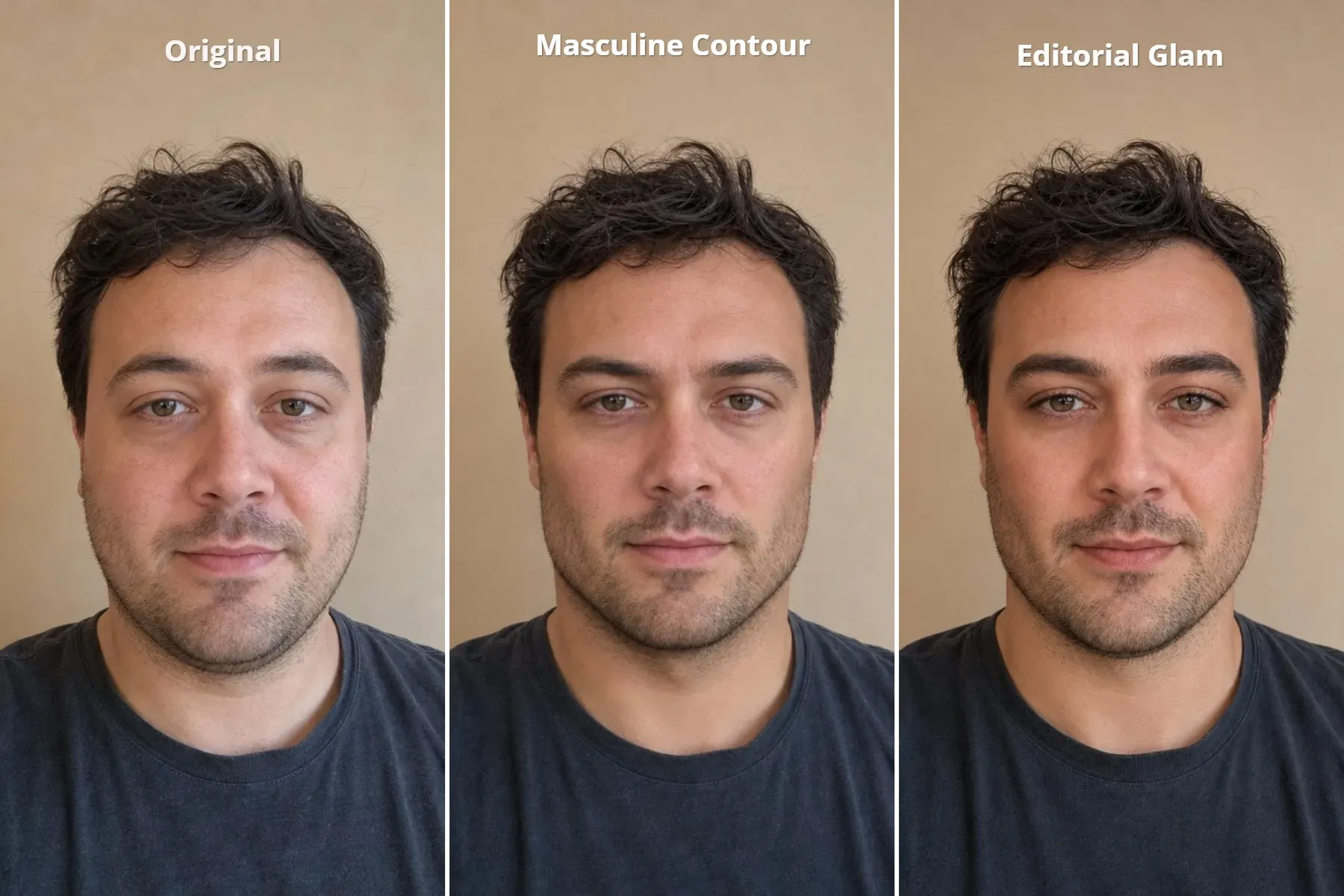
A large share of the original Bold Glamour trend came from men testing the filter because it sharpened jawlines, defined brow bones, and cleared fatigued under-eyes. Standard beauty apps often ruin masculine portraits by adding winged eyelashes or pink lip tint alongside the contour. This prompt isolates the structural shading and studio contrast while keeping lips and lashes untouched, which also pairs cleanly with testing a beard filter on a selfie if you want to preview facial hair and sharper cheek definition together.
plaintext1Preserve the original facial identity, facial proportions, nose, eyes, hair, clothing, and background. Create a more defined masculine facial structure using targeted contour shading: add distinct but natural shadows directly beneath the cheekbones, along the jawline, and beneath the chin to create stronger facial definition. Slightly emphasize the brow bone and sharpen the natural eyebrow shape without changing its density. Reduce under-eye darkness while keeping natural skin texture and stubble visible. Maintain the original skin tone and overall exposure. Keep lips natural, with no lipstick, eyeliner, or eyelash makeup. No global darkening, exaggerated shadows, or skin smoothing.
If you want a heavier makeup look, you can write the prompt like this:
plaintext1Preserve the original facial identity, facial proportions, nose, eyes, hair, clothing, and background. Create a polished masculine editorial look with defined but naturally shaped facial contours. Add blended contour beneath the cheekbones and along the lower jaw to create a cleaner, more sculpted appearance. Keep the jawline gently tapered with rounded jaw angles, avoiding a wide, square, or overly sharp jaw. Slightly enhance the brow bone and groom the natural eyebrows for a fuller, cleaner shape. Apply an even satin-matte complexion, subtle under-eye concealer, softly defined upper lash lines, and a hint of warm neutral eyeshadow. Add a natural muted nude lip tint. Preserve visible skin texture and stubble while maintaining the original skin tone and overall exposure. The result should resemble a refined men's fashion magazine beauty editorial, with noticeable but balanced makeup and contour.
When to use it: Use this version for men's selfies and editorial-style portraits when you want a sharper jawline, more defined brows, and a fresher appearance without adding visible makeup.
Why AI Glamour Filters Make You Look Like a Stranger And How to Fix It
A glamour filter fails the moment viewers notice the AI before they recognize your face. Almost every case of "same-face syndrome" or plastic skin comes down to four predictable triggers in the source photo or prompt.
| What Goes Wrong in the Output | Why the Model Did It | Exact Input or Prompt Fix |
| Nose bridge narrows or chin shrinks into a V-shape | Prompt included subjective words like "beautify," "attractive," or "model face," which trigger default face-slimming weights. | Remove subjective beauty adjectives. Explicitly state "do not alter nose width, chin length, or jawline geometry" in the first sentence. |
| Waxy, poreless forehead that looks like a mannequin | Stacking smoothing words ("flawless, airbrushed, smooth") or running an already-filtered selfie through a second AI pass. | Use your raw, unedited camera-roll photo as the input and add "retain natural skin micro-texture, pores, and moles" at the end of the prompt. |
| Iris color shifts or the whites of the eyes glow neon | Phrases like "bright sparkling eyes" cause the model to bleach the sclera and lighten dark brown eyes to hazel or blue. | Replace "bright eyes" with "keep original [brown/hazel/blue] iris color; add a single soft ring-light catchlight to the pupils." |
| Teeth fuse together or turn chalky white on open smiles | Heavy lip-plumping instructions bleed into the inner mouth boundary on wide-open smiles. | Add "keep original teeth shape and natural tooth shade untouched" whenever editing an open-mouth smile. |
Never feed a glamour-edited output back into the editor for a second round of makeup. Running two consecutive image-to-image passes compounds skin smoothing and flattens natural facial depth around the nose and mouth. If you want darker contour or a redder lip, edit the prompt and run it fresh on your original camera-roll upload.
Turning Your Edited Photo Into a Before-and-After Glamour Reveal Video
Stills work fine for avatars, but feeds on TikTok and Reels favor video. Take your original photo and the retouched version, then feed both into a first-to-last-frame tool like Seedance 2.5 to generate a clean 5-second transition clip.
How to Set Up the Two-Frame Reveal
- Open the video generator workspace and select
Seedance 2.5orOmni 1.1 Flashin First-to-Last-Frame mode. - Upload your raw, unedited camera-roll selfie into the First Frame slot.
- Upload your glamour-edited portrait into the Last Frame slot.
- Set the aspect ratio to
9:16and duration to5 seconds. - Paste one of the two transition prompts below.
Option A: The Hand-Swipe Makeup Wipe
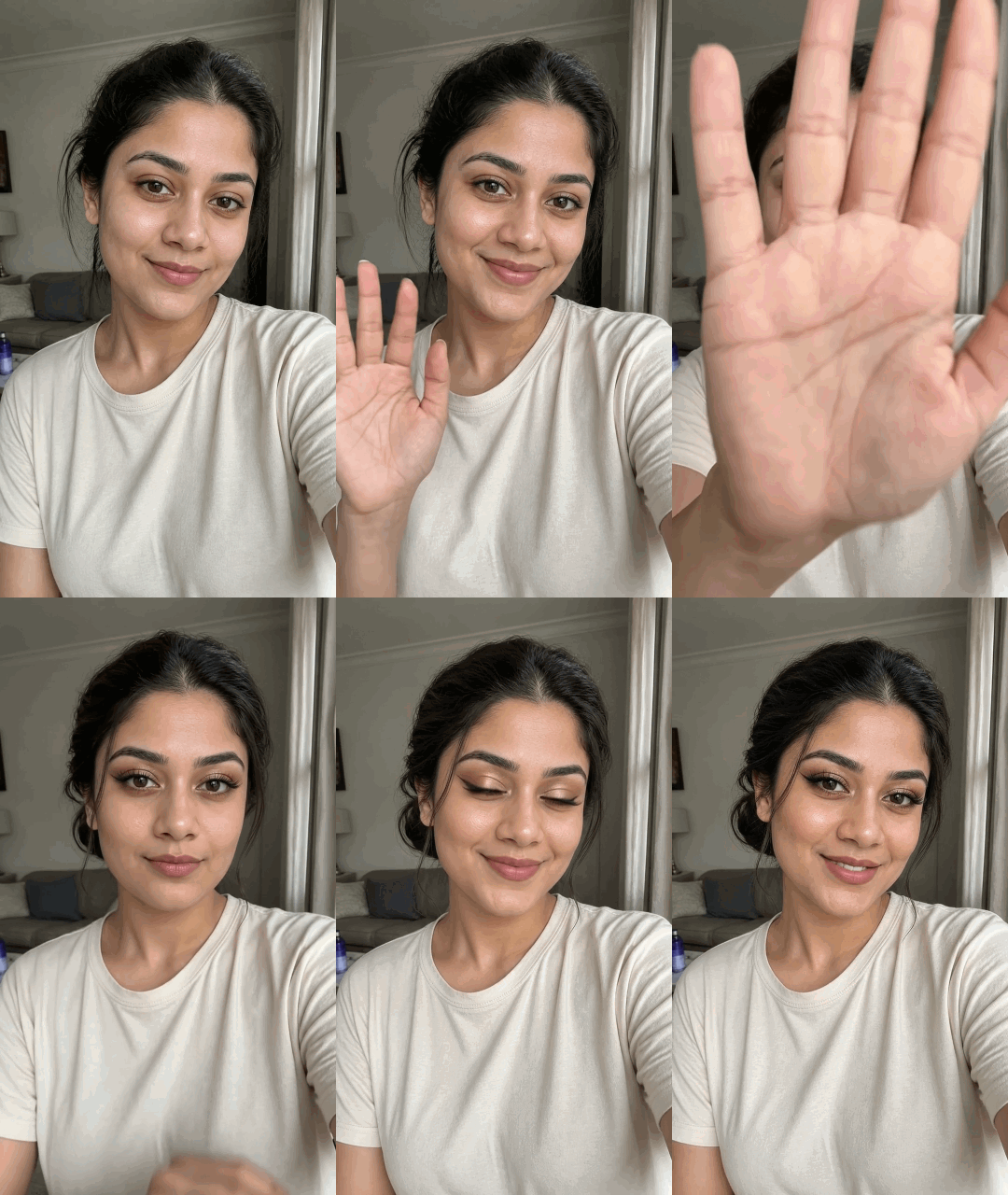
plaintext1Vertical 9:16, 5-second continuous selfie video using the provided first and last frames. 2The woman starts bare-faced, looking into the camera. She raises one hand and smoothly sweeps it across the lens, briefly covering the entire frame. 3Sync the reveal to an upbeat beauty-transition beat: a strong bass drop hits as her hand fully covers the lens. When her hand moves away, reveal her dramatic Bold Glamour makeup and polished low bun hairstyle. 4She finishes with a confident smile and a natural blink. Preserve her facial identity, clothing, camera angle, and living-room background. Smooth motion, realistic hands, no cuts or face distortion.
Option B: The Studio Ring-Light Sweep
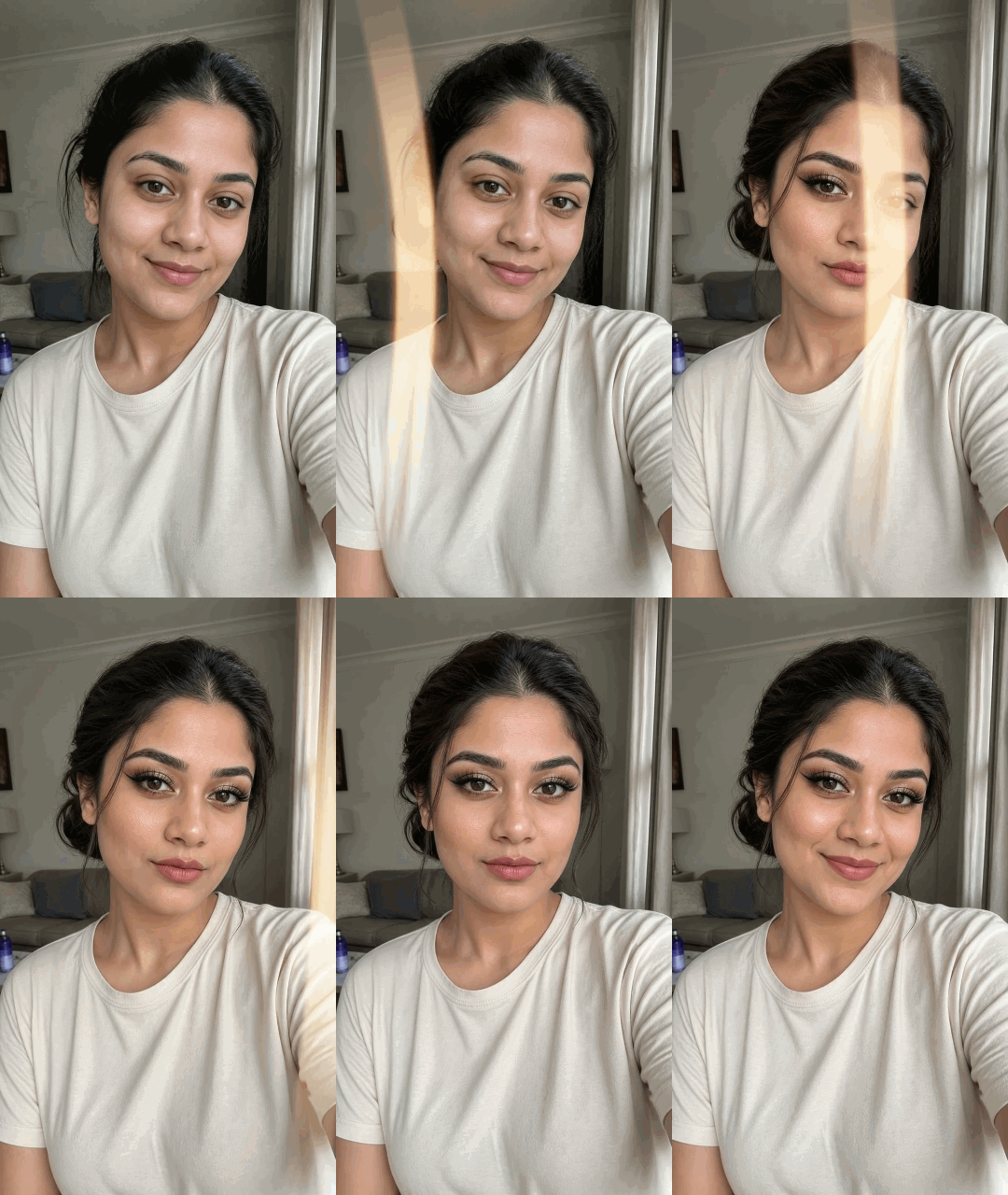
plaintext1Vertical 9:16, 5-second video using the provided first and last frames. 2The woman starts bare-faced, looking into the camera. A soft, warm light sweep moves from left to right across her face. As the light passes, her Bold Glamour makeup and polished low bun hairstyle appear seamlessly, revealing sculpted contour, defined brows, dramatic eye makeup, and rosy-matte lips. 3Sync the completed transformation with an upbeat music beat. Finish with bright ring-light catchlights, a subtle head tilt, and a confident smile. 4Preserve her facial identity, clothing, and living-room background. Smooth transition, natural movement, no cuts, no face distortion.
Option C: Male Glamour Transformation

plaintext1Single continuous shot using the provided first and last frames. No cuts or camera movement. 2The man starts facing the camera with his original messy hair and natural appearance. He then lowers his head and runs one hand through his hair, styling it backward. Keep his appearance unchanged throughout this action. After lowering his hand, he lifts his head toward the camera. **Only when he lifts his head**, transform him into the polished hairstyle and masculine editorial makeup shown in the last frame. Add a brief cinematic flash, subtle light sweep, and sparkling particles synchronized with a sharp bass drop. 3He finishes with direct eye contact and a confident smile. Preserve his facial identity, clothing, and background. 4Use modern TikTok fashion-transformation music with deep bass and punchy electronic drums.
Before posting the finished clip to TikTok or Instagram Reels, check whether your video includes a visible AI motion transition. TikTok asks creators to toggle the AI-generated content label on clips where AI alters facial movement, while static profile photos retouched for lighting and contour can be uploaded directly from your camera roll like any standard portrait edit.
Now it's your turn! Try these prompts, experiment with different looks, and create your own fun glamour transformation. Have fun with it!


